

| Status |
| |
|---|---|---|
| Owner | Prasad Naidu | |
| Stakeholders |
Purpose
The purpose of this document is to define the approach, scope, and rules for the conversion of Bank Master Data from legacy systems into SAP S/4HANA. The Bank Master includes information about House Banks and Bank Directory (External Banks) required for processing payment transactions such as vendor payments, customer refunds, and bank reconciliations.
This conversion ensures that all bank-related master data is available and consistent in the S/4HANA system to support business-critical financial operations post go-live. The data migration encompasses external Banks (from tables like BNKA): Used for storing details of banks globally (e.g., SWIFT, bank address, bank key).
In Syensqo, the bank master data will be loaded and post go-live, the bank master data will be maintained by loading delta changes on a monthly basis.
Conversion Scope
Bank master Data will be migrated from PI2 client to S4
Relevancy Criteria:
1) All Bank keys in BNKA table are in scope from PI2
2) If there are any duplicate keys in source systems
a) Read all the records from table BNKA
b) Eliminate Duplicates - Select max( BANKS, BANKL) , All the other fields from the step b by grouping on the fields BANKS, BANKL
3) Business is responsible for Data cleansing.
| Source | Scope | Source Approx No. of Records | Target System | Target Approx No. of Records |
|---|---|---|---|---|
| PI2 | Bank Master | ~374000 | S4 | ~374000 |
Additional Information
Multi-language Requirement
Document Management
Legal Requirement
Special Requirements
Target Design
The technical design of the target for this conversion approach.
| Table | Field | Data Element | Field Description | Data Type | Length | Requirement |
| BNKA | BANKS | BANKS | Bank Country/Region Key | CHAR | 3 | Mandatory |
| BNKA | BANKL | BANKK | Bank Keys | CHAR | 15 | Mandatory |
| BNKA | BANKA | BANKA | Name of Financial Institution | CHAR | 60 | Mandatory |
| BNKA | PROVZ | REGIO | Region (State, Province, County) | CHAR | 3 | Optional |
| BNKA | STRAS | STRAS_GP | Street and House Number | CHAR | 35 | Optional |
| BNKA | ORT01 | ORT01_GP | City | CHAR | 35 | Optional |
| BNKA | SWIFT | SWIFT | SWIFT-BIC for International Payments | CHAR | 11 | Optional |
| BNKA | BGRUP | BGRUP | Bank Group (bank network) | CHAR | 2 | Optional |
| BNKA | XPGRO | XPGRO | Post Office Bank Current Account Flag | CHAR | 1 | Optional |
| BNKA | LOEVM | LOEVM | Deletion Indicator | CHAR | 1 | Optional |
| BNKA | BNKLZ | BANKL | Bank Number | CHAR | 15 | Mandatory |
| BNKA | ADRNR | AD_ADDRNUM | Address Number | CHAR | 10 | Optional |
| BNKA | BRNCH | BRNCH | Bank Branch | CHAR | 40 | Optional |
| BNKA | CHKME | CHECKMETH | Check Digit Calculation Method | CHAR | 4 | Optional |
| BNKA | VERS | VERS_BF | Format of File with Bank Data | CHAR | 3 | Optional |
| BNKA | BICKY | PRQ_BICKY | Key of a BIC+ data record (Swift) | CHAR | 12 | Optional |
Data Cleansing
The data will be migrated from ECC (PI2) to S4 . The following cleansing criteria should be applied. This cleaning should be performed by business/Cleansing team
ID | Criticality | Error Message/Report Description | Rule | Output | Source System |
1 | High | Bank key not unique within country | BANKS + BANKL must be unique | Flag as duplicate; reject or merge records | PI2 |
2 | High | Missing or invalid SWIFT/BIC code | SWIFT field must be 8 or 11 alphanumeric characters | Flag and request update from valid bank directory | PI2 |
3 | Medium | Bank name contains special characters or inconsistent casing | BANKA field should follow naming conventions and avoid special characters | Normalize or correct bank name formatting | PI2 |
4 | High | Obsolete bank record not linked to any business partner | Check if BANKL is not referenced in any related table (e.g., LFBK, KNBK) | Mark for archival or deletion after verification | PI2 |
7 | High | Duplicate bank key entries detected | BANKL must be unique per BANKS; fuzzy match for duplicates | Flag duplicates; consolidate or clean up | PI2 |
10 | High | Bank key format invalid per country-specific rules | BANKL format must match country-specific structure rules (e.g., DE = 8 digits) | Flag and correct according to rulebook or SAP note | PI2 |
Cleansing is not applicable if the bank master file is procured from the third-party SWIFTRef and no legacy bank master needs to be migrated.
Conversion Process
The high-level process is represented by the diagram below:
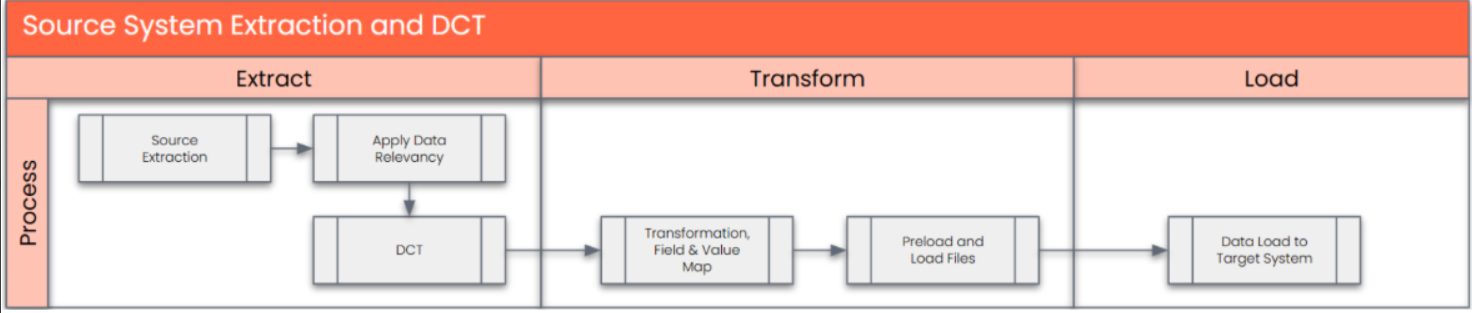
Data Privacy and Sensitivity
Extraction
Data will be extracted from PI2 and will be migrated to S4Extract data from a source into . There are 2 possibilities:
- The data exists. connects to the source and loads the data into . There are 3 methods:
- Perform full data extraction from relevant tables in the source system(s).
- Perform extraction through the application layer.
- Only if ; cannot connect to the source, data is loaded to the repository from the provided source system extract/report.
The agreed Relevancy criteria is applied to the extracted records to identify the records that are applicable for the Target loads
Extraction Run Sheet
| Req # | Requirement Description | Team Responsible |
|---|---|---|
| NA | ||
Selection Screen
| Selection Ref Screen | Parameter Name | Selection Type | Requirement | Value to be entered/set |
|---|---|---|---|---|
Data Collection Template (DCT)
No DCT for this object
Extraction Dependencies
| Item # | Step Description | Team Responsible |
|---|---|---|
| NA | ||
Transformation
The Target fields are mapped to the applicable Legacy field that will be its source, this is a 3-way activity involving the Business, Functional team and Data team. This identifies the transformation activity required to allow to make the data Target ready:
- Perform value mapping and data transformation rules.
- Legacy values are mapped to the to-be values (this could include a default value)
- Values are transformed according to the rules defined in
- Prepare target-ready data in the structure and format that is required for loading via prescribed Load Tool. This step also produces the load data ready for business to perform Pre-load Data Validation
Transformation Run Sheet
Item # | Step description | Team responsible |
1. | Ensure all the fields that require value mapping, as stipulated Mapping tables, have the latest signed-off mapping files imported into toolMigrate. | Data team |
2. | In tool, select the Object Bank Master | Data team |
3. | Go to Process Area Launch and Process the Object - Bank Master | Data team |
4. | Launch the Objects to execute transformation. | Data team |
5. | Monitor the transformation progress and ensure performance and completion is within allowed timeframe | Data team |
6. | Generate Pre-Load reports . | Data team |
7. | Generate data load count. | Data team |
8. | Log errors as defects, if any and address resolutions. Close defects. | Data team |
9. | Re-transform and re-validate the Pre-load reports if necessary. | Data team |
10. | Validate the transformed file as part of pre-load validation, raise data defects or provide the pre-load sign-off. | Business |
11. | Analyse and resolve any pre-load defects logged by business. | Data team |
12. | Repeat steps 6 to 11 if necessary | Data team |
13. | Proceed to pre-load validations | Data team |
Transformation Rules
| Rule# | Source System | Source Table | Source Field | Source Description | Target System | Target Table | Target Field | Target Description | Transformation Logic |
| 1 | ECC / SWIFTREF | BNKA | BANKS | Bank Country/Region Key | S/4 HANA | BNKA | BANKS | Bank Country/Region Key | Copy as-is from ECC |
| 2 | ECC / SWIFTREF | BNKA | BANKL | Bank Keys | S/4 HANA | BNKA | BANKL | Bank Keys | Copy as-is from ECC |
| 3 | ECC / SWIFTREF | BNKA | BANKA | Name of Financial Institution | S/4 HANA | BNKA | BANKA | Name of Financial Institution | Copy as-is from ECC |
| 4 | ECC / SWIFTREF | BNKA | PROVZ | Region (State, Province, County) | S/4 HANA | BNKA | PROVZ | Region (State, Province, County) | Copy as-is from ECC |
| 5 | 7ECC / SWIFTREF | BNKA | STRAS | Street and House Number | S/4 HANA | BNKA | STRAS | Street and House Number | Copy as-is from ECC |
| 6 | ECC / SWIFTREF | BNKA | ORT01 | City | S/4 HANA | BNKA | ORT01 | City | Copy as-is from ECC |
| 7 | ECC / SWIFTREF | BNKA | SWIFT | SWIFT-BIC for International Payments | S/4 HANA | BNKA | SWIFT | SWIFT-BIC for International Payments | Copy as-is from ECC |
| 8 | ECC / SWIFTREF | BNKA | BGRUP | Bank Group (bank network) | S/4 HANA | BNKA | BGRUP | Bank Group (bank network) | Copy as-is from ECC |
| 9 | ECC / SWIFTREF | BNKA | XPGRO | Post Office Bank Current Account Flag | S/4 HANA | BNKA | XPGRO | Post Office Bank Current Account Flag | Copy as-is from ECC |
| 10 | ECC / SWIFTREF | BNKA | LOEVM | Deletion Indicator | S/4 HANA | BNKA | LOEVM | Deletion Indicator | Copy as-is from ECC |
| 11 | ECC / SWIFTREF | BNKA | BNKLZ | Bank Number | S/4 HANA | BNKA | BNKLZ | Bank Keys | Copy as-is from ECC |
| 12 | ECC / SWIFTREF | BNKA | ADRNR | Address Number | S/4 HANA | BNKA | ADRNR | Address Number | Copy as-is from ECC |
| 13 | ECC / SWIFTREF | BNKA | BRNCH | Bank Branch | S/4 HANA | BNKA | BRNCH | Bank Branch | Copy as-is from ECC |
| 14 | ECC / SWIFTREF | BNKA | CHKME | Check Digit Calculation Method | S/4 HANA | BNKA | CHKME | Check Digit Calculation Method | Copy as-is from ECC |
| 15 | ECC / SWIFTREF | BNKA | VERS | Format of File with Bank Data | S/4 HANA | BNKA | VERS | Format of File with Bank Data | Copy as-is from ECC |
| 16 | ECC / SWIFTREF | BNKA | BICKY | Key of a BIC+ data record (Swift) | S/4 HANA | BNKA | BICKY | Key of a BIC+ data record (Swift) | Copy as-is from ECC |
Transformation Mapping
| Mapping Table Name | Mapping Table Description |
|---|---|
Transformation Dependencies
List the steps that need to occur before transformation can commence| Item # | Step Description | Team Responsible |
|---|---|---|
Pre-Load Validation
Project Team
Completeness
| Task | Action |
|---|---|
| Generation of Pre-load reports | |
| Reconciliation of total | Record Count Summary of Record Counts from Constructed dataset, Valid and Invalid record set. |
Accuracy
| Task | Action |
|---|---|
| Mandatory field mapping and transformation | Obtain a list of the fields to be populated with values from mapping files and ensure all these fields contain S/4HANA values. Review the data report to ensure mapping value is not missing in tool. Capture errors in the Data Error report. |
Business
Completeness
| Task | Action |
|---|---|
| Verify record count in Pre-load reports | Ensure third party file SWIFTREF used for Bank master is up to date and it is the latest version file. |
Accuracy
| Task | Action |
|---|---|
Load
The load process includes:
- Execute the automated data load into target system using load tool or product the load file if the load must be done manually
- Once the data is loaded to the target system, it will be extracted and prepared for Post Load Data Validation
| View file | ||||
|---|---|---|---|---|
|
Load Run Sheet
Item | Step description | Team responsible |
1 | Ensure the load tools are transported into the correct tool instance. | Data team |
2 | Ensure DCTs and all required mappings are submitted and complete | Data team |
3 | Ensure Pre-load sign-offs are obtained. | Data team |
4 | Execute tool Trial Balance Upload | Data team |
5 | Generate the post load reports in tool. | Data team |
6 | Log errors as defects, if any and address resolutions. Close defects. | Data team |
7 | Resolve defects by reupload and re-generate post load reports if necessary. | Data team |
8 | Business to validate the post load files as part of post-load validation, raise data defects or provide the post-load sign-off. | Business |
9 | Repeat steps 5 to 7 if necessary. | Data team |
Load Phase and Dependencies
Configuration
| Item # | Configuration Item |
|---|---|
Conversion Objects
| Object # | Preceding Object Conversion Approach |
|---|---|
| list the exact title of the conversion object of only the immediate predecessor – this will then confirm the DDD (Data Dependency Diagram) | |
Error Handling
| Error Type | Error Description | Action Taken |
|---|---|---|
Post-Load Validation
Project Team
Completeness
| Task | Action |
|---|---|
| Reconciliation of Record Count | Confirm all the Bank Master records listed in the Construction file (DCT )/ from the third party SWIFTREF file are loaded |
Accuracy
| Task | Action |
|---|---|
| Check values in key fields for accuracy | Post-load reports will have the same structure as the load file and some additional columns as required to facilitate the post load validation. Any mismatch will be reported under the Post Load - Error report. Each Column will have Source field, target field and Matching Status. ( XXXX_ECC, XXXX_S4HANA, XXXX_MATCH). A loading status field to show the record is loaded in S/4HANA. Also, a field to unmatched fields in the Post-Load file. |
Business
Completeness
| Task | Action |
|---|---|
| Record Count Check | Review the record count report from the Data Team and ensure it is correct by cross-checking with the record count confirmed during Pre-load Business Validations Business will check BNKA table using tcode SE16N. |
Accuracy
| Task | Action |
|---|---|
| Complete Check | Post-Load File contains matching status of each field. |
| Spot check | |
Key Assumptions
- Master Data Standard is up to date as on the date of documenting this conversion approach and data load.
- is in scope based on data design and any exception requested by business.
See also
Change log
| Change History | ||
|---|---|---|
|
Workflow history
| Workflow Report | ||||||
|---|---|---|---|---|---|---|
|