


Purpose
This document defines the conversion approach to create Work Orders in S/4 HANA.
A Work Order in SAP PM is a technical and financial document used to plan, execute, and settle maintenance tasks on technical objects. It serves as a detailed set of instructions, outlining tasks, required resources, parts, and schedules, while tracking costs, technical history, and compliance.
Legacy Plant Maintenance Work Orders use diverse formats across different systems. In line with the SyWay design, EAM Maintenance Work Orders will be standardized.
Conversion Scope
This document covers the approach for converting active Work Orders from legacy source systems into S/4HANA.
A work order in SAP is a formal document that authorizes and tracks maintenance, repair, or production tasks within an organization It contains essential details for effective task management and is used to manage and document various tasks, including maintenance, repairs, and production activities. Key components of a work order include:
- Work Description: Specific details of the task to be carried out.
- Equipment Details: Information about the asset or machinery requiring attention.
- Resources: Personnel, tools, and materials assigned for task completion.
- Dates: Scheduled start and finish dates for timeline management.
- Costing: Estimates for labour, materials, and other expenditures linked to budget accounts.
- Priority & Status: Urgency level and progress tracking (e.g., created, released, completed, closed).
- Operations: Step-by-step instructions or sub-tasks within the Work Order.
The data from legacy system includes:
- All open Work Orders (AUFK-AUFNR) with Active (JEST-INAC <> 'X') System Status (JEST-STAT) = Created (CRTD) or Released (REL).
Work Orders (AUFK-AUFNR) with with Active (JEST-INAC <> 'X') System Status (JEST-STAT) = Technically Completed (TECO) and relevant open Purchase Order (EKKN-EBELN) as defined in CNV-9045 Open Purchase Orders- Work Orders (AUFK-AUFNR) with Maintenance Plant (AUFK-WERKS) existing in Value Mapping: Plant (Maintenance Plant = Yes).
- Work Orders (AUFK-AUFNR) assigned to active legacy Functional Locations (IFLOT-TPLR) ** (Active (JEST-INAC <> 'X') System Status TJ02T-TXT04 <> INAC or DLFL) or Equipment (EQUI-EQUNR) ** (Active (JEST-INAC <> 'X') System Status TJ02T-TXT04 <> INAC or DLFL or ESTO or AVLB)
- Work Orders (AUFK-AUFNR) generated from Maintenance Plan (AFIH-WARPL) with Basic Start Date (AFKO-GSTRP) <= Business Continuity Cutoff Date OTH_Migration_Date Relevant Values A2D (using Object ID "9001" and Field Name = "MHIS-NPLDA")
- Work Orders (AUFK-AUFNR) linked to Notifications (AFIH-QMNUM) generated from Maintenance Plan (QMIH-WARPL) with Basic Start Date (AFKO-GSTRP) <= Business Continuity Cutoff Date OTH_Migration_Date Relevant Values A2D (using Object ID "9001" and Field Name = "MHIS-NPLDA")
A. Work Orders with no open PO, with Basic Start Date (AFKO-GSTRP) later than X Period prior of the Migration / "Go-Live" Date (OTH_Migration_Date Relevant Values A2D (using Object ID "9005" and Field Name = "AFKO-GSTRP") - OTH_Migration_Date Relevant Values A2D (using Object ID "9005" and Field Name = "AFKO-GSTRP_PERIOD"))B. Work Orders with no open PO, with Basic End Date (AFKO-GLTRP) later than X Period prior of the Migration / "Go-Live" Date (OTH_Migration_Date Relevant Values A2D (using Object ID "9005" and Field Name = "AFKO-GLTRP") - OTH_Migration_Date Relevant Values A2D (using Object ID "9005" and Field Name = "AFKO-GLTRP_PERIOD"))
C. Work Orders with open PO, regardless of Basic Start (AFKO-GSTRP)/ Finish Date (AFKO-GLTRP)
Logic for checking PO (Purchase Order) assigned to Work Order -
|
Check if the PO (Purchase Order) is Open using- EKPO-LOEKZ = space "Not deleted"AND EKPO-ELIKZ = space "Final delivery / delivery completed not set"AND EKPO-EREKZ = space "Final invoice not set"
The data from legacy system excludes:
- Work Orders (AUFK-AUFNR) with Active (JEST-INAC <> 'X') System Status (JEST-STAT) = Technically Completed (TECO) that do not meet Inclusion Criteria #2
- Work Orders(AUFK-AUFNR) with Active (JEST-INAC <> 'X') System Status (JEST-STAT) = Deletion Flag (DLFL) status
- Work Orders (AUFK-AUFNR) with Active (JEST-INAC <> 'X') System Status (JEST-STAT) = Closed (CLSD) status
- Work Orders (AUFK-AUFNR) with Active (JEST-INAC <> 'X') System Status (JEST-STAT) = Not Completed/ Do Not Execute (NCMP) status
- Standing Work Orders (Value Mapping: Work Order Type, where Target WO Type = 'YA05').
- Work Orders (AUFK-AUFNR) which are Sub-orders (AFKO-MAUFNR <> '')
- Work Orders (AUFK-AUFNR) with blank Basic End Date (AFKO-GLTRP)
- Work Orders (AUFK-AUFNR) with Order type (AUFK-AUART) maintained in Work Order Type Exclusion List (EXC-Work Order Type)
- Work Orders (AUFK-AUFNR) with Active (JEST-INAC <> 'X') System Status (JEST-STAT) <> (TECO/ DLFL/ CLSD/ NCMP) and with a User Status maintained in the User Status Exclusion List (EXC-Work Order User Status)
List of Tables to extract for this object is maintained here: Extract Table Register.
| Source | Scope | Source Approx No. of Records | Target System | Target Approx No. of Records |
|---|---|---|---|---|
PF2, WP2 | Relevant Work Orders will be extracted from PF2 and WP2 | 70,000 | S/4HANA | 70,000 |
DCT | Work Orders for plants which do not have data existing from PF2 and WP2 | TBD | S/4HANA | TBD |
Additional Information
Multi-language Requirement
Work Order does not have multi language support. Work Order text will be migrated using EN logon.
Multi language is supported for Work Order Long Text. Login via a different language will have its Long Text displayed in the logon language if the language key is maintained in the Work Order.
Document Management
Refer to the KDD085 - Document Management in the SyWay Solution
Note: Documents attached to Equipment will be migrated as part of 9104-EAM Attachments.
Legal Requirement
Not Applicable
Special Requirements
Not Applicable
Target Design
The technical design of the target for this conversion approach.
1. Work Order Header
| Table | Field | Data Element | Field Description | Data Type | Length | Requirement YA01 (Reactive Maintenance) | Requirement YA02 (Proactive Maintenance) | Requirement YA03 (Project Order) |
|---|---|---|---|---|---|---|---|---|
| AUFK | AUFNR | AUFNR | Order Number | CHAR | 12 | Mandatory | Mandatory | Mandatory |
| AUFK | AUART | AUART | Order Type | CHAR | 4 | Mandatory | Mandatory | Mandatory |
| AUFK | KTEXT | KTEXT | Description | CHAR | 40 | Mandatory | Mandatory | Mandatory |
| AFIH | PRIOK | PRIOK | Priority | CHAR | 80 | Mandatory | Mandatory | Mandatory |
| AFKO | GSTRP | GSTRP | Basic Start Date | DATS | 8 | Mandatory | Mandatory | Mandatory |
| AFKO | GSUZP | GSUZP | Basic Start Time | TIMS | 6 | Mandatory | Mandatory | Mandatory |
| AFKO | GLTRP | GLTRP | Basic Finish Date | DATS | 8 | Mandatory | Mandatory | Mandatory |
| AFKO | GLUZP | GLUZP | Basic Finish Time | TIMS | 6 | Mandatory | Mandatory | Mandatory |
| IFLOT | TPLNR | TPLNR | Functional Location | CHAR | 30 | Mandatory | Mandatory | Mandatory |
| AFIH | EQUNR | EQUNR | Equipment | CHAR | 18 | Conditional | Conditional | Conditional |
| AFIH | QMNUM | QMNUM | Assigned Notification | CHAR | 12 | Mandatory | Mandatory | Mandatory |
| AFIH | REVNR | REVNR | Maintenance Event/ Revision | CHAR | 8 | Conditional | Conditional | Conditional |
| AFIH | ILART | ILART | Maintenance Activity Type | CHAR | 3 | Mandatory | Mandatory | Mandatory |
| CRHD | ARBPL | ARBPL | Work Center | CHAR | 8 | Mandatory | Mandatory | Mandatory |
| CRHD | WERKS | WERKS | Work Center Plant | CHAR | 4 | Mandatory | Mandatory | Mandatory |
| AFIH | IWERK | IWERK | Planning Plant | CHAR | 80 | Mandatory | Mandatory | Mandatory |
| AFIH | INGPR | INGPR | Planner Group | CHAR | 80 | Mandatory | Mandatory | Mandatory |
| AUFK | WERKS | WERKS | Maintenance Plant | CHAR | 4 | Mandatory | Mandatory | Mandatory |
| ILOA | BEBER | BEBER | Plant Section | CHAR | 3 | Mandatory | Mandatory | Mandatory |
| ILOA | BUKRS | BUKRS | Company Code | CHAR | 4 | Mandatory | Mandatory | Mandatory |
| ILOA | PROID | PROID | WBS Element (Acc Assignment) | CHAR | 8 | Conditional | Conditional | Conditional |
| ILOA | KOSTL | KOSTL | Cost Center | CHAR | 10 | Mandatory | Mandatory | Conditional |
2. Work Order Operation Data
| Table | Field | Data Element | Field Description | Data Type | Length | Requirement YA01 (Reactive Maintenance) | Requirement YA02 (Proactive Maintenance) | Requirement YA03 (Project Order) |
|---|---|---|---|---|---|---|---|---|
| AUFK | AUFNR | AUFNR | Order Number | CHAR | 12 | Mandatory | Mandatory | Mandatory |
| AFVC | VORNR | VORNR | Operation Number | CHAR | 4 | Mandatory | Mandatory | Mandatory |
| AFVC | LTXA1 | LTXA1 | Operation Description | CHAR | 40 | Mandatory | Mandatory | Mandatory |
| CRHD | ARBPL | ARBPL | Work Center | CHAR | 8 | Mandatory | Mandatory | Mandatory |
| CRHD | WERKS | WERKS | Work Center Plant | CHAR | 4 | Mandatory | Mandatory | Mandatory |
| AFVC | PERNR | PERNR | Person Responsible | CHAR | 8 | Conditional | Conditional | Conditional |
| AFVC | STEUS | STEUS | Control Key | CHAR | 4 | Mandatory | Mandatory | Mandatory |
| AFVC | SAKTO | SAKTO | Cost Element | CHAR | 10 | Conditional | Conditional | Conditional |
| AFVC | EKORG | EKORG | Purchasing Organisation | CHAR | 4 | Conditional | Conditional | Conditional |
| AFVC | EKGRP | EKGRP | Purchasing Group | CHAR | 3 | Conditional | Conditional | Conditional |
| AFVC | MATKL | MATKL | Material Group | CHAR | 9 | Conditional | Conditional | Conditional |
| AFVC | ANLZU | ANLZU | System Condition | CHAR | 1 | Conditional | Conditional | Conditional |
| AFVC | LARNT | LARNT | Activity Type | CHAR | 6 | Conditional | Conditional | Conditional |
| AFVV | ARBEI | ARBEI | Work | NUMC | 7 | Mandatory | Mandatory | Mandatory |
| AFVV | ARBEH | ARBEH | Work Unit | CHAR | 3 | Mandatory | Mandatory | Mandatory |
| AFVC | INDET | INDET | Calculation Key | CHAR | 1 | Mandatory | Mandatory | Mandatory |
| AFVV | DAUNO | DAUNO | Duration | NUMC | 5 | Mandatory | Mandatory | Mandatory |
| AFVV | DAUNE | DAUNE | Duration Unit | CHAR | 3 | Mandatory | Mandatory | Mandatory |
| AFVC | ANZZL | ANZZL | Required Capacities | NUMC | 3 | Mandatory | Mandatory | Mandatory |
| AFVV | EINSA | EINSA | Start Constraint | CHAR | 1 | Conditional | Conditional | Conditional |
| AFVV | NTANF | NTANF | Start Constraint Date | DATS | 8 | Conditional | Conditional | Conditional |
| AFVV | NTANZ | NTANZ | Start Constraint Time | TIMS | 6 | Conditional | Conditional | Conditional |
| AFVV | EINSE | EINSE | Finish Constraint | CHAR | 1 | Conditional | Conditional | Conditional |
| AFVV | NTEND | NTEND | Finish Constraint Date | DATS | 8 | Conditional | Conditional | Conditional |
| AFVV | NTENZ | NTENZ | Finish Constraint Time | TIMS | 6 | Conditional | Conditional | Conditional |
| AFVV | MGVRG | MGVRG | Operation Quantity | NUMC | 13 | Conditional | Conditional | Conditional |
| AFVV | MEINH | MEINH | Operation Quantity Unit | CHAR | 3 | Conditional | Conditional | Conditional |
| AFVC | PREIS | PREIS | Price | CHAR | 11 | Conditional | Conditional | Conditional |
| AFVC | WAERS | WAERS | Currency | CHAR | 5 | Conditional | Conditional | Conditional |
| AFVC | PEINH | PEINH | Price Unit | NUMC | 5 | Conditional | Conditional | Conditional |
| AFVC | LIFNR | LIFNR | Vendor | CHAR | 10 | Conditional | Conditional | Conditional |
| AFVC | WEMPF | WEMPF | Recipient | CHAR | 12 | Conditional | Conditional | Conditional |
| AFVC | BEDNR | BEDNR | Tracking Number | CHAR | 10 | Conditional | Conditional | Conditional |
| AFVC | SORTL | SORTL | Sort Term | CHAR | 10 | Conditional | Conditional | Conditional |
| AFVC | INFNR | INFNR | Purchasing Info Record | CHAR | 10 | Conditional | Conditional | Conditional |
| AFVC | AFNAM | AFNAM | Name of Requisitioner | CHAR | 12 | Conditional | Conditional | Conditional |
| AFVC | ABLAD | ABLAD | Unloading Point | CHAR | 25 | Conditional | Conditional | Conditional |
| AFVV | PLIFZ | PLIFZ | Planned Delivery Time - Day | NUMC | 3 | Conditional | Conditional | Conditional |
| AFVC | NO_DISP | NO_DISP | Reservation Relevance / Generation of Purchase Requisition | CHAR | 1 | Conditional | Conditional | Conditional |
3. Work Order Operation Components
| Table | Field | Data Element | Field Description | Data Type | Length | Requirement YA01 (Reactive Maintenance) | Requirement YA02 (Proactive Maintenance) | Requirement YA03 (Project Order) |
|---|---|---|---|---|---|---|---|---|
| AUFK | AUFNR | AUFNR | Order Number | CHAR | 12 | Mandatory | Mandatory | Mandatory |
| AFVC | VORNR | VORNR | Operation Number | CHAR | 4 | Mandatory | Mandatory | Mandatory |
| RESB | POSNR | POSNR | Item Number of Reservation | NUMC | 4 | Mandatory | Mandatory | Mandatory |
| RESB | MATNR | MATNR | Material | CHAR | 18 | Conditional | Conditional | Conditional |
| RESB | POTX1 | POTX1 | Description | CHAR | 40 | Conditional | Conditional | Conditional |
| RESB | POSTP | POSTP | Item Category | CHAR | 1 | Mandatory | Mandatory | Mandatory |
| RESB | BDMNG | BDMNG | Requirement Quantity | NUMC | 13 | Mandatory | Mandatory | Mandatory |
| RESB | MEINS | MEINS | Unit | CHAR | 3 | Mandatory | Mandatory | Mandatory |
| RESB | NO_DISP | NO_DISP | Reservation Relevance / Generation of Purchase Requisition | CHAR | 1 | Conditional | Conditional | Conditional |
| RESB | WERKS | WERKS | Plant | CHAR | 4 | Conditional | Conditional | Conditional |
| RESB | BDTER | BDTER | Requirements Date | DATS | 8 | Conditional | Conditional | Conditional |
| RESB | KZMPF | KZMPF | Manual Reqmt Date Indicator | CHAR | 1 | Conditional | Conditional | Conditional |
| RESB | LGORT | LGORT | Storage Location | CHAR | 4 | Conditional | Conditional | Conditional |
| RESB | CHARG | CHARG | Batch | CHAR | 10 | Conditional | Conditional | Conditional |
| RESB | GPREIS | GPREIS | Price | NUMC | 15,2 | Conditional | Conditional | Conditional |
| RESB | PEINH | PEINH | Price Unit | NUMC | 5 | Conditional | Conditional | Conditional |
| RESB | WAERS | WAERS | Currency | CHAR | 155 | Conditional | Conditional | Conditional |
| RSADD | EKORG | EKORG | Purchasing Organization | CHAR | 4 | Conditional | Conditional | Conditional |
| RESB | EKGRP | EKGRP | Purchasing Group | CHAR | 3 | Conditional | Conditional | Conditional |
| RESB | LIFNR | LIFNR | Supplier | CHAR | 10 | Conditional | Conditional | Conditional |
| RESB | INFNR | INFNR | Purchasing Info Record | CHAR | 10 | Conditional | Conditional | Conditional |
| RESB | MATKL | MATKL | Material Group | CHAR | 9 | Conditional | Conditional | Conditional |
| RESB | SAKNR | SAKNR | G/L Account | CHAR | 10 | Conditional | Conditional | Conditional |
| RESB | WEMPF | WEMPF | Goods Recipient | CHAR | 12 | Conditional | Conditional | Conditional |
| RESB | ABLAD | ABLAD | Unloading Point | CHAR | 25 | Conditional | Conditional | Conditional |
| RESB | STARTDATE | STARTDATE | Service Performance Start Date | DATS | 8 | Conditional | Conditional | Conditional |
| RESB | PERFORMANCE PERIODSTARTTIME | PERFORMANCE PERIODSTARTTIME | Service Performance Start Time (UTC) | TIMS | 6 | Conditional | Conditional | Conditional |
| RESB | ENDDATE | ENDDATE | Service Performance End Date | DATS | 8 | Conditional | Conditional | Conditional |
| RESB | PERFORMANCE PERIODENDTIME | PERFORMANCE PERIODENDTIME | Service Performance End Time (UTC) | TIMS | 6 | Conditional | Conditional | Conditional |
| RESB | SERVICE DURATION | SERVICE DURATION | Duration of Lean Service | NUMC | 5 | Conditional | Conditional | Conditional |
| RESB | SERVICE DURATIONUNIT | SERVICE DURATIONUNIT | Duration Unit for a Lean Service | CHAR | 3 | Conditional | Conditional | Conditional |
| ESUH | COMMITMENT | COMMITMENT | Expected Value | NUMC | 13 | Conditional | Conditional | Conditional |
| ESUH | SUMLIMIT | SUMLIMIT | Overall Limit | NUMC | 13 | Conditional | Conditional | Conditional |
4. Work Order Operation Relationships
| Table | Field | Data Element | Field Description | Data Type | Length | Requirement YA01 (Reactive Maintenance) | Requirement YA02 (Proactive Maintenance) | Requirement YA03 (Project Order) |
|---|---|---|---|---|---|---|---|---|
| AUFK | AUFNR | AUFNR | Predecessor Order Number | CHAR | 12 | Mandatory | Mandatory | Mandatory |
| AFVC | VORNR | VORNR | Predecessor Operation | CHAR | 4 | Mandatory | Mandatory | Mandatory |
| AUFK | AUFNR | AUFNR | Successor Order Number | CHAR | 12 | Mandatory | Mandatory | Mandatory |
| AFVC | VORNR | VORNR | Successor Operation | CHAR | 4 | Mandatory | Mandatory | Mandatory |
| AFAB | AOBAR | AOBAR | Type of Relationship | CHAR | 2 | Mandatory | Mandatory | Mandatory |
| AFAB | DAUER | DAUER | Time Interval | NUMC | 5 | Conditional | Conditional | Conditional |
| AFAB | ZEINH | ZEINH | Unit | CHAR | 3 | Conditional | Conditional | Conditional |
5. Work Order Object List
| Table | Field | Data Element | Field Description | Data Type | Length | Requirement YA01 (Reactive Maintenance) | Requirement YA02 (Proactive Maintenance) | Requirement YA03 (Project Order) |
|---|---|---|---|---|---|---|---|---|
| AUFK | AUFNR | AUFNR | Order Number | CHAR | 12 | Mandatory | Mandatory | Mandatory |
| OBJK | OBZAE | OBZAE | Counter | CHAR | 10 | Mandatory | Mandatory | Mandatory |
| OBJK | SORTF | SORTF | Sort | CHAR | 20 | Conditional | Conditional | Conditional |
| IFLOT | TPLNR | TPLNR | Functional Location | CHAR | 30 | Mandatory | Mandatory | Mandatory |
| OBJK | EQUNR | EQUNR | Equipment | CHAR | 18 | Conditional | Conditional | Conditional |
| OBJK | MATNR | MATNR | Material | CHAR | 18 | Conditional | Conditional | Conditional |
| OBJK | QMNUM | QMNUM | Notification | CHAR | 12 | Mandatory | Mandatory | Mandatory |
6. Work Order Confirmation
| Table | Field | Data Element | Field Description | Data Type | Length | Requirement YA01 (Reactive Maintenance) | Requirement YA02 (Proactive Maintenance) | Requirement YA03 (Project Order) |
|---|---|---|---|---|---|---|---|---|
| AUFK | AUFNR | AUFNR | Order Number | CHAR | 12 | Mandatory | Mandatory | Mandatory |
| AFVC | VORNR | VORNR | Operation | CHAR | 4 | Mandatory | Mandatory | Mandatory |
| AFRU | ISMNW | ISMNW | Actual Work | NUMC | 7 | Mandatory | Mandatory | Mandatory |
| AFRU | AUERU | AUERU | Final Confirmation | CHAR | 1 | Conditional | Conditional | Conditional |
| AFRU | OFMNW | OFMNW | Remaining work | NUMC | 7 | Mandatory | Mandatory | Mandatory |
| AFRU | ISDD | ISDD | Work Start Date | DATS | 8 | Mandatory | Mandatory | Mandatory |
| AFRU | ISDZ | ISDZ | Work Start Time | TIMS | 6 | Mandatory | Mandatory | Mandatory |
| AFRU | IEDD | IEDD | Work Finish Date | DATS | 8 | Conditional | Conditional | Conditional |
| AFRU | IEDZ | IEDZ | Work Finish Time | TIMS | 6 | Conditional | Conditional | Conditional |
7. Work Order Operation Capacity Requirement
| Table | Field | Data Element | Field Description | Data Type | Length | Requirement YA01 (Reactive Maintenance) | Requirement YA02 (Proactive Maintenance) | Requirement YA03 (Project Order) |
|---|---|---|---|---|---|---|---|---|
| AUFK | AUFNR | AUFNR | Order Number | CHAR | 12 | Mandatory | Mandatory | Mandatory |
| AFVC | VORNR | VORNR | Operation Number | CHAR | 4 | Mandatory | Mandatory | Mandatory |
| KBED | ARBID | ARBID | Work Centre ID | CHAR | 8 | Mandatory | Mandatory | Mandatory |
| KBED | SPLIT | SPLIT | Split Number | CHAR | 3 | Mandatory | Mandatory | Mandatory |
| KBED | PERNR | PERNR | Personnel Number | CHAR | 8 | Mandatory | Mandatory | Mandatory |
| KBEZ | ARBEI | ARBEI | Work | NUMC | 7 | Mandatory | Mandatory | Mandatory |
| KBEZ | ARBEH | ARBEH | Unit of Work | CHAR | 3 | Mandatory | Mandatory | Mandatory |
| KBEZ | DAUNO | DAUNO | Normal Duration | NUMC | 5 | Mandatory | Mandatory | Mandatory |
| KBEZ | DAUNE | DAUNE | Normal duration unit | CHAR | 3 | Mandatory | Mandatory | Mandatory |
8. Work Order Long Text Header
| Table | Field | Data Element | Field Description | Data Type | Length | Requirement YA01 (Reactive Maintenance) | Requirement YA02 (Proactive Maintenance) | Requirement YA03 (Project Order) |
|---|---|---|---|---|---|---|---|---|
| STXH | TDOBJECT | TDOBJECT | Texts: application object | CHAR | 10 | Mandatory | Mandatory | Mandatory |
| STXH | TDNAME | TDOBNAME | Name | CHAR | 70 | Mandatory | Mandatory | Mandatory |
| STXH | TDID | TDID | Text ID | CHAR | 4 | Mandatory | Mandatory | Mandatory |
| STXH | TDSPRAS | SPRAS | Language Key | LANG | 1 | Mandatory | Mandatory | Mandatory |
9. Work Order Long Text Line
| Table | Field | Data Element | Field Description | Data Type | Length | Requirement YA01 (Reactive Maintenance) | Requirement YA02 (Proactive Maintenance) | Requirement YA03 (Project Order) |
|---|---|---|---|---|---|---|---|---|
| STXH | TDOBJECT | TDOBJECT | Texts: application object | CHAR | 10 | Mandatory | Mandatory | Mandatory |
| STXL | TDNAME | TDOBNAME | Name | CHAR | 70 | Mandatory | Mandatory | Mandatory |
| STXL | TDID | TDID | Text ID | CHAR | 4 | Mandatory | Mandatory | Mandatory |
| STXL | TDSPRAS | SPRAS | Language Key | LANG | 1 | Mandatory | Mandatory | Mandatory |
| STXL | TDFORMAT | TDFORMAT | Tag column | CHAR | 1 | Mandatory | Mandatory | Mandatory |
| STXL | ROWCOUNT | ROWCOUNT | Row number | NUMC | 10 | Mandatory | Mandatory | Mandatory |
| STXL | TXLINE | TDLINE | Text Line | CHAR | 72 | Mandatory | Mandatory | Mandatory |
10. Work Order Operation Long Text Header
| Table | Field | Data Element | Field Description | Data Type | Length | Requirement YA01 (Reactive Maintenance) | Requirement YA02 (Proactive Maintenance) | Requirement YA03 (Project Order) |
|---|---|---|---|---|---|---|---|---|
| STXH | TDOBJECT | TDOBJECT | Texts: application object | CHAR | 10 | Mandatory | Mandatory | Mandatory |
| STXH | TDNAME | TDOBNAME | Name | CHAR | 70 | Mandatory | Mandatory | Mandatory |
| STXH | TDID | TDID | Text ID | CHAR | 4 | Mandatory | Mandatory | Mandatory |
| STXH | TDSPRAS | SPRAS | Language Key | LANG | 1 | Mandatory | Mandatory | Mandatory |
11. Work Order Operation Long Text Line
| Table | Field | Data Element | Field Description | Data Type | Length | Requirement YA01 (Reactive Maintenance) | Requirement YA02 (Proactive Maintenance) | Requirement YA03 (Project Order) |
|---|---|---|---|---|---|---|---|---|
| STXH | TDOBJECT | TDOBJECT | Texts: application object | CHAR | 10 | Mandatory | Mandatory | Mandatory |
| STXL | TDNAME | TDOBNAME | Name | CHAR | 70 | Mandatory | Mandatory | Mandatory |
| STXL | TDID | TDID | Text ID | CHAR | 4 | Mandatory | Mandatory | Mandatory |
| STXL | TDSPRAS | SPRAS | Language Key | LANG | 1 | Mandatory | Mandatory | Mandatory |
| STXL | TDFORMAT | TDFORMAT | Tag column | CHAR | 1 | Mandatory | Mandatory | Mandatory |
| STXL | ROWCOUNT | ROWCOUNT | Row number | NUMC | 10 | Mandatory | Mandatory | Mandatory |
| STXL | TXLINE | TDLINE | Text Line | CHAR | 72 | Mandatory | Mandatory | Mandatory |
Data Cleansing
| ID | Criticality | Error Message/Report Description | Rule | Output | Source System | ||||||||||||||||||||||||
|---|---|---|---|---|---|---|---|---|---|---|---|---|---|---|---|---|---|---|---|---|---|---|---|---|---|---|---|---|---|
| 9005-001 | C1 | Open Work Order older than 1 month (based on Creation Date) | Work Order (AFKO-AUFNR) based on the relevancy criteria and Creation date (AUFK-ERDAT) <= (Current Date - 30) Note: Business to perform either of the below | Order No, Order Type, Plant, Description, Creation Date | PF2, WP2 | ||||||||||||||||||||||||
| 9005-002 | C1 | Open Priority Work Orders older than 2 weeks (based on Creation Date) | Work Order (AFKO-AUFNR) based on the relevancy criteria and Creation date (AUFK-ERDAT) <= (Current Date - 14) and Priority as list in the inclusion list (INC-Work Order Priority) Note: Business to Set Work Order Status to Technically Completed (TECO). | Order No, Order Type, Plant, Description, Operation/ Activity No, Creation Date | PF2, WP2 | ||||||||||||||||||||||||
| 9005-003 | C1 | Open Work Order with Blank Order Description | Work Order (AFKO-AUFNR) based on the relevancy criteria and Blank Short Text (AUFK-KTEXT = '') Note: Business to Set appropriate Work Order description | Order No, Order Type, Plant | PF2, WP2 | ||||||||||||||||||||||||
| 9005-004 | C1 | Open Work Order Operation with Blank Control Key | Work Order (AFKO-AUFNR) based on the relevancy criteria and Blank Control Key (AFVC-STEUS = '') Note: Business to Set appropriate Work Order Operation Control Key | Order No, Order Type, Plant, Description, Operation/ Activity No | PF2, WP2 | ||||||||||||||||||||||||
| 9005-005 | C1 | Open Work Order with Blank Order Operation Description | Work Order (AFKO-AUFNR) based on the relevancy criteria and Blank Operation Short Text (AFVC-LTXA1 = '') Note: Business to Set appropriate Work Order Operation description | Order No, Order Type, Plant, Description, Operation/ Activity No | PF2, WP2 | ||||||||||||||||||||||||
| |||||||||||||||||||||||||||||
| 9005-007 | C1 | Release Work Orders with Operations having Blank value maintained for any of the below fields - Work | Work Order (AFKO-AUFNR)with System Status (JEST-STAT) = 'REL' and having Operation with any of the below fields with Blank value Note: Business to Set required values for the above Work Order Operation fields | Order No, Order Type, Plant, Description, Operation/ Activity No, Calculation Key, Work, Duration, No of Capacities | PF2, WP2 | ||||||||||||||||||||||||
|
| ||||||||||||||||||||||||||||
| 009 |
| ||||||||||||||||||||||||||||
| 9005-011 | C3 | Info Report: Open Work Orders with Outstanding Reservation | Work Order (AFKO-AUFNR) based on the relevancy criteria having Reservation (RESB-AUFNR is not Blank) and the Reservation is not deleted (RESB-XLOEK = '' ) and not flagged as final issue (RESB-KZEAR = '') and having outstanding quantity (RESB-BDMNG > RESB-ENMNG) Note: Business to check for the scenarios and cleanse accordingly - | Order No, Order Type, Plant, Description, Reservation No, Material No, Required Quantity, Withdrawal Quantity | PF2, WP2 | ||||||||||||||||||||||||
| 9005-012 | C3 | Info Report: Work Order not in scope for migration (not relevant) | Work Order (AFKO-AUFNR) based on the relevancy criteria (Exclusion) Note: These Work Orders will not be not migrated | Order No, Order Type, Plant, Description | PF2, WP2 | ||||||||||||||||||||||||
| 9005-014 | C3 | Info Report: Open Work Orders with Functional Location and Assembly assigned and not Equipment | Work Order (AFKO-AUFNR) based on the relevancy criteria with (AFIH-ILOAN <>'') and (AFIH-EQUNR ='') and (AFIH-BAUTL <>'' and BAUTL not existing in Equipment Staging Mapping (OBJECT_ID)) | Order No, Order Type, Plant, Description, Functional Location, Assembly | PF2, WP2 | ||||||||||||||||||||||||
| 9005-015 | C3 | Info Report: Open Work Orders without a Technical Object (Functional Location/ Equipment/ Assembly) assigned | Work Order (AFKO-AUFNR) based on the relevancy criteria with no Technical Object (Functional Location/ Equipment/ Assembly) assigned i,e (AFIH-ILOAN = '') and (AFIH-EQUNR = '') and (AFIH-BAUTL ='') Note: These Work Orders will not be not migrated | Order No, Order Type, Plant, Description | PF2, WP2 | ||||||||||||||||||||||||
| 9005-016 | C3 | Info Report: Open Work Orders with blank Basic End Date | Work Order (AFKO-AUFNR) based on the relevancy criteria with Basic End Date (AFKO-GLTRP) = '00000000' Note: These Work Orders will not be not migrated | Order No, Order Type, Plant, Description, Basic Start Date, Basic End Date | PF2, WP2 | ||||||||||||||||||||||||
| 9005-017 | C3 | Info Report: Open Work Orders maintained as Sub Orders | Work Order (AFKO-AUFNR) based on the relevancy criteria for which Superior Order exists (AFKO-MAUFNR is not Blank) Note: These Work Orders will not be not migrated | Order No, Order Type, Plant, Description | PF2, WP2 | ||||||||||||||||||||||||
| 9005-018 | C3 | Info Report: Open Work Order with Materials assigned to Object List | Work Order (AFKO-AUFNR) based on the relevancy criteria for which Object List contains Materials (OBJK-MATNR). Note: These Work Orders Object List entries will not be not migrated | Order No, Order Type, Plant, Description, Material, Material Description | PF2, WP2 | ||||||||||||||||||||||||
| 9005-019 | C3 | Info Report: Open Refurbishment Work Orders | Work Order (AFKO-AUFNR) based on the relevancy criteria having Order Type (AUFK-AUART) = 'ZPM4' Note: These Work Orders will not be not migrated | Order No, Order Type, Plant, Description | WP2 |
Note: List of Cleansing is maintained here: Conversion Specs Register (DCT & Cleansing Report)
Conversion Process
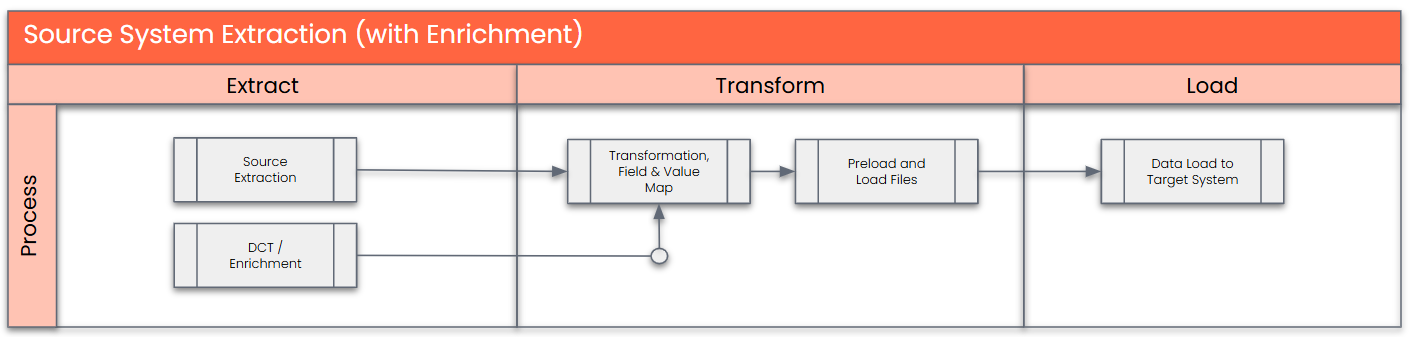
The high-level process is represented by the diagram below:
The following represents the high-level process for Source System Extraction:
The following represents the high-level process for DCT:

Collection will be done manually in the Data Collection Template for sites not on SAP- PF2 or WP2 systems
Data Privacy and Sensitivity
Not Applicable
Extraction
Extract data from a source into Advanced Data Migration and Management (ADMM). There are 2 possibilities:
- The data exists. connects to the source and loads the data into the repository. There are 3 methods:
- Perform full data extraction from relevant tables in the source system(s).
- Perform extraction through the application layer.
- Only if ADMM cannot connect to the source, data is loaded to the repository from the provided source system extract/report.
- The data does not exist (or cannot be converted from its current state). The data is manually collected by the business directly in the repository. This is to be conducted using DCT (Data Collection Template) in Advanced Data Migration and Management (ADMM).
Extraction Run Sheet
| Req # | Requirement Description | Team Responsible |
|---|---|---|
| 1 | Extract data from source system based on relevancy rule | SyWay Data Team |
Selection Screen
| Selection Ref Screen | Parameter Name | Selection Type | Requirement | Value to be entered/set |
|---|---|---|---|---|
| Not Applicable |
Data Collection Template (DCT)
Target Ready Data Collection Template will be created for data with exception of some fields which require transformation as mentioned in the transformation rule.
Note: All rules specified below should be documented as a tooltip in the DC Page.
Format:
- Line 1: Mandatory / Conditional
- Line 2: Remaining text
1. Work Order Header Data Construction Rules
| Field Name | Field Description | Rule |
|---|---|---|
| WERKS | Plant | Mandatory. Populate the Plant to which the Work Order is associated. Allowed values: List from Value Mapping - Plant (where Maintenance Plant = Yes) |
| zLegacyAUFNR | Legacy Order Number | Mandatory. |
| AUART | Order Type | Mandatory. Allowed values: YA01 Reactive Maintenance |
| KCHAR | Description | Mandatory. Populate with a meaningful Order Description. Ensure that it does not include any of below characters: ; Semi-colon |
| PRIOK | Priority | Mandatory. Needs to be selected from value list (T356). |
| GSTRP | Basic Start Date | Mandatory. Populate the Work Order planned start date in YYYYMMDD format. |
| GSUZP | Basic Start Time | Mandatory. Populate the Work Order planned start time in HHMMSS format. |
| GLTRP | Basic End Date | Mandatory. Populate the Work Order planned end date in HHMMSS format. |
| GLUZP | Basic End Time | Mandatory. Populate the Work Order planned end time in HHMMSS format. |
| TPLNR | Functional Location | Mandatory. Populate the Functional Location associated to the asset. Value must exist in Functional Location DCT. |
| EQUNR | Equipment | Conditional. Populate if the Asset being maintained is an Equipment. Otherwise, leave the field blank. Value must exist in Equipment DCT. |
| ILART | Maintenance Activity Type | Mandatory. Needs to be selected from value list (T353I) where ILART starting with M (M01, M02...) |
| PROID | WBS Element (Acc Assignment) | Conditional.
|
2. Work Order Operation Data Construction Rules
| Field Name | Field Description | Rule |
|---|---|---|
| WERKS | Plant | Mandatory. Populate the Plant to which the Work Order is associated. Allowed values: List from Value Mapping - Plant where Maintenance Plant = Yes |
| zLegacyAUFNR | Legacy Order Number | Mandatory. Key to link to Work Order. Must exist in Order Header DCT. |
| zLegacyVORNR | Legacy Operation Number | Mandatory. Sequence number that uniquely identifies an operation in the order. Populate in increments of 10 (e.g., 0010, 0020, 0030) for multiple operations. |
| LTXA1 | Operation Description | Mandatory. Populate with a meaningful description for the Work Order Operation. ; Semi-colon |
| PERNR | Person Responsible | Conditional Populate the Personnel Number of the person responsible/assigned to perform the operation. Value must be an active Person Responsible. |
| STEUS | Control Key | Mandatory. Populate appropriate Control Key based on the how the operation is to be processed (internal/external, etc.). Needs to be selected fromValue List (T430) with pattern 'PMXX' |
| SAKTO | Cost Element | Conditional. Populate the Cost posting account for external services/materials depending on process. Should be a valid Cost Element (S4) |
| EKORG | Purchasing Organisation | Conditional. Populate Purchasing org responsible for procurement activities. Needs to be selected from value list (T024E) |
| EKGRP | Purchasing Group | Conditional. Populate Buyer/group responsible for procurement. Needs to be selected from value list (T024) |
| MATKL | Material Group | Conditional. Populate Material Group for the required Materials/ Services. Needs to be selected from value list (T023) |
| ANLZU | System Condition | Conditional. Populate Condition of the System/ Asset during the maintenance activity. Needs to be selected from value list (T375M) |
| DAUNO | Duration | Mandatory. Populate duration to perform the activity. |
| ANZZL | Required Capacities | Mandatory. Populate the number of required capacities to perform the activity. Must be an integer value. Cannot be 0. |
| EINSA | Start Constraint | Conditional. Populate only if Start Constraint logic is used to be used for scheduling in target. Otherwise, leave the field blank. Allowed values: Select from the below list - 1 - Must start on |
| NTANF | Start Constraint Date | Conditional. Date on which the constrained start is required. Populate only if EINSA is populated. Otherwise, leave the field blank. Date Format DDMMYYYY. |
| NTANZ | Start Constraint Time | Conditional. Time for the constrained start Populate only if EINSA and NTANF is populated. Otherwise, leave the field blank. Time Format HHMMSS. |
| EINSE | Finish Constraint | Conditional. Populate only if Finish Constraint logic is to be used for scheduling in target. Otherwise, leave the field blank. Allowed values: Select from the below list - 1 - Must finish on |
| NTEND | Finish Constraint Date | Conditional. Date on which the constrained finish is required. Populate only if EINSE is populated. Valid Date. Otherwise, leave the field blank. Date Format DDMMYYYY. |
| NTENZ | Finish Constraint Time | Conditional. Time for the constrained finish. Populate only if EINSE and NTEND is populated. Valid Time. Otherwise, leave the field blank. Time Format HHMMSS. |
| MGVRG | Operation Quantity | Conditional. Populate only if the Operation is quantity-based (e.g., service quantity) in the target design. Otherwise, leave the field blank. Numeric value only. Cannot be 0. |
| MEINH | Unit | Conditional. Populate only if MGVRG is populated. Otherwise, leave the field blank. Needs to be selected from value list (T006) |
| PREIS | Price | Conditional. Populate price amount only if the Operation is externally procured / service-related. Otherwise, leave the field blank. Numeric value only. Cannot be negative. |
| PEINH | Price Unit | Conditional. Number of units to which the price refers. Populate only if PREIS is populated. Otherwise, leave the field blank. Must be an integer value. Cannot be 0. |
| LIFNR | Vendor | Conditional. Populate external vendor for the external service/ material if information exist. Otherwise, leave the field blank. Value must exist in Vendor DCT |
| WEMPF | Recipient | Conditional. Populate Goods recipient name for purchasing documents if information exists. Otherwise, leave the field blank. |
| BEDNR | Tracking Number | Conditional. Populate tracking number for PR/PO creation if information exists. Otherwise, leave the field blank. |
| SORTL | Sort Term | Conditional. Populate sort term for the procurement scenario if information exists. Otherwise, leave the field blank. |
| AFNAM | Name of Requisitioner | Conditional. Populate name of the Person requesting procurement if information exists. Otherwise, leave the field blank. |
| NO_DISP | Reservation Relevance / Generation of Purchase Requisition | Populate from the below value list as applicable.
|
3. Work Order Operation Components Data Construction Rules
| Field Name | Field Description | Rule | ||||||||||||
|---|---|---|---|---|---|---|---|---|---|---|---|---|---|---|
| WERKS | Plant | Mandatory. Populate the Plant to which the Work Order is associated. Allowed values: List from Value Mapping - Plant where Maintenance Plant = Yes | ||||||||||||
| zLegacyAUFNR | Legacy Order Number | Mandatory. Key to link to Work Order | ||||||||||||
| zLegacyVORNR | Legacy Operation Number | Mandatory. Key to link to Work Order Operation. Key to link to Work Order. Must exist in Order Operation DCT. | ||||||||||||
| POSNR | Item Number of Reservation | Mandatory. Sequence number that uniquely identifies Component assigned in the Order Operation. Populate in increments of 10 (e.g., 0010, 0020, 0030) for multiple Materials. | ||||||||||||
| MATNR | Material | Conditional Populate with legacy Material number for the component line. Value must exist in Material Master Basic view DCT | ||||||||||||
| POTX1 | Description | Conditional Populate with a meaningful description for the component line item.
| ||||||||||||
| POSTP | Item Category | Mandatory. Populate a valid component item category from the below.
Note - If populating data for a lean service, the values could only be "N" (Non-stock) or "E" (Enhanced Limit). | ||||||||||||
| BDMNG | Quantity | Mandatory. Populate Component quantity requested for the component line. | ||||||||||||
| MEINS | Unit | Mandatory. Populate if BDMNG is populated. Needs to be selected from value list (T006) | ||||||||||||
| NO_DISP | Reservation Relevance / Generation of Purchase Requisition | Mandatory. Populate from the below value list as applicable.
| ||||||||||||
| BDTER | Requirements Date | Conditional Populate the date on which the requested quantity of material is required. If populating this field ensure the Manual Maintenance of Requirement Date is set as 'X' (Yes). Date Format DDMMYYYY. | ||||||||||||
| KZMPF | Manual Reqmt Date Indicator | Conditional Populate Maintenance of Requirement Date Flag from the below list. '' = NO | ||||||||||||
| LGORT | Storage Location | Conditional Populate legacy Storage Location from where stock is planned to be issued. Needs to be selected from value list (T001L) specifc to the Plant (WERKS) for which the data is being populated. | ||||||||||||
| GPREIS | Price | Conditional Populate price for the external component/service line as applicable. | ||||||||||||
| PEINH | Price Unit | Conditional Populate Number of units to which the price refers. Example Populate only if GPREIS is populated. Otherwise, leave the field blank. Must be an integer value. Cannot be 0. | ||||||||||||
| WAERS | Currency | Conditional Populate the currency key for the component price. Must be maintained if GPREIS is populated. Needs to be selected from value list (TCURC) | ||||||||||||
| EKORG | Purchasing Organisation | Conditional. Populate Purchasing org responsible for procurement activities. Needs to be selected from value list (T024E) | ||||||||||||
| EKGRP | Purchasing Group | Conditional. Populate Buyer/group responsible for procurement. Needs to be selected from value list (T024) | ||||||||||||
| LIFNR | Supplier | Conditional. Populate external vendor for the service/ material if information exist. Otherwise, leave the field blank. Value must exist in Value Mapping: Vendor Number | ||||||||||||
| INFNR | Purchasing Info Record | Conditional. Value must exist in Value Mapping: Purchasing Info Record Number | ||||||||||||
| MATKL | Material Group | Conditional. Needs to be selected from value list (T023) | ||||||||||||
| SAKNR | G/L Account | Conditional Populate G/L account as required for account assignment. Value must exist in Value Mapping: GL Account | ||||||||||||
| WEMPF | Goods Recipient | Conditional Populate Goods recipient name for purchasing documents if information exists. Otherwise, leave the field blank. | ||||||||||||
| ABLAD | Unloading Point | Conditional Populate unloading point if information exists. Otherwise, leave the field blank. | ||||||||||||
| STARTDATE | Service Performance Start Date | Conditional To be populated for Lean Service Component Only. Populate performance start date of the Lean Service item. Leave blank if KZMPF (Manual Reqmt Date Indicator) = '' Date Format DDMMYYYY. | ||||||||||||
| PERFORMANCE PERIODSTARTTIME | Service Performance Start Time (UTC) | Conditional To be populated for Lean Service Component Only. Populate the start time of the lean service. Only populate if STARTDATE is maintained, else leave blank. Time Format HHMMSS. | ||||||||||||
| ENDDATE | Service Performance End Date | Conditional To be populated for Lean Service Component Only. Populate performance start end of the Lean Service item. Leave blank if KZMPF (Manual Reqmt Date Indicator) = '' Date Format DDMMYYYY. | ||||||||||||
| PERFORMANCE PERIODENDTIME | Service Performance End Time (UTC) | Conditional To be populated for Lean Service Component Only. Populate the end time of the lean service. Only populate if ENDDATE is maintained, else leave blank. Time Format HHMMSS. | ||||||||||||
| SERVICE DURATION | Duration of Lean Service | Conditional To be populated for Lean Service Component Only. Populate the duration value of the Lean Service. Leave blank if Component is not a Lean Service. | ||||||||||||
| SERVICE DURATIONUNIT | Duration Unit for a Lean Service | Conditional To be populated for Lean Service Component Only. Populate Lean Service duration unit (e.g., Hour, Day). Needs to be selected from value list (T006) | ||||||||||||
| COMMITMENT | Expected Value | Conditional Populate expected value for the Lean Service. The value must be maintained, if the item category "E" (= Enhanced Limit) has been set for the item (lean service). Please make sure, that this value is less than or equal to the overall limit. | ||||||||||||
| SUMLIMIT | Overall Limit | Conditional Populate maximum expenditure value for the Lean Service. The value must be maintained (mandatory), if the item category "E" (= Enhanced Limit) has been set for the item (lean service). Please ensure, that this value is greater than or equal to the expected value. |
4. Work Order Operation Relationships Data Construction Rules
| Field Name | Field Description | Rule |
|---|---|---|
| WERKS | Plant | Mandatory. Populate the Plant to which the Work Order is associated. Allowed values: List from Value Mapping - Plant where Maintenance Plant = Yes |
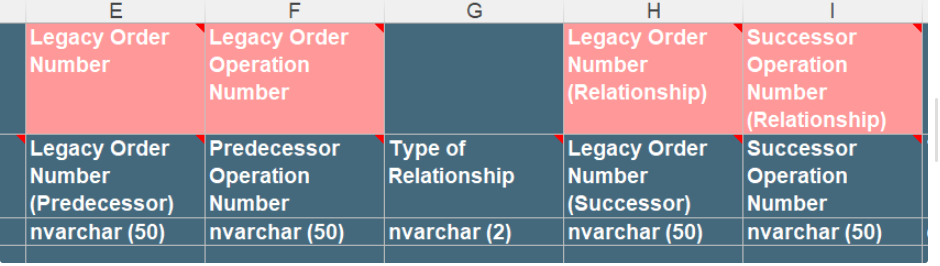
zLegacyAUFNR_PRE | Legacy Order Number (Predecessor) | Mandatory. Populate with the Predecessor order number to which the Predecessor operation belongs. |
| zLegacyVORNR_PRE | Predecessor Operation Number | Mandatory. Populate with the Predecessor operation number within the Predecessor order. |
| zLegacyAUFNR_SUC | Legacy Order Number (Successor) | Mandatory. Populate with the successor order number to which the successor operation belongs. |
| zLegacyVORNR_SUC | Successor Operation Number | Mandatory. Populate with the successor operation number within the successor order. |
| AOBAR | Type of Relationship | Mandatory. Populate relationship type between predecessor and successor operations as required the below list. FS - Finish-to-Start SS - Start-to-Start FF - Finish-to-Finish SF - Start-to-Finish |
| DAUER | Time Interval | Conditional. Populate lag/lead (positive/negative) duration value between operations. |
| ZEINH | Unit | Conditional. Populate duration unit (e.g., Hour, Day) only when DAUER has been populated. Needs to be selected from value list (T006) |
5. Work Order Object List Data Construction Rules
| Field Name | Field Description | Rule |
|---|---|---|
| WERKS | Plant | Mandatory. Populate the Plant to which the Work Order is associated. Allowed values: List from Value Mapping - Plant where Maintenance Plant = Yes |
| zLegacyAUFNR | Legacy Order Number | Mandatory. Key to link to Work Order |
| OBZAE | Counter | Mandatory. Populate with a sequential counter per AUFNR representing each object list item (e.g., 0001, 0002…). |
| SORTF | Sort | Conditional Populate a sort key to control grouping of object list items (e.g., by object type, priority, hierarchy). Else leave blank. |
| TPLNR | Functional Location | Mandatory. Populate with the legacy Functional Location assigned to the order. Value must exist in Functional Location DCT. |
| EQUNR | Equipment | Conditional. Populate with the legacy Equipment assigned to the order. Value must exist in Equipment DCT. |
6. Work Order Long Text Line Data Construction Rules
| Field Name | Field Description | Rule |
|---|---|---|
| WERKS | Plant | Mandatory. Populate the Plant to which the Work Order is associated. Allowed values: List from Value Mapping - Plant where Maintenance Plant = Yes |
| zLegacyAUFNR | Legacy Order Number | Mandatory. Key to link to Work Order |
| TDLINE_LC | Text Line (Local Language) | Conditional User to populate Free Text in language of the country in which each plant is located (French, Italian, Mandarin, Brazilian Portuguese, German or Spanish). |
7. Work Order Operation Long Text Line Data Construction Rules
| Field Name | Field Description | Rule |
|---|---|---|
| WERKS | Plant | Mandatory. Populate the Plant to which the Work Order is associated. Allowed values: List from Value Mapping - Plant where Maintenance Plant = Yes |
| zLegacyAUFNR | Legacy Order Number | Mandatory. Key to link to Work Order |
| zLegacyVORNR | Legacy Operation Number | Mandatory. Key to link to Work Order Operation |
| TDLINE_LC | Text Line (Local Language) | Conditional User to populate Free Text in language of the country in which each plant is located (French, Italian, Mandarin, Brazilian Portuguese, German or Spanish). |
Extraction Dependencies
| Item # | Step Description | Team Responsible |
|---|---|---|
1 | Not Applicable |
The Target fields are mapped to the applicable Legacy field that will be its source, this is a 3-way activity involving the Business, Functional team and Data team. This identifies the transformation activity required to allow ADMM to make the data Target ready:
- Perform value mapping and data transformation rules.
- Legacy values are mapped to the to-be values (this could include a default value)
- Values are transformed according to the rules defined in Advanced Data Migration and Management (ADMM)
- Prepare target-ready data in the structure and format that is required for loading via prescribed Load Tool. This step also produces the load data ready for business to perform Pre-load Data Validation
Transformation Run Sheet
| Item # | Step Description | Team Responsible |
|---|---|---|
1 | Obtain DCT Sign-off from Business. | SyWay Data Team |
2 | In dspMigrate, select the wave – S4/HANA – Plant Maintenance | Syniti |
3 | Go to Process Area Launch and Process the Object – Work Order | Syniti |
4 | Review and Validate Error and Preload Reports | Syniti |
5 | Execute the transformation to prepare the target tables | Syniti |
6 | Validate data from pre-load and error reports | Business/Data owner |
7 | Generate load files | Syniti |
Transformation Rules
Note: Unless otherwise specified, the transformation rules applies to YA01, YA02 and YA03 Order Types.
Work Order System Status Migration:
WO System Status to be transformed based on Legacy WO status, PR/Reservation existence, and whether the Basic Start Date is Before Cutover, within the Cutover Window, or After Cutover. The transformation logic should be developed as per the scenarios stated in the below matrix.
For illustration:
Cutover Date: 01-Oct-2026
X = 4 weeks before Cutover
Y = 4 weeks after Cutover
So:
X weeks before: 03-Sep-2026
Y weeks after: 29-Oct-2026
| Legacy WO status | PR/Reservation exists? | Basic Start Date condition | Example Basic Start Date | Final Status |
| CRTD | Yes | Before Cutover (≥ X weeks before) | 20-Aug-26 | CRTD |
| CRTD | No | Before Cutover (≥ X weeks before) | 15-Aug-26 | CRTD |
| REL | Yes | Before Cutover (≥ X weeks before) | 25-Aug-26 | REL |
| REL | No | Before Cutover (≥ X weeks before) | 18-Aug-26 | CRTD |
| CRTD | Yes | Around Cutover (X weeks before → Y weeks after) | 10-Sep-26 | CRTD |
| CRTD | No | Around Cutover (X weeks before → Y weeks after) | 25-Sep-26 | CRTD |
| REL | Yes | Around Cutover (X weeks before → Y weeks after) | 5-Oct-26 | REL |
| REL | No | Around Cutover (X weeks before → Y weeks after) | 20-Oct-26 | REL |
| CRTD | Yes | After Cutover (≥ Y weeks after) | 10-Nov-26 | CRTD |
| CRTD | No | After Cutover (≥ Y weeks after) | 15-Nov-26 | CRTD |
| REL | Yes | After Cutover (≥ Y weeks after) | 20-Nov-26 | CRTD |
| REL | No | After Cutover (≥ Y weeks after) | 5-Dec-26 | CRTD |
X - OTH_Migration_Date Relevant Values A2D (using Object ID "9005" and Field Name = "AFKO-GSTRP_POSTGOLIV1")
Y - OTH_Migration_Date Relevant Values A2D (using Object ID "9005" and Field Name = "AFKO-GSTRP_POSTGOLIV2")
Cutover - OTH_Migration_Date Relevant Values A2D (using Object ID "9005" and Field Name = "AFKO-GSTRP")
A.1 Logic for checking PR (Purchase Requisition) assign to a Work Order:
| Step | Table | Field(s) | Logic |
|---|---|---|---|
| 1 | AUFK / AFIH | AUFK-AUFNR = AFIH-AUFNR | Identify the PM Work Order |
| 2 | EBKN | EBKN-AUFNR = AUFK-AUFNR | Find PR account assignment against the Work Order |
| 3 | EBAN | EBAN-BANFN = EBKN-BANFN and EBAN-BNFPO = EBKN-BNFPO | Get PR item |
A.2 Check if the PR (Purchase Requisition) is Open using-
EBAN-LOEKZ = space "Not deleted"
AND EBAN-EBAKZ = space "Not closed"
AND EBAN-MENGE > EBAN-BSMNG "Requested quantity > Quantity already ordered / assigned to PO"
B.1 Logic for checking Reservation assign to a Work Order:
| Step | Table | Field(s) | Logic |
|---|---|---|---|
| 1 | AUFK / AFIH | AUFK-AUFNR = AFIH-AUFNR | Identify the PM Work Order |
| 2 | RESB | RESB-AUFNR = AUFK-AUFNR | Find reservations belonging to the Work Order |
B.2 Check if the Reservation is Open using-
RESB-XLOEK = space "Reservation item is not deleted"
AND RESB-KZEAR = space "Reservation item is not finally issued / not completed"
AND RESB-BDMNG > RESB-ENMNG "Required quantity is still greater than Issued quantity, so there is outstanding quantity"
1. Work Order Header Transformation Rule (ECC)Exception: For Work Orders (AUFK-AUFNR) with System Status (JEST-STAT) = Technically Completed (TECO) and relevant open Purchase Order (EKKN-EBELN) as defined in CNV-9045 Open Purchase Orders only Work Order Header needs to be migrated.
| Rule # | Source System | Source Table | Source Field | Source Description | Target System | Target Table | Target Field | Target Description | Transformation Logic |
|---|---|---|---|---|---|---|---|---|---|
| 1 | - | - | - | - | S/4 HANA | AUFK | AUFNR | Order Number | System (Internal numbering) |
| 2 | PF2, WP2 | AUFK | AUART | Order Type | S/4 HANA | AUFK | AUART | Order Type | Value Mapping: Work Order Type (based on Legacy Work Order Type (AUART) and Maintenance Activity Type (ILART)) |
| 3 | PF2, WP2 | AUFK | KTEXT | Description | S/4 HANA | AUFK | KTEXT | Description |
|
| 4 | PF2, WP2 | AFIH | PRIOK | Priority | S/4 HANA | AFIH | PRIOK | Priority |
|
| 5 | PF2, WP2 | AFKO | GSTRP | Basic Start Date | S/4 HANA | AFKO | GSTRP | Basic Start Date | Direct Mapping |
| 6 | PF2, WP2 | AFKO | GSUZP | Basic Start Time | S/4 HANA | AFKO | GSUZP | Basic Start Time | Direct Mapping |
| 7 | PF2, WP2 | AFKO | GLTRP | Basic End Date | S/4 HANA | AFKO | GLTRP | Basic End Date | Direct Mapping |
| 8 | PF2, WP2 | AFKO | GLUZP | Basic End Time | S/4 HANA | AFKO | GLUZP | Basic End Time | Direct Mapping |
| 9 | PF2, WP2 | IFLOT | TPLNR | Functional Location | S/4 HANA | IFLOT | TPLNR | Functional Location |
|
| 10 | PF2, WP2 | AFIH | EQUNR | Equipment | S/4 HANA | AFIH | EQUNR | Equipment |
- if there is S4 EQUNR available for legacy AFIH-ILOAN (Use TPLNR value) using Value Mapping: Equipment. If yes, use that - if there is S4 EQUNR available for legacy AFIH-BAUTL using Value Mapping: Equipment. If yes, use that If there is S4 EQUNR available for both legacy AFIH-ILOAN and AFIH-BAUTL, then the S4 EQUNR for legacy AFIH-BAUTL will have precedence. If there is S4 EQUNR available for legacy AFIH-EQUNR and legacy AFIH-ILOAN and AFIH-BAUTL, then the S4 EQUNR for legacy AFIH-BAUTL will have precedence. |
| 11 | PF2, WP2 | IFLOT | TPLNR | Functional Location | S/4 HANA | AFIH | EQUNR | Equipment | Note: Transformation Rule for legacy EQUNR must run before this rule. This rule is for legacy Functional Locations which are converted to Equipment in S4
|
| 12 | PF2, WP2 | AFIH | BAUTL | Assembly | S/4HANA | AFIH | EQUNR | Equipment | Note: Transformation Rule for legacy EQUNR and legacy TPLNR to EQUNR must run before this rule. This rule is for legacy Assemblies which are converted to Equipment in S4
|
| 13 | PF2, WP2 | AFIH | QMNUM | Assigned Notification | S/4 HANA | AFIH | QMNUM | Assigned Notification | Value Mapping: Notification |
| 14 | PF2, WP2 | AFIH | REVNR | Maintenance Event/ Revision | S/4 HANA | AFIH | REVNR | Maintenance Event/ Revision | Not relevant for load |
| 15 | PF2, WP2 | AFIH | ILART | Maintenance Activity Type | S/4 HANA | AFIH | ILART | Maintenance Activity Type |
|
| 16 | - | - | - | - | S/4 HANA | CRHD | ARBPL | Work Center |
|
| 17 | - | - | - | - | S/4 HANA | CRHD | WERKS | Work Center Plant | Derive the CRHD-WERKS from the derived CRHD-ARBPL value |
| 18 | - | - | - | - | S/4 HANA | AFIH | IWERK | Planning Plant |
|
| 19 | - | - | - | - | S/4 HANA | AFIH | INGPR | Planner group |
|
| 20 | - | - | - | - | S/4 HANA | AUFK | WERKS | Maintenance Plant | Copy from IWERK (Planning Plant) |
| 21 | - | - | - | - | S/4 HANA | ILOA | BEBER | Plant Section |
|
| 22 | - | - | - | - | S/4 HANA | ILOA | BUKRS | Company Code |
|
| 23 | PF2, WP2 | ILOA | PROID | WBS Element (Acc Assignment) | S/4 HANA | ILOA | PROID | WBS Element (Acc Assignment) | If Legacy PROID exists in either of the below ADMM Deployment Prep reports with ILOA-PROID = Report-POSID, where Report-ZACTIVE_PROJECT_OPEN_CLOSED = 'OPEN' and Report-ZACTIVE= 'TRUE' -I2M_ECC_SAPWP2_WBS_REPORT then use Value Mapping : WBS Element Number. Else Not used |
| 24 | - | - | - | - | S/4 HANA | ILOA | KOSTL | Cost Center | For Order Types YA01 and YA02 use below logic-
For Order Types YA03 if S4 PROID exist then pass as BLANK else use below logic-
|
2. Work Order Header Transformation Rule (DCT)
| Rule # | Source System | Source Table | Source Field | Source Description | Target System | Target Table | Target Field | Target Description | Transformation Logic |
|---|---|---|---|---|---|---|---|---|---|
| 1 | DCT | AUFK | zLegacyAUFNR | Legacy Order Number | S/4 HANA | AUFK | AUFNR | Order Number | System (Internal numbering) |
| 2 | DCT | AUFK | AUART | Order Type | S/4 HANA | AUFK | AUART | Order Type | Direct Mapping |
| 3 | DCT | AUFK | KCHAR | Description | S/4 HANA | AUFK | KCHAR | Description | Direct Mapping |
| 4 | DCT | AFIH | PRIOK | Priority | S/4 HANA | AFIH | PRIOK | Priority | Direct Mapping |
| 5 | DCT | AFKO | GSTRP | Basic Start Date | S/4 HANA | AFKO | GSTRP | Basic Start Date | Direct Mapping |
| 6 | DCT | AFKO | GSUZP | Basic Start Time | S/4 HANA | AFKO | GSUZP | Basic Start Time | Direct Mapping |
| 7 | DCT | AFKO | GLTRP | Basic End Date | S/4 HANA | AFKO | GLTRP | Basic End Date | Direct Mapping |
| 8 | DCT | AFKO | GLUZP | Basic End Time | S/4 HANA | AFKO | GLUZP | Basic End Time | Direct Mapping |
| 9 | DCT | IFLOT | TPLNR | Functional Location | S/4 HANA | IFLOT | TPLNR | Functional Location | Direct Mapping |
| 10 | DCT | AFIH | EQUNR | Equipment | S/4 HANA | AFIH | EQUNR | Equipment | Value Mapping: Equipment |
| 11 | DCT | AFIH | QMNUM | Assigned Notification | S/4 HANA | AFIH | QMNUM | Assigned Notification | Not used |
| 12 | - | - | - | - | S/4 HANA | AFIH | REVNR | Maintenance Event/ Revision | Not used |
| 13 | - | - | - | - | S/4 HANA | AFIH | ILART | Maintenance Activity Type | Direct Mapping |
| 14 | - | - | - | - | S/4 HANA | CRHD | ARBPL | Work Center |
|
| 15 | - | - | - | - | S/4 HANA | CRHD | WERKS | Work Center Plant | Derive the S4 CRHD-WERKS from the derived S4 CRHD-ARBPL value |
| 16 | - | - | - | - | S/4 HANA | AFIH | IWERK | Planning Plant |
|
| 17 | - | - | - | - | S/4 HANA | AFIH | INGPR | Planner group |
|
| 18 | - | - | - | - | S/4 HANA | AUFK | WERKS | Maintenance Plant | Copy from IWERK (Planning Plant) |
| 19 | - | - | - | - | S/4 HANA | ILOA | BEBER | Plant Section |
|
| 20 | - | - | - | - | S/4 HANA | ILOA | BUKRS | Company Code |
|
| 21 | DCT | ILOA | PROID | WBS Element (Acc Assignment) | S/4 HANA | ILOA | PROID | WBS Element (Acc Assignment) | Direct mapping for Order Type (AUART) = 'YA03', Else Not used |
| 22 | - | ILOA | KOSTL | Cost Center | S/4 HANA | ILOA | KOSTL | Cost Center | If Legacy PROID doesn't exists as per the rule mentioned above, then derive Cost Centre from -
|
3. Work Order Operation Transformation Rule (ECC)
| Rule # | Source System | Source Table | Source Field | Source Description | Target System | Target Table | Target Field | Target Description | Transformation Logic | ||||||||||||
|---|---|---|---|---|---|---|---|---|---|---|---|---|---|---|---|---|---|---|---|---|---|
| 1 | - | - | - | - | S/4 HANA | AFVC | AUFNR | Order Number | System (Internal numbering) | ||||||||||||
| 2 | PF2, WP2 | AFVC | VORNR | Legacy Operation/Activity | S/4 HANA | AFVC | VORNR | Operation/Activity | Direct Mapping | ||||||||||||
| 3 | PF2, WP2 | AFVC | LTXA1 | Operation Description | S/4 HANA | AFVC | LTXA1 | Operation Description |
| ||||||||||||
| 4 | PF2, WP2 | CRHD | ARBPL | Work Center | S/4 HANA | CRHD | ARBPL | Work Center |
| ||||||||||||
| 5 | PF2, WP2 | CRHD | WERKS | Work Center Plant | S/4 HANA | CRHD | WERKS | Work Center Plant | Derive the S4 CRHD-WERKS from the derived S4 CRHD-ARBPL value | ||||||||||||
| 6 | PF2, WP2 | AFVC | PERNR | Person Responsible | S/4 HANA | AFVC | PERNR | Person Responsible | Value Mapping: Employee Personnel | ||||||||||||
| 7 | PF2, WP2 | AFVC | STEUS | Control Key | S/4 HANA | AFVC | STEUS | Control Key | Value Mapping: Control Key | ||||||||||||
| 8 | PF2, WP2 | AFVC | SAKTO | Cost Element | S/4 HANA | AFVC | SAKTO | Cost Element | Direct Mapping | ||||||||||||
| 9 | PF2, WP2 | AFVC | EKORG | Purchasing Organization | S/4 HANA | AFVC | EKORG | Purchasing Organisation | Value Mapping: Purchasing Organization | ||||||||||||
| 10 | PF2, WP2 | AFVC | EKGRP | Purchasing Group | S/4 HANA | AFVC | EKGRP | Purchasing Group | Value Mapping: Purchasing Group | ||||||||||||
| 11 | PF2, WP2 | AFVC | MATKL | Material Group | S/4 HANA | AFVC | MATKL | Material Group | Value Mapping: Material Group | ||||||||||||
| 12 | PF2, WP2 | AFVC | ANLZU | System Condition | S/4 HANA | AFVC | ANLZU | System Condition | Value Mapping: System Condition | ||||||||||||
| 13 | PF2, WP2 | AFVC | LARNT | Activity Type | S/4 HANA | AFVC | LARNT | Activity Type | Derive Activity Type (CRCO-LSTAR) from Target Work Centre (CRHD-ARBPL) | ||||||||||||
| 14 | PF2, WP2 | AFVV | ARBEI | Work | S/4 HANA | AFVV | ARBEI | Work | Direct Mapping If ARBEI is not in Hours, convert ARBEI value to Hours as below IF Unit = 'H' ELSE IF Unit = 'MIN' | ||||||||||||
| 15 | PF2, WP2 | AFVV | ARBEH | Work Unit | S/4 HANA | AFVV | ARBEH | Work Unit | Default to 'H' (Hours) | ||||||||||||
| 16 | PF2, WP2 | AFVC | INDET | Calculation Key | S/4 HANA | AFVC | INDET | Calculation Key | Default to“0 – Maintain Manually” | ||||||||||||
| 17 | PF2, WP2 | AFVV | DAUNO | Duration | S/4 HANA | AFVV | DAUNO | Duration | Direct Mapping If DAUNE is not in Hours, convert DAUNO value to Hoursas below IF Unit = 'H' ELSE IF Unit = 'MIN' | ||||||||||||
| 18 | PF2, WP2 | AFVV | DAUNE | Duration Unit | S/4 HANA | AFVV | DAUNE | Duration Unit | Default to 'H' (Hours) | ||||||||||||
| 19 | PF2, WP2 | AFVC | ANZZL | Required Capacities | S/4 HANA | AFVC | ANZZL | Required Capacities | Direct Mapping | ||||||||||||
| 20 | PF2, WP2 | AFVV | EINSA | Start Constraint | S/4 HANA | AFVV | EINSA | Start Constraint | Direct Mapping | ||||||||||||
| 21 | PF2, WP2 | AFVV | NTANF | Start Constraint Date | S/4 HANA | AFVV | NTANF | Start Constraint Date | Direct Mapping | ||||||||||||
| 22 | PF2, WP2 | AFVV | NTANZ | Start Constraint Time | S/4 HANA | AFVV | NTANZ | Start Constraint Time | Direct Mapping | ||||||||||||
| 23 | PF2, WP2 | AFVV | EINSE | Finish Constraint | S/4 HANA | AFVV | EINSE | Finish Constraint | Direct Mapping | ||||||||||||
| 24 | PF2, WP2 | AFVV | NTEND | Finish Constraint Date | S/4 HANA | AFVV | NTEND | Finish Constraint Date | Direct Mapping | ||||||||||||
| 25 | PF2, WP2 | AFVV | NTENZ | Finish Constraint Time | S/4 HANA | AFVV | NTENZ | Finish Constraint Time | Direct Mapping | ||||||||||||
| 26 | PF2, WP2 | AFVV | MGVRG | Operation Quantity | S/4 HANA | AFVV | MGVRG | Operation Quantity | Direct Mapping | ||||||||||||
| 27 | PF2, WP2 | AFVV | MEINH | Operation Quantity Unit | S/4 HANA | AFVV | MEINH | Operation Quantity Unit | Direct Mapping | ||||||||||||
| 28 | PF2, WP2 | AFVC | PREIS | Price | S/4 HANA | AFVC | PREIS | Price | Direct Mapping | ||||||||||||
| 29 | PF2, WP2 | AFVC | WAERS | Currency | S/4 HANA | AFVC | WAERS | Currency | Direct Mapping | ||||||||||||
| 30 | PF2, WP2 | AFVC | PEINH | Price Unit | S/4 HANA | AFVC | PEINH | Price Unit | Direct Mapping | ||||||||||||
| 31 | PF2, WP2 | AFVC | LIFNR | Vendor | S/4 HANA | AFVC | LIFNR | Vendor | Value Mapping: Vendor Number | ||||||||||||
| 34 | PF2, WP2 | AFVC | WEMPF | Recipient | S/4 HANA | AFVC | WEMPF | Recipient | Direct Mapping | ||||||||||||
| 35 | PF2, WP2 | AFVC | BEDNR | Tracking Number | S/4 HANA | AFVC | BEDNR | Tracking Number | Direct Mapping | ||||||||||||
| 36 | PF2, WP2 | AFVC | SORTL | Sort Term | S/4 HANA | AFVC | SORTL | Sort Term | Direct Mapping | ||||||||||||
| 37 | PF2, WP2 | AFVC | INFNR | Purchasing Info Record | S/4 HANA | AFVC | INFNR | Purchasing Info Record | Value Mapping: Purchasing Info Record Number | ||||||||||||
| 38 | PF2, WP2 | AFVC | AFNAM | Name of Requisitioner | S/4 HANA | AFVC | AFNAM | Name of Requisitioner | Direct Mapping | ||||||||||||
| 39 | PF2, WP2 | AFVC | ABLAD | Unloading Point | S/4 HANA | AFVC | ABLAD | Unloading Point | Direct Mapping | ||||||||||||
| 40 | PF2, WP2 | AFVV | PLIFZ | Planned Delivery Time - Day | S/4 HANA | AFVV | PLIFZ | Planned Delivery Time - Day | Direct Mapping | ||||||||||||
| 41 | PF2, WP2 | AFVC | NO_DISP | Reservation Relevance / Generation of Purchase Requisition | S/4 HANA | AFVC | NO_DISP | Reservation Relevance / Generation of Purchase Requisition | Check if PO exist in Legacy (PF2/WP2), then set to '1' (Never) Else map based on the below table.
|
Logic to get Working Hours per Work Center Capacity Unit -
| Step | Table | Field(s) | Logic |
|---|---|---|---|
| 1 | CRHD | CRHD-ARBPL, CRHD-WERKS | Identify the Work Center |
| 2 | CRHD | CRHD-OBJTY = 'A', CRHD-OBJID | Internal Work Center object |
| 3 | CRCA | CRCA-OBJTY = CRHD-OBJTY and CRCA-OBJID = CRHD-OBJID | Get capacity allocation |
| 4 | CRCA | CRCA-KAPID | Capacity ID assigned to Work Center |
| 5 | KAKO | KAKO-KAPID = CRCA-KAPID | Get standard capacity / working hours |
Working Hours per Capacity Unit = (KAKO-ENDZT - KAKO-BEGZT - KAKO-PAUSE) / 3600
(Note - Values for the field mentioned would be in seconds and therefore this conversion is required)
KAKO-BEGZT "Start Time"
KAKO-ENDZT "End Time"
KAKO-PAUSE "Total Break Time"
4. Work Order Operation Transformation Rule (DCT)
| Rule # | Source System | Source Table | Source Field | Source Description | Target System | Target Table | Target Field | Target Description | Transformation Logic |
|---|---|---|---|---|---|---|---|---|---|
| 1 | DCT | AFVC | zLegacyAUFNR | Legacy Order Number | S/4 HANA | AFVC | AUFNR | Order Number | Direct Mapping |
| 2 | DCT | AFVC | zLegacyVORNR | Legacy Operation/Activity | S/4 HANA | AFVC | VORNR | Operation/Activity | Direct Mapping |
| 3 | DCT | AFVC | LTXA1 | Operation Description | S/4 HANA | AFVC | LTXA1 | Operation Description | Direct Mapping |
| 4 | DCT | CRHD | ARBPL | Work Center | S/4 HANA | CRHD | ARBPL | Work Center | Direct Mapping |
| 5 | DCT | CRHD | WERKS | Work Center Plant | S/4 HANA | CRHD | WERKS | Work Center Plant | Direct Mapping |
| 6 | DCT | AFVC | PERNR | Person Responsible | S/4 HANA | AFVC | PERNR | Person Responsible | Value Mapping: Employee Personnel |
| 7 | DCT | AFVC | STEUS | Control Key | S/4 HANA | AFVC | STEUS | Control Key | Direct Mapping |
| 8 | DCT | AFVC | SAKTO | Cost Element | S/4 HANA | AFVC | SAKTO | Cost Element | Direct Mapping |
| 9 | DCT | AFVC | EKORG | Purchasing Organization | S/4 HANA | AFVC | EKORG | Purchasing Organisation | Direct Mapping |
| 10 | DCT | AFVC | EKGRP | Purchasing Group | S/4 HANA | AFVC | EKGRP | Purchasing Group | Direct Mapping |
| 11 | DCT | AFVC | MATKL | Material Group | S/4 HANA | AFVC | MATKL | Material Group | Direct Mapping |
| 12 | DCT | AFVC | ANLZU | System Condition | S/4 HANA | AFVC | ANLZU | System Condition | Direct Mapping |
| 13 | DCT | AFVC | LARNT | Activity Type | S/4 HANA | AFVC | LARNT | Activity Type | Derive Activity Type (CRCO-LSTAR) from Target Work Centre (CRHD-ARBPL) |
| 14 | DCT | AFVV | ARBEI | Work | S/4 HANA | AFVV | ARBEI | Work | Derive Work = DAUNO X ANZZL |
| 15 | DCT | AFVV | ARBEH | Work Unit | S/4 HANA | AFVV | ARBEH | Work Unit | Default to 'H' (Hours) |
| 16 | DCT | AFVC | INDET | Calculation Key | S/4 HANA | AFVC | INDET | Calculation Key | Default to '2' (Calculate Work) |
| 17 | DCT | AFVV | DAUNO | Duration | S/4 HANA | AFVV | DAUNO | Duration | Direct Mapping |
| 18 | DCT | AFVV | DAUNE | Duration Unit | S/4 HANA | AFVV | DAUNE | Duration Unit | Default to 'H' (Hours) |
| 19 | DCT | AFVC | ANZZL | Required Capacities | S/4 HANA | AFVC | ANZZL | Required Capacities | Direct Mapping |
| 20 | DCT | AFVV | EINSA | Start Constraint | S/4 HANA | AFVV | EINSA | Start Constraint | Direct Mapping |
| 21 | DCT | AFVV | NTANF | Start Constraint Date | S/4 HANA | AFVV | NTANF | Start Constraint Date | Direct Mapping |
| 22 | DCT | AFVV | NTANZ | Start Constraint Time | S/4 HANA | AFVV | NTANZ | Start Constraint Time | Direct Mapping |
| 23 | DCT | AFVV | EINSE | Finish Constraint | S/4 HANA | AFVV | EINSE | Finish Constraint | Direct Mapping |
| 24 | DCT | AFVV | NTEND | Finish Constraint Date | S/4 HANA | AFVV | NTEND | Finish Constraint Date | Direct Mapping |
| 25 | DCT | AFVV | NTENZ | Finish Constraint Time | S/4 HANA | AFVV | NTENZ | Finish Constraint Time | Direct Mapping |
| 26 | DCT | AFVV | MGVRG | Operation Quantity | S/4 HANA | AFVV | MGVRG | Operation Quantity | Direct Mapping |
| 27 | DCT | AFVV | MEINH | Operation Quantity Unit | S/4 HANA | AFVV | MEINH | Operation Quantity Unit | Direct Mapping |
| 28 | DCT | AFVC | PREIS | Price | S/4 HANA | AFVC | PREIS | Price | Direct Mapping |
| 29 | DCT | AFVC | WAERS | Currency | S/4 HANA | AFVC | WAERS | Currency | Direct Mapping |
| 30 | DCT | AFVC | PEINH | Price Unit | S/4 HANA | AFVC | PEINH | Price Unit | Direct Mapping |
| 31 | DCT | AFVC | LIFNR | Vendor | S/4 HANA | AFVC | LIFNR | Vendor | Value Mapping |
| 34 | DCT | AFVC | WEMPF | Recipient | S/4 HANA | AFVC | WEMPF | Recipient | Direct Mapping |
| 35 | DCT | AFVC | BEDNR | Tracking Number | S/4 HANA | AFVC | BEDNR | Tracking Number | Direct Mapping |
| 36 | DCT | AFVC | SORTL | Sort Term | S/4 HANA | AFVC | SORTL | Sort Term | Direct Mapping |
| 37 | DCT | AFVC | INFNR | Purchasing Info Record | S/4 HANA | AFVC | INFNR | Purchasing Info Record | Direct Mapping |
| 38 | DCT | AFVC | AFNAM | Name of Requisitioner | S/4 HANA | AFVC | AFNAM | Name of Requisitioner | Direct Mapping |
| 39 | DCT | AFVC | ABLAD | Unloading Point | S/4 HANA | AFVC | ABLAD | Unloading Point | Direct Mapping |
| 40 | DCT | AFVV | PLIFZ | Planned Delivery Time - Day | S/4 HANA | AFVV | PLIFZ | Planned Delivery Time - Day | Direct Mapping |
| 41 | DCT | AFVC | NO_DISP | Reservation Relevance / Generation of Purchase Requisition | S/4 HANA | AFVC | NO_DISP | Reservation Relevance / Generation of Purchase Requisition | Direct Mapping |
5. Work Order Operation Component Transformation Rule (ECC)
Criteria - Load all components except for the following scenario:
- Work Order Operation (AFVC-VORNR) status (JEST-STAT) is CNF, or
- Item Category (RESB-POSTP) = L, and Requirement Quantity (RESB-BDMNG) =< Withdrawn Quantity (RESB-ENMNG), or
- Item Category (RESB-POSTP) = N, and Requirement Quantity (RESB-BDMNG) = PO Quantity (EKPO-MENGE) or
- Item Category (RESB-POSTP) = L/N/T, and Final Issue (RESB-KZEAR) isticked
Logic to Link Reservation (RESB) and Purchase Orders (EKPO)
| Step | Table | Field(s) | Logic |
|---|---|---|---|
| 1 | AUFK / AFIH | AUFK-AUFNR = AFIH-AUFNR | Identify PM Work Order |
| 2 | RESB | RESB-AUFNR = AUFK-AUFNR | Get reservation items for the Work Order |
| 3 | RESB | RESB-BANFN, RESB-BNFPO | PR number and PR item referenced by reservation |
| 4 | EKPO | EKPO-BANFN = RESB-BANFN and EKPO-BNFPO = RESB-BNFPO | Get PO item created from that PR |
| 5 | EKKO | EKKO-EBELN = EKPO-EBELN | Get PO header |
| Rule # | Source System | Source Table | Source Field | Source Description | Target System | Target Table | Target Field | Target Description | Transformation Logic | ||||||||||||
|---|---|---|---|---|---|---|---|---|---|---|---|---|---|---|---|---|---|---|---|---|---|
| 1 | - | - | - | - | S/4 HANA | AFVC | AUFNR | Order Number | System (Internal numbering) | ||||||||||||
| 2 | PF2, WP2 | AFVC | VORNR | Operation Number | S/4 HANA | AFVC | VORNR | Operation Number | Direct Mapping | ||||||||||||
| 3 | PF2, WP2 | RESB | POSNR | Item Number of Reservation | S/4 HANA | RESB | POSNR | Item Number of Reservation | Direct Mapping | ||||||||||||
| 4 | PF2, WP2 | RESB | MATNR | Material Number | S/4 HANA | RESB | MATNR | Material | Value Mapping: Material Master | ||||||||||||
| 5 | PF2, WP2 | RESB | POTX1 | Description | S/4 HANA | RESB | POTX1 | Description | Direct Mapping, If Material number is blank. This field is defaulted from the Material Master. Only load if Material Number is blank. If Material number is not blank, retrieve from Material table for reference only. | ||||||||||||
| 6 | PF2, WP2 | RESB | POSTP | Item Category | S/4 HANA | RESB | POSTP | Item Category |
Validation to ensure – if legacy material number is blank, value must be “N” or “T” | ||||||||||||
| 7 | PF2, WP2 | RESB | BDMNG | Requirement Quantity | S/4 HANA | RESB | BDMNG | Requirement Quantity | If Item Category = “L”
If Item Category = N”
Select MENGE from EKPO where AFVC.AUFNR = RESB.AUFNR and AFVC.VORNR = RESB.VORNR and RESB.RSNUM = EBAN.ARSNR and RESB.RSPOS = EBAN.ARSPS and RESB.XLOEK<> ‘X’ and EBAN.BANFN = EKPO.BANFN and EBAN.BNFPO = EKPO.BNFPO | ||||||||||||
| 8 | PF2, WP2 | RESB | MEINS | Unit | S/4 HANA | RESB | MEINS | Unit | Direct Mapping | ||||||||||||
| 9 | PF2, WP2 | RESB | NO_DISP | Reservation Relevance / Generation of Purchase Requisition | S/4 HANA | RESB | NO_DISP | Reservation Relevance / Generation of Purchase Requisition | If PO exist in Legacy (PF2/WP2), then set to '1' (Never) Else map based on the below table.
| ||||||||||||
| 10 | PF2, WP2 | RESB | WERKS | Plant | S/4 HANA | RESB | WERKS | Plant | Value Mapping: Plant | ||||||||||||
| 11 | PF2, WP2 | RESB | BDTER | Requirements Date | S/4 HANA | RESB | BDTER | Requirements Date | Direct Mapping | ||||||||||||
| 12 | PF2, WP2 | RESB | KZMPF | Manual Reqmt Date Indicator | S/4 HANA | RESB | KZMPF | Manual Reqmt Date Indicator | Direct Mapping | ||||||||||||
| 13 | PF2, WP2 | RESB | LGORT | Storage Location | S/4 HANA | RESB | LGORT | Storage Location | Value Mapping: Storage Location. Ensure material is extended to the storage location. | ||||||||||||
| 14 | PF2, WP2 | RESB | CHARG | Batch | S/4 HANA | RESB | CHARG | Batch | Not used | ||||||||||||
| 15 | PF2, WP2 | RESB | GPREIS | Price | S/4 HANA | RESB | GPREIS | Price | Direct Mapping | ||||||||||||
| 16 | PF2, WP2 | RESB | PEINH | Price Unit | S/4 HANA | RESB | PEINH | Price Unit | Direct Mapping | ||||||||||||
| 17 | PF2, WP2 | RESB | WAERS | Currency | S/4 HANA | RESB | WAERS | Currency | Only for Item Category = N, Transform based on mapping table for Currency Code Error if cannot be mapped. Not applicable if Item Category <> N | ||||||||||||
| 18 | PF2, WP2 | RSADD | EKORG | Purchasing Organization | S/4 HANA | RSADD | EKORG | Purchasing Organization | Value Mapping: Purchasing Organization | ||||||||||||
| 19 | PF2, WP2 | RESB | EKGRP | Purchasing Group | S/4 HANA | RESB | EKGRP | Purchasing Group | Value Mapping: Purchasing Group | ||||||||||||
| 20 | PF2, WP2 | RESB | LIFNR | Supplier | S/4 HANA | RESB | LIFNR | Supplier | If not blank, Value Mapping: Vendor | ||||||||||||
| 21 | PF2, WP2 | RESB | INFNR | Purchasing Info Record | S/4 HANA | RESB | INFNR | Purchasing Info Record | If not blank, Value Mapping: Purchasing Info Record | ||||||||||||
| 22 | PF2, WP2 | RESB | MATKL | Material Group | S/4 HANA | RESB | MATKL | Material Group | If not blank, Value Mapping: Material Group | ||||||||||||
| 23 | PF2, WP2 | RESB | SAKNR | G/L Account | S/4 HANA | RESB | SAKNR | G/L Account | If not blank, Value Mapping: G/L Account | ||||||||||||
| 24 | PF2, WP2 | RESB | WEMPF | Goods Recipient | S/4 HANA | RESB | WEMPF | Goods Recipient | Direct Mapping | ||||||||||||
| 25 | PF2, WP2 | RESB | ABLAD | Unloading Point | S/4 HANA | RESB | ABLAD | Unloading Point | Direct Mapping | ||||||||||||
| 26 | - | - | - | - | S/4 HANA | RESB | STARTDATE | Service Performance Start Date | Not used | ||||||||||||
| 27 | - | - | - | - | S/4 HANA | RESB | PERFORMANCE PERIODSTARTTIME | Service Performance Start Time (UTC) | Not used | ||||||||||||
| 28 | - | - | - | - | S/4 HANA | RESB | ENDDATE | Service Performance End Date | Not used | ||||||||||||
| 29 | - | - | - | - | S/4 HANA | RESB | PERFORMANCE PERIODENDTIME | Service Performance End Time (UTC) | Not used | ||||||||||||
| 30 | - | - | - | - | S/4 HANA | RESB | SERVICEDURATION | Duration of Lean Service | Not used | ||||||||||||
| 31 | - | - | - | - | S/4 HANA | RESB | SERVICEDURATIONUNIT | Duration Unit for a Lean Service | Not used | ||||||||||||
| 32 | - | - | - | - | S/4 HANA | ESUH | COMMITMENT | Expected Value | Not used | ||||||||||||
| 33 | - | - | - | - | S/4 HANA | ESUH | SUMLIMIT | Overall Limit | Not used |
6. Work Order Operation Lean Service Transformation Rule (ECC)
Lean Service Criteria: External Services will be mapped to Lean Service Materials.
Lean service is mandatory when:
1. Work Order Operation is external service (AFVC-STEUS=T430-STEUS, T430-LIEF is not blank and T430-SERVICE is not blank)
2. Service Package with the following condition exists: AFVC-PACKNO=ESLL-PACKNO and ESLL-PACKAGE is not blank, get ESLL-SUB_PACKNO. Extract all data ESLL-SUB_PACKNO=ESLL-PACKNO
| Rule # | Source System | Source Table | Source Field | Source Description | Target System | Target Table | Target Field | Target Description | Transformation Logic |
|---|---|---|---|---|---|---|---|---|---|
| 1 | - | - | - | - | S/4 HANA | AFVC | AUFNR | Order Number | System (Internal numbering) |
| 2 | PF2, WP2 | AFVC | VORNR | Operation Number | S/4 HANA | AFVC | VORNR | Operation Number | Direct Mapping |
| 3 | - | - | - | - | S/4 HANA | RESB | POSNR | Item Number of Reservation |
|
| 4 | DCT | RESB | MATNR | Material Number | S/4 HANA | RESB | MATNR | Material | Direct Mapping |
| 5 | - | - | - | - | S/4 HANA | RESB | POTX1 | Description | Not used |
| 6 | DCT | RESB | POSTP | Item Category | S/4 HANA | RESB | POSTP | Item Category | Direct Mapping |
| 7 | DCT | RESB | BDMNG | Requirement Quantity | S/4 HANA | RESB | BDMNG | Requirement Quantity | Direct Mapping |
| 8 | DCT | RESB | MEINS | Unit | S/4 HANA | RESB | MEINS | Unit | Direct Mapping |
| 9 | DCT | RESB | NO_DISP | Reservation Relevance / Generation of Purchase Requisition | S/4 HANA | RESB | NO_DISP | Reservation Relevance / Generation of Purchase Requisition | If Purchase |
| 10 | DCT | RESB | WERKS | Plant | S/4 HANA | RESB | WERKS | Plant | Direct Mapping |
| 11 | DCT | RESB | BDTER | Requirements Date | S/4 HANA | RESB | BDTER | Requirements Date | Direct Mapping |
| 12 | DCT | RESB | KZMPF | Manual Reqmt Date Indicator | S/4 HANA | RESB | KZMPF | Manual Reqmt Date Indicator | Direct Mapping |
| 13 | - | - | - | - | S/4 HANA | RESB | LGORT | Storage Location | Not used |
| 14 | - | - | - | - | S/4 HANA | RESB | CHARG | Batch | Not used |
| 15 | - | - | - | - | S/4 HANA | RESB | GPREIS | Price | Not used |
| 16 | - | - | - | - | S/4 HANA | RESB | PEINH | Price Unit | Not used |
| 17 | - | - | - | - | S/4 HANA | RESB | WAERS | Currency | Not used |
| 18 | - | - | - | - | S/4 HANA | RSADD | EKORG | Purchasing Organization | Not used |
| 19 | - | - | - | - | S/4 HANA | RESB | EKGRP | Purchasing Group | Not used |
| 20 | - | - | - | - | S/4 HANA | RESB | LIFNR | Supplier | Not used |
| 21 | - | - | - | - | S/4 HANA | RESB | INFNR | Purchasing Info Record | Not used |
| 22 | - | - | - | - | S/4 HANA | RESB | MATKL | Material Group | Not used |
| 23 | - | - | - | - | S/4 HANA | RESB | SAKNR | G/L Account | Not used |
| 24 | - | - | - | - | S/4 HANA | RESB | WEMPF | Goods Recipient | Direct Mapping |
| 25 | - | - | - | - | S/4 HANA | RESB | ABLAD | Unloading Point | Not used |
| 26 | DCT | RESB | RESB | STARTDATE | Service Performance Start Date | RESB | STARTDATE | Service Performance Start Date | Direct Mapping |
| 27 | DCT | RESB | RESB | PERFORMANCE PERIODSTARTTIME | Service Performance Start Time (UTC) | RESB | PERFORMANCE PERIODSTARTTIME | Service Performance Start Time (UTC) | Direct Mapping |
| 28 | DCT | RESB | RESB | ENDDATE | Service Performance End Date | RESB | ENDDATE | Service Performance End Date | Direct Mapping |
| 29 | DCT | RESB | RESB | PERFORMANCE PERIODENDTIME | Service Performance End Time (UTC) | RESB | PERFORMANCE PERIODENDTIME | Service Performance End Time (UTC) | Direct Mapping |
| 30 | DCT | RESB | RESB | SERVICEDURATION | Duration of Lean Service | RESB | SERVICEDURATION | Duration of Lean Service | Direct Mapping |
| 31 | DCT | RESB | RESB | SERVICEDURATIONUNIT | Duration Unit for a Lean Service | RESB | SERVICEDURATIONUNIT | Duration Unit for a Lean Service | Direct Mapping |
| 32 | DCT | RESB | ESUH | COMMITMENT | Expected Value | ESUH | COMMITMENT | Expected Value | Direct Mapping |
| 33 | DCT | RESB | ESUH | SUMLIMIT | Overall Limit | ESUH | SUMLIMIT | Overall Limit | Direct Mapping |
7. Work Order Operation Component Transformation Rule (DCT)
Note: External Services will be mapped to Lean Service Materials.
| Rule # | Source System | Source Table | Source Field | Source Description | Target System | Target Table | Target Field | Target Description | Transformation Logic |
|---|---|---|---|---|---|---|---|---|---|
| 1 | DCT | AFVC | zLegacyAUFNR | Legacy Order Number | S/4 HANA | AFVC | AUFNR | Order Number | System (Internal numbering) |
| 2 | DCT | AFVC | zLegacyVORNR | Legacy Operation Number | S/4 HANA | AFVC | VORNR | Operation Number | Direct Mapping |
| 3 | DCT | RESB | POSNR | Item Number of Reservation | S/4 HANA | RESB | POSNR | Item Number of Reservation | Direct Mapping |
| 4 | DCT | RESB | MATNR | Material Number | S/4 HANA | RESB | MATNR | Material | Value Mapping: Material Master |
| 5 | DCT | RESB | POTX1 | Description | S/4 HANA | RESB | POTX1 | Description | Direct Mapping |
| 6 | DCT | RESB | POSTP | Item Category | S/4 HANA | RESB | POSTP | Item Category | Direct Mapping |
| 7 | DCT | RESB | BDMNG | Requirement Quantity | S/4 HANA | RESB | BDMNG | Requirement Quantity | Direct Mapping |
| 8 | DCT | RESB | MEINS | Unit | S/4 HANA | RESB | MEINS | Unit | Direct Mapping |
| 9 | DCT | RESB | NO_DISP | Reservation Relevance / Generation of Purchase Requisition | S/4 HANA | RESB | NO_DISP | Reservation Relevance / Generation of Purchase Requisition | Direct Mapping |
| 10 | DCT | RESB | WERKS | Plant | S/4 HANA | RESB | WERKS | Plant | Direct Mapping |
| 11 | DCT | RESB | BDTER | Requirements Date | S/4 HANA | RESB | BDTER | Requirements Date | Direct Mapping |
| 12 | DCT | RESB | KZMPF | Manual Reqmt Date Indicator | S/4 HANA | RESB | KZMPF | Manual Reqmt Date Indicator | Direct Mapping |
| 13 | DCT | RESB | LGORT | Storage Location | S/4 HANA | RESB | LGORT | Storage Location | Direct Mapping |
| 14 | DCT | RESB | CHARG | Batch | S/4 HANA | RESB | CHARG | Batch | Not used |
| 15 | DCT | RESB | GPREIS | Price | S/4 HANA | RESB | GPREIS | Price | Direct Mapping |
| 16 | DCT | RESB | PEINH | Price Unit | S/4 HANA | RESB | PEINH | Price Unit | Direct Mapping |
| 17 | DCT | RESB | WAERS | Currency | S/4 HANA | RESB | WAERS | Currency | Direct Mapping |
| 18 | DCT | RSADD | EKORG | Purchasing Organization | S/4 HANA | RSADD | EKORG | Purchasing Organization | Direct Mapping |
| 19 | DCT | RESB | EKGRP | Purchasing Group | S/4 HANA | RESB | EKGRP | Purchasing Group | Direct Mapping |
| 20 | DCT | RESB | LIFNR | Supplier | S/4 HANA | RESB | LIFNR | Supplier | Direct Mapping |
| 21 | DCT | RESB | INFNR | Purchasing Info Record | S/4 HANA | RESB | INFNR | Purchasing Info Record | Direct Mapping |
| 22 | DCT | RESB | MATKL | Material Group | S/4 HANA | RESB | MATKL | Material Group | Direct Mapping |
| 23 | DCT | RESB | SAKNR | G/L Account | S/4 HANA | RESB | SAKNR | G/L Account | Direct Mapping |
| 24 | DCT | RESB | WEMPF | Goods Recipient | S/4 HANA | RESB | WEMPF | Goods Recipient | Direct Mapping |
| 25 | DCT | RESB | ABLAD | Unloading Point | S/4 HANA | RESB | ABLAD | Unloading Point | Direct Mapping |
| 26 | DCT | - | - | - | S/4 HANA | RESB | STARTDATE | Service Performance Start Date | Not used |
| 27 | DCT | - | - | - | S/4 HANA | RESB | PERFORMANCE PERIODSTARTTIME | Service Performance Start Time (UTC) | Not used |
| 28 | DCT | - | - | - | S/4 HANA | RESB | ENDDATE | Service Performance End Date | Not used |
| 29 | DCT | - | - | - | S/4 HANA | RESB | PERFORMANCE PERIODENDTIME | Service Performance End Time (UTC) | Not used |
| 30 | DCT | - | - | - | S/4 HANA | RESB | SERVICEDURATION | Duration of Lean Service | Not used |
| 31 | DCT | - | - | - | S/4 HANA | RESB | SERVICEDURATIONUNIT | Duration Unit for a Lean Service | Not used |
| 32 | DCT | - | - | - | S/4 HANA | ESUH | COMMITMENT | Expected Value | Not used |
| 33 | DCT | - | - | - | S/4 HANA | ESUH | SUMLIMIT | Overall Limit | Not used |
8. Work Order Operation Relationships Transformation Rule (ECC)
| Rule # | Source System | Source Table | Source Field | Source Description | Target System | Target Table | Target Field | Target Description | Transformation Logic |
|---|---|---|---|---|---|---|---|---|---|
| 1 | PF2, WP2 | AFVC | AUFNR | Predecessor Order Number | S/4 HANA | AFVC | AUFNR | Predecessor Order Number | System (Internal numbering) |
| 2 | PF2, WP2 | AFVC | VORNR | Predecessor Order Operation | S/4 HANA | AFVC | VORNR | Predecessor Order Operation | Direct Mapping |
| 3 | PF2, WP2 | AFVC | AUFNR | Successor Order Number | S/4 HANA | AFVC | AUFNR | Successor Order Number | System (Internal numbering) |
| 4 | PF2, WP2 | AFVC | VORNR | Successor Order Operation | S/4 HANA | AFVC | VORNR | Successor Order Operation | Direct Mapping |
| 5 | PF2, WP2 | AFAB | AOBAR | Type of Relationship | S/4 HANA | AFAB | AOBAR | Type of Relationship | Direct Mapping |
| 6 | PF2, WP2 | AFAB | DAUER | Time Interval | S/4 HANA | AFAB | DAUER | Time Interval | Direct Mapping |
| 7 | PF2, WP2 | AFAB | ZEINH | Unit | S/4 HANA | AFAB | ZEINH | Unit | Direct Mapping |
9. Work Order Operation Relationships Transformation Rule (DCT)
| Rule # | Source System | Source Table | Source Field | Source Description | Target System | Target Table | Target Field | Target Description | Transformation Logic |
|---|---|---|---|---|---|---|---|---|---|
| 1 | DCT | AFVC | zLegacyAUFNR_PRE | Predecessor Order Number | S/4 HANA | AFVC | AUFNR | Predecessor Order Number | System (Internal numbering) |
| 2 | DCT | AFVC | VORNR_PRE | Predecessor Order Operation | S/4 HANA | AFVC | VORNR | Predecessor Order Operation | Direct Mapping |
| 3 | DCT | AFVC | zLegacyAUFNR_SUC | Successor Order Number | S/4 HANA | AFVC | AUFNR | Successor Order Number | System (Internal numbering) |
| 4 | DCT | AFVC | VORNR_SUC | Successor Order Operation | S/4 HANA | AFVC | VORNR | Successor Order Operation | Direct Mapping |
| 5 | DCT | AFAB | AOBAR | Type of Relationship | S/4 HANA | AFAB | AOBAR | Type of Relationship | Direct Mapping |
| 6 | DCT | AFAB | DAUER | Time Interval | S/4 HANA | AFAB | DAUER | Time Interval | Direct Mapping |
| 7 | DCT | AFAB | ZEINH | Unit | S/4 HANA | AFAB | ZEINH | Unit | Direct Mapping |
10. Work Order Object List Transformation Rule (ECC)
| Rule # | Source System | Source Table | Source Field | Source Description | Target System | Target Table | Target Field | Target Description | Transformation Logic |
|---|---|---|---|---|---|---|---|---|---|
| 1 | - | - | - | - | S/4 HANA | AFVC | AUFNR | Order Number | System (Internal numbering) |
| 2 | PF2, WP2 | OBJK | OBZAE | Counter | S/4 HANA | OBJK | OBZAE | Counter | Direct Mapping |
| 3 | PF2, WP2 | OBJK | SORTF | Sort | S/4 HANA | OBJK | SORTF | Sort | Direct Mapping |
| 4 | PF2, WP2 | IFLOT | TPLNR | Functional Location | S/4 HANA | IFLOT | TPLNR | Functional Location | If not blank, Use Value Mapping: Functional Location |
| 5 | PF2, WP2 | OBJK | EQUNR | Equipment | S/4 HANA | OBJK | EQUNR | Equipment | If not blank, Use Value Mapping: Equipment |
| 6 | PF2, WP2 | IFLOT | TPLNR | Functional Location | S/4 HANA | OBJK | EQUNR | Equipment | Note: Transformation Rule for legacy EQUNR must run before this rule. This rule is for legacy Functional Locations which are converted to Equipment in S4
|
| 7 | PF2, WP2 | OBJK | BAUTL | Assembly | S/4 HANA | OBJK | EQUNR | Equipment | Note: Transformation Rule for legacy EQUNR and legacy TPLNR to EQUNR must run before this rule. This rule is for legacy Assemblies which are converted to Equipment in S4
|
| 8 | PF2, WP2 | OBJK | MATNR | Material | S/4 HANA | OBJK | MATNR | Material | Value Mapping: Material Master |
| 9 | PF2, WP2 | OBJK | QMNUM | Notification | S/4 HANA | OBJK | QMNUM | Notification | Value Mapping: Notification |
11. Work Order Object List Transformation Rule (DCT)
| Rule # | Source System | Source Table | Source Field | Source Description | Target System | Target Table | Target Field | Target Description | Transformation Logic |
|---|---|---|---|---|---|---|---|---|---|
| 1 | DCT | AFVC | zLegacyAUFNR | Legacy Order Number | S/4 HANA | AFVC | AUFNR | Order Number | System (Internal numbering) |
| 2 | PF2, WP2 | OBJK | OBZAE | Counter | S/4 HANA | OBJK | OBZAE | Counter | Direct Mapping |
| 3 | PF2, WP2 | OBJK | SORTF | Sort | S/4 HANA | OBJK | SORTF | Sort | Direct Mapping |
| 4 | PF2, WP2 | IFLOT | TPLNR | Functional Location | S/4 HANA | IFLOT | TPLNR | Functional Location | Value Mapping: Functional Location |
| 5 | PF2, WP2 | OBJK | EQUNR | Equipment | S/4 HANA | OBJK | EQUNR | Equipment | Value Mapping: Equipment |
| 6 | PF2, WP2 | OBJK | MATNR | Material | S/4 HANA | OBJK | MATNR | Material | Not used |
| 7 | PF2, WP2 | OBJK | QMNUM | Notification | S/4 HANA | OBJK | QMNUM | Notification | Value Mapping: Notification |
12. Work Order Confirmation Transformation Rule (ECC)
| Rule # | Source System | Source Table | Source Field | Source Description | Target System | Target Table | Target Field | Target Description | Transformation Logic |
|---|---|---|---|---|---|---|---|---|---|
| 1 | - | - | - | - | S/4 HANA | AUFK | AUFNR | Order Number | System (Internal numbering) |
| 2 | PF2, WP2 | AFVC | VORNR | Operation Number | S/4 HANA | AFVC | VORNR | Operation Number | Direct Mapping |
| 3 | - | - | - | - | S/4 HANA | AFRU | ISMNW | Actual Work | Default to '0' |
| 4 | PF2, WP2 | AFRU | AUERU | Final Confirmation | S/4 HANA | AFRU | AUERU | Final Confirmation | If Operation Status = CNF, then default 'X' else Blank |
| 5 | - | - | - | - | S/4 HANA | AFRU | OFMNW | Remaining work | Default to '0' |
| 6 | - | - | - | - | S/4 HANA | AFRU | ISDD | Work Start Date | Default Current Date |
| 7 | - | - | - | - | S/4 HANA | AFRU | ISDZ | Work Start Time | Default “000000” |
| 9 | - | - | - | - | S/4 HANA | AFRU | IEDD | Work Finish Date | Default Current Date |
| 10 | - | - | - | - | S/4 HANA | AFRU | IEDZ | Work Finish Time | Default “000000” |
13. Work Order Operation Capacity Requirement Transformation Rule (ECC)
Work Order Operation Capacity Requirement is to be migrated only for work orders -
- within creation date (AUFK-ERDAT) later than X Period prior of the Migration / "Go-Live" Date (OTH_Migration_Date Relevant Values A2D (using Object ID "9005" and Field Name = "AUFK-ERDAT") - OTH_Migration_Date Relevant Values A2D (using Object ID "9005" and Field Name = "AUFK-ERDAT_PERIOD"))
- with entries existing in KBED
| Rule # | Source System | Source Table | Source Field | Source Description | Target System | Target Table | Target Field | Target Description | Transformation Logic |
|---|---|---|---|---|---|---|---|---|---|
| 1 | - | - | - | - | S/4 HANA | AUFK | AUFNR | Order Number | System (Internal numbering) |
| 2 | PF2, WP2 | AFVC | VORNR | Operation Number | S/4 HANA | AFVC | VORNR | Operation Number | Direct Mapping |
| 3 | PF2, WP2 | KBED | ARBID | Work Centre ID | S/4 HANA | KBED | ARBID | Work Centre ID | Use below logic :
|
| 4 | PF2, WP2 | KBED | SPLIT | Split Number | S/4 HANA | KBED | SPLIT | Split Number | Direct Mapping |
| 5 | PF2, WP2 | KBED | PERNR | Personnel Number | S/4 HANA | KBED | PERNR | Personnel Number | Value Mapping: Employee Personnel |
| 6 | PF2, WP2 | KBEZ | ARBEI | Work | S/4 HANA | KBEZ | ARBEI | Work | Direct Mapping |
| 7 | PF2, WP2 | KBEZ | ARBEH | Unit of Work | S/4 HANA | KBEZ | ARBEH | Unit of Work | Direct Mapping |
| 8 | PF2, WP2 | KBEZ | DAUNO | Normal Duration | S/4 HANA | KBEZ | DAUNO | Normal Duration | Direct Mapping |
| 9 | PF2, WP2 | KBEZ | DAUNE | Normal duration unit | S/4 HANA | KBEZ | DAUNE | Normal duration unit | Direct Mapping |
14. Work Order Header Long Text Transformation Rule (ECC)
| Rule # | Source System | Source Table | Source Field | Source Description | Target System | Target Table | Target Field | Target Description | Transformation Logic |
|---|---|---|---|---|---|---|---|---|---|
| 1 | - | - | - | - | S/4HANA | STXH | TDOBJECT | Texts: Application object | Default to "AUFK" |
| 2 | PF2, WP2 | AUFK | AUFNR | Order Number | S/4HANA | STXH | TDNAME | Name | Concatenate - Client number (SAP System where data is being migrated) + E.g Client number (e.g., '100') followed by the 12-digit work order number (e.g., '100000012345'), then TDNAME should be 10000000012345. |
| 3 | - | - | - | S/4HANA | STXH | TDID | Text ID | Default to 'KOPF' | |
| 4 | PF2, WP2 | STXH | TDSPRAS | Language Key | S/4HANA | STXH | TDSPRAS | Language Key | Derive Language Key (T001W-SPRAS) from Table T001W where S4 ARBPL-WERK (Plant for Work Center) = T001W-WERKS |
Note: Priority of Long Text to be given first to the Plant's default language followed by other language sorted by the language key.
15. Work Order Header Long Text Line Transformation Rule (ECC)
| Rule # | Source System | Source Table | Source Field | Source Description | Target System | Target Table | Target Field | Target Description | Transformation Logic |
|---|---|---|---|---|---|---|---|---|---|
| 1 | - | - | - | - | S/4HANA | STXH | TDOBJECT | Texts: Application object | Default to "AUFK" |
| 2 | PF2, WP2 | AUFK | AUFNR | Order Number | S/4HANA | STXH | TDNAME | Name | Concatenate - Client number (SAP System where data is being migrated) + E.g Client number (e.g., '100') followed by the 12-digit work order number (e.g., '100000012345'), then TDNAME should be 10000000012345. |
| 3 | - | - | - | S/4HANA | STXH | TDID | Text ID | Default to 'KOPF' | |
| 4 | PF2, WP2 | STXH | TDSPRAS | Language Key | S/4HANA | STXH | TDSPRAS | Language Key | Derive Language Key (T001W-SPRAS) from Table T001W where S4 ARBPL-WERK (Plant for Work Center) = T001W-WERKS |
| 5 | PF2, WP2 | STXL | TDFORMAT | Tag column | S/4HANA | STXL | TDFORMAT | Tag column | Direct Mapping |
| 6 | PF2, WP2 | STXL | ROWCOUNT | Row number | S/4HANA | STXL | ROWCOUNT | Row number | Direct Mapping |
| 7 | PF2, WP2 | STXL | TXLINE | Text Line | S/4HANA | STXL | TXLINE | Text Line | Direct Mapping |
Note: Priority of Long Text to be given first to the Plant's default language followed by other language sorted by the language key.
16. Work Order Operation Long Text Transformation Rule (ECC)
| Rule # | Source System | Source Table | Source Field | Source Description | Target System | Target Table | Target Field | Target Description | Transformation Logic |
|---|---|---|---|---|---|---|---|---|---|
| 1 | - | - | - | - | S/4HANA | STXH | TDOBJECT | Texts: Application object | Default to "AUFK" |
| 2 | PF2, WP2 | AFVC | AUFPL | Routing number of Operation in Order | S/4HANA | STXH | TDNAME | Name | Concatenate - Client number (SAP System where data is being migrated) + E.g Client number (e.g., '100') followed by the 10-digit AUFPL value (1001403027,), and the 8-digit APLZL value (00000002), then TDNAME should be 100100140302700000002. |
| 3 | PF2, WP2 | AFVC | APLZL | General counter for order | |||||
| 4 | - | - | - | S/4HANA | STXH | TDID | Text ID | Default to 'AVOT' | |
| 5 | PF2, WP2 | STXH | TDSPRAS | Language Key | S/4HANA | STXH | TDSPRAS | Language Key | Derive Language Key (T001W-SPRAS) from Table T001W where S4 ARBPL-WERK (Plant for Work Center) = T001W-WERKS |
Note: Priority of Long Text to be given first to the Plant's default language followed by other language sorted by the language key.
17. Work Order Header Long Text Line Transformation Rule (ECC)
| Rule # | Source System | Source Table | Source Field | Source Description | Target System | Target Table | Target Field | Target Description | Transformation Logic |
|---|---|---|---|---|---|---|---|---|---|
| 1 | - | - | - | - | S/4HANA | STXH | TDOBJECT | Texts: Application object | Default to "AUFK" |
| 2 | PF2, WP2 | AFVC | AUFPL | Routing number of Operation in Order | S/4HANA | STXH | TDNAME | Name | Concatenate - Client number (SAP System where data is being migrated) + E.g Client number (e.g., '100') followed by the 10-digit AUFPL value (1001403027,), and the 8-digit APLZL value (00000002), then TDNAME should be 100100140302700000002. |
| 3 | PF2, WP2 | AFVC | APLZL | General counter for order | |||||
| 3 | - | - | - | S/4HANA | STXH | TDID | Text ID | Default to 'KOPF' | |
| 4 | PF2, WP2 | STXH | TDSPRAS | Language Key | S/4HANA | STXH | TDSPRAS | Language Key | Derive Language Key (T001W-SPRAS) from Table T001W where S4 ARBPL-WERK (Plant for Work Center) = T001W-WERKS |
| 5 | PF2, WP2 | STXL | TDFORMAT | Tag column | S/4HANA | STXL | TDFORMAT | Tag column | Direct Mapping |
| 6 | PF2, WP2 | STXL | ROWCOUNT | Row number | S/4HANA | STXL | ROWCOUNT | Row number | Direct Mapping |
| 7 | PF2, WP2 | STXL | TXLINE | Text Line | S/4HANA | STXL | TXLINE | Text Line | Direct Mapping |
Note: Priority of Long Text to be given first to the Plant's default language followed by other language sorted by the language key.
18. Work Order Header Long Text Transformation Rule (DCT)
| Rule # | Source System | Source Table | Source Field | Source Description | Target System | Target Table | Target Field | Target Description | Transformation Logic |
|---|---|---|---|---|---|---|---|---|---|
| 1 | - | - | - | - | S/4HANA | STXH | TDOBJECT | Texts: Application object | Default to "AUFK" |
| 2 | DCT | AUFK | zLegacyAUFNR | Legacy Order Number | S/4HANA | STXH | TDNAME | Name | Concatenate - Client number (SAP System where data is being migrated) + E.g Client number (e.g., '100') followed by the 12-digit work order number (e.g., '100000012345'), then TDNAME should be 10000000012345. |
| 3 | - | - | - | - | S/4HANA | STXH | TDID | Text ID | Default to 'KOPF' |
| 4 | - | - | - | - | S/4HANA | STXH | TDSPRAS | Language Key | Derive Language Key (T001W-SPRAS) from Table T001W where S4 ARBPL-WERK (Plant for Work Center) = T001W-WERKS |
19. Work Order Header Long Text Line Transformation Rule (DCT)
| Rule # | Source System | Source Table | Source Field | Source Description | Target System | Target Table | Target Field | Target Description | Transformation Logic |
|---|---|---|---|---|---|---|---|---|---|
| 1 | - | - | - | - | S/4HANA | STXH | TDOBJECT | Texts: Application object | Default to "AUFK" |
| 2 | DCT | AUFK | zLegacyAUFNR | Legacy Order Number | S/4HANA | STXH | TDNAME | Name | Concatenate - Client number (SAP System where data is being migrated) + E.g Client number (e.g., '100') followed by the 12-digit work order number (e.g., '100000012345'), then TDNAME should be 10000000012345. |
| 3 | - | - | - | - | S/4HANA | STXH | TDID | Text ID | Default to 'KOPF' |
| 4 | - | - | - | - | S/4HANA | STXH | TDSPRAS | Language Key | Derive Language Key (T001W-SPRAS) from Table T001W where S4 ARBPL-WERK (Plant for Work Center) = T001W-WERKS |
| 5 | - | - | - | - | S/4HANA | STXL | TDFORMAT | Tag column | Default to "" |
| 6 | - | - | - | - | STXL | ROWCOUNT | Row Number | For each 132-character string generated, create a separate target row and increment the row number by 1 in sequence until the complete text is split. | |
| 7 | DCT | STXL | TDLINE_LC | Text Line (Local) | S/4HANA | STXL | TXLINE | Text Line | Split the DCT long text into consecutive 132-character strings. For each 132-character string generated, create a separate target row and increment the row counter by 1 in sequence until the complete text is split. |
20. Work Order Operation Long Text Transformation Rule (DCT)
| Rule # | Source System | Source Table | Source Field | Source Description | Target System | Target Table | Target Field | Target Description | Transformation Logic |
|---|---|---|---|---|---|---|---|---|---|
| 1 | - | - | - | - | S/4HANA | STXH | TDOBJECT | Texts: Application object | Default to "AUFK" |
| 2 | DCT | AUFK | zLegacyAUFNR | Legacy Order Number | S/4HANA | STXH | TDNAME | Name | Concatenate - Client number (SAP System where data is being migrated) + E.g Client number (e.g., '100') followed by the 10-digit AUFPL value (1001403027,), and the 8-digit APLZL value (00000002), then TDNAME should be 100100140302700000002. |
| DCT | AFVC | zLegacyVORNR | Legacy Operation Number | ||||||
| 3 | - | - | - | - | S/4HANA | STXH | TDID | Text ID | Default to 'AVOT' |
| 4 | - | - | - | - | S/4HANA | STXH | TDSPRAS | Language Key | Derive Language Key (T001W-SPRAS) from Table T001W where S4 ARBPL-WERK (Plant for Work Center) = T001W-WERKS |
21. Work Order Operation Long Text Line Transformation Rule (DCT)
| Rule # | Source System | Source Table | Source Field | Source Description | Target System | Target Table | Target Field | Target Description | Transformation Logic |
|---|---|---|---|---|---|---|---|---|---|
| 1 | - | - | - | - | S/4HANA | STXH | TDOBJECT | Texts: Application object | Default to "AUFK" |
| 2 | DCT | AUFK | zLegacyAUFNR | Legacy Order Number | S/4HANA | STXH | TDNAME | Name | Concatenate - Client number (SAP System where data is being migrated) + E.g Client number (e.g., '100') followed by the 10-digit AUFPL value (1001403027,), and the 8-digit APLZL value (00000002), then TDNAME should be 100100140302700000002. |
| DCT | AFVC | zLegacyVORNR | Legacy Operation Number | ||||||
| 3 | - | - | - | - | S/4HANA | STXH | TDID | Text ID | Default to 'AVOT' |
| 4 | - | - | - | - | S/4HANA | STXH | TDSPRAS | Language Key | Derive Language Key (T001W-SPRAS) from Table T001W where S4 ARBPL-WERK (Plant for Work Center) = T001W-WERKS |
| 5 | - | - | - | - | S/4HANA | STXL | TDFORMAT | Tag column | Default to "" |
| 6 | - | - | - | - | S/4 Hana | STXL | ROWCOUNT | Row Number | For each 132-character string generated, create a separate target row and increment the row number by 1 in sequence until the complete text is split. |
| 7 | DCT | STXL | TDLINE_LC | Text Line (Local) | S/4HANA | STXL | TXLINE | Text Line | Split the DCT long text into consecutive 132-character strings. For each 132-character string generated, create a separate target row and increment the row counter by 1 in sequence until the complete text is split. |
List of Custom Target Reports for this object is maintained here: Conversion Specification - Custom Reports Register.
Transformation Mapping
| Mapping Table Name | Mapping Table Description |
|---|---|
| Control Key | Legacy to Target Work Order Operation Control Key |
| Employee Personnel | Old Employee to Employee Business Partner |
| Equipment | Legacy/Staging to New Equipment |
| Functional Location | List of relevant Asset Functional Locations slated for migration, including the Target Technical Object. This will also be used for Old to New Functional Location Mapping |
| GL Account | Old to New GL Account |
| Maintenance Activity Type | Old to new Maintenance activity types |
| Material Group | MATKL: Old Material Group to New Material Group |
| Material Master | MATNR: Old to New Material No. |
| Notification | Old to new Notification |
| Plant | Old Plant to New Plant |
| Purchasing Group | EKGRP: Old Purchasing Group to New Purchasing Group |
| Purchasing Info Record Number | INFNR: Old Info Record number to New Info Record Number. |
| Purchasing Organization | EKORG: Old Purchasing Organization to New Purchasing Organization |
| Storage Location | Old to New Storage Location |
| Vendor Number | LIFNR: Old Vendor Code to New Vendor Code |
| WBS Element Number | POSID: Old WBS to new WBS mapping |
| Work Centre A2D (Old to New Mapping) | Old to new Work Centre A2D |
| Work Order | Old to New Work Order |
| Work Order Operation | Old to New Work Order Operation |
| System Condition | Old to New System Condition |
| Work Order Type | Legacy to Target Work Order Type |
List of Transformation Mappings with additional details is maintained here: Transformation Mappings
Transformation Dependencies
List the steps that need to occur before transformation can commence| Item # | Step Description | Team Responsible |
|---|---|---|
| 1 | Ensure DCT tables completeness | SyWay Data Team |
| 2 | Ensure all Transformation mappings are up to date | SyWay Data Team |
Pre-Load Validation
Project Team
Completeness
| Task | Action |
|---|---|
Verify Record Count | SyWay A2D Data Team to verify that the total number of relevant records from the source systems and/or the DCT is equal to the total number of records in the Preload and Load Sheets. |
Accuracy
| Task | Action |
|---|---|
Conversion Accuracy | SyWay A2D Data Team to verify that all fields below meet pass the checks:
|
Review Error Reports | Review and correct the errors. Achieve a zero-error record count as much as possible. Raise defects for data remediated and requiring a correction in the source data. |
Business
Completeness
| Task | Action |
|---|---|
Verify Record Count | Business Data Owner/s to verify that the total number of relevant records from the source systems and/or the DCT is equal to the total number of records in the Preload and Load Sheets. |
Accuracy
| Task | Action |
|---|---|
Conversion Accuracy | Business Data Owner/s to verify that all the data in the load table/file is accurate as per endorsed transformation/mapping rules (and signed-off DCT data). |
Load
The load process includes:
- Execute the automated data load into target system using load tool or product the load file if the load must be done manually
- Once the data is loaded to the target system, it will be extracted and prepared for Post Load Data Validation
Note: A custom load program is required and is to be developed by the SyWay Development Team.
Load Run Sheet
| Item # | Step Description | Team Responsible |
|---|---|---|
1 | Ensure Pre-load sign-offs are obtained. | SyWay Data team |
2 | Go to the load tool and select the correct load Program. | SyWay Data team |
3 | Proceed with Data load. | SyWay Data team |
4 | Validate few records loaded by accessing standard transactions | SyWay Data team |
5 | Generate the post load reports in the tool. | SyWay Data team |
6 | Log errors as defects, if any and address resolutions. Close defects. | SyWay Data team |
7 | Resolve defects by reupload and re-generate post load reports if necessary. | SyWay Data team |
8 | Business to validate the post load files as part of post-load validation, raise data defects or provide the post-load sign-off. | Business |
9 | Repeat steps 5 to 7 if necessary. | SyWay Data team |
Load Phase and Dependencies
Configuration
| Item # | Configuration Item |
|---|---|
| 1 | T001-Company Code |
| 2 | T001L-Storage Location |
| 3 | T001W-Plant |
| 4 | T003O-Work Order Type |
| 5 | T006-Unit of Measure |
| 6 | T023-Material Group |
| 7 | T024-Purchasing Group |
| 8 | T024A-Planner Group |
| 9 | T024E-Purchasing Organization |
| 10 | T3531-Maintenance Activity Type |
| 11 | T356-Priority |
| 12 | T357-Plant Section |
| 13 | T375M-System Condition |
| 14 | T430-Control Key |
| 15 | TCURC-Currency |
Conversion Objects
| Object # | Preceding Object Conversion Approach |
|---|---|
1030 | Work Centre |
1002 | Equipment |
1003 | Functional Location |
1026 | WBS - CAPEX, OPEX, Statistical |
1074 | Cost Centre |
3018 | Vendor |
2019 | Material |
1094 | Purchase Info Records (Including Pricing Conditions) |
1067 | GL Account Operational CoA (incl. secondary CE) |
9005 | Notification |
| TBD | HR Mini Master |
Error Handling
| Error Type | Error Description | Action Taken |
|---|---|---|
Invalid Data | Invalid Work Centre | Expedite whether the master data is changed in the system |
Invalid Data | Invalid Equipment | Expedite whether the master data is changed in the system |
Invalid Data | Invalid Functional Location | Expedite whether the master data is changed in the system |
Invalid Data | Invalid WBS | Expedite whether the master data is changed in the system |
Invalid Data | Invalid Cost Centre | Expedite whether the master data is changed in the system |
Invalid Data | Invalid Vendor | Expedite whether the master data is changed in the system |
Invalid Data | Invalid Material | Expedite whether the master data is changed in the system |
Invalid Data | Invalid Purchase Info Records | Expedite whether the master data is changed in the system |
Invalid Data | Invalid GL Account Operational CoA (incl. secondary CE) | Expedite whether the master data is changed in the system |
Invalid Data | Invalid Notification | Expedite whether the master data is changed in the system |
Invalid Data | Invalid Employee Personnel | Expedite whether the master data is changed in the system |
Configuration | Invalid Company Code | Engage Functional team to expedite and fix the error in the system |
Configuration | Invalid Storage Location | Engage Functional team to expedite and fix the error in the system |
Configuration | Invalid Plant | Engage Functional team to expedite and fix the error in the system |
Configuration | Invalid Work Order Type | Engage Functional team to expedite and fix the error in the system |
Configuration | Invalid Unit of Measure | Engage Functional team to expedite and fix the error in the system |
Configuration | Invalid Material Group | Engage Functional team to expedite and fix the error in the system |
Configuration | Invalid Purchasing Group | Engage Functional team to expedite and fix the error in the system |
Configuration | Invalid Planner Group | Engage Functional team to expedite and fix the error in the system |
Configuration | Invalid Purchasing Organization | Engage Functional team to expedite and fix the error in the system |
Configuration | Invalid Maintenance Activity Type | Engage Functional team to expedite and fix the error in the system |
Configuration | Invalid Priority | Engage Functional team to expedite and fix the error in the system |
Configuration | Invalid Plant Section | Engage Functional team to expedite and fix the error in the system |
Configuration | Invalid System Condition | Engage Functional team to expedite and fix the error in the system |
Configuration | Invalid Control Key | Engage Functional team to expedite and fix the error in the system |
| Configuration | Invalid Currency | Engage Functional team to expedite and fix the error in the system |
Post-Load Validation
Project Team
Completeness
| Task | Action |
|---|---|
Verify Count | SyWay A2D Data Team to verify the record count created in target S/4 HANA by accessing post load reports in dspMigrate or standard reports from S/4 HANA. |
Verify Logs | Check if there is data that failed to load and perform the necessary actions (e.g. register as post load issue or attempt to load the record again, etc.). |
Accuracy
| Task | Action |
|---|---|
Conversion Accuracy | Verify that the Reference Functional Location data in target S/4 HANA were loaded correctly via dspMigrate post load reports or standard reports from S/4 HANA. |
Business
Completeness
| Task | Action |
|---|---|
Verify Count | Download Post Load Reports from dspMigrate and verify that the record count loaded in the target S/4 HANA is the same count as of the endorsed load file. |
Accuracy
| Task | Action |
|---|---|
Conversion Accuracy | Verify that the Reference Functional Location data in target S/4 HANA were loaded correctly via dspMigrate post load reports or standard reports from S/4 HANA. |
Key Assumptions
- Data is in scope based on data design and any exception requested by business.
- Data cleansing has met the required percentage threshold for the specified mock cycle and all preparation activities have been completed
- No data enrichment is needed
- Based on discussion with the business - the User Status in legacy will not be migrated over to S4
- All Long Text will be migrated and defaulted to the language key of the plant
- YA04 Order Type will not be migrated due to low volumes and handled by being closed in legacy as part of cleansing. Any Refurbishment order required would be created as new in S4.
- Notification missing for legacy open Work Orders will be migrated and assigned to the respective target Work Orders. The Notification for this scenario will be migrated with header information copied from the Target Work Orders
- Settlement Rule is not in scope of migration for this CS
- All outstanding reservations will be migrated (with outstanding quantity), PR to be recreated in S/4 for the outstanding quantity
Refurbishment orders using split valuation are not part of Mock 1 migration scope.
- If Work Order has all three populated i.e Functional Location, Equipment and Assembly and if the Legacy Assembly is mapped to a Target Equipment (as per Value Mapping: Equipment) then this Equipment should be assigned on the Work Order.
- Framework PO that are assigned to WO are not in scope
TECO WOs with Open POs with no reference object (Functional Location/ Equipment) will not be migrated. These will be cleansed.- Only one language keys exists for WO Header and Operation Long Text
See also
Change log
| Change History | ||
|---|---|---|
|
Workflow history
| Workflow Report | ||||||
|---|---|---|---|---|---|---|
|