
velocity
#if($hasEdit)
info
IS users can access the BW Private Space.
/info
#end
/velocity
html
...
...
...
...
...
<div style="clear: both;"></div>
</div>
/html
BW Introduction
...
...
...
...
...
displayed in Excel.
High level of BW data flow
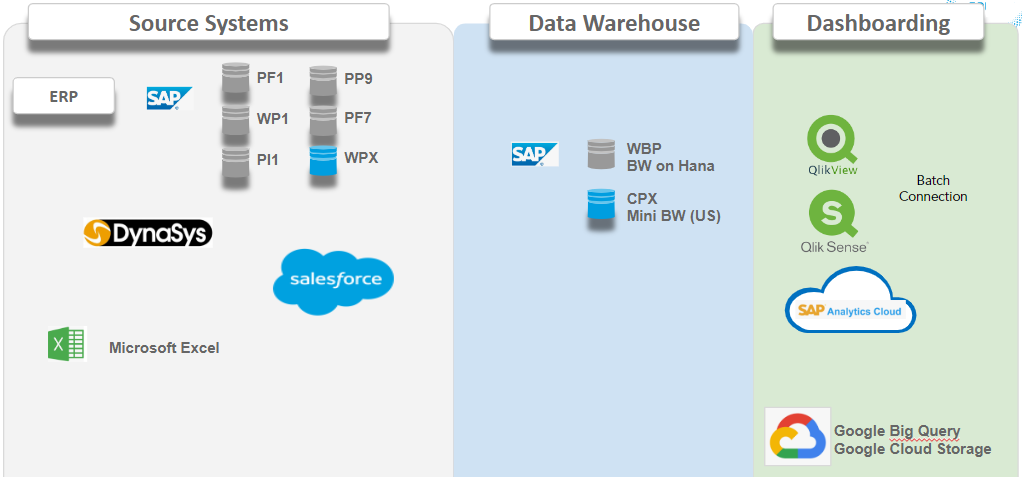
Also BW is the main database to send data to other platforms like Qlik, Salesforce, SAC (Sap Analytic Cloud) GCP (Google Cloud Platform), Tableau by data engineering tool such as Talend or MFT (Manage File Transfer) tool.
BW Reports are organized by Applications (represented as 'Roles" in the
...
...
...
...
Getting BW installed
Requesting Installation
You cannot install SAP Business Intelligence by yourself.
To get BW installed on your PC you need to request it from your local
...
- Choose the service Software Installation Request [Workstation]
- Software Requested: SAPGUI (SAP Logon & SAP Business Client)

...
Checking the Installation
To
...
use BW you need to have the "Analysis for Microsoft Excel" tool installed.
To check the installation :
- Select "START" button
- Open the "SAP Business Intelligence" folder
- Double Click "Analysis for Microsoft Excel"
- Verify that you have the "Analysis" Ribbon in the top bar
| Note |
|---|
...
If you do not |
...
find the " |
...
SAP Business Intelligence" folder, you need to request it from your local Service One and request them to install Analysis for Microsoft Excel. |


...
Getting a BW Account
To get a new BW account (or to modify/delete your
...
existing account)
...
WBP Server (Rhodia Legacy)
- Download the BW Form and fill it based on what you need.
- Send the filled form to the APPLICATIONS HELPDESKby email.
- The Security team will proceed to account validation.
- Once access is validated the account will be created and you will receive by email your new user/password.
...
, the requester fills the BW online form in Service One:
- Choose the service SAP Access Request
- Select the Type of request: creation or modification
- Select the environment: Production (WBP), Pré-Production (WBV), Quality (WBQ)
- Select the SAP system: WBP - BW Business Warehouse
- Select the Business Roles you need
Authorization team will ask for validation from some key contacts. This take several days due to required approvals (Based on the applications and perimeter the
...
L1 AM team will request several approvals).
Note that after your first connexion your password will have to be changed.
PQ1 Server (Solvay Legacy)
For PQ1 BW access there is currently no form. To request an access, please send an email to the APPLICATIONS HELPDESK. Please provide your job description, scope and if possible explain what kind of reports you are interrested in. The support team will determine your access based on your explanations.
Getting Support and Training
Support and training for Business Warehouse can be requested the same way as any other IS tool.
...
Once accesses are validated, L1 AM team will create the account and inform the User by email.

Getting Trained
You can request a training or join an existing training using the YouGrow learning platform,
You can filter on the learning catalog " BW" Business Warehouse to see the list of all trainings available

Password Reset and Unlock Account
For Account unlocking and password resets on WBP or any SAP systems, you can
...
use Self
...
-Service Reactivate User System Specific
- Move system WBPCLNT400 to the RIGHT
- Click Save to reactivate your WBP account

User Guides
The name of the program used to access BW reports is called the Business Explorer (BEX) Analyzer
Currently 2 versions of the Analyzer coexist :
- Version 3.x : Called * nalyzer (SAP BW 3.x)* in your programs.
- Version 7 : Called * nalyzer* in your programs.
At this time, most users are trained and use version 3, but we are starting to rollout version 7 on some applications.
| Analysis (New version) | Bex Analyzer 3.x (Legacy) | Bex Analyzer (Legacy) |
|---|---|---|---|
Program | !Attachment Library^AnalysisProgram.png]]|[[imageAnalyzer3program:png|style="DISPLAY: block; MARGIN-LEFT: auto; MARGIN-RIGHT: auto"! | !Attachment Library^Analyser program:png|! | |
Tool bar | !Attachment Library^]]|[[imageV7Toolbar:png! | ||
Basic User Guide | |||
Query Refresh Quick Guide | |||
Workbook Quick Guide | |||
Advanced User Guide | |||
Converting Workbooks |
| ||
Exercice/Correction |
|
BW Applications
The BW reports are organised into "Applications", which are basically functional groups of reports.
In BW each application is represented by a "Role" - A folder that contains the reports.
As we currently have 2 BW production servers from the legacies, the applications list are different.
On WBP server (Rhodia legacy BW)
Code | Name | Access by | Scope | Description |
|---|---|---|---|---|
AU | Authorisation Follow Up | Rhodia Legacy | RCS Authorisations - GRC | |
CATS | Time Sheet | Personnel Area | Rhodia Legacy | Cross Application Time Sheets reporting from RCS |
COPC | Production Costs | Plant | Rhodia Legacy | Cost estimates, components & Activities, material yeld... |
FC2 | Fixed Costs | Plant | Rhodia Legacy | Enterprise Fixed Costs reporting |
FIAA | Fixed assets accouting | Company | Rhodia Legacy | Reporting on the RCS fixed assets |
FIAP | Account payables | Company | Rhodia Legacy | Vendor accounting : balances, overdues... |
FIAR | Account Receivables | Company | Rhodia Legacy | Customer accounting : balances, overdues, credit... |
ITC | Credit Management | Company | Full Solvay | New credit management reporting (With both legacies, including CICC & Acetow data - with master data based on PRS) |
FIGL | General Ledger | Company | Rhodia Legacy | General ledger reporting : balances |
FISCA | Supplier Credit Automation |
| Rhodia Legacy | Reports for the supplier credit optimisation process |
Company Or GBU | Rhodia Legacy | Working Capital by company or GBU reports | ||
CBS | Function Costs | Function & Company & Family | Full Solvay | Functions/Shared Services fixed costs reporting. Includes Legacy-Rhodia & Legacy-Solvay perimeter. Now includes the PEC (Costs but not CASH OUT/CAPEX). |
Zone (All or AP) | Rhodia Legacy | Purchasing function reporting | ||
GTS | Global Trade Services |
| Rhodia Legacy | Import/Export reporting |
Company | Rhodia Legacy | Inventory and stock movements reports | ||
| Rhodia Legacy | Statistics on RCS usage | ||
OC | Order Changes | Company & Plant | Rhodia Legacy | Sales orders history reporting |
PM | Plant Maintenance | Company | Rhodia Legacy | Maintenance orders, notifications and operations (hours/costs/counting) reporting |
PP | Production Planning | Company | Rhodia Legacy | SOIP Reports - Actual/MRP production, Consumption, Sales & Procurement |
GBU & Family | Rhodia Legacy | PEC, CASH, CAPEX reporting - WBS elements costs | ||
PU | Purchasing For Plants | Company | Rhodia Legacy | Purchasing reporting for non-purchasing function users |
QM | Quality Management | Plant | Rhodia Legacy | QM Lots reporting : individual results and statistics |
TR | Transportation Costs | Company | Rhodia Legacy | Shipment costs analysis reporting |
EHS | Substance Volume Tracking |
| Rhodia Legacy | |
Value Stream | Rhodia Legacy | Industrial Dashboard detail reports by value stream |
In addition to these applications, there are some complements that can be selected in the BW Access form that will give additional rights but without giving a new role :
Name | Description |
|---|---|
PS Complement | Allows to enter the planned PEC and CAPEX directly in the BW report |
FIAP Complement | Account Payables Optimisation |
On PQ1 server (Solvay legacy BW)
All applications scope are Solvay Legacy and do not include Rhodia Legacy data.
Code | Name | Description |
|---|---|---|
FI | Financial Accounting | |
| Credit Management | |
| Overhead Cost Controlling | |
| General Ledger Accounting | |
PCA | Profit Center Accounting | |
| Production Costs (PRG) | |
PCO | Product Cost Controlling | |
COPA | Profitability Analysis | |
AP_WC | Working Capital AP | |
| Gross Margin Analysis | |
P&L | P&L and Consolidation | |
IM | Investment Management | |
FAS | FAS Connect | |
| IAM Applications | |
| Collections Management | |
| Dispute Management | |
| Yearly IT reporting - Costs | |
| BI Statistics | |
LE | Logistics Execution System | |
PUR | Purchasing | |
| Vendor Evaluation | |
| Production Plan & Cont | |
QM | Quality Management | |
| Solvay Stocks | |
INFBR | Incoming Notas Fiscals | |
ONFBR | Outgoing Notas Fiscals | |
| SAPL Costs & LCM | |
| Global | |
| US History | |
| SAPL | |
| Solexis | |
PM | Plant Maintenance | |
PS | Project System | |
| Cross Application Timesheets | |
SALES | Sales & Distribution | |
| Sales Force | |
TP | Transfer Pricing |
BW Data Updating
In BW the data is not updated in real-time The data is copied from the different sources periodically.
+For the WBP server (Rhodia legacy BW) :
- Most data (excluding below exceptions) is loaded * nce a day.* The data updating starts at * 2pm Paris Time and finishes around 6pm Paris Time*.
- Due to closing reporting, some applications are loaded several times a day (up to 6) following the D4 loading schedule.
Example :
If you modify a document in RCS, you will usually need to wait until the next day to see the impact in BW reports (with exception of the D4 loading scheduled applications)
You can now check the loading status of each BW application (WBP only) in live via the |Loading Status >http://issp.priv.rhodia.com/issp/report/loadingStatus.do]* page in the IS Support Portal.*
The page shows a table which is continuously updated with the progress and times of each loading.
Example :
...