

| Status |
| ||||||||
|---|---|---|---|---|---|---|---|---|---|
| Owner | |||||||||
| Stakeholders |
Purpose
The purpose of this document is to define the conversion approach to create 1078 Cost Element Groups (ie., Hierarchies) in S/4 HANA.for Cost Element Groups into S/4 HANA. Cost Element Group is the process used to group together any cost elements for a specific purpose mainly reporting and overheads allocation.
Currently, the cost element groups utilized in the legacy systems with a basic and single dimension sets with similar characteristics are grouped together for reporting and overhead allocation purpose.
In S/4, Cost Element groups will be organized in a tree like structure to group all similar types of cost elements together. Grouping it makes it easier to report and allocate costs in a single source of transaction. These groups will be created under specific controlling area and can be updated or changed when the purpose of their use changes. The new GL account (CoA) design in S/4 will govern the development of Cost Element Groups. As a result, even if the CE Groups are extracted from the legacy systems, they will not be migrated into S/4 instead, the new CE groups will be created in accordance with the MDS and the new group details will be collected through a Data Collection Templates (DCT).
The hierarchy below is for reference and is expected to be created similar CE hierarchy in the target system.
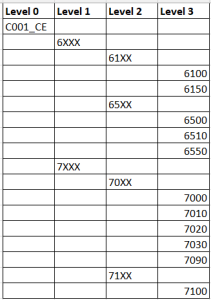
Conversion Scope
The scope of this document covers the approach for converting active from Legacy Source Systems into creating a new Cost Element Groups into S/4HANA following the 1078-Cost element groups Master Data Design Standard. DD-FUN-050 Master Data Standard_1078-Cost element groups. This object's conversion from source to target is an approved DCT document.
The data from legacy system includes: N/A
The data from legacy system excludes: N/A
| Source | Scope | Source Approx No. of Records | Target System | Target Approx No. of Records |
|---|---|---|---|---|
| PF2 | Cost Element Groups | 6338 | S/4HANA | TBA |
| WP2 | Cost Element Groups | 2182 | S/4HANA | TBA |
Additional Information
Multi-language Requirement
Cost Element Groups will primarily be managed in English. However, according to KDD055, this master data standard will be implemented in 4 core languages.
- English (EN)
- French (FR)
- Italian (IT)
- Chinese (ZN)
Note: For other language requirements were not finalized while developing this document, refer to Jira ID # PDM 603.
Document Management
N/A
Legal Requirement
N/A
Special Requirements
N/A
Target Design
The technical design of the target for this conversion approach.
| Table | Field | Data Element | Field Description | Data Type | Length | Requirement R = Required : Mandatory field. S = System: System generates the value O = Optional: Not Mandatory |
|---|---|---|---|---|---|---|
| SETHEADER | SETCLASS | SETCLASS | Set Class | CHAR | 4 | S |
| SETHEADER | SUBCLASS | SETSUBCLS | Organizational Unit as Set Subclass | CHAR | 12 | S |
| SETHEADER | SETNAME | SETNAMENEW | Set Name | CHAR | 24 | R |
| SETHEADERT | LANGU | SPRAS | Language Key | LANG | 1 | O |
| SETHEADERT | DESCRIPT | SETTEXT | Short Description of a Set | CHAR | 40 | R |
| SETNODE | LINEID | SETLINE | Set Line Counter | NUMC | 10 | R |
| SETNODE | SETNAME | SETNAMENEW | Set Name | CHAR | 24 | O |
| SETNODE | SUBSETNAME | SEBSETNAME | Subordinate Set ID | CHAR | 24 | O |
| SETLEAF | SETNAME | SETNAMENEW | Set Name | CHAR | 24 | O |
| SETLEAF | VALFROM | SETVALMIN | From Value | CHAR | 40 | R |
| SETLEAF | VALTO | SETVALMAX | To Value | CHAR | 40 | R |
Data Cleansing
Data Cleansing is not relevant for this object because the entire Chart of Accounts will be afresh designed in S/4HANA
| ID | Criticality | Error Message/Report Description | Rule | Output | Source System |
|---|---|---|---|---|---|
| N/A |
Conversion Process
The high-level process is represented by the diagram below. Although source extraction is planned, no relevancy or extraction rules are implemented. The Data team will collect the new cost element groups using the DCT, and an ETL process will be followed to the Target loads.
The high-level process for DCT is represented by the diagram below:
Data Privacy and Sensitivity
Extraction
Extract data from a source into . There are 2 possibilities:
The data exists. connects to the source and loads the data into . There are 3 methods:N/AExtraction
Perform full data extraction from relevant tables in the source
system(s).The agreed Relevancy systems into Syniti Migrate. There will be no relevancy criteria is applied to the extracted records to identify the records that are , The DCT is applicable for the Target loads.
Extraction Run Sheet
| Req # | Requirement Description | Team Responsible |
|---|---|---|
| 1. | The new cost element groups will be collected using the Data Collection Template (DCT) | Data Team |
Selection Screen
| Selection Ref Screen | Parameter Name | Selection Type | Requirement | Value to be entered/set |
|---|---|---|---|---|
| N/A |
Data Collection Template (DCT)
Target Ready Data Collection Template will be created for data with Cost Element Groups with exception of some fields which require transformation as mentioned in the transformation rule.DCT Rules- 1 for Cost Element Groups with English language
| Field Name | Field Description | Rule |
|---|---|---|
| TKA01-KOKRS | Controlling Area | Defaults to 'XXXX' |
| SETHEADER-SECLASS | Set Class | This field set to be '0102' for Cost Element Group |
| SETHEADER-SUBCLASS | Organizational Unit as Set Subclass | This field is system generated and defaults to 'XXXX' as a Chart of Accounts |
| SETHEADER-SETNAME | Set Name | CO01_CE - Cost Element Group Main Hierarchy ID |
| SETHEADERT-LANGU | Language key | |
| SETHEADERT-DESCRIPT | Short Description of a Set | Description for Cost Element Group Main Hierarchy ID |
| SETNODE-LINEID | Set Line | This refers to the Hierarchy root node. |
| SETNODE-SETNAME | Set Name | This will only updates when there is a subset to the main CE group. If not, this wont be updated in SETNODE. |
| SETNODE-SUBSETNAME | Subordinate Set ID | This refers to the lowest set ID of the main group |
| SETLEAF-SETNAME | Set Name | This refers to the lowest set ID name in the hierarchy |
| SETLEAF-VALFROM | From Value | Cost Elements assignment from a single value or range |
| SETLEAF-VALTO | To Value | Cost Elements assignment to |
DCT - 2 for Cost Element Groups descriptions will be collected on multiple languages (Other than English), hence a separate DCT will be used
| SETHEADER | SETNAME | Set Name | Business to enter content as per data type and length permitted |
| SETHEADERT | LANGU | Language Key | Business to enter content as per data type and length permitted |
| SETHEADERT | DESCRIPT | Description | Business to enter content as per data type and length permitted |
Extraction Dependencies
| Item # | Step Description | Team Responsible |
|---|---|---|
| N/A |
Transformation
The To prepare the data for Target, the Target fields are mapped to the applicable corresponding Legacy field that will be its source, this is a 3-way activity involving the Business, Functional team and Data team. This identifies the transformation activity required to allow to make the data Target ready:(in this case, DCT)
- Perform value mapping and data transformation rules.
- Legacy values are mapped to the to-be values (this could include a default value)
- Values are transformed according to the rules defined in
- Prepare target-ready data in the structure and format that is required for loading via prescribed Load Tool. This step also produces the load data ready for business to perform Pre-load Data Validation
Transformation Run Sheet
| Item # | Step Description | Team Responsible |
|---|---|---|
| 1 | Obtain DCT Sign-off from Business | R2R Data Team |
| 2 | Generate Load Files | R2R Data Team |
| 3 | Monitor the transformation progress and ensure that performance and completion are within the allowed timelines | R2R Data Team |
| 4 | Review and Validate Error and Preload Reports | R2R Data Team |
| 5 | Log defects for any kind of errors and address resolution | R2R Data Team |
| 6 | Re-transform the pre-load files, validate and ready for load (This step is applicable If step 5 is active, else No) | R2R Data Team |
| 7 | Proceed for final loads | R2R Data Team |
Transformation Rules
| Rule # | Source system | Source Table | Source Field | Source Description | Target System | Target Table | Target Field | Target Description | Transformation Logic |
|---|---|---|---|---|---|---|---|---|---|
| 1 | DCT | TKA01 | KOKRS | Controlling Area | SAP S/4HANA | TKA01 | KOKRS | Controlling Area | 1:1 |
| 2 | DCT | SETHEADER | SETCLASS | Set Class | SAP S/4HANA | SETHEADER | SECLASS | Set Class | Constant value: '0102' |
| 3 | DCT | SETHEADER | SUBCLASS | Organizational Unit as Set Subclass | SAP S/4HANA | SETHEADER | SUBCLASS | Organizational Unit as Set Subclass | System generates value in the background |
| 4 | DCT | SETHEADER | SETNAME | Set Name | SAP S/4HANA | SETHEADER | SETNAME | Set Name | Direct mapping from DCT |
| 5 | DCT | SETHEADERT | LANGU | Language Key | SAP S/4HANA | SETHEADERT | LANGU | Language Key | Direct mapping from DCT |
| 6 | DCT | SETHEADERT | DESCRIPT | Short Description of a Set | SAP S/4HANA | SETHEADERT | DESCRIPT | Short Description of a Set | Direct mapping from DCT |
| 7 | DCT | SETNODE | LINEID | Set Line | SAP S/4HANA | SETNODE | LINEID | Set Line | Direct mapping from DCT |
| 8 | DCT | SETNODE | SETNAME | Set Name | SAP S/4HANA | SETNODE | SETNAME | Set Name | Direct mapping from DCT |
| 9 | DCT | SETNODE | SUBSETNAME | Subordinate Set ID | SAP S/4HANA | SETNODE | SUBSETNAME | Subordinate Set ID | Direct mapping from DCT |
| 10 | DCT | SETLEAF | SETNAME | Set Name | SAP S/4HANA | SETLEAF | SETNAME | Set Name | Direct mapping from DCT |
| 11 | DCT | SETLEAF | VALFROM | From Value | SAP S/4HANA | SETLEAF | VALFROM | From Value | Direct mapping from DCT |
| 12 | DCT | SETLEAF | VALTO | To Value | SAP S/4HANA | SETLEAF | VALTO | To Value | Direct mapping from DCT |
Transformation Mapping
| Mapping Table Name | Mapping Table Description |
|---|---|
| N/A |
Transformation Dependencies
List the steps that need to occur before transformation can commence| Item # | Step Description | Team Responsible |
|---|---|---|
| 1 | Ensure DCT completeness | R2R Data Team |
| 2 | Value Mappings are according to the latest design | R2R Data Team |
Pre-Load Validation
Project Team
Completeness
| Task | Action |
|---|---|
| Verify Record Count | R2R Data Team to verify that the total number of relevant records from the DCT is equal to the total number of records in the Preload and Load Sheets. |
Accuracy
| Task | Action |
|---|---|
| Conversion Accuracy | R2R Data Team to ensure that all fields listed below pass the checks:
|
| Review Error Reports | Review and correct the errors. Achieve a zero-error record count as much as possible. Raise defects for data remediated and requiring a correction in the source DCT. |
Business
Completeness
| Task | Action |
|---|---|
| Verify Record Count | Business Data Owner/s to verify that the total number of relevant records from the the DCT is equal to the total number of records in the Preload and Load Sheets. |
Accuracy
| Task | Action |
|---|---|
| Conversion Accuracy | Business Data Owner/s to verify that all the data in the load table/file is accurate as per endorsed transformation / mapping rules (and signed-off DCT data). |
Load
The load process includes:
- Execute the automated data load into target system using load tool or product , for this object, the load file if the load must be done manuallytool will be LSMW with Import method IDOC and Basic Type - COSTELEMENTGROUP_CREATE01.
- Once the data is loaded to the target system, it will be extracted and prepared for Post Load Data Validation
Sample DCT attached is for reference.
| View file | ||||
|---|---|---|---|---|
|
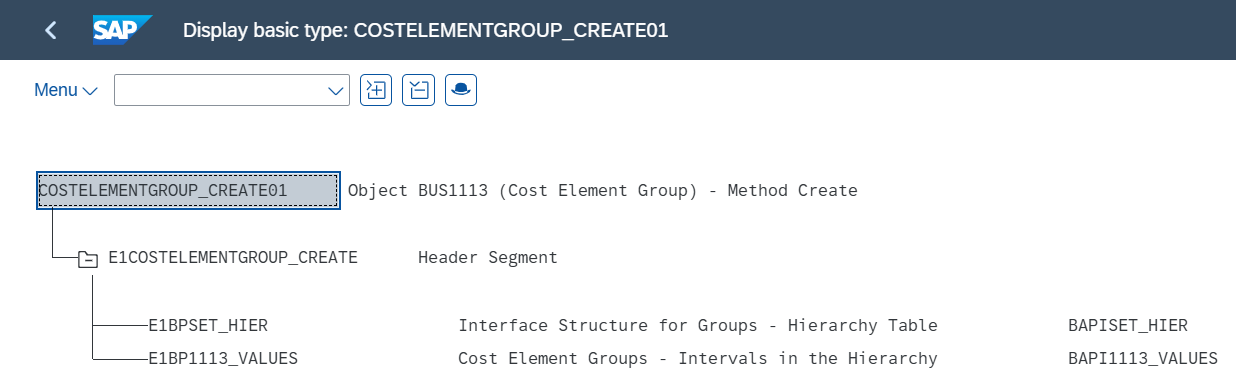
Export-1 will be used to update the group information
| Export-1: E1BPSET_HIER | |||
| GROUPNAME | HIERLEVEL | VALCOUNT | DESCRIPT |
Export-2 will be used to update the values in conjunction with the hierarchies
| Export-2: E1BP1113_VALUES | |
| VALFROM | VALTO |
Export-3 will be used to update the descriptions of the Hierarchy for different languages
<SETHEADER-SETNAME> | <SETHEADER-LANGU> | <SETHEADER-DESCRIPT> |
<SETHEADER-SETNAME> | <SETHEADER-LANGU> | <SETHEADER-DESCRIPT> |
<SETHEADER-SETNAME> | <SETHEADER-LANGU> | <SETHEADER-DESCRIPT> |
Note: actual load format and fields will be finalized during the design.
Load Run Sheet
| Item # | Step Description | Team Responsible |
|---|---|---|
| 1 | Go to <Load tool> | R2R Data Team |
| 2 | Load 1 or 2 records for "Create Cost Element Groups" to validate if data is loaded successfully without errors | R2R Data Team |
| 3 | Proceed with full load if step 2 is successful and validated | R2R Data Team |
| 4 | Validate few records loaded by accessing standard transactions or tables from S/4HNA E.g. KAH3 or FIORI: Manage Cost Element Groups | R2R Data Team |
| 5 | Generate post load report if step 4 is validated | R2R Data Team |
Load Phase and Dependencies
Configuration
| Item # | Configuration Item |
|---|---|
| 1 | Controlling Area |
| 2 | Chart of Accounts |
| 3 | General Ledger Accounts |
Conversion Objects
| Object # | Preceding Object Conversion Approach |
|---|---|
| 1067 | GL Account Operational COA (Incl. Secondary CElist the exact title of the conversion object of only the immediate predecessor – this will then confirm the DDD (Data Dependency Diagram) |
Error Handling
| Error Type | Error Description | Action Taken |
|---|---|---|
| Configuration | Data update is unsuccessful (ex. Invalid Cost Element), system provides opportunity to review the incorrectly populated data and these need to be analysed and corrected | Consult Functional team to expedite and fix the error in the system |
Post-Load Validation
Project Team
Completeness
| Task | Action |
|---|---|
Verify Count | R2R Data Team to verify the record count created in target S/4 HANA by accessing post load reports using standard reports from S/4 HANA. |
Verify Logs | Check if there is data that failed to load and perform the necessary actions (e.g. register as post load issue or attempt to load the record again, etc.). |
Accuracy
| Task | Action |
|---|---|
| Conversion Accuracy | Verify that the Cost Element Groups in target S/4 HANA are loaded correctly via load program and validate post load reports using standard t.code KAH3 or database tables SETHEADER, SETHEADERT, SETNODE and SETLEAF from S/4 HANA. |
Business
Completeness
| Task | Action |
|---|---|
Verify Count | Download Post Load Reports from load program and verify that the record count loaded in the target S/4 HANA is the same count as of the approved load file. |
Accuracy
| Task | Action |
|---|---|
| Conversion Accuracy | Verify that the Cost Element Groups in target S/4 HANA are loaded correctly via load program and validate post load reports using standard t.code KAH3 or database tables SETHEADER, SETHEADERT, SETNODE and SETLEAF from S/4 HANA. |
Key Assumptions
- Master Data Standard is up to date as on the date of documenting this conversion approach and data load.
- Data values in DCT are target ready data unless a specific transformation rule is in scope based on data design and any exception requested by business.stated for that field in the transformation rules
- Basic required configuration to be completed prior to this conversation
- LSMW load program will be processed in foreground
- LSMW load method will be finalized during the design phase
See also
Change log
| Change History | ||
|---|---|---|
|