

| Status |
| |
| Owner | ||
| Stakeholders |
Purpose
This document outlines the SyWay Program approach to data migration and readiness to move to new business processes as part of Release 2. It establishes an operational framework to ensure data is clean, reliable, structured and available at go-live.
The objectives are:
- To establish a forward-looking data strategy in Release 2 that minimizes the volume of data migration required during Release 4, thereby reducing risk, effort, and rework in later phases of the program.
To identify and define the data objects and migration requirements from ECC and other third-party systems to Ariba, Keelvar, and Icertis as part of Release 2
Background
This document outlines the data migration and cleansing approach for Release 2, which focuses on the implementation of the Source to Contract (S2C) process as part of the broader program roadmap. Release 2 is an intermediate deployment that introduces standardised procurement processes and integrates with existing ECC systems and third-party applications such as Convergence.
The primary objective of this release is to establish foundational S2C capabilities that can be reused and scaled during subsequent releases, particularly Release 4 (R4), which will involve a broader S/4HANA transformation. As such, the data migration strategy for Release 2 is designed with reusability and future scalability in mind.
Due to the continued reliance on legacy ECC systems in this phase, there are limitations in the extent of data cleansing that can be performed. Existing data in ECC will be migrated largely in its current state, with only targeted validations and enrichment applied where feasible. Cleansing activities will be focused on data sets required for the new S2C processes and integrations, ensuring functional readiness without major disruption to upstream or downstream systems.
Data Scope
The scope encompasses all master data, open transactional data and historical records required to ensure business continuity, legal compliance and readiness for Release 2. Data will be migrated from multiple SAP ECC source systems and legacy third-party applications into a Standardized SyWay environment.
Data Sources
Data will be extract data from a range of legacy systems that currently support Syensqo’s global operations. These sources span SAP and non-SAP applications and include structured and semi-structured data repositories.
Primary Data Sources include:
SAP ECC systems – multiple instances
Convergence
Contract repositories (other than convergence) / Local drives
Data Migration Process
For Release 2, the data migration process supports the enablement of Source to Contract (S2C) functionality within SAP Ariba, with downstream integration to Icertis, which acts as a slave system consuming master data from Ariba. Unlike traditional ERP implementations, most relevant data for S2C is treated as configuration within Ariba, requiring a data-driven approach to setup rather than transactional migration.
The data team’s primary responsibility is to populate Data tables / Ariba upload templates, which define the system’s configuration and reference data. These templates serve as the foundation for both Ariba and Icertis, as Icertis relies on Ariba to provide key master data objects such as suppliers, categories, and organizational structures.
The process follows these key steps:
| Step | ActivityActivity | Owned By | |
|---|---|---|---|
| Template Finalisation | Standard Ariba/Icertis templates for key data objects (e.g., suppliers, commodity codes, sourcing templates, approval flows) | Functional Team | |
| Data Collection | Source data is gathered from existing ECC systems, third-party applications (e.g., Convergence) etc. | Data Team / Contract Migration team | |
| Template Population | Source data is provided to the function team for populating the templates | Functional Team / Data team / Contract Migration team | |
| Validation and Review | Validation of the values with | BusinessBusiness | Functional team |
| Upload Templates | Validated templates are uploaded into Ariba/ICertis using its import tools | Functional Team |
Data Objects in Scope
Following are the data objects that are in scope for Release 2
| Data Object | Category | How is it loaded in Ariba | How is it loaded in Icertis | How is it loaded in Keelvar |
|---|---|---|---|---|
| Company Code | Enterprise Structure | Interface |
Manually Upload | N/A | |
| Purchasing Organization | Enterprise Structure | Interface |
Manually Upload | N/A | |
| Purchasing Groups | Enterprise Structure | Interface |
N/A | N/A |
| Plant | Enterprise Structure | Interface |
N/A | N/A |
Suppliers | Master Data | Interface from ECC |
Replication from Ariba | Replication from Ariba | |
| Bidders | Master Data |
| Manually created in Ariba | Replication from Ariba | Replication from Ariba | |
| Materials | Master Data | Not Required | N/A |
| N/A | ||||
| Material Groups | Master Data | Interface (L3 - used in Line Item Level) | Manually Upload (L3 - used in Line Item Level) | N/A |
| Commodity Codes | Master Data | Manually Upload (L1/L2/L3 - used in Header Field) | Manually Upload (L1/L2/L3 - used in Header Field) | Manually Upload (L3 - used in Header Field) |
UOM | Master Data | Upload |
N/A | N/A | |
Payment Terms | Master Data | Interface |
Manually Upload | N/A |
| Incoterms | Master Data | Interface |
Manually Upload | N/A | |
| Currency | Master Data | Standard. Manually Upload |
Manually Upload | N/A | |
| Item Categories | Master Data | Interface |
N/A | N/A | |
| Users (Including Jobs, Roles and org structure)* | Master Data | Interface from IAG |
| Interface from |
| IAG | Replication from Ariba | |||
| Legal Contracts | Transactional Data | N/A | Upload (for Legal Migration) | N/A |
| Exchange Rates | Transactional Data | Interface | Interface |
| N/A |
*User interfaced from IAG. Roles configured in Ariba and Icertis
Data approach for R2 and R4
The data strategy for the Source to Contract (S2C) implementation spans across Release 2 and Release 4, with a clear distinction in how data is handled across both Ariba and Icertis.
Release 2 Data Approach
In Release 2, the focus is on enabling Ariba Guided Sourcing / Contracts using a targeted data set derived from existing ECC and third-party systems. This data is used to configure Ariba / Icertis via interfaces / upload templates and to support sourcing and contracting processes. Key characteristics of the Release 2 approach include:
| Ariba | Icertis | Keelvar | ||
|---|---|---|---|---|
|
| master
|
| It doesn't store any master data
|
Release 4 Data Approach
The Source to Contract (S2C) data strategy spans multiple releases, transitioning from a manually managed data load in Release 2 to a fully integrated and governed master data model in Release 4. The approach differs by system, depending on its role in the S2C landscape.
This section outlines the data approach for Ariba, Icertis, and Keelvar across both releases.
| Ariba | Icertis | Keelvar | |
|---|---|---|---|
|
|
| and does not persist any master data
|
Following is the table of all the data objects and the approach in Release 2 and Release 4.
| Data Object | Change in R4 | R2 | R4 | Pre-requisite |
|---|---|---|---|---|
| Company Code | Numbering Scope | Existing company codes are replicated to Ariba and Icertis | Ariba: The R2 company codes are inactivated, and the new company codes are made active Icertis: The R2 company codes are replaced with R4 company codes | Mapping between R2 and R4 codes |
| Purchasing Organization | Numbering | Existing Purchasing Org codes are replicated to Ariba and Icertis | Ariba: The R2 POrgs are inactivated, and the new codes are made active Icertis: The R2 POrgs are replaced with R4 codes | Mapping between R2 and R4 codes |
| Purchasing Groups | Numbering Scope | Existing Purchasing |
| Groups codes are replicated to Ariba and Icertis | Ariba: The R2 Pgroup are inactivated, and the new codes are made active Icertis: |
Pgroup are |
implemented using R4 codes | Mapping between R2 and R4 codes | |
| Plant | Numbering Scope | Existing plants are replicated to Ariba |
Ariba: The R2 plants are inactivated, and the new codes are made active |
| Mapping between R2 and R4 codes | ||
Suppliers | Numbering Scope | Existing suppliers are replicated to Ariba, Icertis and |
| Keelvar | Ariba and Keelvar: The R2 suppliers are inactivated, and the new codes are made active Icertis: The R2 suppliers are replaced with R4 codes | Mapping between R2 and R4 codes |
| Bidders | Numbering Scope |
Bidders are created in Ariba and replicated to |
Icertis and |
Keelvar | Ariba and Keelvar: The R2 bidders are inactivated, and the new codes are made active Icertis: The R2 bidders are replaced with R4 codes | Mapping between R2 and R4 codes | ||
| Materials | Numbering Scope | Not applicable | Ariba: The R4 codes are made active. Icertis: The R4 codes are made active. | Mapping between R2 and R4 codes |
| Material Groups | Numbering Scope | Existing |
material groups are |
integrated to Ariba and manually loaded in Icertis | Ariba: The R2 |
material groups are inactivated, and the new codes are made active Icertis: The R2 |
material groups are replaced with R4 codes | Mapping between R2 and R4 codes |
| Commodity Codes | Numbering Scope | Existing |
commodity codes are |
manually loaded in Ariba (L1,2,3), Icertis (L1/L2/L3) and Keelvar (L3) | Ariba and Keelvar |
: The R2 |
commodity codes are inactivated, and the new codes are made active Icertis: The R2 |
commodity codes are replaced with R4 codes | Mapping between R2 and R4 codes | |
UOM | Scope | Existing UOM are |
manually loaded in Ariba | Ariba: The delta UOM for R2 are inactivated, and the new codes are made active |
Icertis: The R2 UOM are replaced with R4 codes
Mapping between R2 and R4 codes | ||||
Payment Terms | Scope | Old Payment terms used on contracts are loaded and marked as inactive New Payment terms loaded | No Action required | N/A |
| Incoterms | Scope | Existing incoterms are replicated to Ariba and Icertis | Ariba: The delta incoterms are inactivated, and the new codes are made active Icertis: The R2 incoterm codes are replaced with R4 codes | N/A |
| Currency | None | Existing currencies are |
| loaded in Ariba (Standard) and Icertis (Upload) | No Action required | N/A |
| Item Categories | None | Existing Item Categories are |
| integrated to Ariba | Based on lean services outcome, Lean Services needs to be added in the item categories | N/A |
| Users (Including Jobs, Roles and org structure) | Numbering Scope |
| Users provisioned based on mapping of R2 role to person, broadly aligned to current jobs and roles. | Users with their new Jobs and Roles are replicated | N/A | ||
| Legal Contracts MetaData | None | Meta Data determined in Release 2 is loaded | No Action Required | N/A |
| Legal Contract Templates (Clauses) | None | Legal contracts and clauses are loaded | No Action Required | N/A |
| Legal Contracts | None | Legal contracts and clauses are loaded | No Action Required | N/A |
| Exchange Rates | None | Exchange Rates from ECC are loaded daily | No Action Required | N/A |
Legal Contract Migration Approach
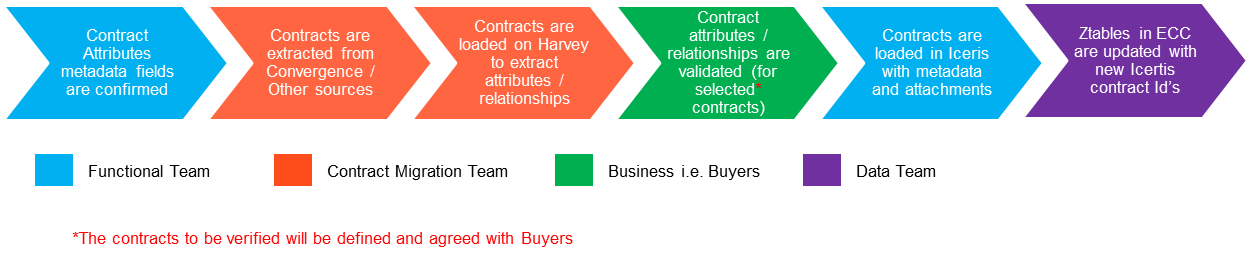
Following is the approach followed for the legal contract migration:Step 1:
- Contract attributes are defined by the functional team
- Contracts and existing attributes are extracted from Convergence and other data sources by contract migration team
- Contracts are loaded on to Harvey to extract the contract metadata and relationships
- The contract metadata and relationships are validated - This step is performed only on selected critical contracts which are agreed with Business upfront
- The validated contracts are loaded into Icertis along with the metadata and attachment
- Any relevant Z-tables are updated with Icertis contract
- ID - They contain convergence
- ID previously
Change log
| Change History | ||
|---|---|---|
|