

| Status | In Progress
| |
|---|---|---|
| Owner | ||
| Stakeholders |
Purpose
</Start CR359 - Global Hierarchy Definition>
The purpose of this document is to define the approach for the maintenance of master data supporting the Project scoring methodology. This master data comprises fixed parameters used in the scoring calculations.
Project scoring uses structured scoring models to evaluate and prioritize projects based on predefined criteria like strategic alignment, risk.
data 'Investment Classification' Global Hierarchy which defines classification criteria for a Portfolio Item.
Conversion Scope
The scope of this document covers the approach applicable to Investment Classification Global Hierarchy
Conversion Scope
The scope of this document covers the approach applicable to all Project Scoring parameters and drop-down lists supporting PPM bucket/item custom fields which are created in S/4 HANA following the Project Scoring and Other dropdowns Master Data Design Standard.
The drop-down lists define the allowable values to be entered in the relevant custom fields on a PPM Item or Bucket. The scoring master data controls the parameters input to the scoring calculations (performed on PPM Items in SAC). These parameters are centrally maintained.
This is a completely new object for Syensqo with the data being sourced using This is a completely new object for Syensqo with the data being sourced using DCT (Data Collection Template).
List of source systems and approximate number of records
| Source | Scope | Source Approx No. of Records | Target System | Target Approx No. of Records |
|---|---|---|---|---|
| DCT | All Records | S/4HANA | TBD |
For Mock-1 conversions, data will be loaded directly into S/4HANA ROW and China instances.
Note: The Master Data Management (MDM) process is not built yet; the approach for loading and reconciling PPM master data in MDM will be covered as part of the MDM design and is not covered in this Conversion SpecificationMigration load to be done to ROW instance with replication to other S/4 Hana instances (China and CUI) done by batch job as per business process. To be included in cut-over strategy document.
Additional Information
Multi-language Requirement
Portfolio scoring attributes will be maintained Maintained in English Language only.
Document Management
Not applicable
Legal Requirement
Not applicable
Special Requirements
Not applicable
Target Design
The technical design of the target for this conversion approach.
| Table | Field | Data Element | Field Description | Data Type | Length | Requirement |
|---|
Data Cleansing
Data cleansing not applicable, as data object Project Scoring and Other dropdowns will be collected specifically for data migration.
Collection will be done manually in the Data Collection Template.
Conversion Process
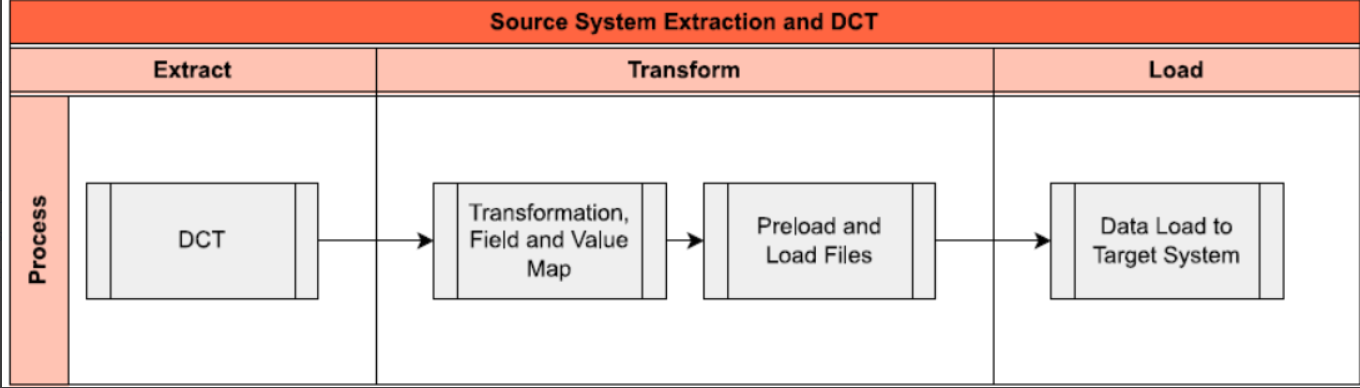
The high-level process is represented by the diagram below:
Data Privacy and Sensitivity
Not applicableExtraction
Extract data from a source into Syniti Migrate.
The data does not exist (or cannot be converted from its current state). The data is manually collected by the business directly in Syniti Migrate. This is to be conducted using DCT (Data Collection Template) in Syniti Migrate
The agreed Relevancy criteria is applied to the extracted records to identify the records that are applicable for the Target loads
Extraction Run Sheet
Raise issues as defects if Req # 1 to 2 are not met
Repeat Req # 1 to 3 if required
Selection Screen
Not ApplicableData Collection Template (DCT)
Target Ready Data Collection Template will be created for Project Scoring and Other dropdowns data with exception of some fields which require transformation as mentioned in the transformation rule.Project Scoring and Other dropdowns DCT Rules.
Unique code (Numeric) assigned to table entry,
It is a Required Field: Preload Check to be done to confirm that this field is filled the Data Collection Template
Investment Category - a reporting attribute assigned to PPM Items; defines the driver for the project as either 'Growth' or 'Sustenance'.
It is a Required Field: Preload Check to be done to confirm that this field is filled in the Data Collection Template
Unique code (Numeric) assigned to table entry.
It is a Required Field: Preload Check to be done to confirm that this field is filled in the Data Collection Template
Free text field.
Investment Reason - a reporting attribute assigned to PPM Items; defines the detailed investment/ expense reason.
It is a Required Field: Preload Check to be done to confirm that this field is filled in the Data Collection Template
Unique code assigned to table entry
It is a Required Field: Preload Check to be done to confirm that this field is filled in the Data Collection Template.
Code assigned to Sub-Category;
Note: this is a configuration table.
Code assigned to Investment Reason
It is a Required Field: Preload Check to be done to confirm that this field is filled in the Data Collection Template.
Code assigned to Investment Category
Active Flag - if set, the record does not appear in the drop-down list for the field
Unique code assigned to table entry
It is a Required Field: Preload Check to be done to confirm that this field is filled in the Data Collection Template.
Classification of the industrial end users based upon type of industry e.g. aerospace, automotive etc.
Free text field.
It is a Required Field: Preload Check to be done to confirm that this field is filled in the Data Collection Template.
Active Flag - if set, the record does not appear in the drop-down list for the field
Initially blank. Set to Inactive when record is no longer valid for selection on a PPM Item.
Defines the key market influencing the project.
Free text field.
It is a Required Field: Preload Check to be done to confirm that this field is filled in the Data Collection Template.
Active Flag - if set, the record does not appear in the drop-down list for the field
Initially blank. Set to Inactive when record is no longer valid for selection on a PPM Item.
Unique (Numeric) code assigned to table entry
It is a Required Field: Preload Check to be done to confirm that this field is filled in the Data Collection Template.
Enables the grouping of Items for budget allocation and financial tracking
Free text field.
It is a Required Field: Preload Check to be done to confirm that this field is filled in the Data Collection Template.
Unique code (Numeric) assigned to table entry
It is a Required Field: Preload Check to be done to confirm that this field is filled in the Data Collection Template.
Classification of R&I projects for reporting
Free text field.
It is a Required Field: Preload Check to be done to confirm that this field is filled in the Data Collection Template.
Unique (Numeric) code assigned to table entry; manually selected or value returned from Questionnaire
It is a Required Field: Preload Check to be done to confirm that this field is filled in the Data Collection Template.
Defines whether the project is relevant for Export Control; 0 (No), 1-9 (Yes)
It is a Required Field: Preload Check to be done to confirm that this field is filled in the Data Collection Template.
Active Flag - if set, the record does not appear in the drop-down list for the field
Note: Set to Inactive when record is no longer valid for selection on a PPM Item.
Unique code assigned to table entry; value returned from Questionnaire
Must be a number, 0-9, allowing for all possible results returned from the Questionnaire.
Defines whether the project is relevant for Export Taxonomy; 0 (No), 1-9 (Yes)
It is a Required Field: Preload Check to be done to confirm that this field is filled in the Data Collection Template.
Active Flag - if set, the record does not appear in the drop-down list for the field
Note: Set to Inactive when record is no longer valid for selection on a PPM Item.
Unique (numeric) code assigned to table entry
Justification for a Must Do classification of the Item.
Free text field.
It is a Required Field: Preload Check to be done to confirm that this field is filled in the Data Collection Template.
Active Flag - if set, the record does not appear in the drop-down list for the field
Note: Set to Inactive when record is no longer valid for selection on a PPM Item.
Description of Risk Magnitude
Free text field.
It is a Required Field: Preload Check to be done to confirm that this field is filled in the Data Collection Template.
Active Flag - if set, the record does not appear in the drop-down list for the field
Note: Set to Inactive when record is no longer valid for selection on a PPM Item.
Description of Risk Likelihood
Free text field.
It is a Required Field: Preload Check to be done to confirm that this field is filled in the Data Collection Template.
Numeric Value assigned to the Risk Likelihood.
Multiplied by the Risk Magnitude to give the Risk Rating. Input to Project Scoring calculation.
It is a Required Field: Preload Check to be done to confirm that this field is filled in the Data Collection Template.
Active Flag - if set, the record does not appear in the drop-down list for the field
Note: Set to Inactive when record is no longer valid for selection on a PPM Item.
Unique number assigned to the table entry. conventionally 1-5.
It is a Required Field: Preload Check to be done to confirm that this field is filled in the Data Collection Template.
Description
Description of Regulatory Risk Likelihood
Free text field.
It is a Required Field: Preload Check to be done to confirm that this field is filled in the Data Collection Template.
Value assigned to the Regulatory Risk Magnitude. Multiplied by the Regulatory Risk Likelihood to give the Regulatory Risk Rating. Input to Project Scoring calculation.
It is a Required Field: Preload Check to be done to confirm that this field is filled in the Data Collection Template.
Active Flag - if set, the record does not appear in the drop-down list for the field
Note: Set to Inactive when record is no longer valid for selection on a PPM Item.
Unique number assigned to the table entry. conventionally 1-5.
It is a Required Field: Preload Check to be done to confirm that this field is filled in the Data Collection Template.
Description
Description of Regulatory Risk Likelihood
Free text field.
It is a Required Field: Preload Check to be done to confirm that this field is filled in the Data Collection Template.
Numeric Value assigned to the Regulatory Risk Likelihood . Multiplied by the Regulatory Risk Magnitude to give the Regulatory Risk Rating. Input to Project Scoring calculation.
It is a Required Field: Preload Check to be done to confirm that this field is filled in the Data Collection Template.
Active Flag - if set, the record does not appear in the drop-down list for the field
Note: Set to Inactive when record is no longer valid for selection on a PPM Item.
Unique number (1-99) assigned to table entry
It is a Required Field: Preload Check to be done to confirm that this field is filled in the Data Collection Template.
Description
Description of Regulatory Risk Time Horizon
Free text. eg. '> 1 Year', '1-5 Years', '> 5 Years'
It is a Required Field: Preload Check to be done to confirm that this field is filled in the Data Collection Template.
Factor
Factor assigned to the Regulatory Risk Time Horizon . Multiplied by the Regulatory Risk Rating to factor in the time horizon for which the Regulatory Risk applies. Input to Project Scoring calculation.
It is a Required Field: Preload Check to be done to confirm that this field is filled in the Data Collection Template.
Active Flag - if set, the record does not appear in the drop-down list for the field
Note: Set to Inactive when record is no longer valid for selection on a PPM Item.
Global Business Unit to which the weighting applies.
Must be name of leaf Profit Centre Hierarchy Node
It is a Required Field: Preload Check to be done to confirm that this field is filled in the Data Collection Template.
Category to which the weighting applies
Must be a valid entry in RPM_PROJ_CAT table
It is a Required Field: Preload Check to be done to confirm that this field is filled in the Data Collection Template.
Market Driver to which the weighting applies
Must be a valid entry in /SYQ/T_MKT_DRVR table
It is a Required Field: Preload Check to be done to confirm that this field is filled in the Data Collection Template.
The scoring methodology to which the weighting applies
Must be 'Financial', 'Risk' or 'Regulatory'
It is a Required Field: Preload Check to be done to confirm that this field is filled in the Data Collection Template.
The Weighting Factor to be applied for the combination of GBU, Scoring Methodology and Category
Numeric field
Unique number assigned to table entry
It is a Required Field: Preload Check to be done to confirm that this field is filled in the Data Collection Template.
Function Name assigned to a L3 Bucket; used for reporting and validations
Free text field eg. 'Industrial', 'R&I', 'IT'
It is a Required Field: Preload Check to be done to confirm that this field is filled in the Data Collection Template.
Active Flag - if set, the record does not appear in the drop-down list for the field
Note: Set to Inactive when record is no longer valid for selection on a PPM Item.
Extraction Dependencies
No Dependencies for Extract
Transformation
The Target fields are mapped to the applicable Legacy field that will be its source, this is a 3-way activity involving the Business, Functional team and Data team. This identifies the transformation activity required to allow to make the data Target ready:
- Perform value mapping and data transformation rules.
- Legacy values are mapped to the to-be values (this could include a default value)
- Values are transformed according to the rules defined in
- Prepare target-ready data in the structure and format that is required for loading via prescribed Load Tool. This step also produces the load data ready for business to perform Pre-load Data Validation
Transformation Run Sheet
1
Obtain DCT Sign-off from Business
Data Team
2
Execute and Load and perform Transformation
Data Team
3
Monitor the transformation progress and ensure performance and completion is within allowed timeframe
Data team
4
Review and Validate Error and Preload Reports
Data Team
5
Generate data load count.
Data team
6
Generate Load Files
Data Team
7
Transformation Rules
Transformation Mapping
Transformation Dependencies
List the steps that need to occur before transformation can commenceEnsure all the fields that require value mapping, as stipulated. Mapping tables, have the correct values mapped and imported into tool.
Data Team
Pre-Load Validation
Project Team
Completeness
Verify Record Count
SyWay I2M Data Team to verify that the total number of relevant records from the DCT is equal to the total number of records in the Preload and Load Sheets.
Accuracy
Conversion Accuracy
SyWay I2M Data Team to verify that all fields below meet pass the checks:
- Mandatory Fields
- Field and Value Mapping Correctness
- Null Checks
- Text Length Checks
Review Error Reports
Review and correct the errors. Achieve a zero-error record count as much as possible. Raise defects for data remediated and requiring a correction in the source (DCT) data.
| UHDT_VRSN | VER_ID | VRSID | Version ID (Hierarchy) | CHAR | 40 | System Generated |
| UHDT_VRSN | VER_STATUS | VRSST | Version Status | CHAR | 1 | Mandatory |
| UHDT_VRSN | HIER_HID | VHRID | Hierarchy ID | CHAR | 20 | Mandatory |
| UHDT_VRSN | HIER_CATG | CAKEY | Hierarchy Subtype | CHAR | 4 | Mandatory |
| UHDT_VRSN | UPDATED_AT | VRSUT | Version Updated Time | DEC | 15 | System Generated |
| UHDT_VRSN | UPDATED_BY | VRSUB | Version Updated By | CHAR | 12 | System Generated |
| UHDT_VRSN | CREATED_AT | VRSCT | Version Creation Time | DEC | 15 | System Generated |
| UHDT_VRSN | CREATED_BY | VRSCB | Version Created By | CHAR | 12 | System Generated |
| UHDT_VRSN | LOCKED_BY | UNAME | User Name | CHAR | 12 | System Generated |
| UHDT_VRSN | LOCKED_AT | VRSLT | Version locked at | DEC | 15 | System Generated |
| UHDT_VRSN | MAINTENANCE_LANG | LANGU | Language Key | LANG | 1 | System Generated |
| UHDT_NODE | NODE_ID | NODID | Node ID | CHAR | 40 | System Generated |
| UHDT_NODE | VER_ID | VRSID | Version ID | CHAR | 40 | System Generated |
| UHDT_NODE | NODE_PID | NPNID | Node Parent ID | CHAR | 40 | Mandatory |
| UHDT_NODE | NODE_TYPE | NODTP | Node Type | CHAR | 1 | Mandatory |
| UHDT_NODE | NODE_ENTITY | BNNAM | Business Entity Name | CHAR | 30 | System Generated |
| UHDT_NODE | NODE_LEVEL | NLEVL | Node Level | NUMC | 6 | System Generated |
| UHDT_NODE | NODE_LVAL | NLVAL | Node Low Value | CHAR | 40 | Mandatory |
| UHDT_NODE | CREATED_AT | NODCT | Node Creation Time | CHAR | 14 | System Generated |
| UHDT_NODE | CREATED_BY | NODCB | Node Created By | CHAR | 12 | System Generated |
| UHDT_NODE | UPDATED_AT | NODUT | Node Updated Time | CHAR | 14 | System Generated |
| UHDT_NODE | UPDATED_BY | NODUB | Node Updated By | CHAR | 12 | System Generated |
| UHDT_NTXT | NODE_ID | NODID | Node ID (for Text) | CHAR | 40 | System Generated |
| UHDT_NTXT | LANG | LANGU | Language Key (Node Text) | LANG | 1 | System Generated |
| UHDT_NTXT | LVAL_TXT | NLTXT | Node Low Text | CHAR | 128 | Mandatory |
| UHDT_NTXT | VER_ID | VRSID | Version ID (Hierarchy for Node Text) | CHAR | 40 | System Generated |
| UHDT_NATTRVALS | NODE_ID | NODID | Node ID (for Attribute) | CHAR | 40 | System Generated |
| UHDT_NATTRVALS | ATTR_NAME | NATNM | Attribute Name | CHAR | 30 | System Generated |
| UHDT_NATTRVALS | ATTR_LVAL | ALVAL | Attribute Low Value | CHAR | 40 | Mandatory |
| UHDT_NATTRVALS | VER_ID | VRSID | Version ID (Hierarchy for Node Attribute) | CHAR | 40 | System Generated |
Data Cleansing
Data cleansing not applicable, as data object Project Scoring and Other dropdowns - Investment Classification' Global Hierarchy will be collected specifically for data migration.
Collection will be done manually in the Data Collection Template.
| ID | Criticality | Error Message/Report Description | Rule | Output | Source System |
|---|---|---|---|---|---|
| Not applicable |
Conversion Process
The high-level process is represented by the diagram below:
Data Privacy and Sensitivity
Not applicableExtraction
The data does not exist (or cannot be converted from its current state). The data is manually collected by the business directly in Syniti Migrate. This is to be conducted using DCT (Data Collection Template) in Syniti Migrate
The agreed Relevancy criteria is applied to the extracted records to identify the records that are applicable for the Target loads
Extraction Run Sheet
| Req # | Requirement Description | Team Responsible |
|---|---|---|
| 1 | Ensure DCT is collected | Data Team |
| 2 | Perform preliminary completeness check, data quality check. | Data Team |
| 3 | Raise issues as defects if Req # 1 to 2 are not met | Data Team |
| 4 | Repeat Req # 1 to 3 if required | Data Team |
Selection Screen
Not Applicable| Selection Ref Screen | Parameter Name | Selection Type | Requirement | Value to be entered/set |
|---|---|---|---|---|
| Not Applicable |
Data Collection Template (DCT)
Target Ready Data Collection Template will be created for Project Scoring and Other dropdowns - Investment Classification' Global Hierarchy data with exception of some fields which require transformation as mentioned in the transformation rule.DCT Rules.
| Field Name | Field Description | Rule | ||||||||||||||||
|---|---|---|---|---|---|---|---|---|---|---|---|---|---|---|---|---|---|---|
| HIER_HID | Hierarchy ID | ID of the Hierarchy/Root node Must be 'SY_INV' for Syensqo's Investment Classification Hierarchy Display field in DCT | ||||||||||||||||
| HIER_CATG | Hierarchy Subtype | Hierarchy Type configured with controls and settings for the Hierarchy Must be 'ZINV' for Syensqo's Investment Classification Hierarchy Display field in DCT | ||||||||||||||||
| NODE_TYPE | Node Type | Code identifying the type of Node. For the Syensqo Investment Classification hierarchy these are: Tooltips Dropdown to have both code and description | ||||||||||||||||
| NODE_LVAL | Node Low Value | External ID of the Node, manually assigned. Tool Tip: If Node level 1 It is a Required Field: Preload Check to be done to confirm that this field is filled in the Data Collection Template | ||||||||||||||||
| LVAL_TXT | Node Low Text | Name of the Node: Tooltip: - Root node = 'Syensqo Investment Classification' It is a Required Field: Preload Check to be done to confirm that this field is filled in the Data Collection Template | ||||||||||||||||
| NODE_PID | Node Parent ID | Reference to the Node ID of the Parent Node. This is the node selected under which a new node is created. Maintain manually It is a Required Field: Preload Check to be done to confirm that this field is filled in the Data Collection Template | ||||||||||||||||
| ATTR_LVAL | Attribute Low Value | Value of the Node Attribute, selected from the allowed list of values defined in configuration. -ZCLASS (Classification) dropdown as 'Investment Category', 'Main Business Driver', 'Sub Business Driver' or 'Investment Reason - ZSCORE must be a valid entry on the Scoring Methodology master data table /SYQ/T_SCORING_METH.
Dropdown to have both code and description. -ZFUNC must be a valid entries (multiple entries are allowed) on the Functions master data table /SYQ/T_FUNCTION
Dropdown to have both code and description It is a Required Field: Preload Check to be done to confirm that this field is filled in the Data Collection Template |
Extraction Dependencies
No Dependencies for Extract
| Item # | Step Description | Team Responsible |
|---|---|---|
| Not applicable |
Transformation
No transformation mapping required.
Prepare target-ready data in the structure and format that is required for loading via prescribed Load Tool. This step also produces the load data ready for business to perform Pre-load Data Validation
Transformation Run Sheet
| Item # | Step Description | Team Responsible |
|---|---|---|
1 | Obtain DCT Sign-off from Business | Data Team |
2 | Execute and Load and perform Transformation | Data Team |
3 | Monitor the transformation progress and ensure performance and completion is within allowed timeframe | Data team |
4 | Review and Validate Error and Preload Reports | Data Team |
5 | Generate data load count. | Data team |
6 | Generate Load Files | Data Team |
7 | Log errors as defects, if any and address resolutions. Close defects. | Data team |
| 8 | Re-transform and re-validate the Pre-load reports if necessary. | Data team |
| 9 | Validate the transformed file as part of pre-load validation, raise data defects or provide the pre-load sign-off. | Business |
| 10 | Analyze and resolve any pre-load defects logged by business. | Data team |
| 11 | Repeat steps 7 to 10 if necessary | Data team |
| 12 | Proceed to pre-load validations | Data team |
Transformation Rules
| Rule # | Source system | Source Table | Source Field | Source Description | Target System | Target Table | Target Field | Target Description | Transformation Logic | ||||||||||||||||
|---|---|---|---|---|---|---|---|---|---|---|---|---|---|---|---|---|---|---|---|---|---|---|---|---|---|
| 1 | S/4 Hana | UHDT_VRSN | UHDT_VRSN | Version ID (Hierarchy) | System Generated | ||||||||||||||||||||
| 2 | S/4 Hana | UHDT_VRSN | VER_STATUS | Version Status | Mandatory Load with status = Active | ||||||||||||||||||||
| 3 | DCT | HIER_HID | Hierarchy ID | S/4 Hana | UHDT_VRSN | HIER_HID | Hierarchy ID | Manually copy from Non ECC source Must be 'SY_INV' for Syensqo's Investment Classification Hierarchy | |||||||||||||||||
| 4 | DCT | HIER_CATG | Hierarchy Subtype | S/4 Hana | UHDT_VRSN | HIER_CATG | Hierarchy Subtype | Manually copy from Non ECC source Must be 'ZINV' for Syensqo's Investment Classification Hierarchy | |||||||||||||||||
| 5 | S/4 Hana | UHDT_VRSN | UPDATED_AT | Version Updated Time | System Generated | ||||||||||||||||||||
| 6 | S/4 Hana | UHDT_VRSN | UPDATED_BY | Version Updated By | System Generated | ||||||||||||||||||||
| 7 | S/4 Hana | UHDT_VRSN | CREATED_AT | Version Creation Time | System Generated | ||||||||||||||||||||
| 8 | S/4 Hana | UHDT_VRSN | CREATED_BY | Version Created By | System Generated | ||||||||||||||||||||
| 9 | S/4 Hana | UHDT_VRSN | LOCKED_BY | User Name | System Generated | ||||||||||||||||||||
| 10 | S/4 Hana | UHDT_VRSN | LOCKED_AT | Version locked at | System Generated | ||||||||||||||||||||
| 11 | S/4 Hana | UHDT_VRSN | MAINTENANCE_LANG | Language Key | System Generated | ||||||||||||||||||||
| 12 | S/4 Hana | UHDT_NODE | NODE_ID | Node ID | System Generated | ||||||||||||||||||||
| 13 | S/4 Hana | UHDT_NODE | VER_ID | Version ID | System Generated | ||||||||||||||||||||
| 14 | DCT | NODE_PID | Node Parent ID | S/4 Hana | UHDT_NODE | NODE_PID | Node Parent ID | Mandatory Manually copy from Non ECC source | |||||||||||||||||
| 15 | DCT | NODE_TYPE | Node Type | S/4 Hana | UHDT_NODE | NODE_TYPE | Node Type | Mandatory Manually copy from Non ECC source For the Syensqo Investment Classification hierarchy these are: | |||||||||||||||||
| 16 | S/4 Hana | UHDT_NODE | NODE_ENTITY | Business Entity Name | System Generated | ||||||||||||||||||||
| 17 | S/4 Hana | UHDT_NODE | NODE_LEVEL | Node Level | System Generated | ||||||||||||||||||||
| 18 | DCT | NODE_LVAL | Node Low Value | S/4 Hana | UHDT_NODE | NODE_LVAL | Node Low Value | Mandatory. Manually copy from Non ECC source | |||||||||||||||||
| 19 | S/4 Hana | UHDT_NODE | CREATED_AT | Node Creation Time | System Generated | ||||||||||||||||||||
| 20 | S/4 Hana | UHDT_NODE | CREATED_BY | Node Created By | System Generated | ||||||||||||||||||||
| 21 | S/4 Hana | UHDT_NODE | UPDATED_AT | Node Updated Time | System Generated | ||||||||||||||||||||
| 22 | S/4 Hana | UHDT_NODE | UPDATED_BY | Node Updated By | System Generated | ||||||||||||||||||||
| 23 | S/4 Hana | UHDT_NTXT | NODE_ID | Node ID (for Text) | System Generated | ||||||||||||||||||||
| 24 | S/4 Hana | UHDT_NTXT | LANG | Language Key (Node Text) | System Generated | ||||||||||||||||||||
| 25 | DCT | LVAL_TXT | Node Low Text | S/4 Hana | UHDT_NTXT | LVAL_TXT | Node Low Text | Mandatory. Manually copy from Non ECC source | |||||||||||||||||
| 26 | S/4 Hana | UHDT_NTXT | VER_ID | Version ID (Hierarchy for Node Text) | System Generated | ||||||||||||||||||||
| 27 | S/4 Hana | UHDT_NATTRVALS | NODE_ID | Node ID (for Attribute) | System Generated | ||||||||||||||||||||
| 28 | S/4 Hana | UHDT_NATTRVALS | ATTR_NAME | Attribute Name | System Generated | ||||||||||||||||||||
| 29 | DCT | ATTR_LVAL | Attribute Low Value | S/4 Hana | UHDT_NATTRVALS | ATTR_LVAL | Attribute Low Value | Mandatory. Manually copy from Non ECC source Value of the Node Attribute, selected from the allowed list of values defined in configuration. -ZCLASS (Classification) must be 'Investment Category', 'Main Business Driver', 'Sub Business Driver' or 'Investment Reason - ZSCORE must be a valid entry on the Scoring Methodology master data table /SYQ/T_SCORING_METH.
Dropdown to have both code and description. -ZFUNC must be a valid entries (multiple entries are allowed) on the Functions master data table /SYQ/T_FUNCTION
Dropdown to have both code and description | |||||||||||||||||
| 30 | S/4 Hana | UHDT_NATTRVALS | VER_ID | Version ID (Hierarchy for Node Attribute) | System Generated |
List of Custom Target Reports for this object is maintained here: Conversion Specification - Custom Reports Register.
CNV_1192_Investment Classification Global Hierarchy template
Transformation Mapping
| Mapping Table Name | Mapping Table Description |
|---|---|
| Not applicable |
Transformation Dependencies
List the steps that need to occur before transformation can commence| Item # | Step Description | Team Responsible |
|---|---|---|
Not applicable |
Pre-Load Validation
Project Team
Completeness
| Task | Action |
|---|---|
Verify Record Count | SyWay I2M Data Team to verify that the total number of relevant records from the DCT is equal to the total number of records in the Preload and Load Sheets. |
Accuracy
| Task | Action |
|---|---|
Conversion Accuracy | SyWay I2M Data Team to verify that all fields below meet pass the checks:
|
Review Error Reports | Review and correct the errors. Achieve a zero-error record count as much as possible. Raise defects for data remediated and requiring a correction in the source (DCT) data. |
Business
Completeness
| Task | Action |
|---|---|
Verify Record Count | Business Data Owner/s to verify that the total number of relevant records from the DCT is equal to the total number of records in the Preload and Load Sheets. |
Accuracy
| Task | Action |
|---|---|
Conversion Accuracy | Business Data Owner/s to verify that all the data in the load table/file is accurate as per endorsed transformation/mapping rules (and signed-off DCT data). |
Load
The load process includes:
- Execute the automated data load into target system using load tool or product the load file if the load must be done manually
- For Mock 1: All data will be loaded into both the S/4 ROW and S/4 China clients. To be included in mock-1 cut-over strategy document
- Post load, activate global hierarchy in SAP S/4HANA via Manage Global Hierarchies Fiori app (F2918) to make the hierarchy available for real-time reporting. Step required for mock-1 only.
Note: Once MDM is available the replication will be done from MDM to both instances ROW and China.
Load Run Sheet
| Item # | Step Description | Team Responsible |
|---|---|---|
1 | Manually create the hierarchy header/root node in each instance (ROW and China) | Data Team |
2 | Load using fiori app Via Manage Global Hierarchies fiori app (F2918) or Custom Load Program. Note: Syniti to evaluate whether standard app can be used for multiple entries upload or required custom program. If custom load program is used, load the nodes and single-value attributes via the app then load multi-value attributes via program. | Data Team |
3 |
Business
Completeness
Verify Record Count
Business Data Owner/s to verify that the total number of relevant records from the DCT is equal to the total number of records in the Preload and Load Sheets.
Accuracy
Conversion Accuracy
Business Data Owner/s to verify that all the data in the load table/file is accurate as per endorsed transformation/mapping rules (and signed-off DCT data).
Load
The load process includes:
- Execute the automated data load into target system using load tool or product the load file if the load must be done manually
- Once the data is loaded to the target system, it will be extracted and prepared for Post Load Data Validation
- Migration load to be done to ROW instance with replication to other S/4 Hana instances via interface (API) to the China and CUI instance. To be included in cut-over strategy document.
Load Run Sheet
| Item # | Step Description | Team Responsible |
|---|---|---|
1 | Load using transaction custom upload | Data Team |
2 | Load 3 records for < > to validate if data is loaded successfully without errors | Data Team |
4 | Proceed with full load if step 3 Load 3 records for < > to validate if data is loaded successfully without errorsis validated | Data Team |
5 | Validate few records loaded by accessing Manage Global Hierarchies Fiori App | Data Team |
6 | Generate post load report if step 5 is validated | Data Team |
7 | Activate Global hierarchy in SAP S/4 Hana via fiori app Manage Global Hierarchies (required for Mock1) | Data Team |
4 | Proceed with full load if steps 2 and 3 are validated | Data Team |
5 | Validate few records loaded by accessing Portfolio Bucket Structure App | Data Team |
6 | Generate post load report if step 5 is validated | Data Team |
Load Phase and Dependencies
Configuration
8 | All steps (from 2 to 7) must be repeated for S/4 ROW and then China | Data Team |
Load Phase and Dependencies
Configuration
| Item # | Configuration Item | ||
|---|---|---|---|
| 1 | Custom table /SYQ/T_SCORING_METH with fields SCORING_METHOD_CD, SCORING_METHOD, ACTIVE | ||
| 2 | Custom table /SYQ/T_FUNCTION with fields FUNCTION_CD, FUNCTION_DESC, ACTIVE | ||
| 3 | Custom table /SYQ/T_INVEST_RSN-INVEST_RSN_CD | ||
| 4 | Global Hierarchy Type ZINV | Item # | Configuration Item
Conversion Objects
| Object # | Preceding Object Conversion Approach |
|---|---|
| Not applicable |
Error Handling
| Error Type | Error Description | Action Taken |
|---|---|---|
| Not applicable |
Post-Load Validation
Project Team
Completeness
| Task | Action |
|---|---|
Verify Count | SyWay I2M Data Team to verify the record count created in target target S/4 HANA 4HANA ROW and China instances by accessing post load reports or standard reports from S/4 HANA. |
Verify Logs | Check if there is data that failed to load and perform the necessary actions (e.g. register as post load issue or attempt to load the record again, etc.)., etc.). |
Accuracy
| Task | Action |
|---|---|
Conversion Accuracy | Verify that the tables in target S/4HANA ROW and China instances were loaded correctly via SE16 download |
Business
Completeness
| Task | Action |
|---|---|
| Verify Count | Extract data in S/4HANA ROW and China instances via fiori tile and verify the count. For multi-value attributes, verify count with reconciliation report generated in Syniti ADMM |
Accuracy
| Task | Action |
|---|---|
Conversion Accuracy | Verify that the tables in target S/4 HANA were loaded correctly via SE16 download |
Business
Completeness
| Verify Count | Extract data in S/4HANA ROW and China instances via fiori tile and check correct value match. For multi-value attributes, use reconciliation report generated in Syniti ADMM and verify the value match. |
Accuracy
| Task | Action
|---|
Key Assumptions
- Master Data Standard is up to date as on the date of documenting this conversion approach and data load.
- Project Scoring and Other dropdowns - Investment Classification Global Hierarchy is in scope based on data design and any exception requested by business.
</END CR359>
See also
Change log
| Change History | ||
|---|---|---|
|