
| Status |
| |
| Owner | ||
| Stakeholders | PETTIFORD-ext, owen PASQUALI, Laurent Ian Heawood | |
| LeanIX Link | SAP Integration Suite |
Introduction
Purpose
The purpose of this document is to outline the application architecture of SAP Cloud Integration Suite as deployed by SyWayScope & Objectives
This document will describe the the high-level architecture architecture of the SAP Cloud Integration applicationSuite.
Out of Scope:
- Since SAP Cloud Integration Suite is a SaaS applicationgroup of SaaS applications accessed over the internet, network and infrastructure architecture will NOT not be covered here.
- Product documentation and information that can be found online will not be documented replicated here, but referenced using hyperlinks.
- Implementation details such as Integration Design or API Management Design may have different architectures.
Application Architecture
Overview

| draw.io Diagram | ||||||||||||||||||||||||
|---|---|---|---|---|---|---|---|---|---|---|---|---|---|---|---|---|---|---|---|---|---|---|---|---|
|
Application Architecture Components

| Component | Acronym | Description | ||
|---|---|---|---|---|
| Business Accelerator Hub | Business Accelerator is a centralized resource for developers and partners to build integrations and extensions for SAP solutions, access pre-built integration content, and accelerate digital transformation efforts. The key features of the hub is enabling the discovery of API, ability to use existing integration content provided by SAP and partners. | |||
| Cloud Integration | CI, CPI | Formally known as Hana Cloud Integration (HCI) and Cloud Platform Integration (CPI), CI is the core capability enabling the integration design and execution with SAP and non-SAP, cloud, and on-premise applications. CI enables Integration design via web based User Interface, providing orchestration of integration processes, connectivity to SAP, non-SAP, Cloud and On-Premise systems and Data Transformation. | ||
| API Management | APIM | APIM provides governance, security and monitoring of API, enabling exposure, management and monetization of APIs. APIM brings together all components necessary to expose and consume APIs providing capabilities for complete lifecycle of APIs, including, discovery, security, mediation, traffic management, analytics and documentation. | ||
| Event Mesh ( & Advanced Event Mesh ) | EM ( & AEM ) | EM provides the core infrastructure for enterprise-grade broker for event-driven architecture. It allow asynchronous communication between SAP and non-SAP. | ||
| Advanced Event Mesh | AEM | A version of Event Mesh with more advanced capabilities, but using a different technology stack that includes the Solace event broker, and requiring more expensive licensing. A review of the integration requirements and capabilities performed in October 2025 found that SyWay would not require the use of Advanced Event Mesh, and use the standard Event Mesh instead where warranted. | ||
| Open Connectors | A Central Hub to access configurable connectors for over 170 160 non-SAP applications through harmonised APIs, enabling simplification and acceleration of integrations. | |||
| Integration Advisor & Trading Partner Management | IAE & TPM | IAE & TPM accelerate the development of business-oriented interfaces and mappings, generate runtime artefacts quickly, and significantly reduce efforts. Combined with AI-assisted tool for mapping and defining message interfaces, it provides industry-specific content based on standards like EDI, cXML, and assists in accelerated B2B/EDI mapping activity. A Central cockpit provides the ability to centrally manage trading partner relationships. | ||
| Integration Assessment | Integration Assessment capability is a methodology and toolset for deciding when to use different integration techniques and patterns and provides guidance on integration strategy and helps standardize integration patterns across projects. | Migration Assessment | Migration Assessment assists the transition from legacy SAP Process Orchestration (SAP PO) environments to Integration Suite. | |
| Graph | Graph provides the ability centralise and manage APIs to provide a unified Enterprise API exposing data from multiple SAP sources |
Application Security
User Access
User Access to all of the components in Integration Suite is via Weba web browser, and is limited to technical user users (developers, system administrators, support teams, etc).
Authentication
- User Authentication User authentication to Cloud Integration is via SAML Single Sign-on (SSO) using Syensqo Entra ID federated to IdP. Username and Password logon are not permitted.
- System Authentication options for non-human system user accounts include:
- OAuth 2.0 - access tokens issued via XSUAA
- Basic Authentication
- Cloud Connector - for outbound traffic from Cloud Integration to On-Premise system - systems hosted inside a Syensqo network or in RISE. This provides a TLS-encrypted tunnel connection and authenticates via Principal Propagation.
Authentication Flow
User accesses Cloud Integration tenant URL
- The request gets redirected to SAP IdP configured in SAP BTP subaccount for Cloud Integration
User is re-directed to Corporate Identity Provider (IdP) logon page - Microsoft (i.e. Entra ID)
User authenticates to Microsoft using Entra ID, if not already authenticated.
IdP validates and issues SAML 2.0 assertion assertion back to BTP
SAP BTP maps the Role Collections assigned to the User
User accesses Cloud Integration
Authorisation
Standard Roles and Role Collections are assigned for User Access to Cloud Integration Components. Roles are assigned via SAP BTP Cockpit
| System | Administrator | Developer | General Access |
|---|---|---|---|
| Cloud Integration | PI_Administrator | PI_Integration_Developer | PI_Read_Only, PI_Business_Expert |
| API Management | APIPortal.Administrator, APIManagement.SelfService.Administrator, AuthGroup.SelfService.Admin, AuthGroup.API.Admin | APIPortal.Configurator, APIPortal.Developer, APIPortal.Tester, APIPortal.Service.CatalogIntegration | APIPortal.Guest |
Communication Security
For System-to-system communication, all data transfers are encrypted via a suitable mechanism - for example:
- HTTP Adapter which uses TLS 1.2 as the standard (HTTPS)
- IDoc Adapter, which also uses TLS 1.2 as the standard (HTTPS)
- RFC Adapter, using SAP SNC (Secure Network Communications)
- SFTP Adapter which uses SSH - 2
Data Security
SAP data centers are certified to comply with global security standards, such as ISO/IEC 27001 and SOC 2. We implement SAP implements stringent security measures including encryption, 24/7 monitoring, and regular audits. SOC2 reports have been reviewed by SyWay and Syensqo Cybersecurity and are generally treated as confidential documents.Other Controls
System Availability SLA is 99.7% (documented in SAP Trust Center - Service Level Agreement for Cloud Services ).SAP Integration Suite on SAP BTP offers a system availability service level of up to 99.95%. This reliability commitment is supported by the official SAP Integration Suite product page, under the section “The capabilities you need, all in one place,” which highlights enterprise-grade features such as multizone availability, failover prevention, and elastic scaling for high performance and throughput. Further details on uptime guarantees, entitlements, and usage metrics by license type are provided in the SAP Business Technology Platform Service Description Guide.
System Landscape
In line with Syensqo's overall preference for the Microsoft technology stack, Azure is generally the preferred infrastructure provider. In Europe, this means the EU20 region is hosted by Azure in the Netherlands. The EU10 region is used to provide regional and provider diversity and to implement a simple and cost-effective Disaster Recovery strategy (see relevant section for more details). A separate pair of instances is provisioned in US21 region in the US to handle interfaces processing export-controlled data that must remain in the US, and a third pair is provisioned in China for resiliency and local integration requirements.
| Landscape Tier | Rest of the World (hosted in Europe) | Hosted in USA | Hosted in China |
|---|---|---|---|
| Development |
System Landscape
| https://syw-itg-dev-eu20.authentication.eu20.hana.ondemand.com |
Project Test Environment
Operation Architecture
Change and Configuration Management
Transport Management
Landscape Setup
Configure Landscape - Define your system landscapes (e.g., Development, QA, Production) within Figaf's Configuration -> Landscapes page. Specify details like platform, automatic transport lookup, and landscape items.
Synchronize Systems - Synchronize your source system (e.g., your development environment) with Figaf to capture the current state of your integration objects.
Create a Development Ticket
Generate Ticket - Navigate to DevOps -> Tickets and create a new development ticket, associating it with the relevant landscape. This ticket will track your changes.
Attach and Track Objects
Attach Tracked Objects - Within the ticket, go to the "Tracked Objects" tab. Attach the specific transport(s) or integration objects (e.g., iFlows, mappings) that contain the code you want to transport.
Release Management
| N/A | N/A | ||
Integration Testing | To be provisioned in EU10 region | To be provisioned in US21 region | To be provisioned in China (Shanghai) |
|---|---|---|---|
| User Acceptance Testing | |||
| Training | |||
| Parallel Testing | |||
| Production | To be provisioned in EU20 region | To be provisioned in US21 region | To be provisioned in China (Shanghai) |
Operation Architecture
Transport Management
Managed through Figaf Tooling see Figaf transport management
Transport landscape see DD-TEC-170 Transport Management for Release 4
Release Management
SAP Release ManagementProvides information on patch releases for hotfixes, bugfixes, and code enhancements. Patches for SAP Cloud Integration and Integration Advisor . Patch Release information covers the most recent changes made to the latest version of the software.
Monitoring
Monitoring
Standard Monitoring

FIGAF
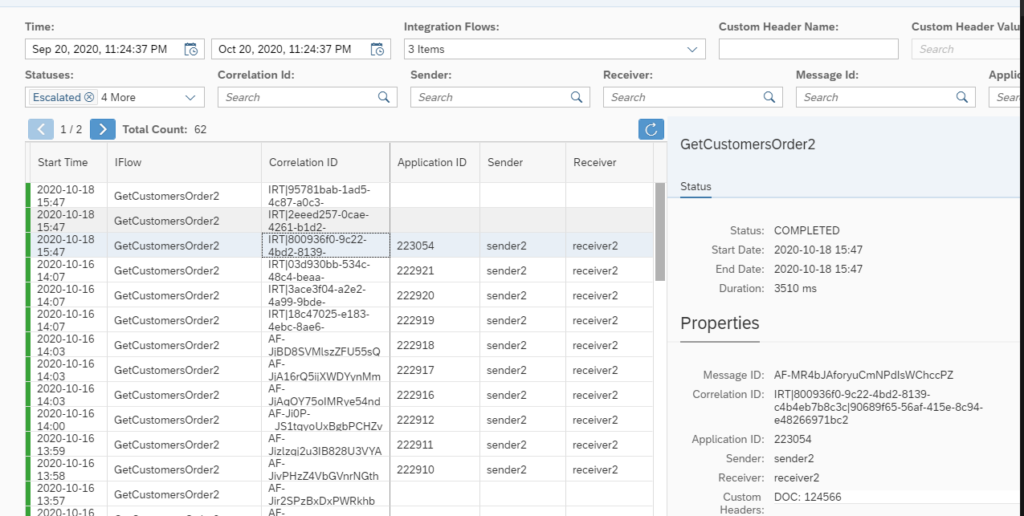
Application Monitoring
System Monitoring
SAP System Monitoring - CALM and other common componentsin SAP Integration Suite provides end-to-end visibility into integration processes, APIs, and event-driven messaging across hybrid and cloud landscapes. It helps administrators, developers, and business stakeholders ensure that integrations run reliably, securely, and in compliance with business SLAs.
Monitoring in SAP Cloud Integration (CI)
- Message Monitoring - This core feature of SAP Cloud Platform Integration (SCPI), used to track, analyse, and troubleshoot the flow of integration messages between systems. It provides visibility into message processing, status, and potential errors, ensuring smooth operation of integration scenarios. Note - payloads are not captured by default, these may only be captured through explicit tracing with sufficient privilege in the system.
- Integration Content - Deployed object status with associated error on failure.
- Security Content - List displays of existing credentials (obscured passwords), certificates with expiry and custom user roles. Additional tooling is available for connectivity testing etc.
- Datastore Monitoring - List display of local storage (global variables) for use by integration developers (correlations/aggregators).
| Info |
|---|
This section will be updated once the capabilities of Figaf's DevOps suite, purchased in October 2025, have been deployed and configured. |
Monitoring in API Management
Monitoring in SAP API Management provides transparency into how APIs are being consumed, their performance, and any potential errors. It allows administrators, developers, and business users to analyse API traffic, detect issues, and ensure APIs are meeting business and technical expectations.
- API Analytics and Monitoring
- Provides real-time and historical insights into API traffic
- Tracks metrics such as request counts, response times, error rates, latency, and throughput.
- Allows filtering by API proxies, applications, developers, or time ranges
- Helps identify usage trends including unusual traffic patterns for capacity planning and fraud detection.
- Trace and Debug
- Captures inbound and outbound request/response details
- Shows traffic distribution across APIs and consumers
Sizing
SAP monitors system load and utilization, and scales up hardware resources either proactively in response to increased load being detected, or in response to a ticket raised by Syensqo. Additionally a review with SAP can be scheduled when extensive changes when increases in load are expected to modify configuration,
and proactively scales up capacity during release deployment.High Availability
deployed across multiple availability zones with the following SLA:
- RPO - 4h
- RTO - 24h
Disaster Recovery
SAP data centers are designed with redundancy and disaster recovery plans to help ensure business continuity. In the event of an outage, data and services are automatically rerouted to other operational centers.Backup/Restore
SAP performs full backups with the following schedule to meet SAP's recovery point objective.
Maintenance Plan
Weekly Maintenance Windows for SAP Cloud Services – Standard Windows SAP weekly standard maintenance windows are scheduled as listed below for the Cloud Services in this section: Start Time in UTC per region MENA FRI 7 pm UTC APJ SAT 3 pm UTC Europe: SAT 10 pm UTC Americas SUN 4 am UTC The above-mentioned maintenance windows define the maximum scheduled downtime from which certain cloud services consume only partially
SAP Cloud Platform API Management SAP Cloud Platform Integration 2 Hours
Major Maintenance
Up to 4 times per year: UTC Europe: FRI 10 pm – SAT 2 am UTC Americas: SAT 4 am – SAT 8 am UTC
this requires simulated loads for monitoring in a non-productive stance to "tune" the system.
Extensions of the log storage area and retention periods can be requested at additional cost.
Cloud Integration tenant characteristics
| Resource | Scope |
|---|---|
| Integration content | 2 GB |
| JMS Overview | 9 GB, 150 transactions (default configuration with 30 queues) Can be scaled up to 30 GB, 500 transactions (with 100 queues) |
| JMS Queue | 300 MB with 5 transactions, 5 consumers, and 5 providers |
| Message processing log persistence | 35 GB total Retention period 30 days by default. |
| Runtime database | 35 GB |
| Disk space | 10 GB |
| Billing |
Note: SAP-to-SAP free messages are only offered for the Cloud Integration capability. This is applicable only for the messages processed by prepackaged integration packages published by SAP on the SAP Business Accelerator Hub. |
Disaster Recovery
SAP provides a Disaster Recovery service as an additional service which must be purchased on an order form. This is implemented by completely replicating the infrastructure in a secondary region, which roughly doubles the cost of the Integration Suite.
In order to provide a more cost-effective solution, the SyWay design will instead provision the Test environments in a separate region from the Production environment. In case of a significant Disaster-level failure event affecting an entire region of BTP, the integration flows which are already deployed in the Test environment can be reconfigured to connect to the production environments of S/4HANA and other integrated systems. The use of Figaf's DevOps tooling will assist in this. Although this involves some significant manual effort and does not provide for automatic fail-over, it represents a much more cost-effective strategy for achieving both regional and provider diversity.
As Cloud Integration does not persist business data, RPO (Recovery Point Objective) is not an important attribute of a Disaster Recovery solution.
The Recovery Time Objective (RTO) achievable via this solution can only be estimated after full implementation of the Figaf DevOps suite and a practice execution. It is however expected that a 24-hour RTO is achievable.
Backup/Restore
All the data that’s being backed up is safeguarded by following set of qualities that guarantee a secure backup and facilitate data restoration with minimal loss:
Full backup: All necessary data is backed up daily.
Incremental backup: All delta updates within a day are backed up every 15 mins.
Data Storage: Each set of backup data is stored in secondary storage for up to 14 days.
Data Security: Every backup data stored is encrypted by default with the standard encryption mechanism.
Recovery Options: Point in time recovery is supported.
Maintenance Plan
SAP Integration Suite follows a comprehensive maintenance approach with zero downtime updates for Cloud Integration, though dependent BTP services may still cause potential issues.
Zero Downtime Software Updates
- SAP performs automatic software updates for Cloud Integration.
- Updates are applied using a zero-downtime process, requiring no customer action.
- Productive integration scenarios continue running without interruption during updates.
Update Schedule and Process
- Follows a monthly update cadence (every 4 weeks).
- Updates usually occur on weekends, outside business hours.
- Rollout is random across tenants; specific timing per tenant is not provided and cannot be controlled by a customer.
Maintenance Windows and Exceptions
Most updates are seamless, but some require downtime, such as:
- Major upgrades
- Database updates
- Network or infrastructure changes
SAP reserves a weekly maintenance window for urgent patches or tenant/database operations.
Notification and Monitoring
- Customers can subscribe to receive advance email notifications for expected disruptions.
- Subscriptions can be done in Cloud Service Availability Notifications application in SAP for Me
- Link in SAP for Me: https://me.sap.com/systemsprovisioning/getNotified
- More details in this community blog.
- System status and maintenance updates are also available in SAP for Me.
See also
Integration Development StandardService Introduction
Application Category
Support Team
Skill required
SAP Cloud Integration Developers, ArchitectsChecklist
Exceptions
See also| Attachments | ||||||
|---|---|---|---|---|---|---|
|
Change log
| Change History | ||
|---|---|---|
|