

| Status |
| |
|---|---|---|
| Owner | ||
| Stakeholders |
Purpose
The purpose of this document is to define the conversion approach to create active Batch Search Strategies in S/4 HANA based on the Master Data Standards DD-FUN-050 Master Data Standard_1062-Batch Search Strategy
in S/4 HANA.
When entering the goods issue of a material handled in batches, you can enter * in the Batch field in order to initiate automatic batch determination. The system then uses a specific search strategy to find batches with certain characteristic values (such as status, shelf life, etc.) and suggests these batches in a list. In this list, the batches are sorted by specific criteria (sort sequence), and the characteristic values are displayed. The system suggests how to distribute the given quantity to the batches found. You can accept the system’s proposal for the goods movement or you can distribute the quantity manually.
The system can only search for batches on the basis of search strategies. Therefore, you have to define these strategies. In a search strategy, you define the values according to which the system is to find batches.
A search strategy is assigned to a strategy type. Strategy types you can define a search strategy at various levels.For Syway we will be migrating the following strategies.
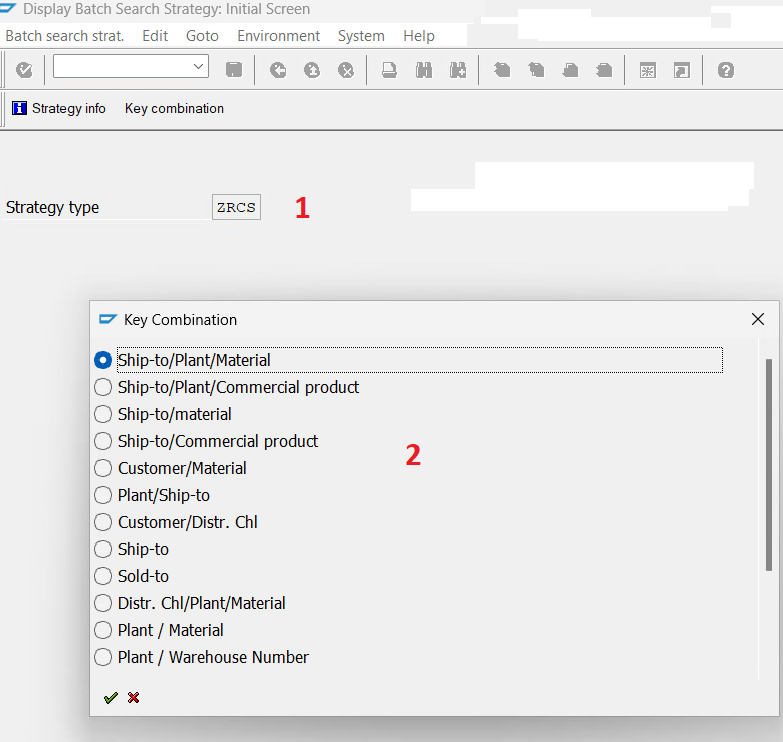
The Strategy Type has A few Key Combinations
Conversion Scope
All Active batch search strategies that are valid according to Validity dates in legacy.
You choose a strategy type and a key combination. And based on this combination it will determine the table for the strategy
The data from legacy system includes depending on Key Combination:
| Material |
| Customer/Material |
| Customer/Plant/Material |
| Movement Type/Plant |
| Plant/Material |
| Movement Type/Plant/Material |
| Plant |
| Order Type/Plant/Component |
| Order Type/Plant/ProductionMaterial/Compo |
| Plant/Ship-to |
| Customer/Distr. Chl |
| Plant / Sales Organization |
| Ship-to/Plant/Material |
| Ship-to |
| Sold-to |
| Ship-to/material |
| Item Division |
| Plant / Warehouse Number |
| Plant/Ship.point |
| Plant / Material |
| Plant/Shipping Point/Division in item |
| Plant/Sales org./Ship Point |
| Ship-to/Plant/Commercial product |
| Ship-to/Commercial product |
| Order type/Plant |
| Movmt type/Plant/produced material/Component |
| Movement type plant storage location |
Conversion Scope
All Active batch search strategies that are valid according to Validity dates in legacy.You choose a strategy type and a key combination. And based on this combination it will determine the table for the strategy
The data from legacy system includesexcludes:
- Deleted Conditions (KONDH LEEVM_KO)
- Search Strategies which has expired (KODATBI in the Past)
The data from legacy system excludes:
List of source systems and approximate number of records| Source | Scope | Source Approx No. of Records | Target System | Target Approx No. of Records |
|---|---|---|---|---|
| PF2,WP2 | All active Search Strategies with a valid date | Approx. 60k records | S4H | Depending on Plant Consolidation |
Additional Information
Multi-language Requirement
Not Applicable
Document Management
Not Applicable
Legal Requirement
Not Applicable
Special Requirements
Not Applicable
Target Design
Example of Upload Template: Source data for Condition record for batch determination (for all areas) Example
The technical design of the target for this conversion approach.
| Table | Field | Data Element | Field Description | Data Type | Length | Check Table | Requirement | Transformation Notes |
|---|---|---|---|---|---|---|---|---|
| KOTHxxx | KSCHL | KSCHL | Condition Key | CHAR | 4 | T685 | Required | (See Matrix) |
| KOTHxxx | KAPPL | KAPPL | Application | CHAR | 2 | T681A | Conditional | (See Matrix) |
| KOTHxxx | KODATAB | KODATAB | Validity start date of the condition record | DATS | 8 | Mandatory | (See Matrix) | |
| KOTHxxx | KODATBI | KODATBI | Validity end date of the condition record | DATS | 8 | Mandatory | (See Matrix) | |
| KONDH | CHASP | CHASP | Batches: No. of batch splits allowed | NUMC | 3 | Conditional | ||
| KONDH | CHSPL | CHSPL | Number of batch splits can be changed | CHAR | 1 | Conditional | ||
| KONDH | CHMDG | CHMDG | Batches: Dialog batch determination | CHAR | 1 | Conditional | ||
| KONDH | KZAME | KZAME | ID for display of UoM in batch determination | CHAR | 1 | Required | ||
| KONDH | CHMVS | CHMVS | Batches: Exit to quantity proposal | NUMC | 3 | Required | ||
| KONDH | CHVLL | CHVLL | Overdelivery allowed in batch determination | CHAR | 1 | Conditional | ||
| KONDH | CHVSK | CHVSK | Selection type at start of batch determination | CHAR | 1 |
| Required | ||||||||
| KLAH | <By batch characteristics> CLASS | KLASSE_D | Selection Criteria | Required | Dependent on CNV-1047 Batch Characteristics of Class Type: 023 link KONDH to a search strategy in SAP, use the KNUMH (condition record number) to join KONDH and AUSP or INOB tables, which contain characteristic values used in batch search strategies. The link is made through the KONDH-KNUMH and AUSP-OBJEK fields, or INOB-CUOBJ and AUSP-OBJEK fields, to link characteristic values from the AUSP table to the condition record found in KONDH. You can then can then Link AUSP record to KLAH via KSSK/INOB to get the Class name field used for Selection Criteria. | |||
| KONDH | <By batch characteristics> | Sort Criteria | Required | Dependent on CNV-1047 Batch Characteristics of Class Type: 023 link KONDH to a search strategy in SAP, use the KNUMH (condition record number) to join KONDH and AUSP or INOB tables, which contain characteristic values used in batch search strategies. The link is made through the KONDH-KNUMH and AUSP-OBJEK fields, or INOB-CUOBJ and AUSP-OBJEK fields, to link characteristic values from the AUSP table to the condition record found in KONDH | ||||
| KONDH | LOEVM_KO | LOEVM_KO | Deletion indicator for condition item | CHAR | 1 | Conditional | ||
| AUSP | OBJEK | CUOBN | Key of Object to be Classified | CHAR | 90 | Conditional | If it has a Characteristic Copy field to the Characteristics tab | |
| AUSP | ATINN | ATINN | Internal Char no. | NUMC | 10 | Conditional | Copy (ATNAM in Template) | |
| AUSP | ATWRT | ATWRT | Internal Characteristic | CHAR | 70 | Conditional | Copy | |
| AUSP | ITEM_NO | WZAEHL | Sequence Number | NUMC | 4 | Conditional | Copy |
Depending On the Strategy Type Various Tables and Columns Come into Scope. (See Figure1)
figure 1
The following Matrix shows which fields are in scope per table:
x designates a copy Action
O Designates copy from xref (Where legacy and Target do not keep the same Numbering use applicable cross reference table)
Note* KOTH9xx series are as per Current "as is" Naming. As the tables are custom numbering dependant on Condition records. the "To Be" numbering may be different. Can only confirm once new condition records are created as to what the table names will be in target
| FIELD | KAPPL | KSCHL | DATBI | DATAB | KNUMH | PMATN | MATNR | KNDNR | WERKS | BWART | AUART | KUNWE | VTWEG | VKORG | SPART | SPARP | LGNUM | VSTEL | ZWRKST | LGORT | LAND1 | MATKL | HIENR | MVGR3 | PRODH | MVGR1 | LAND1 | |||
| Source System | Table Name | Key Combination) | Description | Application | Strategy Type | Valid To | Valid From | Cond.record no. | Production Material Number | Material | Customer | Plant | Movement Type | Order Type | Ship-To-Party | Distr. Channel | Sales Org | Division Header | Division in Item | Whse Number | Shipping Point | Prod com for batch | Storage Location | Dest. Country | Material Group | Customer(hier) | Quality | Prod. Hierarchy | IndustOrigin | Dest. Country |
| WP2 | KOTH001 | Material | x | x | x | x | x | x | ||||||||||||||||||||||
| WP2 | KOTH002 | Customer/Material | x | x | x | x | x | x | x | |||||||||||||||||||||
| WP2 | KOTH003 | Customer/Plant/Material | x | x | x | x | x | x | x | x | ||||||||||||||||||||
| WP2 | KOTH501 | Plant/Ship-to | x | x | x | x | x | x | x | |||||||||||||||||||||
| WP2 | KOTH502 | Customer/Distr. Chl | x | x | x | x | x | x | x | |||||||||||||||||||||
| WP2 | KOTH503 | Plant / Sales Organization | x | x | x | x | x | x | x | |||||||||||||||||||||
| WP2 | KOTH900 | Ship-to/Plant/Material | x | x | x | x | x | x | x | x | ||||||||||||||||||||
| WP2 | KOTH901 | Ship-to | x | x | x | x | x | x | ||||||||||||||||||||||
| WP2 | KOTH902 | Sold-to | x | x | x | x | x | x | ||||||||||||||||||||||
| WP2 | KOTH903 | Ship-to/material | x | x | x | x | x | x | x(KNDNR) | |||||||||||||||||||||
| WP2 | KOTH905 | Division (header) | x | x | x | x | x | x | ||||||||||||||||||||||
| WP2 | KOTH907 | Item Division | x | x | x | x | x | x | ||||||||||||||||||||||
| WP2 | KOTH908 | Plant / Warehouse Number | x | x | x | x | x | x | x | |||||||||||||||||||||
| WP2 | KOTH909 | Plant/Ship.point | x | x | x | x | x | x | x | |||||||||||||||||||||
| WP2 | KOTH911 | Plant / Material | x | x | x | x | x | x | x | |||||||||||||||||||||
| WP2 | KOTH913 | Plant/Sales org./Ship Point | x | x | x | x | x | x | x | x | ||||||||||||||||||||
| WP2 | KOTH914 | Ship-to/Plant/Commercial product | x | x | x | x | x | x | x | x | ||||||||||||||||||||
| WP2 | KOTH915 | Ship-to/Commercial product | x | x | x | x | x | x | x | |||||||||||||||||||||
| PF2 | KOTH001 | Material | x | x | x | x | x | x | ||||||||||||||||||||||
| PF2 | KOTH002 | Customer/Material | x | x | x | x | x | x | x | |||||||||||||||||||||
| PF2 | KOTH003 | Customer/Plant/Material | x | x | x | x | x | x | x | x | ||||||||||||||||||||
| PF2 | KOTH004 | Destination Country/Mat.Group | x | x | x | x | x | x | x | |||||||||||||||||||||
| PF2 | KOTH005 | Destination country | x | x | x | x | x | x | ||||||||||||||||||||||
| PF2 | KOTH006 | Material Group | x | x | x | x | x | x | ||||||||||||||||||||||
| PF2 | KOTH007 | Customer hierarchy | x | x | x | x | x | x | ||||||||||||||||||||||
| PF2 | KOTH008 | Customer Hierarchy/Material | x | x | x | x | x | x | x | |||||||||||||||||||||
| PF2 | KOTH901 | Ship-to/Material | x | x | x | x | x | x | x | |||||||||||||||||||||
| PF2 | KOTH902 | Ship-to/Matl group | x | x | x | x | x | x | x | |||||||||||||||||||||
| PF2 | KOTH903 | Quality/Customer/Material | x | x | x | x | x | x | x | x | ||||||||||||||||||||
| PF2 | KOTH904 | Quality/Customer/Matl group | x | x | x | x | x | x | x | x | ||||||||||||||||||||
| PF2 | KOTH905 | Quality/Material | x | x | x | x | x | x | x | |||||||||||||||||||||
| PF2 | KOTH906 | Quality/Matl group | x | x | x | x | x | x | x | |||||||||||||||||||||
| PF2 | KOTH907 | Prod.hier. | x | x | x | x | x | x | ||||||||||||||||||||||
| PF2 | KOTH908 | Quality/Ind.Origin/Matl group | x | x | x | x | x | x | x | x | ||||||||||||||||||||
| PF2 | KOTH909 | Quality/RecipCntry/Matl group | x | x | x | x | x | x | x | x | ||||||||||||||||||||
| PF2 | KOTH912 | Quality/Ind.Origin/Customer/Matl group | x | x | x | x | x | x | x | x | x | |||||||||||||||||||
| PF2 | KOTH913 | Qual/Sales org/Matl Group | x | x | x | x | x | x | x | x | ||||||||||||||||||||
| PF2 | KOTH916 | Qual./Ind.Or./Material | x | x | x | x | x | x | x | x | ||||||||||||||||||||
| PF2 | KOTH917 | Qual./Ind.Or./Customer/Material | x | x | x | x | x | x | x | x | x | |||||||||||||||||||
| PF2 | KOTH918 | Qual./Plant/Material | x | x | x | x | x | x | x | x | ||||||||||||||||||||
| PF2 | KOTH919 | Qual./Ind.Or./Ship-To/Matl Group/Plant | x | x | x | x | x | x | x | x | x | x | ||||||||||||||||||
| PF2 | KOTH920 | Qual./Ship-To/Material/Plant | x | x | x | x | x | x | x | x | x | |||||||||||||||||||
| PF2 | KOTH921 | Qual./Ind.Or./Ship-To/Material/Plant | x | x | x | x | x | x | x | x | x | x | ||||||||||||||||||
| PF2 | KOTH922 | Qual./Ship-To/Matl Group/Plant | x | x | x | x | x | x | x | x | x | |||||||||||||||||||
| PF2 | KOTH923 | Qual./Sales org./Material | x | x | x | x | x | x | x | x | ||||||||||||||||||||
| PF2 | KOTH924 | Qual./Plant/Matl Group | x | x | x | x | x | x | x | x |
Target Config Mapping to merge the sources:
| Target KOTH Table | Description | PF2 | WP2 |
| 001 | Material | 001 | 001 |
| 002 | Customer/Material | 002 | 002 |
| 003 | Customer/Plant/Material | 003 | 003 |
| 004 | Destination Country/Mat.Group | 004 | |
| 005 | Destination country | 005 | |
| 006 | Material Group | 006 | |
| 007 | Customer hierarchy | 007 | |
| 008 | Customer Hierarchy/Material | 008 | |
| 901 | Ship-to/Material | 901 | |
| 902 | Ship-to/Matl group | 902 | |
| 903 | Quality/Customer/Material | 903 | |
| 904 | Quality/Customer/Matl group | 904 | |
| 905 | Quality/Material | 905 | |
| 906 | Quality/Matl group | 906 | |
| 907 | Prod.hier. | 907 | |
| 908 | Quality/Ind.Origin/Matl group | 908 | |
| 909 | Quality/RecipCntry/Matl group | 909 | |
| 910 | Quality/Ind.Origin/Customer/Matl group | 912 | |
| 911 | Qual/Sales org/Matl Group | 913 | |
| 912 | Qual./Ind.Or./Material | 916 | |
| 913 | Qual./Ind.Or./Customer/Material | 917 | |
| 914 | Qual./Plant/Material | 918 | |
| 915 | Qual./Ind.Or./Ship-To/Matl Group/Plant | 919 | |
| 916 | Qual./Ship-To/Material/Plant | 920 | |
| 917 | Qual./Ind.Or./Ship-To/Material/Plant | 921 | |
| 918 | Qual./Ship-To/Matl Group/Plant | 922 | |
| 919 | Ship-to/Plant/Material | 900 | |
| 920 | Ship-to | 901 | |
| 921 | Sold-to | 902 | |
| 922 | Division (header) | 905 | |
| 923 | Item Division | 906 | |
| 924 | Plant / Warehouse Number | 908 | |
| 925 | Plant/Ship.point | 909 | |
| 023 | Plant / Material | 911 | |
| 926 | Plant/Sales org./Ship Point | 913 | |
| 927 | Plant/Ship-to | 501 | |
| 928 | Customer/Distr. Chl | 502 | |
| 929 | Plant / Sales Organization | 503 | |
| 930 | Plant/Material | 911 | |
| 931 | Ship-to/Plant/Commercial product | Hold | 914 |
| 932 | Ship-to/Commercial product | Hold | 915 |
| 933 | Qual./Sales org./Material | 923 | Hold |
| 934 | Qual./Plant/Matl Group | 924 | Hold |
Data Cleansing
| ID | Criticality | Error Message/Report Description | Rule | Output | Source System |
|---|---|---|---|---|---|
| N/A | |||||
Conversion Process
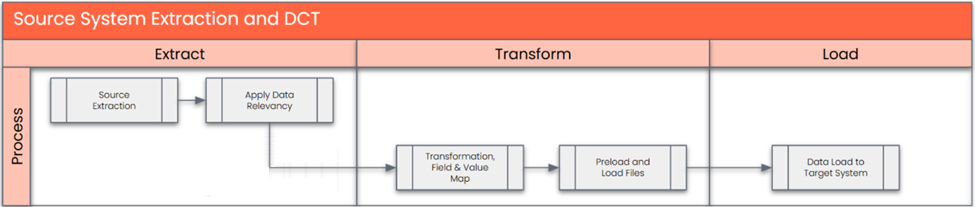
The high-level process is represented by the diagram below:
Data Privacy and Sensitivity
Not ApplicableExtraction
Extract data from a source into . There are 2 possibilities:
- The data exists. connects to the source and loads the data into . There are 3 methods:
- Perform full data extraction from relevant tables in the source system(s).
- Perform extraction through the application layer.
- Only if ; cannot connect to the source, data is loaded to the repository from the provided source system extract/report.
- The data does not exist (or cannot be converted from its current state). The data is manually collected by the business directly in . This is to be conducted using DCT (Data Collection Template) in
The agreed Relevancy criteria is applied to the extracted records to identify the records that are applicable for the Target loads
Extraction Run Sheet
| Req # | Requirement Description | Team Responsible |
|---|---|---|
| 1) | Legacy System Extraction (PF2 & WP2) based on Access Sequence & Strategy Type Key Combination to determine which table is needed. | |
| Records with a Valid To Date in the Future(KOTHxxx-KODATBI >= Current /Migration Date) | ||
Selection Screen
| Selection Ref Screen | Parameter Name | Selection Type | Requirement | Value to be entered/set |
|---|---|---|---|---|
| VCH3 | Strategy Type | Key | Mandatory | All strategies (As an example Use ZRCS) |
| -> Key Combinations are displayed which determines tables for Strategy and columns available | ||||
Data Collection Template (DCT)
Target Ready Data Collection Template will be created for data with exception of some fields which require transformation as mentioned in the transformation rule.DCT Rules
| Field Name | Field Description | Rule |
|---|---|---|
| N/A | ||
Extraction Dependencies
| Item # | Step Description | Team Responsible |
|---|---|---|
| 1) | Connection needs to be setup with the correct Authorisation for extract | Synity |
| 2) | Possible scheduling of AUSP /INOB as size is generally big and may take some time | Synity |
| 3) | Org Structure design needs to be finalised to determine extract package filtering needed for big tables
| Synity |
Transformation
The Target fields are mapped to the applicable Legacy field that will be its source, this is a 3-way activity involving the Business, Functional team and Data team. This identifies the transformation activity required to allow to make the data Target ready:
- Perform value mapping and data transformation rules.
- Legacy values are mapped to the to-be values (this could include a default value)
- Values are transformed according to the rules defined in
- Prepare target-ready data in the structure and format that is required for loading via prescribed Load Tool. This step also produces the load data ready for business to perform Pre-load Data Validation
Transformation Run Sheet
| Item # | Step Description | Team Responsible |
|---|---|---|
| 1 | Execute Collect to ensure PREP /Snapshot is up to date. | Synity / SyWay S2P Data Team |
| 2 | Execute Transform | Synity / SyWay S2P Data Team |
| 3 | Review & validate any Error Reports (Config etc) | Synity / SyWay S2P Data Team |
| 4 | Generate & validate Preload Report (Ensure proper Business names as per Data Dictionary) | Synity / SyWay S2P Data Team |
| 5 | Generate Load files | Synity / SyWay S2P Data Team |
Transformation Rules
| Rule # | Source system | Source Table | Source Field | Source Description | Target System | Target Table | Target Field | Target Description | Transformation Logic |
|---|---|---|---|---|---|---|---|---|---|
| 1 | PF2/WP2 | KOTHxxx | KSCHL | Condition Key | S4 /HANA | KOTHxxx | KSCHL | Condition Key | Copy from Source to Target (See Matrix) Additional fields become available depending on Key Combination |
| 2 | PF2/WP2 | KOTHxxx | KAPPL | Application | S4 /HANA | KOTHxxx | KAPPL | Application | Copy from Source to Target (See Matrix) Additional fields become available depending on Key Combination |
| 3 | PF2/WP2 | KOTHxxx | KODATAB | Validity start date of the condition record | S4 /HANA | KOTHxxx | KODATAB | Validity start date of the condition record | Copy from Source to Target (See Matrix) Additional fields become available depending on Key Combination |
| 4 | PF2/WP2 | KOTHxxx | KODATBI | Validity end date of the condition record | S4 /HANA | KOTHxxx | KODATBI | Validity end date of the condition record | Copy from Source to Target (See Matrix) Additional fields become available depending on Key Combination |
| 5 | PF2/WP2 | KONDH | CHASP | Batches: No. of batch splits allowed | S4 /HANA | KONDH | CHASP | Copy from Source to Target | |
| 6 | PF2/WP2 | KONDH | CHSPL | Number of batch splits can be changed | S4 /HANA | KONDH | CHSPL | Copy from Source to Target | |
| 7 | PF2/WP2 | KONDH | CHMDG | Batches: Dialog batch determination | S4 /HANA | KONDH | CHMDG | Copy from Source to Target | |
| 8 | PF2/WP2 | KONDH | KZAME | ID for display of UoM in batch determination | S4 /HANA | KONDH | KZAME | Copy from Source to Target | |
| 9 | PF2/WP2 | KONDH | CHMVS | Batches: Exit to quantity proposal | S4 /HANA | KONDH | CHMVS | Copy from Source to Target | |
| 10 | PF2/WP2 | KONDH | CHVLL | Overdelivery allowed in batch determination | S4 /HANA | KONDH | CHVLL | Copy from Source to Target | |
| 11 | PF2/WP2 | KONDH | CHVSK | Selection type at start of batch determination | S4 /HANA | KONDH | CHVSK | Copy from Source to Target | |
| 12 | PF2/WP2 | KLAH | CLASS | Selection Criteria | S4 /HANA | Rule ( link KONDH to a search strategy in SAP, use the KNUMH (condition record number) to join KONDH and AUSP or INOB tables, which contain characteristic values used in batch search strategies. The link is made through the KONDH-KNUMH and AUSP-OBJEK fields, or INOB-CUOBJ and AUSP-OBJEK fields, to link characteristic values from the AUSP table to the condition record found in KONDH. You can then can then Link AUSP record to KLAH via KSSK/INOB to get the Class name field used for Selection Criteria. | |||
| 12 | PF2/WP2 | T685H | T685H-CLASS_SRT | Sort Criteria | S4 /HANA | KONDH | T685H | Rule (Copy from T685H) based on Condition | |
| 12 | PF2/WP2 | KONDH | LOEVM_KO | LOEVM_KO | Deletion indicator for condition item | KONDH | LOEVM_KO | Copy from Source to Target |
Transformation Mapping
| Mapping Table Name | Mapping Table Description |
|---|---|
| Plants | Mapping of Legacy Plants to Target System value (Value Mapping) Applicable as per Matrix |
| Storage Location | Mapping of Legacy Storage location to Target System value (Value Mapping) Applicable as per Matrix |
| Material | Mapping of Legacy Material to Target System Material no. as per Material Basic Data xref |
| Customer | Mapping of Legacy Customer to Target System Customer no. xref |
| Movement Type | Mapping of Legacy Mvt type to Target Mvt Type |
| Order Type | Mapping of Legacy Order type to Target Order type |
| Component | Mapping of Legacy Component to Target Component |
| Production material | Mapping of Production Material to Target Produced Material |
| Ship-to | Mapping of Legacy Ship-to to Target Ship-to |
| Sold-to | Mapping of Legacy Sold to to Target Sold to |
| Distribution Channel | Mapping of Legacy Distribution Channel to Target Distribution Channel |
| Sales Orginisation | Mapping of Legacy Sales Org to Target Org |
| Commercial Product | Mapping of Legacy Commercial Product to target Commercial Product |
| Item Devision | Mapping of Legacy Division to Target Devisiion |
| Warehouse Number | Mapping of Legacy Whse Number to Target Whse Number |
| Shipping Point | Mapping of Legacy Ship point to Target Ship point. |
Transformation Dependencies
List the steps that need to occur before transformation can commence| Item # | Step Description | Team Responsible |
|---|---|---|
| 1 | Ensure all Transformation mappings are up to date | Synity/Data Team |
| 2 | Check Tables for fields are up to date & complete | Synity/Data Team |
| 3 |
| Synity/Data Team |
Pre-Load Validation
Project Team
Completeness
| Task | Action |
|---|---|
| Verify Record Counts | Row counts in PREP (Relevancy) should tie back to Count in Target Table |
Accuracy
| Task | Action |
|---|---|
| Conversion Accuracy | SyWay P2F Data Team to verify that all fields pass the following checks:
|
| Review Error Reports | Fields that fail checks due to Target Readiness etc. should be highlighted in error reports. These reports need to be flagged & decision can be made to Remediate values in initial Mock cycles but no remediation should be applied when doing final dress rehearsal. |
Business
Completeness
| Task | Action |
|---|---|
| Verify Record Counts | Business Data Owner/s to verify that the total number of relevant records from the the Relevancy Reports is equal to the total number of records in the Preload and Load Sheets. |
Accuracy
| Task | Action |
|---|---|
| Conversion Accuracy | Business Data Owner/s to verify that all the data in the load table/file is accurate as per endorsed transformation/mapping rules (and signed-off DCT data). |
Load
The load process includes:
- Execute the automated data load into target system using load tool or product the load file if the load must be done manually
- Once the data is loaded to the target system, it will be extracted and prepared for Post Load Data Validation
Load Run Sheet
| Item # | Step Description | Team Responsible |
|---|---|---|
| 1. | Go to Load tool (Migrate your Data) | Synity/Data Team |
| 2. | Run Simulation & validate if any Errors are encountered | Synity/Data Team |
| 3. | If No errors encountered proceed with Prepare & simulate | Synity/Data Team |
| 4. | Once Approval has been given proceed with Migration | Synity/Data Team |
| 5. | Any Migration Errors need to be highlighted & and depending on volume & criticality of Mock cycle either be fixed & reloaded or Marked for correcting in subsequent Mocks | Synity/Data Team |
| 6. | Generate all Post-load Reports with summary information with counts that clearly show :
| Synity/Data Team |
| 7. | Check a sample of a few materials in S/4 HANA | Synity/Data Team |
| 8. | Garner validations/signoffs. | Synity/Data Team |
Load Phase and Dependencies
In order to migrate this object the following Dependencies should have been completed before attempting the migration
- Characteristics
- Class
- Customer
- Product
Configuration
| Item # | Configuration Item |
|---|---|
Conversion Objects
| Object # | Preceding Object Conversion Approach |
|---|---|
| list the exact title of the conversion object of only the immediate predecessor – this will then confirm the DDD (Data Dependency Diagram) | |
Error Handling
| Error Type | Error Description | Action Taken |
|---|---|---|
| Missing Config | Plant/Storage Location etc not available |
Post-Load Validation
Project Team
Completeness
| Task | Action |
|---|---|
| Verify Count | SyWay P2FData Team to verify the record count created in target S/4 HANA by accessing post load reports in dspMigrate or standard reports from S/4 HANA |
Accuracy
| Task | Action |
|---|---|
| Verify Logs | Check if there is data that failed to load and perform the necessary actions (e.g. register as post load issue or attempt to load the record again, etc.). |
Business
Completeness
| Task | Action |
|---|---|
| Verify Count | Download Post Load Reports from dspMigrate and verify that the record count loaded in the target S/4 HANA is the same count as of the endorsed load file. |
Accuracy
| Task | Action |
|---|---|
| Conversion Accuracy | Verify that the Material data in target S/4 HANA were loaded correctly via dspMigrate post load reports or standard reports from S/4 HANA. |
Key Assumptions
- Master Data Standard is up to date as on the date of documenting this conversion approach and data load. is in scope based on data design and any exception requested by business.
See also
Change log
| Change History | ||
|---|---|---|
|