
Document Links
| Jira | ||||||||||
|---|---|---|---|---|---|---|---|---|---|---|
|
Introduction
This document describes the data flow for objects in the technical space.
| Sub-Area | Details | Example KPIs | Comments |
|---|---|---|---|
| TECPRO - Signavio Process Manager | Signavio is the source of truth for which task is performed by which process role using which executable (e.g. Fiori app, transaction, report, etc.). However Signavio does not provide sufficient reporting capability to meet the needs of various downstream consumers of this information, who need to use information from the process models to answer various questions in order to perform subsequent work. Examples include:
| N/A The reporting is focused on comparing versions of data |
Jira Request Coverage
The models covered under this DDFS will cater for the requirements raised though the following Jira Requests:
Jira server Syensqo's Jira columnIds issuekey,summary,issuetype,created,updated,duedate,assignee,reporter,priority,status,resolution columns key,summary,type,created,updated,due,assignee,reporter,priority,status,resolution serverId d8efc1ef-48bd-3b4e-8714-ad827f4f059b key ERP-1107
How to use this document
Please see the SyWay Analytics Approach document, section 'Documentation' for more information about the context of this document.
This document is designed to:
- Be an aid in to the initial design of a data flow for the reporting functional consultant
- Be the means of communication between the reporting functional consultant and the developer as to what is to be built
- Be the long term repository for the documentation of the actual technical build.
Fill in the document following the steps below and keeping close alignment with the SAP Analytics and Reporting Standards.
First, copy this template, copy the template data flow diagram inside it, replace the template DFD with the new DFD in the new document.
In DFD:
- Lay out the spaces.
- Populate the spaces with the tentative objects depicting object type with the appropriate box. (Build the entity relationship model). Use a short, meaningful, code for the object name to keep the boxes small and the design flexible till complete.
- Be aware of and respect the colour coding for boxes as seen in the key at the top of the DFD.
- N.B. do not include master data objects in transaction data DFD unless they are actively joined to (i.e. not just used as attributes). MD objects have their own DFD.
- Where an object's data flow belongs in a different DFD (e.g. S2P consumes an object from O2C), just reference the object, don't include its full flow.
- Once the data flow makes sense (i.e. will deliver the desired solution), populate the technical names for relevant objects in the boxes into the tables beneath the data flow diagram. This allows you to add / change the names without having to reconfigure the diagram.
In the confluence document:
- Update the details of any business logic below the data flow diagram. Updates to be made according to the layer and type.
Please see the example DFD done for a fictional requirement that wishes to show original purchase order item and value alongside the PO history according to Purchase Order Creation date.
Document Links
Introduction
...
Data Flow Diagram
| draw.io Diagram | ||||||||||||||||||||||
|---|---|---|---|---|---|---|---|---|---|---|---|---|---|---|---|---|---|---|---|---|---|---|
|
| Table of Contents | ||||
|---|---|---|---|---|
|
Source System Extractors
Standard extractors do not need to be documented unless extended.
Where custom extractors / extensions are required, reference the FSD for that enhancement.
| Extractor Name | Build Jira Ref For Extension Information |
|---|
Inbound Layer
Inbound layer objects only need documentation if some field adjustment is made (over and above the standard load date / time and source system stamp).
1TL_TECPRO_SignavioProcessChanges_01
Field XYZ converted to date.
Field ABC converted from BIGINT to...
Harmonisation Layer
Every table will have it's own harmonization view. This only needs to be documented if field adjustments are required. E.g. Conversion of data field / type.
Where actions are performed to improve reusability, e.g. joining header and item tables, details of the join (left outer, which is left, which is right, fields to join with, cardinality etc) should listed.
...
| Comment | ||||||||||||||
|---|---|---|---|---|---|---|---|---|---|---|---|---|---|---|
| TBC Signavio Report |
| Data is extracted from Signavio using a report written by SAP. It will post data to CPI which, in turn, will make this data available to via a REST API. The functionality to extract data from REST APIs is not available till the Q2 2026 release which (at time of writing) has not yet been delivered. |
N.B. The file extract is a shared program which produces the data for multiple use cases, including stand alone CSV/Excel files. It was requested to have normalised files separating process and master data but this was rejected.
Inbound Layer
1TL_TECPRO_SIGNAVIOPROCESSCHANGES_01
| Warning |
|---|
This table will contain data from the most recent file load ONLY! |
Prior to each new load of data, the existing data in this table will be moved to 2TL_TECPRO_SignavioProcessChanges_01 using transformation flow 2FT_TECPRO_SignavioProcessChanges_01 and then the contents of 1TL_TECPRO_SIGNAVIOPROCESSCHANGES_01 will be deleted. This is required to support the swimlane comparison reporting.
The table will receive fields delivered by the SAP report:
Process ID
Process name
Revision number
L1-L4 decomposition
Process Owner
Last change date
Last changed by
POD
Release
Sub-Function
Task name
Task type
Task ID
Pool name
Lane name
IT System title
IT System category name
LeanIX Link
Executable name
Executable category name
App ID
App name
App type
UI technology
Application component
Dictionary Link
An additional column 'export timestamp' is appended to the data. This is added to the file header by the Signavio report and applied by CPI.
Harmonisation Layer
2TL_TECPRO_SignavioProcessChanges_01
This table will store historical snapshots of data loaded from 1TL_TECPRO_SIGNAVIOPROCESSCHANGES_01. It should never contain the most recent data. The process for the population of this table is described under 1TL_TECPRO_SIGNAVIOPROCESSCHANGES_01.
2VR_TECPRO_SignavioProcessHistory_01
Purpose
Prepare table data for use.
Source
2TL_TECPRO_SignavioProcessChanges_01
Calculation
Calculated dimension CD_PLANT to change length of field 'Plant' from 4 to 5 to align with WHM plant. (Ubiquitously true, reusable change made at lowest level possible)Fields used in comparison logic in subsequent views will be checked to ensure that they are not null. If they are null then the null value will be replaced by space. These fields are: Process ID, Task ID, Lane Name, App ID, Dictionary Link, ExportTimestamp.
2VR_TECPRO_
...
SignavioProcessMostRecent_01
Calculation
Calculated measure: CM_PRICE = Value / Quantity. (Ubiquitously true, reusable change made at lowest level possible).
2VR_TECPRO_SignavioProcessMostRecent_01
Join
Purpose: Join PO header and item to create reusable view at item level that contains all fields from PO header
LHS: 2VR_S4H_C_PurchaseOrderDex
RHS: 2VR_S4H_C_PurchaseOrderItemDex
Join Field: POHeader to POHeader
Join type: Left outer join
Cardinality: 1: Many
Projection
Remove fields that occur in both PO Header and Item views leaving fields from PO Header side.
Propagation Layer
3VR_TECPRO_SignavioSwimLaneChanges_02
Calculation
...
Purpose
Prepare table data for use.
Source
1TL_TECPRO_SIGNAVIOPROCESSCHANGES_01
Calculation
Fields used in comparison logic in subsequent views will be checked to ensure that they are not null. If they are null then the null value will be replaced by space. These fields are: Process ID, Task ID, Lane Name, App ID, Dictionary Link, ExportTimestamp.
Propagation Layer
3VR_TECPRO_SignavioSwimLaneChanges_02
Source 1
3VR_TECPRO_SigProHistoryLinkAppToSys_01
Filter
"Dictionary Link" IS NOT NULL - this restricts the results to only those lines where an executable has been found (i.e. removing lines where only the system has been found).
Calculation
Map fields to equivalent DCD name to allow them to be identifiable as being from a different source post full join.
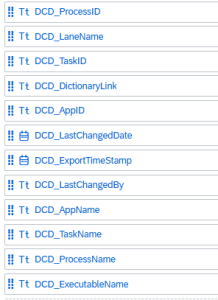
Projection
Restrict field list to just the new DCD fields.
Source 2
3VR_TECPRO_SigProMostRecentLinkAppToSys_01
Filter
"Dictionary Link" IS NOT NULL - this restricts the results to only those lines where an executable has been found (i.e. removing lines where only the system has been found).
Projection
Restrict to equivalent fields as seen in projection from source 1.
Join
Full join of data from Source 1 and Source 2 as Many:Many
Key fields are: Process ID, Task ID, Lane Name, Dictionary Link (which represents the executable), IT System Title (which has been found when linking the executable lines to the system lines in the previous view).
This key will generate the correct cartesian product for comparison of lines between snapshots, taking the blended executable / system lines into consideration.
Calculation
3VR_TECPRO_SignavioProcessUnion_01
Join
Purpose: etc
3VR_TECPRO_SignavioProcessLinkAppToSys_01
Join
Purpose: etc
3VF_TECPRO_SignavioProcessUnion_01
Union
Purpose: To bring in values from PO level alongside lower level granularity documents
| Target Field | Source1-Field | Source2-Field |
|---|---|---|
| PO | PO | PO |
| POItem | POItem | POItem |
| MaterialDocument | - | MaterialDocument |
Associations to master data
List objects where material master associations are to be made.
Calculated Measures (Pre-Aggregation Calculations)
3VF_TECPRO_SignavioSwimLaneChanges_02
Source Current data
Filter
IT System Category is Null - Only steps executed by humans
Projection
Remove all fields not relevant to swimlanes
Source Previous Snapshot
Filter
IT System Category is Null - Only steps executed by humans
Calculation
Rename all fields relevant to Swimlanes to DCD_ to identify separately in join
Projection
Remove all fields not relevant to swimlanes
Union
...
Fields
Calculation
Reorder fields such that field equivalents are alongside each other.Purpose: To bring in values from PO level alongside lower level granularity documents
Reporting Layer
4MA_TECPRO_SignavioProcessUnion_01
Link to FSD (Each Analytic model should have its own FSD).
Include technical details for:
Calculated Measures (Post Aggregation Calculations / exception aggregation etc)
Restricted Measures
Detail restrictions
Currency Conversions
Detail rate type, from currency
Variables
Data access controls
4MA_TECPRO_SignavioSwimLaneChanges_02
Link to FSD (Each Analytic model should have its own FSD).
Include technical details for:
Calculated Measures (Post Aggregation Calculations / exception aggregation etc)
Restricted Measures
Detail restrictions
Currency Conversions
Detail rate type, from currency