

| Status |
| |
|---|---|---|
| Owner | ||
| Stakeholders | WELENSKY-ext, Dave VILARES, ines LEIGHTON-ext, Dean PUN-ext, Eddy TEE-ext, Paul JOSHI-ext, Aditya Ayse Sarukan; Aurelia Stefanescu; [Syniti POD Lead]; [Syniti Consultant] MOUSSA-ext, Eva HUSSAN-ext, Nishin SARUKAN-ext, Ayse STEFANESCU-ext, Aurelia |
Purpose
The purpose of this document is to define the conversion approach to create EAM Characteristics in S/4 HANA.
Legacy Plant Maintenance Characteristics is using a diverse range of formats across the different systems. There are instances where the same characteristics are duplicated within and across sources and with informal words. This results in data inconsistency. As per SyWay design, EAM Characteristics will be standardized.
Conversion Scope
The scope of this document covers the approach for converting active EAM Characteristics from Legacy Source Systems into S/4HANA following the EAM Characteristics Master Data Design Standard.
Characteristics define a single custom field used to capture specific properties, attributes or values of an object. In SAP, Classes and Characteristics together form the “Classification System”.
For Syensqo, Characteristics will be used to record key attributes supporting reliability categorization and various analyses. It will be primarily used for information and reporting of attribute data across a large set of technical objects (e.g. Functional Location Structure). These Characteristics will be created centrally and assigned to relevant Classes.
From the current source systems’ perspective, Class and Characteristic concepts already exist (but in slightly different structure). Characteristic data and their allowed values are independently managed between PF2 and WP2. While these have been identified as source systems, a considerable amount of data construction will be required to support the production of data load sheets in the desired format.
While these systems serve as sources, extensive construction will be necessary to produce properly formatted data load sheets for S/4 HANA.
The scope of this document covers the approach for converting active Characteristics from Legacy systems (PF2, WP2) and creation of New EAM Characteristics into S/4 HANA following the Characteristics Master Data Design Standard.
The data from legacy system includes:
- Characteristics (CABN-ATNAM) assigned to Classes with below Class Typebelow Class Type (KLAH-KLART)
- 001-Material Class
- 002-Equipment Class
- 003-Functional Location
- </Start CR0164>
017-Document Management</End CR0164> - 018-Task List Class
- 037-Measuring Point Class
- 080-Maintenance Plans Class
- Characteristics assigned to Active active Legacy Measuring Points
- Valid from [Current Date]
- Status = 1 (Released)
- (IMPTT-POINT)
- Legacy Measuring Point linked to active Legacy Functional Location (IFLOT-TPLNR with System Status TJ02T-TXT04 <> INAC)
- Legacy Measuring Point linked to active Legacy Equipment (EQUI-EQNR with System Status TJ02T-TXT04 <> INAC)
- Status (CABN-ATMST) = 1 (Released)
The data from legacy system excludes:The data from legacy system excludes:
- Characteristics for Deletion (Deletion Indicator CABN-LKENZ = "X")
List of source systems and approximate number of records
| Source | Scope | Source Approx No. of Records | Target System | Target Approx No. of Records |
|---|---|---|---|---|
| PF2, WP2 | Characteristics will be collected via DCT. An initial extract of the relevant Characteristics will be provided in google sheet format to assist business in decision making on including any relevant Characteristics from PF2 and WP2 as EAM Characteristics. Any additional Characteristics that need to be created to support the new design may be added in the DCT. A review and standardization will be done across all characteristics in the DCT. | 6,500 | 6,500 |
Additional Information
Multi-language Requirement
Note: A full Data Construct will be created for Characteristics, as the SyWay design is changing and a complete standardization will be performed. While data may already exist, it cannot be easily transformed to align with the new SyWay data setup. | 6,500 | 6,500 |
Additional Information
Multi-language Requirement
EAM Characteristic description will be made available EAM Characteristic description will be made available in English.
Multi language is supported for EAM Characteristics. Login via a different language will have its description displayed in the logon language if the language key is maintained in the Characteristics.
Document Management
Not Applicable
Legal Requirement
Not Applicable
Special Requirements
Not Applicable
Target Design
The technical design of the target for this conversion approach.
1. Characteristics
| Table | Field | Data Element | Field Description | Data Type | Length | Requirement |
|---|---|---|---|---|---|---|
| CABN | ATNAM | ATNAM | Characteristic Name | CHAR | 30 | Mandatory |
| CABN | DATUV | DATUV | Valid-From Date | DATS | 8 | Mandatory |
| CABN | ATKLA | ATKLA | Characteristics Group | CHAR | 10 | |
| CABN | ATMST | ATMST | Status of a characteristic | CHAR | 1 | Mandatory |
| CABN | ATFOR | ATFOR | Data Type | CHAR | 4 | Mandatory |
| CABN | ANZST | ANZST | Number of Characters | INT2 | 5 | Mandatory (When Data Type = CURR, CHAR, NUM) |
| CABN | ANZDZ | ANZDZ | Number of Decimal Places | INT2 | 5 | Mandatory (When Data Type = NUM) |
| CABN | ATKLE | ATKLE | Case Sensitive | CHAR | 1 |
|
| CABN | CURRENCY | CURRENCY | Currency Key | CUKY | 1 | Mandatory (When Data Type = CURR) |
| CABN | MSEHI | MSEHI | Unit of Measure | UNIT | 6 | |
| CABN | ATSCH | ATSCH | Value with template | CHAR | 30 |
|
| CABN | ATDEX | ATDEX | Exponent Display Format | NUMC | 1 |
| CABN | ATEIN | ATEIN | Single Value | CHAR | 1 | |
| CABN |
| ATGLA | ATGLA | Indicator: restrictable characteristic | CHAR | 1 | ||
| CABN | ATERF | ATERF | Entry Required | CHAR | 1 | |
| CABN | ATINT | ATINT | Interval values allowed | CHAR | 1 | |
| CABN | ATVOR | ATVOR | Value with Plus or Minus Sign | CHAR | 1 | |
| CABN | ATSON | ATSON | Indicator: Additional Values | CHAR | 1 |
2. Characteristic Descriptions
| CABN | ATBEW | ATBEW | Single/Multiple Value | CHAR | 1 | System |
2. Characteristic Descriptions
| Table | Field | Data Element | Table | Field | Data Element | Field Description | Data Type | Length | Requirement |
|---|---|---|---|---|---|---|---|---|---|
| CABN | ATNAM | ATNAM | Characteristic Name | CHAR | 30 | Mandatory | |||
| CABNT | ATBEZ | ATBEZ | Characteristic description | CHAR | 4030 | Mandatory | |||
| CABNT | SPRAS | SPRAS | Language Key (Characteristic Description) | LANG | 1 | Mandatory |
Note: Each Characteristic must have 1 entry for each language in scope: English, French, Italian, Mandarin, BrazilianBrazilian Portuguese, Portuguese, German and Spanish
3. Characteristic Restrictions to Class Types
| Table | Field | Data Element | Field Description | Data Type | Length | Requirement |
|---|---|---|---|---|---|---|
| CABN | ATNAM | ATNAM | Characteristic Name | CHAR | 30 | Mandatory |
| KSML | KLART | KLASSENART | Class Type | 0CHAR | 3 | Mandatory |
Note: One Characteristic should have at least one Class Type Restriction assigned.
4. Characteristic Values
| Table | Field | Data Element | Field Description | Data Type | Length | Requirement |
|---|---|---|---|---|---|---|
| CABN | ATNAM | ATNAM | Characteristic Name | CHAR | 30 | Mandatory |
| CAWN | ATWRT | ATWRT | Characteristic Value | CHAR | 30 | |
| CAWN |
| CURR_FROM | CAWN |
Note: Construct Data Selection Value is to be defined for the Characteristic.
5. Characteristic Value Descriptions
Note: Each Characteristic Value must have 1 entry for each language in scope: English, French, Italian, Mandarin, Brazilian, Portuguese, German and Spanish
Characteristics A2D Data strictly adheres to the Master Data Standard. The complete information of the key fields that hold the Characteristic information follows the Master Data Standard document that is located here.
Data Cleansing
No data cleansing is required for Characteristics in the legacy systems. If any cleansing is deemed necessary, it will be performed outside of the systems.
As a result, the cleansed Characteristics data will be populated directly in the Data Collection Template (DCT).
Conversion Process
The high-level process is represented by the diagram below:

Collection will be done manually in the Data Collection Template for the following scenarios:
- For sites not on SAP-PF2 or WP2 systems
- For new Characteristics that need to be created to support the to-be design
Data Privacy and Sensitivity
Not ApplicableExtraction
Extract data from a source into Syniti Migrate. There are 2 possibilities:
- The data exists. Syniti Migrate connects to the source and loads the data into Syniti Migrate. There are 3 methods:
- Perform full data extraction from relevant tables in the source system(s).
- Perform extraction through the application layer.
- Only if Syniti Migrate; cannot connect to the source, data is loaded to the repository from the provided source system extract/report.
- The data does not exist (or cannot be converted from its current state). The data is manually collected by the business directly in Syniti Migrate. This is to be conducted using DCT (Data Collection Template) in Syniti Migrate
The agreed Relevancy criteria is applied to the extracted records to identify the records that are applicable for the Target loads
- The data exists. Syniti Migrate connects to the source and loads the data into Syniti Migrate. There are 3 methods:
Extraction Run Sheet
Selection Screen
Data Collection Template (DCT)
Target Ready Data Collection Template will be created for EAM Characteristics data with exception of some fields which require transformation as mentioned in the transformation rule.
- The extracted report will be loaded into the required structure using the DCT.
- Standardization activities (including deduplication, standardization and additions) will be carried out within the DCT.
Delta Data Management: Initial collection will be done via the report and one-time load to the DCT will be performed. Any delta after the initial collection within the DCT will require business to take due diligence to ensure any subsequent delta cleansing is verified and aligned within the DCT.
1. Characteristics DCT Rules
Mandatory
The naming convention for characteristics will follow the structure:
EAM_ + Abbreviation
(For characteristics that are specific to a Measuring Point and intended for use only on that object, the characteristic name should start with “EAM_MPT + Abbreviation.
Abbreviation = should be meaningful to the end user
examples:
EAM_MPT_RUN_HOURS
EAM_PIPING_TYPE
Conditional.
User must provide a value indicating when this characteristic will be valid for use. Otherwise, leave blank.
Conditional.
- Must be a valid Characteristic Group (TCMG).
- If the characteristic belongs to a group of similar characteristics, assign it to the appropriate characteristic group. Otherwise, leave the field blank
- Characteristic Groups have the format <Group Code>_XXXX where Group Code is a 2 character field representing the functional group it relates to e.g. AM – Asset Management and XXXX is a 4 character abbreviation of the class the characteristics relate to.
Char groups shall align with class groups.
Mandatory.
Non-Editable.
Default to ''1''
Mandatory
- Character format (CHAR): for characteristic values that consist of a character string
- Numeric format (NUM): for numeric characteristic values
- Date format (DATE): for characteristic values that represent a date
- Time format (TIME): for characteristic values that represent a time
- Currency format (CURR): for characteristic values that are entered in a currency
Ensure use of a valid data type
Conditional.
This field must be filled, when Data Type chosen '' CURR, CHAR, NUM''
Maximum value=30 for CHAR
Maximum value=15 for CURR
Maximum value=15 for NUM
Conditional.
This field can be filled when the Data Type is set to NUM.
When 'CURR' is chosen, the field is automatically populated based on the selected currency.
Conditional.
Indicator (check box).
This field can to be filled, when Data Type chosen CHAR.
Conditional.
This needs to be filled, when data type chosen CURR.
Conditional.
This can be filled, when data type chosen NUM
Conditional.
This can be filled, when data type chosen CHAR, NUM, CURR
Conditional.
Allowed values:
0: No exponent
1: Standard
2: Exponent entered
3: Scientific exponent
This can to be filled, when data type chosen NUM
Conditional.
Indicator (check box).
Select this option if only a single value is allowed for the characteristic. If ‘Single Value’ is selected, the indicator ‘More Than One Value Allowed for Characteristic’ cannot be chosen.
Conditional.
Indicator (check box).
Select this option if multiple value is allowed for the characteristic. If ‘More Than One Value Allowed for Characteristic’ is selected, the indicator ‘Single Value’ cannot be chosen.
Conditional.
Indicator (check box).
This can be marked, when data type chosen CHAR, CURR, DATE, NUM, TIME
This field can be selected only if the ‘More Than One Value’ indicator is marked.
Conditional.
Indicator (check box).
This can be marked, when data type chosen CHAR, CURR, DATE, NUM, TIME
Conditional.
Indicator (check box).
This can be marked, when data type chosen CURR, DATE, NUM, TIME
Conditional.
Indicator (check box).
This can be marked, when data type chosen CURR, NUM
Conditional.
Indicator (check box).
Once the language key is selected, the description field should be filled in the corresponding language.
2. Characteristic Description DCT Rules
Mandatory.
Should exist in Characteristics DCT Rules
Mandatory.
- The description should correspond to the Language Key provided.
- Characteristic description should be in Title Case
- Duplicate descriptions will not be allowed for each Language Key
Mandatory.
- The selected Language Key must correspond to the description provided.
- Language shall be English, French, Italian, Mandarin, Brazilian Portuguese, German and Spanish
3. Characteristic Restrictions to Class Types DCT Rules
Mandatory.
Should exist in Characteristics DCT Rules
Mandatory.
The following values apply to A2D;
001 - Material Class
002 - Equipment Class
003 - Functional Location
017 - Document Management
018 - Task List Class
037 - Measuring Point Class
080 - Maintenance Plans Class
4. Characteristic Value DCT Rules
Mandatory.
Should exist in Characteristics DCT Rules
Conditional.
If the characteristic has character format (CHAR), this field contains a single character string.
If values in time format (TIME) must have the format HH:MM:SS. The separators are set automatically.
Example: 112855 --> 11:28:55
If the values in date format (DATE) must have the format DD.MM.YYYY. The separators are set automatically.
Example: 110100 --> 11.01.2000
Conditional.
Indicator (check box).
If the business selects this checkbox for a value, it shall be marked; otherwise, it shall remain blank.
| _CURR_FROM | Characteristic Value | CURR | 23 | |||
| CAWN | CURR_TO | CAWN_CURR_TO | Characteristic Value | CURR | 23 | |
| CAWN | CURRENCY | WAERS_CURR | Characteristic Value | CUKY | 5 | |
| CAWN | DATE_FROM | CAWN_DATE_FROM | Characteristic Value | DATS | 8 | |
| CAWN | DATE_TO | CAWN_DATE_TO | Characteristic Value | DATS | 8 | |
| CAWN | DEC_FROM | CAWN_DEC_FROM | Characteristic Value | DECFLOAT34 | 34 | |
| CAWN | DEC_TO | CAWN_DEC_TO | Characteristic Value | DECFLOAT34 | 34 | |
| CAWN | TIME_FROM | CAWN_TIME_FROM | Characteristic Value | TIMS | 6 | |
| CAWN | TIME_TO | CAWN_TIME_TO | Characteristic Value | TIMS | 6 | |
| CAWN | ATSTD | ATSTD | Default value | CHAR | 1 | |
| CAWN | ATCOD | ATCOD | Code for Value Dependency | CHAR | 1 | System |
Note: Allowed Values is to be defined for the Characteristic (where applicable).
5. Characteristic Value Descriptions
| Table | Field | Data Element | Field Description | Data Type | Length | Requirement |
|---|---|---|---|---|---|---|
| CAWN | ATNAM | ATNAM | Characteristic Name | CHAR | 30 | Mandatory |
| CAWN | ATWRT | ATWRT | Characteristic Value | CHAR | 30 | Mandatory |
| CAWNT | SPRAS | SPRAS | Language Key (Characteristic Value Description) | LANG | 1 | Mandatory |
| CAWNT | ATWTB | ATWTB | Characteristic Value Description | CHAR | 30 | Mandatory |
Note: Each Characteristic Value must have 1 entry for each language in scope: English, French, Italian, Mandarin, Brazilian, Portuguese, German and Spanish
Characteristics A2D Data strictly adheres to the Master Data Standard. The complete information of the key fields that hold the Characteristic information follows the Master Data Standard document that is located here.
Data Cleansing
No data cleansing is required for Characteristics in the legacy systems. If any cleansing is deemed necessary, it will be performed outside of the systems.
As a result, the cleansed Characteristics data will be populated directly in the Data Collection Template (DCT).
| ID | Criticality | Error Message/Report Description | Rule | Output | Source System |
|---|---|---|---|---|---|
| Not Applicable |
Conversion Process
The high-level process is represented by the diagram below:
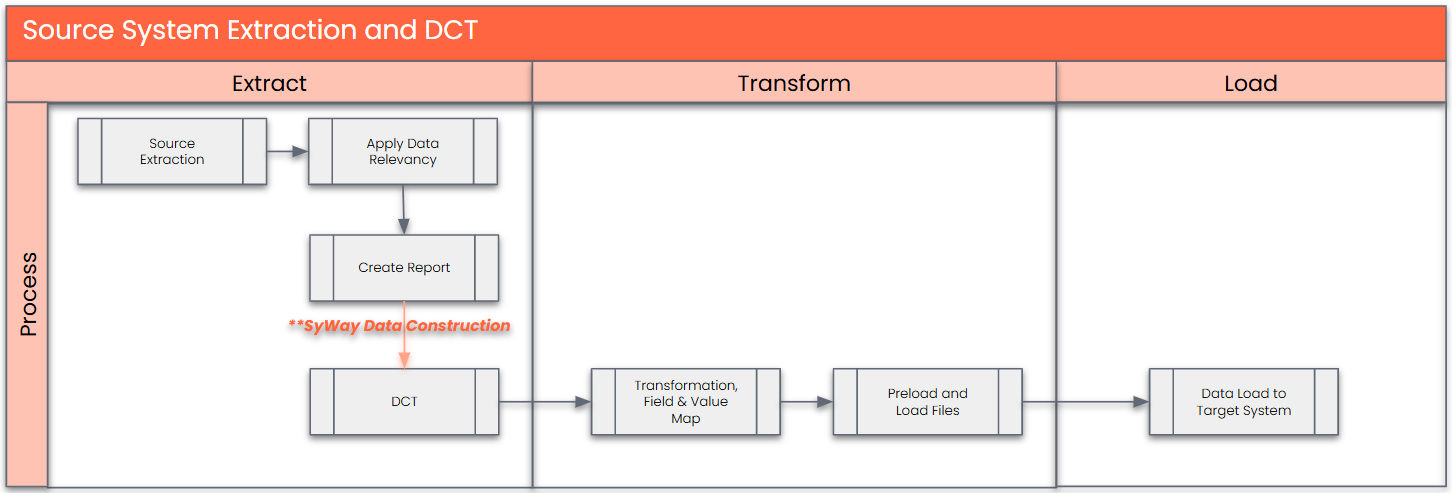
Collection will be done manually in the Data Collection Template for the following scenarios:
- For new Characteristics that need to be created to support the to-be design
Data Privacy and Sensitivity
Not ApplicableExtraction
Extract data from a source into Syniti Migrate. There are 2 possibilities:
- The data exists. Syniti Migrate connects to the source and loads the data into Syniti Migrate. There are 3 methods:
- Perform full data extraction from relevant tables in the source system(s).
- Perform extraction through the application layer.
- Only if Syniti Migrate; cannot connect to the source, data is loaded to the repository from the provided source system extract/report.
- The data does not exist (or cannot be converted from its current state). The data is manually collected by the business directly in Syniti Migrate. This is to be conducted using DCT (Data Collection Template) in Syniti Migrate
The agreed Relevancy criteria is applied to the extracted records as reference point to identify the records that are applicable for the data construction in the DCT.
- The data exists. Syniti Migrate connects to the source and loads the data into Syniti Migrate. There are 3 methods:
Extraction Run Sheet
| Req # | Requirement Description | Team Responsible |
|---|---|---|
| 1 | Extract data from source system based on relevancy rule | SyWay Data Team |
| 2 | Google Sheet report pre-populated with PF2 and WP2 information to be generated based on relevancy criteria. | SyWay Data Team |
Selection Screen
| Selection Ref Screen | Parameter Name | Selection Type | Requirement | Value to be entered/set |
|---|---|---|---|---|
| Not Applicable |
Data Collection Template (DCT)
Target Ready Data Collection Template will be created for EAM Characteristics data with exception of some fields which require transformation as mentioned in the transformation rule.
- The extracted report will be loaded into the required structure using the DCT.
- Standardization activities (including deduplication, standardization and additions) will be carried out within the DCT.
Delta Data Management: Initial collection will be done via the report and one-time load to the DCT will be performed. Any delta after the initial collection within the DCT will require business to take due diligence to ensure any subsequent delta cleansing is verified and aligned within the DCT.
Note: All rules specified below should be documented as a tooltip in the DC Page.
Format:
- Line 1: Mandatory / Conditional
- Line 2: Remaining text
1. Characteristics Data Construction Rules
| Field Name | Field Description | Rule |
|---|---|---|
| ATNAM | Characteristic Name | Mandatory. Staging identifier used to uniquely define an A2D characteristic. |
| DATUV | Valid-From Date | Conditional. Provide a value indicating when this characteristic will be valid for use. Otherwise, leave blank. |
| ATKLA | Characteristics Group | Conditional.
|
| ATFOR | Data Type | Mandatory. Allowed values:
Ensure use of a valid data type. |
| ANZST | Number of Characters | Conditional. This field must be filled, when Data Type chosen '' CURR, CHAR, NUM'' |
| ANZDZ | Number of Decimal Places | Conditional. This field must be filled when the Data Type is set to NUM. |
| ATKLE | Case Sensitive | Conditional. Indicator (check box). Allowed Values: " " = Not Checked "X" = Checked This field can to be filled, when Data Type chosen CHAR. |
| CURRENCY | Currency Key | Conditional. This needs to be filled, when data type chosen CURR. |
| MSEHI | Unit of Measure | Conditional. This can be filled, when data type chosen NUM |
| ATSCH | Value with template | Conditional. Allowed Values: Values as per configuration (TCPS) This can be filled, when data type chosen CHAR, NUM, CURR |
| ATDEX | Exponent Display Format | Conditional. Allowed values: |
| ATEIN | Single Value | Conditional. Indicator (check box). Allowed Values: " " = Not Checked "X" = Checked If the option 'Single Value' is selected "X", this means only one value can be assigned to the Characteristic. |
| ATGLA | Indicator: restrictable characteristic | Conditional. Indicator (check box). Allowed Values: " " = Not Checked "X" = Checked This can be marked, when data type chosen CHAR, CURR, DATE, NUM, TIME |
| ATERF | Entry Required | Conditional. Indicator (check box). Allowed Values: " " = Not Checked "X" = Checked This can be marked, when data type chosen CHAR, CURR, DATE, NUM, TIME |
| ATINT | Interval values allowed | Conditional. Indicator (check box). Allowed Values: " " = Not Checked "X" = Checked This can be marked, when data type chosen CURR, DATE, NUM, TIME |
| ATVOR | Value with Plus or Minus Sign | Conditional. Indicator (check box). Allowed Values: " " = Not Checked "X" = Checked This can be marked, when data type chosen CURR, NUM |
| ATSON | Indicator: Additional Values | Conditional. Indicator (check box). Allowed Values: " " = Not Checked "X" = Checked This can only be checked (marked "X") if the “Indicator: restrictable characteristic” checkbox is checked (marked "X"). |
| ATBEZ_EN | Description (English) | Mandatory. Ensure to that this Class Description is in English. Ensure that it does not include any of below characters: |
| ATBEZ_FR | Description (French) | Mandatory. Ensure to that this Class Description is in French. Ensure that it does not include any of below characters: |
| ATBEZ_IT | Description (Italian) | Mandatory. Ensure to that this Class Description is in Italian. Ensure that it does not include any of below characters: |
| ATBEZ_ZH | Description (Mandarin) | Mandatory. Ensure to that this Class Description is in Mandarin. Ensure that it does not include any of below characters: |
| ATBEZ_PT | Description (Brazilian Portuguese) | Mandatory. Ensure to that this Class Description is in Portuguese. Ensure that it does not include any of below characters: |
| ATBEZ_DE | Description (German) | Mandatory. Ensure to that this Class Description is in German. Ensure that it does not include any of below characters: |
| ATBEZ_ES | Description (Spanish) | Mandatory. Ensure to that this Class Description is in Spanish. Ensure that it does not include any of below characters: |
| KLART_001 | Class Type (Material Class) | Conditional. Indicator (check box). Allowed Values: " " = Not Checked "X" = Checked Select if to be assigned with 001-Material Class Type |
| KLART_002 | Class Type (Equipment Class) | Conditional. Indicator (check box). Allowed Values: " " = Not Checked "X" = Checked Select if to be assigned with 002-Equipment Class Type |
| KLART_003 | Class Type (Functional Location) | Conditional. Indicator (check box). Allowed Values: " " = Not Checked "X" = Checked Select if to be assigned with 003-Functional Location Class Type |
</Start CR0164>
</End CR0164> | </Start CR0164>
</End CR0164> | </Start CR0164>
</End CR0164> |
| KLART_018 | Class Type (Task List Class) | Conditional. Indicator (check box). Allowed Values: " " = Not Checked "X" = Checked Select if to be assigned with 018-Task List Class Type |
| KLART_037 | Class Type (Measuring Point Class) | Conditional. Indicator (check box). Allowed Values: " " = Not Checked "X" = Checked Select if to be assigned with 037-Measuring Point Class Type |
| KLART_080 | Class Type (Maintenance Plans Class) | Conditional. Indicator (check box). Allowed Values: " " = Not Checked "X" = Checked Select if to be assigned with 080-Maintenance Plan Class Type |
2. Characteristic Value Data Construction Rules
| Field Name | Field Description | Rule |
|---|---|---|
| ATNAM | Characteristic Name | Mandatory. Should exist in Characteristics DCT Rules |
| ATWRT | Characteristic Value | Conditional.
Note for DATE, TIME, NUM and CURR formats:
|
| ATSTD | Default value | Conditional. Indicator (check box). Allowed Values: " " = Not Checked "X" = Checked If the business selects this checkbox for a value, it shall be marked; otherwise, it shall remain blank. |
| ATWTB_EN | Description (English) | Mandatory for Characteristics with Data Type = CHAR. Ensure to that this Class Description is in English. Ensure that it does not include any of below characters: |
| ATWTB_FR | Description (French) | Mandatory for Characteristics with Data Type =CHAR. Ensure to that this Class Description is in French. Ensure that it does not include any of below characters: |
| ATWTB_IT | Description (Italian) | Mandatory for Characteristics with Data Type =CHAR. Ensure to that this Class Description is in Italian. Ensure that it does not include any of below characters: |
| ATWTB_ZH | Description (Mandarin) | Mandatory for Characteristics with Data Type =CHAR. Ensure to that this Class Description is in Mandarin. Ensure that it does not include any of below characters: |
| ATWTB_PT | Description (Brazilian Portuguese) | Mandatory for Characteristics with Data Type =CHAR. Ensure to that this Class Description is in Portuguese. Ensure that it does not include any of below characters: |
| ATWTB_DE | Description (German) | Mandatory for Characteristics with Data Type =CHAR. Ensure to that this Class Description is in German. Ensure that it does not include any of below characters: |
| ATWTB_ES | Description (Spanish) | Mandatory for Characteristics with Data Type =CHAR. Ensure to that this Class Description is in Spanish. Ensure that it does not include any of below characters: |
Note: Data Selection Value is to be defined for the Characteristic (where applicable).
Extraction Dependencies
| Item # | Step Description | Team Responsible |
|---|---|---|
Not Applicable |
Transformation
The Target fields are mapped to the applicable Legacy field that will be its source, this is a 3-way activity involving the Business, Functional team and Data team. This identifies the transformation activity required to allow to make the data Target ready:
- Perform value mapping and data transformation rules.
- Legacy values are mapped to the to-be values (this could include a default value)
- Values are transformed according to the rules defined in
- Prepare target-ready data in the structure and format that is required for loading via prescribed Load Tool. This step also produces the load data ready for business to perform Pre-load Data Validation
Transformation Run Sheet
| Item # | Step Description | Team Responsible |
|---|---|---|
1 | Obtain DCT Sign-off from Business. | SyWay Data Team |
2 | In dspMigrate, select the wave – S4/HANA – Plant Maintenance | Syniti |
3 | Go to Process Area Launch and Process the Object – Characteristics | Syniti |
4 | Review and Validate Error and Preload Reports | Syniti |
5 | Execute the transformation to prepare the target tables | Syniti |
6 | Validate data from pre-load and error reports | Business/Data owner |
7 | Generate load files | Syniti |
Transformation Rules
1. Characteristics
| Rule # | Source system | Source Table | Source Field | Source Description | Target System | Target Table | Target Field | Target Description | Transformation Logic |
|---|---|---|---|---|---|---|---|---|---|
| 1 | DCT | CABN | ATNAM | Characteristic Name | S/4 Hana | CABN | ATNAM | Characteristic Name | Generate as per this format: EAM_NNNNNN (NNNNNN represents a sequential number)
Note: For future deployments, this setup will need to be revisited to ensure the maximum EAM_NNNNNN value configured in the target system is considered. The next characteristic to be created should be Max(EAM_NNNNNN) + 1. |
| 2 | DCT | CABN | DATUV | Valid-From Date | S/4 Hana | CABN | DATUV | Valid-From Date | If has value in DCT, Direct Mapping. If blank, derive the date as per Value Mapping: OTH_Migration_Date Relevant Values A2D (using Object ID "1015" and Field Name = "CABN-DATUV". |
| 3 | DCT | CABN | ATKLA | Characteristics Group | S/4 Hana | CABN | ATKLA | Characteristics Group | Direct Mapping |
| 4 | DCT | CABN | ATMST | Status of a characteristic | S/4 Hana | CABN | ATMST | Status of a characteristic | Default to ''1'' |
| 5 | DCT | CABN | ATFOR | Data Type | S/4 Hana | CABN | ATFOR | Data Type | Direct Mapping |
| 6 | DCT | CABN | ANZST | Number of Characters | S/4 Hana | CABN | ANZST | Number of Characters | Direct Mapping |
| 7 | DCT | CABN | ANZDZ | Number of Decimal Places | S/4 Hana | CABN | ANZDZ | Number of Decimal Places | Direct Mapping |
| 8 | DCT | CABN | ATKLE | Case Sensitive | S/4 Hana | CABN | ATKLE | Case Sensitive | Direct Mapping |
| 9 | DCT | CABN | CURRENCY | Currency Key | S/4 Hana | CABN | CURRENCY | Currency Key | Direct Mapping |
| 10 | DCT | CABN | MSEHI | Unit of Measure | S/4 Hana | CABN | MSEHI | Unit of Measure | Direct Mapping |
| 11 | DCT | CABN | ATSCH | Value with template | S/4 Hana | CABN | ATSCH | Value with template | Direct Mapping |
| 12 | DCT | CABN | ATDEX | Exponent Display Format | S/4 Hana | CABN | ATDEX | Exponent Display Format | Direct Mapping |
| 13 | DCT | CABN | ATEIN | Single Value | S/4 Hana | CABN | ATEIN | Single Value | Direct Mapping |
| 14 | DCT | CABN | ATGLA | Indicator: restrictable characteristic | S/4 Hana | CABN | ATGLA | Indicator: restrictable characteristic | Direct Mapping |
| 15 | DCT | CABN | ATERF | Entry Required | S/4 Hana | CABN | ATERF | Entry Required | Direct Mapping |
| 16 | DCT | CABN | ATINT | Interval values allowed | S/4 Hana | CABN | ATINT | Interval values allowed | Direct Mapping |
| 17 | DCT | CABN | ATVOR | Value with Plus or Minus Sign | S/4 Hana | CABN | ATVOR | Value with Plus or Minus Sign | Direct Mapping |
| 18 | DCT | CABN | ATSON | Indicator: Additional Values | S/4 Hana | CABN | ATSON | Indicator: Additional Values | Direct Mapping |
| 19 | - | - | - | - | S/4 Hana | CABN | ATBEW | Single/Multiple Value |
|
2. Characteristic Descriptions
| Rule # | Source system | Source Table | Source Field | Source Description | Target System | Target Table | Target Field | Target Description | Transformation Logic |
|---|---|---|---|---|---|---|---|---|---|
| 1 | DCT | CABN | ATNAM | Characteristic Name | S/4 Hana | CABN | ATNAM | Characteristic Name | Value Mapping: Characteristic A2D |
| 2 | DCT | CABNT | ATBEZ_EN | Characteristic Description (English) | S/4 Hana | CABNT | ATBEZ | Characteristic description | Direct Mapping |
| 3 | DCT | CABNT | SPRAS | Language Key (Characteristic Description) | S/4 Hana | CABNT | SPRAS | Language Key (Characteristic Description) | Default to "E" |
UNION
| Rule # | Source system | Source Table | Source Field | Source Description | Target System | Target Table | Target Field | Target Description | Transformation Logic |
|---|---|---|---|---|---|---|---|---|---|
| 1 | DCT | CABN | ATNAM | Characteristic Name | S/4 Hana | CABN | ATNAM | Characteristic Name | Value Mapping: Characteristic A2D |
| 2 | DCT | CABNT | ATBEZ_FR | Characteristic description (French) | S/4 Hana | CABNT | ATBEZ | Characteristic description | Direct Mapping |
| 3 | DCT | CABNT | SPRAS | Language Key (Characteristic Description) | S/4 Hana | CABNT | SPRAS | Language Key (Characteristic Description) | Default to "F" |
UNION
| Rule # | Source system | Source Table | Source Field | Source Description | Target System | Target Table | Target Field | Target Description | Transformation Logic |
|---|---|---|---|---|---|---|---|---|---|
| 1 | DCT | CABN | ATNAM | Characteristic Name | S/4 Hana | CABN | ATNAM | Characteristic Name | Value Mapping: Characteristic A2D |
| 2 | DCT | CABNT | ATBEZ_IT | Characteristic description (Italian) | S/4 Hana | CABNT | ATBEZ | Characteristic description | Direct Mapping |
| 3 | DCT | CABNT | SPRAS | Language Key (Characteristic Description) | S/4 Hana | CABNT | SPRAS | Language Key (Characteristic Description) | Default to "I" |
UNION
| Rule # | Source system | Source Table | Source Field | Source Description | Target System | Target Table | Target Field | Target Description | Transformation Logic |
|---|---|---|---|---|---|---|---|---|---|
| 1 | DCT | CABN | ATNAM | Characteristic Name | S/4 Hana | CABN | ATNAM | Characteristic Name | Value Mapping: Characteristic A2D |
| 2 | DCT | CABNT | ATBEZ_ZH | Characteristic description (Mandarin) | S/4 Hana | CABNT | ATBEZ | Characteristic description | Direct Mapping |
| 3 | DCT | CABNT | SPRAS | Language Key (Characteristic Description) | S/4 Hana | CABNT | SPRAS | Language Key (Characteristic Description) | Default to "1" |
UNION
| Rule # | Source system | Source Table | Source Field | Source Description | Target System | Target Table | Target Field | Target Description | Transformation Logic |
|---|---|---|---|---|---|---|---|---|---|
| 1 | DCT | CABN | ATNAM | Characteristic Name | S/4 Hana | CABN | ATNAM | Characteristic Name | Value Mapping: Characteristic A2D |
| 2 | DCT | CABNT | ATBEZ_PT | Characteristic description (Brazilian Portuguese) | S/4 Hana | CABNT | ATBEZ | Characteristic description | Direct Mapping |
| 3 | DCT | CABNT | SPRAS | Language Key (Characteristic Description) | S/4 Hana | CABNT | SPRAS | Language Key (Characteristic Description) | Default to "P" |
UNION
| Rule # | Source system | Source Table | Source Field | Source Description | Target System | Target Table | Target Field | Target Description | Transformation Logic |
|---|---|---|---|---|---|---|---|---|---|
| 1 | DCT | CABN | ATNAM | Characteristic Name | S/4 Hana | CABN | ATNAM | Characteristic Name | Value Mapping: Characteristic A2D |
| 2 | DCT | CABNT | ATBEZ_DE | Characteristic description (German) | S/4 Hana | CABNT | ATBEZ | Characteristic description | Direct Mapping |
| 3 | DCT | CABNT | SPRAS | Language Key (Characteristic Description) | S/4 Hana | CABNT | SPRAS | Language Key (Characteristic Description) | Default to "D" |
UNION
| Rule # | Source system | Source Table | Source Field | Source Description | Target System | Target Table | Target Field | Target Description | Transformation Logic |
|---|---|---|---|---|---|---|---|---|---|
| 1 | DCT | CABN | ATNAM | Characteristic Name | S/4 Hana | CABN | ATNAM | Characteristic Name | Value Mapping: Characteristic A2D |
| 2 | DCT | CABNT | ATBEZ_ES | Characteristic description (Spanish) | S/4 Hana | CABNT | ATBEZ | Characteristic description | Direct Mapping |
| 3 | DCT | CABNT | SPRAS | Language Key (Characteristic Description) | S/4 Hana | CABNT | SPRAS | Language Key (Characteristic Description) | Default to "S" |
3. Characteristic Characteristic Restrictions to Class Types
Only get the records where KLART_001 = "X"
| Rule # | Source system | Source Table | Source Field | Source Description | Target System | Target Table | Target Field | Target Description | Transformation Logic |
|---|---|---|---|---|---|---|---|---|---|
| 1 | DCT | CABN | ATNAM | Characteristic Name | S/4 Hana | CABN | ATNAM | Characteristic Name | Value Mapping: Characteristic A2D |
| 2 | DCT | KSML | KLART_001 | Class Type (Material Class) | S/4 Hana | KSML | KLART | Class Type | Default to "001" |
UNION
Only get the records where KLART_002 = "X"
| Rule # | Source system | Source Table | Source Field | Source Description | Target System | Target Table | Target Field | Target Description | Transformation Logic |
|---|---|---|---|---|---|---|---|---|---|
| 1 | DCT | CABN | ATNAM | Characteristic Name | S/4 Hana | CABN | ATNAM | Characteristic Name | Value Mapping: Characteristic A2D |
| 2 | DCT | KSML | KLART_002 | Class Type (Equipment Class) | S/4 Hana | KSML | KLART | Class Type | Default to "002" |
UNION
Only get the records where KLART_003 = "X"
| Rule # | Source system | Source Table | Source Field | Source Description | Target System | Target Table | Target Field | Target Description | Transformation Logic |
|---|---|---|---|---|---|---|---|---|---|
| 1 | DCT | CABN | ATNAM | Characteristic Name | S/4 Hana | CABN | ATNAM | Characteristic Name | Value Mapping: Characteristic A2D |
| 2 | DCT | KSML | KLART_003 | Class Type (Functional Location) | S/4 Hana | KSML | KLART | Class Type | Default to "003" |
UNION
</Start CR0164>
Only get the records where KLART_017 = "X"
| |||||||||
</End CR0164>
UNION
Only get the records where KLART_018 = "X"
| Rule # | Source system | Source Table | Source Field | Source Description | Target System | Target Table | Target Field | Target Description | Transformation Logic |
|---|---|---|---|---|---|---|---|---|---|
| 1 | DCT | CABN | ATNAM | Characteristic Name | S/4 Hana | CABN | ATNAM | Characteristic Name | Value Mapping: Characteristic A2D |
| 2 | DCT | KSML | KLART_018 | Class Type (Task List Class) | S/4 Hana | KSML | KLART | Class Type | Default to "018" |
UNION
Only get the records where KLART_037 = "X"
| Rule # | Source system | Source Table | Source Field | Source Description | Target System | Target Table | Target Field | Target Description | Transformation Logic |
|---|---|---|---|---|---|---|---|---|---|
| 1 | DCT | CABN | ATNAM | Characteristic Name | S/4 Hana | CABN | ATNAM | Characteristic Name | Value Mapping: Characteristic A2D |
| 2 | DCT | KSML | KLART_037 | Class Type (Measuring Point Class) | S/4 Hana | KSML | KLART | Class Type | Default to "037" |
UNION
Only get the records where KLART_080 = "X"
| Rule # | Source system | Source Table | Source Field | Source Description | Target System | Target Table | Target Field | Target Description | Transformation Logic |
|---|---|---|---|---|---|---|---|---|---|
| 1 | DCT | CABN | ATNAM | Characteristic Name | S/4 Hana | CABN | ATNAM | Characteristic Name | Value Mapping: Characteristic A2D |
| 2 | DCT | KSML | KLART_080 | Class Type (Maintenance Plans Class) | S/4 Hana | KSML | KLART | Class Type | Default to "080" |
4. Characteristic Values
Only get the records where Characteristics with Data Type = CHAR
| Rule # | Source system | Source Table | Source Field | Source Description | Target System | Target Table | Target Field | Target Description | Transformation Logic |
|---|---|---|---|---|---|---|---|---|---|
| 1 | DCT | CABN | ATNAM | Characteristic Name | S/4 Hana | CABN | ATNAM | Characteristic Name | Value Mapping: Characteristic A2D |
| 2 | DCT | CAWN | ATWRT | Characteristic Value | S/4 Hana | CAWN | ATWRT | Characteristic Value | Direct Mapping |
| 3 | DCT | CAWN | ATSTD | Default value | S/4 Hana | CAWN | ATSTD | Default value | Direct Mapping |
| 4 | - | - | - | - | S/4 Hana | CAWN | ATCOD | Code for Value Dependency | Default to "3" |
Only get the records where Characteristics with Data Type = CURR
| Rule # | Source system | Source Table | Source Field | Source Description | Target System | Target Table | Target Field | Target Description | Transformation Logic |
|---|---|---|---|---|---|---|---|---|---|
| 1 | DCT | CABN | ATNAM | Characteristic Name | S/4 Hana | CABN | ATNAM | Characteristic Name | Value Mapping: Characteristic A2D |
| 2 | DCT | CAWN | ATWRT | Characteristic Value | S/4 Hana | CAWN | CURR_FROM | Characteristic Value | If range: values concatenated using " - ", derive the value before " - ". Otherwise, direct mapping. |
| 3 | DCT | CAWN | ATWRT | Characteristic Value | S/4 Hana | CAWN | CURR_TO | Characteristic Value | If range: values concatenated using " - ", derive the value after " - ". Otherwise, leave blank. |
| 4 | DCT | CABN | CURRENCY | Currency Key | S/4 Hana | CAWN | CURRENCY | Currency | Derive from Currency Key of the Characteristics |
| 5 | DCT | CAWN | ATSTD | Default value | S/4 Hana | CAWN | ATSTD | Default value | Direct Mapping |
| 6 | - | - | - | - | S/4 Hana | CAWN | ATCOD | Code for Value Dependency | Default to "3" |
Only get the records where Characteristics with Data Type = DATE
| Rule # | Source system | Source Table | Source Field | Source Description | Target System | Target Table | Target Field | Target Description | Transformation Logic |
|---|---|---|---|---|---|---|---|---|---|
| 1 | DCT | CABN | ATNAM | Characteristic Name | S/4 Hana | CABN | ATNAM | Characteristic Name | Value Mapping: Characteristic A2D |
| 2 | DCT | CAWN | ATWRT | Characteristic Value | S/4 Hana | CAWN | DATE_FROM | Characteristic Value | If range: values concatenated using " - ", derive the value before " - ". Otherwise, direct mapping. |
| 3 | DCT | CAWN | ATWRT | Characteristic Value | S/4 Hana | CAWN | DATE_TO | Characteristic Value | If range: values concatenated using " - ", derive the value after " - ". Otherwise, leave blank. |
| 4 | DCT | CAWN | ATSTD | Default value | S/4 Hana | CAWN | ATSTD | Default value | Direct Mapping |
| 5 | - | - | - | - | S/4 Hana | CAWN | ATCOD | Code for Value Dependency | Default to "3" |
Only get the records where Characteristics with Data Type = NUM
| Rule # | Source system | Source Table | Source Field | Source Description | Target System | Target Table | Target Field | Target Description | Transformation Logic |
|---|---|---|---|---|---|---|---|---|---|
| 1 | DCT | CABN | ATNAM | Characteristic Name | S/4 Hana | CABN | ATNAM | Characteristic Name | Value Mapping: Characteristic A2D |
| 2 | DCT | CAWN | ATWRT | Characteristic Value | S/4 Hana | CAWN | DEC_FROM | Characteristic Value | If range: values concatenated using " - ", derive the value before " - ". Otherwise, direct mapping. |
| 3 | DCT | CAWN | ATWRT | Characteristic Value | S/4 Hana | CAWN | DEC_TO | Characteristic Value | If range: values concatenated using " - ", derive the value after " - ". Otherwise, leave blank. |
| 4 | DCT | CAWN | ATSTD | Default value | S/4 Hana | CAWN | ATSTD | Default value | Direct Mapping |
| 5 | - | - | - | - | S/4 Hana | CAWN | ATCOD | Code for Value Dependency | Default to "3" |
Only get the records where Characteristics with Data Type = TIME
5. Characteristic Value Description DCT Rules
Mandatory.
Should exist in Characteristics DCT Rules
Mandatory.
Should exist in Characteristic Value DCT Rules
Mandatory.
- The selected Language Key must correspond to the description provided.
- Language shall be English, French, Italian, Mandarin, Brazilian Portuguese, German and Spanish
Mandatory.
- The description should correspond to the Language Key provided.
- Duplicate descriptions will not be allowed for each Language Key
Transformation
The Target fields are mapped to the applicable Legacy field that will be its source, this is a 3-way activity involving the Business, Functional team and Data team. This identifies the transformation activity required to allow to make the data Target ready:
- Perform value mapping and data transformation rules.
- Legacy values are mapped to the to-be values (this could include a default value)
- Values are transformed according to the rules defined in
- Prepare target-ready data in the structure and format that is required for loading via prescribed Load Tool. This step also produces the load data ready for business to perform Pre-load Data Validation
Transformation Run Sheet
1
Obtain DCT Sign-off from Business.
SyWay Data Team
2
In dspMigrate, select the wave – S4/HANA – Plant Maintenance
Syniti
3
Go to Process Area Launch and Process the Object – Characteristics
Syniti
4
Review and Validate Error and Preload Reports
Syniti
5
Execute the transformation to prepare the target tables
Syniti
6
Validate data from pre-load and error reports
Business/Data owner
7
Generate load files
SyWay Data Team
Transformation Rules
1. Characteristics
| Rule # | Source system | Source Table | Source Field | Source Description | Target System | Target Table | Target Field | Target Description | Transformation Logic | Transformation Logic | ||||||||
|---|---|---|---|---|---|---|---|---|---|---|---|---|---|---|---|---|---|---|
| 1 | DCT | CABN | ATNAM | Characteristic Name | S/4 Hana | CABN | ATNAM | Characteristic Name | Value Mapping: Characteristic A2D | |||||||||
| 21 | DCT | CABNCAWN | ATNAMATWRT | Characteristic NameValue | S/4 Hana | CABNCAWNATNAM | TIME_FROM | Characteristic Name | Direct Mapping A Global Value Mapping (Characteristic A2D) will be created to reference old PM Characteristics. | Value | If range: values concatenated using " - ", derive the value before " - ". Otherwise, direct mapping. | |||||||
| 3 | DCT | CAWN | ATWRT | Characteristic Value | 2 | DCT | CABN | DATUV | Valid-From Date | S/4 Hana | CAWN | CABN | DATUV | Valid-From Date | If has value in DCT, Direct Mapping. If blank, default to Creation Date. | TIME_TO | Characteristic Value | If range: values concatenated using " - ", derive the value after " - ". Otherwise, leave blank. |
| 4 | DCT | CAWN | ATSTD | Default value | 3 | DCT | CABN | ATKLA | Characteristics Group | S/4 Hana | CABNCAWN | ATKLAATSTD | Characteristics GroupDefault value | Direct Mapping4 | ||||
| 5 | ||||||||||||||||||
| - | ||||||||||||||||||
| - | ATMST | Status of a characteristic|||||||||||||||||
| - | - | S/4 Hana | ||||||||||||||||
| CAWN | ATMST | Status of a characteristic | Direct Mapping | |||||||||||||||
| 5 | DCT | CABN | ATFOR | Data Type | S/4 Hana | CABN | ATFOR | Data Type | Direct Mapping | |||||||||
| ATCOD | Code for Value Dependency | Default to "3" |
5. Characteristic Value Descriptions:
Only get the records where Characteristics with Data Type = CHAR
| Rule # | Source system | Source Table | Source Field | Source Description | Target System | Target Table | Target Field | Target Description | Transformation Logic | ||
|---|---|---|---|---|---|---|---|---|---|---|---|
| 1 | |||||||||||
| DCT | CABN | ANZST | Number of Characters|||||||||
| ATNAM | Characteristic Name | S/4 Hana | CABN | ANZST | Number of Characters | Direct Mapping | 7|||||
| ATNAM | Characteristic Name | Value Mapping: Characteristic A2D | |||||||||
| 2 | DCT | ||||||||||
| CAWNT | ANZDZ | Number of Decimal Places||||||||||
| SPRAS | Language Key (Characteristic Value Description) | S/4 Hana | |||||||||
| CAWNT | ANZDZ | Number of Decimal Places | Direct Mapping | 8||||||||
| SPRAS | Language Key (Characteristic Value Description) | Default to "E" | |||||||||
| 3 | DCT | ||||||||||
| CAWN | |||||||||||
| ATWRT | |||||||||||
| Characteristic Value | S/4 Hana | ||||||||||
| CAWN | |||||||||||
| ATWRT | |||||||||||
| Characteristic Value | Direct Mapping | ||||||||||
| 94 | DCT | CABNCAWNT | CURRENCY | ATWTB_EN | Characteristic Value Description (English)Currency Key | S/4 Hana | CABNCAWNT | CURRENCY | ATWTB | Characteristic Value DescriptionCurrency Key | Direct Mapping |
| 10 | DCT | CABN | MSEHI | Unit of Measure | S/4 Hana | CABN | MSEHI | Unit of Measure | Direct Mapping |
UNION
| Rule # | Source system | Source Table | Source Field | Source Description | Target System | Target Table | Target Field | Target Description | Transformation Logic |
|---|---|---|---|---|---|---|---|---|---|
| 1 | |||||||||
| DCT | CABN | ATSCH | Value with template|||||||
| ATNAM | Characteristic Name | S/4 Hana | CABN | ATSCH||||||
| CABN | ATNAM | Characteristic Name | Value | Direct Mapping | 12|||||
Mapping: Characteristic A2D | |||||||||
| 2 | DCT | ||||||||
| CAWNT | ATDEX | Exponent Display Format||||||||
| SPRAS | Language Key (Characteristic Value Description) | S/4 Hana | |||||||
| CAWNT | ATDEX | Exponent Display Format | Direct Mapping | 13||||||
| SPRAS | Language Key (Characteristic Value Description) | Default to "F" | |||||||
| 3 | DCT | ||||||||
| CAWN | |||||||||
| ATWRT | |||||||||
| Characteristic Value | S/4 Hana | ||||||||
| CAWN | |||||||||
| ATWRT | |||||||||
| Characteristic Value | Direct Mapping | ||||||||
| 4 | DCT | ||||||||
| CAWNT | ATAME | Indicator: More Than One Value Allowed for Characteristic||||||||
| ATWTB_FR | Characteristic Value Description (French) | S/4 Hana | CABN | ATAME | Indicator:|||||
| CAWNT | ATWTB | Characteristic Value Description | |||||||
Direct Mapping |
UNION
| Rule # | ||||||
|---|---|---|---|---|---|---|
| Source system | ||||||
| Source Table | ATGLA | Indicator: restrictable characteristic | S/4 Hana | CABN | ATGLA | Indicator: restrictable characteristic | Direct Mapping | 16
| Source Field | Source Description | Target System | Target Table | Target Field | Target Description | Transformation Logic |
| 1 | DCT | CABN | ||||
| ATNAM | ||||||
| Characteristic Name | S/4 Hana | CABN | ||||
| ATNAM | ||||||
| Characteristic Name | ||||||
Value Mapping: Characteristic A2D | ||||||
| 2 | DCT | |||||
| CAWNT | ATINT | Interval values allowed|||||
| SPRAS | Language Key (Characteristic Value Description) | S/4 Hana | ||||
| CAWNT | ATINT | Interval values allowed | Direct Mapping | 18|||
| SPRAS | Language Key (Characteristic Value Description) | Default to "I" | ||||
| 3 | DCT | |||||
| CAWN | ||||||
| ATWRT | Characteristic Value | |||||
| S/4 Hana | ||||||
| CAWN | ||||||
| ATWRT | Characteristic Value | |||||
| Direct Mapping | ||||||
| 4 | DCT | |||||
| CAWNT | ATSON | Indicator: Additional Values|||||
| ATWTB_IT | Characteristic Value Description (Italian) | S/4 Hana | ||||
| CAWNT | ATSON | Indicator|||||
| ATWTB | Characteristic Value Description | |||||
Direct Mapping |
2. Characteristic DescriptionsUNION
| Rule # | Source system | Source Table | Source Field | Source Description | Target System | Target Table | Target Field | Target Description | Transformation Logic | ||
|---|---|---|---|---|---|---|---|---|---|---|---|
| 1 | DCT | CABN | ATNAM | Characteristic Name | S/4 Hana | CABN | ATNAM | Characteristic Name | Value Mapping: Characteristic A2D | ||
| 21 | DCT | CABNCAWNT | ATNAMSPRAS | Characteristic NameLanguage Key (Characteristic Value Description) | S/4 Hana | CABNCAWNT | ATNAMSPRAS | Characteristic Name | Language Key (Characteristic Value Description) | Default to "1" | |
| 3 | Direct Mapping | 2 | DCT | CABNTCAWN | ATBEZATWRT | Characteristic descriptionValue | S/4 Hana | CABNTCAWN | ATBEZATWRT | Characteristic descriptionValue | Direct Mapping Value Mapping: OTH_Informal Words and OTH_Invalid Characters |
| 34 | DCT | CABNTCAWNT | SPRAS | ATWTB_ZH | Characteristic Value Description(MandarinLanguage Key (Characteristic Description) | S/4 Hana | CABNTCAWNT | SPRASATWTB | Language Key (Characteristic Value Description) | Direct Mapping |
3. Characteristic DescriptionsUNION
| Rule # | Source system | Source Table | Source Field | Source Description | Target System | Target Table | Target Field | Target Description | Transformation Logic | ||
|---|---|---|---|---|---|---|---|---|---|---|---|
| 1 | DCT | CABN | ATNAM | Characteristic Name | S/4 Hana | CABN | ATNAM | Characteristic Name | Value Mapping: Characteristic A2D | ||
| 2 | DCT | CAWNT | SPRAS | Language Key (Characteristic Value Description | ) | S/4 Hana | CAWNT | SPRAS | Language Key (Characteristic Value Description) | Default to "P" | |
| 3 | Transformation Logic | 1 | DCT | CABNCAWN | ATNAMATWRT | Characteristic NameValue | S/4 Hana | CABNCAWN | ATNAMATWRT | Characteristic NameValue | Direct Mapping |
| 24 | DCT | KSMLCAWNT | KLART | ATWTB_PT | Characteristic Value Description (Brazilian Portuguese)Class Type | S/4 Hana | KSMLCAWNT | KLART | ATWTB | Characteristic Value DescriptionClass Type | Direct Mapping |
4. Characteristic ValuesUNION
| Rule # | Source system | Source Table | Source Field | Source Description | Target System | Target Table | Target Field | Target Description | Transformation Logic | ||
|---|---|---|---|---|---|---|---|---|---|---|---|
| 1 | DCT | CABN | ATNAM | Characteristic Name | S/4 Hana | CABN | ATNAM | Characteristic Name | Direct Value Mapping: Characteristic A2D | ||
| 2 | DCT | CAWNT | SPRAS | Language Key (Characteristic Value Description) | S/4 Hana | CAWNT | SPRAS | Language Key (Characteristic Value Description) | Default to "D" | ||
| 3 | DCT | CAWN | ATWRT | Characteristic Value | S/4 Hana | CAWN | ATWRT | Characteristic Value | Direct Mapping | ||
| 34 | DCT | CAWNCAWNT | ATSTD | ATWTB_DE | Characteristic Value Description (German)Default value | S/4 Hana | CAWNCAWNT | ATSTD | ATWTB | Characteristic Value DescriptionDefault value | Direct Mapping |
5. Characteristic Value DescriptionsUNION
| Rule # | Source system | Source Table | Source Field | Source Description | Target System | Target Table | Target Field | Target Description | Transformation Logic |
|---|---|---|---|---|---|---|---|---|---|
| 1 | DCT | CABN | ATNAM | Characteristic Name | S/4 Hana | CABN | ATNAM | Characteristic Name | Direct Value Mapping: Characteristic A2D |
| 2 | DCT | CAWNT | SPRAS | Language Key (Characteristic Value Description) | S/4 Hana | CAWNT | SPRAS | Language Key (Characteristic Value Description) | Direct MappingDefault to "S" |
| 3 | DCT | CAWN | ATWRT | Characteristic Value | S/4 Hana | CAWN | ATWRT | Characteristic Value | Direct Mapping |
| 4 | DCT | CAWNT | ATWTB_ES | Characteristic Value Description (Spanish) | S/4 Hana | CAWNT | ATWTB | Characteristic Value Description | |
| Characteristic Value Description | Direct Mapping |
List of Custom Target Reports for this object is maintained here: Conversion Specification - Custom Reports Register.
Transformation Mapping
| Mapping Table Name | Mapping Table Description | ||||
|---|---|---|---|---|---|
| Characteristic A2D | Old to New Characteristic A2D | ||||
| OTH_Informal Words | List of Informal Words and the words used to replace | _Migration_Date Relevant Values A2D | Dates to be defaulted for A2D objects for each Migration Cycle | OTH_Informal Characters | List of Informal Characters |
Transformation Dependencies
List the steps that need to occur before transformation can commence| Item # | Step Description | Team Responsible |
|---|---|---|
| 1 | Ensure DCT tables completeness | SynitiSyWay Data Team |
| 2 | Ensure all Transformation mappings are up to date. | SynitiSyWay Data Team |
Pre-Load Validation
Project Team
Completeness
| Task | Action |
|---|---|
| Verify Record Count | SyWay A2D Data Team to verify that the total number of relevant records from the DCT is equal to the total number of records in the Preload and Load Sheets. |
Accuracy
| Task | Action |
|---|---|
| Conversion Accuracy | SyWay A2D Data Team to verify that all fields below meet pass the checks:
|
| Review Error Reports | Review and correct the errors. Achieve a zero-error record count as much as possible. Raise defects for data remediated and requiring a correction in the source data. |
Business
Completeness
| Task | Action |
|---|---|
| Verify Record Count | Business Data Owner/s to verify that the total number of relevant records from the the DCT is equal to the total number of records in the Preload and Load Sheets. |
Accuracy
| Task | Action |
|---|---|
| Conversion Accuracy | Business Data Owner/s to verify that all the data in the load table/file is accurate as per endorsed transformation/mapping rules (and signed-off DCT data). |
Load
The load process includes:
- Execute the automated data load into target system using load tool or product the load file if the load must be done manually
- Once the data is loaded to the target system, it will be extracted and prepared for Post Load Data Validation
Load Run Sheet
| Item # | Step Description | Team Responsible |
|---|---|---|
1 | Ensure Pre-load sign-offs are obtained. | SyWay Data team |
2 | Go to the load tool and select the correct load Program. | SyWay Data team |
3 | Proceed with Data load. | SyWay Data team |
4 | Validate few records loaded by accessing standard transactions. | SyWay Data team |
5 | Generate the post load reports in the tool. | SyWay Data team |
6 | Log errors as defects, if any and address resolutions. Close defects. | SyWay Data team |
7 | Resolve defects by re-upload and re-generate post load reports if necessary. | SyWay Data team |
8 | Business to validate the post load files as part of post-load validation, raise data defects or provide the post-load sign-off. | Business |
9 | Repeat steps 5 to 7 if necessary. | SyWay Data team |
Load Phase and Dependencies
Pre-Cutover
Configuration
| Item # | Configuration Item |
|---|---|
| 1 | T002-Language Keys |
| 2 | T006-Units of Measurement |
| 3 | TCMG-Characteristic Group |
| 4 | TCMS-Characteristic Status |
| 5 | TCPS-Define Characters in Templates |
Conversion Objects
| Object # | Preceding Object Conversion Approach |
|---|---|
| Not Applicable |
Error Handling
| Error Type | Error Description | Action Taken |
|---|---|---|
| Configuration | Invalid Language Key | Engage Functional team to expedite and fix the error in the system |
| Configuration | Invalid Units of Measurement | Engage Functional team to expedite and fix the error in the system |
| Configuration | Invalid Characteristic Group | Engage Functional team to expedite and fix the error in the system |
| Configuration | Invalid Characteristic Status | Engage Functional team to expedite and fix the error in the system |
| Configuration | Invalid Value Template (Define Characters in Templates) | Engage Functional team to expedite and fix the error in the system |
Post-Load Validation
Project Team
Completeness
| Task | Action |
|---|---|
Verify Count | SyWay A2D Data Team to verify the record count created in target S/4 HANA by accessing post load reports in dspMigrate or standard reports from S/4 HANA. |
Verify Logs | Check if there is data that failed to load and perform the necessary actions (e.g. register as post load issue or attempt to load the record again, etc.). |
Accuracy
| Task | Action |
|---|---|
Conversion Accuracy | SyWay A2D Data Team to verify that the EAM Characteristics data in target S/4 HANA were loaded correctly via dspMigrate post load reports or standard reports from S/4 HANA. |
Business
Completeness
| Task | Action |
|---|---|
Verify Count | Download Post Load Reports from dspMigrate and verify that the record count loaded in the target S/4 HANA is the same count as of the endorsed load file. |
Accuracy
| Task | Action |
|---|---|
Conversion Accuracy | Verify that the EAM Characteristics data in target S/4 HANA were loaded correctly via dspMigrate post load reports or standard reports from S/4 HANA. |
Key Assumptions
- Master Data Standard is up to date as on the date of documenting this conversion approach and data load.
- Data cleansing has met the required percentage threshold for the specified mock cycle and all preparation activities have been completed. (If applicable for Cleansing)
- Data entries in DCT are target-ready data unless a specific transformation rule is stated for that field in the transformation rules.
- Not all legacy Plant Maintenance (PM) Characteristics need to be mapped to S/4 HANA PM Characteristics. If any of the successor objects is dependent on a PM Characteristic field with no mapped values, this will be an enrichment activity or manual transformation for the successor object to derive the PM Characteristic.
See also
Change log
| Change History | ||
|---|---|---|
|
Workflow history
| Workflow Report | ||||||
|---|---|---|---|---|---|---|
|