

| Status |
| |
|---|---|---|
| Owner | ||
| Stakeholders |
Purpose
The purpose of this document is to define the conversion approach to create Material Master- Additional Data in S/4 HANA.
Conversion Scope
The scope of this document covers the approach for converting active Materials - Additional Data from Legacy Source Systems into S/4HANA following the Materials Master Data Design Standard.
From the current system landscape, Material data exists separately in the legacy systems (PF2 and WP2), with potential discrepancies in both organizations. Harmonization and validation are required to ensure accurate and consolidated data in S/4HANA. While PF2 and WP2 serve as source systems, extensive mapping and transformation logic will be necessary to produce properly formatted load templates in line with the target design.
Relevancy Rules
This object is migrated after Material Basic Data, therefore only materials in scope for object '2019 - Materials Basic Data View' are in scope for this object.
Click link below to go to the Conversion Spec for 2019 to see the full set of relevancy rules.
https://wiki.syensqo.com/x/-Z7ZNw
| Source | Scope | Source Approx No. of Records | Target System | Target Approx No. of Records |
|---|---|---|---|---|
| PF2,WP2 | The Material Master Records will be extracted that meet the relevancy criteria of Material Basic Data. The Material Master Records will be extracted or collected via DCT. | 700,000 | S4H | 260,000 |
Additional Information
MDS Documents
MDS Link |
Multi-language Requirement
Multi language is supported for Materials - Additional Data. Login via a different language will show the description displayed in the logon language if the language key is maintained.
The following languages are allowed:
- Core languages: EN - English, FR - French, IT - Italian and ZH - Mandarin.
- Additional languages: PT - Brazilian Portuguese, DE - German, ES - Spanish
- Additional Supplier languages that are possible: PL - Polish, JA - Japanese, KO - Korean, FI - Finnish, BG - Bulgarian, RU - Russian, TH- Thai, ZF - Chinese traditional, SK - Slovak, Z9 - Brazil Portuguese.
Document Management
Not Applicable
Legal Requirement
Not Applicable
Special Requirements
Not Applicable
Target Design
The technical design of the target for this conversion approach.
| Sequence | Table | Technical Field | Field Description | Field Format | Field Length | Requirement |
| 001 | MARA | MATNR | Material | Text (CHAR) | 40 | System |
| 002 | MAKT | SPRAS | Language | Text (CHAR) | 1 | Required |
| 003 | MAKT | MAKTX | Description | Text (CHAR) | 40 | Required |
| 004 | MARM | MEINH | AUn | Text (CHAR) | 3 | Conditional |
| 005 | MARM | UMREZ | Y (Numerator) | DEC | 5 | Conditional |
| 006 | MARM | UMREN | X (Denominator) | DEC | 5 | Conditional |
| 007 | MARM | MEINS | BUn | Text (CHAR) | 3 | Automatic |
| 008 | MARM | EAN11 | EAN/UPC | Text (CHAR) | 18 | Conditional |
| 009 | MARM | NUMTP | Ct | Text (CHAR) | 2 | Conditional |
| 010 | MARM | LAENG | Length | QUAN | 13,3 | Conditional |
| 011 | MARM | BREIT | Width | QUAN | 13,3 | Conditional |
| 012 | MARM | HOEHE | Height | QUAN | 13,3 | Conditional |
| 013 | MARM | MEABM | Unit (Dimensions) | UNIT | 3 | Conditional |
| 014 | MARM | VOLUM | Volume | QUAN | 13,3 | Conditional |
| 015 | MARM | VOLEH | Vol. Unit | UNIT | 3 | Conditional |
| 016 | MARM | BRGEW | Gross Weight | QUAN | 13,3 | Conditional |
| 017 | MARM | NTGEW | Net weight(derived) | QUAN | 13,3 | Automatic |
| 018 | MARM | GEWEI | Weight Unit | UNIT | 3 | Conditional |
| 019 | MARM | NEST_FTR | Rem. Vol. After Nesting | DEC | 3 | Not Required |
| 020 | MARM | MAX_STACK | Max. Stacking Factor | QUAN | 3 | Not Required |
| 021 | MARM | TOP_LOAD_FULL | Maximum Top Load | QUAN | 13,3 | Not Required |
| 022 | MARM | TOP_LOAD_FULL_UOM | UoM of Maximum Top Load on Full Package | UNIT | 3 | Not Required |
| 023 | MARM | CAPAUSE | Capacity Usage | DEC | 15,3 | Not Required |
| 024 | MARM | TY2TQ | Category of Unit of Measure | Text (CHAR) | 1 | Not Required |
| 025 | MARM | MEINH | Alternative Unit of Measure for stock keeping unit (Derived) | Text (CHAR) | 3 | System |
| 026 | T006A | MSEHT | Alternative UOM description (Derived) | Text (CHAR) | 10 | System |
| 027 | MEAN | HPEAN | Main indicator: EAN | Text (CHAR) | 1 | Conditional |
| 028 | MEAN | EAN11 | EAN/UPC | Text (CHAR) | 18 | Conditional |
| 029 | MEAN | EANTP | EAN Category | Text (CHAR) | 2 | Conditional |
| 030 | DRAW | DOKAR | Document Type | Text (CHAR) | 3 | Not Required |
| 031 | DRAW | DOKNR | Document Number | Text (CHAR) | 25 | Not Required |
| 032 | DRAW | DOKVR | Last Document Version | Text (CHAR) | 2 | Not Required |
| 033 | DRAW | DOKTL | Document Part | Text (CHAR) | 3 | Not Required |
| 034 | DRAW | DOKVR | Document Version | Text (CHAR) | 2 | Not Required |
| 035 | DRAW | DKTXT | Document Description | Text (CHAR) | 40 | Not Required |
| 036 | DRAW | STATU | Status Text | Text (CHAR) | 3 | Not Required |
| 037 | DRAW | OBJKY | Object Description | Text (CHAR) | 40 | Not Required |
| 038 | DRAW | LOEKZ | Deletion Indicator | Text (CHAR) | 1 | Not Required |
| 039 | DRAW | AENNR | Change Number | Text (CHAR) | 12 | Not Required |
| 040 | DRAW | DOKGR | Authorization Group | Text (CHAR) | 4 | Not Required |
| 041 | DRAW | HERKL | Origin | Text (CHAR) | 3 | Not Required |
| 042 | DRAW | MANDT | Client | Text (CHAR) | 3 | Not Required |
| 043 | DRAW | DRLID | Document Relationship indicator | Text (CHAR) | 3 | Not Required |
| 044 | T002T | SPTXT | Language key | Text (CHAR) | 2 | Conditional |
| 045 | STXL | CLUSTD | Text, Text ID: GRUN | Text (CHAR) | 132 | Conditional |
| 046 | T002T | SPTXT | Language key | Text (CHAR) | 2 | Not Required |
| 047 | STXL | CLUSTD | Text, Text ID: PRUE | Text (CHAR) | 132 | Not Required |
| 048 | T002T | SPTXT | Language key | Text (CHAR) | 2 | Conditional |
| 049 | STXL | CLUSTD | Text, Text ID: IVER | Text (CHAR) | 132 | Conditional |
Data Cleansing
| ID | Criticality | Error Message/Report Description | Rule | Output | Source System | ||||
|---|---|---|---|---|---|---|---|---|---|
2021-001 | C1 | UoM alignment | Check that all material AUoMs adhere to S4 standardization, refer to UoM mapping table:
| PF2/WP2 | |||||
| 2021-002 | C1 | UoM calculations | Check that all UoM conversions are correct eg. 1 Ton = 1000 kg | PF2/WP2 | |||||
| 2021-003 | C1 | Additional Descriptions | Material descriptions must adhere to S4 standardization so no special characters etc and must not exceed character limit. Refer to 'Informal Words' document (Special Characters tab):
| PF2/WP2 | |||||
| 2021-004 | C1 | Default Description | All materials must have an EN description by default | PF2/WP2 | |||||
| 2021-006 | C1 | Language | Check that all Suppliers have their local language included in list | PF2/WP2 | |||||
| 2021-007 | C1 | EAN/GTIN | Check if all EAN/GTIN codes are still valid | PF2/WP2 | |||||
| 2021-008 | C1 | EAN/GTIN | Check that all AUoM have a unique EAN | PF2/WP2 | |||||
| 2021-009 | C1 | EAN/GTIN | Check that no duplicates exist for EAN | PF2/WP2 | |||||
| 2021-010 | C1 | Additional Validation Reports | Additional Validation Reports will be added in Validation_Reports_link | PF2/WP2 |
Conversion Process
The high-level process is represented by the diagram below:
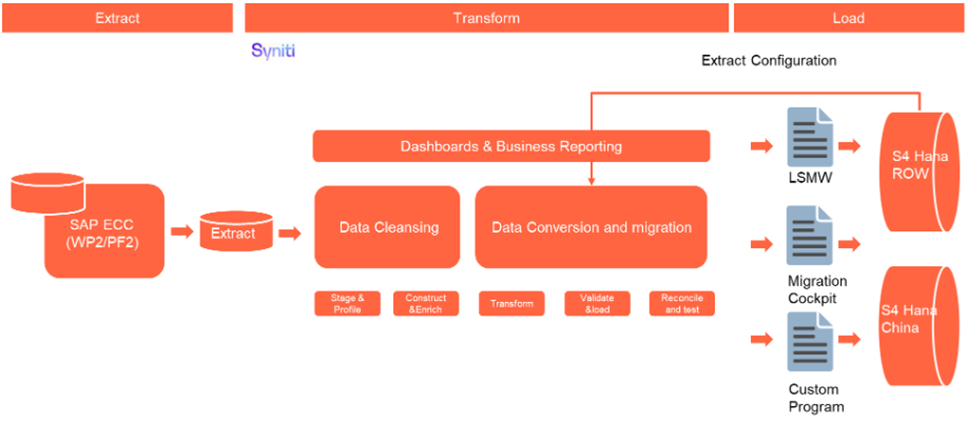
The high-level process for Services, where there is no source data, is represented by the diagram below:

Data Privacy and Sensitivity
Not ApplicableExtraction
The agreed Relevancy criteria is applied to the extracted records to identify the records that are applicable for the Target loads
Extraction Run Sheet
| Req # | Requirement Description | Team Responsible |
|---|---|---|
1 | Extract data from source system based on relevancy rule | Syniti |
Selection Screen
| Selection Ref Screen | Parameter Name | Selection Type | Requirement | Value to be entered/set |
|---|---|---|---|---|
| Not Applicable |
Data Collection Template (DCT)
Materials & Service Master
| draw.io Diagram | ||||||||||||||||||||||
|---|---|---|---|---|---|---|---|---|---|---|---|---|---|---|---|---|---|---|---|---|---|---|
|
| SAP Structure | SAP Field | Type | Length | Field Description | Importance | Rules |
| MARM - Alternative Unit of Measure 1:n | ||||||
| MARM | MATNR | CHAR | 18 | Material Number | mandatory for sheet | Material Number* A key that uniquely identifies the product. |
| MARM | BRGEW | DEC | 15 (3 decimals) | Gross Weight | Gross Weight Gross weight expressed in the unit of weight specified by you in the Unit of weight field. The system can use the gross weight at a later stage, depending on what kind of capacity check you run, to check storage bin capacity for warehouse management purposes. | |
| MARM | GEWEI | UNIT | 3 | Weight Unit | Unit of Weight (ISO Format) Unit referring to the gross weight or net weight of the product. If a product is created with sales data, the field unit of weight gets mandatory. Please provide an entry in this field or a default unit of weight is defined in product groups settings. | |
| MARM | VOLUM | DEC | 15 (3 decimals) | Volume | Volume Space that the product occupies per unit of volume. The volume refers to the unit specified in the "Volume unit" field. The volume and its unit always refer to the base unit of measure. | |
| MARM | VOLEH | UNIT | 3 | Volume Unit | Volume Unit If you specify a volume, you have to enter the corresponding volume unit here. | |
| MARM | EAN11 | CHAR | 18 | EAN/UPC | Copy from source to target system Maintain EAN/UPC No available from the manufacturer and migrate if values exist in legacy. Any EAN currently in the system has to be either 8,12,13,14 digits long (as per GS1 standards) Not applicable for ZSER Materials. | |
| MARM | NUMTP | CHAR | 2 | EAN category | Copy from source to target system If both the EAN field and the EAN category field contain values, the system assumes that you want to enter the EAN externally. HK - Short EAN (8 digits) Not applicable for ZSER Materials. | |
| SAP Structure | SAP Field | Type | Length | Field Description | Importance | Rules | ||
| MEAN - Additional GTINs 1:n | ||||||||
| MEAN | MATNR | CHAR | 18 | Material Number | mandatory for sheet | Material Number* A key that uniquely identifies the product. | ||
| MEAN | MEINH | UNIT | 3 | Alternative Unit of Measure | mandatory for sheet | There are multiple situations in which Alternative UOM should be maintained as list below - 1.) For product compliance (SVT, DG quantity limit checks) and Sustainability (CSRD reporting), Sustainability team should be able to derive mass units for any product in our scope (based on compliance relevant indicators). It means the needed conversion will be available in the product master for products not created in mass units" Alternate UoM maintained in the material master for the materials (marked as compliance relevant) so the system is able to convert to mass units and utilize it for the compliance assessment checks in S2S. 2.) For Material type = ZDIR(Direct materials - diluted chemical product), % concentration is specified as alternative UOM where Alt Un = KAI(Kilogram Active ingredient and the relevant conversion to Base unit KG will be maintained. eg: Sulphuric acid 98% concentrate will be maintained as 100 KG will be 98 KAI. 2.) Alternative units of measure can also be defined to identify packages or lager containers for smaller units of measure such as cartons, boxes, bottles, barrels, pallets (storage unit types) and so on. A material can be stored, transported and sold in various units of measure. However, you only need to maintain the fields of the units of measure if they deviate from the base unit of measure. If no other fields with units of measure are maintained, the system automatically takes the base unit of measure as a basis for its calculations. | ||
| MEAN | HPEAN | CHAR | 1 | Main Indicator (EAN) | Conditional | Specifies that the International Article Number (EAN) is the main EAN for the unit of measure. If there are several EANs for each unit of measure, one of them should be marked as the main EAN.This will default to 'X' for the current migration Not Applicable for ZSER materials. | ||
| MEAN | EAN11 | CHAR | 18 | GTIN (EAN/UPC) | mandatory for sheet | GTIN (EAN/UPC) | mandatory for sheet | Copy from source to target system EANs (European Article Numbers), or Global Trade Item Numbers (GTINs), are used to uniquely identify products on a global scale. This allows for standardized identification of chemical materials and finished goods across different countries and trading partners.This enables the system to identify specific items, even across various suppliers and purchase orders, and provides the data needed for point-of-sale and warehouse operations. A standardized unit that uniquely identifies a material relating to a unit of measure or type of packaging. The International Article Number (EAN) is assigned by the manufacturer of the material. In this case, the EAN identifies the manufacturer uniquely. The equivalent of the EAN in America is the Universal Product Code (UPC). Maintain EAN/UPC No available from the manufacturer and migrate if values exist in legacy. Any EAN currently in the system has to be either 8,12,13,14 digits long (as per GS1 standards) Not applicable for ZSER Materials. |
| MEAN | EANTP | CHAR | 2 | GTIN Category | mandatory for sheet | If both the EAN field and the EAN category field contain values, the system assumes that you want to enter the EAN externally.Possible EAN Categories to be used: HK - Short EAN (8 digits) Not applicable for ZSER Materials. | ||
| SAP Structure | SAP Field | Type | Length | Field Description | Importance | |
| MAKT - Material Descriptions (short/long material text per language) 1:n | ||||||
| MAKT | MATNR | CHAR | 18 | Material Number | mandatory for sheet | Material Number* A key that uniquely identifies the product. |
| MAKT | SPRAS | CHAR | 2 | Language Key | mandatory for sheet | Language Key* The language key indicates - the language in which texts are displayed, - the language in which you enter texts, - the language in which the system prints texts. |
| MAKT | MAKTX | CHAR | 40 | Material Description | mandatory for sheet | Material Description* Text that describes the product in more detail. Note: You can maintain additional descriptions (for languages other than those provided on the 'Basic Data' sheet). |
| SAP Structure | SAP Field | Type | Length | Field Description | Importance | |
| STXH / STXL - Long Text (Compressed Text Lines) | ||||||
| STXH / STXL | TDOBJECT | CHAR | 10 | Text Object | mandatory for sheet | Text object (e.g. MATERIAL, EINA, EKKO, LFA1, ASMD, etc.) |
| STXH / STXL | TDNAME | CHAR | 70 | Text Name (technical key) | mandatory for sheet | Text name / key (material, vendor, info record key, document, etc.) |
| STXH / STXL | TDID | CHAR | 4 | Text ID | mandatory for sheet | For Basic Data Long Text TDID = GRUN, for Internal Comment TDID = IVER |
| STXH / STXL | TDSPRAS | LANG | 1 | Language Key | mandatory for sheet | Language key (1-char SAP code: E, F, D, P, S, etc.) |
| STXH / STXL | TDLINE | CHAR | 132 | Text Line Content | mandatory for sheet | Text line content |
CR0407 - date 16/03/26 CR0407-DCT.xlsx
| SAP Structure | SAP Field | Type | Length | Field Description | Importance | Comments/ Tooltip |
| MAKT - Material Descriptions (Different Languages | ||||||
| System | CHAR | System | mandatory | If Material/Lang_key in ECC then populate = 'ECC' else value = 'CONSTRUCT' System is for MATNR/SPRAS - Allowed values ECC/CONSTRUCT | ||
| SOURCE_SYSTEM | CHAR | Source | mandatory | Source System is for MATNR and allowed values are: SAPPF2/SAPWP2/Construct | ||
| MAKT | MATNR | CHAR | 18 | Material Number | mandatory | Material |
| MAKT | SPRAS | LANG | 2 | Language Key | mandatory | Language key ( example EN/FR/DE..) |
| MAKT | MTART | CHAR | 4 | Legacy Material Type | mandatory if in ECC | Automatic population from ECC data based on Material Number |
| MAKT | MATKL | CHAR | 9 | LegacyMaterial_Grp | mandatory if in ECC | Automatic population from ECC data based on Material Number |
| MAKT | MAKTX | CHAR | 40 | Legacy_Material_Description | mandatory if in ECC | Automatic population from ECC data based on Material Number |
| MAKT | MTART | CHAR | 4 | S4_ Mat Type(Derived) | mandatory | Populate S4 Material type based on Material Type mapping from Data team |
| MAKT | MATKL | CHAR | 9 | S4_MAT_GRP | mandatory | Populate based on Material Group mapping from Project team |
| MAKT | MAKTX | CHAR | 40 | S4-MAKTX | mandatory | 1) Populate from Proposed descrip from Data team 2) Business input allowed |
| Formatting_Status | optional | Populate from 'Proposed S4 descrip' from Data team Dropdown values -
| ||||
| 1 | relevancyRelevancy_Flag | mandatory if in ECC | Automatic population from Deduplication Data (Including Relevancy rule) | |||
| 1 | Business_Approval | Conditional | Business input allowed | |||
| 1 | Re-Approval_Required | Conditional | Automatic population: If S4 material type or S4 material group is changed then Re-Approval_Required Flag will change to 'Yes' and field 'Business_Approval' will be set to 'Blank'. | |||
| Comment | optional | Business input allowed | ||||
| MAKT |
| |||||
Extraction Dependencies
| Item # | Step Description | Team Responsible |
|---|---|---|
1 | Materials and Plants in scope to be loaded must be identified so that we can limit the extraction to this sub-set of data. | Syniti |
2 | All data cleansing tasks have been completed | S2P Data Team |
3 | All dedupe tasks have been completed | Syniti/S2P Data Team |
4 | All description translations have been completed | S2P Data Team |
Transformation
The Target fields are mapped to the applicable Legacy field that will be its source, this is a 3-way activity involving the Business, Functional team and Data team. This identifies the transformation activity required to allow Syniti ADMM to make the data Target ready:
- Perform value mapping and data transformation rules.
- Legacy values are mapped to the to-be values (this could include a default value)
- Values are transformed according to the rules defined in Syniti ADMM
- Prepare target-ready data in the structure and format that is required for loading via prescribed Load Tool. This step also produces the load data ready for business to perform Pre-load Data Validation
- Use the Informal Words list to properly exclude records based on it's description (MAKT-MAKTX)
- List can be encountered here
Transformation Run Sheet
| Item # | Step Description | Team Responsible |
|---|---|---|
1 | Verify that data is extracted and merged. | S2P Data Team |
2 | Transformation jobs are ready for execution. | Syniti |
Transformation Rules
| Rule # | Source system | Source Table | Source Field | Source Description | Target System | Target Table | Target Field | Target Description | Transformation Logic |
|---|---|---|---|---|---|---|---|---|---|
| 001 | PF2/WP2 | MARM | MATNR | Material Number | S/4HANA | MARM | MATNR | Material Number | Reference new Material number in Target System from mapping reference (XREF) table |
| 002 | PF2/WP2 | MARM | MEINH | Alternative Unit of Measure (ISO Format) | S/4HANA | MARM | MEINH | Alternative Unit of Measure (ISO Format) | |
| 003 | PF2/WP2 | MARM | UMREN | Denominator for Conversion to Base Unit | S/4HANA | MARM | UMREN | Denominator for Conversion to Base Unit | Copy from source to target system |
| 004 | PF2/WP2 | MARM | UMREZ | Numerator for Conversion to Base Unit | S/4HANA | MARM | UMREZ | Numerator for Conversion to Base Unit | Copy from source to target system |
| 005 | PF2/WP2 | MARM | EAN11 | EAN/GTIN | S/4HANA | MARM | EAN11 | EAN/GTIN | Copy from source to target system Maintain EAN/UPC No available from the manufacturer and migrate if values exist in legacy. Not applicable for ZSER Materials. |
| 006 | PF2/WP2 | MARM | NUMTP | EAN/GTIN Category | S/4HANA | MARM | NUMTP | EAN/GTIN Category | Copy from source to target system If both the EAN field and the EAN category field contain values, the system assumes that you want to enter the EAN externally. Possible EAN Categories to be used: HK - Short EAN (8 digits) Not applicable for ZSER Materials. |
| 007 | PF2/WP2 | MEAN | HPEAN | Main Indicator (EAN) | S/4HANA | MEAN | HPEAN | Main Indicator (EAN) | Only required if multiple vendors exist for material, with different EANS |
| 008 | PF2/WP2 | MEAN | EAN11 | EAN/GTIN | S/4HANA | MEAN | EAN11 | EAN/GTIN | Copy from source to target system If both the EAN field and the EAN category field contain values, the system assumes that you want to enter the EAN externally. For 8 digit EAN codes, category should be set as HK, otherwise default to HEMaintain EAN/UPC No available from the manufacturer and migrate if values exist in legacy. Not applicable for ZSER Materials. |
| 009 | PF2/WP2 | MEAN | EANTP | EAN/GTIN Category | S/4HANA | MEAN | EANTP | EAN/GTIN Category | Copy from source to target system If both the EAN field and the EAN category field contain values, the system assumes that you want to enter the EAN externally. Possible EAN Categories to be used: HK - Short EAN (8 digits) |
| 010 | PF2/WP2 | MARM | LAENG | Length | S/4HANA | MARM | LAENG | Length | Copy from source to target system |
| 011 | PF2/WP2 | MARM | BREIT | Width | S/4HANA | MARM | BREIT | Width | Copy from source to target system |
| 011 | PF2/WP2 | MARM | HOEHE | Height | S/4HANA | MARM | HOEHE | Height | Copy from source to target system |
| 012 | PF2/WP2 | MARM | MEABM | Unit for Length/Width/Height(ISO Format) | S/4HANA | MARM | MEABM | Unit for Length/Width/Height(ISO Format) | Copy or map from source to target system in adherence to S4H ISO Data Standard |
| 013 | PF2/WP2 | MARM | BRGEW | Gross Weight | S/4HANA | MARM | BRGEW | Gross Weight | Copy from source to target system |
| 014 | PF2/WP2 | MARM | GEWEI | Unit of Weight (ISO Format) | S/4HANA | MARM | GEWEI | Unit of Weight (ISO Format) | Copy or map from source to target system in adherence to S4H ISO Data Standard |
| 015 | PF2/WP2 | MARM | VOLUM | Volume | S/4HANA | MARM | VOLUM | Volume | Copy from source to target system |
| 016 | PF2/WP2 | MARM | VOLEH | Volume Unit (ISO Format) | S/4HANA | MARM | VOLEH | Volume Unit (ISO Format) | Copy or map from source to target system in adherence to S4H ISO Data Standard |
| 017 | PF2/WP2 | MARM | MAKTX | Description | S/4HANA | MARM | MAKTX | Description | Copy additional descriptions in multiple languages from source to target system |
| 018 | PF2/WP2 | MARM | SPRAS | Language Key | S/4HANA | MARM | SPRAS | Language Key | Default language - English Alternative criteria for maintenance of text is to support regulatory with Syway Suppliers about the Purchase order text, thereby Supplier languages should also be maintained basis languages maintained in Business partner - Suppliers master data. |
| 019 | PF2/WP2 | STXL | TDOBJECT | Text Object | S/4HANA | STXL | TDOBJECT | Text Object | Default To MATERIAL |
| 020 | PF2/WP2 | STXL | TDNAME | Text Name (technical key) | S/4HANA | STXL | TDNAME | Text Name (technical key) | Map from ECC MARA-MATNR or ECC ASMD-ASNUM to S4 MARA-MATNR |
| 021 | PF2/WP2 | STXL | TDID | Text ID | S/4HANA | STXL | TDID | Text ID | For Basic Data Long Text TDID = GRUN, for Internal Comment TDID = IVER |
| 022 | PF2/WP2 | STXL | TDSPRAS | Language Key | S/4HANA | STXL | TDSPRAS | Language Key | Copy from source to target system |
| 023 | PF2/WP2 | STXL | TDLINE | Text Line Content | S/4HANA | STXL | TDLINE | Text Line Content | Copy from source to target system |
Transformation Mapping
| Mapping Table Name | Mapping Table Description | |
|---|---|---|
| Material | XREF | Value_Mapping_Link |
| AUoM | Mapping of Alternate Unit Of Measure |
Transformation Dependencies
List the steps that need to occur before transformation can commence| Item # | Step Description | Team Responsible |
|---|---|---|
1 | Data has been extracted from source systems | Syniti |
2 | Deduplication is completed | Syniti & S2P Data Team |
3 | Configuration should be completed - (Config documents should be complete) | S2P Functional Team |
4 | Ensure DCT completeness | S2P Data Team |
| 5 | Value mapping and XREF tables are ready | Syniti & S2P Data Team |
| 6 | All material description translations have been completed | S2P Data Team |
Exclusion Table
| SAP Structure | SAP Field | Type | Length | Field Description | Importance |
| MARM - Exclusions for Alt UoM | |||||
| MARM | MATNR | CHAR | 18 | Material Number | mandatory for sheet |
| MARM | UMREN | NUMC | 5 | Denominator for Conversion to Base Unit | mandatory for sheet |
| MARM | MEINH | UNIT | 3 | Alternative Unit of Measure | mandatory for sheet |
| MARM | UMRENUMREZ | NUMC | 5 | Denominator Numerator for Conversion to Base Unit | mandatory for sheetMARM |
| MARA | |||||
| MEINS | |||||
| UNIT | 5 | Numerator for Conversion to Base Unit||||
| 3 | Alternative Unit of Measure | mandatory for sheet | |||
| SAP Structure | SAP Field | Type | Length | Field Description | Importance |
| MEAN - Exclusions for EAN/GTIN | |||||
| MEAN | MATNR | CHAR | 18 | Material Number | mandatory for sheet |
| MEAN | MEINH | UNIT | 3 | Alternative Unit of Measure | mandatory for sheet |
| MEAN | LFNUM | CHAR | 5 | Consecutive Number | mandatory for sheet |
| MEAN | EAN11 | CHAR | 18 | GTIN (EAN/UPC) | mandatory for sheet |
| MEAN | EANTP | CHAR | 2 | GTIN Category | mandatory for sheet |
| SAP Structure | SAP Field | Type | Length | Field Description | Importance | Rules |
| STXH/STXL - Exclusions for Additional Descriptions | ||||||
| STXH / STXL | TDOBJECT | CHAR | 10 | Text Object | mandatory for sheet | |
| STXH / STXL | TDNAME | CHAR | 70 | Text Name (technical key) | mandatory for sheet | |
| STXH / STXL | TDID | CHAR | 4 | Text ID | mandatory for sheet | For Basic Data Long Text TDID = GRUN, for Internal Comment TDID = IVER |
| STXH / STXL | TDSPRAS | LANG | 1 | Language Key | mandatory for sheet | |
Pre-Load Validation
Project Team
Completeness
| Task | Action |
|---|---|
Verify Record Count | The number of records presented after relevancy checks and validation needs to be correct compared to the staged data in Migrate. |
Accuracy
| Task | Action |
|---|---|
Conversion Accuracy | Data team to verify that the data staged in the preload tables are correct in terms of the mapping rules. This will be done via Syniti DSP reports. |
Business
Completeness
| Task | Action |
|---|---|
Count and Completeness check | All fields required as per mapping template rules must be completed. Validity reports checking each field in ADMM must be built to help check. |
Accuracy
| Task | Action |
|---|---|
Conversion Accuracy | Business team to verify that the data staged in the preload tables are correct in terms of the mapping rules. This will be done via Syniti ADMM reports/SAP reports |
Load
The load process includes:
- Execute the automated data load into target system using load tool or product the load file if the load must be done manually
- Once the data is loaded to the target system, it will be extracted and prepared for Post Load Data Validation
Load Run Sheet
| Item # | Step Description | Team Responsible |
|---|---|---|
1 | Verify data extracted | Data Specialist |
2 | Verify data merged | Data Specialist |
3 | Verify Material XREF is ready | Data Specialist |
4 | Release - Load signoff and go-ahead by Functional/Data Owner | Functional/Data Owner - S2P |
5 | Approval to stage/Pre-stage steps | Functional/Data Owner - S2P |
6 | Extraction from source | Syniti |
7 | Extraction from S4 where needed | Syniti |
8 | Stage data for transformations | Syniti |
9 | Run transforms | Syniti |
10 | Execute pre-load report | Syniti |
11 | Validate preload report - release | Syniti |
12 | Prepare and simulate | Data Specialist |
13 | Pre-load verification and approval to load | Data Specialist/Data Owner - S2P |
14 | Load to S4 | Syniti |
15 | Complete Jira steps, Volumes and Timings | All - where applicable |
16 | Execute post-load report | Developer - Syniti or Data Specialist - S2P |
17 | Post-load report verification/validation | Data Specialist/Functional/Data Owner - S2P |
18 | Object load completion approval | Data Owner - S2P |
Load Phase and Dependencies
Configuration
| Item # | Configuration Item |
|---|---|
Conversion Objects
| Object # | Preceding Object Conversion Approach |
|---|---|
| 1 | Material Master - Basic View (2019) |
Error Handling
| Error Type | Error Description | Action Taken |
|---|---|---|
| Data | Language errors | Fix incorrect data |
| Data | Duplicates | Fix incorrect data |
Post-Load Validation
Project Team
Post-Load Step
Step Description | Team Responsible |
Execute post-load report | Developer - Syniti or Data Specialist - S2P |
Post-load report verification/validation | Data Specialist/Functional/Data Owner - S2P |
Object load completion approval | Data Owner - S2P |
Completeness
Completeness
| Task | Action |
|---|---|
Execute post-load report | Developer - Syniti or Data Specialist - S2P |
Post-load report verification/validation | Data Specialist/Functional/Data Owner - S2P |
Object load completion approval | Data Owner - S2P |
Accuracy
| Task | Action |
|---|---|
Verify count | The number of records presented in the preload needs to be compared to the post-load. – Syniti report |
Field by field check | Compare source data to target data. |
Business
Completeness
| Task | Action |
|---|---|
Verify Count | The number of records presented in the preload needs to be compared to the post-load Syniti report. |
Missing data | Check missing data which was supposed to be loaded. |
Reconciliation | Participate in Post-load walkthroughs. |
Accuracy
| Task | Action |
|---|---|
Conversion Accuracy | Business team to verify that the data staged in the preload tables are correct in terms of the mapping rules. This will be done via Syniti/SAP reports. |
Key Assumptions
- Master Data Standard is up to date as on the date of documenting this conversion approach and data load.
- Materials - Additional Data is in scope based on data design and any exception requested by business.
See also
Change log
| Change History | ||
|---|---|---|
|
Workflow history
| Workflow Report | ||||||
|---|---|---|---|---|---|---|
|