

| Status |
| |
|---|---|---|
| Owner | ||
| Stakeholders |
Purpose
The purpose of this document is to define the conversion approach to create upload Materials - Purchasing View in into S/4 HANA as part of the Material Data Migration.
Link to MDS: DD-FUN-050 Master Data Standard_2020-Material master-Purchasing data
Conversion Scope
The scope of this document covers the approach for converting active Materials - Purchasing View from Legacy Source Systems into S/4HANA following the Materials Master Data Design Standard.
From the current system landscape, Material data exists separately in the legacy systems (PF2 and WP2), with potential discrepancies in both organizations. Harmonization and validation are required to ensure accurate and consolidated data in S/4HANA. While PF2 and WP2 serve as source systems, extensive mapping and transformation logic will be necessary to produce properly formatted load templates in line with the target design.
Relevancy Rules
- All materials created in the previous 6 months will be included unless flagged for deletion
- These include Material Types ZUNB, ZBOM, ZPRC regardless of activity (unless flagged for deletion)
- We will only include materials that are extended to the following (excluding ZPRC material type as these do not require plant extension):
- Company Codes in scope
- Plants in scope
- Purchasing Orgs in scope
- Sales Orgs in scope
- Include only Material Types in scope
- We will include for migration all materials that have activity over the previous 3 years, to include:
- For procurement data use EKKO/EKPO tables
- For sales data use VBAK/VBAP tables
- For production data use AFKO/AFPO tables
- We will include for migration all materials that have open documents including the following:
- Open PO
- Open contracts
- Open STO
- Open SO
- Open WO
- Have current stock - refer to MARD table
- We will include all BOM data for materials in scope using tables: MAST/STKO/STPO
- Materials with Deletion Flags will be excluded unless appearing in the following open transactions:
- Open PO
- Open contracts
- Open STO
- Open SO
- Open WO
- Deletion Flags (Table/Field) are as follows: MARA/LVORM = 'X' MARA/MSTAE = Z3, Z4, ZZ (PF2 system) Z0 (WP2 system)
- Materials with the word 'OBSOLETE' or 'DELETED' contained within the Short Description will be excluded. Also excluded are Materials where Short Description contains '**OBS', '**OBS**', '**OBS***', '*OBS*', '*OBS**', '***OBS***'
Source Approx No. of Records
No. of Records
The Material Master Records will be extracted/collected via DCT. An initial extract of the relevant data will be provided in Google Sheet format to assist business in decision making on including any relevant data from Source Systems.
Any additional data that need to be created to support the new design may be added in the DCT.
A data review and standardization will be done across all Info Records in the DCT.
This object is migrated after Material Basic Data and Material General Plant, therefore only materials in scope for the object "2019 - Materials Basic Data View" and have Plants in scope as per the object "2010 - Materials - General Plant Data / S.Loc Data", are in scope for this object. Click here to go to the Conversion Spec for 2019 to see the full set of relevancy rules. Furthermore, as per the MDS for 2019, materials with certain Material Types will not be extended to the Purchasing View, while all other Material Types will be. Currently the Material Type not extended is the To-Be Material Type ZBAS, but this may change. Therefore this MDS must be reviewed for changes to this rule as part of the preparation of a Syniti ADMM Transform run.
As an additional relevancy requirement Plant Extensions where MARC-MMSTA = Z0 for WP2 and either Z4 or ZZ for PF2 must be excluded from the migration. Note that the existing rule of excluding a Plant Extension where MARC-LVORM = 'X' still applies.
The Service Master will be loaded as Materials in the Target. The relevancy rules for this are also covered in the object "2019 - Materials Basic Data View".
| Source | Scope | Source Approx. No. of Records | Target System | Target Approx. No. of Records |
|---|---|---|---|---|
| PF2, WP2 | Materials: The Material Master Records will be extracted that meet the relevancy criteria of Material Basic Data. Material Type will further refine this list to Materials relevant for the Purchasing View. | Materials: Plants (See CNV-2010): | S4H | Materials: Plants (See CNV-2010): |
| DCT | Services: There is no Purchase View data, therefore a DCT will be required for the records that meet the relevancy criteria to be created as Materials and Material Type will further refine this list to records relevant for the Purchasing View. | Services: | S4H | 10,174 ** |
Predecessor Object
Material Master - Basic View (2019) → Materials - Additional data (2021) → Materials - General Plant Data / S.Loc Data (2010) → Materials Purchasing View (2020).
Additional Information
Multi-language Requirement
Not Applicable
Document Management
Additional Information
Multi-language Requirement
Not Applicable
Document Management
Not Applicable
Legal Requirement
Not Applicable
Special Requirements
Not Applicable
Target Design
The technical design of the target for this conversion approach.
| Table | Field |
|---|
| Field Description | Data Type | Length | Requirement |
|---|
Updated in Predecessor / Other Object | ||
|---|---|---|
| MARC | MATNR | Material Number |
| CHAR |
| 18 | Required |
2010 |
| MARC | WERKS | Plant | CHAR | 4 |
| Required |
| 2010 |
| MARA | MEINS | Base Unit of Measure |
| UNIT | 3 | Required | 2019 |
| MARA | BSTME ** | Order Unit |
| UNIT | 3 | Conditional |
| MARA | VABME ** |
| Variable |
| Order Unit |
| CHAR |
| 1 | Conditional | |||||
| MARA | MATKL | Material Group | CHAR | 9 | Required | 2019 |
| MARC | EKGRP | Purchasing Group | CHAR | 3 | Conditional |
| MARC | MMSTA | Material Status (Plant-Specific |
| ) | CHAR | 2 | Conditional |
| MARC | MMSTD | Valid From |
| DATS | 8 | Conditional | ||
| MLAN |
| TAXIM | Tax Indicator for Material |
| CHAR |
| 1 | Required |
| MARC | MFRGR*** | Material Freight |
| Group | CHAR |
| 4 |
| Not Required |
| MARC | KAUTB | Automatic |
| PO allowed | CHAR | 1 |
| Required |
| MARC |
| KZKRI | Critical Part | CHAR |
| 1 |
| Conditional |
| MARA |
| MFRPN | Manufacturer Part Number |
| CHAR |
| 40 |
| Conditional |
| MARA | MFRNR | Manufacturer |
| CHAR |
| 10 |
| Conditional |
| MARC |
| HERKL | Country of Origin | CHAR | 3 | Conditional | ||
| MARC | WEBAZ | GR Processing Time | DEC | 3 | Conditional | 2005 |
** BSTME and VABME are no longer in CNV_2019 so they must be included here.
*** MARC-MFRGR is no longer needed.
Data Cleansing
Data Cleansing
| ID | Criticality | Error Message/Report Description | Rule | Output | Source System |
|---|
| Syniti Report Required | |
|---|---|
| 1 | High |
| Purchasing Group |
Conversion Process
The high-level process is represented by the diagram below:

Data Privacy and Sensitivity
Extraction
Extract data from a source into . There are 2 possibilities:
- The data exists. connects to the source and loads the data into . There are 3 methods:
- Perform full data extraction from relevant tables in the source system(s).
- Perform extraction through the application layer.
- Only if ; cannot connect to the source, data is loaded to the repository from the provided source system extract/report.
- The data does not exist (or cannot be converted from its current state). The data is manually collected by the business directly in . This is to be conducted using DCT (Data Collection Template) in
The agreed Relevancy criteria is applied to the extracted records to identify the records that are applicable for the Target loads
Extraction Run Sheet
1
Extract data from source system based on relevancy rule
SyWay Data Team
2
Google Sheet report pre-populated with PF2 and WP2 information to be generated based on relevancy criteria.
SyWay Data Team
Selection Screen
Data Collection Template (DCT)
Target Ready Data Collection Template will be created for Materials - Purchasing View data with exception of some fields which require transformation as mentioned in the transformation rule.Materials - Purchasing View DCT Rules
Extraction Dependencies
1
Data cleansing of legacy Material data must be completed.
If standardization within the DCT begins using relevant data from PF2 and WP2 before the cleansing is finalized, it is understood that the business will take due diligence to ensure any subsequent delta cleansing is verified and aligned within the DCT.
Business
Transformation
The Target fields are mapped to the applicable Legacy field that will be its source, this is a 3-way activity involving the Business, Functional team and Data team. This identifies the transformation activity required to allow to make the data Target ready:
- Perform value mapping and data transformation rules.
- Legacy values are mapped to the to-be values (this could include a default value)
- Values are transformed according to the rules defined in
- Prepare target-ready data in the structure and format that is required for loading via prescribed Load Tool. This step also produces the load data ready for business to perform Pre-load Data Validation
Transformation Run Sheet
1
Obtain DCT Sign-off from Business
SyWay S2P Data Team
2
<Add steps from Syniti Migrate here>
SyWay S2P Data Team
3
Review and Validate Error and Preload Reports
SyWay S2P Data Team
4
Generate Load Files
SyWay S2P Data Team
Transformation Rules
001
PF2/WG2
S_MARA
MATNR
Material Number
S/4HANA
S_MARA
MATNR
Material Number
Generate new Material number in Target System and maintain mapping in reference table
002
PF2/WG2
S_MARC
WERKS
Plant
S/4HANA
S_MARC
WERKS
Plant
Map from source to target
003
PF2/WG2
S_MARA
MEINS
Base Unit of Measure (ISO Format)
S/4HANA
S_MARA
MEINS
Base Unit of Measure (ISO Format)
Map from source to target in adherence to Data Standard
004
PF2/WG2
S_MARA
BSTME
Order Unit of Measure (ISO Format)
S/4HANA
S_MARA
BSTME
Order Unit of Measure (ISO Format)
Map from source to target in adherence to Data Standard
005
PF2/WG2
S_MARA
VABME
State of Variable Purchase Order Unit
S/4HANA
S_MARA
VABME
State of Variable Purchase Order Unit
Copy from source to target system
006
PF2/WG2
S_MARC
EKGRP
Purchasing Group
S/4HANA
S_MARC
EKGRP
Purchasing Group
Map from source to target using Purchasing Group mapping table
007
PF2/WG2
S_MARA
MATKL
Material Group
S/4HANA
S_MARA
MATKL
Material Group
Map from source to target using Material Group mapping table
008
PF2/WG2
S_MARC
MMSTA
Plant-Specific Material Status
S/4HANA
S_MARC
MMSTA
Plant-Specific Material Status
Copy from source to target system
009
PF2/WG2
S_MARC
MMSTD
Valid From Date for Status
S/4HANA
S_MARC
MMSTD
Valid From Date for Status
Copy from source to target system
010
PF2/WG2
S_MARC
TAXIM
Tax Indicator
S/4HANA
S_MARC
TAXIM
Tax Indicator
Copy from source to target system
011
PF2/WG2
S_MARC
KAUTB
Automatic Purchase Oder Allowed
S/4HANA
S_MARC
KAUTB
Automatic Purchase Oder Allowed
Copy from source to target system
012
PF2/WG2
S_MARC
XCHPF
Batch Management Req. Indicator
S/4HANA
S_MARC
XCHPF
Batch Management Req. Indicator
Copy from source to target system
013
PF2/WG2
S_MARA
EKWSL
Purchasing Value Key
S/4HANA
S_MARA
EKWSL
Purchasing Value Key
Copy from source to target system
014
PF2/WG2
S_MARC
WEBAZ
GR Processing Time
S/4HANA
S_MARC
WEBAZ
GR Processing Time
Copy from source to target system
Transformation Mapping
Purchasing Group
Mapping of legacy Purchasing Groups to target system value
Transformation Dependencies
List the steps that need to occur before transformation can commence1
Ensure DCT tables completeness
SyWay S2P Data Team
2
Value Mappings are according to the latest design - <List of Value Mappings>
SyWay S2P Data Team
Pre-Load Validation
Project Team
Completeness
Verify Record Count
Business Data Owner/s to verify that the total number of relevant records from the the DCT is equal to the total number of records in the Preload and Load Sheets.
Accuracy
Conversion Accuracy
SyWay S2P Data Team to verify that all fields below meet pass the checks:
- Mandatory Fields
- Field and Value Mapping Correctness
- Null Checks
- Text Length Checks
Review Error Reports
Review and correct the errors. Achieve a zero-error record count as much as possible. Raise defects for data remediated and requiring a correction in the source data.
Business
Completeness
Verify Record Count
Business Data Owner/s to verify that the total number of relevant records from the the DCT is equal to the total number of records in the Preload and Load Sheets.
| Missing | If MARC-EKGRP is Blank then include in the report. | MARA-MATNR, MARC-WERKS | PF2, WP2 & DCT | YES | ||
| 2 | Medium | Country Of Origin Missing ** | if ( MARC-HERKL is Blank ) AND | MARA-MATNR, MARC-WERKS | PF2 & WP2 | YES |
|
** This rule has been clarified by Dean Leighton in a Google Chat with Jasleen Madhok, John Hancock and Steve Clarke on Wednesday 12 November 2025.
**** This report is not required because the field is owned by MRP and they will have and manage a cleansing report if required.
Conversion Process
The high-level process for Materials, where the source is PF2 & WP2, is represented by the diagram below:
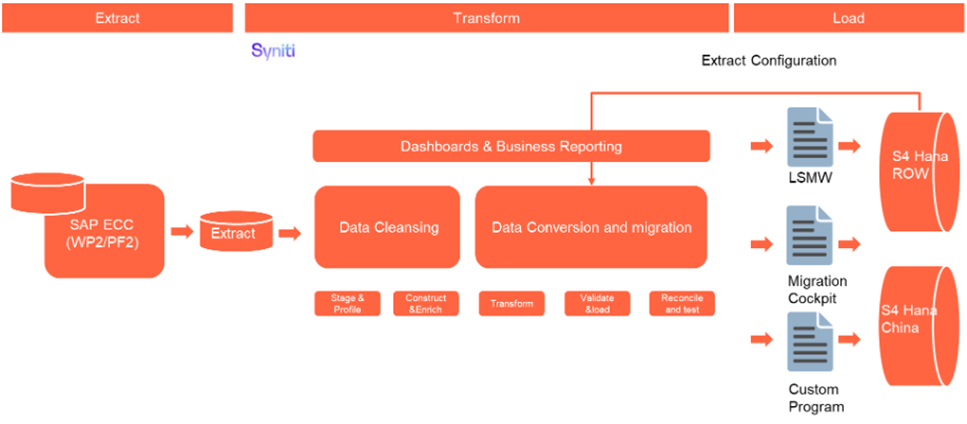
The high-level process for Services, where there is no source data, is represented by the diagram below:

Field Governance Rules | |||||
These governance rules apply to the individual fields within the data record. | |||||
Rule # | Field Label | Rule Description | Validation Method | Conditional Logic | Cleansing Rule (see above) |
1 | MARA-MATNR & MARC-WERKS | Only records where the material or service has been loaded into the Target, i.e. it is relevant. | Upfront Automated | Fields in the Material & Plant XREFs | |
2 | MARA-MTART | if To-Be Material Type = 'ZBAS' then DO NOT extend Material to Purchasing View | Field in the Material Type XREF | ||
3 | MARC-HERKL | This field is only applicable for Plants in Brazil with Material types associated with ZDIR or Spares (ZIND) or | Upfront Automated | ( T001W-LAND1 = 'BR' ) AND | Rule 2 |
** This rule has been clarified by Dean Leighton in a Google Chat with Jasleen Madhok, John Hancock and Steve Clarke on Wednesday 12 November 2025.
Data Privacy and Sensitivity
Not Applicable
Extraction
The source for Purchasing data for Materials is PF2 & WP2. This will be extracted by Syniti and the Relevancy criteria, as specified in object "2019 - Materials Basic Data View" and Material Type relevant to the Purchasing View, applied to identify the records that are applicable for the Target load.
There is no source for Purchasing data for Services, therefore this data will be extracted by Syniti from a DCT (see below in the DCT section for more details).
Extraction Run Sheet
Req # | Requirement Description | Team Responsible |
|---|---|---|
1 | Extract data from source system based on relevancy rule | Syniti |
Selection Screen
Selection Ref Screen | Parameter Name | Selection Type | Requirement | Value to be entered/set |
|---|---|---|---|---|
Not Applicable |
Data Collection Template (DCT)
Target Ready Data Collection Template will be created for Materials - Purchasing View data with exception of some fields which require transformation as mentioned in the transformation rule.
There is no source for Purchasing data for Services, therefore this data will be extracted by Syniti from the DCT specified below. It will be populated by Business for relevant services which they want to migrate.
Materials - Purchasing View DCT Rules
Field Name | Field Description | Rule | Tool Tip | zComment | zDelete |
|---|---|---|---|---|---|
MARC-MATNR | Material Number | Required | The Service Master Number will be used to identify the corresponding Target Material Number. | ||
MARC-WERKS | Plant | Exists in Plant XREF as a To-Be Plant and use dropdown. | Organizational unit where material is maintained/used (e.g., manufacturing site, storage location). | ||
MARA-BSTME | Order Unit | Value in Check Table T006 | The unit in which the material is ordered from vendors (may differ from Base UoM). | ||
MARC-EKGRP | Purchasing Group | Value in Check Table T024 | Buyer or group of buyers responsible for procurement activities of the material. | ||
|
|
|
| ||
|
|
|
| ||
MLAN-TAXIM | Tax Indicator for Material | Value in Check Table TMKM1 | Defines if material is taxable, non-taxable, or exempt for purchasing. | ||
|
|
|
| ||
|
|
|
| ||
|
|
|
| ||
MARA-MFRPN | Manufacturer Part Number | General part number assigned by the manufacturer. | |||
MARA-MFRNR | Manufacturer | Vendor or producer of the material. | |||
MARC-HERKL | Manufacturer Country | Value in Check Table T005 | Country where the manufacturer is located. | ||
MARC-WEBAZ** | GR Processing Time | Value >= 0 | Time (in days) between goods receipt and availability for use. |
** MARC-WEBAZ is in the Conversion Spec for 2005, Material Master - MRP Views, however the DCT is for Services and Services will not get the MRP Views so the field has been included to capture this data if required.
*** The MRC fields MMSTA, MMSTD and KAUTB are now defaulted in the Transformation section so they must be removed from the DCT.
**** MARC-KZKRI has been updated with CR0445. It now has default value which is done in the Transformation Rules.
***** MARC-MFRGR is no longer needed.
Extraction Dependencies
Item # | Step Description | Team Responsible |
|---|---|---|
1 | Materials and Plants in scope to be loaded must be identified so that we can limit the extraction to this sub-set of data. | Syniti |
Transformation
The Target fields are mapped to the applicable Legacy field that will be its source, this is a 3-way activity involving the Business, Functional team and Data team. This identifies the transformation activity required to allow ADMM to make the data Target ready:
- Perform value mapping and data transformation rules.
- Legacy values are mapped to the to-be values (this could include a default value).
- Values are transformed according to the rules defined in ADMM.
- Prepare target-ready data in the structure and format that is required for loading via the prescribed Load Tool. This step also produces the load data ready for business to perform Pre-load Data Validation.
Transformation Run Sheet
| Item # | Step Description | Team Responsible |
|---|---|---|
1 | Verify that Material data is extracted from both source systems. | Syniti / S2P Data Team |
2 | Verify that Services data is extracted from the DCT. | Syniti / S2P Data Team |
3 | Verify that the Material Number XREF has been updated for both material and service data. | Syniti |
4 | Review the MDS for 2019 to check what Material Types must not be extended to the Purchasing View and update the rule if required | S2P Data Team |
5 | Transformation jobs are ready for execution. | Syniti |
| 6 | Generate Load Files. | Syniti |
Transformation Rules
| Rule # | Source system | Source Table | Source Field | Source Description | Target System | Target Table | Target Field | Target Description | Transformation Logic |
|---|---|---|---|---|---|---|---|---|---|
1 | PF2,WP2,DCT | MARC | MATNR | Material Number | S/4HANA | MARC | MATNR | Material Number | Map Source to Target using Material XREF |
2 | PF2,WP2,DCT | MARC | WERKS | Plant | S/4HANA | MARC | WERKS | Plant | Map Source to Target using Plant XREF |
PF2,WP2,DCT | MARA | BSTME | Order Unit | S/4HANA | MARA | BSTME | Order Unit | Copy As-Is | |
PF2,WP2,DCT | MARA | VABME | Variable Order Unit | S/4HANA | MARA | VABME | Variable Order Unit | Default to Blank | |
PF2,WP2,DCT | MARC | EKGRP | Purchasing Group | S/4HANA | MARC | EKGRP | Purchasing Group | Map Source to Target using Purchasing Group XREF | |
PF2,WP2,DCT | MARC | MMSTA | Material Status (Plant-Specific) | S/4HANA | MARC | MMSTA | Material Status (Plant-Specific) | Default to Blank | |
PF2,WP2,DCT | MARC | MMSTD | Valid From | S/4HANA | MARC | MMSTD | Valid From | Default to '00000000' | |
PF2,WP2,DCT | MLAN | TAXIM | Tax Indicator for Material | S/4HANA | MLAN | TAXIM | Tax Indicator for Material | Copy As-Is | |
|
|
| |||||||
PF2,WP2,DCT | MARC | KAUTB | Automatic PO allowed | S/4HANA | MARC | KAUTB | Automatic PO allowed | Default to X. | |
PF2,WP2,DCT | MARC | KZKRI*** | Critical Part | S/4HANA | MARC | KZKRI*** | Critical Part | Default to: if MARA-MTART IN ('UNBW','NLAG') and PIR > EUR 15k then X else Blank PIR > EUR 15K will have been calculated when determining MARA-MTART = UNBW or NLAG in Conversion Spec for 2019, therefore store the result of this calc in a table so it can be referenced here. | |
PF2,WP2,DCT | MARA | MFRPN | Manufacturer Part Number | S/4HANA | MARA | MFRPN | Manufacturer Part Number | if S4H.MARA-MTART IN ('ZIND','UNBW','NLAG') and LEGACY.MARA-MFRPN is not Blank and LEGACY.MARA-MFRNR = LEGACY_LFA1-LIFNR and LEGACY.LFA1-LOEVM = '' then Copy As-Is else Blank | |
PF2,WP2,DCT | MARA | MFRNR | Manufacturer | S/4HANA | MARA | MFRNR | Manufacturer | if S4H.MARA-MTART IN ('ZIND','UNBW','NLAG') and LEGACY.MARA-MFRPN is not Blank and LEGACY.MARA-MFRNR = LEGACY_LFA1-LIFNR and LEGACY.LFA1-LOEVM = '' then Copy As-Is else Blank | |
PF2,WP2,DCT | MARC | HERKL | Country of Origin | S/4HANA | MARC | HERKL | Country of Origin | if S4H.MARA-MTART IN ('ZIND','UNBW','NLAG','ZDIR') then Copy As-Is else Blank | |
DCT only | MARC | WEBAZ** | GR Processing Time | S/4HANA | MARC | WEBAZ** | GR Processing Time | Copy As-Is |
*** MARC-KZKRI has been updated with CR0445.
**** MARC-MFRGR is no longer needed.
Transformation Mapping
Mapping Table Name | Mapping Table Description | Link |
|---|---|---|
Material | XREF | |
| Plant | XREF | Conversion Specification - Mappings |
| Purchasing Group | XREF | Conversion Specification - Mappings |
Transformation Dependencies
List the steps that need to occur before transformation can commence| Item # | Step Description | Team Responsible |
|---|---|---|
1 | Data has been extracted from sources systems | Syniti |
2 | Deduplication is completed | Syniti & S2P Data Team |
3 | Configuration should be completed - (Config documents should be complete) | S2P Functional Team |
4 | Ensure DCT completeness | S2P Data Team |
| 5 | Value mapping and XREF tables are ready | Syniti & S2P Data Team |
Pre-Load Validation
Project Team
Completeness
| Task | Action |
|---|---|
Verify Record Count | The number of records presented after relevancy checks and validation, as well as the number of records in the DCT, needs to be correct compared to the staged data in Syniti ADMM. |
Completeness check | All fields required as per mapping template rules must be completed. Syniti ADMM standard validity reports checking each field in Syniti must be built. |
Accuracy
| Task | Action |
|---|---|
Conversion Accuracy | Verify that the data staged in the preload tables are correct in terms of the mapping rules. This will be done via Syniti ADMM standard reports.. |
Review Error Reports | Review and correct the errors. Achieve a zero-error record count as much as possible. Raise defects for data remediated and requiring a correction in the source data. |
Business
Completeness
| Task | Action |
|---|---|
Completeness Check | Business should compare legacy record counts, taking into account the reduction from the relevancy and deduplication processes, against the record count in the preload table. |
Accuracy
| Task | Action |
|---|---|
Conversion Accuracy | Business team to verify that the data staged in the preload tables are correct in terms of the mapping rules. This will be done via Syniti ADMM reports/SAP reports. |
Load
The load process includes:
- Execute the automated data load into target system using the appropriate load tool.
- Once the data is loaded into the target system, it will be extracted and prepared for Post Load Data Validation.
Load Run Sheet
| Item # | Step Description | Team Responsible |
|---|---|---|
1 | Verify data extracted | Data Specialist/Functional - S2P |
2 | Verify data combined from both source systems and DCT | Data Specialist/Functional - S2P |
3 | Verify Material, Plant and Purchasing Group XREFs are ready | Data Specialist/Functional - S2P |
4 | Stage data for transformations | Syniti |
5 | Run transforms | Syniti |
6 | Execute pre-load report | Syniti |
7 | Validate preload report - release | Data Specialist/Functional - S2P |
8 | Prepare and simulate | Syniti |
9 | Pre-load verification and approval to load | Functional/Data Owner - S2P |
10 | Load to S4 | Syniti |
11 | Complete Jira steps, Volumes and Timings | All - where applicable |
12 | Execute post-load report | Syniti |
13 | Post-load report verification/validation | Data Specialist/Functional/Data Owner - S2P |
14 | Object load completion approval | Data Owner - S2P |
Load Phase and Dependencies
Configuration
| Item # | Configuration Item |
|---|---|
| MM Config Values | |
Conversion Objects
| Object # | Preceding Object Conversion Approach |
|---|---|
| 1 | Material Master - Basic View (2019) |
| 2 | Materials - General Plant Data / S.Loc Data (2010) |
Error Handling
| Error Type | Error Description | Action Taken |
|---|---|---|
| Data | Source Material not linked to a Target Material in the XREF | Fix incorrect data |
| Data | Source Plant not linked to a Target Plant in the XREF | Fix incorrect data |
| Data | Source Purchasing Group not linked to a Target Purchasing Group in the XREF | Fix incorrect data |
Data | Duplicates | Fix incorrect data |
Load | Authorization errors | Apply for the applicable authorization permission and retry |
Load | Technical load failures - If using MC - Simulation errors, etc | Investigate error and rectify. Retry simulation and/or load |
Config | Configuration is missing in the Target System | Missing config added in the Target System |
Post-Load Validation
Project Team
Post-Load Steps
Step Description | Team Responsible |
Execute post-load report | Syniti |
Post-load report verification/validation | Data Specialist/Functional/Data Owner - S2P |
Object load completion approval | Data Owner - S2P |
Completeness
| Task | Action |
|---|---|
Verify Count | The number of records presented in the post-load needs to be compared to the preload – Syniti report |
Field by field check | Compare source data staged in the preload tables to target data in the load tables |
Accuracy
Conversion Accuracy
Business Data Owner/s to verify that all the data in the load table/file is accurate as per endorsed transformation/mapping rules (and signed-off DCT data).
Load
The load process includes:
- Execute the automated data load into target system using load tool or product the load file if the load must be done manually
- Once the data is loaded to the target system, it will be extracted and prepared for Post Load Data Validation
Load Run Sheet
1
Go to <Load Tool>
SyWay S2P Data Team
2
Load 3 records for < > to validate if data is loaded successfully without errors
SyWay S2P Data Team
3
Load 3 records for < > to validate if data is loaded successfully without errors
SyWay S2P Data Team
4
Proceed with full load if steps 2 and 3 are validated
SyWay S2P Data Team
5
Validate few records loaded by accessing standard transactions from S/4HNA eg. MM03
SyWay S2P Data Team
6
Generate post load report if step 5 is validated
SyWay S2P Data Team
Load Phase and Dependencies
Configuration
Conversion Objects
Error Handling
Post-Load Validation
Project Team
Completeness
| Task | Action |
|---|---|
Verify Count | SyWay S2P Data Team to verify the record count created in target S/4 HANA by accessing post load reports in dspMigrate or standard reports from S/4 HANA. |
Accuracy
| Task | Action |
|---|---|
Verify Logs | Check if there is data that failed to load and perform the necessary actions (e.g. register as post load issue or attempt to load the record again, etc.). |
Business
Completeness
| Task | Action |
|---|---|
Verify Count | The number of records presented in the preload needs to be compared to the post-load Syniti report. |
Missing data | Check missing data which was supposed to be loaded. |
Reconciliation | Participate in Post-load walkthroughs. |
Field by field check | Perform random Field by Field checks by comparing source data staged in the preload tables to target data in the load tablesDownload Post Load Reports from dspMigrate and verify that the record count loaded in the target S/4 HANA is the same count as of the endorsed load file. |
Accuracy
| Task | Action |
|---|---|
Conversion Accuracy | Verify that the Material data in target S/4 HANA were was loaded correctly via dspMigrate Syniti post-load reports or standard reports from S/4 HANA. |
Key Assumptions
- Master Data Standard is up to date as on the date of documenting this conversion approach and data load.
- Materials - Purchasing Data is in scope based on data design and any exception requested by business.
See also
Change log
| Change History | ||
|---|---|---|
|
Workflow history
| Workflow Report | ||||||
|---|---|---|---|---|---|---|
|