


| Status | Approved |
|---|---|
| Owner | BIDALIA-ext, Kuldeep |
| Stakeholders | |
| Jira Request ID | ERP-21 - Getting issue details... STATUS |
| Jira Development ID | ERP-65 - Getting issue details... STATUS |
High- Level Specification
| Parameter | Value |
|---|---|
| Application System | S/4Hana ROW, S/4Hana China, S/4Hana CUI |
| Business Process Reference | 10.02.01.01. Manage Project/WBS Changes |
Functional Overview
Standard SAP WBS element tables offer foundational fields for project structuring, but they often need to be enhanced for business-specific attributes. In Syway design, custom fields are introduced to capture business specific attributes for reporting, compliance and cross-steam integration.
Scope and Objectives
Following are the scope of this enhancement to enable reporting and compliance
- To add three new fields to the WBS element master data i.e. CAPEX/OPEX, Maintenance Event & Trading Company Code.
- Enable data entry, validation, and storage in the appropriate database tables.
Process Flow Diagram
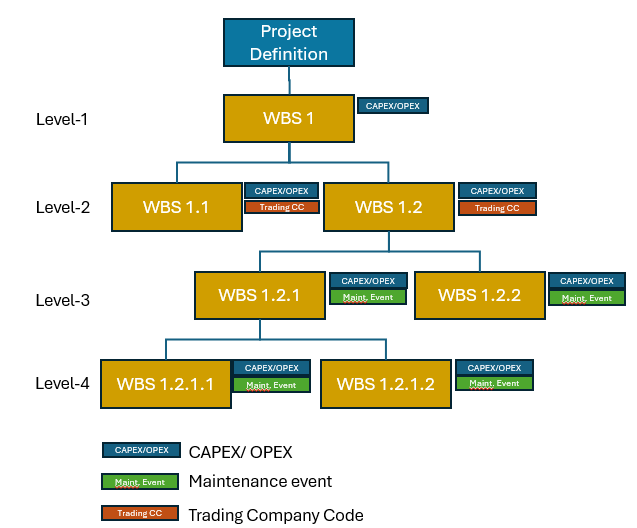
The diagram above illustrates the potential levels within the WBS where new custom fields could be integrated, depending on the nature of the project.
Step | Description | Comment |
|---|---|---|
| 1 | Create a project from PPM Item and maintain CAPEX/OPEX field in eligible WBS element. | CAPEX/OPEX field will be available with drop-down values for account assigned WBS elements. Select a WBS element and pick CAPEX in the field and save. Select another WBS element and pick OPEX in the field and save. |
| 2 | Create a Project from PPM Item and enter Maintenance Event in eligible WBS element. | Maintenance Event will be included in the search help functionality for user selection. Maintain Maintenance Event in a level 3 or level 4 WBS element and save. |
| 3 | Create a Intercompany Recharges project and enter Trading Company Code in eligible WBS element. | Trading Company Code will be included in the search help functionality for user selection. Maintain Trading Company Code in a WBS element and save. |
Assumptions
- The addition of Z-fields within the standard table structure ensures that standard SAP functionality remains unaffected.
- The newly introduced custom fields will be seamlessly integrated into the SAP user interface across both Fiori and GUI, ensuring consistent availability within WBS specific applications and t-codes.
Dependencies
- New custom fields in WBS elements will be controlled using validation and substitution rules defined in the project profiles.
Security, Integrity and Controls
Standard WBS authorization object checks will be applicable to the newly created custom fields.
Configuration Requirements
N/A
Language Requirements
N/A
Special Requirements
N/A
Design Rationale
Functional Requirements
Custom fields are required on the WBS element master data i.e. CAPEX/OPEX, Maintenance Event, and Trading Company Code to report financial classification, maintenance tracking, and intercompany relevance.
- CAPEX/OPEX field is mandatory and identifies whether the WBS element is intended for capital investment or expense, driving downstream reporting and settlement.
- Maintenance Event field is conditionally editable and applicable only to WBS elements of project profiles "Capital/ Operational Expense" and "Operational Expense", allowing linkage to predefined maintenance cycles or events.
- Trading Company Code field is mandatory for intercompany recharge projects, ensuring accurate identification of the trading partner for intercompany billing and reconciliation.
All fields will be available in the WBS master data screen with validation, dropdowns, and standard search help to support user experience, audit-readiness, and governance compliance.
Proposed Technology to Use
SAP enables the creation of custom WBS fields using its in-app extensibility features via Business Context “Project Element”.
Data Source Considerations
| Table | Field Name | Comments/Calculation/Field Manipulation |
|---|---|---|
| PRPS | SYMAIN_EVT | Data source for this field will be T352R-REVNR. |
| PRPS | SYTRADE_CC | Data source for this field will be T001-BUKRS |
| PRPS | SYCAP_OPX | Data element will accommodate field values CAPEX, OPEX and also permit blank |
Data Validation Considerations
| Table | Field Name | Comments/Calculation/Field Manipulation |
|---|---|---|
| PRPS | SYMAIN_EVT | Upon submission with incorrect field values, this field should raise a standard validation error as defined by data element REVNI |
| PRPS | SYTRADE_CC | Upon submission with incorrect field values, this field should raise a standard validation error as defined by data element PS_PBUKR |
Custom Tables
N/A
Master Data
N/A
| Field | Description | Data Type/Length | Validation rule/ Value Help |
|---|---|---|---|
Configuration Table
N/A
| Field | Description | Data Type/Length | Validation rule/ Value Help |
|---|---|---|---|
Selection Screen Enhancement
N/A
| Field Name | Description | Select: | Data Type/Length | Default Value/ Validation rule/ Value Help | Selection Logic |
|---|---|---|---|---|---|
Processing Logic
Create three custom fields on the WBS element (table PRPS) using the in‑app extensibility framework-
- CAPEX/OPEX
- Maintenance Event
- Trading Company Code
Field details-
| Field | CAPEX/OPEX | Maintenance Event | Trading Company Code |
|---|---|---|---|
| Description | CAPEX/OPEX | Maintenance Event | Trading Company Code |
| Field ID | SYCAP_OPX | SYMAIN_EVT | SYTRADE_CC |
| Table | PRPS | PRPS | PRPS |
| Field length | 8 | 8 | 4 |
| Data Type | CHAR | CHAR | CHAR |
| Data Element | Custom | REVNI | PS_PBUKR |
| Field Values | CAPEX OPEX Allow Blank | Standard Search help | Standard Search help |
Add in User Interface (SAP Fiori) | Yes | Yes | Yes |
| Add in WBS CDS Views | Yes | Yes | Yes |
Field catalog used for validation and substitution | Yes | Yes | Yes |
Applicable Project Profiles | This field is applicable to WBS elements across all project profiles | This field is applicable to WBS elements where project profile (PROJ-PROFL) is ZPS0001 & ZPS0002 | This field is applicable to WBS elements where project profile is ZPS0004 i.e. "Intercompany Recharges". PROJ-PROFL = ZPS0004 |
Relationship between WBS element and Project Profile | |||
To maintain future scalability, Project Profiles should not be hardcoded in the program.
Custom fields will be added to the WBS element screen. The exact tab/screen will be decided later.
Volumetrics
N/A
Performance Considerations
N/A
Error Handling
N/A
Testing
How to Test
Ensure that projects are created using the project profiles: ZPS0001 (Capital/ Operational Expense), ZPS0002 (Operational Expense), ZPS0003 (Statistical Expense), ZPS0004 (Intercompany Recharges), and ZPS0005 (Provisional Expense). Confirm that the three custom fields are visible in the WBS elements as per predefined logics.
Test Conditions and Expected Results
| ID | Condition | Expected Result |
|---|---|---|
| 1.1 | Create a project having project profile ZPS0001 from a PPM Item and structure WBS elements up to level 4. | Custom field "CAPEX/OPEX" & "Maintenance Event" will appear against all WBS elements. The custom field 'Trading Company Code' will not be displayed on the WBS element screen. |
| 1.2 | Check drop down values in "CAPEX/OPEX" field | Drop down field selection will allow any of CAPEX, OPEX or blank entry. No text entry will be allowed. |
| 1.3 | Check search help of the "Maintenance Event" field | Standard "Revision" search help will appear allowing selection of a Maintenance Event with following search criteria categories-
|
| 1.4 | Enter invalid data in the 'Maintenance Event' field and submit the entry | A standard error message will be triggered by the system |
| 2 | Create a project having project profile ZPS0002 from a PPM Item and structure WBS elements up to level 3. | Custom field "CAPEX/OPEX" & "Maintenance Event" will appear against all WBS elements. The custom field 'Trading Company Code' will not be displayed on the WBS element screen. |
| 3 | Create a project using project profile ZPS0003 and structure WBS elements up to level 2. | Custom field "CAPEX/OPEX" will appear against all WBS elements. The custom fields 'Maintenance Event' and 'Trading Company Code' are not displayed on the WBS element screen. |
| 4.1 | Create a project using project profile ZPS0004 and structure WBS elements up to level 2. | Custom field "CAPEX/OPEX" will appear against all WBS elements. Custom field "Trading Company Code" will appear against all WBS elements. The custom fields 'Maintenance Event' will not be displayed on the WBS element screen. |
| 4.2 | Check search help of the "Trading Company Code" field | Standard "Company Code" search help will appear allowing selection of a single company code. |
| 4.3 | Enter invalid data in the 'Trading Company Code' field and submit the entry | A standard error message will be triggered by the system |
| 5 | Create a project using project profile ZPS0005 and structure WBS elements up to level 2. | Custom field "CAPEX/OPEX" will appear against all WBS elements. The custom fields 'Maintenance Event' and 'Trading Company Code' are not displayed on the WBS element screen. |

Test Considerations/Dependencies
- A2D team need to provide sample Maintenance Events for validation and testing purposes.
Other Information
Development Details
Package
| Package Name | Parent Package |
|---|---|
Enhancement Implementation
| Enhancement Type | Standard Definition Name | Custom Implementation Name | Design Rationale Reference |
|---|---|---|---|
Other Development Objects
| Object Type | Object Name | Purpose/High Level Logic | Design Rationale Reference |
|---|---|---|---|
Appendix
Custom Authorization Group Naming Convention
This table is based on the Syensqo development standards document. It provides the naming conventions for authorization groups to associated with custom reports and tables to comply with security requirements.
ABAP | ZFI | ZMM | ZPS | ZCO | ZSD | ZBC | ZFI | ZCA |
|---|---|---|---|---|---|---|---|---|
| TABLES | ZFIT | ZMMT | ZPST | ZCOT | ZSDT | ZBCT | ZFIT | ZCAT |