


| Status | Revision in Progress |
|---|---|
| Owner | |
| Stakeholders |
Purpose
The purpose of this document is to define the conversion approach to create 1044 Quality Info Record in S/4 HANA.
Quality Info Records are used in SAP Quality Management (QM) to control the procurement and usage of materials from vendors. A QIR documents whether a supplier is approved to deliver a particular material, under what conditions, and with what quality agreements in place. It also supports restrictions such as blocking or requiring source inspections before delivery. This feature helps ensure supplier quality compliance and strengthens the linkage between procurement and quality processes.
In SAP S/4HANA, the structure and usage of Quality Info Records remain consistent with SAP ECC, generally defined by key combinations such as Material / Vendor / Plant. QIRs can include attributes such as release status, validity dates, procurement blocks, source inspection requirements, and quality agreement indicators.
In SAP ECC, aside from the standard structures, Quality Info Records may also exist with extended combinations or enhancements, for example:
Material / Vendor without plant reference,
Additional custom fields capturing supplier quality ratings,
Legacy blocks or obsolete release indicators that are no longer in use.
Such cases must be reviewed carefully (pending MDS) to determine whether they remain relevant for migration.
This conversion aims to migrate active and relevant Quality Info Records from existing ECC systems into S/4HANA by applying the required transformation logic using Syniti as the data migration and transformation platform. The converted records will be loaded into the target S/4HANA system using standard SAP mechanisms such as BAPIs (e.g., BAPI_QM_QUALINFORECORD_CREATE), IDOCs, or direct table loads where applicable, ensuring compliance with procurement and quality integration processes.
This Conversion Specification does not include the WPX system (CUI Objects).
Conversion Scope
The scope of this document covers the approach for converting active Quality Info Record from Legacy Source Systems into S/4HANA following the Quality Info Record - Master Data Design Standard.
The data from legacy system includes:
Active QIRs used within the last four (4) years in procurement. (QINF-ERSTELLDAT >= CURRENT DATE - 4)
QIRs without deletion flag.(QINF-LOEKZ = BLANK)
Plant-specific QIRs that will be migrated to the To-Be Plant Mapping in Enterprise Structure Catalog worksheet "30. Plants"
QIRs referenced in active material-vendor (procurement). Refer Material and BP-Vendor objects.
The data from legacy system excludes:
Inactive QIRs not used in more than four (4) years.
QIRs marked for deletion.
QIRs belonging to deleted plants (per To-Be Plant mapping).
- QIRs referenced in inactive material-vendor (procurement).
| Source | Scope | Source Approx. No. of Records | Target System | Target Approx. No. of Records |
|---|---|---|---|---|
| PF2 and WP2 | Quality Info Record will be extracted from PF2 and WP2 client | PF2: In-scope : 4628 records WP2: In-scope : 1631 records | S/4 HANA | In-scope data: 6259 records |
Additional Information
Multi-language Requirement
Not applicable
Document Management
Not applicable
Legal Requirement
Not applicable
Special Requirements
Not applicable
Target Design
The technical design of the target for this conversion approach.
| Table | Field | Data Element | Field Description | Data Type | Length | Requirement |
| QINF | MANDT | MANDT | The client field, identifies the SAP client for which record was created | CLNT | 3 | R |
| QINF | MATNR | MATNR | Material Number for which quality info record is to be created | CHAR | 40 | R |
| QINF | WERK | WERKS_D | Plant Code for which quality info record is to be created | CHAR | 4 | R |
| QINF | LIEFERANT | ELIFN | Vendor Code for which quality info record is to be created | CHAR | 10 | R |
| QINF | REVLV | REVLV | This field stores specific version of a material for a given vendor-plant combination in a quality info record | CHAR | 2 | R |
| QINF | FREI_DAT | QFREIDAT | Valid to date for the quality info record | DATS | 8 | R If the release has an end date, enter it; else enter 31.12.9999 |
| QINF | FREI_MNG | QFREIMG | This field functions as a limit the controls how much of a product can be ordered from a specific vendor before further action is taken, such as needing a new quality inspection. | QUAN | 13 | C |
| QINF | SPERRGRUND | QSPERRGR | This field is a blocking reason code that specifies why a material-vendor combination is blocked or released for procurement transactions like quotations, purchase orders, or goods receipts. | CHAR | 40 | C |
| QINF | SPERRFKT | QSPERRFKT | This field can can block a supplier for purchase orders, goods receipts, or both, by setting the appropriate value. | CHAR | 2 | C |
| QINF | FREI_MGKZ | QFREIMGKZ | This indicator effectively blocks new purchase orders for the specified material from that vendor, as the "release quantity" has been exhausted or used up. | CHAR | 1 | C |
| QINF | NOINSP | QNOINSP | This field indicates whether a goods receipt inspection is to be skipped for a specific material, vendor, and plant combination. It allows users to skip inspections for materials that are already known to be of high quality or where no incoming inspection is required by the business process. | CHAR | 1 | C |
| QINF | QSSYSFAM | QSSYS_IST | Thi field indicates the specific quality management system used by a supplier for a particular material and vendor combination. | CHAR | 4 | C |
| QINF | QSSYSDAT | QQSSYSDAT | Valid to Date for Actual (Existing) QM system | DATS | 8 | C |
| QINF | VORLABN | QVORLABN | Lot Creation lead time for source inspection | INT1 | 3 | C |
| QINF | VARIABNAHM | QINFVAR1 | Inspection type for inspection lot origin (source inspection) | CHAR | 8 | C |
| QINF | CERTCONTROL | QCERTCONTROL | This field allows to control how quality certificates are handled for a material from a specific supplier, for example, to trigger inspections or block procurement until a certificate is received and verified. | CHAR | 1 | C |
| QINF | ZAEHL | Q_COUNT | Internal Counter for DB Objects | NUMC | 6 | S |
| QINF | ERSTELLER | QINFERST | Name of User who Created the Q-Info Record | CHAR | 12 | S |
| QINF | ERSTELLDAT | QINFERSTDT | Create Date of Q-Info Record | DATS | 8 | S |
| QINF | AENDERER | QINFAEND | Name of User who Most Recently Changed the Q-Info Record | CHAR | 12 | S |
| QINF | AENDERDAT | QINFAENDDT | Change Date of Q-Info Record | DATS | 8 | S |
| QINF | BEST_MG | QBSTMG | This field accumulates the total quantity of a specific material that has been ordered from a particular vendor for a given plant. | QUAN | 13 | C |
| QINF | ME | QBSTME | Base Unit of Measure for the Material | UNIT | 3 | C |
| QINF | DAT_RUECK | QRSDAT | The reset date clears the accumulated total ordered quantity, allowing for new orders to be placed again against the release quantity. | DATS | 8 | C |
| QINF | SPRACHE | SPRAS | This field indicates the language in which information, like text descriptions or status messages, is stored or displayed | LANG | 1 | C |
| QINF | QVVORH | QQSVVORH | If the Quality agreement exists ( is True) for this Material with this Supplier, certain aspects of the Quality Info Records will be determined by the Quality Agreement. | CHAR | 1 | S |
| QINF | LTEXTKZ | QLTEXTKZ | Inspection Characteristic Long Text Exists | CHAR | 1 | C |
| QINF | SPRAS | SPRAS | This field allows SAP to store and retrieve information in different languages for users and customers with varying language preferences. | LANG | 1 | C |
| QINF | PLOS | QPLOSQINF | This field provides the direct link between the material's procurement record and quality inspection process for that specific batch or quantity | NUMC | 12 | S |
| QINF | PLOS2 | QPLOSQINF2 | This field is used to link a info record to a subsequent inspection lot, to define conditions or actions that should be triggered based on the outcome of a previous inspection. | NUMC | 12 | S |
| QINF | STSMA | QSTSMAQINF | Status profile defines a set of statuses for a quality info record | CHAR | 8 | C |
| QINF | OBJNR | QINFOBJNR | System generated unique identifier for quality info record | CHAR | 22 | S |
| QINF | NOINSPABN | QNOWEABN | This field prevents goods receipt (GR) inspection from taking place if a source inspection lot has already been created for that material and vendor combination. | CHAR | 1 | C |
Data Cleansing
| ID | Criticality | Rule | Output | Source System |
| 1044-001 | C1 | QIR references a material that does not exist in MARA/MARC or is flagged for deletion/blocked at plant. | Material | PF2/WP2 |
| 1044-002 | C1 | QIR (MATNR/LIFNR/WERKS) references vendor not in LFA1/LFM1 (or blocked for purchasing). | Vendor | PF2/WP2 |
| 1044-003 | C2 | Indicator for Long text(LTEXTKZ) is set but no long text is maintained. | QIR Text | PF2/WP2 |
| 1044-004 | C1 | Material does not have a QM view in Material master | Material | PF2/WP2 |
Conversion Process
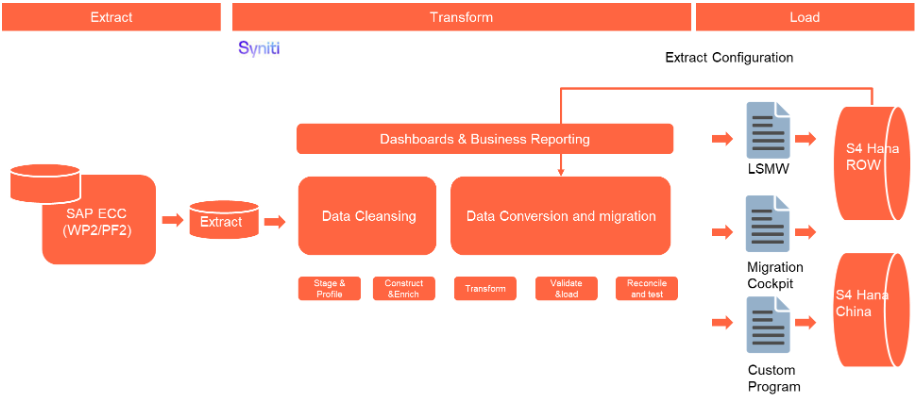
The high-level process is represented by the diagram below:
The ETL (Extract, Transform, Load) process is a structured approach to data migration and management, ensuring high-quality data is seamlessly transferred across systems. Here’s a breakdown of its key components:
1. Extraction
The process begins with extracting metadata and raw data from source systems, such as Syensqo ECC system (i.e. WP2/PF2) periodically. The extracted data is then staged for transformation.
2. Transformation
Once extracted, the data undergoes cleansing, consolidation, and governance. This step ensures data integrity, consistency, and compliance with business rules. The transformation process includes:
- Data validation to remove inconsistencies.
- Standardization to align formats across datasets.
- Business rule application to refine data for operational use.
3. Loading
The transformed data is then loaded into the target S/4HANA system.
Data Privacy and Sensitivity
Not applicableExtraction
Extract data from a source into . There are 2 possibilities:
- The data exists. connects to the source and loads the data into . There are 3 methods:
- Perform full data extraction from relevant tables in the source system(s).
- Perform extraction through the application layer.
- Only if ; cannot connect to the source, data is loaded to the repository from the provided source system extract/report.
- The data does not exist (or cannot be converted from its current state). The data is manually collected by the business directly in . This is to be conducted using DCT (Data Collection Template) in
The agreed Relevancy criteria is applied to the extracted records to identify the records that are applicable for the Target loads
Extraction Run Sheet
| Req # | Requirement Description | Team Responsible |
|---|---|---|
| Extraction Scope Definition | - Identify the source systems and databases involved. - Define the data objects (tables, fields, records) to be extracted. - Establish business rules for data selection. | Syniti / LTC Data team |
| Extraction Methodology | - Specify the extraction approach (full, incremental, or delta extraction). - Determine the tools and technologies used. - Define data filtering criteria to exclude irrelevant records. | Syniti |
| Extraction Execution Plan | - Establish execution timelines and batch processing schedules. - Assign responsibilities for extraction monitoring. - Document dependencies on other migration tasks. | Syniti |
| Data Quality and Validation | - Define error handling mechanisms for extraction failures. | Syniti |
Selection Screen
| Selection Ref Screen | Parameter Name | Selection Type | Requirement | Value to be entered/set |
|---|---|---|---|---|
| Not applicable |
Data Collection Template (DCT)
A Target-Ready Data Collection Template will be created for all required fields in the Quality Info Record, except for fields that require transformation in accordance with the defined transformation rules. Each template will follow the structure and format required by the target S/4HANA Material Master configuration for Quality Management.
| Table | Field Name | Field Description | Data Type | Length | Requirement | Rule | Mapping |
| QINF | MATNR | Material Number | CHAR | 40 | Required | Material number as uploaded via CNV–2019 Basic Data View; must exist in MARA/MARC | Copy from DCT |
| QINF | WERK | Plant | CHAR | 4 | Required | List of valid plants per To-Be Plant Mapping; plant must be active | Copy from DCT |
| QINF | LIEFERANT | Supplier | CHAR | 10 | Required | List of valid Vendors as per the BP vendor master | Copy from DCT |
| QINF | REVLV | Revision Level | CHAR | 2 | Required | This field stores specific version of a material for a given vendor-plant combination in a quality info record | Copy from DCT |
| QINF | FREI_DAT | Release Until | DATS | 8 | Required | If the release has an end date, enter it; else enter 31.12.9999 | Copy from DCT |
| QINF | FREI_MNG | Release Quantity | QUAN | 13 | Conditional | This field functions as a limit the controls how much of a product can be ordered from a specific vendor before further action is taken, such as needing a new quality inspection. | Copy from DCT |
| QINF | SPERRGRUND | Blocking Reason | CHAR | 40 | Conditional | If the record is blocked, enter a valid block function (a quotation, purchase order, goods receipt or all functions) to be performed; else leave blank. | Copy from DCT |
| QINF | SPERRFKT | Blocking Function | CHAR | 2 | Conditional | If the record is blocked, enter a valid block function (a quotation, purchase order, goods receipt or all functions) to be performed; else leave blank. | Copy from DCT |
| QINF | FREI_MGKZ | Indicator: Release Quantity Is Active | CHAR | 1 | Conditional | If the vendor–material combination is released, set indicator; else set as blocked | Copy from DCT |
| QINF | NOINSP | Inspection Control | CHAR | 1 | Conditional | If inspection is waived, set indicator; else leave blank. | Copy from DCT |
| QINF | QSSYSFAM | Actual QM System | CHAR | 4 | Conditional | If vendor has a certified quality system, enter system type; else leave blank. | Copy from DCT |
| QINF | QSSYSDAT | QM System Valid To | DATS | 8 | Conditional | If vendor's quality system is certified, enter certification date; else leave blank. | Copy from DCT |
| QINF | VORLABN | Lead Time (in Days) | INT1 | 3 | Conditional | Lot Creation lead time for source inspection | Copy from DCT |
| QINF | VARIABNAHM | Source Inspection | CHAR | 8 | Conditional | if Source Inspection is required. select 0101, else leave it empty | Copy from DCT |
| QINF | CERTCONTROL | Certificate | CHAR | 1 | Conditional | If certificate is required, enter type; else leave blank | Copy from DCT |
| QINF | BEST_MG | Quantity Ordered for the Material | QUAN | 13 | Conditional | if control is required to limit the qty we can buy for this Material/Vendor combination. Otherwise it can be empty | Copy from DCT |
| QINF | ME | Base Unit of Measure for the Material | UNIT | 3 | Conditional | C. Copy from source system | Copy from DCT |
| QINF | DAT_RUECK | Date when the Ordered Quantity Was Reset | DATS | 8 | Conditional | If the accumulated total ordered quantity is to be cleared to allow for new orders to be placed again against the release quantity; else leave it blank | Copy from DCT |
| QINF | SPRACHE | Language Key | LANG | 1 | Conditional | If text language differs from default, enter ISO key; else leave default. | Copy from DCT |
| QINF | LTEXTKZ | Inspection Characteristic Long Text Exists | CHAR | 1 | Conditional | Migrate long text if we have this field ='X' | Copy from DCT |
| QINF | SPRAS | Language Key | LANG | 1 | Conditional | If text language differs from default, enter ISO key; else leave default. | Copy from DCT |
| QINF | STSMA | Status Profile Assigned to Quality Info Record | CHAR | 8 | Conditional | Status Profile Assigned to Quality Info Record | Copy from DCT |
| QINF | NOINSPABN | No GR Inspection if Source Inspection Lot Exists | CHAR | 2 | Conditional | No GR Inspection if Source Inspection Lot Exists | Copy from DCT |
| QINF | LOEKZ | Deletion Flag | CHAR | 1 | Conditional | This field indicates that quality info record is flagged for deletion or has been archived, but it is not yet physically deleted from the database | Copy from DCT |
| Note |
Extraction Dependencies
Before data extraction can commence, several prerequisite steps and conditions must be met to ensure a smooth and accurate extraction process. These dependencies involve confirming system readiness, validating data structures, and ensuring that appropriate access rights and credentials are in place.
Each step must be clearly defined, assigned to responsible teams, and completed prior to extraction activities. Proper coordination across stakeholders is required to mitigate risks and avoid delays in the migration timeline.
| Item # | Step Description | Team Responsible |
|---|---|---|
| 1 | Source System Availability
| Syensqo IT |
| 2 | Data Structure
| Syniti |
| 3 | Referential Integrity
| Syniti |
| 4 | Extraction Methodology
| Syniti |
| 5 | Performance and Scalability Considerations
| Syniti |
| 6 | Security and Compliance
| Syniti |
Transformation
The Target fields are mapped to the applicable Legacy field that will be its source, this is a 3-way activity involving the Business, Functional team and Data team. This identifies the transformation activity required to allow to make the data Target ready:
- Perform value mapping and data transformation rules.
- Legacy values are mapped to the to-be values (this could include a default value)
- Values are transformed according to the rules defined in
- Prepare target-ready data in the structure and format that is required for loading via prescribed Load Tool. This step also produces the load data ready for business to perform Pre-load Data Validation
Transformation Run Sheet
| Item # | Step Description | Team Responsible |
|---|---|---|
1 | Transformation Scope Definition - Identify the source and target data structures. - Define business rules for data standardization. - Establish data cleansing requirements to remove inconsistencies. | Data Team |
2 | Data Mapping and Standardization - Align source fields with target fields. - Ensure unit consistency (e.g., currency, measurement units) | Data Team |
3 | Business Rule Application - Implement data enrichment/collection if applicable - Apply conditional transformations based on predefined logic/business rules | Data Team |
4 | Transformation Execution Plan - Define batch processing schedules. - Assign responsibilities for monitoring execution. - Establish error-handling mechanisms | Syniti |
Transformation Rules
| Rule # | Source system | Source Table | Source Field | Source Description | Target System | Target Table | Target Field | Target Description | Transformation Logic |
|---|---|---|---|---|---|---|---|---|---|
| 1 | PF2/WP2 | QINF | MANDT | Client | S/4 HANA | QINF | MANDT | Client | R.Internal |
| 2 | PF2/WP2 | QINF | MATNR | Material Number | S/4 HANA | QINF | MATNR | Material Number | R.xref for Material(As per mapping file) |
| 3 | PF2/WP2 | QINF | WERK | Plant | S/4 HANA | QINF | WERK | Plant | R.xref for Plant(As per mapping file) |
| 4 | PF2/WP2 | QINF | LIEFERANT | Supplier | S/4 HANA | QINF | LIEFERANT | Supplier | R.Xref for Supplier(As per mapping file) |
| 5 | PF2/WP2 | QINF | REVLV | Revision Level | S/4 HANA | QINF | REVLV | Revision Level | R.Copy |
| 6 | PF2/WP2 | QINF | FREI_DAT | Release Until | S/4 HANA | QINF | FREI_DAT | Release Until | R.Rule: If the release has an end date, enter it; else enter 31.12.9999 |
| 7 | PF2/WP2 | QINF | FREI_MNG | Release Quantity | S/4 HANA | QINF | FREI_MNG | Release Quantity | C. Copy from source system. |
| 8 | PF2/WP2 | QINF | SPERRGRUND | Blocking Reason | S/4 HANA | QINF | SPERRGRUND | Blocking Reason | C. Copy from source system. |
| 9 | PF2/WP2 | QINF | SPERRFKT | Blocking Function | S/4 HANA | QINF | SPERRFKT | Blocking Function | C. Copy from source system. |
| 10 | PF2/WP2 | QINF | FREI_MGKZ | Indicator: Release Quantity Is Active | S/4 HANA | QINF | FREI_MGKZ | Indicator: Release Quantity Is Active | C. Copy from source system. |
| 11 | PF2/WP2 | QINF | NOINSP | Inspection Control | S/4 HANA | QINF | NOINSP | Inspection Control | C. Copy from source system. |
| 12 | PF2/WP2 | QINF | QSSYSFAM | Actual QM System | S/4 HANA | QINF | QSSYSFAM | Actual QM System | C. Copy from source system. |
| 13 | PF2/WP2 | QINF | QSSYSDAT | QM System Valid To | S/4 HANA | QINF | QSSYSDAT | QM System Valid To | C. Copy from source system. |
| 14 | PF2/WP2 | QINF | VORLABN | Lead Time (in Days) | S/4 HANA | QINF | VORLABN | Lead Time (in Days) | C. Copy from source system. |
| 15 | PF2/WP2 | QINF | VARIABNAHM | Source Inspection | S/4 HANA | QINF | VARIABNAHM | Source Inspection | C. Copy from source system. |
| 16 | PF2/WP2 | QINF | CERTCONTROL | Certificate | S/4 HANA | QINF | CERTCONTROL | Certificate | C. Copy from source system. |
| 17 | PF2/WP2 | QINF | ZAEHL | Internal Counter for DB Objects | S/4 HANA | QINF | ZAEHL | Internal Counter for DB Objects | S.Internal |
| 18 | PF2/WP2 | QINF | ERSTELLER | Name of User who Created the Q-Info Record | S/4 HANA | QINF | ERSTELLER | Name of User who Created the Q-Info Record | S.Internal |
| 19 | PF2/WP2 | QINF | ERSTELLDAT | Create Date of Q-Info Record | S/4 HANA | QINF | ERSTELLDAT | Create Date of Q-Info Record | S.Internal |
| 20 | PF2/WP2 | QINF | AENDERER | Name of User who Most Recently Changed the Q-Info Record | S/4 HANA | QINF | AENDERER | Name of User who Most Recently Changed the Q-Info Record | S.Internal |
| 21 | PF2/WP2 | QINF | AENDERDAT | Change Date of Q-Info Record | S/4 HANA | QINF | AENDERDAT | Change Date of Q-Info Record | S.Internal |
| 22 | PF2/WP2 | QINF | BEST_MG | Quantity Ordered for the Material | S/4 HANA | QINF | BEST_MG | Quantity Ordered for the Material | C. Copy from source system |
| 23 | PF2/WP2 | QINF | ME | Base Unit of Measure for the Material | S/4 HANA | QINF | ME | Base Unit of Measure for the Material | C. Copy from source system |
| 24 | PF2/WP2 | QINF | DAT_RUECK | Date when the Ordered Quantity Was Reset | S/4 HANA | QINF | DAT_RUECK | Date when the Ordered Quantity Was Reset | C. Copy from source system |
| 25 | PF2/WP2 | QINF | SPRACHE | Language Key | S/4 HANA | QINF | SPRACHE | Language Key | C. Internal |
| 26 | PF2/WP2 | QINF | QVVORH | Quality Assurance Agreement Exists | S/4 HANA | QINF | QVVORH | Quality Assurance Agreement Exists | S.Internal |
| 27 | PF2/WP2 | QINF | LTEXTKZ | Inspection Characteristic Long Text Exists | S/4 HANA | QINF | LTEXTKZ | Inspection Characteristic Long Text Exists | C. Copy from source system. Migrate long text if we have this field ='X' |
| 28 | PF2/WP2 | QINF | SPRAS | Language Key | S/4 HANA | QINF | SPRAS | Language Key | C. Copy from source system. |
| 29 | PF2/WP2 | QINF | PLOS | Inspection Lot No. in QINF for Current Status | S/4 HANA | QINF | PLOS | Inspection Lot No. in QINF for Current Status | S.Internal |
| 30 | PF2/WP2 | QINF | PLOS2 | Inspection Lot No. in QINF for Next Status | S/4 HANA | QINF | PLOS2 | Inspection Lot No. in QINF for Next Status | S.Internal |
| 31 | PF2/WP2 | QINF | STSMA | Status Profile Assigned to Quality Info Record | S/4 HANA | QINF | STSMA | Status Profile Assigned to Quality Info Record | C. Copy from source system. |
| 32 | PF2/WP2 | QINF | OBJNR | QINF Object Number in Status Management | S/4 HANA | QINF | OBJNR | QINF Object Number in Status Management | S.Internal |
| 33 | PF2/WP2 | QINF | NOINSPABN | No GR Inspection if Source Inspection Lot Exists | S/4 HANA | QINF | NOINSPABN | No GR Inspection if Source Inspection Lot Exists | C. Copy from source system. |
| 34 | PF2/WP2 | STXH | TDOBJECT | Text Object | S/4HANA | STXH | TDOBJECT | Text Object | Default to"QINF" |
| 35 | PF2/WP2 | STXH | TDNAME | Text Name | S/4HANA | STXH | TDNAME | Text Name | The STXH table data will be migrated as-is from the current system to S/4HANA, with no modifications, ensuring consistency and traceability of existing records. |
| 36 | PF2/WP2 | STXH | TDID | Text ID | S/4HANA | STXH | TDID | Text ID | The STXH table data will be migrated as-is from the current system to S/4HANA, with no modifications, ensuring consistency and traceability of existing records. Default to 'QINF' |
| 37 | PF2/WP2 | STXH | TDSPRAS | Language Key | S/4HANA | STXH | TDSPRAS | Language Key | The STXH table data will be migrated as-is from the current system to S/4HANA, with no modifications, ensuring consistency and traceability of existing records. |
| 38 | PF2/WP2 | STXH | TDVERSION | Version Number of Text | S/4HANA | STXH | TDVERSION | Version Number of Text | The STXH table data will be migrated as-is from the current system to S/4HANA, with no modifications, ensuring consistency and traceability of existing records. |
| 39 | PF2/WP2 | STXL | CLUSTD | Text Line (Compressed) | S/4HANA | STXL | CLUSTD | Text Line (Compressed) | The STXL table data will be migrated as-is from the current system to S/4HANA, with no modifications, ensuring consistency and traceability of existing records. |
| 40 | PF2/WP2 | STXL | TDOBJECT | Text Object (Reference from STXH) | S/4HANA | STXL | TDOBJECT | Text Object | Default to"QINF" |
| 41 | PF2/WP2 | STXL | TDNAME | Text Name | S/4HANA | STXL | TDNAME | Text Name | The STXH table data will be migrated as-is from the current system to S/4HANA, with no modifications, ensuring consistency and traceability of existing records. |
Transformation Mapping
| Mapping Table Name | Mapping Table Description |
|---|---|
| Material | Mapping of legacy Material to new S/4HANA Material according to To-Be Material Mapping definition. |
| Plant | Mapping of legacy Plants to new S/4HANA Plant codes according to To-Be Plant Mapping definition. |
| Supplier | Mapping of legacy Supplier to new S/4HANA Supplier according to To-Be Material Mapping definition. |
Transformation Dependencies
List the steps that need to occur before transformation can commence| Item # | Step Description | Team Responsible |
|---|---|---|
1 | Value Mappings are according to the latest design - <List of Value Mappings> | SyWay Data Team |
Pre-Load Validation
Project Team
Completeness
| Task | Action |
|---|---|
Compare Data Counts |
|
Validate the mandatory fields | Validate there is value for all the mandatory fields |
Validate Primary Keys and Unique Constraints |
|
Test Referential Integrity | Confirm dependent records exist in related tables |
Accuracy
| Task | Action |
|---|---|
Validate the transformation | Validate the fields which require transformation have the value after transformation instead of the original field value |
Check Data Consistency |
|
Business
Completeness
| Task | Action |
|---|---|
Compare Data Count |
|
| Review populated templates for missing or incorrect values | Use checklists to verify completeness and correctness before submission |
Accuracy
| Task | Action |
|---|---|
Conversion Accuracy | Business Data Owner/s to verify that all the data in the load table/file is accurate as per endorsed transformation/ mapping rules (and signed-off DCT data). |
Load
The load process includes:
- Execute the automated data load into target system using load tool or product the load file if the load must be done manually
- Once the data is loaded to the target system, it will be extracted and prepared for Post Load Data Validation
Load Run Sheet
| Item # | Step Description | Team Responsible |
|---|---|---|
1 | Load Scope Definition - Identify the target system and database structure. - Define data objects (tables, fields, records) to be loaded. - Establish business rules for data validation. | Data team |
2 | Load Methodology - Specify the loading tools and technologies (Migration Cockpit, LSMW, custom loading program). | Syniti |
3 | Data Quality and Validation - Ensure data integrity checks (null values, duplicates, format validation). - Perform pre-load validations to verify completeness. - Define error handling mechanisms for load failures | Syniti |
4 | Load Execution Plan - Establish execution timelines and batch processing schedules. - Assign responsibilities for monitoring execution. - Document dependencies on other migration tasks | Syniti |
5 | Logging and Reporting - Maintain detailed logs of loading activities. - Generate summary reports on loaded data volume and quality. - Define escalation procedures for errors | Syniti |
Load Phase and Dependencies
The Quality Info records will be loaded in the pre-cutover (PreCutover 4 phase) period.
Before loading, it will have dependency on the following configuration and data objects in the S/4 HANA.
Configuration
| Item # | Configuration Item |
|---|---|
| 1 | T001W – Plants/Branches: Definition of plants where Quality info records are created and maintained. |
| 2 | T006 – Units of Measurement: ISO-compliant UoM definitions to ensure consistency of Base Unit of Measure for the Material |
| 3 | TQ04A - Blocked functions: Ensure to allow only valid Block functions |
| 4 | TQ02B - Actual QM system: Ensure supplier qualification and compliance tracking within the Quality Management module. |
| 5 | TQ30 - Inspection type: Ensure the right inspections are used |
| 6 | TJ20- Status Profiles: Ensures valid QM status profiles are used |
| 7 | T002- Language keys: Ensures valid Languages are used for short and long texts |
Conversion Objects
| Object # | Preceding Object Conversion Approach |
|---|---|
| CNV-2009 | Material master along with QM view |
| CNV-3026 | BP-Vendor Master |
Error Handling
| Error Type | Error Description | Action Taken |
|---|---|---|
| 1 | Plant does not exist or not mapped in target system | Verify that the plant exists in the target system and mapping is correctly maintained. Reprocess once mapping is updated. |
| 2 | UoM (Unit of Measure) is invalid | Ensure that UoM is mapped correctly in T006 and harmonized with the target system. Correct invalid values in the collection template and reload. |
| 3 | Material number exists and extended to required Plant and QM view | Verify that the Material exists in the target system and mapping is correctly maintained. Reprocess once mapping is updated. |
| 4 | Supplier exists in Target system | Verify that the Supplier exists in the target system and mapping is correctly maintained. Reprocess once mapping is updated. |
Post-Load Validation
Project Team
Completeness
Accuracy
| Task | Action |
|---|---|
Execute Sample Queries and Reports |
|
Conduct Post-Migration Reconciliation | Generate reports comparing pre- and post-migration data. |
Business
Post-load validation is a critical step in data migration, ensuring that transferred data is accurate, complete, and functional within the target system.
1. Ensuring Data Integrity
After migration, data must be consistent with its original structure. Post-load validation checks for missing records, incorrect mappings, and formatting errors to prevent discrepancies.
2. Business Continuity
Faulty data can disrupt operations, leading to financial losses and inefficiencies. Validating post-load data ensures that applications function as expected, preventing downtime.
3. Error Detection and Resolution
By validating data post-migration, businesses can detect anomalies early, reducing the cost and effort required for corrections
Completeness
| Task | Action |
|---|---|
| Perform Source-to-Target Comparisons |
|
| Conduct Post-Migration Reconciliation | Go through reports comparing pre- and post-migration data. |
Accuracy
| Task | Action |
|---|---|
Perform Manual Testing | Conduct manual spot-checks for additional assurance. |
Key Assumptions
- Master Data Standard is up to date as on the date of documenting this conversion approach and data load.
- Quality info records is in scope based on data design and any exception requested by business.
- Data cleansing has met the required percentage threshold for the specified mock cycle and all preparation activities have been completed.
- Data entries in DCT are target-ready data unless a specific transformation rule is stated for that field in the transformation rules.