Tasks to be completed when documenting an operation (from creation to publication)1. Enter the Title of the operation / page2. Add the following Labels :
3. Fill in all fields as described above4. Once the description of the operation is completed, ensure it is approved and published by launching the SBS-Finance approval workflow |
| Domain: Country Accounting |
Responsibility area: N/A |
Table of contents
By default the table of contents displays Heading 1 & Heading 2 (other levels can be added)
Scope3. Remove the icon when not applicable ERP4. Remove the icon(s) when not applicable
Frequency5. Remove the icon(s) when not applicable
References6. Add the link to SAP transaction(s) (when it exists) FBL3N; KSB1; FB01; Z1F_CRC_DATA_ENRICH; Z1V_CRC_BILLING; KB11N Forms7. Insert the links accordingly and change the link text with the OP name AttachmentsPrevious OP << |

1. Objective and Scope
1.1. Objective of this Operation
The purpose of this document is to explain what is the Interrompabilitá process in Italy.
1.2. Scope
This procedure applies to the following Italian Companies: 0279, 0270, 5835.
2. Definitions
See Finance Glossary:
3. Tasks description
3.1. I perform the monthly invoicing
The Invoice must be posted until the 10th of each month (this is the limit date for which Terna accepts to receive the invoice).
In order to we be able to issue the invoice on time we should receive the invoice request from Donatella Sogni before this date. In case no information is provided until 10th we should send a reminder to Donatella Sogni (send an e-mail through Freshdesk):
| The invoice request received is regarding the previous month (e.g. in April we receive the invoice regarding March period). |

| As you could check in the reply from Donatella (in the print above) in some months the information arrives a little late because Terna doesn't send the invoice details until the agreed date. |
- The invoice request received through Freshdesk should look like this (E.g. of Freshdesk Ticket #2765786):

There is a Template excel with all the posting instructions to be performed. IT Interrompibilitá. The excel file will be attached to SAP (SW issued by 0279 to Terna) with the cumulative amounts. As such, please go to the previous month document and insert the current month data.
3.1.1. I issue the invoice from Solvay SA to Terna
After receiving the invoice request from Donatella Sogni, the 1st step is to issue the invoice from Solvay SA to Terna.
Open the PDF file attached to the Freshdesk request and retrieve the invoicing information:
- In the first page of the PDF it's mentioned the total amount to be invoiced to Terna.

- In the second page of the PDF we have this amount split by Solvay partners and site (this information will be further used to issue the affiliates invoices).

In order to post the invoice to Terna you should create a KB11N with the following details:
- Sender Cost Center: YU880OPDIV;
- Receiver WBS: E00279CBTP410682INT;
- Cost element: 7446100000;
- Text: "INTERROMPIBILITÀ Month 2019";
- Amount: the TOTALE from column Saldo da regolare is the amount to invoice to Terna (in our example it is 54.512,87€) you could also use as reference the amount displayed in the first page of the PDF
- Material: 20194703;
- Tax code: A1
Example of KB11N posting:

After the posting is done run the invoicing steps (data enrichment + croco billing) to generate the invoice.
Send the invoice image to fatturazioni_p_mercato@terna.it
With the implementation of mandatory real-time electronic sales invoice issuance and reporting for Italy, from 1st January 2019 (Legge n. 205 del 27 dicembre 2017, "Legge di bilancio 2018") all relevant invoices have to be submitted to the Italian Revenue Agency’s e-invoicing platform, Sistema di Interscambio (SdI). This means as soon as the invoice is issued it will be automatically submitted to the Italian Revenue Agency. Take this into consideration in case you need to perform any further text adjustments in the invoice so the information doesn't conflict with what has been submitted to the Italian Fiscal Authorities. |
3.1.2. I issue the intercompany invoices
After performing the Terna invoice we need to issue the affiliate invoices. The affiliate invoices can be issued until the end of the month.
We should post an invoice from each affiliate site to company 0279, this means:
- One invoice from Solvay Chimica Italia (company 0270) site Massa to company 0279;
- One invoice from Solvay Chimica Italia (company 0270) site Rosignano to company 0279;
- One invoice from Solvay Specialty Polymers Italy (company 5835) site SPINETTA MARENGO to company 0279.
The total amount invoiced by the affiliates should be equal to the amount invoiced by company 0279 to Terna because:
|

As mentioned before, the amounts to be invoiced by the affiliates are retrieved from the second page of the PDF:

Post an S1 document through transaction FB01 with the following details (use the amounts reported by Terna):

After the posting is done run the invoicing steps (data enrichment + croco billing) to generate the invoices.
The tax code of the invoices issued by the affiliates is K1.
Material is 20194703.
As you would see in the point 3.1.3 I transfer from profit account to accrual, this transfer is already being done directly in the invoice posting. |
It is important to guarantee that the accounting document (C0 document) was correctly generated and to process the correspondent outbound and incoming Idocs. |
3.1.3. I transfer from profit account to accrual
This step is only for the Affiliate companies. |
As the invoice of the period is always posted on the month after, FA &Treasury team books always an accrual to reflect the revenue on the correct month: In our example, the invoice posted in February concerns Interrompabilitá from January. Although the invoice was only posted in February the revenue was already recognized in the correct period (January) through an accrual posting.
Since an accrual was already posted on account 2220000000 this account will be with balance until the invoice is issued.
This is the reason why we have to transfer the invoiced amounts to account 2220000000: by transferring the invoiced amounts to the accrual account we are guaranteeing this account will be balanced:


The cost centers used in the accruals are different for each company site:
|
Template file Interrompibilitá – sheet: transfer pofit acc to accrual. |
2) Check Account 2220000000 and clear the accrual (task to be performed by FA & Treasury team)
- Go to FBL3N transaction for account 2220000000:

- Go to FBL3N transaction for account 2220000000:
- Subtotal the items by Assignment field and filter the assignment by *Interromp*

The accrual posting normally is booked with a recurrent posting or received via Freshdesk ticket, if you do not find the Recurrent by assignment you can look by Reference or Offsetting Account no.= 7470000000
After the Accrual posting transfer we clear the items, and if necessary change the assignment of the postings:
E.g.

Every time we have a Delta between Accrual and Invoice we book the difference in the G/L account 7470000000 with the correspondent cost center. |
3.2. I perform the yearly invoicing "Conguaglio"
On a yearly basis we receive from Donatela Sogni or CAM Francesco Piccoli the Invoices related to the annual adjustments for Electricity.
The information is received normally in the beginning of next year (February/March)
E.g. in March 2016 we received the "Conguaglios" of year 2019.

We should receive one invoice per month/period.
The procedure is the same as the Monthly invoicing we just need to PAY VERY ATTENTION
3.2.1. I issue the invoice or credit note
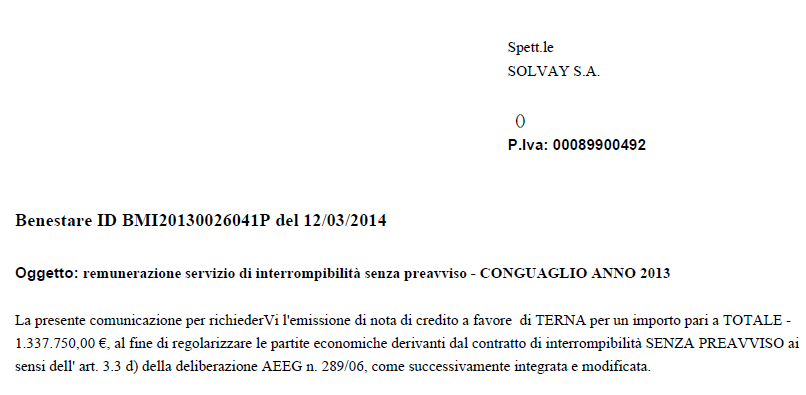
We look to the PDF received and check if:
- It's an Invoice:

- It's a Credit Note:
3.3. I update the Interrompibilità excel file
In the file template Interrompibilità you will find the following table that will help you perform the S1 document:

Update the column Doc Date and Posting Date to the current date.
Update the column Amount according to the PDF file received by Terna.
Update date the column Text to the current month and year.
End of document.