Prerequisite

PF1 Worldwide

This document describes the transactions related to the process of R&D project creation and modification. 


process name 

Area: Responsability Area 

previous Operation(s): (warning)

Rules & Glossary: Costing - Rules Costing - Glossary Costing - SAP Operations

Additional information 


Guideline


The R&D projects aims to track costs of R&D projects. In order to facilitate the capitalization of qualifying R&D projects, a time and cost-tracking system has been created using WBS (Work Breakdown Structure) in the accounting ERP system (SAP).


Find below the codification of the R&D project:                                                   


R

-

XXX

XX

XXXX


R

-

BU Code

First two characters of the plant code

Free characters


When for BU code we have:


First two digits of the plant need to be checked on the table ZPRI.


CJ01 - Create Project

ZZJ02 - R&D - Create Projects from XLS template


Send an e-mail to the Controller in order to obtain the confirmation or validation that everything is OK in project creation process, in order to perform the release.


  • Click on ''Back'' (F3) .


  • When the warning message appears, click on ''Yes''.


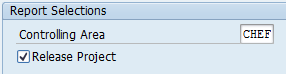
  • Tick the''Release project'' field.


Send an e-mail to the Controller confirming that the R&D WBS was created and release.


If a request is received to change a project to Fixed Asset:


Go to CJ02 and select the project:


Select the WBS/Line where you want to create as final assets: Extras -> Create completed Asset.


Go to the next screen and complete the missing information provided in the request: Asset Class and Cost center.


In the bottom of the SAP screen the following message will appear:


Go the settlement rule of the WBS to confirm you have a new line for the final asset.


Then go back to the previous screen, in order to set up the project as Technically completed: Edit -> Status ->Technically complete.


Check if the status in WBS is ''TECO''.


The project can now be saved .

Then, display again the project and settlement rule, in order to find the final asset number as below ( eg: 250000024135-0).


Reference


Next Operation(s): (warning)