Tasks to be completed when documenting an operation (from creation to publication)1. Enter the Title of the operation / page2. Add the following Labels :
3. Fill in all fields as described above4. Once the description of the operation is completed, ensure it is approved and published by launching the SBS-Finance approval workflow |
| Domain: Country Accounting |
Responsibility area: N/A |
Table of contents
By default the table of contents displays Heading 1 & Heading 2 (other levels can be added)
Scope3. Remove the icon when not applicable ERP4. Remove the icon(s) when not applicable
(to be filled!) Frequency5. Remove the icon(s) when not applicable (to be filled!) References6. Add the link to SAP transaction(s) (when it exists) FBL3N; KSB1 Forms7. Insert the links accordingly and change the link text with the OP name AttachmentsPrevious OP << |

1. Objective and Scope
1.1. Objective of this Operation
The purpose of this document is to explain how to proceed with the Interrompabilitá procedure in Italy.
1.2. Scope
This procedure applies to the following Italian Companies: 0279, 0270, 5835.
2. Definitions
See Finance Glossary:
3. Tasks description
3.1. I perform the monthly invoicing
The Invoice should be received before the 10th of each month, if not we need to request Donatella Sogni. (E.g. of Freshdesk case: 590995)

There is a Template excel with all the posting instructions to be performed. (At the end of this procedure). The excel file will be attached to SAP (SW issued by 0279 to Terna) with the cumulative amounts. As such, please go to the previous month document and insert the current month data.
3.1.1. I issue the invoice from Solvay SA to Terna
After receiving the invoice, the 1st step is to Issue the Invoice from Solvay SA to Terna.
- Every month we received from Donatella Sogni the Invoice regarding the Previous Month.
E.g. in April we received the invoice regarding March period.

- In the invoice image we have the information split by Solvay Partners.
For example the total amount of May invoice is 467.630,59€ and we have the total amount by Solvay partner.

Posting information to bear in mind:
- Document Date: Invoice date = 08/06/2016
- Document Header Text: INTERROMPIBILITÀ MM2016
- Reference: BO_case number
- P/L account: 7446000000
- Cost Center: YU880OPDIV
- Croco Partner: 410682 (change Croco?)

- Material: 20132817
- Text: VERY IMPORTANT = The invoice from 0279 to TERNA has to be updated with the long text


We split in the SW posting the amount by Plant/Company:

Template file IT Interrompibilitá - sheet: Terna Invoice |
Is important to issue the invoice right after these steps until the accounting document so that when done the invoice should be send to Terna which has to be send until the 10th to the following mail box:
The affiliate invoices can be issued until the end of the month.
3.1.2. I issue the intercompany invoices
After performing the Terna invoice we need to issue the affiliate invoices.
Posting information to bear in mind:
- Document Date: Invoice date = 08/06/2016
- Document Header Text: INTERR. MM.2016
- Reference: BO_case number
- P/L account: 7470000000
- Cost Center:
Company | Business Area | Cost Center | Order |
0270 | 7630 | 4S32321900 |
|
0270 | 7510 | XR32321900 |
|
5835 | 3490 | UD32321900 |
|
5835 | 3490 | JF323219VR |
|
- Croco Partner: 400001 (change Croco?)
- Material: 20132817
- Assigment: Interromp. MM/16
- Text: It's very important to have the TEXT description on each Solvay Invoice the information should change each month according to Terna invoice. (text to insert in the template)
It is important to issue the invoice right after these steps until the accounting document. |
3.1.3. I transfer from profit account to accrual
As the Invoice of the period is always received on the month after, Local team books always an accrual to reflect the cost on the correspondent period.
The new Intercompany procedure for SW documents needs to be done between Balance Sheet Account 2220200000 against a PL account as of Jan2016.
As so when the invoice is booked we need to transfer the cost from PL account 7470000000 to accrual account 2220000000.
This step is only for the Affiliate companies. |
Following steps to be done:
1) Transfer posting from account 7470000000 to account 2220000000.
Template file IT Interrompibilitá – sheet: transfer pofit acc to accrual. |
2) Check Account 2220000000 and clear the accrual (task to be performed by country team)
- Go to FBL3N transaction:

- Subtotal the items by Assignment field – "Interromp. MM/16"

The accrual posting normally is booked with a recurrent posting or received via Salesforce (change salesforce) case, if you do not find the Recurrent by assignment you can look by Reference or Offsetting Account no.= 7470000000
- 5835 – Recurrent posting = ITSLX5
- 0270 – Recurrent Posting = IT90537-S1030 for Massa plant and Salesforce (change salesforce) case for Rosignano plant (ex. case 4156273)
After the Accrual posting transfer we clear the items, and if necessary change the assignment of the postings:
E.g.

Every time we have a Delta between Accrual and Invoice we book the diference in the G/L account 7470000000 with the correspondent cost center. |
For Example in 5835 we had a dif of 1.242,62€ and we booked as follow:

3.1.4. I fill in croco (change Croco?) table in 0279 with costs arrived from each affiliates
We fill in 0279 the following information and execute the croco_imput transaction. (change Croco? imput or input?)

3.1.5. I perform the check of cost center YU880OPDIV
After Costs on 0279 have been posted with Croco Input transaction (change Croco?) we need to check if the Cost center YU880OPDIV is equal to Zero at end of the month, if not something in the process failed and we need to check all steps.
Go to KSB1

Following result should be:

3.2. I perform the yearly invoicing "Conguaglio"
On a yearly basis we receive from Donatela Sogni or CAM Francesco Piccoli the Invoices related to the annual adjustments for Electricity.
The information is received normally in the beginning of next year (February/March)
E.g. in March 2016 we received the "Conguaglios" of year 2015.

We should receive one invoice per month/period.

If we look to the invoice we see the Inv. reference which is related this adjustment.
"Benestare ID" and the "ID Benestare di Riferimento(…)"
The procedure is the same as the Monthly invoicing we just need to PAY VERY ATTENTION
3.2.1. I issue the invoice or credit note
We look to the invoice image and check if:
- It's an Invoice:

- It's a Credit Note:
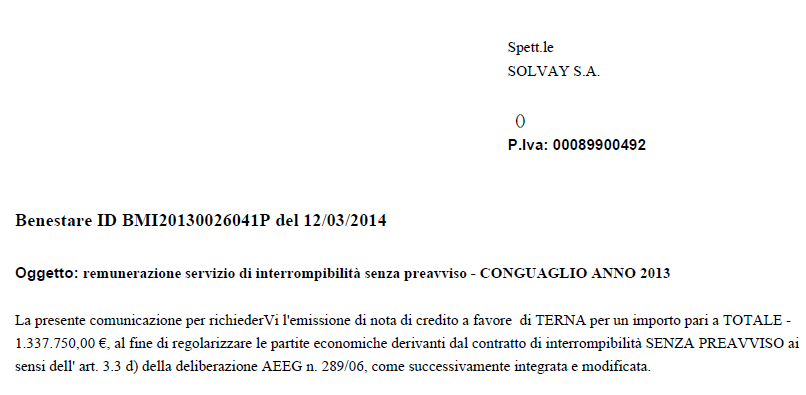
By then we need to check if the SW should be booked as a Debit or a credit document in account 2220200000, posting key 40 or 50.
3.2.2. I insert the text on the invoice image

Information in IT Interrompibilitá - sheet: Conguaglio 2015 details
3.2.3. I fill in the template details information
sheet: Conguaglio 2015 details

3.2.4. I issue invoice from Solvay SA to Terna
sheet: Terna Conguaglio 2015
3.2.5. I issue the Intercompany invoices
sheet: Affiliates Inv Conguaglio 2015
3.2.6. I transfer from profit account to accrual
With the new Intercompany process in order to issue Invoice/credit notes we need to book a BS account against a P&L account, so we book the SW but in the end we need to transfer the amount from P&L account to the BS accrual account 222xxx, so that we can clear the month end provision against the invoice done in following month.
1) Transfer posting from P&L account 747xxx to accrual account 222xxx
2) Clear of Account 2220000000
3.2.7. I perform the check of cost center YU880OPDIV
Check if the Cost center YU880OPDIV is equal to Zero at end of the month, if not something in the process failed and we need to check all steps.
End of document.