Overview
Visit Minute is a Convergence page to record every meeting that took place between a Solvay Buyer and an external party.
Following topics will be in the page:
- Meeting Date
- Meeting Location
- Short description
- Topics Discussed
Table of content
Step-By-Step
Account Owner you can Create “Visit Minute”
1- In Tabs => Click on “Accounts”
2- In View Menus => Select “My Accounts”
3- In ListViews => Click on “an Account” e.g. SAP SE

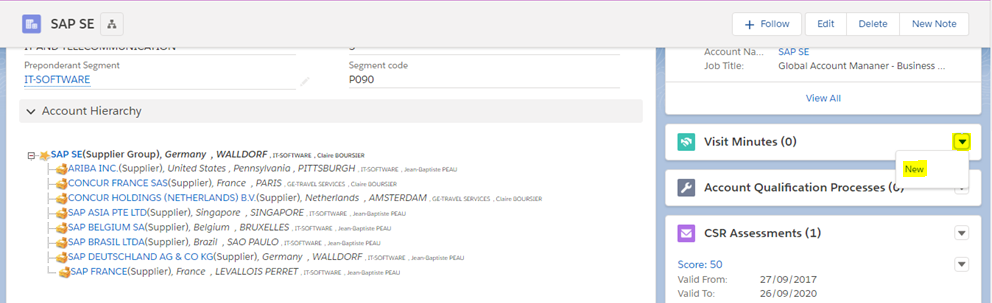
Go to the "Visit Minutes" related list to the right of your screen and click in the button "New"
1- Verify that the name of your supplier is the right one on the field "Account“
2- Click on the "Meeting Date" field and choose the date of the day you met our supplier
3- Click on the "Meeting Location" field and write the location of the meeting
4- Click on the "Short Description" field and write a description for the Visit Minute
5- In the topic discussed fields, select the right ones. If several, select them maintaining the "Ctrl" key
6- In the "Meeting Minute" field, write your notes to be shared with all.
7- In the "Additionnal Internal Notes" field, write your notes to be shared internally (Solvay Only)
8- Click "Save"
The Visit Minute is created, you are directed to the Visit Minute Detail page, and you can see the content.


Back to the Account page, go and see the "Visit Minutes" related list. The Visit Minute you just created is visible

Need help?