BW Introduction
Business Warehouse (BW) is an SAP tool that can be used to extract reports with data coming from the transactional systems and mainly RCS. Users can use the Analyser, an excel add-on, to connect to BW and then select a report to execute. The result of the report will directly be extracted in Excel.
Reports are organised by Applications (represented as 'Roles" in the Anaylsis) corresponding to functional areas. Each user is given access to one or more Applications based on needs.
Getting BW installed
Requesting Installation
To get BW installed on your PC you need to request it from your local SBS - IS - Infrastructure support. You cannot install SAP Business Intelligence by yourself because admin rights are needed on the PC to do so.
Checking the Installation
To check if BW has been installed, check if you have the Analysis in your programs :
If you do not have the "Analysis for Microsoft Excel" in your programs then BW has not been correctly installed.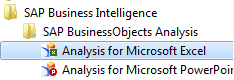
Getting a BW Account
To get a new BW account (or to modify/delete your existin account) the process is different depending on the server.
WBP Server (Rhodia Legacy)
- Download the BW Form and fill it based on what you need.
- Send the filled form to the SBS-IS-Appli-Help@solvay.com by email.
- The Security team will proceed to account validation.
- Once access is validated the account will be created and you will receive by email your new user/password.
Account creation can take several days to due required approvals (Based on the applications and perimeter the security team will request several approvals).
Note that after your first connexion your password will have to be changed.
PQ1 Server (Solvay Legacy)
For PQ1 BW access there is currently no form. To request an access, please send an email to the APPLICATIONS HELPDESK. Please provide your job description, scope and if possible explain what kind of reports you are interrested in. The support team will determine your access based on your explanations.
Getting Support and Training
For general training or support, you could refer to weLink for more information.
For Account unlocking and password resets on WBP, you can use the Password Self Service on the SAP GRC Access Control