BW - Introduction
Business Warehouse (BW) is the SAP tool to extract reports with data coming from the transactional systems (mainly WP1 & PF1). Users can use Analysis, an excel add-in, to connect to BW and then select a report to launch. The result of the report will directly be displayed in Excel.
High level of BW data flow
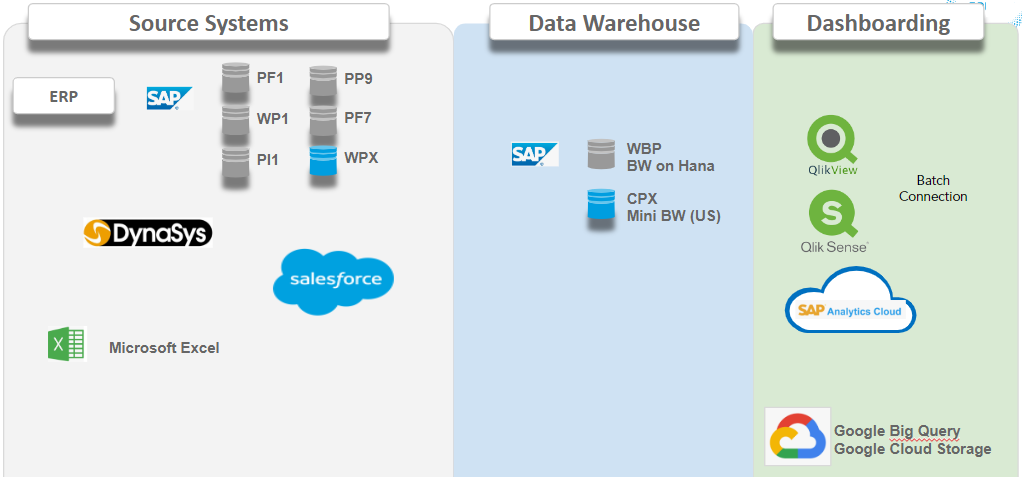
Also BW is the main database to send data to other platforms like GCP, Tableau by data engineering tool such as Talend
BW Reports are organized by Applications (represented as 'Roles" in the Analysis) corresponding to functional areas. Each user is given access to one or more Applications based on needs.
Getting BW installed
Requesting Installation
To get BW installed on your PC you need to request it from your local Service One. You cannot install SAP Business Intelligence by yourself.
Checking the Installation
To use BW you need to have the "Analysis for Microsoft Excel" tool installed.
To check the installation :
- Select "START" button
- Click on "All Programs"
- Search for the "SAP Business Intelligence" folder
- Open the "SAP BusinessObjects Analysis" folder (SAP GUI 770 does not have this folder any more)
- Select Analysis for Microsoft Excel
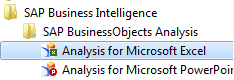
- Double Click Analysis for Microsoft Excel and verify that you have the "Analysis" Ribbon in the top bar

If you did not find the "SAP Business Intelligence" Folder, you need to contact your SBS infraservice desk support and request them to install Analysis for Microsoft Excel.
Please note that Analyzer tool is obsolete. Please do not use it

SAP Analysis for MS Excel provided by SAP and the Analysis Tool Pack Add-IN are 2 different tools.
|


Getting a BW Account
To get a new BW account (or to modify/delete your existing account) the process is:
The requester fills the BW online form.
- After submission, a ticket is created in the Helix
- Authorization team will ask for validation from some key contacts. This take several days due to required approvals (Based on the applications and perimeter the L1 AM team will request several approvals).
- Once accesses are validated, L1 AM team will create the account and inform the User by email.
Getting Trained
You can request a training or join an existing training using the YouGrow
You can filter on the learning catalog "BW" Business Warehouse to see the list of all trainings available

Password Reset and Unlock Account
For Account unlocking and password resets on WBP or any SAP systems, you can use Self-Service Reactivate User System Specific
Contents for this page : Links to sub-pages : |
if you are not able to find the solution in the self help portal, please send an email - Service one to our customer support team. |