In line with the People Engagement Journey the process of exit management is led by the Manager. This deployment highlights the focus on the empowerment and accountability of leaders to make people decisions.
The Site HR Partner continues to play a direct and crucial role in the exit management process by ensuring local compliance and supporting the Managers through the process to successfully terminate an employee.
WHAT TO DO AS A SITE HR WHEN I RECEIVE A NOTIFICATION FOR SEPARATION?
When an employee requests to leave the company or the manager decides to terminate an employee, the procedure below is required in order to successfully terminate the employee:
Step one: Check/Discuss
For involuntary separation: Review if there are legal implications & contractual obligations.
For voluntary separation: check if there are bonding agreements (i.e. non compete).
For medical incapacity: start the assessment procedure, consulting labor physician (if needed) and according to local legislation.
Evaluate the right type of solution and recommend alternative actions to the Manager who decide how to proceed.
Discuss with Unions/working council (as needed).
Step two: Prepare
If a decision is taken to proceed with the separation, contact the payroll to calculate the severance (as needed)*.
Apply theNEW approval Matrix to the involuntary separation package (where Settlement Agreement is Required).
Support the Manager with the action plan preparation (if needed).
*NEW: The Manager will have to discuss and agree with the N+1 the implementation of the non compete for Sensitive Roles and confirm the payment agreed in the addendum.
Step three: Execute
Support the Manager with the communication to the employee.
Prepare separation documents (when needed) and get it signed and stored in My HR Services - Employee file.
Check, change, and approve in MY HR Services the separation details entered by the manager & attach the link to relevant documents stored in My HR Services - Employee file.
Manager and HR will be notified after payroll data check and approval.
Note: Site HRs in the UK, please fill out thisTermination Form so the UK Payroll team can perform the termination action in the payroll system.
HOW TO MANAGE TERMINATION APPROVAL WORKFLOW AND CHANGE SEPARATION DETAILS IN MY HR SERVICES
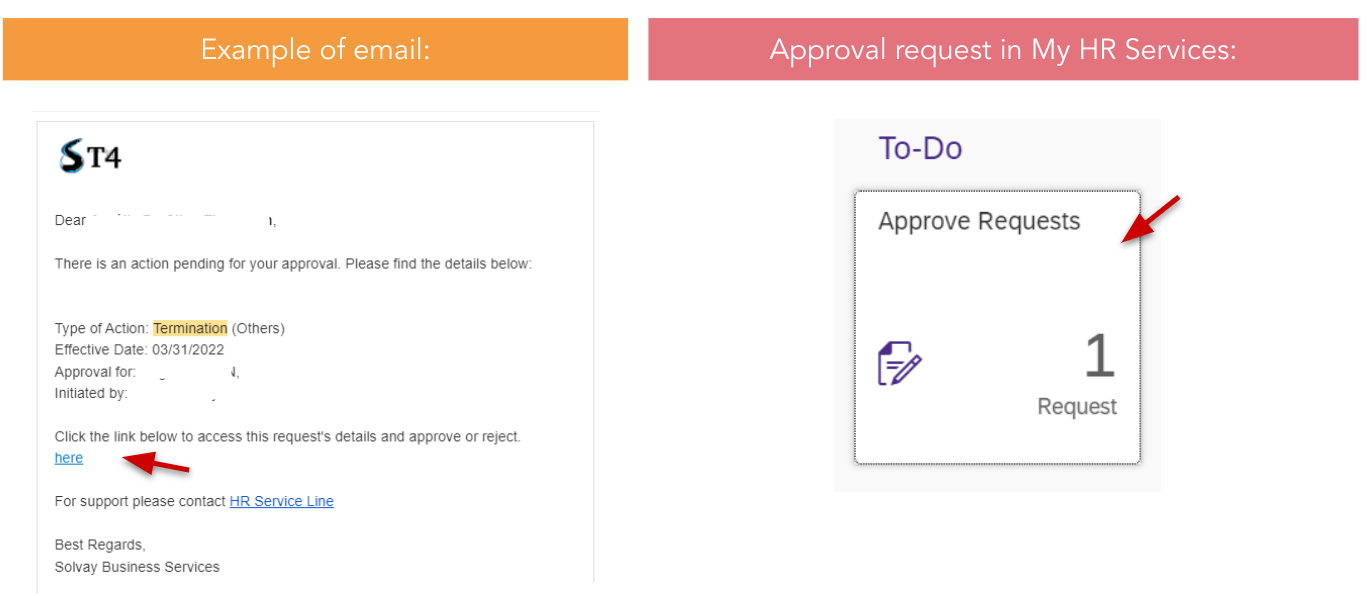
As Site HR Partner, you will receive Termination approval workflows and see the approval requests in your email or directly on My HR Services main screen:
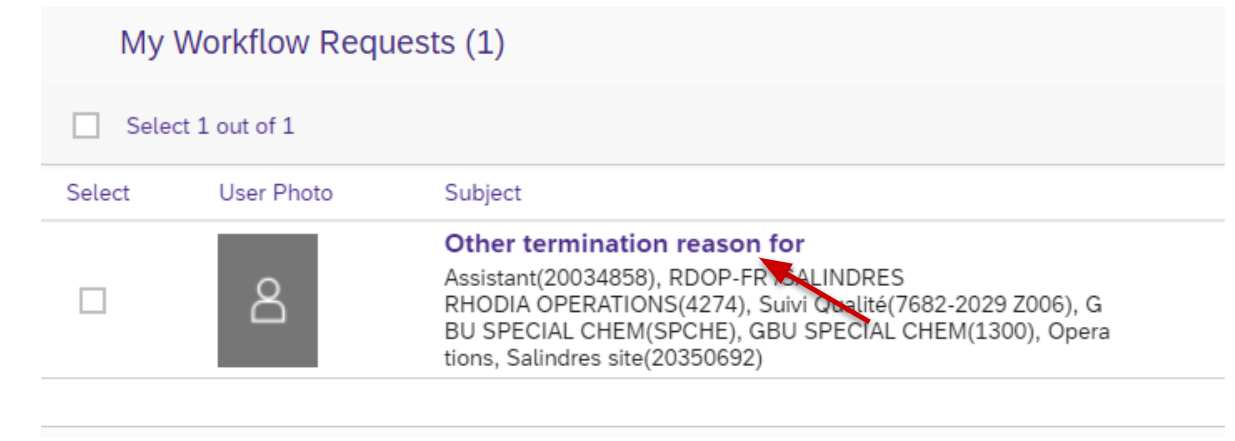
Once you open the Approval request - click on the name of the Request on the left side to review the details of the request:
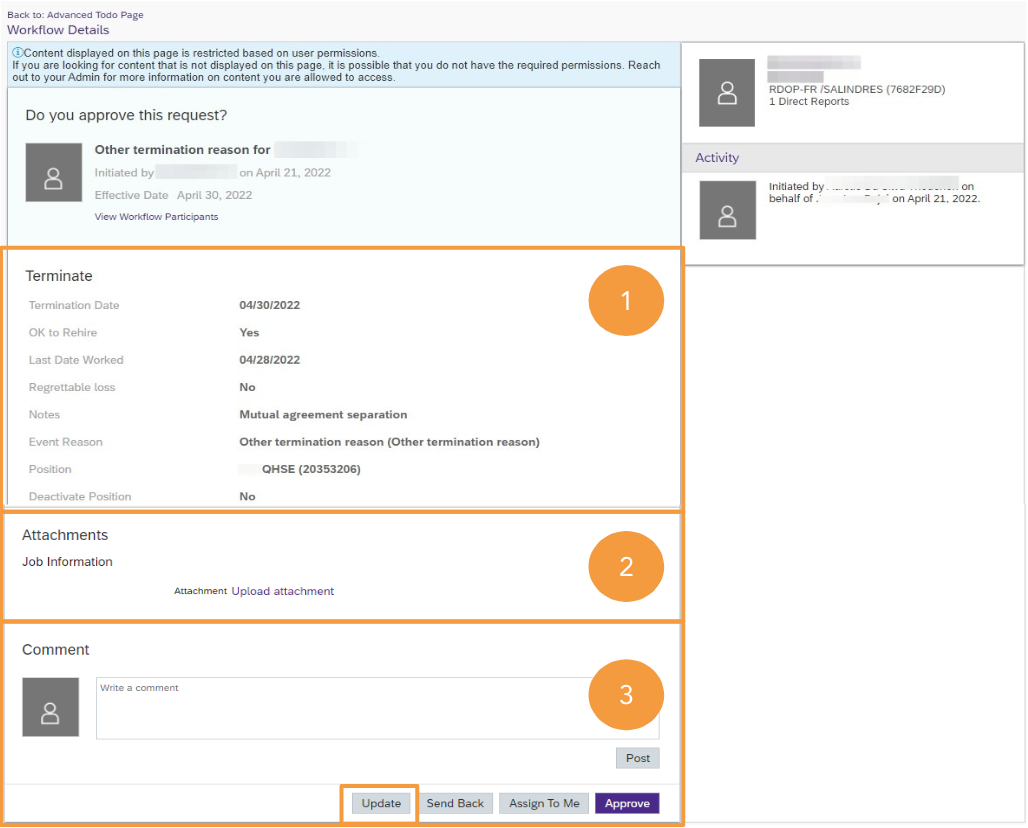
Then the following information will need to be filled out:
Review the Termination Details provided by the Manager.
Points of attention:
Regrettable Loss: is it matching with the definition?
Last Date worked: is it adjusted to reflect the effective last working day if prior to the termination?
Event reason: in case of Other Termination Reason, check Notes provided and click on "Update" button to adjust the Termination Reason.
2. Upload Attachment to share to Payroll Teams about the termination if needed.
3. Share in the Comment section any relevant information or link to the Documents already stored in the ‘Employee File’ tool. Update the workflow (see next slide) to complete the Covenant Package terms and the Termination Reason if applicable.
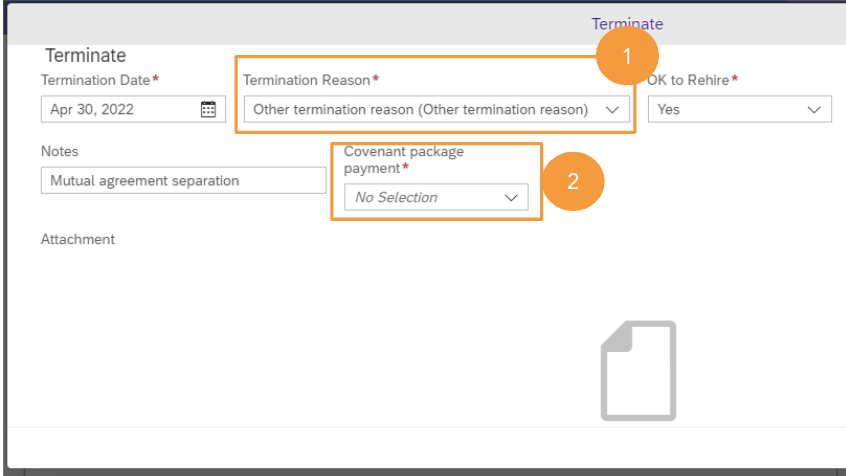
Then the following information will need to be filled out:
Edit the Termination Reason when “Other termination reason”.
This is a “dummy” termination reason for managers to cover everything but Resignation or Retirement. New termination reasons will progressively be added
As Site HR Partner, you have access to all global and local termination reasons that match each situation. Choose accordingly.
Confirm if a Covenant Package Payment for Sensitive Role is required as per the manager’s indications.
Once you save, the workflow is submitted to the Country Payroll.
PROCESS FOR SITE HR FOR EMPLOYEES INCLUDED IN REORGANIZATION PROJECTS
As Site HR, my responsibility for employees in the scope of any restructuring program is:
To consult WDA’s suppressed position files and fill in the information concerning the employee, indicating:
Holidays Start/End dates
Leave of absence: Mobility/Garden Leave Start/End dates (if applicable)
Last Date Worked
Termination Date and Termination Reason
The Workforce Administration team will proceed with the position changes, record the Leave of Absence, and process the Termination in Success Factors.