Audience
The information contained in this page is intended for:
- Architects working with GCP
- Developers building applications and/or infrastructure that is deployed to GCP
- Operations/support staff responsible for managing applications and/or infrastructure that is deployed to GCP
Scope
The information contained in this page offers a high level overview of an automation framework that allows the repeatable and reliable deployment of applications and the infrastructure to support them, to GCP. It serves only as a guide and is not a definitive solution or standard. Each project will have its own unique requirements, but the framework presented here can be used a starting point or as an inspiration for a real-life implementation.
Assumptions
The example project attached to this page makes certain assumptions that contribute to the opinionated nature and code structure of the framework. However, as mentioned above, this is only intended to be used as a starting point so adjustments can always be made. The assumptions made are as follows:
- The example project code reflects/aligns with the defined structure for source code repositories
- Terraform is an approved Infrastructure-as-Code (IaC) technology
- Developers can build and deploy software components and infrastructure from their local development systems
- All projects have five (5) environments
- Development and build/deployments are executed on Linux Operating System (OS) machines
If any of the above assumptions are not true,. the framework can still be applied/used with modifications to address the gaps.
Pre-requisites
In order to implement the automation framework the following pre-requisites must be met:
- At least one appropriate GCP project has been created and its project name, project ID and project number are known.
- The person using the framework has a GCP account and appropriate GCP Identity & Access management (IAM) permissions to deploy resources in the target GCP project(s).
- The person using the framework has technical knowledge of and skills in Linux Operating System shell commands and utilities.
- The person using the framework has an appropriately configured development machine with the following:
- Network connectivity to GCP
- Bash shell
- The envsubst utility
- The latest version of the Google Cloud SDK (gcloud) with the alpha, beta, gsutil and docker-credential-gcr additional components
- A recent version of Terraform or a Terraform version management tool like tfenv (https://github.com/tfutils/tfenv) set to use a recent version of Terraform
- A recent version of Gradle
Solution Overview
The Automation Framework is based on the parameterisation of all important input values for the build & deployment processes, in the form of environment variables. This approach allows for reliable repeatable builds & deployments across multiple environments, since the required input values are standardised and multiple manually maintained input variable files for each environment are avoided.
It is assumed that all builds & deployments will be executed in a Linux Operating System environment and as such, all relevant automation scripts are written for execution in a bash compatible execution environment. In addition to a global environment variables file, each module in the project has its own local environment variables file along with a build/deployment executable script. The name of the build script in each software component module is “run_deploy.sh” while the infra module has two (2) scripts to match the Terraform plan & apply actions, named “terraform_plan.sh” and “terraform_apply.sh” respectively. The software component build scripts as well as the terraform deployment scripts, accept a single parameter indicating the target environment. The valid options are:
- dev – Development environment [default if no parameter value provided]
- test – Test environment
- uat – QA/UAT environment
- nonprod – Non-Production environment
- prod – Production environment
The global environment variables file defines some globally applicable environment variables such as the GCP Project ID where all resources should be deployed, the environment that the deployment should target, the GCP region where resources should be deployed etc. The local environment variables file defines all values specific to that module, such as name of component, name of Cloud Secret Manager secrets it uses, name of container to build etc. The names of the global and local environment variable files are respectively:
- set_env_core.sh – One (1) file for whole project at the root level of the project
- set_env_local.sh – One (1) per module, at the root level of each module
The first action that both the software component build scripts and the infra deployment scripts will take, is load the global environment variables file, followed by the local environment variables file. This order is important because many of the local environment variable values may include the GCP Project ID or target environment. In some cases, configuration files will not support direct environment variable substitution. In these cases, template files are created to include the environment variable references where necessary, and before the build/deployment is executed, the actual configuration file is re-generated using the template and environment variable values loaded into memory at that time. These configuration files that are dynamically generated at run-time, are excluded from the source code repository, i.e. are not stored with the code, via exclusion directives in the project’s .gitignore file.
Project Repository Structure
The diagram below illustrates the structure of the sample project's repository.
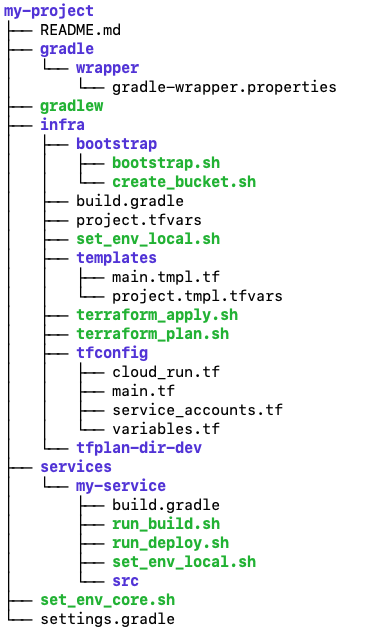
- README.md – A README file that includes basic information that would enable a user to work within the project and deploy the services. This would have to be populated by the development team to reflect the specifics of the project in question.
- gradle [folder] – The folder containing the Gradle wrapper configuration to use Gradle for managing the project without depending on a Gradle installation being present on the host system.
- wrapper [folder] – Folder containing the Gradle wrapper configuration.
- gradle-wrapper.properties – The configuration file for the gradle version used in the project.
- gradlew – The executable for using the Gradle wrapper from the local self-contained Gradle instance.
- infra [module / folder] – The folder containing the Infrastructure-as-Code (IaC) configuration file and scripts.
- bootstrap [folder] – The folder containing all of the “bootstrap” infrastructure deployment scripts.
- boostratp.sh – The main “bootstrap” infrastructure deployment script. It expects one (1) optional parameter, the name of the target environment. The valid values are "dev", "test", "uat", "nonprod" or “prod” as explained above.
- create_bucket.sh – Helper script that checks if a Cloud Storage bucket already exists and if it doesn’t, creates it. Expects one (1) parameter: the globally unique name of the bucket.
- build.gradle – The Gradle build file including all module project dependencies. Since this module is an IaC module, the build file is empty.
- project.tfvars – The list of defined terraform variables and their values to use in the infrastructure deployment. This file is generated dynamically at runtime from the corresponding template file. It is not stored with the code in the repository and the project’s .gitignore file includes an exclusion pattern that ignores it for code commits.
- set_env_local.sh – The local environment variables file. Since the infra module deploys the infrastructure to support all software components of the Consumer Subscription API service, this file also loads the local environment variable files for the other modules in order to successfully reference the service names, container image names etc. It expects one (1) optional parameter, the name of the target environment. The valid values are "dev", "test", "uat", "nonprod" or “prod” as explained above.
- templates [folder] – The folder containing the templates for configuration files that are dynamically generated at runtime.
- main.tmpl.tf – The main Terraform configuration file template. It includes a reference to the Cloud Storage bucket where the remote Terraform state is stored. This is based on an environment variable.
- project.tmpl.tfvars – The Terraform variables file template. All defined Terraform variables get their value from environment variables so all entries in this file are dynamically generated at runtime.
- terraform_apply.sh – The infrastructure deployment script that applied the generated Terraform plan. It expects one (1) optional parameter, the name of the target environment. The valid values are "dev", "test", "uat", "nonprod" or “prod” as explained above.
- terraform_plan.sh – The infrastructure deployment script that generates the Terraform plan for all necessary infrastructure changes, based on the configuration files and currently deployed resources in the GCP project. It expects one (1) optional parameter, the name of the target environment. The valid values are "dev", "test", "uat", "nonprod" or “prod” as explained above.
- tfconfig [folder] – The folder containing all Terraform configuration files.
- cloud_run.tf – The TF configuration file for the Cloud Run instances of the relevant service components.
- main.tf – The main TF configuration file. This is generated dynamically at runtime from the corresponding template file. It is not stored with the code in the repository and the project’s .gitignore file includes an exclusion pattern that ignores it for code commits.
- service_accounts.tf – The TF configuration file for the service accounts used in the project.
- variables.tf – The TF configuration file with the definitions of all variables used.
- tfplan-dir-<env> [folder] – The temporary build folder for the infrastructure deployment where <env> is the value of the target environment. This directory is generated dynamically at runtime and is not stored with the code in the repository. The project’s .gitignore file includes an exclusion pattern that ignores it for code commits.
- services [folder] – The directory containing the software component modules
- my-service [module / folder] – The module for the "my-service" component.
- build.gradle – The Gradle build file including all module project dependencies.
- run_build.sh – The executable script to build the code locally. Since this is a local build it simply helps to identify any potential code issues that would block a successful build for deployment. It expects one (1) optional parameter, the name of the target environment. The valid values are "dev", "test", "uat", "nonprod" or “prod” as explained above.
- run_deploy.sh – The executable script to build the component’s container image. It builds the container image and then uploads it to the Cloud Container Registry. It expects one (1) optional parameter, the name of the target environment. The valid values are "dev", "test", "uat", "nonprod" or “prod” as explained above.
- set_env_local.sh – The local environment variables file. It expects one (1) optional parameter, the name of the target environment. The valid values are "dev", "test", "uat", "nonprod" or “prod” as explained above.
- src [folder] – The directory that contains the implementation code for the component.
- set_env_core.sh – This is a bash executable script that exports a number of project-wide shared environment variables, to support the standardisation and automation of the build and deployment processes for the project.
- settings.gradle – The Gradle settings file that defines the project and its modules.
Bootstrapping
The “bootstrap” process deploys infrastructure that is either necessary for the execution of the regular build and deployment steps, or infrastructure that should persist as-is between builds. For example, this includes the Cloud Storage bucket where the remote Terraform state is stored to ensure consistent infrastructure builds, as well as any static external IP addresses that are attached to external HTTPS Load Balancers etc. The bootstrap process can be executed by executing the script infra/bootstrap/bootstrap.sh. It expects only one (1) parameter, the name of the target environment as detailed above. The bootstrap script performs the following tasks:
- Load global and local environment variables
- Enable all required GCP APIs
- Create all required Cloud Storage buckets
- Create all other required persistent resources as needed
For all of the above tasks, the script will first check if the resource already exists and will attempt to create it only if it does not already exist. The script is intended to be executed once, before any components of the project are built or deployed. However, if additional resources that need to persist or should be independent of regular builds should be deployed such as a new Cloud Secret Manager Secret, then the updated script could be re-executed. Because of the way the script is structured, previously deployed resources by the script will not be affected.
Build & Deployment process
The IaC configuration files that define the GCP infrastructure that supports the service component(s), reference attributes of the software components such as container image names, component versions etc. For this reason, component builds must take place before the infrastructure deployment. The order of the software component builds does not matter, as long as all of them are completed before the infrastructure deployment. These can be triggered in the sample application by executing the following scripts:
Service software component build
./services/my-service/run_deploy.sh <target env>
Infrastructure deployment
./infra/terraform_plan.sh <target env>
./infra/terraform_apply.sh <target env>
Before executing a software component build of an infrastructure deployment, the person using the framework must authenticate themselves with GCP. The following two (2) commands will open a browser window where the user must login with their GCP-connected Google account credentials and accept the authorisation prompt to allow GCP access to their account. Once these steps have been successfully completed, the person will be able to execute the build and deployment.
gcloud auth login
gcloud auth application-default login
Resources
The below attachment includes all the relevant framework files for the simple deployment of a Cloud Run instance to GCP.
my-project.zip