In the ELN, it's possible that researchers modify some parts of the hierarchy themselves (without making a Service One ticket).
Please find below the different icons in the hierarchy and the modifications you can make according to your role in ELN:
Different icons:
- High level hierarchy: defined for ELN deployment. It's not possible to modify it by yourself. If you need:
- to create a new folder, please do a Service One ticket
- to modify the current hierarchy, please discuss with your ELN Coordinator & your ELN team
Project can be created by key users to have more flexibility. Please, validate the name of the folder with your Lab manager.
Studies & Folders can be created by key users and users.
Experiments & Reports can be created by key users and users.

How to modify my hierarchy?
- 1. Select the folder(s) you want to move.
- Users can move: experiments & reports
- Key users can move: experiments, reports, studies & projects
- 2. Right-click, then "Move".
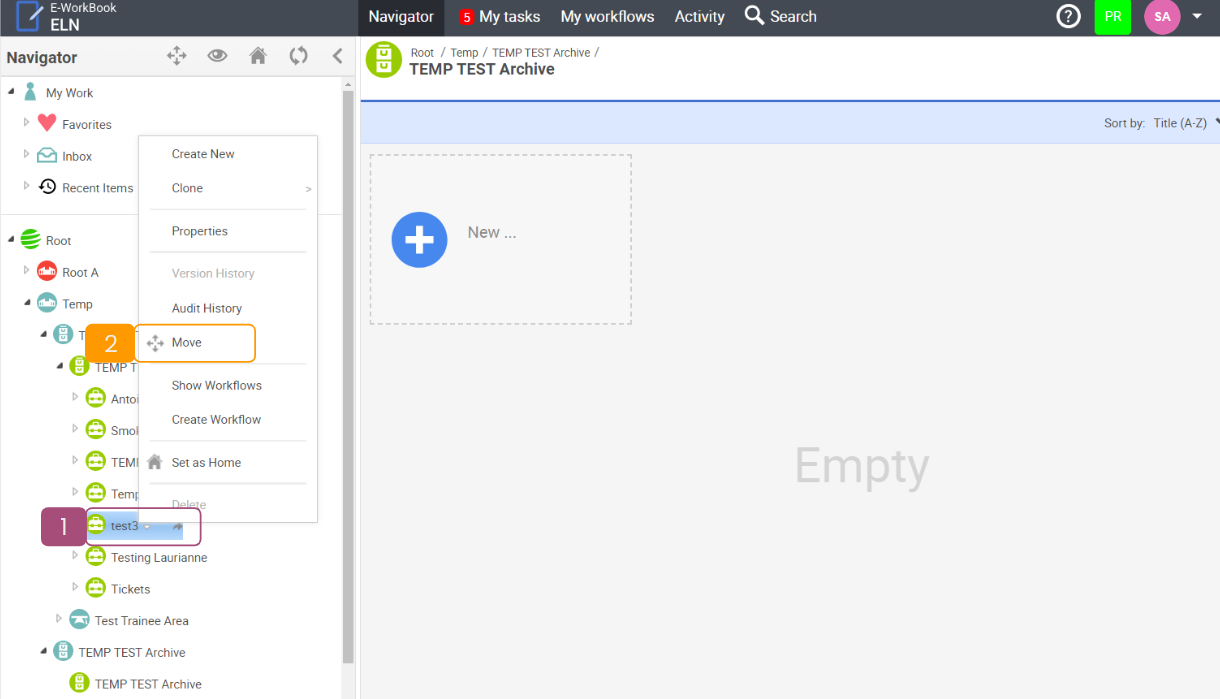
- 3. Select all the folders/experiments you want to move:
- You can select one or more folder(s)/experiments(s) in different locations BUT be careful about folder compatibility. For example, it's not possible to put a project under an experiment.
- You can select the whole folder or just a few experiments.
→TIPS: It's very useful at the end of an internship, you can select different experiments from different trainees and move them all at once under the right project.
- 4. Select the new location (only one).
- 5. Click on "Move"

- 6. Select "Restructuring"
- 7. Click on "Move"

- 8. Folder(s) has been moved successfully!
