| Status | |
| Owner | |
| Stakeholders |
Issue
The Mobility solution streamlines logistics and warehouse execution by providing automatic real-time data capture and updates, and facilitates the effective and efficient processing of the inbound, outbound and internal goods movements. Therefore, Syensqo has implemented Neptune-based Mobility Solution (In short, Neptune Solution), which is a set of mobile applications developed based on Neptune platform integrating with SAP ECC backend programs.
- As transitioning into SAP S/4HANA, it is a good opportunity to review the current highly customized Neptune solution and also assess some other options to implement a standard, simplified and future proof mobile solution across Syensqo.
- KDD014 - Future-proof Warehouse Operations describes that as part of the transition into SAP S/4HANA, the SAP WM module is obsolete. Also for that reason, the current mobility solution should be reviewed.
Recommendation
The recommendation is to use Neptune-based Solution, which offers both online and offline capabilities to ensure users can perform daily tasks seamlessly even during network disruptions. The Neptune Solution also provides warehouse users tailored apps with unified view of both logistics and warehouse management functionalities. Furthermore, change management is limited since the users are familiar with the Neptune App navigations.
However, it’s still worth exploring apps prebuilt by third-party vendors later during detailed design. This might discover a valuable solution without the complexity of building from scratch.
Background & Context
Mobility solutions facilitate the effective and efficient execution across logistics and warehouse processes, including inbound, outbound, production integration and internal goods movements. Some examples are:
- Goods receipt for purchase order
- Putaway in Warehouse Management
- Picking for outbound delivery
- Packing
- Loading on outbound delivery
- Staging to production
- Goods receipt on process order
- Material consumption
- Physical inventory counting
- Ad hoc movement in Inventory Management or Warehouse Management
Neptune is a Norwegian company that sells and distributes Neptune platform to design and deploy mobile applications which can interface with SAP. In Syensqo the Nereid project rolled out the mobility solution of Neptune across the organization.
Syensqo Neptune Solution, sitting on Neptune DX Platform Planet 8 module, includes a set of business tailored applications which support and manage on the site logistics and warehouse management operations.
Assumptions
- The current Neptune solution covers functionalities of Logistics, Warehouse Management (WM) and Plant Maintenance (PM). The Plant Maintenance Functionalities are covered in the EAM - Mobility Solution KDD and not further discussed in this document.
- The business requirements for mobile functionalities are expected to be refined further during the detailed design phase.
- Language requirements for the mobile applications are covered in a separate KDD in detailed design.
- This document assumes the recommendation of KDD014 (Future-Proof Warehouse Operations) is followed in the future design meaning EWM will be implemented.
- For sites to be rolled out the mobility solution, the scale of required hardware and infrastructure will be assessed during the detailed design phase.
Constraints
By understanding the below challenges, we can mitigate risks and optimize the Neptune-based mobile solution to meet the Syensqo specific needs.
User Experience (UX) in Mobile Context: Although Neptune allows for custom UX design, which can lead to a highly tailored user experience, however, inconsistencies or complex functionalities may impact user adoption and productivity. So to ensure the intuitive and efficient workflows that align with business processes, the UX design should focus on minimizing user inputs, utilizing device features such as barcode scanning, and providing clear navigation paths.
Mobile App Lifecycle Management: Neptune solution is not an one-off implementation, but requires Syensqo to manage the mobile application lifecycle and ensure the mobility solution is compatible with evolving SAP releases, operating system updates, and device changes. This may involve continuous software update and version management etc., which requires proactive planning and regular maintenance.
Vendor Support and Roadmap: Dependency on Neptune as a third-party solution provider necessitates understanding their support policies, product roadmap, and future compatibility with SAP updates. Regular communication with Neptune regarding updates, patches, and new features is essential to stay current and leverage enhancements.
Impacts
Process and functionalities:
- S/4HANA will introduce changes in the processes, role definition and authorization concepts. These will impact future functionalities in the mobility solution. The current functionalities in place in the mobility solution will be reviewed.
- If Syensqo decides to go forward with the Neptune solution, the migration from SAP ECC integrated Neptune Solution to S/4HANA integrated solution requires Process Re-engineering & Feature Alignment with the ERP Rebuild solution design.
User Training and Change Management:
- Sufficient and qualitative end user training across all relevant warehouses is required for a successful implementation.
Data Mapping and Conversion:
- Data structures and data models in S/4HANA differ from ECC. The Neptune Solution must accommodate these changes and ensure data integrity.
Business Rules
The decision may translate into business rules which enforce the decision and will require configuration. List these business rules here. For example, "An Outline Agreement cannot be created via the RFQ process. An awarded RFQ can only result in a Purchase Order".
- Potentially, the selected mobility solution should be rolled out to all the Syensqo Manufacturing Plants, DCs (Distribution Centers) operated and managed by Syensqo, R&I Centers and Spare part warehouses. Defined processes and further updates will be determined during the detailed design phase.
- Warehouses for which a Warehouse Management System will be implemented based on criteria defined in KDD on Mobility Solutions in Warehouse Management will have sufficient mobile devices to support the execution of their Warehouse Management processes.
Options considered
List the options (viable options or alternatives) you considered. These often require a longer explanation with diagrams, or references to other documents (links are best, but attachments are also possible). Use enough detail to adequately explain what you considered so that a project or business stakeholder reviewing this decision will not come back and ask "did you think about...?"; this leads to loss of credibility and questioning of other decisions. This section also helps ensure that you considered enough suitable alternatives rather than just copy/pasting SAP's recommendations.
Option A: SAP standard solution
Describe the option in sufficient detail for a reader familiar with the subject matter to understand it properly
From logistics perspective, SAP is offering the SAP Inventory Manager:
SAP Inventory Manager is a complete wireless inventory management solution. It provides the company with the tools to improve and manage inventory levels, efficiently fill customer orders, and track the movement of materials using mobile devices with scanning functionality. The mobile application accesses the SAP Enterprise Asset Management (EAM) solution and provide the technicians and warehouse staff with the ability to execute stockroom operations in an automated and seamless way.
Inventory Manager can be deployed on a wide range of mobile devices, such as phone, tablet and windows mobile devices. It supports19 different languages. Refer to List of Languages Supported by SAP Inventory Manager in below section See also.
From Warehouse Management perspective, SAP EWM is offering an extended RF framework. It enables various warehouse activities, such as picking, putting away, packing, counting, and more, to be managed efficiently and accurately. Screen personas can be used to adapt the screens with greater flexibility and limited complexity.
This is an example of the basic RF menu to display for the warehouse operators.
These menus are easily adjustable on warehouse operator level.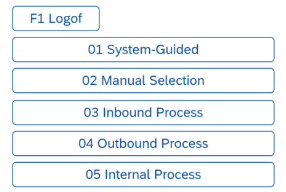
Option B: Neptune-based Solution
Describe the option in sufficient detail for a reader familiar with the subject matter to understand it properly
Based on business requirements the Neptune applications will be built with leveraging the current functionalities.
Option C: Third-party vendor
Describe the option in sufficient detail for a reader familiar with the subject matter to understand it properly
Applications prebuilt by third party vendor can be considered.
Examples of third-party vendors are The Config Team (Prebilt) and HRC Software.
Option D: SAP Fiori Solution
Describe the option in sufficient detail for a reader familiar with the subject matter to understand it properly
Based on business requirements the Fiori applications will be built with leveraging the current functionalities.
Evaluation
Outline why you selected a position. The best format could be a pro/con table (sample below), but is up to you as the author. You must consider complexity, feasibility, cost/effort to implement, but also ongoing operational impact and cost. You must consider the program principles and explain any deviations in detail. This is probably as important as the decision itself.
Option A: SAP standard solution | Option B: Neptune-Based Solution | Option C: Third- Party Vendor | Option D: SAP Fiori Solution | |
|---|---|---|---|---|
| Functional Fit |
|
|
|
|
| Integration |
|  Although it can be tightly integrated with SAP, it is not as seamless integration as the standard SAP solutions. Although it can be tightly integrated with SAP, it is not as seamless integration as the standard SAP solutions. |
|
|
| Usability |
|
|  Expected that these solutions are user friendly and easy to navigate. Expected that these solutions are user friendly and easy to navigate. |
|
| Offline Capabilities | No offline capabilities if required to operate in a remote area without network. | Offline capabilities can be used if required to operate in a remote area without network. | Vendor can be selected based on offline capabilities if required. | No offline capabilities if required to operate in a remote area without network. |
| Implementing effort and Change Management |
|
| Extra complexity to work with both SAP and third-party vendor. | Development is required to fit to the needs of Syensqo. |
Scalability and |
See also
Insert links and references to other documents which are relevant when trying to understand this decision and its implications. Other decisions are often impacted, so it's good to list them here with links. Attachments are also possible but dangerous as they are static documents and not updated by their authors.
