| Status | |
| Owner | |
| Stakeholders | The business stakeholders involved in making, reviewing, and endorsing this decision. Type @ to mention people by name |
Issue
This document discusses the primary mechanism for end users to access and interact with the user interfaces of the core enterprise systems in scope of the ERP Rebuild program, while taking into account usability, security and broad coverage to as many applications as possible. This document will focus on Desktop-based experiences as this is the primary access mechanism for most users. Other KDDs will cover more targeted mobile user experiences.
Recommendation
Summarise the recommendation being made for the reader, leaving the pro/con evaluation and exact decision-making process to the subsequent sections.
Background & Context
Explain the context in which the decision is being made.
Assumptions
- The core components of Syensqo’s enterprise landscape are not separated by GBU. Each instance of S/4HANA, Ariba, SuccessFactors, etc. will cover multiple GBUs.
- Separate instances may be required based on strategic or regulatory requirements. If this is required then separation will occur along geopolitical lines (e.g. by country), and thus each instance would likely still contain data and processes for multiple GBUs.
- Users will be aligned to one instance rather than multiple instances, and thus will have one primary entry point into the landscape.
- Chromebooks are deprecated end user devices and will be replaced with a Windows PC when they reach end of life. They are thus not explicitly considered in this document.
- Although the ERP Rebuild scope encompasses applications besides S/4HANA, the vast majority of user-exposed transactions will be hosted by S/4HANA rather than the more focused SaaS products integrated to S/4HANA.
Constraints
- SAP Start is a relatively immature product early in its development lifecycle: integration to S/4HANA Private Cloud was only released with S/4HANA 2023 FPS01 (released in early 2024). Thus many restrictions exist in the integration of these products when compared with the relatively mature Fiori Launchpad available since 2016.
- Integration of SAP Build Work Zone Standard with S/4HANA Private Cloud has been available since the 1809 release of S/4HANA, when the product was called SAP Launchpad Service or SAP Fiori Cloud. SAP are transitioning the integration mechanism to “exposure mode version 2” which introduces new and different constraints. As this integration matures, it could be worth revisiting the recommendation in this document.
Impacts
Describe the impact of the decision on other aspects such as other processes, infrastructure, other SAP modules or systems, data cleansing and migration, developments, automations, interfaces, in-flight projects, etc.
Business Rules
- Every system deployed by ERP Rebuild must have its user interfaces integrated into the common launchpad to provide a single entry point for end users.
- As far as technically possible, functions, applications, or reports must be accessed via deep-linking. The application’s main UI must only be linked directly from the launchpad if deep-linking is not technically possible.
- The browser is the primary UI client. Additional clients may be required for specialised use cases by exception only.
- SAP GUI is not considered to be a primary user interface and will not be generally available to end users.
Options considered
Desktop computers are considered the primary access mechanism for most of the users in most situations, and therefore must support all except highly specialised, role-specific functions. In modern SAP deployments there are four main starting points for a user’s interaction with SAP applications: the Fiori Launchpad embedded into S/4HANA, SAP Start, and SAP Build Work Zone, the latter being available in both Standard and Advanced versions. Of these, Fiori Launchpad is recommended to be embedded into S/4HANA while the other options are hosted on BTP.
“Build Work Zone” is a brand name applied to two different products that are both running on SAP BTP, but have quite different heritages: Work Zone Standard is a re-branding of BTP Fiori Launchpad Service, while Work Zone Advanced shares a name but little technology heritage with the Standard edition and thus offers different features and limitations.
Option A: SAP Fiori Launchpad in S/4HANA
Since the launch of Fiori-based user interfaces, the Fiori Launchpad has served as the common starting point for users of S/4HANA with a role-based menu structure, integration of Enterprise Search, a common workflow inbox, notification handling, and management of user preferences and defaults. Since the release of S/4HANA 1809, SAP have recommended an Embedded deployment running inside S/4HANA, rather than a separate stand-alone “hub and spoke” deployment using a dedicated Fiori Front-End Server.
A Fiori Launchpad based on Fiori 3.0 broadly offers the following capabilities:
- Role-based content including app launchers, tiles, pages, etc.
- Ability to integrate Web Dynpro and SAP GUI for HTML applications side-by-side with native UI5-based Fiori apps, including the use of semantic object navigation.
- Integration of Enterprise Search provided by the underlying business systems
- Integration of notifications and workflow tasks from connected business systems.
- Integration of Fiori-like interfaces provided by SAP SaaS applications such as SuccessFactors.
- Ability to publish tiles with arbitrary URL targets to support any other application, as well as static content hosted elsewhere.
Option B: SAP Start
SAP Start is a simple “launching point” designed as an “out of the box” solution for customers whose end users access more than one SAP cloud-based application (e.g. SuccessFactors and S/4HANA Public Cloud). It prioritises speedy implementation and simplicity over functional richness and thus offers only relatively simple features such as:
- Support for S/4HANA Cloud (both Public and Private editions), SuccessFactors, Fieldglass. Support for SAP Sales Cloud and SAP Service Cloud is on the roadmap for late 2024.
- Search for and launch apps and functions across the connected applications.
- Limited search integration for content inside the connected applications.
- Integration of workflow tasks from SAP Task Center, the BTP-hosted central workflow inbox.
- Integration with Joule, the SAP AI chatbot and co-pilot.
SAP Start is a relatively new product launched in late 2023. It is hosted on BTP and built using the same technology stack as Build Work Zone Standard. SAP offers an upgrade path from SAP Start to Build Work Zone Standard, although some technical migration work is required in addition to a licensing change.

Option C: SAP Build Work Zone Standard
SAP Build Work Zone Standard was formerly known as Launchpad Service - a BTP-hosted Fiori Launchpad able to surface Fiori apps from several underlying application providers such as S/4HANA, other ABAP-based systems, but also SuccessFactors, and selected other SaaS applications. It offers capabilities comparable to the Fiori Launchpad, such as:
- Role-based content including app launchers, tiles, pages, etc.
- Integration of Enterprise Search provided by the underlying business systems
- Support for Integration Cards which surface simple tasks from the underlying business systems into the Work Zone UI.
- Integration of notifications and workflow tasks from connected business systems.
It is built on the same technology stack as SAP Start, but not using the same stack as Build Work Zone Advanced. Migration from one to the other requires not only a licensing change, but also work to align the content models. SAP plans to deliver a migration tool, but this is not featured in the roadmap yet.
Several significant technical limitations remain, meaning Work Zone is not a full replacement for Fiori Launchpad, including restrictions on the use of Fiori 3 Spaces and Pages, merging of content from several underlying S/4HANA systems, and limitations on the use of SAP Analytics Cloud, CoPilot/Joule. Some of these limitations are resolved using “exposure mode version 2” which effectively causes S/4HANA applications to be launched in a separate browser tab; however this causes the Fiori Launchpad from the underlying S/4HANA system to then be loaded in that separate tab. SAP Note 3042853 contains further details on these limitations.

Option D: SAP Build Work Zone Advanced
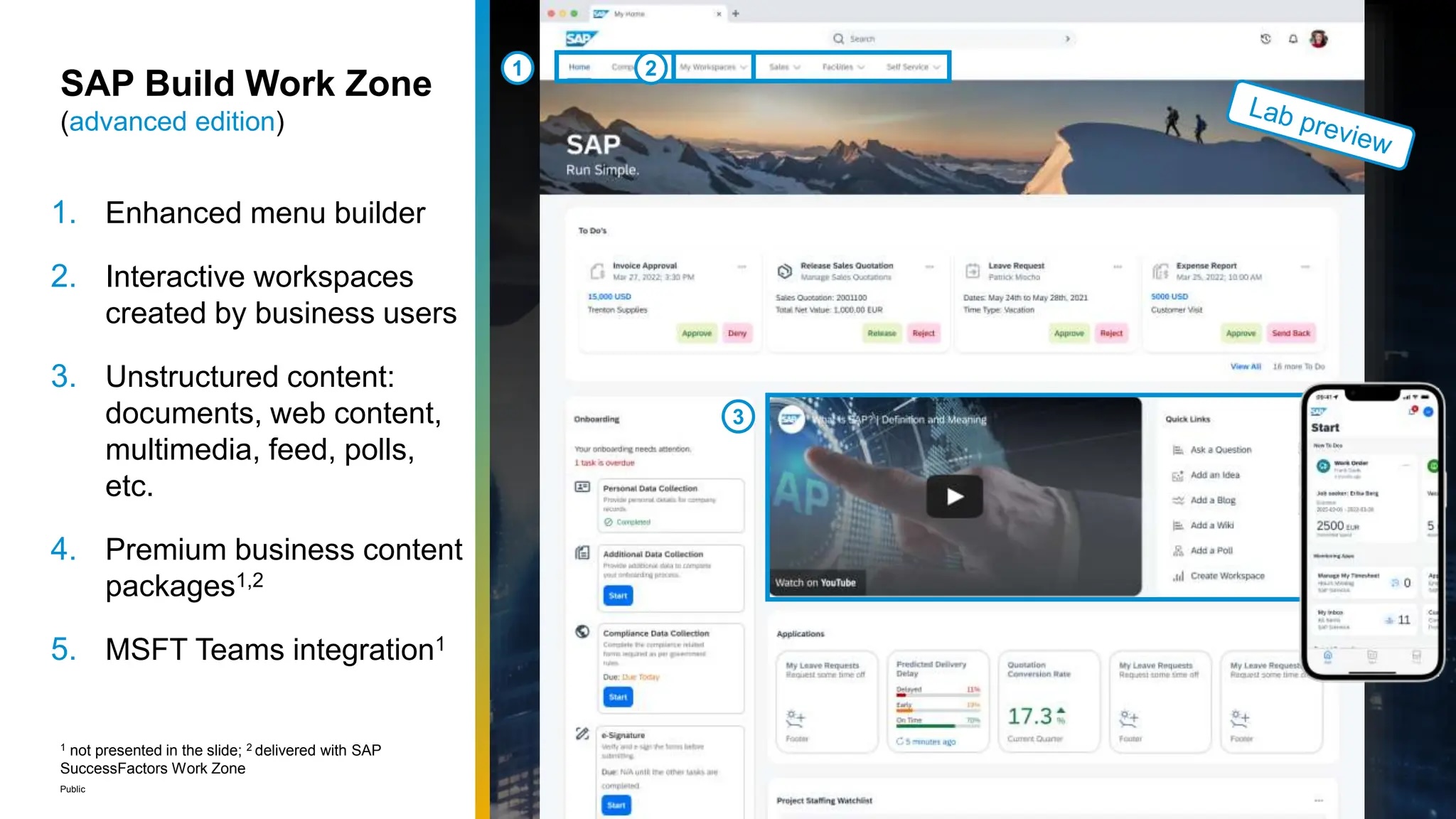
SAP Build Work Zone Advanced layers additional functionalities on top of Build Work Zone Standard, adding:
- “Citizen-developer” features that allow end users to build and share personalised, collaborative workspaces which can include external non-SAP content and collaboration features.
- Integrate intranet-like, unstructured content such as Forums, ToDo lists, Knowledge Base articles, documents from a document management system, or static content.
- Create task-oriented workspaces which can be shared with external collaborators or made public.
- Content packages delivered by SAP to integrate functionality from some SaaS applications. As of July 2024, this is only available for SuccessFactors.
- Integration with Microsoft Teams and low-code applications built using SAP Build tools
- APIs and webhooks published for other applications to consume.
As of July 2024, the underlying technology stack for the Standard and Advanced options of Build Work Zone are different. Migration from one to the other requires not only a licensing change, but also work to align the content models. SAP plans to deliver a migration tool, but this is not featured in the roadmap yet. Due to the differing technology stacks, some features of Standard are not available in Advanced; for example SAP Mobile Start is not yet supported for the Advanced version.
Evaluation
Outline why you selected a position. The best format could be a pro/con table (sample below), but is up to you as the author. You must consider complexity, feasibility, cost/effort to implement, but also ongoing operational impact and cost. You must consider the program principles and explain any deviations in detail. This is probably as important as the decision itself.
Weighting | Option A | Option B SAP Start | Option C SAP Build Work Zone Standard | Option D SAP Build Work Zone Advanced | |
|---|---|---|---|---|---|
| Alignment with SAP Roadmap | Low |
|
|
|
|
| Solution Maturity | High |
|  Con Con |
|
|
| Functional Fit | High |  Pro Pro | Con | Con | Pro |
| Simplicity | Med | ||||
| Security | High | ||||
See also
Insert links and references to other documents which are relevant when trying to understand this decision and its implications. Other decisions are often impacted, so it's good to list them here with links. Attachments are also possible but dangerous as they are static documents and not updated by their authors.
