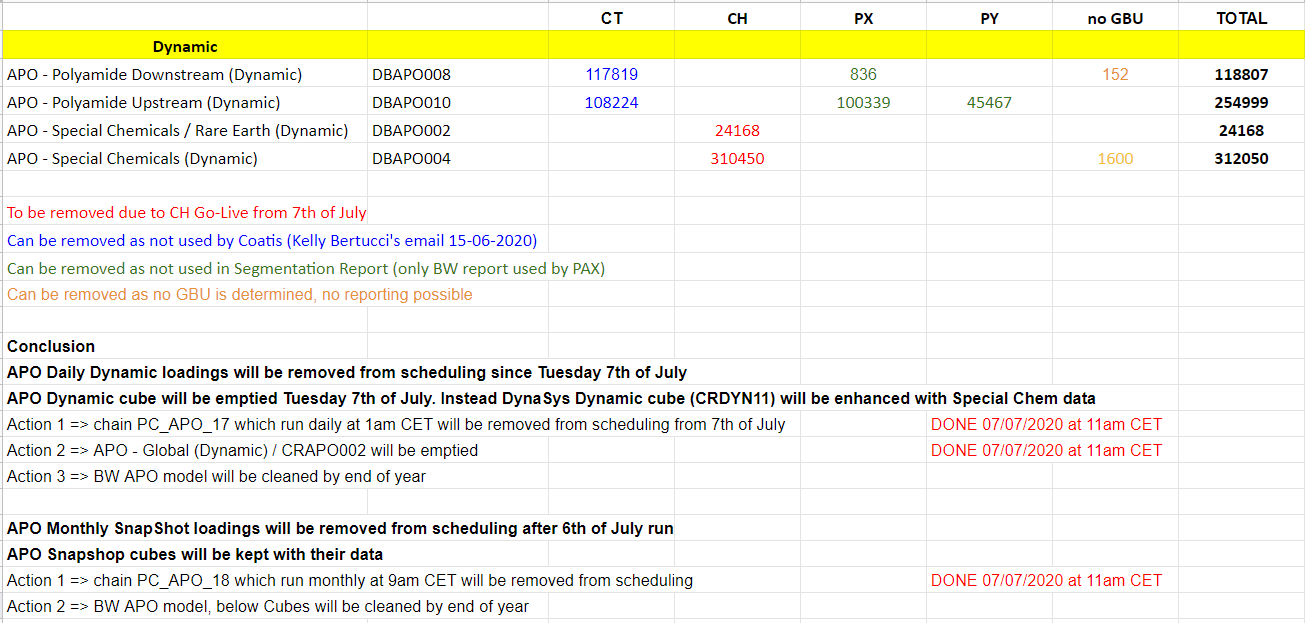
APO> BW loadings are stopped from 7th of June
This application extract the forecasts from the application APO. The data is loaded and aggregated in BW and made accessible through a multiprovider which regroups data from three application. APO, Dynasys and Logility. In time, application Logility will be terminated and the data coming from APO should be integrated in Dynasys.
Tool Leader + IT leader of the application: Celia Gonzales
How many users? Which user category ? Is there critical period ? Which geographical perimeter? Describe in one sentence: around 50 users, worldwide or 200 users / European Site
Golive In May 2017
List of application role + menu role and explanation if we have several applications role with special rules.
This should be the same as what's done for Dynasys.
| Role Code | Role Description | Explanation |
|---|---|---|
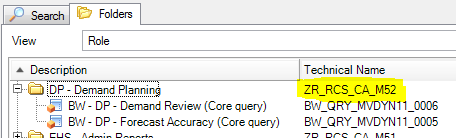
| ZR_RCS_CA_M52 | DP - Demand Planning | Role Menu Dynasys (APO uses the same queries) Currently (Nov 2016), only 2 queries published in this role
|
| ZBI_RCS_DP_A02 | Demand Planning - Dynasys | Role utilisateur Dynasys Authorization object ZBI_DPS
|
| ZBI_RCS_DP_A03 | Demand Planning - Dynasys Keyuser | Authorization object ZBI_DPS_K
|
List of autorisation objects mandatory for the application.
This should be the same as what's done for Dynasys.
| Authorization object | Explanation |
|---|---|
GBU (CPFCTR1_2) | ZR_*_CA_P05 |
Reporting documentation drive folder:
https://drive.google.com/open?id=0BxkySrtHryoBeG05a0ljVWJpSmM
C_MATNR2: adjust the format of the material number to the right number of digit, adding/removing zeros in the process.
0LOGSYS : Determination of system source
C_SHIPTID & C_SOLDID (only for Special Chemical): Removing of source system extension and adjustment of the format
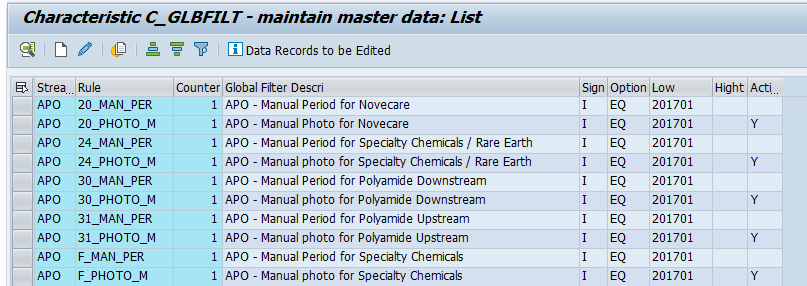
It's usually the previous month. It can however be fixed to a specific value through the use of filters in masterdata C_GLBFILT
*DSO Business layer has key figures as Summation not Overwrite, it is required to delete old data before reload.
C_MATPNT2 is determined through the coupling of material and plant and is used for business assignments (ERP or BFC). It contains multiple attributes mainly loaded through either the standard attributes from datasource 0mat_plant and the MD C_SUBACT2 (a mix of Profit center (WP1) and Business area (PF1, PI1 and RHO systems)).
C_CDSA contains the distribution channel coupled with division. The IECRA can also be found in C_MATPNT2, but it's value is wrong.
IECRA is specified in this dataflow as an information but is not reliable. IECRA is not an organizational structure used in Solvay.
Commercial Product for RCS and Material Group for Solvay
Data in APO can't really be aggregated in a DSO as every characteristic is key (like in an infocube). This means that the semantic keys which were determined for the propagation level is not absolute. Since the DSO are in write optimized, there is no loss of data thanks to the techical keys. It is necessary however to load the key figures in summation at business level.
We are always loading data for current month M
The month view is determined depending on the difference between the period 0CALMONTH of the forecast and the considered period C_FCSTMTH (date of the photo).
IF 0CALMONTH = C_FCSTMTH THEN C_FLGMTH = 'M'
ELSE IF 0CALMONTH > C_FCSTMTH THEN C_FLGMTH = 'M-2, M-3,...' (There is no M-1)
ELSE C_FLGMTH = 'N/A'
Examples:
Calendar Year/Month (0CALMONTH) | End of Month View (C_FCSTMTH) | Concerned Period (Flag) (C_FLGMTH) |
|---|---|---|
| 07.2017 | 07.2017 | M |
| 02.2019 | 07.2017 | M-20 |
| 08.2016 | 07.2017 | N/A |
For each snapshot loaded in a business datastore object, we rework the entire datastore object. We update the Gross History quantity for past snapshots using the latest GH quantity depending on the keys of the DSO.
There is 4 bias which are calculated:
This dataflow is using the same multiprovider than the dataflow for dynasys. Therefore when modifying multiprovider MVDYN11, beware of the impacts.
The loading of the snapshot part is done on the same day than dynasys.
Qlikview is also use query of APO QV_BW_QRY_MVDYN11_0005
There is a high volume of data for the snapshot dataflow, which is why a clean-up was established during the loading in the PC. We keep only 36 months of history. The deletion process is done on every layer.
As the snapshot and dynamic dataflow use the same source, a decision tree was used to stop one loading if the other is already on-going.
Id | Description | Type | Frequency | Comments |
|---|---|---|---|---|
| PC_APO_17 | META - D - APO - Current period and future periods | Master | Daily | Master Chain for dynamic forecasts |
| PC_APO_11 | TD - D - APO - Propagation Layer - Current and future period | Master | Daily | Loading of the propagation layer for dynamic forecasts for every sources |
| PC_APO_01 | TD - D - APO - PL - Sp & Ch / Rare Earth - Cur. and Fut. Per | Single | Daily | Loading of dynamic forecasts for Specialty Chemicals / Rare Earth |
| PC_APO_02 | TD - D - APO - PL - Novecare - Current and Future Periods | Single | Daily | Loading of dynamic forecasts for Novecare |
| PC_APO_05 | TD - D - APO - PL - Polyamide Downstream - Cur. and Fut. Per | Single | Daily | Loading of dynamic forecasts for Polyamide Downstream |
| PC_APO_07 | TD - D - APO - PL - Polyamide Upstream - Cur. and Fut. Per | Single | Daily | Loading of dynamic forecasts for Polyamide Upstream |
| PC_APO_09 | TD - D - APO - PL - Special Chemicals - Current and Fut. Per | Single | Daily | Loading of dynamic forecasts for Specialty Chemicals |
| PC_APO_23 | TD - M - APO - Business Layer - Current and future periods | Master | Daily | Loading of the business layer for dynamic forecasts for every sources |
| PC_APO_25 | TD - D - APO - BL Novecare - Current and future periods | Single | Daily | Loading of dynamic forecasts for Novecare |
| PC_APO_26 | TD - D - APO - BL Polya. Downst - Current and future periods | Single | Daily | Loading of dynamic forecasts for Polyamide Downstream |
| PC_APO_27 | TD - D - APO - BL Polya. Upstr - Current and future periods | Single | Daily | Loading of dynamic forecasts for Polyamide Upstream |
| PC_APO_14 | TD - D - APO - BL Sp & Ch / Rare Earth - Current and fut per | Single | Daily | Loading of dynamic forecasts for Specialty Chemicals |
| PC_APO_21 | TD - D - APO - BL Special Chemicals - Current and future per | Single | Daily | Loading of dynamic forecasts for Specialty Chemicals |
| PC_APO_15 | TD - D - APO - Reporting Layer - Current and future period | Single | Daily | Loading of the reporting layer for dynamic forecasts for every sources |
| PC_APO_40 | MD - D - APO - Master Data | Single | Daily | Loading of APO master data |
| PC_APO_18 | META - M - APO - Snapshots | Master | Monthly | Loading of APO Snapshots |
| PC_APO_12 | TD - M - APO - Propagation Layer - Snapshot | Master | Monthly | Loading of snapshots for every sources in the propagation layer |
| PC_APO_03 | TD - M - APO - PL - Special Chemical / Rare Earth - Snapshot | Single | Monthly | Loading of snapshots forecasts for Specialty Chemicals / Rare Earth |
| PC_APO_04 | TD - M - APO - PL - Novecare - Snapshot | Single | Monthly | Loading of snapshots forecasts for Novecare |
| PC_APO_06 | TD - M - APO - PL - Polyamide Downstream - Snapshot | Single | Monthly | Loading of snapshots forecasts for Polyamide Downstream |
| PC_APO_08 | TD - M - APO - PL - Polyamide Upstream - Snapshot | Single | Monthly | Loading of snapshots forecasts for Polyamide Upstream |
| PC_APO_10 | TD - M - APO - PL - Special Chemicals - Snapshot | Single | Monthly | Loading of snapshots forecasts for Specialty Chemicals |
| PC_APO_24 | TD - M - APO - Business Layer - Snapshots | Master | Monthly | Loading of snapshots for every sources in the business layer |
| PC_APO_28 | TD - M - APO - BL Novecare - Snapshots | Single | Monthly | Loading of snapshots forecasts for Novecare - Deletion of snpashots older than 36 months |
| PC_APO_29 | TD - M - APO - BL Polyamide Downst - Snapshots | Single | Monthly | Loading of snapshots forecasts for Polyamide Downstream - Deletion of snpashots older than 36 months |
| PC_APO_30 | TD - M - APO - BL Polyamide Upstream - Snapshots | Single | Monthly | Loading of snapshots forecasts for Polyamide Upstream - Deletion of snpashots older than 36 months |
| PC_APO_22 | TD - M - APO - BL Special Chemicals - Snapshot | Single | Monthly | Loading of snapshots forecasts for Specialty Chemicals - Deletion of snpashots older than 36 months |
| PC_APO_13 | TD - M - APO - BL Special Chemicals / Rare Earth - Snapshot | Single | Monthly | Loading of snapshots forecasts for Specialty Chemicals / Rare Earth - Deletion of snpashots older than 36 months |
| PC_APO_16 | TD - M - APO - Reporting Layer - Snapshot | Master | Monthly | Loading of snapshots for every sources in the reporting layer |
| PC_APO_33 | TD - M - APO - RL Novecare - Snapshot | Single | Monthly | Loading of snapshots forecasts for Novecare - |
| PC_APO_35 | TD - M - APO - RL Polyamide Downstream - Snapshot | Single | Monthly | Loading of snapshots forecasts for Polyamide Downstream - |
| PC_APO_37 | TD - M - APO - RL Polyamide Upstream - Snapshot | Single | Monthly | Loading of snapshots forecasts for Polyamide Upstream - |
| PC_APO_31 | TD - M - APO - RL Special Chemicals - Snapshot | Single | Monthly | Loading of snapshots forecasts for Specialty Chemicals - |
| PC_APO_19 | TD - M - APO - RL Special Chemicals / Rare Earth - Snapshot | Single | Monthly | Loading of snapshots forecasts for Specialty Chemicals / Rare Earth - |
| PC_APO_39 | TD - M - APO - Deletion of old photos from propagation dso | Single | Monthly | Deletions of snapshots older than 36 months |
There is two master PC:
if possible, give some information on average process chain duration, amount of data loaded and total data volume example: daily process chain loaded in 30 min, weekly chain loaded in 1h15, with around 2k to 10k lines in DELTA mode for a total of 10M lines in cube. The purpose is to give a general overview of the volume of data managed y the application
| Key Figure | Estimation Daily | Estimation Monthly |
|---|---|---|
| ~ Average Process Chain Runtime | ~1h30 | 5h |
| ~ Average nb of rows loaded per load |
|
|
36 Months of history.
The cleanup is made in the process chains. Cleanup for business and reporting layers is made in the corresponding PC, but there is a specific PC for propagation level, which is launched when the whole dataflow's loading ended.
The DSO DBAPO012 is available if necessary to backup the data of a dso on business layer. This is used especially when there is a need to change the structure of a core DSO. Data must be backed up DBAPO012 before modification of a dso structure, then reloaded from DBAPO012 to datastore after modification.
Ultimately, the data provided in APO will be delivered through Dynasys. When this happens, the loadings in APO must be stopped. If not, this will generates duplicate data at reporting level.
This happened for example for the APO flow Polyamide Downstream. Part of the data currently being loaded through APO was then being loaded through Dynasys. This means the previous loading at propagation layer needed to be modified. The rules were given by functional User. It entails using two infopackages to load two subsets of the data:
Of course for future needs the filters to be applied may be partly or completely different
See Query definition under Dynasys.
List the most important and complex queries only with a link to the documentation
Give detail on all complex functionalities: list most important and/or complex KPI, query jump, alerts
Indicate if there are broadcasts and give some details on the broadcast settings.
Beware of the impacts when working on the multiprovider or the queries, as they are also used by Dynasys.
Give the list and explanation on the known, not-solved, bugs.
Procedure to reload manually APO Novecare during current month.
The normal APO snapshots loading takes place on the 6th of each month , but It may happen that the Business requires a new snapshot reload during the same month. The procedure below details how this is done :
The data flow for APO Novecare is as follows :
Z20_DP_PLAREA (Data Source) => DPAPO008 (DSO) ==> DBAPO007 (DSO) => CRAPO005 (InfoCube).
In order to be able to do data reloads in the WBP system, you need to log on as a Firefighter by using transaction /n/Virsa/VFAT .,See documentation on following link : https://wiki.solvay.com/pages/viewpage.action?spaceKey=TECHREP&title=How+to+use+Firefighter+on+WBP
Please follow these steps :
1 - Deletion of the data loaded on the 6th of the month :
Highlight the data load that occurred on the 6th of the month and delete it manually in DSO DPAPO008.
For DBAPO007 and CRAPO005 do a complete deletion of data .
Start by deleting the load in DBAPO007 to be able to delete the load of DPAPO008.
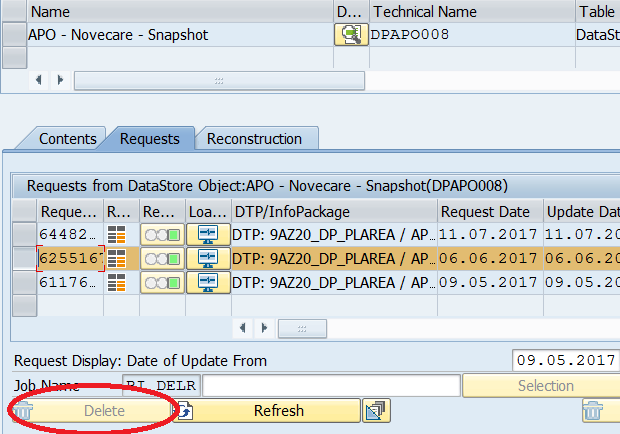
Then delete data completely in DSO DPAPO007 and InfoCube CRAPO005.
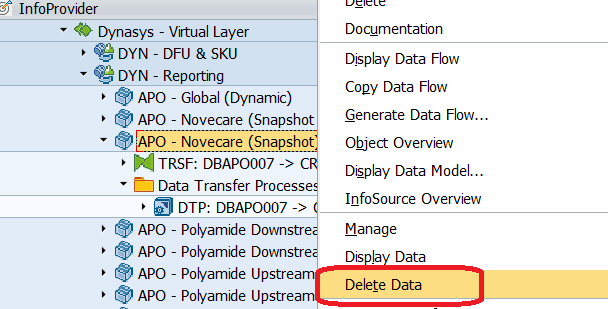
Highlight the Infoprovider , right-click, then Delete data
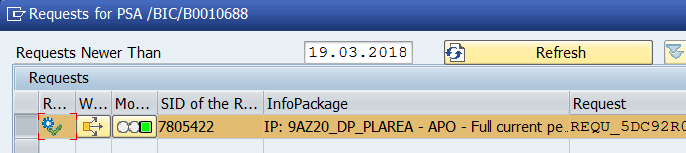
2 - Data reload from Data Source 9AZ20_DP_PLAREA. : Delete the data in PSA.
3 - Run InfoPackage IP: 9AZ20_DP_PLAREA - APO - Full
This IP is the most time consuming. It will take anything between 6 to 8 hours for about 15 million records .
4 - Then load DPAPO008 :
' Run DTP DTP: 9AZ20_DP_PLAREA / APO -> DPAPO008 - Full. This should take about 1h1/2
Then activate DSO.
5 - Load DSO DBAPO007.
Run DTP DTP: DPAPO008 - > DBAPO007 - Delta. This will take under 4 hours. Then activate DSO
Then update again DPAPO007 on itself : Run DTP DTP: DBAPO007 -> DBAPO007 - Full - GH Value and Bias update
6 - Load InfoCube CRAPO005.
Delete indexes on InfoCube CRAPO005 in Manage => Performance tab
Then delete also indexes on InfoCube CRAPO005 on the BW Accelerator System :
Highlight the Cube, then right-click, then
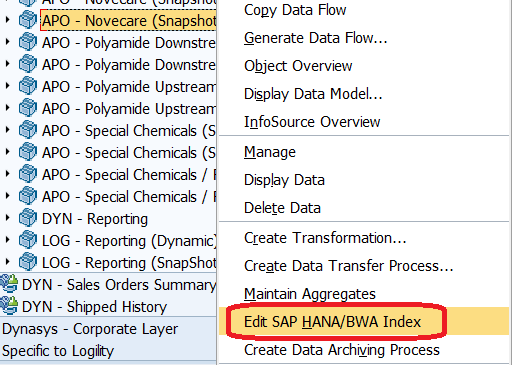
Then on following screen delete BIA indexes on CRAPO005 :
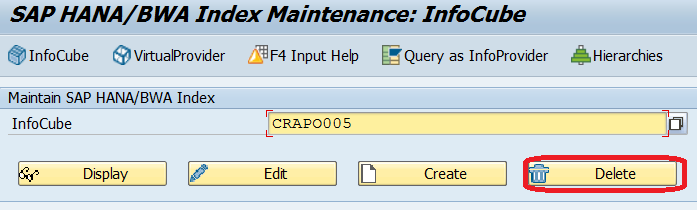
Then Run DTP DTP: DBAPO007 -> CRAPO005 - Full M to M-6
Rebuild indexes on InfoCube CRAPO005 on the same fashion as described above for index deletion.
End of Procedure.
Detail planned major evolution if already known. Example: complete decommissioning of application is planned in 2017 / Extension to solvay perimeter planned in 2nd semester of 2016
+
APO> BW loadings are stopped from 7th of June
This application extract the forecasts from the application APO. The data is loaded and aggregated in BW and made accessible through a multiprovider which regroups data from three application. APO, Dynasys and Logility. In time, application Logility will be terminated and the data coming from APO should be integrated in Dynasys.
Tool Leader + IT leader of the application: Celia Gonzales
How many users? Which user category ? Is there critical period ? Which geographical perimeter? Describe in one sentence: around 50 users, worldwide or 200 users / European Site
Golive In May 2017
List of application role + menu role and explanation if we have several applications role with special rules.
This should be the same as what's done for Dynasys.
| Role Code | Role Description | Explanation |
|---|---|---|
| ZR_RCS_CA_M52 | DP - Demand Planning | Role Menu Dynasys (APO uses the same queries) Currently (Nov 2016), only 2 queries published in this role
|
| ZBI_RCS_DP_A02 | Demand Planning - Dynasys | Role utilisateur Dynasys Authorization object ZBI_DPS
|
| ZBI_RCS_DP_A03 | Demand Planning - Dynasys Keyuser | Authorization object ZBI_DPS_K
|
List of autorisation objects mandatory for the application.
This should be the same as what's done for Dynasys.
| Authorization object | Explanation |
|---|---|
GBU (CPFCTR1_2) | ZR_*_CA_P05 |
Reporting documentation drive folder:
https://drive.google.com/open?id=0BxkySrtHryoBeG05a0ljVWJpSmM
C_MATNR2: adjust the format of the material number to the right number of digit, adding/removing zeros in the process.
0LOGSYS : Determination of system source
C_SHIPTID & C_SOLDID (only for Special Chemical): Removing of source system extension and adjustment of the format
It's usually the previous month. It can however be fixed to a specific value through the use of filters in masterdata C_GLBFILT
*DSO Business layer has key figures as Summation not Overwrite, it is required to delete old data before reload.
C_MATPNT2 is determined through the coupling of material and plant and is used for business assignments (ERP or BFC). It contains multiple attributes mainly loaded through either the standard attributes from datasource 0mat_plant and the MD C_SUBACT2 (a mix of Profit center (WP1) and Business area (PF1, PI1 and RHO systems)).
C_CDSA contains the distribution channel coupled with division. The IECRA can also be found in C_MATPNT2, but it's value is wrong.
IECRA is specified in this dataflow as an information but is not reliable. IECRA is not an organizational structure used in Solvay.
Commercial Product for RCS and Material Group for Solvay
Data in APO can't really be aggregated in a DSO as every characteristic is key (like in an infocube). This means that the semantic keys which were determined for the propagation level is not absolute. Since the DSO are in write optimized, there is no loss of data thanks to the techical keys. It is necessary however to load the key figures in summation at business level.
We are always loading data for current month M
The month view is determined depending on the difference between the period 0CALMONTH of the forecast and the considered period C_FCSTMTH (date of the photo).
IF 0CALMONTH = C_FCSTMTH THEN C_FLGMTH = 'M'
ELSE IF 0CALMONTH > C_FCSTMTH THEN C_FLGMTH = 'M-2, M-3,...' (There is no M-1)
ELSE C_FLGMTH = 'N/A'
Examples:
Calendar Year/Month (0CALMONTH) | End of Month View (C_FCSTMTH) | Concerned Period (Flag) (C_FLGMTH) |
|---|---|---|
| 07.2017 | 07.2017 | M |
| 02.2019 | 07.2017 | M-20 |
| 08.2016 | 07.2017 | N/A |
For each snapshot loaded in a business datastore object, we rework the entire datastore object. We update the Gross History quantity for past snapshots using the latest GH quantity depending on the keys of the DSO.
There is 4 bias which are calculated:
This dataflow is using the same multiprovider than the dataflow for dynasys. Therefore when modifying multiprovider MVDYN11, beware of the impacts.
The loading of the snapshot part is done on the same day than dynasys.
Qlikview is also use query of APO QV_BW_QRY_MVDYN11_0005
There is a high volume of data for the snapshot dataflow, which is why a clean-up was established during the loading in the PC. We keep only 36 months of history. The deletion process is done on every layer.
As the snapshot and dynamic dataflow use the same source, a decision tree was used to stop one loading if the other is already on-going.
Id | Description | Type | Frequency | Comments |
|---|---|---|---|---|
| PC_APO_17 | META - D - APO - Current period and future periods | Master | Daily | Master Chain for dynamic forecasts |
| PC_APO_11 | TD - D - APO - Propagation Layer - Current and future period | Master | Daily | Loading of the propagation layer for dynamic forecasts for every sources |
| PC_APO_01 | TD - D - APO - PL - Sp & Ch / Rare Earth - Cur. and Fut. Per | Single | Daily | Loading of dynamic forecasts for Specialty Chemicals / Rare Earth |
| PC_APO_02 | TD - D - APO - PL - Novecare - Current and Future Periods | Single | Daily | Loading of dynamic forecasts for Novecare |
| PC_APO_05 | TD - D - APO - PL - Polyamide Downstream - Cur. and Fut. Per | Single | Daily | Loading of dynamic forecasts for Polyamide Downstream |
| PC_APO_07 | TD - D - APO - PL - Polyamide Upstream - Cur. and Fut. Per | Single | Daily | Loading of dynamic forecasts for Polyamide Upstream |
| PC_APO_09 | TD - D - APO - PL - Special Chemicals - Current and Fut. Per | Single | Daily | Loading of dynamic forecasts for Specialty Chemicals |
| PC_APO_23 | TD - M - APO - Business Layer - Current and future periods | Master | Daily | Loading of the business layer for dynamic forecasts for every sources |
| PC_APO_25 | TD - D - APO - BL Novecare - Current and future periods | Single | Daily | Loading of dynamic forecasts for Novecare |
| PC_APO_26 | TD - D - APO - BL Polya. Downst - Current and future periods | Single | Daily | Loading of dynamic forecasts for Polyamide Downstream |
| PC_APO_27 | TD - D - APO - BL Polya. Upstr - Current and future periods | Single | Daily | Loading of dynamic forecasts for Polyamide Upstream |
| PC_APO_14 | TD - D - APO - BL Sp & Ch / Rare Earth - Current and fut per | Single | Daily | Loading of dynamic forecasts for Specialty Chemicals |
| PC_APO_21 | TD - D - APO - BL Special Chemicals - Current and future per | Single | Daily | Loading of dynamic forecasts for Specialty Chemicals |
| PC_APO_15 | TD - D - APO - Reporting Layer - Current and future period | Single | Daily | Loading of the reporting layer for dynamic forecasts for every sources |
| PC_APO_40 | MD - D - APO - Master Data | Single | Daily | Loading of APO master data |
| PC_APO_18 | META - M - APO - Snapshots | Master | Monthly | Loading of APO Snapshots |
| PC_APO_12 | TD - M - APO - Propagation Layer - Snapshot | Master | Monthly | Loading of snapshots for every sources in the propagation layer |
| PC_APO_03 | TD - M - APO - PL - Special Chemical / Rare Earth - Snapshot | Single | Monthly | Loading of snapshots forecasts for Specialty Chemicals / Rare Earth |
| PC_APO_04 | TD - M - APO - PL - Novecare - Snapshot | Single | Monthly | Loading of snapshots forecasts for Novecare |
| PC_APO_06 | TD - M - APO - PL - Polyamide Downstream - Snapshot | Single | Monthly | Loading of snapshots forecasts for Polyamide Downstream |
| PC_APO_08 | TD - M - APO - PL - Polyamide Upstream - Snapshot | Single | Monthly | Loading of snapshots forecasts for Polyamide Upstream |
| PC_APO_10 | TD - M - APO - PL - Special Chemicals - Snapshot | Single | Monthly | Loading of snapshots forecasts for Specialty Chemicals |
| PC_APO_24 | TD - M - APO - Business Layer - Snapshots | Master | Monthly | Loading of snapshots for every sources in the business layer |
| PC_APO_28 | TD - M - APO - BL Novecare - Snapshots | Single | Monthly | Loading of snapshots forecasts for Novecare - Deletion of snpashots older than 36 months |
| PC_APO_29 | TD - M - APO - BL Polyamide Downst - Snapshots | Single | Monthly | Loading of snapshots forecasts for Polyamide Downstream - Deletion of snpashots older than 36 months |
| PC_APO_30 | TD - M - APO - BL Polyamide Upstream - Snapshots | Single | Monthly | Loading of snapshots forecasts for Polyamide Upstream - Deletion of snpashots older than 36 months |
| PC_APO_22 | TD - M - APO - BL Special Chemicals - Snapshot | Single | Monthly | Loading of snapshots forecasts for Specialty Chemicals - Deletion of snpashots older than 36 months |
| PC_APO_13 | TD - M - APO - BL Special Chemicals / Rare Earth - Snapshot | Single | Monthly | Loading of snapshots forecasts for Specialty Chemicals / Rare Earth - Deletion of snpashots older than 36 months |
| PC_APO_16 | TD - M - APO - Reporting Layer - Snapshot | Master | Monthly | Loading of snapshots for every sources in the reporting layer |
| PC_APO_33 | TD - M - APO - RL Novecare - Snapshot | Single | Monthly | Loading of snapshots forecasts for Novecare - |
| PC_APO_35 | TD - M - APO - RL Polyamide Downstream - Snapshot | Single | Monthly | Loading of snapshots forecasts for Polyamide Downstream - |
| PC_APO_37 | TD - M - APO - RL Polyamide Upstream - Snapshot | Single | Monthly | Loading of snapshots forecasts for Polyamide Upstream - |
| PC_APO_31 | TD - M - APO - RL Special Chemicals - Snapshot | Single | Monthly | Loading of snapshots forecasts for Specialty Chemicals - |
| PC_APO_19 | TD - M - APO - RL Special Chemicals / Rare Earth - Snapshot | Single | Monthly | Loading of snapshots forecasts for Specialty Chemicals / Rare Earth - |
| PC_APO_39 | TD - M - APO - Deletion of old photos from propagation dso | Single | Monthly | Deletions of snapshots older than 36 months |
There is two master PC:
if possible, give some information on average process chain duration, amount of data loaded and total data volume example: daily process chain loaded in 30 min, weekly chain loaded in 1h15, with around 2k to 10k lines in DELTA mode for a total of 10M lines in cube. The purpose is to give a general overview of the volume of data managed y the application
| Key Figure | Estimation Daily | Estimation Monthly |
|---|---|---|
| ~ Average Process Chain Runtime | ~1h30 | 5h |
| ~ Average nb of rows loaded per load |
|
|
36 Months of history.
The cleanup is made in the process chains. Cleanup for business and reporting layers is made in the corresponding PC, but there is a specific PC for propagation level, which is launched when the whole dataflow's loading ended.
The DSO DBAPO012 is available if necessary to backup the data of a dso on business layer. This is used especially when there is a need to change the structure of a core DSO. Data must be backed up DBAPO012 before modification of a dso structure, then reloaded from DBAPO012 to datastore after modification.
Ultimately, the data provided in APO will be delivered through Dynasys. When this happens, the loadings in APO must be stopped. If not, this will generates duplicate data at reporting level.
This happened for example for the APO flow Polyamide Downstream. Part of the data currently being loaded through APO was then being loaded through Dynasys. This means the previous loading at propagation layer needed to be modified. The rules were given by functional User. It entails using two infopackages to load two subsets of the data:
Of course for future needs the filters to be applied may be partly or completely different
See Query definition under Dynasys.
List the most important and complex queries only with a link to the documentation
Give detail on all complex functionalities: list most important and/or complex KPI, query jump, alerts
Indicate if there are broadcasts and give some details on the broadcast settings.
Beware of the impacts when working on the multiprovider or the queries, as they are also used by Dynasys.
Give the list and explanation on the known, not-solved, bugs.
Procedure to reload manually APO Novecare during current month.
The normal APO snapshots loading takes place on the 6th of each month , but It may happen that the Business requires a new snapshot reload during the same month. The procedure below details how this is done :
The data flow for APO Novecare is as follows :
Z20_DP_PLAREA (Data Source) => DPAPO008 (DSO) ==> DBAPO007 (DSO) => CRAPO005 (InfoCube).
In order to be able to do data reloads in the WBP system, you need to log on as a Firefighter by using transaction /n/Virsa/VFAT .,See documentation on following link : https://wiki.solvay.com/pages/viewpage.action?spaceKey=TECHREP&title=How+to+use+Firefighter+on+WBP
Please follow these steps :
1 - Deletion of the data loaded on the 6th of the month :
Highlight the data load that occurred on the 6th of the month and delete it manually in DSO DPAPO008.
For DBAPO007 and CRAPO005 do a complete deletion of data .
Start by deleting the load in DBAPO007 to be able to delete the load of DPAPO008.
Then delete data completely in DSO DPAPO007 and InfoCube CRAPO005.
Highlight the Infoprovider , right-click, then Delete data
2 - Data reload from Data Source 9AZ20_DP_PLAREA. : Delete the data in PSA.
3 - Run InfoPackage IP: 9AZ20_DP_PLAREA - APO - Full
This IP is the most time consuming. It will take anything between 6 to 8 hours for about 15 million records .
4 - Then load DPAPO008 :
' Run DTP DTP: 9AZ20_DP_PLAREA / APO -> DPAPO008 - Full. This should take about 1h1/2
Then activate DSO.
5 - Load DSO DBAPO007.
Run DTP DTP: DPAPO008 - > DBAPO007 - Delta. This will take under 4 hours. Then activate DSO
Then update again DPAPO007 on itself : Run DTP DTP: DBAPO007 -> DBAPO007 - Full - GH Value and Bias update
6 - Load InfoCube CRAPO005.
Delete indexes on InfoCube CRAPO005 in Manage => Performance tab
Then delete also indexes on InfoCube CRAPO005 on the BW Accelerator System :
Highlight the Cube, then right-click, then
Then on following screen delete BIA indexes on CRAPO005 :
Then Run DTP DTP: DBAPO007 -> CRAPO005 - Full M to M-6
Rebuild indexes on InfoCube CRAPO005 on the same fashion as described above for index deletion.
End of Procedure.
Detail planned major evolution if already known. Example: complete decommissioning of application is planned in 2017 / Extension to solvay perimeter planned in 2nd semester of 2016
+