| Type Code | BW description | Currencies | Frequency | Periods |
|---|---|---|---|---|
| CAR1 | Magnitude Exchange Rate | To EUR only | Monthly | Up to 2020 |
| CAR3 | Exchange Rate base on CAR1 ref. crcy EUR | All | Monthly | Up to 2020 |
| M | Standard translation at average rate | All | Daily | Up to last day |
| ZRH2 | Exchange Rate base on ZHRO ref. crcy EUR | All | Monthly | Up to last month |
| ZRH3 | Exchange Rate base on ZHRO ZBUD ref. EUR | All | Monthly | |
| ZRHO | Monthly valuation consolidation rate | To EUR only | Monthly | Up to year + |
| C | Cumulated average monthly (reporting) | To EUR only | Monthly | Up to last month |
| ZBUD | ZBUD Monthly reval. for budget (spring) | To EUR only | Monthly | Up to current month |
CAR1 is the joining of the "un-cumulated" version of the Cumulated Monthly Mean (CMM - Also refered as "YTD Monthly Avg Rate") AND the PREV (Budget) rates from BFC.
For past months, CAR1 is the un-cumulated CMM and for the future months, it is the PREV rate.
Must be used for Profit & Loss accounts (cumulated) and most of balance sheet movement flows.
Business Objects receives the Cumulated Monthly Mean rate (CMM) and the PREV (Budget) rates from BFC and calculates via a program the "un-cumulated" monthly rates and then sends it to BW via flat file.
For details of the calculations in BO :
CAR3 is the same rate as CAR1 but can be used to convert from any currency to any currency.
As CAR1 can only be used to convert to EUR, CAR3 is set so that EUR is used as a "Pivot" currency.
The CAR3 is not as exact as the CAR1 rate because the "pivoting" calculation may loose some decimals information. |
The M rate comes directly from SAP WP1.
Loaded via program RSIMPCURR with variant ZRATE_M
It's the End of month rate (FDM) from BFC. Rate is posted by the European Central Bank (ECB - TARGET system) or related National Central Bank, on last quotation day.
Values can be checked In the finance team site. Under Exchange Rate. "Fin mois / End of Month".
Or in the Solia CICC Online, Financial And Credit Tools :
http://solia.solvay.com/irj/portal/CICCOnline_FinancialAndCreditTools
SAP WP1 - Rate ZRHO
Must be used for Balance Sheet accounts, end of period flow.
Loaded via program RSIMPCURR with variant ZRHO
ZRH2 is the same rate as ZRHO but can be used to convert from any currency to any currency.
As ZRHO can only be used to convert to EUR, ZRH2 is set so that EUR is used as a "Pivot" currency.
Program used : Z_CREATE_EXCHANGE_RATES_ZRH2 Pgr: Exchange Rate ZRH2 base on ZRHO
The ZRH2 is not as exact as the ZRHO rate because the "pivoting" calculation may loose some decimals information. |
ZRH2 is the concatenation of the ZRHO and ZBUD exchange rates. It takes the ZRHO rate for past periods and the ZBUD for the future periods.
EUR is set as a pivot currency so that the rate can be used from any currency to any currency.
Z_CREATE_EXCHANGE_RATES_ZRH3 Pgr: Exchange Rate ZRH3 base on ZRHO and ZBUD
The ZRH3 is not as exact as the ZRHO rate because the "pivoting" calculation may loose some decimals information. |
It's the Cumulated Monthly Mean (CMM - Also refered as "YTD Monthly Avg Rate") from BFC.
Values can be checked In the finance team site. Under Exchange Rate. "Moyen / Average".
Or in the Solia CICC Online, Financial And Credit Tools :
http://solia.solvay.com/irj/portal/CICCOnline_FinancialAndCreditTools
It is used by Qlikview for the "Fixed Cost Dashboard".
SAP PI1
Exchange rates version PREV (the same as used for Budget and RSB Phases)
BFC
File is : //exploit/BW/Credit_Supplier_Automation/PREVExchangeRatesForBW-SCA-EurUsd.txt
File sent via FTP from 6th to 20th day of the month at 0:30 am (Paris Time).
| Application | Query | Rate | Time Reference |
|---|---|---|---|
| GSV | CVA 01_00_00: Invoiced purchasing turnover (FI) GSV_QRY_CUB_FIAP1_CVA_010000 | CAR3 | 0CALMONTH - Invoice Posting Date |
| TR | BW - Shipment costs analysis new (Core Query) BW_QRY_MPR_TR002_0001 | CAR1 | 0CALMONTH - Shipment Creation Date |
| PS | BW - Projects PEC & Cash (Core Query) BW_QRY_MPR_PS004_0001 | CAR3 | 0CALMONTH :
|
| FC2 | FC2-A01 - Cost Analyst - NVC destination (Core) BW_QRY_MPR_FC001_0010C | CAR3 | 0FISCPER - Posting Date |
| CBS | CBS - Functions - end of month (Core query) BW_QRY_MPR_FC001_0001 | CAR3 | 0FISCPER - Posting Date |
| IM | BW - Stock evolution with conversion (Core Query) BW_QRY_MPR_IC001_0062 | ZRHO | 0CALMONTH - Stock Month |
| FIAR | BW - Credit Management Overdue (Core Query) BW_QRY_MVFIAR01_0002 | ZRH2 | Selected Date (Variable) |
| FIWC | BW - Working Capital for GBU (Core Query) BW_QRY_MPR_WC02_0002 | ZRH2 | Selected Date (Variable) |
| Type Code | BW description | Currencies | Frequency | Periods |
|---|---|---|---|---|
| M | Standard translation at average rate | To EUR | Daily | Up to current day |
| C | Cumulated average monthly (reporting) | To EUR | Monthly | Up to last month |
| A | Average Monthly (Reporting) | To EUR | Monthly | Up to M-1 ? |
The M rate comes directly from the SAP PF1_050.
It happens daily around 08:00 am on Job S_ZW_020_D_EXCHANGERATES.
Loaded via program RSIMPCURR with variant PRS_C_M to load type C and M from PF1_050.
It's the Cumulated Monthly Mean (CMM - Also refered as "YTD Monthly Avg Rate") from BFC.
SAP PF1_050
It happens daily around 08:00 am on Job S_ZW_020_D_EXCHANGERATES.
Loaded via program RSIMPCURR with variant PRS_C_M to load type C and M from PF1_050.
Process chain ZZCHE_YTD_RATE loads rate into ZZCONRAT ODS.
Currency translation | The currency translation happens at different steps : As defined here above, the currency of the transactions are either kept as is or converted into another currency (controlling area currency, ...) when they are uploaded in the different infocubes. If you want to select another currency than that one stored in the infocube, you may translate it on spot when using a query or by creating a key figure with the requested currency and the appropriated available rate. |
Example on invoices | Table 1: Solvay chemicals international (0005) has EUR as local currency but issued following invoices :
Table2: T-code: OB08 to see exchange rate (in case we have only following exchange rate in the system)
| ||||||||||||||||||||||||||||
Data base currency | The result of the query will be (with database currency - the amount without conversion by exchange rate of OB08. It is calculated during loading data) : It calculate by using table 1 with 3 decimals
The invoiced gross amount is always in local currency and is the result of the conversion of the gross amount in transaction currency as been converted at the rate M (with 3 decimals) of the posting date. Remark : the NETV is a calculation based on the invoiced gross amount. | ||||||||||||||||||||||||||||
Rate M |
For example, we are querying on 17/02/2006. You want to convert the CHF to EUR, in the result of the query if you use rate : ZZTODAY (rate M) : It calculate by using table 2 with Rate M on 17/02/2006 (date of execution the report) for all key figures, which is 1,5588
| ||||||||||||||||||||||||||||
Rate C | On the 17/02 you want to convert the CHF to EUR, in the result of the query, if you use the rate : ZZVAVMONTC (rate C) It calculate by using table 2 with Rate C on 17/02/2006 (date of execution the report) for all key figures, which is 1,54942
| ||||||||||||||||||||||||||||
Enf of month rate | If your the definition of your key figure in your query specially refers to the rate :ZZVAVMONTH (Monthly end of month rate) :
It calculate by using table 2 with Rate M base on Cal. year / month 12.2005 use 1,5551 01.2006 use 1,5547 02.2006 use 1,5588 It is used exchange rate of last date on each month that available on table 2 (OB08) |
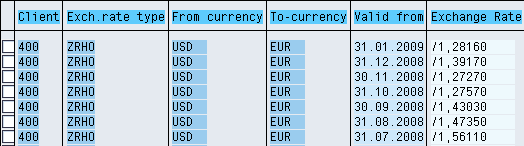
Note If there is no rate for a period BW will use the previous one! Using the example above: if I need to convert from USD to EUR with date = 10.02.2009 since there is no rate it will use the January rate