| Type Code | BW description | Currencies | Frequency | Periods |
|---|---|---|---|---|
| CAR1 | Magnitude Exchange Rate | To EUR only | Monthly | Up to 2020 |
| CAR3 | Exchange Rate base on CAR1 ref. crcy EUR | All | Monthly | Up to 2020 |
| M | Standard translation at average rate | All | Daily | Up to last day |
| ZRH2 | Exchange Rate base on ZHRO ref. crcy EUR | All | Monthly | Up to last month |
| ZRH3 | Exchange Rate base on ZHRO ZBUD ref. EUR | All | Monthly | |
| ZRHO | Monthly valuation consolidation rate | All | Monthly | Up to year + |
| C | Cumulated average monthly (reporting) | To EUR only | Monthly | Up to last month |
| ZBUD | ZBUD Monthly reval. for budget (spring) | To EUR only | Monthly | Up to current month |
The CAR1 rate comes from Business Objects PPE application. In BO, this rate is calculated by
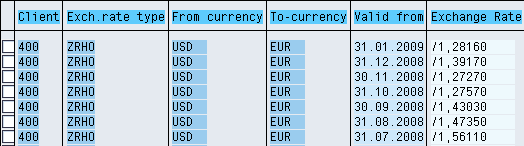
Note If there is no rate for a period BW will use the previous one! Using the example above: if I need to convert from USD to EUR with date = 10.02.2009 since there is no rate it will use the January rate