| Status | |
|---|---|
| Owner | LIU-ext, Ekawati |
| Stakeholders | The business stakeholders involved in making, reviewing, and endorsing this decision. Type @ to mention people by name |
Purpose
The purpose of this document is to define the data conversion approach to create Materials - Sales view with sales long text in S/4HANA.
Sales View is a part of the Material Master data that defines how a material is sold to customers. It's essential for creating sales orders, quotations, and other sales documents within the Sales and Distribution (SD) module. The Sales View includes information like sales organization, distribution channel, delivering plant, tax information, and sales-related text.
This conversion aims to migrate active and relevant Materials - Sales view with sales long text records from existing ECC systems into S/4HANA by applying required transformation logic using Syniti as the data migration and transformation platform. The converted records will be loaded into the target S/4HANA system using standard SAP mechanisms such as IDOCs, BAPIs, or direct table loads where applicable.
Conversion Scope
The scope of this document covers the approach for converting active Material Master Sales View including the sales long text from Legacy Source Systems into S/4HANA following the Materials - Sales view with sales long text Master Data Design Standard: DD-FUN-050 Master Data Standard_2003-Materials - Sales view with sales long text.
From the current system landscape, Materials - Sales view with sales long text exist in both legacy systems - PF2 and WP2. Harmonization and validation are required to ensure the accurate and consolidated data in S/4HANA. While PF2 and WP2 serve as source systems, a mapping and transformation logic will be necessary to produce properly formatted load templates in line with the target design.
The data from legacy system includes:
- Material Basic Data View is migrated as per CNV-2019 Materials - Basic Data View.
- The Sales Organization and Distribution Channel for Materials - Sales View with Sales Long Text is within the scope of S/4HANA.
- Flag for deletion at distribution chain/ sales organization level (MVKE-LVORM), Material Master Sales View is in the scope if:
* No flag for deletion
* With flag for deletion, but have sales transaction in the last 4 years for the sales organization in scope
20260227-Eka: the following are updated in this Conversion Specs:
- Refer to CR0279 - Update Conversion Specs to remove mention of CUI System
- DCT-MLAN: remove pre-population
- Transformation:
- As the pre-population is removed from DCT-MLAN, default tax code to 1 (taxable) for combination Material / Country not in ECC.
- Distribution Channel based on sales organization country instead of plant country
- Delete Cleansing Report - Material Sales Text for all language
20260420-Eka: Refer to CR0455 - L2C CNV-3003 Distribution channel logic enhancement: Update this Conversion Specs Distribution Channel logic to follow CNV-3003
List of source systems and approximate number of records
| Source | Scope | Source Approx No. of Records | Target System | Target Approx No. of Records |
|---|---|---|---|---|
| PF2 | Materials - Sales view with sales long text | 50,000 | S/4HANA ROW/ China | 50,000 |
| WP2 | Materials - Sales view with sales long text | 90,000 | S/4HANA ROW/ China | 90,000 |
Additional Information
Multi-language Requirement
N/A
Document Management
N/A
Legal Requirement
N/A
Special Requirements
Due to compliance requirement, there will be one SAP instance for Rest of the World (ROW) and one for China and one for CUI. For Materials - Sales view with sales long text, the same data will be created in all 2 SAP instances as it is Tier 1 object with central data governance and maintenance rule.
Target Design
Materials - Sales View with Sales Long Text Data strictly adheres to the Master Data Standard. The complete information of the key fields that hold the Materials - Sales View with Sales Long Text information follows the Master Data Standard document.
The technical design of the target for this conversion approach.
| Table | Field | Data Element | Field Description | Data Type | Length | Requirement ZDIR | Requirement ZIND | Requirement ZSER | Requirement ZLEI | Requirement NLAG |
|---|---|---|---|---|---|---|---|---|---|---|
| MVKE | MATNR | MATNR | Material | CHAR | 40 | Mandatory | Mandatory | Mandatory | Mandatory | Mandatory |
| MVKE | VKORG | VKORG | Sales Organization | CHAR | 4 | Mandatory | Mandatory | Mandatory | Mandatory | Mandatory |
| MVKE | VTWEG | VTWEG | Distribution Channel | CHAR | 2 | Mandatory | Mandatory | Mandatory | Mandatory | Mandatory |
| MVKE | LVORM | LVOVK | DF distr. chain lvl | CHAR | 1 | Conditional | Conditional | Conditional | Conditional | Conditional |
| MVKE | VMSTA | VMSTA | DChain-spec. status | CHAR | 2 | Conditional | Conditional | Conditional | Conditional | Conditional |
| MVKE | VMSTD | VMSTD | Valid from | DATS | 8 | Conditional | Conditional | Conditional | Conditional | Conditional |
| MVKE | AUMNG | MINAU | Minimum order qty | QUAN | 13 | Conditional | Conditional | Conditional | Conditional | Not Used |
| MVKE | LFMNG | MINLF | Minimum Delivery Qty | QUAN | 13 | Conditional | Conditional | Not Used | Conditional | Not Used |
| MVKE | EFMNG | MINEF | Min. MtO quantity | QUAN | 13 | Conditional | Conditional | Not Used | Conditional | Not Used |
| MVKE | SCMNG | SCHRT | Delivery unit | QUAN | 13 | Conditional | Conditional | Not Used | Conditional | Not Used |
| MVKE | SCHME | SCHME | Unit Of Measure of Delivery Unit | UNIT | 3 | Conditional | Conditional | Not Used | Conditional | Not Used |
| MVKE | VRKME | VRKME | Sales Unit | UNIT | 3 | Conditional | Conditional | Conditional | Conditional | Conditional |
| MVKE | MTPOS | MTPOS | Item Category Group | CHAR | 4 | Mandatory | Mandatory | Mandatory | Mandatory | Mandatory |
| MVKE | DWERK | DWERK_EXT | Delivering Plant | CHAR | 4 | Conditional | Conditional | Conditional | Not Used | Not Used |
| MVKE | PRODH | PRODH_D | Product Hierarchy | CHAR | 18 | Conditional | Not Used | Not Used | Not Used | Not Used |
| MVKE | KONDM | KONDM | Material Price Grp | CHAR | 2 | Conditional | Conditional | Conditional | Conditional | Conditional |
| MVKE | KTGRM | KTGRM | Acct Assmt Grp Mat. | CHAR | 2 | Conditional | Conditional | Conditional | Conditional | Conditional |
| MVKE | MVGR2 | MVGR2 | Material Group 2 | CHAR | 3 | Conditional | Not Used | Not Used | Not Used | Not Used |
| MVKE | MVGR3 | MVGR3 | Material Group 3 | CHAR | 3 | Conditional | Not Used | Not Used | Not Used | Not Used |
| MVKE | MVGR4 | MVGR4 | Material Group 4 | CHAR | 3 | Conditional | Not Used | Not Used | Not Used | Not Used |
| MVKE | RDPRF | RDPRF | Rounding Profile | CHAR | 4 | Conditional | Not Used | Not Used | Not Used | Not Used |
| MVKE | MEGRU | MEGRU | Unit of Measure Group | CHAR | 4 | Conditional | Not Used | Not Used | Not Used | Not Used |
| MVKE | VAVME | VAVME | Variable Sales Unit Not Allowed | CHAR | 1 | Conditional | Not Used | Not Used | Not Used | Not Used |
| MLAN | MATNR | MATNR | Material Number | CHAR | 40 | Mandatory | Mandatory | Mandatory | Mandatory | Mandatory |
| MLAN | ALAND | ALAND | Departure Ctry/Reg. | CHAR | 3 | Mandatory | Mandatory | Mandatory | Mandatory | Mandatory |
| MLAN | TAXM1 | TAKLM | Tax Classification 1 | CHAR | 1 | Mandatory | Mandatory | Mandatory | Mandatory | Mandatory |
| MLAN | TAXM2 | TAKLM | Tax Classification 2 | CHAR | 1 | Conditional | Conditional | Conditional | Conditional | Conditional |
| MLAN | TAXM3 | TAKLM | Tax Classification 3 | CHAR | 1 | Conditional | Conditional | Conditional | Conditional | Conditional |
| MLAN | TAXM4 | TAKLM | Tax Classification 4 | CHAR | 1 | Conditional | Conditional | Conditional | Conditional | Conditional |
| MLAN | TAXM5 | TAKLM | Tax Classification 5 | CHAR | 1 | Conditional | Conditional | Conditional | Conditional | Conditional |
| MLAN | TAXM6 | TAKLM | Tax Classification 6 | CHAR | 1 | Conditional | Conditional | Conditional | Conditional | Conditional |
| MLAN | TAXM7 | TAKLM | Tax Classification 7 | CHAR | 1 | Conditional | Conditional | Conditional | Conditional | Conditional |
| MLAN | TAXM8 | TAKLM | Tax Classification 8 | CHAR | 1 | Conditional | Conditional | Conditional | Conditional | Conditional |
| MLAN | TAXM9 | TAKLM | Tax Classification 9 | CHAR | 1 | Conditional | Conditional | Conditional | Conditional | Conditional |
| STXH | TDOBJECT | TDOBJECT | Text object | CHAR | 10 | Mandatory | Mandatory | Mandatory | Mandatory | Mandatory |
| STXH | TDNAME | TDOBNAME | Text Name | CHAR | 70 | Mandatory | Mandatory | Mandatory | Mandatory | Mandatory |
| STXH | TDID | TDID | Text ID | CHAR | 4 | Mandatory | Mandatory | Mandatory | Mandatory | Mandatory |
| STXH | TDSPRAS | SPRAS | Language Key | LANG | 1 | Mandatory | Mandatory | Mandatory | Mandatory | Mandatory |
| Function Module | Long Text | Text Details/ Long Text | CHAR | Mandatory | Mandatory | Mandatory | Mandatory | Mandatory |
Data Cleansing
All data cleansing should take place in the data source system as defined in this document, unless system limitations prevent it.
Materials - Sales view with sales long text
ALL Data Cleansing should be after Relevancy Rule
| ID | Criticality | Error Message/Report Description | Rule | Output | Source System |
|---|---|---|---|---|---|
| 2003-001 | C1 | Duplicate Data by Distribution Channel | For selected material based on relevancy rule, where it has same sales organization with multiple distribution channel: include in the report if any value in the Target Design fields are different Exclude the following in the duplication logic: | Source System/ GBU from S/4 Sales Organization/ Same as per DCT Template Business to copy paste from this report to DCT template and this data to be excluded in the Extraction and Transformation. | PF2/ WP2 |
| 2003-002 | C1 | The data from legacy system with distribution chain Flag for deletion | Flag for deletion at distribution chain/ sales organization level (MVKE-LVORM) <> Blank: For sales transaction in the last 4 years, refer to logic from CR0455 | Source System/ Material No./ Material Description/ Sales Organization/ Sales Organization Name/ Distribution Channel/ Distribution Channel Name/ Flag for deletion at client level/ Flag for deletion at distribution chain level | PF2/ WP2 |
| 2003-003 | C1 | Material with distribution-chain material status | Cross-distribution-chain material status (MARA-MSTAV) OR Distribution-chain-specific material status (MVKE-VMSTA) is NOT Blank or NOT 63 (Available for Sale) | Source System/ Material No./ Material Description/ Sales Organization/ Sales Organization Name/ Distribution Channel/ Distribution Channel Name/ Cross-distribution-chain material status/ Cross-distribution-chain material status description/ Distribution-chain-specific material status/Distribution-chain-specific material status description | PF2/ WP2 |
| 2003-004 | C1 | Material GBU not the same with Sales Organization GBU | Refer to the GBU determination from Material Master profit centre in Transformation Rule | Source System/ Material No./ Material Description/ Sales Organization/ Sales Organization Name/ Distribution Channel/ Distribution Channel Name/ GBU from Material Profit Centre/ GBU from Material Profit Centre - Description/ GBU from S/4 Material Sales Organization | PF2/ WP2 |
| 2003-005 | C1 | Active Material but not used in the existing sales area | 1. Material flag for deletion (MARA-LVORM and MVKE-LVORM) = Blank For sales transaction in the last 4 years, refer to logic from CR0455 | Source System/ Material No./ Material Description/ Sales Organization/ Sales Organization Name/ Distribution Channel/ Distribution Channel Name/ Last Sales Document No. and Date | PF2/ WP2 |
| 2003-006 | C1 | Material with Sales View but map to S/4 material type without sales view | Material flag for deletion (MARA-LVORM and MVKE-LVORM) = Blank AND Material Cross Distribution Chain status and Distribution Chain specific status = 63 (Available for Sales) or Blank BUT the S/4 material type for it does not have sales view | Source System/ Material No./ Material Description/ Sales Organization/ Sales Organization Name/ Distribution Channel/ Distribution Channel Name/ S/4 Material Type without Sales View | PF2/ WP2 |
Conversion Process
The high-level process is represented by the diagram below:
The ETL (Extract, Transform, Load) process is a structured approach to data migration and management, ensuring high-quality data is seamlessly transferred across systems. Here’s a breakdown of its key components:
1. Extraction
The process begins with extracting metadata and raw data from source systems, such as Syensqo ECC system WP2 and PF2. The extracted data is then staged for transformation.
2. Transformation
Once extracted, the data undergoes cleansing, consolidation, and governance. This step ensures data integrity, consistency, and compliance with business rules. The transformation process includes:
- Data validation to remove inconsistencies.
- Standardization to align formats across datasets.
- Business rule application to refine data for operational use.
3. Loading
The transformed data is then loaded into the target S/4HANA system.

Data Privacy and Sensitivity
N/A
Extraction
Extract data from a source into Syniti Migrate for SAP ROW and SAP China relevant entities. There are 2 possibilities:
- The data exists. Syniti Migrate connects to the source and loads the data into Syniti Migrate. There are 3 methods:
- Perform full data extraction from relevant tables in the source system(s).
- Perform extraction through the application layer.
- Only if Syniti Migrate cannot connect to the source, data is loaded to the repository from the provided source system extract/report.
- The data does not exist (or cannot be converted from its current state). The data is manually collected by the business directly in Syniti Migrate. This is to be conducted using DCT (Data Collection Template) in Syniti Migrate
The agreed Relevancy criteria is applied to the extracted records to identify the records that are applicable for the Target loads.
For SAP CUI related entities, it will be alternative extraction process and the data will be stored in approved tools.
Extraction Run Sheet
| Req # | Requirement Description | Team Responsible |
|---|---|---|
| 2003-001 | - Identify the source systems and databases involved. - Define the data objects (tables, fields and records) to be extracted. - Establish business rules for data selection. | L2C Data team |
| 2003-002 | - Specify the extraction approach (full, incremental, or delta extraction). - Determine the tools and technologies used. - Define data filtering criteria to exclude irrelevant records. | Syniti |
| 2003-003 | - Establish execution timelines and batch processing schedules. - Assign responsibilities for extraction monitoring. - Document dependencies on other migration tasks. | Syniti |
| 2003-004 | - Define error handling mechanisms for extraction failures. | Syniti |
Selection Screen
| Selection Ref Screen | Parameter Name | Selection Type | Requirement | Value to be entered/set |
|---|---|---|---|---|
| Sales Organization | Multiple | Valid sales organization for extraction | In-scope Sales Organization | |
Data Collection Template (DCT)
Target Ready Data Collection Template will be created for Materials - Sales view with sales long text data with exception of some fields which require transformation as mentioned in the transformation rule.
Materials - Sales view with sales long text - FULL DCT
DCT for when data not available in ECC, e.g. service material master data (table: ASMD), service material for WP2/ PF2 billing via Finance to S/4 billing via SD, new sales organization in scope with legacy system non-ECC, Duplicate Data by Distribution Channel, etc.
Business to manually fill-up/ update all required fields.
Note: all rules specified below should be documented as a tooltip in the DC Page.
- Rule as per Target Design for material type, e.g. Mandatory, Conditional, Not Used
- Rule as per Table below
| Field Name | Field Description | Data Type | Length | Requirements | Rule |
|---|---|---|---|---|---|
| MVKE - Sales Data for Material | |||||
| MATNR | Material | CHAR | 40 | Mandatory | Material number as per uploaded via CNV-2019 Materials - Basic Data Views |
| VKORG | Sales Organization | CHAR | 4 | Mandatory | List from Sales Organization in scope with the correct GBU |
| VTWEG | Distribution Channel | CHAR | 2 | Mandatory | 10 - Export, when plant country different from ship-to party country; and material type as per value mapping MAP_MTART-VTWEG 20 - Domestic, when plant country same as ship-to party country; and material type as per value mapping MAP_MTART-VTWEG 30 - Interco, if material type as per value mapping MAP_MTART-VTWEG |
| LVORM | DF distr. chain lvl | CHAR | 1 | Conditional | Set deletion flag for the material if this product cannot be sold, ordered, or delivered at the distribution chain level |
| VMSTA | DChain-spec. status | CHAR | 2 | Conditional | List from available Distribution Chain Specific Material Status (MAP_VMSTA, only S/4 section) |
| VMSTD | Valid from | DATS | 8 | Conditional | Date when Distribution Chain Specific Material Status becomes active. |
| AUMNG | Minimum order qty | QUAN | 13 | Conditional | Enter the required minimum quantity to sale to the customer. Fill only if a minimum quantity is relevant for the material in the sales order, if not leave blank. |
| LFMNG | Minimum Delivery Qty | QUAN | 13 | Conditional | Enter the required minimum quantity to deliver to the customer. Fill only if a minimum quantity is relevant for the material in the delivery, if not leave blank. |
| EFMNG | Min. MtO quantity | QUAN | 13 | Conditional | Enter the required minimum quantity for a sales order to trigger production order creation. Fill only if a minimum quantity is relevant for the material in the make to order, if not leave blank. |
| SCMNG | Delivery unit | QUAN | 13 | Conditional | Enter a quantity if material must be delivered in a specific quantity in outbound processes. When creating sales orders and when deliveries are processed, the system checks if the requested quantity aligns with the delivery unit. The system enforces rounding: only quantities that are full multiples of the delivery unit can be delivered. Example: If the delivery unit is set to 12 bottles, the system won't allow delivery for 13 or 25 bottles; only multiples like 12, 24, 36, will pass, enforcing streamlined warehouse and transport operations |
| SCHME | Unit Of Measure of Delivery Unit | UNIT | 3 | Conditional | Select the relevant unit of measure of delivery unit. This field pairs with the "Delivery Unit" number, indicating what the delivery unit actually represents—such as boxes, cartons, pallets, or bottles List available Unit of Measure (MAP_MEINS only the S/4 section) |
| VRKME | Sales Unit | UNIT | 3 | Conditional | Select the relevant sales unit applicable if material is sale in a diffrent unit as the base unit of measure during sales processing. The sales unit must be compatible with the units defined in the material master. Example: If a product’s sales unit is set to "Box," customers will always order in “boxes” and the system will convert this to the base unit (e.g., 60 individual pieces if 1 box = 12 pieces) for warehouse and delivery processes List available Unit of Measure (MAP_MEINS only the S/4 section) |
| MTPOS | Item Category Group | CHAR | 4 | Mandatory | The general item category values applicable are: - If material type ZDIR, then 'NORM Standard Item' or 'BANS Third Party Item' or 'ZAN2 Auxiliary items' or 'ZAN3 Distress/Scrap/Raw' or 'ZAN4 Bonded Warehouse' item category group can be selected - If material type ZIND then 'NORM Standard Item' item category group can be selected - If material type ZSER and does not require a delivery note, then 'LEIS Service w/o Delivery' item category group can be selected - If material type ZSER and a delivery note is required, then 'DIEN Service w/ Delivery' item category group can be selected - If material type ZLEI then 'LEIH Returnable Packaging' item category group can be selected - If material type NLAG, then 'NLAG Non Stock Item/Test Panel' item category group can be selected |
| DWERK | Delivering Plant | CHAR | 4 | Conditional | Select the delivering plant relevant for the material as the source of goods for delivery processing and stock updates, only if the material requires to have a specfic delevering source. This plant will be responsible for delivering materials to the customer. When selecting delivering plant data in the Material Sales View, the delivering plant must be authorized for the selected Sales Organization and Distribution Channel in the system configuration. List Plant in-scope assigned to the Sales Organization and Distribution Channel above. |
| PRODH | Product Hierarchy | CHAR | 18 | Conditional | Enter the product hierarchy relevant for the material. Each product hierarchy is made up of levels, with each level representing a more specific characteristic or grouping—like Category > Subcategory > Product Type. Only material with material type ZDIR will be relevant for Product Hierarchy. Refer to value mapping MAP_PRODH (only the S/4 section) |
| KONDM | Material Price Grp | CHAR | 2 | Conditional | Enter the material pricing group relevant for the material. This field is used to bundle materials into pricing groups, so pricing conditions such as discounts, surcharges, or rebates can be applied collectively to all materials within the group. List Material Price Group MAP_KONDM (only the S/4 section) |
| KTGRM | Acct Assmt Grp Mat. | CHAR | 2 | Conditional | Enter an account assignment group relevant for the material. This field is used to group materials by their accounting nature, such as finished goods, trading goods, services, or packaging materials. Each group is linked to specific General Ledger (G/L) accounts for revenue posting. List Account Assignment Group for Material MAP_KTGRM (only the S/4 section) |
| MVGR2 | Material Group 2 | CHAR | 3 | Conditional | Part of the product hierarchy relevant for the material. Only for material type ZDIR and Specialty Polymer material. Refer to value mapping MAP_PRODH (only the S/4 section) |
| MVGR3 | Material Group 3 | CHAR | 3 | Conditional | Part of the product hierarchy relevant for the material. Only for material type ZDIR and Novecare material. Refer to value mapping MAP_PRODH (only the S/4 section) |
| MVGR4 | Material Group 4 | CHAR | 3 | Conditional | Part of the product hierarchy relevant for the material. Only for material type ZDIR and Technology Solution material. Refer to value mapping MAP_PRODH (only the S/4 section) |
| RDPRF | Rounding Profile | CHAR | 4 | Conditional | Enter the rouding profile relevant for the material, only used to round up or down quantities for consistency in delivery process. Only material type ZDIR will be relevant for rounding profile. Automatically round up sales order quantities to convenient deliverable units. Example: A customer orders 19.5 kg. Since the warehouse can't break a pack, SAP uses the rounding profile to round the order up to 20 kg, so only whole packs are delivered. |
| MEGRU | Unit of Measure Group | CHAR | 4 | Conditional | Unit of measure groups (UoM groups) are groups of one or more units of measure that you either allow as units of measure for a product or exclude from the set of possible UoMs for the product. You can assign UoM groups for the products of both the deliverying and receiving locations. Only material type ZDIR will be relevant for unit of measure group. |
| VAVME | Variable Sales Unit Not Allowed | CHAR | 1 | Conditional | Check the box to restrict sales orders to only use the sales unit of measure specified in the material master for the relevant sales organization and distribution channel. If checked for a material, SAP ensures that sales orders, deliveries, and invoices for that material can only use the defined sales unit. Only material type - ZDIR will be relevant Example: A company sells wine bottles only in full cases (12 bottles per case). On the material master, the sales unit is set as "case", and the "Variable Sales Unit Not Allowed" field is checked. This means sales orders can only be created in cases — users cannot select "bottle" as the sales unit, nor can they order partial cases or use other UoMs like "pack" or "box" |
| STXH - STXD SAPscript text file header | |||||
| TDSPRAS | Language Key | LANG | 1 | Mandatory | Key language identifies the language associated in which the sales text is maintained and stored in the system. Only languages defined in table T002 (SAP language codes) are valid values ensuring consistency and validity of language data. - Default language will be English - Based on employee language coverage : The text should be maintained in 4 core languages - English(EN), French(FR), Italian(IT) & Mandarin(ZH). Additional languages available in which text can be maintained are Portuguese(PT), German(DE), Spanish(ES). - Customer languages should also be maintained as basis languages maintained in Business partner - Customer master data. Based on current languages used to maintained material sales text below languages are possible: FR - French EN - English ES - Spanish DE - German IT - Italian NL - Dutch PT - Portuguese ZH-Mandarin PL- Polish JA- Japanese KO- Korean FI- Finnish BG- Bulgarian RU-Russian TH- Thai ZF- Chinese traditional Z9 - Brazil Portuguese SK - Slovak AR-Arabic EL-Greek CS-Czecg AF-Afrikaans HE-Hebrew HU-Hungarian ID-Indonesian KK-Kazakh SL-Slovenian SB-Serbian SV-Swedish ET-Estonian MS-Malay TR-Turkish |
| Long Text | Text Details/ Long Text | CHAR | Mandatory | Sales long text for material master | |
Materials - Sales view with sales long text - MLAN DCT
DCT for when Tax data not available in ECC, e.g. service material master data (table: ASMD), service material for WP2/ PF2 billing via Finance to S/4 billing via SD, new sales organization in scope with legacy system non-ECC, Duplicate Data by Distribution Channel, new plant assignment to sales organization in S/4HANA. DCT for when data not available in ECC, etc.Refer to Transformation Rule for MLAN-ALAND:1. Get all S/4 Plants assigned to the S/4 Sales Organization2. Get Plant Country (T001W-LAND1) for all Plants from #13. IF Plant Country = to existing MLAN-ALAND: COPY4. IF Plant Country <> to existing MLAN-ALAND: due to new plant assignment in S/4, Business to collect the information and update the respective DCT.
| Field Name | Field Description | Data Type | Length | Requirements | Rule |
|---|---|---|---|---|---|
| MLAN - Tax Classification for Material | |||||
| MATNR | Material Number | CHAR | 40 | Mandatory | Material Number |
| MAKTX | Material Description | CHAR | 40 | Display only | Link to Material Description table: MAKT |
| ALAND | Departure Ctry/Reg. | CHAR | 3 | Mandatory | Material Plant Country for which the Tax are required |
| TAXM1 | Tax Classification 1 | CHAR | 1 | Mandatory | Fill the correct value from available list |
| TAXM2 | Tax Classification 2 | CHAR | 1 | Conditional | If required, fill the correct value from available list |
| TAXM3 | Tax Classification 3 | CHAR | 1 | Conditional | If required, fill the correct value from available list |
| TAXM4 | Tax Classification 4 | CHAR | 1 | Conditional | If required, fill the correct value from available list |
| TAXM5 | Tax Classification 5 | CHAR | 1 | Conditional | If required, fill the correct value from available list |
| TAXM6 | Tax Classification 6 | CHAR | 1 | Conditional | If required, fill the correct value from available list |
| TAXM7 | Tax Classification 7 | CHAR | 1 | Conditional | If required, fill the correct value from available list |
| TAXM8 | Tax Classification 8 | CHAR | 1 | Conditional | If required, fill the correct value from available list |
| TAXM9 | Tax Classification 9 | CHAR | 1 | Conditional | If required, fill the correct value from available list |
| GBU | GBU from Material Profit Centre | ||||
Extraction Dependencies
| Item # | Step Description | Team Responsible |
|---|---|---|
| 1 | Source System Availability
| Syensqo IT |
| 2 | Data Structure
| Syniti |
| 3 | Referential Integrity
| Syniti |
| 4 | Extraction Methodology
| Syniti |
| 5 | Performance and Scalability Considerations
| Syniti |
| 6 | Security and Compliance
| Syniti |
Transformation
The Target fields are mapped to the applicable Legacy field that will be its source, this is a 3-way activity involving the Business, Functional team and Data team. This identifies the transformation activity required to allow Syniti Migrate to make the data Target ready:
- Perform value mapping and data transformation rules.
- Legacy values are mapped to the to-be values (this could include a default value)
- Values are transformed according to the rules defined in Syniti Migrate
- Prepare target-ready data in the structure and format that is required for loading via prescribed Load Tool. This step also produces the load data ready for business to perform Pre-load Data Validation
Transformation Run Sheet
| Item # | Step Description | Team Responsible |
|---|---|---|
| 1 | Identify target S/4HANA fields and determine applicable legacy source fields from ECC system (PF2/ WP2). | Functional Team (L2C) + Data Team (L2C) |
| 2 | Map legacy field values to S/4HANA target values (including field-level mapping and technical names) | Data Team (L2C), Data Team (Syniti) |
| 3 | Define value mapping rules for fields requiring standardization or harmonization across the source systems | Functional Team (L2C) + Data Team (L2C) |
| 4 | Identify and agree on default values where legacy data is incomplete or inconsistent | Business Team + Functional Team (L2C) |
| 5 | Configure transformation rules in Syniti Migrate | Data Team (Syniti) |
| 6 | Review transformation logic and mappings with Business for confirmation | Business Team + Functional Team (L2C) |
| 7 | Perform initial transformation run and generate draft target-ready dataset | Data Team (Syniti) |
| 8 | Review draft target-ready data for structure and completeness | Data Team (L2C), Functional Team (L2C) |
| 9 | Share transformed data with Business for Pre-load Validation | Business Team |
| 10 | Incorporate feedback from Business and refine mappings or transformation logic as needed | Data Team (L2C) |
| 11 | Finalize and approve transformed data as Target Ready Load File | Business + Functional (L2C) + Data Team (L2C) |
| 12 | Handover final file to Load Team or trigger the load via Syniti Load Workbench | Data Team (Syniti), Data Load Team |
Transformation Rules ECC
Data Extraction Logic for Materials - Sales View with sales long text
1. Process by Source System
Perform the extraction steps from source system, i.e. WP2 and PF2.
2. Extract Materials - Sales View with sales long text - Data
Extract Materials - Sales View with sales long text from table - MVKE (Sales Data for Material).
3. Extract Materials - Sales View with sales long text - Tax Selection
For each material from table MVKE above; get the Country and Tax Classification from Tax Classification for Material (table - MLAN).
4. Extract Materials - Sales View with sales long text - Text Selection
For each item level from table MVKE above concatenate the material number (18 digit), sales organization (4 digit) and distribution channel (2 digit) and default text object = MVKE and Text ID - 0001; get the Text Name and Language from table - STXH (STXD SAPscript text file header).
Note: Text ID maybe maintained in multiple languages. To migrate for all languages.
5. Extract Materials - Sales View with sales long text - Text Details
For each Text Object, Text Name, Text ID and Language from table - STXH above, get the Text Details via function module: read_text.
6. S/4 Sales Organization is representing GBU.
Get GBU based on the Material Profit Centre (MARC-PRCTR).
6.1. If the material GBU are not the same with S/4 Sales Organization GBU; exclude the material from transformation, but add it to Cleansing report.
6.2. If multiple ECC Sales Organization merge into 1 S/4 Sales Organization; include in the transformation if the material GBU is the same as S/4 Sales Organization GBU. Else exclude and add to the Cleansing report.
6.3. If 1 ECC Sales Organization is split into multiple S/4 Sales Organization; transform the material to respective S/4 Sales Organization where material GBU same as S/4 Sales Organization GBU. Else exclude and add to the Cleansing report.
Following are the logic to find Material GBU:
WP2

- Refer to CNV-2010 Materials - General Plant Data/ S.Loc Data for material type where profit centre will be required
- Get Material, Plant, Maintenance Status, DF at plant level, Profit Centre (screenshot column: A, B, D, E, F) from MARC (Plant Data for Material), where flag for deletion/ MARC-LVORM = blank and Plant is in-scope.
- Get the Company Code T001K-BUKRS (screenshot column: H) for the Plant (T001W-WERKS), where Valuation Area T001K-BWKEY = T001W-BWKEY
- Get the Sales Organization in-scope TVKO-VKORG for Company Code TVKO-BUKRS in the list (from #3) and TVKWZ-VKORG for Plant in the list (from #2). Add another records/ lines if there are multiple Sales Organizations.
- Get Controlling Area (screenshot column: I) for the Company Code from table: TKA02
- Get Profit Centre ID (screenshot column: G): concatenate Controlling Area (from #5) and Profit Centre (from #2)
- Get Profit Centre Group (screenshot column: J): VLOOKUP (Profit Centre ID,SETLEAF!ID:SETNAME,3,FALSE) from table: SETLEAF (from #B)
- Get Value Stream Codification (screenshot column: K): digit 7 and 8 of Profit Centre Group (from #7)
- Get GBU (screenshot column: L): VLOOKUP (Value Stream Codification,'GBU Lookup '!A:B,2,FALSE) - from #A.

A. GBU Lookup
a. File: https://wiki.syensqo.com/display/CostFAQ/Rules+-+Material+Profit+Center
b. Refer to: ZY - Is used to define a specific GBU code as follows (the currently active GBU's are the ones highlighted):
•ZJ for a VS under GBU TECHNOLOGY SOLUTIONS |
|---|
•ZK for a VS under GBU COMPOSITES MATERIALS |
•ZL for a VS under GBU SOLD ACTIVITIES (2003-2010) |
•ZM for a VS under GBU SPECIALTY POLYMERS |
•ZN for a VS under GBU NOVECARE |
•ZO for a VS under GBU AROMA PERFORMANCE |
•ZQ for a VS under GBU Oil & Gas |
•ZR for a VS under GBU CBS (former NON REPARTI RHODIA) |
c. Open the link to: WP2 Codification Value Streams Master (OBSOLETE)
d. Download the file and go to worksheet: 1. Liste VS
e. Get “Value Stream Codification” code from column V and GBU description from column A
f. Combine #b and #e; then remove duplicate

B. Get all records from table: SETLEAF, where SETLEAF-SETCLASS = 0106 (Profit Centre Group)
- Insert ID (screenshot column: I): concatenate Organizational Unit (screenshot column: B) and From Value (screenshot column: G)
- Copy Set Name (screenshot column: C) and paste to the last column (screenshot column: K)
PF2

- Refer to CNV-2010 Materials - General Plant Data/ S.Loc Data for material type where profit centre will be required
- Get Material, Plant, Profit Centre, DF at plant level, (screenshot column: A, B, E, G) from MARC (Plant Data for Material), where flag for deletion/ MARC-LVORM = blank and Plant is in-scope.
- Get the Company Code T001K-BUKRS (screenshot column: D) for the Plant (T001W-WERKS), where Valuation Area T001K-BWKEY = T001W-BWKEY
- Get the Sales Organization in-scope TVKO-VKORG for Company Code TVKO-BUKRS in the list (from #3) and TVKWZ-VKORG for Plant in the list (from #2). Add another record/ line if there are multiple Sales Organizations.
- Get Profit Centre Name CEPCT-KTEXT (screenshot column: F), where CEPCT-PRCTR = MARC-PRCTR and CEPCT-SPRAS = EN
- Get Division MARA-SPART (screenshot column: H), where MARC-MATNR = MARA-MATNR and MARA-LVORM = blank.
- Get Plant Div ID (screenshot column: I): concatenate Plant (from #2) and Division (from #5)
- Get Business Area (screenshot column: J): VLOOKUP (Plant Div ID, T134G!C:D, 2, FALSE) from table: T134G (from #A)
- Get Division (screenshot column: K): digit 2 and 3 of Business Area (from #8)
- Get Sub Business Unit ZZR_REPO_DIV-ZZRSBU (screenshot column: L), where Division (from #9) = ZZR_REPO_DIV-ZZRDIV
- Get Business Unit ZZR_REPO_SBU-ZZRBU (screenshot column: M), where ZZR_REPO_DIV-ZZRSBU (from #10) = ZZR_REPO_SBU-ZZRSBU
- Get Division (PCtr) (screenshot column: N): digit 2 and 3 of Profit Centre Name (from #5)
- IF Business Area (screenshot column: J) = #N/A: get Sub BU ZZR_REPO_DIV-ZZRSBU (screenshot column: P), where Division (PCtr) (from #12) = ZZR_REPO_DIV-ZZRDIV
- IF Business Area (screenshot column: J) = #N/A: get BU ZZR_REPO_SBU-ZZRBU (screenshot column: Q), where ZZR_REPO_DIV-ZZRSBU (from #13) = ZZR_REPO_SBU-ZZRSBU
- Get Final BU (screenshot column: R): If BU from #11 not blank, use it, else use the BU value from #14.
- Get BU Description ZZR_REPO_SBU-ZZRSBU_MNAME (screenshot column: S), where ZZR_REPO_SBU-ZZRSBU (from #15) = ZZR_REPO_SBU-ZZRSBU
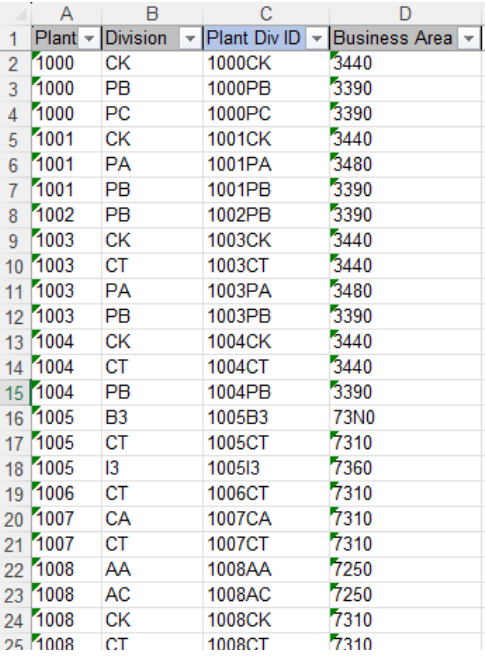
A. Get all records from table: T134G:
- Insert Plant Div ID (screenshot column: C): concatenate Plant (screenshot column: A) and Division (screenshot column: B)
Rule to determine GBU from: Rules - PF1 - Profit center
20260420-Eka: Refer to CR0455 - L2C CNV-3003 Distribution channel logic enhancement: Update this Conversion Specs Distribution Channel logic to follow CNV-3003
| Rule # | Source system | Source Table | Source Field | Source Description | Target System | Target Table | Target Field | Target Description | Mapping Table | Transformation Logic |
|---|---|---|---|---|---|---|---|---|---|---|
| 2003-001 | WP2/ PF2 | MVKE | MATNR | Material | S/4HANA | MVKE | MATNR | Material | MAP_MATNR | Mapping |
| 2003-002 | WP2/ PF2 | MVKE | VKORG | Sales Organization | S/4HANA | MVKE | VKORG | Sales Organization | MAP_VKORG | Mapping |
| 2003-003 | WP2/ PF2 | MVKE | VTWEG | Distribution Channel | S/4HANA | MVKE | VTWEG | Distribution Channel | MAP_MTART MAP_MTART-VTWEG | RULE for Distribution Channel - 10 and 20: Refer to CNV-3003 → Special Requirements → C. Distribution Channel Transformation RULE for Distribution Channel - 30: 1. Get S/4 material type as per mapping table: MAP_MTART. |
| 2003-004 | WP2/ PF2 | MVKE | LVORM | DF distr. chain lvl | S/4HANA | MVKE | LVORM | DF distr. chain lvl | Copy | |
| 2003-005 | WP2/ PF2 | MVKE | VMSTA | DChain-spec. status | S/4HANA | MVKE | VMSTA | DChain-spec. status | MAP_VMSTA | Mapping |
| 2003-006 | WP2/ PF2 | MVKE | VMSTD | Valid from | S/4HANA | MVKE | VMSTD | Valid from | Copy | |
| 2003-007 | WP2/ PF2 | MVKE | AUMNG | Minimum order qty | S/4HANA | MVKE | AUMNG | Minimum order qty | Copy | |
| 2003-008 | WP2/ PF2 | MVKE | LFMNG | Minimum Delivery Qty | S/4HANA | MVKE | LFMNG | Minimum Delivery Qty | Copy | |
| 2003-009 | WP2/ PF2 | MVKE | EFMNG | Min. MtO quantity | S/4HANA | MVKE | EFMNG | Min. MtO quantity | Copy | |
| 2003-010 | WP2/ PF2 | MVKE | SCMNG | Delivery unit | S/4HANA | MVKE | SCMNG | Delivery unit | Copy | |
| 2003-011 | WP2/ PF2 | MVKE | SCHME | Unit Of Measure | S/4HANA | MVKE | SCHME | Unit Of Measure | MAP_MEINS | Mapping |
| 2003-012 | WP2/ PF2 | MVKE | VRKME | Sales Unit | S/4HANA | MVKE | VRKME | Sales Unit | MAP_MEINS | Mapping |
| 2003-013 | WP2/ PF2 | MVKE | MTPOS | Item Category Group | S/4HANA | MVKE | MTPOS | Item Category Group | MAP_MTPOS | Mapping |
| 2003-014 | WP2/ PF2 | MVKE | DWERK | Delivering Plant | S/4HANA | MVKE | DWERK | Delivering Plant | MAP_WERKS | Mapping |
| 2003-015 | WP2/ PF2 | MVKE | PRODH | Product Hierarchy | S/4HANA | MVKE | PRODH | Product Hierarchy | MAP_MTART MAP_PRODH | Rule 1. Get S/4 material type as per mapping table: MAP_MTART. 2. If S/4 material type = ZDIR (Direct materials), get the product hierarchy as per following: PF2: - Get ECC material group (MARA-MATKL) for the material then go to MAP_PRODH to get product hierarchy level 1, product hierarchy level 2, product hierarchy level 3, Material Group 2 (Specialty Polymer), Material Group 3 (Novecare) and Material Group 4 (Technology Solutions) - Concatenate product hierarchy level 1, product hierarchy level 2 and product hierarchy level 3 from mapping table for MVKE-PRODH. IF S/4 product hierarchy not found, report for error handling. - Material group 2 from mapping table for MVKE-MVGR2 - Material group 3 from mapping table for MVKE-MVGR3 - Material group 4 from mapping table for MVKE-MVGR4 WP2: - Get ECC basic material (MARA-WRSKT) for the material then go to MAP_PRODH to get product hierarchy level 1, product hierarchy level 2, product hierarchy level 3, Material Group 2 (Specialty Polymer), Material Group 3 (Novecare) and Material Group 4 (Technology Solutions) - Concatenate product hierarchy level 1, product hierarchy level 2 and product hierarchy level 3 from mapping table for MVKE-PRODH. IF S/4 product hierarchy not found, report for error handling. - Material group 2 from mapping table for MVKE-MVGR2 - Material group 3 from mapping table for MVKE-MVGR3 - Material group 4 from mapping table for MVKE-MVGR4 |
| 2003-016 | WP2/ PF2 | MVKE | KONDM | Material Price Grp | S/4HANA | MVKE | KONDM | Material Price Grp | MAP_KONDM | Mapping |
| 2003-017 | WP2/ PF2 | MVKE | KTGRM | Acct Assmt Grp Mat. | S/4HANA | MVKE | KTGRM | Acct Assmt Grp Mat. | MAP_KTGRM | Mapping |
| 2003-018 | WP2/ PF2 | MVKE | MVGR2 | Material Group 2 | S/4HANA | MVKE | MVGR2 | Material Group 2 | MAP_MTART MAP_PRODH | Rule Refer to the rule for Product Hierarchy (2003-015) above. |
| 2003-019 | WP2/ PF2 | MVKE | MVGR3 | Material Group 3 | S/4HANA | MVKE | MVGR3 | Material Group 3 | MAP_MTART MAP_PRODH | Rule Refer to the rule for Product Hierarchy (2003-015) above. |
| 2003-020 | WP2/ PF2 | MVKE | MVGR4 | Material Group 4 | S/4HANA | MVKE | MVGR4 | Material Group 4 | MAP_MTART MAP_PRODH | Rule Refer to the rule for Product Hierarchy (2003-015) above. |
| 2003-021 | WP2/ PF2 | MVKE | RDPRF | Rounding Profile | S/4HANA | MVKE | RDPRF | Rounding Profile | MAP_MTART MAP_RDPRF | Rule 1. Get S/4 material type as per mapping table: MAP_MTART. 2. If S/4 material type = ZDIR (Direct materials); get value from mapping table MAP_RDPRF |
| 2003-022 | WP2/ PF2 | MVKE | MEGRU | Unit of Measure Group | S/4HANA | MVKE | MEGRU | Unit of Measure Group | MAP_MTART | Rule 1. Get S/4 material type as per mapping table: MAP_MTART. 2. If S/4 material type = ZDIR (Direct materials); copy value from ECC |
| 2003-023 | WP2/ PF2 | MVKE | VAVME | Variable Sales Unit Not Allowed | S/4HANA | MVKE | VAVME | Variable Sales Unit Not Allowed | MAP_MTART | Rule 1. Get S/4 material type as per mapping table: MAP_MTART. 2. If S/4 material type = ZDIR (Direct materials); copy value from ECC |
| 2003-024 | WP2/ PF2 | MLAN | MATNR | Material Number | S/4HANA | MLAN | MATNR | Material Number | MAP_MATNR | Mapping |
| 2003-025 | WP2/ PF2 | MLAN | ALAND | Departure Ctry/Reg. | S/4HANA | MLAN | ALAND | Departure Ctry/Reg. | Rule 4. IF Plant Country <> to existing MLAN-ALAND: due to new plant assignment in S/4 and data not available in PF2/ WP2, copy the country and default the tax classification (for required TAXM1 - TAXM9) to 1 (taxable) | |
| WP2/ PF2 | MLAN | TAXM1 | Tax Classification 1 | S/4HANA | MLAN | TAXM1 | Tax Classification 1 | MAP_TAXKM | Mapping | Mapping If material and country combination not in ECC, default the tax classification (for required TAXM1 - TAXM9) to 1 (taxable). |
| WP2/ PF2 | MLAN | TAXM2 | Tax Classification 2 | S/4HANA | MLAN | TAXM2 | Tax Classification 2 | MAP_TAXKM | Mapping | Mapping If material and country combination not in ECC, default the tax classification (for required TAXM1 - TAXM9) to 1 (taxable). |
| WP2/ PF2 | MLAN | TAXM3 | Tax Classification 3 | S/4HANA | MLAN | TAXM3 | Tax Classification 3 | MAP_TAXKM | Mapping | Mapping If material and country combination not in ECC, default the tax classification (for required TAXM1 - TAXM9) to 1 (taxable). |
| WP2/ PF2 | MLAN | TAXM4 | Tax Classification 4 | S/4HANA | MLAN | TAXM4 | Tax Classification 4 | MAP_TAXKM | Mapping | Mapping If material and country combination not in ECC, default the tax classification (for required TAXM1 - TAXM9) to 1 (taxable). |
| WP2/ PF2 | MLAN | TAXM5 | Tax Classification 5 | S/4HANA | MLAN | TAXM5 | Tax Classification 5 | MAP_TAXKM | Mapping | Mapping If material and country combination not in ECC, default the tax classification (for required TAXM1 - TAXM9) to 1 (taxable). |
| WP2/ PF2 | MLAN | TAXM6 | Tax Classification 6 | S/4HANA | MLAN | TAXM6 | Tax Classification 6 | MAP_TAXKM | Mapping | Mapping If material and country combination not in ECC, default the tax classification (for required TAXM1 - TAXM9) to 1 (taxable). |
| WP2/ PF2 | MLAN | TAXM7 | Tax Classification 7 | S/4HANA | MLAN | TAXM7 | Tax Classification 7 | MAP_TAXKM | Mapping | Mapping If material and country combination not in ECC, default the tax classification (for required TAXM1 - TAXM9) to 1 (taxable). |
| WP2/ PF2 | MLAN | TAXM8 | Tax Classification 8 | S/4HANA | MLAN | TAXM8 | Tax Classification 8 | MAP_TAXKM | Mapping | Mapping If material and country combination not in ECC, default the tax classification (for required TAXM1 - TAXM9) to 1 (taxable). |
| WP2/ PF2 | MLAN | TAXM9 | Tax Classification 9 | S/4HANA | MLAN | TAXM9 | Tax Classification 9 | MAP_TAXKM | Mapping | Mapping If material and country combination not in ECC, default the tax classification (for required TAXM1 - TAXM9) to 1 (taxable). |
| WP2/ PF2 | STXH | TDOBJECT | Text object | S/4HANA | STXH | TDOBJECT | Text object | Copy | Copy | |
| WP2/ PF2 | STXH | TDNAME | Text Name | S/4HANA | STXH | TDNAME | Text Name | Concatenate: 1st 18 digit = Material Number Next 4 digit = Sales Organization Last 2 digit = Distribution Channel | Concatenate: 1st 18 digit = Material Number Next 4 digit = Sales Organization Last 2 digit = Distribution Channel | |
| WP2/ PF2 | STXH | TDID | Text ID | S/4HANA | STXH | TDID | Text ID | Copy | Copy | |
| WP2/ PF2 | STXH | TDSPRAS | Language Key | S/4HANA | STXH | TDSPRAS | Language Key | Copy | Copy | |
| WP2/ PF2 | Function Module | Long Text | Text Details/ Long Text | S/4HANA | Text Details | Copy Text Details | Copy Text Details |
Transformation Rules FULL DCT
| Rule # | Source system | Source Table | Source Field | Source Description | Target System | Target Table | Target Field | Target Description | Mapping Table | Transformation Logic |
|---|---|---|---|---|---|---|---|---|---|---|
| 2003-001 | DCT | - | MATNR | Material | S/4HANA | MVKE | MATNR | Material | Direct Mapping DCT should get the material number once CNV-2019 uploaded | |
| 2003-002 | DCT | - | VKORG | Sales Organization | S/4HANA | MVKE | VKORG | Sales Organization | Direct Mapping | |
| 2003-003 | DCT | - | VTWEG | Distribution Channel | S/4HANA | MVKE | VTWEG | Distribution Channel | Direct Mapping | |
| 2003-004 | DCT | - | LVORM | DF distr. chain lvl | S/4HANA | MVKE | LVORM | DF distr. chain lvl | Direct Mapping | |
| 2003-005 | DCT | - | VMSTA | DChain-spec. status | S/4HANA | MVKE | VMSTA | DChain-spec. status | Direct Mapping | |
| 2003-006 | DCT | - | VMSTD | Valid from | S/4HANA | MVKE | VMSTD | Valid from | Direct Mapping | |
| 2003-007 | DCT | - | AUMNG | Minimum order qty | S/4HANA | MVKE | AUMNG | Minimum order qty | Direct Mapping | |
| 2003-008 | DCT | - | LFMNG | Minimum Delivery Qty | S/4HANA | MVKE | LFMNG | Minimum Delivery Qty | Direct Mapping | |
| 2003-009 | DCT | - | EFMNG | Min. MtO quantity | S/4HANA | MVKE | EFMNG | Min. MtO quantity | Direct Mapping | |
| 2003-010 | DCT | - | SCMNG | Delivery unit | S/4HANA | MVKE | SCMNG | Delivery unit | Direct Mapping | |
| 2003-011 | DCT | - | SCHME | Unit Of Measure | S/4HANA | MVKE | SCHME | Unit Of Measure | Direct Mapping | |
| 2003-012 | DCT | - | VRKME | Sales Unit | S/4HANA | MVKE | VRKME | Sales Unit | Direct Mapping | |
| 2003-013 | DCT | - | MTPOS | Item Category Group | S/4HANA | MVKE | MTPOS | Item Category Group | Direct Mapping | |
| 2003-014 | DCT | - | DWERK | Delivering Plant | S/4HANA | MVKE | DWERK | Delivering Plant | Direct Mapping | |
| 2003-015 | DCT | - | PRODH | Product Hierarchy | S/4HANA | MVKE | PRODH | Product Hierarchy | Direct Mapping | |
| 2003-016 | DCT | - | KONDM | Material Price Grp | S/4HANA | MVKE | KONDM | Material Price Grp | Direct Mapping | |
| 2003-017 | DCT | - | KTGRM | Acct Assmt Grp Mat. | S/4HANA | MVKE | KTGRM | Acct Assmt Grp Mat. | Direct Mapping | |
| 2003-018 | DCT | - | MVGR2 | Material Group 2 | S/4HANA | MVKE | MVGR2 | Material Group 2 | Direct Mapping | |
| 2003-019 | DCT | - | MVGR3 | Material Group 3 | S/4HANA | MVKE | MVGR3 | Material Group 3 | Direct Mapping | |
| 2003-020 | DCT | - | MVGR4 | Material Group 4 | S/4HANA | MVKE | MVGR4 | Material Group 4 | Direct Mapping | |
| 2003-021 | DCT | - | RDPRF | Rounding Profile | S/4HANA | MVKE | RDPRF | Rounding Profile | Direct Mapping | |
| 2003-022 | DCT | - | MEGRU | Unit of Measure Group | S/4HANA | MVKE | MEGRU | Unit of Measure Group | Direct Mapping | |
| 2003-023 | DCT | - | VAVME | Variable Sales Unit Not Allowed | S/4HANA | MVKE | VAVME | Variable Sales Unit Not Allowed | Direct Mapping | |
| 2003-024 | DCT | - | MATNR | Material Number | S/4HANA | MLAN | MATNR | Material Number | Direct Mapping | |
| 2003-025 | DCT | - | ALAND | Departure Ctry/Reg. | S/4HANA | MLAN | ALAND | Departure Ctry/Reg. | Direct Mapping | |
| 2003-026 | DCT | - | TAXM1 | Tax Classification 1 | S/4HANA | MLAN | TAXM1 | Tax Classification 1 | Direct Mapping | |
| 2003-027 | DCT | - | TAXM2 | Tax Classification 2 | S/4HANA | MLAN | TAXM2 | Tax Classification 2 | Direct Mapping | |
| 2003-028 | DCT | - | TAXM3 | Tax Classification 3 | S/4HANA | MLAN | TAXM3 | Tax Classification 3 | Direct Mapping | |
| 2003-029 | DCT | - | TAXM4 | Tax Classification 4 | S/4HANA | MLAN | TAXM4 | Tax Classification 4 | Direct Mapping | |
| 2003-030 | DCT | - | TAXM5 | Tax Classification 5 | S/4HANA | MLAN | TAXM5 | Tax Classification 5 | Direct Mapping | |
| 2003-031 | DCT | - | TAXM6 | Tax Classification 6 | S/4HANA | MLAN | TAXM6 | Tax Classification 6 | Direct Mapping | |
| 2003-032 | DCT | - | TAXM7 | Tax Classification 7 | S/4HANA | MLAN | TAXM7 | Tax Classification 7 | Direct Mapping | |
| 2003-033 | DCT | - | TAXM8 | Tax Classification 8 | S/4HANA | MLAN | TAXM8 | Tax Classification 8 | Direct Mapping | |
| 2003-034 | DCT | - | TAXM9 | Tax Classification 9 | S/4HANA | MLAN | TAXM9 | Tax Classification 9 | Direct Mapping | |
| 2003-035 | - | - | TDOBJECT | Text object | S/4HANA | STXH | TDOBJECT | Text object | Default to "MVKE" | |
| 2003-036 | - | - | TDNAME | Text Name | S/4HANA | STXH | TDNAME | Text Name | Concatenate: 1st 18 digit = Material Number Next 4 digit = Sales Organization Last 2 digit = Distribution Channel | |
| 2003-037 | - | - | TDID | Text ID | S/4HANA | STXH | TDID | Text ID | Default to "0001" | |
| 2003-038 | DCT | - | TDSPRAS | Language Key | S/4HANA | STXH | TDSPRAS | Language Key | Direct Mapping | |
| 2003-039 | DCT | - | Long Text | Text Details/ Long Text | S/4HANA | Text Details | Direct Mapping |
List of Custom Target Reports for this object is maintained here: Conversion Specification - Custom Reports Register.
Transformation Mapping
| Mapping Table Name | Mapping Table Description |
|---|---|
| MAP_KONDM | ECC (PF2/ WP2) to S/4AHANA Material Price Group Mapping Table |
| MAP_KTGRM | ECC (PF2/ WP2) to S/4AHANA Material Account Assignment Group Mapping Table |
| MAP_MATNR | ECC (PF2/ WP2) to S/4AHANA Material No. Mapping Table |
| MAP_MEGRU | ECC (PF2/ WP2) to S/4AHANA Unit of Measure Group Mapping Table |
| MAP_MEINS | ECC (PF2/ WP2) to S/4AHANA Unit of Measure Mapping Table |
| MAP_MTART | ECC (PF2/ WP2) to S/4AHANA Material Type Mapping Table |
| MAP_MTART-VTWEG | ECC (PF2/ WP2) to S/4AHANA Allowed Material Type for Distribution Channel Mapping Table |
| MAP_MTPOS | ECC (PF2/ WP2) to S/4AHANA Item Category Group Mapping Table |
| MAP_PRODH | ECC (PF2/ WP2) to S/4AHANA Product Hierarchy Mapping Table |
| MAP_RDPRF | ECC (PF2/ WP2) to S/4AHANA Rounding Profile Mapping Table |
| MAP_TAXKM | ECC (PF2/ WP2) to S/4AHANA Material Tax Classification Mapping Table |
| MAP_VKORG | ECC (PF2/ WP2) to S/4AHANA Sales Organization Mapping Table |
| MAP_VMSTA | ECC (PF2/ WP2) to S/4AHANA Distribution Chain Material Status Mapping Table |
| MAP_WERKS | ECC (PF2/ WP2) to S/4AHANA Plant Mapping Table |
Transformation Dependencies
List the steps that need to occur before transformation can commence| Item # | Step Description | Team Responsible |
|---|---|---|
| 1 | Source Data Integrity - Ensure extracted data is complete, accurate, and consistent. - Validate that data types and formats align with transformation requirements. | Syniti |
| 2 | Referential Integrity - Ensure dependent records are transformed together or in advance | Syniti |
| 3 | Transformation Logic and Mapping - Define data mapping rules between source and target schemas. | Data Team |
| 4 | Performance and Scalability Considerations - Optimize transformation processes for large datasets. - Ensure system resources can handle transformation workloads | Syniti |
| 5 | Logging and Error Handling - Maintain detailed logs of transformation activities. - Define error-handling procedures for failed transformations | Syniti |
Pre-Load Validation
Project Team
The following pre-load validations will be performed by the Project Team.
Completeness
| Task | Action |
|---|---|
| Compare Data Counts | 1. Verify row counts in the source databases. 2. Identify missing or duplicated records. |
| Validate the mandatory fields | Validate there is value for all the mandatory fields |
| Validate Primary Keys and Unique Constraints | 1. Check for duplicate or missing primary key values, i.e. if there is same sales organization, distribution channel and material number. 2. Ensure unique constraints are maintained. |
| Test Referential Integrity | Confirm dependent records exist in related tables. |
Accuracy
| Task | Action |
|---|---|
| Validate the transformation | Validate the fields which require transformation have the value after transformation instead of the original field value |
| Check Data Consistency | 1. Compare field values across systems 2. Validate data formats and structures |
Business
The following pre-load validations will be performed by the Business.Completeness
| Task | Action |
|---|---|
| Compare Data Counts | 1. Verify row counts in the source databases. 2. Identify missing or duplicated records. |
| Review populated templates for missing or incorrect values | Use checklists to verify completeness and correctness before submission. |
Accuracy
| Task | Action |
|---|---|
| Conversion Accuracy | Business Data Owner/s to verify that all the data in the load table/ file is accurate as per endorsed transformation/ mapping rules (and signed-off DCT data). |
Load
The load process includes:
- Execute the automated data load into target system using load tool or product the load file if the load must be done manually
- Once the data is loaded to the target system, it will be extracted and prepared for Post Load Data Validation
Load Run Sheet
| Item # | Step Description | Team Responsible |
|---|---|---|
| 1 | Confirm readiness of final approved data sets for each ECC source system WP2 and PF2 | Business / Functional Team |
| 2 | Validate transformation rules and mappings in Syniti tool | Data Team (L2C-Data) |
| 3 | Generate target-ready load files based on S/4HANA material sales view with sales long text table format | Data Team (Syniti) |
| 4 | Review and approve load files before execution | Business / Functional Team |
| 5 | Execute the upload program in the S/4HANA system | Data Load Team |
| 6 | Monitor load progress and capture load statistics (records loaded, errors, duplicates, etc.) | Data Team (Syniti) / Technical Team |
| 7 | Extract loaded data from S/4HANA for post-load validation | Data Team (Syniti) |
| 8 | Perform post-load data validation (compare target data with source/ approved files) for all loaded material sales view with sales long text | Data Team (L2C-Data) |
| 9 | Log and resolve any data load errors or mismatches identified during validation | Data Team (Syniti and L2C-Data) + Functional Team |
| 10 | Obtain business sign-off on successful load and validation | Business Team |
| 11 | Archive load logs, error reports, and validation results for audit/compliance | Data Team (L2C-Data) / Data Team (Syniti) / PMO |
Load Phase and Dependencies
The Materials – Sales views with sales long text will be loaded in the pre-cutover period.
Before loading, it will have dependency on the configuration and 2019 - Materials-Basic View(required Material Types-ROH/FERT/HALB/SRV/DIEN/ZDIE/Packaging/Spares). The configuration needs to be transported into the respective system first, including the manual configuration such as the number range set up. And 2019 Materials-Basic View(required Material Types-ROH/FERT/HALB/SRV/DIEN/ZDIE/Packaging/Spares) have to be uploaded into the respective system first.
Configuration
| Item # | Configuration Item |
|---|---|
| 1 | Sales Organization |
| 2 | Distribution Channel |
| 3 | Plant |
| 4 | Unit of Measure |
| 5 | Item Category Group |
| 6 | Material Status - Sales |
| 7 | Product Hierarchy |
| 8 | Material Price Group |
| 9 | Account Assignment Group - Material |
| 10 | Material Group 2 |
| 11 | Material Group 3 |
| 12 | Material Group 4 |
| 13 | Rounding Profile |
| 14 | Country |
| 15 | Pricing Condition Type for Tax |
| 16 | Define Tax Determination Rules |
| 17 | Maintain Tax Relevance for Materials |
Conversion Objects
| Object # | Preceding Object Conversion Approach |
|---|---|
2019 | Materials - Basic View |
Error Handling
| Error Type | Error Description | Action Taken |
|---|---|---|
| Configuration/ Data Transformation | The value XXX for field XXX doesn't exist | 1. Check the mapping/ conversion is done properly in the loading file 2. Validate the target value is configured/ transported in the target system 3. Reach out to functional team to validate the configuration |
| Configuration | There is mandatory field XXX missing | 1. Validate MDS if the fields are set as mandatory 2. Validate if there is value in the pre-loading file 3. Validate if the configuration for the mandatory fields are done properly |
| Data Error | The Material Master were not defined | Validate the Material Master - Basic View were migrated. |
Post-Load Validation
Project Team
The following post-load validations will be performed by the Project Team.
Completeness
| Task | Action |
|---|---|
| Validate Record count | Validate all tables has the same records as the loading file |
| Perform Source-to-Target Comparisons | 1. Validate that migrated data matches source records count. 2. Check for discrepancies in numerical values, text fields, and timestamps. |
Accuracy
| Task | Action |
|---|---|
| Execute Sample Queries and Reports | 1. Run queries to validate business logic. 2. Generate reports to compare expected vs. actual results |
| Conduct Post-Migration Reconciliation | Generate reports comparing pre- and post-migration data. |
| Perform Manual Testing | Pick up a few random sample for each material type. |
Business
Post-load validation is a critical step in data migration, ensuring that transferred data is accurate, complete, and functional within the target system.
1. Ensuring Data Integrity
After migration, data must be consistent with its original structure. Post-load validation checks for missing records, incorrect mappings, and formatting errors to prevent discrepancies.
2. Business Continuity
Faulty data can disrupt operations, leading to financial losses and inefficiencies. Validating post-load data ensures that applications function as expected, preventing downtime.
3. Error Detection and Resolution
By validating data post-migration, businesses can detect anomalies early, reducing the cost and effort required for corrections
Completeness
| Task | Action |
|---|---|
| Perform Source-to-Target Comparisons | 1. Validate that migrated data matches source records count. 2. Check for discrepancies in numerical values, text fields, and timestamps |
| Conduct Post-Migration Reconciliation | Go through post-load validation reports comparing pre- and post-migration data. |
Accuracy
| Task | Action |
|---|---|
| Perform Manual Testing | Conduct manual spot-checks for additional assurance. |
Key Assumptions
- Material - Sales view with sales long text Master Data Standard is up to date as on the date of documenting this conversion approach and data load.
- Materials - Sales views with sales long text is in scope based on data design and any exception requested by business.
- There will be 3 SAP instances, one for ROW and one for China
and one for CUI only. For S/4HANA CUI instance, the migration activity will be handled by US based data consultant.
See also
Insert links and references to other documents which are relevant when trying to understand this decision and its implications. Other decisions are often impacted, so it's good to list them here with links. Attachments are also possible but dangerous as they are static documents and not updated by their authors.