| Status | |
|---|---|
| Owner | Maytingsari Tjahjo, GOTTIPATI-ext, Madhu |
| Stakeholders |
The purpose of this document is to define the conversion approach to migrate asset master (main and sub-asset) from legacy systems to S/4HANA. All sub-assets (with sub number 1,2,3, etc) will be migrated as main asset with sub number 0.
There are 2 group go-live as below:
- Group 1 go-live (1 July 2028) (System PF2)
- Group 2 go-live (1 Jan 2029) (System WP2)
Note: There is possibility to shift into 1 go live date, this option is currently still being considered.
This document consists of links to other documents that support conversion process such as Master Data Standard for Fixed Asset master. DD-FUN-050 Master Data Standard_1070-Fixed Assets (incl. Sub Assets) - Google Sheets
Asset master consists of information of Fixed Assets Register including:
- General information such as asset description, asset class, account determination, capitalization date, etc. (Table ANLA)
- Time Dependent data – Assignment of related data by validity period (such as cost center, plant, location, etc.) (Table ANLZ)
- Depreciation terms data - Depreciation keys, useful life and depreciation areas. (Table ANLB)
- Asset main no. text (Table ANLH)
Conversion Scope
The scope of this document covers the approach for converting active assets (main and sub-asset) from legacy Source Systems (PF2 and WP2) into S/4HANA following the Fixed Asset MDS (Master Data Standard).
As per Global Process Design for S/4HANA:
- The creation of additional sub-assets is not permitted; therefore, all sub-assets (with sub number 1,2,3, etc) will be migrated as main asset with sub number 0
- Group Asset will not be used. Therefore, tax depreciation area information of the group asset (i.e. Depreciation Key, Useful life (Year and Period), and Ordinary Depreciation Start Date) need to be assigned into all underlying active individual asset's tax depreciation areas in S4/HANA. Note: Company code 5955 (India) is the only company code that have Group assets.
Logic to determine the underlying assets under Group Asset:
- Table ANLB, specify group asset that is not equal to blank in company code 5955. Result: List of underlying assets (active and non-active) for each group asset.
- Table ANLA, list down the underlying assets from rule 2 and filter only the active assets (i.e. deactivation date is blank)
- Table ANLB, specify group assets number into field ANLN1 and company code 5955 to get the tax depreciation area information of the group asset (i.e. Depreciation Key, Useful life (Year and Period), and Ordinary Depreciation Start Date)
- Assign the tax depreciation area information of the group asset (Source: area 15) (i.e. Depreciation Key, Useful life (Year and Period), and Ordinary Depreciation Start Date) into the corresponding underlying active asset's target tax depreciation area from Step 2.
Relevancy rule:
The data from legacy system includes:
- Main and sub assets (exclude Group Asset) with all rules below to be met:
- Company code is in scope (Enterprise Structure Catalog - Google Sheets, worksheet "10. Company Code") AND
- Non-AuC (Asset under Construction) AND
- Non-RoU (Right-of-Use) asset AND
- Non-Asset Shares AND
- Deactivation date (ANLA-DEAKT) is blank or deactivation date in current year for mid-year migration scenarios only (Deactivation date in current year is only applicable for Group 1 Go-live (1 July 2028) and not applicable for Group 2 Go live (1 Jan 2029)) AND
- Indicator Asset is a group asset (ANLA-XANLGR) is NOT “X” AND
- One of the 2 following criteria must be met:
- Posted with values in one of the depreciation areas (Check if there is value in ANLC-KANSW in one of depreciation areas). Please refer to R2R Mapping table List.xlsx - Google Sheets OR
- Unposted in all depreciation areas (No value in ANLC-KANSW in all depreciation areas) and appeared in the settlement rules of CAPEX Projects (The asset number is shown in COBRB-KONTY=FXA and COBRB-PERBZ = FUL)
- Group asset with all rules below to be met (Group asset will be migrated as normal asset):
- Company code is 5955 (India)
- Indicator Asset is a group asset (ANLA-XANLGR) is = “X”
The data from legacy system excludes:
- Assets under construction (AUC). Please refer to file R2R Mapping table List.xlsx - Google Sheets, worksheet "AUC Classes")
- RoU (Right-of-Use) Assets. Please refer to file R2R Mapping table List.xlsx - Google Sheets, worksheet "RoU Classes")
- Assets under asset class Shares (Shares will no longer be managed via FI-AA in S/4). Please refer to file R2R Mapping table List.xlsx - Google Sheets, worksheet "Share Asset Class". Note: The share balance that is currently stored in fixed asset (ECC) must become part of the GL balance loads (S4/HANA).
List of source systems and approximate number of records:
| Source | Scope | Source Approx No. of Records | Target System | Target Approx No. of Records |
|---|---|---|---|---|
PF2 | Relevant fixed asset master records extracted from the source system and transformed according to the target data into a pre-load report. | 140.300 | S/4HANA | 140.300 |
WP2 | Relevant fixed asset master records extracted from the source system and transformed according to the target data into a pre-load report. | 143.098 | S/4HANA | 143.098 |
Additional Information
Multi-language Requirement
It was decided to apply approach below:
- Field “Description Line1” (ANLA-TXT50) = Migrate as it is from legacy system to S/4HANA (The description could be any languages (not only the 4 core languages but also any other non-core languages)).
- Field “Description Line2” (ANLA-TXA50) = Migrate as it is from legacy system to S/4HANA. In PF2 and WP2, the field "Description Line 2" is used to add information on the description of the asset when the Line 1 is not enough.
- Field "Asset main no.text" (ANLH-ANLHTXT) must be in English
Document Management
N/A
Legal Requirement
N/A
Special Requirements
Due to compliance requirement, there will be 2 SAP instances as below:
- SAP instance for Rest of the World (ROW)
- SAP instance for China
Fixed Asset master data will be migrated to respective SAP instances based on the company codes. Please refer to column "Company Code" and "Instance" in Enterprise Structure Catalog - Google Sheets (worksheet 10. Company code),
Target Design
The technical design of the target for this conversion approach:
| Table | Field | Data Element | Field Description | Data Type | Length | Requirement for Data Migration |
|---|---|---|---|---|---|---|
ANLA | BUKRS | BUKRS | Company Code | CHAR | 4 | Mandatory |
ANLA | ANLN1 | ANLN1 | Main Asset number | CHAR | 12 | System generated number and mandatory |
ANLA | ANLN2 | ANLN2 | Asset sub-number | CHAR | 4 | System generated number and mandatory |
ANLA | ANLKL | ANLKL | Asset Class | CHAR | 8 | Mandatory |
ANLA | ZUJHR | DZUJAHR | Fiscal year in which first acquisition was posted | NUMC | 4 | Optional |
ANLA | ZUPER | DZUPER | Period in which first acquisition was posted | NUMC | 3 | Optional |
ANLA | ZUGDT | DZUGDAT | Asset value date of the first posting | DATS | 8 | Optional |
ANLA | AKTIV | AKTIVD | Asset capitalization date | DATS | 8 | Optional |
ANLA | DEAKT | DEAKT | Deactivation on | DATS | 8 | Optional |
ANLA | ORD41 | ORD41 | Evaluation group 1 | CHAR | 4 | Optional |
ANLA | ORD42 | ORD42 | Evaluation group 2 | CHAR | 4 | Optional |
ANLA | ORD43 | ORD43 | Evaluation group 3 | CHAR | 4 | Optional |
ANLA | ORD44 | ORD44 | Evaluation group 4 | CHAR | 4 | Optional |
ANLA | LIFNR | LIFNR | Account number of vendor (other key word) | CHAR | 10 | Optional |
ANLA | HERST | HERST | Manufacturer of asset | CHAR | 30 | Conditional |
ANLA | VMGLI | VMGLI | Property Classification Key | CHAR | 4 | Conditional |
ANLA | AIBN1 | AIBN1 | Original asset number or Original Group Asset number | CHAR | 12 | Mandatory |
ANLA | AIBN2 | AIBN2 | Original Sub-Asset | CHAR | 4 | Mandatory |
ANLA | AIBDT | AIBDT | Original Acquisition Date of AuC/ Transferred Asset | DATS | 8 | Optional |
ANLA | MENGE | AM_MENGE | Quantity | QUAN | 13 | Optional |
ANLA | MEINS | MEINS | Base unit of measure | UNIT | 3 | Conditional |
ANLA | INKEN | INKEN | Include asset in inventory list | CHAR | 1 | Mandatory |
ANLA | IVDAT | IVDAT_ANLA | Last Inventory on | DATS | 8 | Optional |
ANLA | INVZU | INVZU_ANLA | Inventory Note | CHAR | 15 | Optional |
ANLA | INVNR | INVNR_ANLA | Inventory Number | CHAR | 25 | Conditional |
ANLA | VBUND | RASSC | Company ID of Trading Partner | CHAR | 6 | Conditional |
ANLA | TXT50 | TXA50_ANLT | Asset description | CHAR | 50 | Mandatory |
ANLA | TXA50 | TXA50_MORE | Additional asset description | CHAR | 50 | Conditional |
ANLA | GDLGRP | GDLGRP | Evaluation group 5 | CHAR | 8 | Conditional |
ANLA | SERNR | AM_SERNR | Serial number | CHAR | 18 | Conditional |
ANLA | UMWKZ | AM_UMWKZ | Reason for Environmental Investment | CHAR | 5 | Conditional |
ANLB | AFABE | AFABE_D | Depreciation area | NUMC | 2 | Mandatory |
ANLB | AFABG | AFABG | Depreciation Start date | DATS | 8 | Optional |
ANLB | AFASL | AFASL | Depreciation Key | CHAR | 4 | Mandatory |
ANLB | NDJAR | NDJAR | Useful Life | NUMC | 3 | Optional |
ANLB | NDPER | NDPER | Useful Life (Period) | NUMC | 4 | Optional |
ANLB | SCHRW | SCHRW | Asset scrap value | CURR | 13 with 2 decimals | Conditional |
ANLB | SCHRW_PROZ | SCHRW_PROZ | Scrap value % | DEC | 14 | Conditional |
ANLB | ANLGR | ANLGR | Group asset | CHAR | 12 | Not used |
ANLZ | KOSTL | KOSTL | Cost Centre | CHAR | 10 | Mandatory |
ANLZ | PRCTR | PRCTR | Profit Centre | CHAR | 10 | System generated |
ANLZ | WERKS | WERKS_D | Plant | CHAR | 4 | Mandatory |
ANLZ | STORT | STORT | Location | CHAR | 10 | Optional |
ANLZ | RAUMN | RAUMNR | Room | CHAR | 8 | Optional |
ANLZ | KFZKZ | AM_KFZKZ | License Plate No. of Vehicle | CHAR | 15 | Optional |
ANLH | ANLHTXT | ANLHTXT | Asset main no. text | CHAR | 50 | Mandatory |
ANLZ | XSTIL | XSTIL | Asset shutdown indicator | CHAR | 1 | Optional |
Below is the Migration Cockpit Template for Fixed Asset (Master Data and Balance):
Source data for Fixed asset (incl. balances and transactions).xlsx
Data Cleansing
| ID | Criticality | Error Message/Report Description | Rule | Output | Source System |
|---|---|---|---|---|---|
| 1 | C2 (Data can be loaded into SAP but not Business Ready) | Report "Unposted asset without any linked object" Action item: Business to review this list and take necessary action accordingly. | Rule 1: Company codes must be in scope. Rule 2: Asset class is not Asset under Construction class and is not RoU asset class and is not asset class Shares Rule 3: Has Deactivation date = BLANK Rule 4: Has Creation date > 12 months ago from extraction date. Rule 5a: Has capitalization date = BLANK or Rule 5b: Has capitalization date populated but no entry is found in ANLC (Asset Value Fields) table for the asset in all depreciation areas. Rule 6: Does not appear in the settlement rule of any relevant cost objects. | Region Country Company code Asset number Asset Sub-Number Asset Class Description Deactivation date GL Account Capitalization date Current NBV WBS/IO | PF2 and WP2 |
| 2 | C2 (Data can be loaded into SAP but not Business Ready) | Any assets with an inventory date less than 5 years ago should be checked and potentially retired as part of the data cleansing exercise. The field "Last Inventory on" date can be used for data cleansing prior to migration to identify aged assets that may no longer exist but haven't been written off. Action item: Business to review and retire obsolete Fixed Asset Report for Assets (Main and Sub-assets) with "Last Inventory on Date" as Blank or less than 5 years ago. Cleansing report is created for businesses to do cleansing on a regular basis. As the physical count date will always be 31 Oct, For PF2: For WP2: | Rule 1: Company must be in scope Rule 2: Asset class is not Asset under Construction and is not RoU asset and is not asset class Shares Rule 3: Has Deactivation date = BLANK. Rule 4: Has Last Inventory on Date = BLANK or less than 1 Nov 2023 for PF2 and 1 Nov 2024 for WP2
| Region Country Company code Asset number Sub-Number Description Asset Class Last Inventory on Inventory Note Cost Centre Profit center Capitalization Date | PF2 and WP2 |
| 3 | C1 (Data cannot be loaded to SAP) | Report "Fixed Assets with negative net book value in real depreciation areas and relevant for S/4HANA migration" Action item:
| Rule 1: Company codes must be in scope. Rule 2: Asset class is not Asset under Construction and is not RoU asset and is not asset class Shares Rule 3: Has Deactivation date = blank or current year Rule 4: Table ANLC is showing negative NBV in real depreciation area | Region Country Company code Asset number Asset Sub-Number Asset Class Description Deactivation date Deprecation area Current NBV for real depreciation areas | PF2 and WP2 |
| 4 | C2 (Data can be loaded into SAP but not Business Ready) | A soft link is required between equipment and Fixed Assets for capital spare parts. For Fixed Assets which represent capital spare parts, the ones that are in use in the plant will be linked to an equipment. For to-be design, we will not have dedicated asset class for “Capital Spares” As part of cleansing activities, Business must identify manually by assigning "Capital Spares" into field "Asset Super Number" in asset master which represent “Capital Spares”, after that for these assets:
1.Load material master with standard material type for capital spares 2.Post Good Receipts then serial number is generated automatically (Fixed asset master must not be created) 3.Business to fill in XREF table
R2R Mapping table List.xlsx - Google Sheets (worksheet "Serial Number) 4. Load all Fixed Asset masters (capital spares and non-capital spares Note: A2D team does not need to assign Fixed Asset number into Equipment master. | Extract Table ANLA to list down the assets in scope for this object 1070 so business can identify manually which assets that represent capital spart parts or not. Rule 1: Company codes must be in scope. Rule 2: Asset class is not Asset under Construction and is not RoU asset and is not asset class Shares Rule 3: Has Deactivation date = BLANK or current year. | Region Country Company code Asset number Asset Sub-Number Asset Class Description Inventory Number Asset Super Number | PF2 and WP2 |
| 5 | C2 (Data can be loaded into SAP but not Business Ready) | Extract the asset description of field ANLA-TXT50 and ANLA-TXA50 for business to translate it into English Action item:
| Rule 1: Company codes must be in scope. Rule 2: Asset class is not Asset under Construction and is not RoU asset and is not asset class Shares Rule 3: Has Deactivation date = BLANK or current year. | Region Country Company code Asset number Asset Sub-Number Asset Class Description Asset Main Number Text | PF2 and WP2 |
| 6 | C1 (Data cannot be loaded to SAP) | Scrap values must not be used for the S/4HANA leading corporate (IFRS) depreciation areas (i.e. depreciation areas 01-04 and 99) Note: 99 is a technical depreciation area, wouldn't have a depreciation area equivalent in ECC. 02 and 03 are newly introduced and wouldn't have an equivalent in ECC For legacy assets, scrap values shall be adopted unless they are related to corporate (IFRS) depreciation areas. Action item:
Note: Depreciation area 50 (PF2) must be mapped to area 01 (S/4). Depreciation area 01 (WP2) must be mapped to area 01 (S/4). | Rule 1: Company codes must be in scope. Rule 2: Asset class is not Asset under Construction and is not RoU asset and is not asset class Shares Rule 3: Has Deactivation date = BLANK or current year. Rule 4: Legacy depreciation area 50 (PF2) and 01 (WP2) is mapped to S/4 depreciation area 01 | Region Country Company code Asset number Asset Sub-Number Asset Class Description Asset Main Number Text Scrap value in legacy depreciation area 50 (PF2) and 01 (WP2) | PF2 and WP2 |

Conversion Process
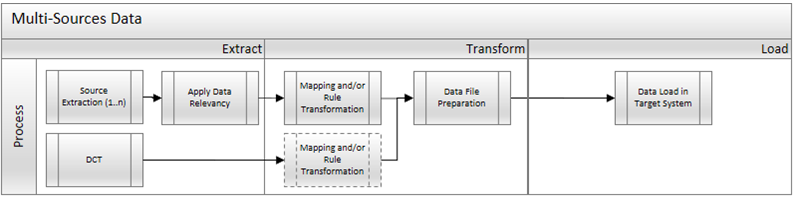
The high-level process is represented by the diagram below.
Note: DCT is not required for this object 1070. DCT is shown in table below, for reference only, just in case in the future data migration, DCT is required.
Process | Activity |
Extract | Extract involves collecting data from the source. If the source is a system, Extract means to pull the required data from source systems into repository using ADMM. There are 2 steps for this method: a. Perform full data extraction from relevant asset tables in the source system(s). b. Apply Relevancy criteria for filtering the data that will be applicable according to Target Design. |
Transform | There are 2 steps of Transform activities that can happen in ADMM: 1. Perform mapping and data transformation rules. Some data will need to be mapped to the to-be values and/or updated according to the rules as per design requirement in target system. 2. Prepare load-ready data in the structure and format that is required for loading via standard Load Tool. This step also produces the load data ready for business to perform Pre-load Data Validation. |
Load | This process includes: 1. Execute the automated data load into target system using load tool. Note: There may be some cases where the load is done manually as part of business activities. If there is any, the load steps will be specified in section "Load Run Sheet" 2. Once the data is loaded to target system, it will be extracted out and prepared for Post Load Data Validation. |
Delta Data Management
Any main assets created in the legacy systems (PF2 and WP2) after the full extraction for Mock conversion will be re-extracted again from legacy systems (PF2 and WP2) for each mock or cutover rehearsals.
As data cleansing is performed in PF2 and WP2 to meet SYWAY design standard, each extraction will re-transform extracted data with on-going new unmapped legacy values discovered and mapped.
Data Privacy and Sensitivity
N/AExtraction
The asset master data records shall be extracted from SAP ECC and migrated using the Syniti Migrate.
- The data exists. Syniti Migrate connects to the source and loads the data into Syniti Migrate. There are 3 methods:
- Perform full data extraction from relevant tables in the source system(s).
- Perform extraction through the application layer.
- Only if cannot connect to the source, data is loaded to the repository from the provided source system extract/report.
- The data does not exist (or cannot be converted from its current state). The data is manually collected by the business directly in Syniti Migrate. This is to be conducted using DCT (Data Collection Template) in Syniti Migrate. This is not applicable for this object 1070
The agreed Relevancy criteria is applied to the extracted records to identify the records that are applicable for the Target loads
Extraction Run Sheet
| Req # | Requirement Description | Team Responsible |
|---|---|---|
1. | Extract all main assets from ANLA table in PF2 and WP2. | Syniti team |
2. | Apply Asset Relevancy criteria on the extracted records. | Syniti team |
3. | Extract Time Dependent Data of asset master records in Req#2 above from ANLZ table in PF2 and WP2. | Syniti team |
4. | Extract Depreciation Terms Data of the asset master in Req#2 from ANLB table in PF2 and WP2. | Syniti team |
5. | Extract Asset Main Number Text of asset master records in Req#2 above from ANLH table in PF2 and WP2. | Syniti team |
Selection Screen
If applicable, this section will give the details on any selection screen parameters, including the parameter type, that are required to be entered to ensure consistent data extracts.| Selection Ref Screen | Parameter Name | Selection Type | Requirement | Value to be entered/set |
|---|---|---|---|---|
| N/A |
Data Collection Template (DCT)
N/A
Extraction Dependencies
List the steps that need to occur before extraction can commence
| Item # | Step Description | Team Responsible |
|---|---|---|
| 1. | Data cleansing of legacy main assets in the source system to adhere to target design is completed. | Business |
| 2. | Data cleansing of legacy assets where assets that are no longer physically exist will be assessed for retirement is accomplished | Business |
Transformation
The Target fields are mapped to the applicable Legacy field that will be its source, this is a 3-way activity involving the Business, Functional team and Data team. This identifies the transformation activity required to allow Syniti Migrate to make the data Target ready:
- Perform value mapping and data transformation rules.
- Legacy values are mapped to the to-be values (this could include a default value)
- Values are transformed according to the rules defined in Syniti Migrate
- Prepare target-ready data in the structure and format that is required for loading via prescribed Load Tool. This step also produces the load data ready for business to perform Pre-load Data Validation
Transformation Run Sheet
| Item # | Step Description | Team Responsible |
|---|---|---|
1. | Ensure all the fields that require value mapping, as stipulated in Section "Mapping tables", have the latest signed-off mapping files imported into Syniti Migrate. | Data team |
2. | Go to Process Area Launch and Process the Object – Fixed Asset | Data team |
3. | Launch the Objects to execute transformation. | Data team |
4. | Perform transformation main assets and sub numbers extracted from PF2 and WP2 where target values will be derived from mapping tables. | Data team |
5. | Generate Pre-Load reports in Syniti Migrate. | Data team |
6. | Generate data load count in Syniti Migrate. | Data team |
7. | Log errors as defects, if any and address resolutions. Close defects. | Data team |
8. | Re-transform and re-validate the Pre-load reports if necessary. | Data team |
9. | Validate the transformed file as part of pre-load validation, raise data defects or provide the pre-load sign-off. | Business |
10. | Analyze and resolve any pre-load defects logged by business. | Data team |
Transformation Rules
List of all fields in the Target table field to be populated with values according to the Fixed Asset Master Data Standard to facilitate loading into target system.
Business rule in S4/HANA:
All asset sub numbers will be migrated as a regular asset number. System validation is created to prevent the use of sub-assets in S/4HANA.
| Rule # | Source system | Source Table | Source Field | Source Description | Target System | Target Table | Target Field | Target Description | Transformation Logic |
|---|---|---|---|---|---|---|---|---|---|
1. | PF2 and WP2 | ANLA | BUKRS | Company Code | S/4HANA | ANLA | BUKRS | Company Code | Value Mapping. Map from source to target by using company code mapping table. Must be valid company code in company code configuration (table T001) |
2. | PF2 and WP2 | ANLA | ANLN1 | Asset number | S/4HANA | ANLA | ANLN1 | Asset number | System generated number. |
3. | PF2 and WP2 | ANLA | ANLN2 | Asset sub-number | S/4HANA | ANLA | ANLN2 | Asset sub-number | System generated number. The system automatically assigns sub-asset number 0 by default to every asset created. However, the creation of additional sub-assets/child assets is not permitted in the global process designs for S/4HANA. Note: All sub-assets (with sub number 1,2,3, etc) will be migrated as main asset with sub number 0 |
4. | PF2 and WP2 | ANLA | ANLKL | Asset Class | S/4HANA | ANLA | ANLKL | Asset Class | Value Mapping. Map from source to target via Asset Class mapping table. Must be valid in asset class configuration (Table ANKA (Asset Class: General Data) and ANKB (Asset Class: Depreciation area)) |
5. | PF2 and WP2 | ANLA | ZUJHR | Fiscal year in which first acquisition was posted | S/4HANA | ANLA | ZUJHR | Fiscal year in which first acquisition was posted | Copy from legacy. For migrated assets, the values from the legacy system shall be adopted. Note: This field is not listed in LTMC template |
6. | PF2 and WP2 | ANLA | ZUPER | Period in which first acquisition was posted | S/4HANA | ANLA | ZUPER | Period in which first acquisition was posted | Copy from legacy For migrated assets, the values from the legacy system shall be adopted. Note: This field is not listed in LTMC template |
7. | PF2 and WP2 | ANLA | ZUGDT | Asset value date of the first posting | S/4HANA | ANLA | ZUGDT | Asset value date of the first posting | Copy from legacy. For migrated assets, the values from the legacy system shall be adopted. Note: This field is not listed in LTMC template |
8. | PF2 and WP2 | ANLA | AKTIV | Capitalization date | S/4HANA | ANLA | AKTIV | Capitalization date | Copy from legacy. For migrated assets, the values from the legacy system shall be adopted. |
9. | PF2 and WP2 | ANLA | DEAKT | Deactivation Date | S/4HANA | ANLA | DEAKT | Deactivation Date | Copy from legacy. Assets that are deactivated in the current year will be migrated. Therefore, this field is only applicable for company codes which are in Group 1 go live. Group 1 go live date is 1 July 2028 Group 2 go live date is 1 Jan 2029 For migrated assets retired in the fiscal year of a mid-year go-live (Group 1 Go live), the values from the legacy system shall be adopted. |
10. | PF2 and WP2 | ANLA | ORD41 | Evaluation group 1 | S/4HANA | ANLA | ORD41 | Evaluation group 1 | Value mapping. Map from source to target system via Evaluation Group 1 mapping table Must be valid in Evaluation group 1 in configuration (Tables T087) |
11. | PF2 and WP2 | ANLA | ORD42 | Evaluation group 2 | S/4HANA | ANLA | ORD42 | Evaluation group 2 | Value mapping. Map from source to target system via Evaluation Group 2 mapping table Must be valid in Evaluation group 2 in configuration (Tables T087) |
12. | PF2 and WP2 | ANLA | ORD43 | Evaluation group 3 | S/4HANA | ANLA | ORD43 | Evaluation group 3 | Value mapping. Map from source to target system via Evaluation Group 3 mapping table Must be valid in Evaluation group 3 in configuration (Tables T087) |
13. | PF2 and WP2 | ANLA | ORD44 | Evaluation group 4 | S/4HANA | ANLA | ORD44 | Evaluation group 4 | Value mapping. Map from source to target system via Evaluation Group 4 mapping table Must be valid in Evaluation group 4 in configuration (Tables T087) |
14. | PF2 and WP2 | ANLA | LIFNR | Account number of vendor (other key word) | S/4HANA | ANLA | LIFNR | Account number of vendor (other key word) | Value mapping. It will be migrated based on a mapping table of Vendor, provided that the vendor is relevant for BP master creation in S/4HANA. |
15. | PF2 and WP2 | ANLA | HERST | Manufacturer of asset | S/4HANA | ANLA | HERST | Manufacturer of asset | Rule. This field is only required for assets that have value in field "Trading Partner" in ECC. This field shall be used to capture additional free-text information on the asset's origin required for tax or other types of audits where tracing of an asset's origin is a crucial piece of information. E.g. for migrated assets from legacy systems, this field will display the old asset number (ANLA-AIBN1) from the legacy asset in the legacy systems together with trading partner information if the asset was acquired via intercompany transactions in the legacy system and the trading partner relates to an affiliated entity that no longer exists in S/4HANA (e.g. due to divestments). Logic: 1.Filter assets that value in field "Trading Partner" in ECC. 2.If the entity doesn't exist in trading partner mapping, concatenate the ECC value of Trading Partner (ANLA-VBUND), ANLA-AIBN1 (Original asset number) and ANLA-AIBN2 (Original Sub-Asset) and store it into this field ANLA-HERST. |
16. | PF2 and WP2 | ANLA | VMGLI | Property Classification Key | S/4HANA | ANLA | VMGLI | Property Classification Key | Value mapping. Map from source to target system via Property Classification Key mapping table. The property classification key is required in some countries to perform property tax reporting (e.g. France) to local authorities. This is only required in some countries as per localization requirements for asset classes related to land and property. |
17. | PF2 and WP2 | ANLA | ANLN1 | Asset Number | S/4HANA | ANLA
| AIBN1 | Original asset number | Copy from legacy. This is a cross-field copying. Populate this field with the legacy PF2 and WP2 main asset |
18. | PF2 and WP2 | ANLA | ANLN2 | Asset Sub-Number | S/4HANA | ANLA | AIBN2 | Original Sub-Asset | Copy from legacy. This is a cross-field copying. Populate this field with the legacy PF2 and WP2 asset sub-number.
|
19. | PF2 and WP2 | ANLA | AIBDT | Original Acquisition Date of AuC/ Transferred Asset | S/4HANA | ANLA | AIBDT | Original Acquisition Date of AuC/ Transferred Asset | Copy from legacy |
20. | PF2 and WP2 | ANLA | MENGE | Quantity | S/4HANA | ANLA | MENGE | Quantity | Copy from legacy. Quantities captured in the legacy systems shall be retained. |
21. | PF2 and WP2 | ANLA | MEINS | Base unit of measure | S/4HANA | ANLA | MEINS | Base unit of measure | Value mapping. Must be populated if Quantity is populated The unit of measure shall be set to 'EA' to facilitate quantity tracking on Fixed Assets for all assets except for: - Intangible Assets For assets of type 'Land and Building' an alternate unit of measure 'M2' can be maintained. Map from source to target via unit of measure mapping table |
22. | PF2 and WP2 | ANLA | INKEN | Include asset in inventory list | S/4HANA | ANLA | INKEN | Include asset in inventory list | Defaulted to “X” All tangible and intangible Fixed Assets may be subjected to physical inventory counts. By setting this indicator, they will be included in SAP standard reports specifically designed for the physical inventory count process. |
23. | PF2 and WP2 | ANLA | IVDAT | Last Inventory On | S/4HANA | ANLA | IVDAT | Last Inventory On | Copy from legacy. The date from the legacy systems shall be adopted. It captures the date of the last asset sighting as part of the physical inventory count process |
24. | PF2 and WP2 | ANLA | INVZU | Inventory Note | S/4HANA | ANLA | INVZU | Inventory Note | Copy from legacy. This field will be migrated as it is. This will be updated with the new target values as per S/4 design after the first inventory count cycle, which captures the user ID of the person who last confirmed the physical existence of the Fixed Asset as part of the physical inventory count process. |
25. | PF2 and WP2 | ANLA | INVNR | Inventory Number | S/4HANA | ANLA | INVNR | Inventory Number |
Note: For capital spares, the sequence steps are described as below:
3. Load object 1002 (equipment master) |
26. | PF2 and WP2 | ANLA | VBUND | Trading Partner | S/4HANA | ANLA | VBUND | Trading Partner | Value mapping
|
27. | PF2 and WP2 | ANLA | TXT50 | Asset description | S/4HANA | ANLA | TXT50 | Description 1 | Copy from legacy |
28. | PF2 and WP2 | ANLA | TXA50 | Additional asset description | S/4HANA | ANLA | TXA50 | Description 2 | Copy from legacy This field is only required if a meaningful description of the asset's nature goes beyond 50 chars and hence can't be captured in its full length in field ANLT-TXT50 due to field length constraints. |
29. | PF2 and WP2 | ANLA | GDLGRP | Evaluation group 5 | S/4HANA | ANLA | GDLGRP | Evaluation group 5 | Value mapping. Map from source to target system via Evaluation Group 5 mapping table Must be valid in Evaluation group 5 in configuration (Tables T087G) |
30. | PF2 and WP2 | ANLA | SERNR | Serial number | S/4HANA | ANLA | SERNR | Serial number |
As part of cleansing activities, Business must identify manually by assigning "Capital Spares" into field "Asset Super Number" for asset master which represent “Capital Spares”, after that for these assets, serial number from S/4HANA must be assigned manually into column "S/4 Serial Number" in XREF table below. Below are the steps in sequence:
R2R Mapping table List.xlsx - Google Sheets (worksheet "Serial Number) 4. Load all Fixed Asset masters (capital spares and non-capital spares |
31 | PF2 and WP2 | ANLA | UMWKZ | Reason for Environmental Investment | S/4HANA | ANLA | UMWKZ | Reason for Environmental Investment | Value mapping. Map from source to target via Reason for Environmental Investment mapping table. |
32. | PF2 and WP2 | ANLB | AFABE | Depreciation area | S/4HANA | ANLB | AFABE | Depreciation area | Value mapping. Map from source to target via Depreciation area mapping table. |
33 | PF2 and WP2 | ANLB | AFABG | Depreciation Start date | S/4HANA | ANLB | AFABG | Depreciation Start date | Copy from legacy |
34, | PF2 and WP2 | ANLB | AFASL | Depreciation Key | S/4HANA | ANLB | AFASL | Depreciation Key | Value mapping. It will be migrated based on a mapping table of depreciation key |
35. | PF2 and WP2 | ANLB | NDJAR | Useful Life (Year) | S/4HANA | ANLB | NDJAR | Useful Life | Copy from legacy |
36. | PF2 and WP2 | ANLB | NDPER | Useful Life (Period) | S/4HANA | ANLB | NDPER | Useful Life (Period) | Copy from legacy |
37. | PF2 and WP2 | ANLB | SCHRW | Asset scrap value | S/4HANA | ANLB | SCHRW | Asset scrap value | Rule and copy from legacy. Scrap value shall be adopted unless they are related to corporate (IFRS) depreciation areas. Scrap value must not be used for the leading corporate (IFRS) S/4 depreciation areas (areas 01-04 and 99) For IFRS : it should be blank(01, 02, 03, 04,99), non IFRS populate the value from legacy (copy) |
38. | PF2 and WP2 | ANLB | SCHRW_PROZ | Scrap value % | S/4HANA | ANLB | SCHRW_PROZ | Scrap value % | Rule and copy from legacy. Scrap value percentages shall be adopted unless they are related to corporate (IFRS) depreciation areas. Scrap value percentages must not be used for the leading corporate (IFRS) S/4 depreciation areas (areas 01-04 and 99) For IFRS : it should be blank(01, 02, 03, 04,99), non IFRS populate the value from legacy (copy) |
39. | PF2 and WP2 | ANLZ | KOSTL | Cost Centre | S/4HANA | ANLZ | KOSTL | Cost Centre | Value mapping. Map from source (latest validity date) to target via Cost Centre mapping table. |
40. | S/4HANA | ANLZ | PRCTR | Profit Centre | System generated. The profit center is derived from the cost center maintained in the asset master record. In source systems, Profit center is not populated in asset master. The reason why this field is shown in asset master because segment reporting in FI-AA is activated as some new features in S/4 are only available if this feature is on. With this feature switched on, the profit center must be maintained in the Fixed Asset master. And also, to be able to report Fixed Asset registers by profit center going forward. | ||||
41. | PF2 and WP2 | ANLZ | WERKS | Plant | S/4HANA | ANLZ | WERKS | Plant | Value mapping. Map from source (latest validity date) to target via Plant mapping table. Must be valid in plant assigned to the company code configuration (Table T001K) Plant is a mandatory reporting attribute maintained in the Fixed Asset master for all assets to facilitate the physical inventory count and tax determination processes. |
42. | PF2 and WP2 | ANLZ | STORT | Asset location | S/4HANA | ANLZ | STORT | Asset location | Value mapping. Map from source (latest validity date) to target via Location mapping table. Must be valid Location (T499S-STAND) assigned to plant above in configuration (Table T499S) |
43. | PF2 and WP2 | ANLZ | RAUMN | Room | S/4HANA | ANLZ | RAUMN | Room | Copy value from source (latest validity date) to target system. |
44. | PF2 and WP2 | ANLZ | KFZKZ | License Plate No. of Vehicle | S/4HANA | ANLZ | KFZKZ | License Plate No. of Vehicle | Copy value from source (latest validity date) to target system. |
45. | PF2 and WP2 | ANLH | ANLHTXT | Asset main no. text | S/4HANA | ANLH | ANLHTXT | Asset main no. text | Copy from legacy. For migrated assets, this field shall be used to capture the English translation of the asset description |
46. | PF2 and WP2 | ANLZ | XSTIL | Shutdown indicator | S/4HANA | ANLZ | XSTIL | Shutdown indicator | Copy value from source (latest validity date) to target system. |

List of Custom Target Reports for this object is maintained here: Conversion Specification - Custom Reports Register.
Transformation Mapping
List of mapping tables where the legacy values will have to be transformed to SyWay values.
| Mapping Table Name | Mapping Table Description |
|---|---|
Company code | Mapping of legacy company code to SyWay company code |
Asset Class | Mapping of legacy asset Class to SyWay asset class |
Unit of measure | Mapping of legacy unit of measure to SyWay unit of measure |
Cost center | Mapping of legacy cost centre to SyWay cost centre |
Profit center | Mapping of legacy profit centre to SyWay profit centre |
Plant | Mapping of legacy plant code to SyWay plant code |
Location | Mapping of legacy location to SyWay location |
Evaluation group 1 | Mapping of legacy EG1 to SyWay EG1 |
Evaluation group 2 | Mapping of legacy EG2 to SyWay EG2 |
Evaluation group 3 | Mapping of legacy EG3 to SyWay EG3 |
Evaluation group 4 | Mapping of legacy EG4 to SyWay EG4 |
Depreciation area | Mapping of legacy depreciation areas to SyWay depreciation areas |
Depreciation key | Mapping of legacy depreciation key to SyWay depreciation key |
Property Classification Key | Mapping of legacy Property Classification Key to SyWay Property Classification Key |
Trading Partner | Mapping of legacy Trading Partner to SyWay Trading Partner |
Equipment number | Mapping of legacy Equipment number to SyWay Equipment number |
Functional Location | Mapping of legacy Functional Location to SyWay Equipment number |
Evaluation Group 5 | Mapping of legacy Evaluation Group 5 to SyWay Evaluation Group 5 |
Reason for Environmental Investment | Mapping of legacy Reason for Environmental Investment to SyWay Reason for Environmental Investment |
Transformation Dependencies
List the steps that need to occur before transformation can commence| Item # | Step Description | Team Responsible |
|---|---|---|
1. | Ensure all the fields that require value mapping, as stipulated in Section "Mapping tables", have the correct values mapped and imported into ADMM. | Data team |
Pre-Load Validation
Project Team
The following pre-load validations will be performed by the Project Team.Completeness
| Task | Action |
|---|---|
Generation of Pre-load reports | Pre-load reports will have same structure as of load file with additional columns/attributes if required by business to facilitate validations. Main Assets: There will be 2 Pre-load reports generated: 1. Asset Master Main data (General, Time-dependent, Allocations) 2. Asset Depreciation terms data (Depreciation areas, Useful life by Depreciation area and Depreciation Keys) |
Reconciliation of record count | Main Assets Total number of main Assets in the extract is compared against total number of main assets in the legacy system. Less: 1. All main assets under company codes not in scope. 2. Total number of AUCs in the legacy systems 3. Total number of RoU assets in the legacy systems 4. Total number of Asset Shares in the legacy systems 5. Non-Relevant records (Deactivated assets in the previous years, Main assets dropped via Relevancy criteria - refer to Conversion Scope). 6. Other constraints/errors. Total Number of Records to load: 1. Asset Master main data 2. Asset Depreciation terms data: Total number of records for main assets multiply by the number of depreciation areas defined in the Chart of Depreciation. |
Accuracy
| Task | Action |
|---|---|
Mandatory field mapping and transformation
| Obtain a list of the fields to be populated with values from mapping files (Refer to section "Mapping tables") and ensure all these fields contain S/4HANA values. Review the data report to ensure mapping value is not missing in ADMM. Capture errors in the Data Error report. |
Business
The following pre-load validations will be performed by the business.Completeness
| Task | Action |
|---|---|
Verify record count in Pre-load reports by region
| In legacy system, execute Asset Balances report (S_ALR_87011963 – Asset Balances - by Asset Number) and ensure “Current book value” is selected to obtain a list of active posted assets to be migrated for the companies in scope for each region. Compare the count in this report and assets populated in DCT against the count of main assets to be loaded in Pre-load. |
Verify Relevancy rules applied
| In Legacy system, execute Unposted Asset report (S_ALR_87012056 - Directory of Unposted Assets) to retrieve the list of unposted assets with deactivation date = Blank. These assets should not appear in the Pre-load report. Leverage the List of Unposted Assets relevant for migration in ADMM for any unposted asset flagged as relevant for migration as the asset fulfils the Relevancy criteria. (Section "Conversion Scope"). |
Accuracy
| Task | Action |
|---|---|
Conversion accuracy | Verify all main assets are transformed accurately as per endorsed transformation/mapping rules. Review List of Error reports in ADMM for any mismatch or missing transformed values. |
Load
Data Loading will be done using the migration cockpit object and format of which is attached here:
Source data for Fixed asset (incl. balances and transactions).xlsx
The load process includes:
- Execute the automated data load into target system using load tool or product the load file if the load must be done manually
- Once the data is loaded to the target system, it will be extracted and prepared for Post Load Data Validation
Load Run Sheet
| Item # | Step Description | Team Responsible |
|---|---|---|
1. | Ensure the load tools are transported into the correct ADMM instance. | Data team |
2. | Ensure Pre-load signoffs are obtained. | Data team |
3. | Load fixed assets | |
4. | Generate the post load reports in ADMM. | Data team |
5. | Log errors as defects, if any and address resolutions. Close defects. | Data team |
6. | Resolve defects via data update or upload and re-generate post load reports if necessary. | Data team |
7. | Business to validate the post load files as part of post-load validation, raise data defects or provide the post-load sign-off. | Data team |
8. | Repeat steps 4 to 6 if necessary. | Data team |
Load Phase and Dependencies
Pre Cutover is the phase as to when the load for this object will occur.
Configuration
List the Configurations required before loading can commence
| Item # | Configuration Item |
|---|---|
1. | Company code-related configuration (Chart of Depreciation per country, Plant, Location, Asset Class, Depreciation areas, Depreciation keys, Asset Number Range Interval). |
2.
| Asset Data Transfer Configuration · Transfer date – Last day of the month prior to go-live · Legacy Data Transfer Status = In Preparation · Document type 9A |
Conversion Objects
| Object # | Preceding Object Conversion Approach |
|---|---|
| 1073 | Profit Centre |
| 1074 | Cost Centre |
| 1002 | Equipment |
| Material Master |
Error Handling
The table below depicts some possible system errors for this data object during data load. All data load error is to be logged as defect and managed within the Defect Management
| Error Type | Error Description | Action Taken |
|---|---|---|
Invalid Data | Relevant cost center is not valid in the validity of time dependent data in the Asset master to be loaded. | Check whether the validity of time dependent data in cost center needs to be changed. |
Post-Load Validation
Project Team
The following post-load validations will be performed by the Project Team.Completeness
| Task | Action |
|---|---|
Reconciliation of Total Record Count | Total number of records loaded for (Main Assets, Depreciation terms) will be generated in the Post-load reports in ADMM. Main Assets Total no. of Main assets in the Post Load report is compared against total number of main assets in the pre-load reports by region. Less: Any errors during load. |
Mandatory fields check | Review the post load file and note the records that failed the mandatory fields check. Below are the mandatory fields: · Company Code · Asset Class · Asset Description · Asset Main Number Text · Cost Centre · Profit Centre Depreciation terms · Depreciation Key · Useful Life Year (except for keys *000) and Period (except for keys *0000) |
Accuracy
| Task | Action |
|---|---|
Check values in key fields for accuracy | Post-load reports will have the same structure as the load file and some additional columns as required to facilitate the post load validation. Leverage on ADMM to create a Post load report that reports S/4 HANA loaded records along with the legacy values side-by-side to allow for 100% check of all these fields in the shortest possible time. Main Assets: There will be 2 post load reports generated in ADMM for key fields comparison: 1. Asset Master data (General, Time-dependent, Allocations) 2. Asset Depreciation terms data (Depreciation areas, Useful life and Depreciation Keys by Depreciation area) Any mismatch will be reported under the Post Load – Error report. |
Business
The following post-load validations will be performed by the business.Completeness
| Task | Action |
|---|---|
Record Count Check | Review the record count report from the Data Team and ensure it is correct by cross-checking with the record count confirmed during Pre-load Business Validations. |
Accuracy
| Task | Action |
|---|---|
Check accuracy of field values | Based on the field checks report from the Data Team, conduct a sample check to prove accuracy of the values in S/4 HANA against the source (Pre-load report or PF2 and WP2 system). Suggested sample size is 1 per company code, per asset class. |
Key Assumptions
- Master Data Standard is up to date as on the date of documenting this conversion approach and data load.
- Fixed Asset is in scope based on data design and any exception requested by business.
- Asset Master cleansing task is completed.
- All assets flagged for deletion must be deactivated (i.e. populate the deactivation date field).
See also
Insert links and references to other documents which are relevant when trying to understand this decision and its implications. Other decisions are often impacted, so it's good to list them here with links. Attachments are also possible but dangerous as they are static documents and not updated by their authors.