| Status | |
|---|---|
| Owner | |
| Stakeholders | The business stakeholders involved in making, reviewing, and endorsing this decision. Type @ to mention people by name |
Purpose
The purpose of this document is to define the conversion approach to create Materials - Basic Data View in S/4 HANA.
Conversion Scope
The scope of this document covers the approach for converting active Materials - Basic Data View from Legacy Source Systems into S/4HANA following the Materials Master Data Design Standard.
From the current system landscape, Material data exists separately in the legacy systems (PF2 and WP2), with potential discrepancies in both organizations. Harmonization and validation are required to ensure accurate and consolidated data in S/4HANA. While PF2 and WP2 serve as source systems, extensive mapping and transformation logic will be necessary to produce properly formatted load templates in line with the target design.
We will carry out the following steps:
1) Establish a detailed set of relevancy rules for materials by consulting with the Business, Functional and Integration teams
2) Identify all duplicate materials in the Legacy systems with the help of tools developed by Syniti, and subsequently cleanse or merge the data
3) Analyse all current Material Types in Legacy and set the mapping for S4H accordingly. Where it is not possible for a one to one mapping between types we will work with the business to identify the correct mapping on a material level.
4) We will carry out cleansing tasks where needed across all material fields (for example, material descriptions and languages)
5) We will provide value mapping tables where needed for S4H compliance or where standardization is required (for example, Units of Measure)
6) We will provide detailed transformation rules for Syniti, working with our Functional and Integration teams
Relevancy Rules
REGULAR MATERIALS
- All materials created in the previous 6 months will be included unless flagged for deletion
- All Material Types will be considered unless they are on the Exclusion list as follows: Material Types PROD (PF2 & WP2), ZIMM, ZIRT (PF2), ZINT (WP2), 731 (PF2) to be excluded. Also Maintenance Assemblies to be excluded (MTypes Z750 (PF2), ZIBA (WP2)).
- Material Types ZUNB, ZBOM, ZPRC (WP2) will be included regardless of activity (unless flagged for deletion).
- For Services we will include materials where MARA.MTART = ZDIE (WP2) or Z710, Z720, Z732, ZB20 (PF2). We will also include materials where MARA.MEINS = PRT or LE, or where MARA.MTPOS_MARA = LEIS.
- We will only include materials that are extended to Plants currently in scope, according to the Enterprise Structure (excluding ZPRC material type as these do not require plant extension). If any material has no valid extensions, to any in scope plants, but open transactions/stock exist within these corresponding in scope plants, then we will include these materials as part of relevancy.
- We will include for migration all materials that have activity over the previous 48 months for non ZIND/ZABF materials, or 60 months for ZIND/ZABF materials:
- For procurement data use EKKO/EKPO tables where EKKO.LOEKZ = "" (blank) EKPO.LOEKZ = "" (blank) and use EKPO/AEDAT for date range.
- For sales data use VBAK/VBAP tables
- For work order data use AUFK/AFKO/AFPO tables. Check date using AUFK.ERDAT. This applies to the following Order Categories only, Process Orders (AUFK.AUTYP = 40) and Maintenance Orders (AUFK.AUTYP = 30) where AUFK.LOEKZ = "" (blank).
- Valid PIRs and Source List (this includes Not Deleted/Validity Date not expired/In scope Purchasing Orgs and Plants based on Enterprise Structure) Check tables EINA/EINE/EORD. Check EORD.NOTKZ is showing as not blocked. Check that SL date (EORD.BDATU) has not expired. Check that EINA.LOEKZ = "" (blank) and EINE.LOEKZ = "" (blank). Check that PIR dates, (EINA.LIFBI) and (EINE.PRDAT), have not expired.
- Additionally, we can check material movements by querying MKPF/MSEG tables for the last 48 months for non ZIND/ZABF materials and 60 months for ZIND/ZABF materials.
- We will include for migration all materials that have open documents including the following:
- Open PO where (EKPO.EREKZ ≠ 'X') and (EKKO.BSTYP = F) and STO where (EKPO.ELIKZ ≠ 'X'), (EKKO.BSTYP = F) and (EKKO.BSART = UB/UBNI).
- Open contracts and scheduling agreements where (EKKO.KDATE has not expired) and (EKKO.BSTYP = K)
- Open SO. VBUK.GBSTK = ('A','B') VBUK.VBTYP = C
- Open WO. Use AUFK for checking open Process orders (AUFK.AUTYP = 40) and Maintenance Orders (AUFK.AUTYP=30). Link field AUFK.OBJNR to JEST.OBNR to get status codes not equal to TECO AND JEST.INACT ≠ 'X'.
- Have current stock/open inventory
For Open Inventory use the following tables:
MARD
MKOL (Consignment stock)
MSKA (Sales Order stock)
MSLB (Special stock)
MSPR (Project stock)
- We will include BOM data for materials in scope using tables: MAST/STKO/STPO. We will include all Production and Plant Maintenance BOMs and their related components. MAST data will include BOM Usage (STLAN) 1 (Production) & 4 (Plant Maintenance). STKO data will include BOM Category STKO.STLTY = E (Equipment), F (Functional Location) & M (Material). Exclude inactive BOMs (STKO.STLST = 02). All BOM components will be included in relevancy regardless of activity (unless flagged for deletion). Exclude any deleted records STKO.LOEKZ, STKO.LKENZ= X, STPO.LKENZ = X.
- Materials with Deletion Flags will be excluded unless appearing in the following open transactions:
- Open PO/STO
- Open contracts and scheduling agreements
- Open SO
- Open WO
- Deletion Flags (Table/Field) are as follows: MARA.LVORM = 'X' MARA.MSTAE = Z4, ZZ (PF2 system) Z0 (WP2 system) MARA.MSTAV = 51
- Materials with the word 'OBSOLETE' or 'DELETED' contained within the Short Description will be excluded. Also excluded are Materials where Short Description contains '**OBS', '**OBS**', '**OBS***', '*OBS*', '*OBS**', '***OBS***'
- Include ZIND/ZABF materials with Purchase Requisition for the last 60 months. Check table EBAN. Check for validity date EBAN.ERDAT. Check EBAN.BSTYP = B. Check that EBAN.LOEKZ = "" (blank). Check valid Plant according to the Enterprise Structure.
- Include non ZIND/ZABF materials with Purchase Requisition for the last 48 months. Check table EBAN. Check for validity date EBAN.ERDAT. Check EBAN.BSTYP = B. Check valid Purchase Org/Plant according to the Enterprise Structure
- Include all materials with PLIR (Planned Independent Requirements). Check table PBIM/PBED for materials PBIM.MATNR. Check PBIM.LOEVR ≠ 'D'. Check PBIM.WERKS for in scope Plants.
- Include all materials with planned orders for external procurement. Check table PLAF. Check date PLAF.PSTTR for previous 4 years activity. Check for special procurement in field PLAF.SOBES = 0.
| Source | Scope | Source Approx No. of Records | Target System | Target Approx No. of Records |
|---|---|---|---|---|
| PF2,WP2 | The Material Master Records will be extracted or collected via DCT. Any additional data that need to be created to support the new design may be added in the DCT. A data review and standardization will be done across all Info Records in the DCT. | 1,200,000 | S4H | 260,000 |
| PF2,WP2 | Service master records currently reside in the ASMD table, totaling approximately 38,000 for PF2-020 and 900 for WP2. | 39,528 (PF2 38,644 and WP2 884) | S4H | 4,475 (PF2 4,171 and WP2 304) |
Additional Information
MDS Documents
MDS Link |
Multi-language Requirement
Languages to be extracted (available on Source Systems)
SAP standard supports all ISO languages, ensure that all standard languages are considered in scope.
Material Master will have a default description available in English.
Multi language is supported for Materials. Login via a different language will show the description displayed in the logon language if the language key is maintained.
- Core languages: EN - English, FR - French, IT - Italian and ZH - Mandarin.
- Additional languages: PT - Portuguese, DE - German, ES - Spanish
- Additional Supplier languages that are possible: PL - Polish, JA - Japanese, KO - Korean, FI - Finnish, BG - Bulgarian, RU - Russian, TH- Thai, ZF - Chinese traditional, SK - Slovak, Z9 - Brazil Portuguese.
Document Management
Not Applicable
Legal Requirement
Not Applicable
Special Requirements
Not Applicable
Target Design
This section defines the structure and configuration of the target system in SAP S/4HANA. It specifies how each target field is designed, including data types, field lengths, and business rules, ensuring alignment between functional requirements and technical implementation for the conversion process.
The technical design of the target for this conversion approach.
| Sequence | Table | Technical Field | Field Description | Field Format | Field Length | Requirement |
| 001 | MARA | MATNR | Material Number | Text (CHAR) | 18 | Required |
| 002 | MARA | MBRSH | Industry Sector | Text (CHAR) | 1 | Required |
| 003 | MAKT | MAKTX | Description | Text (CHAR) | 40 | Required |
| 004 | MAKT | SPRAS | Language Key | Text (CHAR) | 2 | Default to 'EN' |
| 005 | MARA | MTART | Material Type | Text (CHAR) | 4 | Required |
| 006 | MARA | MEINS | Base Unit of Measure (ISO Format) | Text (CHAR) | 3 | Required |
| 007 | MARA | MATKL | Material Group | Text (CHAR) | 9 | Required |
| 008 | MARA | BISMT | Old Material Number | Text (CHAR) | 40 | Required |
| 012 | MARA | SPART | Division | Text (CHAR) | 2 | Required |
| 013 | MARA | PRDHA | Product Hierarchy | Text (CHAR) | 18 | Conditional |
| 014 | MARA | MSTAE | Cross-Plant Product Status | Text (CHAR) | 2 | Conditional |
| 015 | MARA | MSTDE | Valid-From Date | Date | Conditional | |
| 017 | MARA | MTPOS_MARA | General Item Category Group | Text (CHAR) | 4 | Required |
| 018 | MARA | BEGRU | Authorization Group | Text (CHAR) | 4 | Required |
| 019 | MARA | BRGEW | Gross Weight | Number (NUMC) | 13,3 | Conditional |
| 020 | MARA | NTGEW | Net Weight | Number (NUMC) | 13,3 | Conditional |
| 021 | MARA | GEWEI | Unit of Weight (ISO Format) | Text (CHAR) | 3 | Conditional |
| 022 | MARA | VOLUM | Volume | Number (NUMC) | 13,3 | Conditional |
| 023 | MARA | VOLEH | Volume Unit | Text (CHAR) | 3 | Conditional |
| 024 | MARA | GROES | Size/Dimensions | Text (CHAR) | 32 | Conditional |
| 025 | MARA | EAN11 | GTIN | Text (CHAR) | 18 | Conditional |
| 026 | MARA | NUMTP | GTIN Category | Text (CHAR) | 2 | Conditional |
| 027 | MARA | RMATP | Ref Material for Packaging | Text (CHAR) | 40 | Conditional |
| 028 | MARA | MAGRV | Material Group: Packaging Materials | Text (CHAR) | 4 | Conditional |
| 029 | MARA | NORMT | Industry Standard Description | Text (CHAR) | 18 | Conditional |
| 031 | MARA | WRKST | Basic Material | Text (CHAR) | 48 | Conditional |
| 032 | MARA | CHML_CMPLNC_RLVNC_IND | Chemical Compliance Relevance Indicator | Text (CHAR) | 1 | Required |
Data Cleansing
| ID | Criticality | Error Message/Report Description | Rule | Output | Source System | Team Responsible |
|---|---|---|---|---|---|---|
2019-001 | C1 | English description missing or | All materials require English description by default, so need to be provided if missing. | PF2/WP2 | Syniti/Data Team | |
2019-002 | C1 | Description format | Material descriptions must adhere to S4 standardization so no special characters etc and must not exceed character limit. Refer to 'Informal Words' document (Special Characters tab): | PF2/WP2 | Syniti/Data Team | |
2019-003 | C1 | UoM alignment | Check that all material UoMs adhere to S4 ISO standard, refer to UoM mapping table | PF2/WP2 | Syniti/Data Team | |
2019-004 | C1 | Check Gross and Net Weights | Check that Gross and Net Weights exist for any material extended to EU plants (excluding production plants). Check that Gross Weight >= Net Weight. | PF2/WP2 | Syniti | |
2019-005 | C1 | Verify overlaps OR duplicated descriptions between ASMD/MARA | Verify for overlaps / duplications between: ASMDT-ASMD_TEXT (Service Master Description – EN) Compare records on the same system and cross system for English language | PF2/WP2 | Data Team | |
2019-006 | C1 | Validation Reports | Validation Reports to be built | Syniti |
Conversion Process
The high-level process is represented by the diagram below:
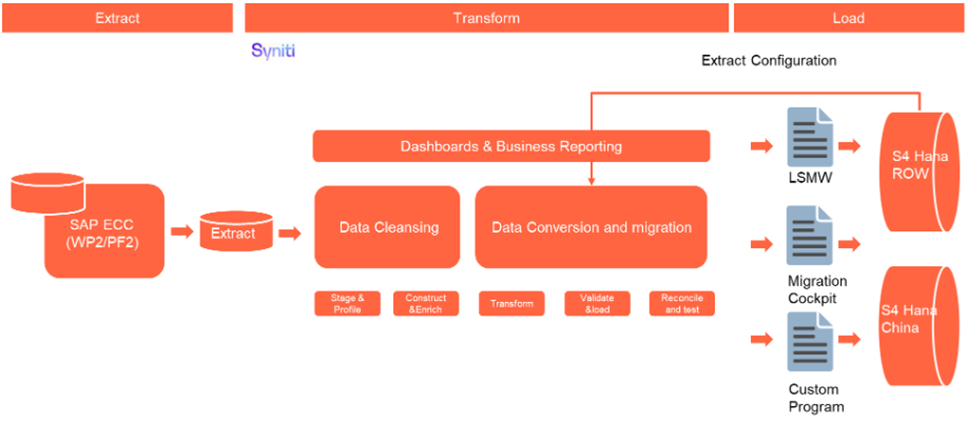
The high level process for Classes that will be captured in a DCT are represented by the diagram below:
 e
e
Data Privacy and Sensitivity
Not ApplicableExtraction
The source for Basic data for Materials is PF2 & WP2. This will be extracted by Syniti based on the Relevancy criteria.
Extraction Run Sheet
| Req # | Requirement Description | Team Responsible |
|---|---|---|
| 1 | Extract Material Master data (MARA) from PF2 and WP2 ECC systems according to the defined Relevancy Rules (scope by Material Type, and Activity). | Syniti |
| 2 | Validate the extracted data volumes against ECC totals to ensure completeness before applying any filtering (count check per Material Type and per Plant). | Syniti |
| 3 | Apply exclusion criteria (e.g. deletion flags, obsolete status). | Syniti |
| 4 | Include recent transactional linkage (e.g., materials used in open PO, SO, or movements) within last 5 years for indirect/waste materials and 4 years for all others. | Syniti |
| 5 | Validate UoM conversions and ensure all Base Units (MEINS) exist in UoM ISO mapping table. | Syniti/Data Team |
| 6 | Generate Google Sheet report pre-populated with PF2 and WP2 extracted data for Business validation | Syniti/Data Team |
Selection Screen
| Selection Ref Screen | Parameter Name | Selection Type | Requirement | Value to be entered/set |
|---|---|---|---|---|
| Not Applicable |
Data Collection Template (DCT)
Materials & Service Master
| SAP Structure | SAP Field | Type | Length | Field Description | Importance | Long Description |
| MARA - General Material Master Data (client-level basic material data) | ||||||
| MARA | MATNR | CHAR | 18 | Material Number | mandatory for sheet | Material Number A key that uniquely identifies the product. For a numeric field add leading zeros. |
| MARA | MTART | CHAR | 4 | Material Type | mandatory for sheet | Material Type All ZPRC materials will map to ZBAS Material Type regardless of Material Group. Check to see if any materials are components in a Production BOM, and if so then set Material Type to be ZDIR instead of using mapping. Use Value Mapping table for Material Types. This maps ECC Material Group to the proposed S4H Material Type. |
| MARA | MATKL | CHAR | 9 | Material Group | Material Group | |
| MARA | MBRSH | CHAR | 1 | Industry Sector | Industry Sector | |
| MAKT | MAKTX | CHAR | 40 | Material Description (Short Text) LANGUAGE EN | mandatory for sheet | Description* |
| MAKT | SPRAS | LANG | 2 | Language Key | mandatory for sheet | Language Key |
| MARA | MEINS | UNIT | 3 | Base Unit of Measure | mandatory for sheet | Base Unit of Measure (ISO Format)* |
MARA | EAN11 | CHAR | 18 | International Article Number (EAN/UPC) | Any EAN currently in the system has to be either 8,12,13,14 digits long (as per GS1 standards) Not applicable for ZSER Materials. | |
| MARA | NUMTP | CHAR | 2 | Category of International Article Number | EAN Category | |
| MARA | SPART | CHAR | 2 | Division | Division | |
| MARA | BISMT | CHAR | 18 | Old Material Number | Old Material Number
| |
| MARA | PRDHA | CHAR | 18 | Product Hierarchy | Product Hierarchy | |
| MARA | NORMT | CHAR | 18 | Industry Standard Description | Industry Standard Description Description of the product in accordance with the appropriate industry standard (such as ANSI or ISO). This field is purely for information. | |
| MARA | GROES | CHAR | 40 | Size/Dimensions | Size/Dimensions Text field that you can use as you like, for example, to record the size or dimensions of the product. The data you enter is merely for information and is not used by the system. | |
| MARA | MTPOS_MARA | CHAR | 4 | General Item Category Group | General Item Category Group | |
| MARA | BEGRU | CHAR | 4 | Authorization Group | Authorization Group The authorization group enables you to protect access to certain objects. | |
| MARA | MSTAE | CHAR | 2 | Cross-Plant Material Status | Cross-Plant Material Status | |
| MARA | MSTDE | DATS | 8 | Date from Which the Material Status Is Valid | Valid-From Date Date from which the cross-plant product status is valid. | |
| MARA | ANP | NUMC | 9 | ANP Code (Brazil Localization) | ANP Code | |
| MARA | BRGEW | QUAN | 15 | Gross Weight | Gross Weight Gross weight expressed in the unit of weight specified by you in the Unit of weight field. The system can use the gross weight at a later stage, depending on what kind of capacity check you run, to check storage bin capacity for warehouse management purposes. | |
| MARA | NTGEW | QUAN | 15 | Net Weight | Net Weight Net weight expressed in the unit of weight specified by you in the Unit of weight field. | |
| MARA | GEWEI | UNIT | 3 | Weight Unit | Unit of Weight (ISO Format) | |
| MARA | VOLUM | QUAN | 15 | Volume | Volume Space that the product occupies per unit of volume. The volume refers to the unit specified in the "Volume unit" field. The volume and its unit always refer to the base unit of measure. | |
| MARA | VOLEH | UNIT | 3 | Volume Unit | Volume Unit | |
| MARA | MAGRV | CHAR | 4 | Material Group: Packaging Materials | Material Group added using value mapping table | |
| MARA | RMATP | CHAR | 18 | Reference Material for Packaging | Reference Material added using value mapping table: This will be added for ZDIR materials only | |
| MARA | WRKST | CHAR | 4 | Basic Material | The field will be populated for materials with material type = ZDIR ( Finished Goods) to store the reference of unpackaged product (R&I samples, materials with material type ZBAS) on the packaged goods ready to sell commercially. This is required as part of NPI process. | |
Enrichment DCT for Material Type
When you will rerun?
How will you maintain old decisions
| System | Material | Mat Description | Flag | Current ECC Material Type & Description | Proposed S4 Material Type & Description (Editable) | Approved (Editable) | Comments (Editable) | Audit Field |
|---|---|---|---|---|---|---|---|---|
| PF2/WP2 | MARA-MATNR
| MAKT-MAKTX | Blank - For existing materials included as part of relevancy Out of Scope - For materials removed from scope New – Assigned to materials added as a result of: (i) changes in relevancy scope or (ii) newly created material. | MARA-MTART T134-MTBEZ | 1) For initial data load, materials will reference the mapping for Material Types in the Value Mapping table (link below), based on Material Group mapped to Material Type. This DCT will be used for materials that have been excluded, as the mapping is incorrect, and these need to be mapped manually to the correct Material Type. | Business will be required to approve each record in this column. If left blank it will be treated as invalid. | Audit field to capture any changes to Proposed S4 Material Type |
Extraction Dependencies
| Item # | Step Description | Team Responsible |
|---|---|---|
1 | Data cleansing of legacy Material data must be completed. | Business |
Transformation
The Target fields are mapped to the applicable Legacy field that will be its source, this is a 3-way activity involving the Business, Functional team and Data team. This identifies the transformation activity required to allow Syniti Migrate to make the data Target ready:
- Perform value mapping and data transformation rules.
- Legacy values are mapped to the to-be values (this could include a default value)
- Values are transformed according to the rules defined in Syniti Migrate
- Prepare target-ready data in the structure and format that is required for loading via prescribed Load Tool. This step also produces the load data ready for business to perform Pre-load Data Validation
Transformation Run Sheet
| Item # | Step Description | Team Responsible |
|---|---|---|
1 | Verify that Material data is extracted from both source systems. | Syniti / S2P Data Team |
2 | Verify that Services data is extracted from the DCT. | Syniti / S2P Data Team |
3 | Verify that the Material Number XREF has been updated for both material and service data. | Syniti |
5 | Transformation jobs are ready for execution. | Syniti |
| 6 | Generate Load Files. | Syniti |
Transformation Rules
| Rule # | Source system | Source Table | Source Field | Source Description | Target System | Target Table | Target Field | Target Description | Transformation Logic |
|---|---|---|---|---|---|---|---|---|---|
| 1 | PF2/WP2 | MARA/DCT | MATNR | Material Number | S/4HANA | MARA | MATNR | Material Number | Generate new Material number in Target System and maintain mapping in reference (XREF) table. The number ranges for each Material Type can be referenced from the MDS (link below). It is the Material Type Views tab (column V & W). The exception to this is for Composite materials as they will keep the material number used in Legacy/Source system. |
| 2 | PF2/WP2 | MARA/DCT | MBRSH | Industry Sector | S/4HANA | MARA | MBRSH | Industry Sector | Industry Sector = C - Chemical Industry (for Syensqo) |
| 3 | PF2/WP2 | MARA/DCT | MTART | Material Type | S/4HANA | MARA | MTART | Material Type | 1) All ZPRC materials will map to ZBAS Material Type regardless of Material Group. 2) Check to see if any materials have been flagged as components in a Production BOM, and if so then set Material Type to be ZDIR instead of using XREF table. 3) An Exclusion list will be maintained where materials are identified as having an incorrect Material Group. This will then be added to the Enrichment DCT for loading with the correct Type. Exclude 1) & 2). 4) Create XREF table by referencing the Value Mapping table (link below) for Material Types. This maps ECC Material Group to the proposed S4H Material Type. Exclude 1), 2) &3) 5) Check PIR's for all ZIND materials, and if value >15k EUR then set Material Type to UNBW. |
| 4 | PF2/WP2 | MAKT/DCT | MAKTX | Description | S/4HANA | MAKT | MAKTX | Description | General Rule for short description, applicable to all material types except ZSER, VERP and Raw materials within ZDIR - Maximum number of 40 characters All capital letters Do not use double quotes (") to represent inches. If necessary, use two single quotes (') Use comma (,) or space to separate the words Do not include supplier specific information, they can be added to the Material PO text long description which will be printed on PO Include Material Description explaining the product details, size and packaging container ex: ALKAMULS BR 200 KG METAL DRUM Do not include Special characters in description. The Description field contains details used to define the item. This field is used as the internal product description and prints on purchase orders (but not sales orders) & is mandatory for all items. For Packaging materials, Material type - VERP Material group - 24110000 Containers, Short description rule - Packaging name + capacity + basic material (of pallet- Type of pallet : WOOD, STEEL or PE) + characteristics Material group - 24140000 Packing supplies , Short description rule - Packaging name + dimensions + capacity + specific characteristics (if exists) Material group - 55121600 Labels , Short description rule - Material + Packaging name + dimensions + product name For Raw Materials, Material type - ZDIR with combination of Purchasing category Purchasing category- Chemicals, Alcohols, Amines, Minerals, Metals, Steam and Industrial gases, Surfactants, Thickeners & Waxes and Oils Short description rule - chemical description+ concentration + weight + packaging type e.g. CARBON DIOXID 99% 25KG CYL Purchasing category - Fibers and Yarns, Mat group -11151512 Glass Fiber, Short description rule - Glass Style - Width (Metric + US) - Finish – ‘Glass Fabric’ - Line or Country(If needed) Mat group - 11151500 Other Fiber, Short description rules basis Fiber type- Carbon Style - Weight(gsm) - Width (Metric + US) - Fiber Type used - Tow - Twist - Line or Country(If needed) e.g. 8HS 372GSM 42IN T300 3K ST (FR) Aramid Style - Width (Metric + US) - Finish – ‘Aramid Fabric’ - Line or Country(If needed), e.g. 120 50IN CS-800 ARAMID FABRIC Astroquartz Style - Width (Metric + US) - Finish – ‘Astroquartz Fabric’ - Line or Country (If needed), e.g. 503 38IN A1100S ASTROQUARTZ FABRIC Purchasing category - Resins, Short description rule - Brand/Chemical name - Product – Form (If Required) - Country (If Required) - Weight - Pkg size, e.g. ARALDITE MY9663 WGT PK SIZE Purchasing category - Solvents, Short description rule - Brand/Chemical Name (Purity if required)- Weight - Pkg Size, e.g. ACETONE (99%) WGT PK SIZE For Indirect Materials, Mat type - ZIND, NLAG, UNBW Material Description must follow the UNSPSC structure Format: NOUN + MODIFIER + ATTRIBUTE 1 + ATTRIBUTE 2 Noun = What the material is Modifier = Type or Function Attributes = Key details (size, material, rating, spec, etc) Use standard abbreviations where required Maximum length = 40 characters For Service Materials, Mat type - ZSER Maximum number of 40 characters All capital letters Use comma (,) or space to separate the words Include Service description e.g. ‘Cleaning services’ |
| 5 | PF2/WP2 | MAKT/DCT | SPRAS | Language Key | S/4HANA | MAKT | SPRAS | Language Key | Default language - English |
| 6 | PF2/WP2 | MARA/DCT | MEINS | Base Unit of Measure (ISO Format) | S/4HANA | MARA | MEINS | Base Unit of Measure (ISO Format) | Map from source to target system in adherence to S4H ISO Data Standard using mapping table below: |
| 7 | PF2/WP2 | MAKT/DCT | MATKL | Material Group | S/4HANA | MARA | MATKL | Material Group | Map from source to target using Material Group mapping table: |
| 8 | PF2/WP2 | MARA/DCT | BISMT | Old Material Number | S/4HANA | MARA | BISMT | Old Material Number | For scenarios where 1 ECC material is merged to 1 S4 Material, Old Material No field needs to be populated with ECC material no. The BAAN no and description will be stored on classification. For scenarios where multiple ECC materials are merged into 1 S4 Material, Golden record should be identified and needs to be populated on the old material no field in this view. Other materials can be maintained in Old Material No characteristic on classification. |
| 9 | PF2/WP2 | MARA/DCT | SPART | Division | S/4HANA | MARA | SPART | Division | Required to determine for which division the material will be created. This field is populated depending on the division configure in the system. This will be a Default value = 01 (Product). |
| 10 | PF2/WP2 | MARA/DCT | PRDHA | Product Hierarchy | S/4HANA | MARA | PRDHA | Product Hierarchy | Map from source to target using table below. Only material with material type ZDIR will be relevant for Product Hierarchy. Field Value is determined from: |
| 11 | PF2/WP2 | MARA/DCT | MSTAE | Cross Plant Material Status | S/4HANA | MARA | MSTAE | Cross Plant Material Status | Map from source to target using Material Status mapping table |
| 12 | PF2/WP2 | MARA/DCT | MSTDE | Valid From | S/4HANA | MARA | MSTDE | Valid From | Copy from source to target system |
| 13 | PF2/WP2 | MARA/DCT | MTPOS_MARA | General Item Category Group | S/4HANA | MARA | MTPOS_MARA | General Item Category Group | Select the general item category group relevant for the material. |
| 14 | PF2/WP2 | MARA/DCT | BEGRU | Authorization Group | S/4HANA | MARA | BEGRU | Authorization Group | Copy from source to target system |
| 15 | PF2/WP2 | MARA/DCT | BRGEW | Gross Weight | S/4HANA | MARA | BRGEW | Gross Weight | Copy from source to target system. Any material extended to EU plants require gross and net weight to be populated (excluding production plants). |
| 16 | PF2/WP2 | MARA/DCT | NTGEW | Net Weight | S/4HANA | MARA | NTGEW | Net Weight | Copy from source to target system. Any material extended to EU plants require gross and net weight to be populated (excluding production plants). |
| 17 | PF2/WP2 | MARA/DCT | GEWEI | Unit of Weight (ISO Format) | S/4HANA | MARA | GEWEI | Unit of Weight (ISO Format) | Map from source to target system in adherence to S4H ISO Data Standard |
| 18 | PF2/WP2 | MARA/DCT | VOLUM | Volume | S/4HANA | MARA | VOLUM | Volume | Copy from source to target system |
| 19 | PF2/WP2 | MARA/DCT | VOLEH | Volume Unit | S/4HANA | MARA | VOLEH | Volume Unit | Map from source to target system in adherence to S4H ISO Data Standard |
| 20 | PF2/WP2 | MARA/DCT | GROES | Size/Dimensions | S/4HANA | MARA | GROES | Size/Dimensions | Copy from source to target system |
| 21 | PF2/WP2 | MARA/DCT | EAN11 | EAN/UPC | S/4HANA | MARA | EAN11 | EAN/UPC | Copy from source to target system Maintain EAN/UPC No available from the manufacturer and migrate if values exist in legacy. Any EAN currently in the system has to be either 8,12,13,14 digits long (as per GS1 standards) Not applicable for ZSER Materials. |
| 22 | PF2/WP2 | MARA/DCT | NUMTP | EAN Category | S/4HANA | MARA | NUMTP | EAN Category | Copy from source to target system If both the EAN field and the EAN category field contain values, the system assumes that you want to enter the EAN externally. For 8 digit EAN codes, category should be set as HK, otherwise default to HE. Not applicable for ZSER Materials. |
| 23 | PF2/WP2 | MARA/DCT | MAGRV | Material Group: Packaging Materials | S/4HANA | MARA | MAGRV | Material Group: Packaging Materials | Map from source to target using value mapping table: This will be added for materials with ZLEI/ZLEH/ZLER Mat Type |
| 24 | PF2/WP2 | MARA/DCT | RMATP | Ref. material for packaging | S/4HANA | MARA | RMATP | Ref. material for packaging | Map from source to target using value mapping table: This will be added for ZDIR materials only |
| 25 | PF2/WP2 | MARA/DCT | NORMT | Industry Standard Description (Ind. Std Desc.) | S/4HANA | MARA | NORMT | Industry Standard Description (Ind. Std Desc.) | Copy from source to target system |
| 26 | PF2/WP2 | MARA/DCT | WRKST | Basic Material | S/4HANA | MARA | WRKST | Basic Material | The field will be populated for materials with material type = ZDIR (Finished Goods) to store the reference of unpackaged product (R&I samples, materials with material type ZBAS) on the packaged goods ready to sell commercially. |
| 28 | S/4HANA | MARA | CHML_CMPLNC_RLVNCE_IND | Compliance Relevant Indicator | Compliance Relevant Indicator to be set for materials/material groups related to chemicals. The Indicator is visible in the view within the Fiori App “Manage Product Master Data (ID: F1602)” under the Product Compliance tab in Manage Product Master. Additionally, you can refer to the backend table field MARA–CHML_CMPLNC_RLVNCE_IND, where the corresponding values are stored. | ||||
| 29 | PF2/WP2 | MARA/DCT | ANP | ANP Code | S/4HANA | MARA | ANP | ANP Code | Copy from source to target system |
Transformation Mapping
| Mapping Table Name | Mapping Table Description | Link |
|---|---|---|
Material Type | Mapping of legacy Material Types to target system value | |
Material Group | Mapping of legacy Material Groups to target system value | |
| Product Hierarchy | Mapping of legacy Product Hierarchies to target system value | |
| BUoM | Mapping of Base Unit Of Measure |
Transformation Dependencies
List the steps that need to occur before transformation can commence| Item # | Step Description | Team Responsible |
|---|---|---|
1 | All Material Type mapping has been completed and mapping table in place | S2P Data Team |
2 | Data has been extracted from sources systems | Syniti |
3 | Material Relevancy run is completed | |
4 | Deduplication is completed | Syniti & S2P Data Team |
5 | Configuration should be completed - (Config documents should be complete) | S2P Functional Team |
6 | Ensure DCT completeness | S2P Data Team |
| 7 | Value mapping and XREF tables are ready | Syniti & S2P Data Team |
Inclusion table/Exclusion Table
| 1 | Exclusion table to show ECC materials extracted that are not to be migrated |
| 2 | Exclusion table to show where DCT will be the source instead of ECC |
| 3 | Inclusion table to show additional materials required from ECC (as were not part of original relevancy criteria) |
Pre-Load Validation
Project Team
Completeness
| Task | Action |
|---|---|
Verify Record Count | The number of records presented after relevancy checks and validation, as well as the number of records in the DCT, needs to be correct compared to the staged data in Syniti ADMM. |
Completeness check | All fields required as per mapping template rules must be completed. Syniti ADMM standard validity reports checking each field in Syniti must be built. |
Accuracy
| Task | Action |
|---|---|
Conversion Accuracy | Verify that the data staged in the preload tables are correct in terms of the mapping rules. This will be done via Syniti ADMM standard reports.. |
Review Error Reports | Review and correct the errors. Achieve a zero-error record count as much as possible. Raise defects for data remediated and requiring a correction in the source data. |
Business
Completeness
| Task | Action |
|---|---|
Completeness Check | Business should compare legacy record counts, taking into account the reduction from the relevancy and deduplication processes, against the record count in the preload table. |
Accuracy
| Task | Action |
|---|---|
Conversion Accuracy | Business team to verify that the data staged in the preload tables are correct in terms of the mapping rules. This will be done via Syniti ADMM reports/SAP reports. |
Load
The load process includes:
- Execute the automated data load into target system using load tool or product the load file if the load must be done manually
- Once the data is loaded to the target system, it will be extracted and prepared for Post Load Data Validation
Load Run Sheet
| Item # | Step Description | Team Responsible |
|---|---|---|
1 | Verify data extracted | Data Specialist/Functional - S2P |
2 | Verify data combined from both source systems and DCT | Data Specialist/Functional - S2P |
3 | Verify Material, Plant and Purchasing Group XREFs are ready | Data Specialist/Functional - S2P |
4 | Stage data for transformations | Syniti |
5 | Run transforms | Syniti |
6 | Execute pre-load report | Syniti |
7 | Validate preload report - release | Data Specialist/Functional - S2P |
8 | Prepare and simulate | Syniti |
9 | Pre-load verification and approval to load | Functional/Data Owner - S2P |
10 | Load to S4 | Syniti |
11 | Complete Jira steps, Volumes and Timings | All - where applicable |
12 | Execute post-load report | Syniti |
13 | Post-load report verification/validation | Data Specialist/Functional/Data Owner - S2P |
14 | Object load completion approval | Data Owner - S2P |
Load Phase and Dependencies
Configuration
| Item # | Configuration Item | Description |
|---|---|---|
| MARA | MTART | Material Type |
| MARA | MBRSH | Industry Sector |
| MARA | MATKL | Material Group |
| MARA | MEINS | Unit of Measure |
| MARA | LABOR | Lab/Office |
| MARA | SPART | Division |
| MARA | PRDHA | Prod Hierarchy |
| MARA | MSTAE | X-Plant status |
| MARA | MTPOS_MARA | Item Category |
| MARA | BEGRU | Auth Group |
| MARA | GEWEI | Weight Unit |
| MARA | VOLEH | Volume Unit |
| MARA | NUMTP | EAN Category |
| MARA | MAGRV | Material Packaging Group |
| MAKT | SPRAS | Language |
Conversion Objects
| Object # | Preceding Object Conversion Approach |
|---|---|
Error Handling
| Error Type | Error Description | Action Taken |
|---|---|---|
Config | Configuration is missing in the Target System | Missing config to be added in the Target System |
Data | Duplicates | Fix incorrect data |
Post-Load Validation
Project Team
Post-Load Steps
Step Description | Team Responsible |
Execute post-load report | Syniti |
Post-load report verification/validation | Data Specialist/Functional/Data Owner - S2P |
Object load completion approval | Data Owner - S2P |
Completeness
| Task | Action |
|---|---|
Verify Count | The number of records presented in the post-load needs to be compared to the preload – Syniti report |
Field by field check | Compare source data staged in the preload tables to target data in the load tables. |
Accuracy
| Task | Action |
|---|---|
Verify Logs | Check if there is data that failed to load and perform the necessary actions (e.g. register as post load issue or attempt to load the record again, etc.). |
Business
Completeness
| Task | Action |
|---|---|
Verify Count | The number of records presented in the preload needs to be compared to the post-load Syniti report. |
Missing data | Check missing data which was supposed to be loaded. |
Reconciliation | Participate in Post-load walkthroughs. |
Field by field check | Perform random Field by Field checks by comparing source data staged in the preload tables to target data in the load tables. |
Accuracy
| Task | Action |
|---|---|
Conversion Accuracy | Verify that the data in S/4 HANA was loaded correctly via Syniti post-load reports. |
Key Assumptions
- Master Data Standard is up to date as on the date of documenting this conversion approach and data load.
- Materials - Basic Data is in scope based on data design and any exception requested by business.
See also Next Steps:
We are adding list of all tasks which need to be completed for Material master data preparation for migration.