| Status | |
|---|---|
| Owner | |
| Stakeholders | The business stakeholders involved in making, reviewing, and endorsing this decision. Type @ to mention people by name |
Purpose
This document outlines the conversion strategy for migrating Source List data from SAP ECC systems to SAP S/4HANA.
In the legacy systems, Source List entries may be duplicated, outdated, or inconsistently maintained across plants and purchasing organizations. Some entries reference inactive vendors or materials and contain obsolete validity dates. As per SyWay standards, Source List data will be rationalized and aligned to the new S/4HANA data model.
---CHECKLIST---
- Logical Source and Target Systems are identified.
- Processing Type is specified (i.e. Direct Input, BAPI, IDoc, Web Service, OData API, etc.)
- Standard or custom load program name/BAPI/IDoc is specified to support this functionality.
- Data Mapping is provided for mappings which are not obvious to a suitably-skilled and experienced developer
- All translation requirements are clearly defined (including data validation rules, data derivation/calculation and default values, if applicable)Input and/or Output file layouts are provided for all record types possible
- Transaction volume is specified / Execution frequency is specified / Restart/Recovery requirements have been defined
- Error handling requirements are specified, including alerting requirement and expected action on failure.
- Application log requirement if applicable to be specified.
--- Additional topics to check---
- Rules for Data Merging (all systems)
Conversion Scope
The objective is to convert active and relevant Source List entries from legacy systems (PF2, WP2) into S/4HANA in accordance with the Source List Master Data Design.
The Source List in SAP defines the approved supply source(s) for a specific material over a given timeframe and plant. It plays a critical role in the Source-to-Pay process, particularly in automatic sourcing and purchase requisition conversion.
The legacy systems already use Source List functionality, but the structure, completeness, and business relevance vary. A cleansing and standardization process will be undertaken to ensure only valid, non-redundant records are transitioned.
The data from legacy system includes:
Valid Source List entries with active Vendor and Material
Entries with current or future Validity Period
Plant (when applicable) and Purchasing Organization combinations relevant to the business scope
Fixed vendor flags and quota arrangements, if maintained
The data from legacy system excludes:
Entries with deletion indicators
Expired entries with no future relevance
Entries referring to blocked materials or vendors
| Source | Scope | Source Approx No. of Records | Target System | Target Approx No. of Records |
|---|---|---|---|---|
| P2F | The Source List will be extracted/collected via DCT. An initial extract of the relevant data will be provided in Google Sheet format to assist business in decision making. Any additional data that need to be created to support the new design may be added in the DCT. | 217.793 | S4H | 180.000 |
| WP2 | 139.062 | S4H | 90.000 |
Data will be extracted via Syniti Migrate and formatted into DCTs (Data Collection Templates). Business users will validate and confirm the relevance of each entry.
Additional Information
Multi-language Requirement
Descriptions are not applicable for Source List records, but Plant and Purchasing Organization descriptions may be presented in English and logon language if available.
Document Management
N/A
Legal Requirement
N/A
Special Requirements
Processing Type ETL:
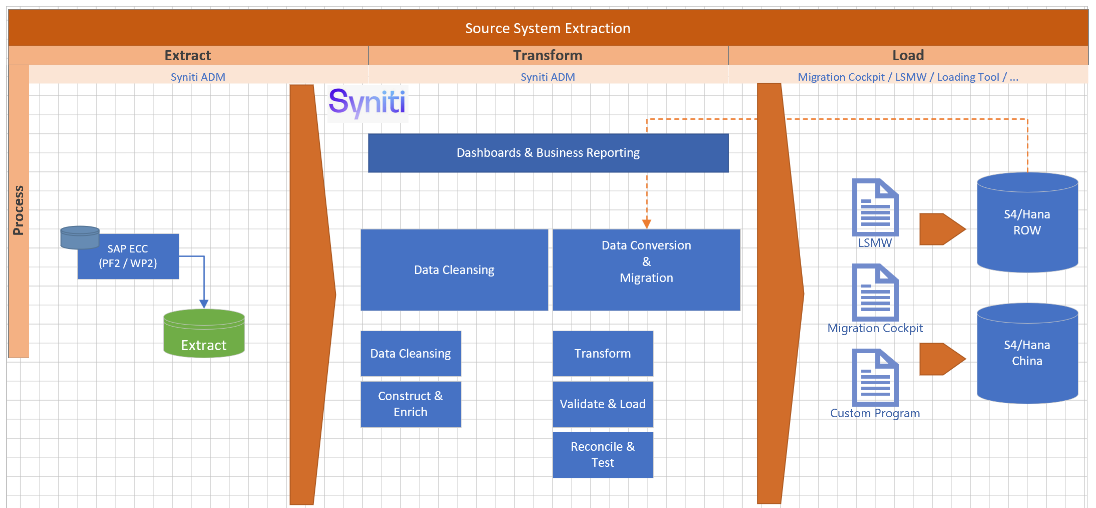
The extraction and transformation will be done by Syniti, while the loading will be executed by a Standard tool of SAP Migration Cockpit.
- E - Extraction: Data will be Extracted from at least two source systems. This process will be executed by Syniti
- T - Transform: Data will be Cleansed, Transformed, Merged, and staging areas of Migration Cockpit will be updated by Syniti
- L - Loading: Data will be Loaded using the Migration Cockpit
Target Design
The technical design of the target system for this conversion approach is detailed below. All fields subject to mapping tables are highlighted in orange for clarity.
| Table | Field | Data Element | Field Description | Data Type | Length | Requirement |
|---|---|---|---|---|---|---|
| S_EORD | ZEORD | Number of Source List Record (Legacy) | CHAR | 20 | The field is auto generated | |
| S_EORD | MATNR | Product Number | CHAR | 80 |
*a mapping table should be used to easily identify and reference the legacy INFNR values, ensuring consistent and traceable mapping to the target system during the data migration process. | |
| S_EORD | WERKS | Plant | CHAR | 80 |
| |
| S_EORD | VDATU | Source List Record Valid From | DATE | 8 | ||
| S_EORD | BDATU | Source List Record Valid To | DATE | 8 | *Do not send records that have this field in the past, those should be excluded during the Extraction. | |
| S_EORD | LIFNR | Supplier's Account Number | Text | 80 |
| |
| S_EORD | EKORG | Purchasing Organization | Text | 80 |
| |
| S_EORD | TYPE | Agreement Type | Text | 1 | ||
| S_EORD | EBELN | Outline Purchase Agreement Number | Text | 80 | ||
| S_EORD | EBELP | Agreement Item | Number | 5 | ||
| S_EORD | FLIFN | Indicator: Fixed Supplier | Text | 1 | ||
| S_EORD | NOTKZ | Indicator: Blocked | Text | 1 | ||
| S_EORD | AUTET | Source List Usage in Products Planning | Text | 80 |
Data Cleansing
Standardization activities include:
| ID | Criticality | Error Message/Report Description | Rule | Output | Source System |
|---|---|---|---|---|---|
| 1097-002 | C1 | Elimination of expired entries | Remove expired dates before upload the date | ||
| 1097-004 | C1 | Standardizing date formats and flags | Check whether the date format is correct according to the users language |
Conversion Process
The conversion process begins with the extraction of Source List records from ECC systems based on relevancy criteria. These records are pre-validated to ensure referenced materials and vendors are active and valid. The validated data is then loaded into the DCT where cleansing, standardization, and transformation activities are performed. Once complete, the business reviews the entries and confirms readiness. Following this, load files are prepared and test loads are executed for validation. If successful, a full data load is carried out into S/4HANA, followed by a post-load validation to confirm completeness and accuracy.
Data Privacy and Sensitivity
N/AExtraction
Extract data from a source into Syniti Migrate. There are 2 possibilities:
- The data exists. Syniti Migrate connects to the source and loads the data into Syniti Migrate. There are 3 methods:
- Perform full data extraction from relevant tables in the source system(s).
- Perform extraction through the application layer.
- Only if Syniti Migrate; cannot connect to the source, data is loaded to the repository from the provided source system extract/report.
- The data does not exist (or cannot be converted from its current state). The data is manually collected by the business directly in Syniti Migrate. This is to be conducted using DCT (Data Collection Template) in Syniti Migrate
The agreed Relevancy criteria is applied to the extracted records to identify the records that are applicable for the Target loads
Relevancy Rules
During data migration for Purchasing Info Records (Info Records), relevancy rules ensure that only valid, useful, and up-to-date records are included in the target SAP S/4HANA system.
- Material and Vendor must exist in the target system. Only include Info Records where both MARA-MATNR and LFA1-LIFNR are valid and being migrated to S4Hana;
- Purchasing Organization and Plant must be relevant (already present in the target system). Only include Info Records for Purchasing Orgs (EINE-EKORG) and Plants (EINE-WERKS) in scope;
- Info Record must be active and relevant to external procurement;
- Recent activity (present in any PO) or validity period (EINE-DATAB / EINE-DATBI). Include only if conditions are valid in the last 3-5 years or used in POs recently (to check EKPO, EKBE);
- Exclusion of deleted (EINA-LOEKZ) or blocked records (LFA1-SPERR). Exclude Info Records where deletion/block flags are set on vendor, material, or info record;
- Valid pricing conditions must exist (check validity period of conditions like PB00). Include only Info Records that has a Price (EINE-NETPR);
- Deduplication: Rule to be confirmed by Business
Extraction Run Sheet
| Req # | Requirement Description | Team Responsible |
|---|---|---|
001 | Extract data from source system based on relevancy rule | SyWay Data Team |
002 | Google Sheet report pre-populated with PF2 and WP2 information to be generated based on relevancy criteria. | SyWay Data Team |
003 | Only extract data that is NOT marked for deletion Where: EINA-LOEKZ = ”” | SyWay Data Team |
004 | Only extract records that are still valid Where: EINA-LIFBI >= Today’s date | SyWay Data Team |
005 | Extract Info Records for Vendors that are NOT marked for deletion and are part of an Info Record | SyWay Data Team |
006 | Extract Info Records for Vendors that are in scope | SyWay Data Team |
007 | Extract Info Records for Materials that are NOT marked for deletion and are part of the respective Info Record | SyWay Data Team |
008 | Extract Info Records for Materials that are in scope | SyWay Data Team |
009 | Extract Info Records for Plants that are in scope. Do this check when EINE-WERKS is different than initial | SyWay Data Team |
010 | Extract Info Records for Purchasing Organizations that are in scope. Do this check when EINE-EKORG is different than initial |
Selection Screen
If applicable, this section will give the details on any selection screen parameters, including the parameter type, that are required to be entered to ensure consistent data extracts.| Selection Ref Screen | Parameter Name | Selection Type | Requirement | Value to be entered/set |
|---|---|---|---|---|
Data Collection Template (DCT)
Target Ready Data Collection Template will be created for Data Object data with exception of some fields which require transformation as mentioned in the transformation rule.<Object> DCT Rules
| Field Name | Field Description | Rule |
|---|---|---|
| EORD-MATNR | Material Number | Only select the materials that are in scope |
| EORD-WERKS | Plant | Only select the plants that are in scope |
| EORD-BDATU | Valid-to Date | Only select entries that are bigger or equal today's date |
| EORD-LIFNR | Vendor Number | Only select the vendors that are in scope |
| EORD-EKORG | Purchasing Organization | Only select the Purchasing Organization that are in scope |
Extraction Dependencies
List the steps that need to occur before extraction can commence
| Item # | Step Description | Team Responsible |
|---|---|---|
001 | Vendor - The Info Record is created for a specific vendor, therefore the vendor must exist and be active | S2P |
002 | Material - The Info Record is for a specific material, therefore the material must exist and be active | S2P |
003 | Purchasing Organization - Mandatory organizational level (configuration). Must be valid for both the vendor and material | S2P |
004 | Plant (optional) - If a plant-specific Info Record is used, the plant must be valid (included on scope) and maintained | FICO |
005 | Currency & UoM - Must align with vendor master and material master data | S2P |
006 | Tax Code - Should exist in system and be consistent with vendor's country and plant region | S2P |
007 | Vendor Master Settings - The vendor must have the purchasing organization maintained in purchasing view | S2P |
Transformation
The Target fields are mapped to the applicable Legacy field that will be its source, this is a 3-way activity involving the Business, Functional team and Data team. This identifies the transformation activity required to allow Syniti Migrate to make the data Target ready:
- Perform value mapping and data transformation rules.
- Legacy values are mapped to the to-be values (this could include a default value)
- Values are transformed according to the rules defined in Syniti Migrate
- Prepare target-ready data in the structure and format that is required for loading via prescribed Load Tool. This step also produces the load data ready for business to perform Pre-load Data Validation
Transformation Run Sheet
| Item # | Step Description | Team Responsible |
|---|---|---|
| 001 | Identify target S/4HANA fields and determine applicable legacy source fields from both ECC systems WP2, PF2 | Functional Team (S2P)+ Data Team (S2P) |
| 002 | Map legacy field values to S/4HANA target values (including field-level mapping and technical names) | Data Team (S2P), Data Team (Syniti) |
| 003 | Define value mapping rules for fields requiring standardization or harmonization across the two source systems WP2 and PF2. | Functional Team (S2P)+ Data Team (S2P) |
| 004 | Identify and agree on default values where legacy data is incomplete or inconsistent | Business Team + Functional Team (S2P) |
| 005 | Configure transformation rules in Syniti Migrate (including calculated fields, formatting rules, etc.) | Data Team (Syniti), Data Team (S2P) |
| 006 | Review transformation logic and mappings with Business for confirmation | Business Team + Functional Team (S2P) |
| 007 | Perform initial transformation run and generate draft target-ready dataset | Data Team (Syniti), |
| 008 | Review draft target-ready data for structure and completeness | Data Team (S2P), Functional Team (S2P) |
| 009 | Share transformed data with Business for Pre-load Validation | Business Team |
| 010 | Incorporate feedback from Business and refine mappings or transformation logic as needed | Data Team (S2P) |
| 011 | Finalize and approve transformed data as Target Ready Load File | Business + Functional (S2P) + Data Team (S2P) |
| 012 | Handover final file to Load Team or trigger the load via Syniti Load Workbench | Data Team (Syniti), Data Load Team |
Transformation Rules
| Rule # | Source system | Source Table | Source Field | Source Description | Target System | Target Table | Target Field | Target Description | Transformation Logic |
|---|---|---|---|---|---|---|---|---|---|
001 | Legacy | EORD | MATNR | Material | S/4HANA | EORD | MATNR | Material | Select the new Material Code from the mapping table and update the corresponding target structure accordingly |
002 | Legacy | EORD | LIFNR | Vendor | S/4HANA | EORD | LIFNR | Vendor | Select the new Vendor Code from the mapping table and update the corresponding target structure accordingly |
003 | Legacy | EORD | MEINS | Order Unit | S/4HANA | EORD | MEINS | Order Unit | Select the new Order Unit Code from the mapping table and update the corresponding target structure accordingly. |
004 | Legacy | EORD | WERKS | Plant | S/4HANA | EORD | WERKS | Plant | Select the new Plant Code from the mapping table and update the corresponding target structure accordingly |
Transformation Mapping
Use the exact name and reference this section in the “Transformation rules” above| Mapping Table Name | Mapping Field Name | Mapping Table Description |
|---|---|---|
LIFNR | LIFNR | <Vendor> |
MATNR | MATNR | <Material> |
WERKS | WERKS | <Plant> |
EKORG | EKORG | <Purchasing Organization> |
EKGRP | EKGRP | <Purchasing Group> |
MATKL | MATKL | <Material Group> |
MEINS | MEINS | <Unit of Measure> |
Proposal for mapping Tables
Vendors - all fields are key on the table
Create the mapping table LIFNR with the following structure
Source-Target System ID | From - Vendor | To - Vendor |
DF2|XX1 | 001000123 | 003000010 |
WD2|XX2 | 001000567 | 003000010 |
Materials - all fields are key on the table
Create the mapping table MATNR with the following structure
Source-Target System ID | From - Material | To - Material |
DF2|XX1 | 700000123 | 750 |
WD2|XX2 | 435679 | 750 |
Plant - all fields are key on the table
Create the mapping table WERKS with the following structure
Source-Target System ID | From - Plant | To - Pant |
DF2|XX1 | 1000 | C901 |
WD2|XX2 | 1000 | D901 |
Purchasing Organization - all fields are key on the table
Create the mapping table EKORG with the following structure
Source-Target System ID | From - Purch Org | To - Purch Org |
DF2|XX1 | 3000 | D903 |
WD2|XX2 | 3000 | D901 |
Transformation Dependencies
List the steps that need to occur before transformation can commence| Item # | Step Description | Team Responsible |
|---|---|---|
| 001 | Org structure configuration is complete | Functional Team (S2P) + Data Team (S2P) |
| 002 | Value Mapping Tables are complete | Functional Team (S2P) + Data Team (S2P) |
| 003 | Dependent Master Data records for Materials / Vendors are loaded | Functional Team (S2P) + Data Team (S2P) |
Pre-Load Validation
Project Team
The following pre-load validations will be performed by the Project Team.Completeness
| Task | Action |
|---|---|
| Configuration | Ensure necessary configurations are in place in target system and field mapping |
| Review Mapping Table | Ensure all the source organization units are mapped with target values |
| Check Values | Validate the pre-load data confirming the values are aligned with target system format and |
| Validate template structure and required field population | Ensure mandatory fields are filled in |
Total number of records | SyWay S2P Data Team to verify that the total number of relevant records from the DCT is equal to the total number of records in the Preload and Load Sheets. |
Accuracy
| Task | Action |
|---|---|
| Review Mapping Table | Ensure all the source organization units are mapped with target values |
| Check mapping rules against configuration | Cross-check mapping sheet with customizing entries |
| Set up validation rules based on target table and fields | Use rule-based validation and lookups against master data (e.g., EORD) |
| Perform format validation (date, currency, decimal separators) | Standardize format to match SAP accepted input (e.g., YYYYMMDD for dates) |
| Implement logic to detect duplicate records | Example: Run duplicate checks using key combinations (e.g., MATNR + EKORG + WERKS) |
| Conduct dry runs using LTMC or BAPIs and review logs | Analyze load results and correct format or conversion errors |
Business
The following pre-load validations will be performed by the business.Completeness
| Task | Action |
|---|---|
| Check whether the total number of records meet the final result after Data Cleansing | Check the total number of records and compare the source system against SAP S4Hana |
| Review populated templates for missing or incorrect values | Use checklists to verify completeness and correctness before submission |
| Ensure all required fields were properly covered | Confirm that vendor/ material/ plant were properly transformed and are not miss |
Accuracy
| Task | Action |
|---|---|
Conversion Accuracy | Verify that all fields below meet pass the checks: |
Review Error Reports | Review and correct the errors. Achieve a zero-error record count as much as possible. Raise defects for data remediated and requiring a correction in the source data. |
Load
The load process includes:
- Execute the automated data load into target system using load tool or product the load file if the load must be done manually
- Once the data is loaded to the target system, it will be extracted and prepared for Post Load Data Validation
Load Run Sheet
| Item # | Step Description | Team Responsible |
|---|---|---|
| 001 | Confirm readiness of final approved data sets for each ECC source system WP2 and PF2 | Business / Functional Team |
| 002 | Validate transformation rules and mappings in Syniti tool | Data Team (S2P-Data) |
| 003 | Generate target-ready load files based on S/4HANA table format | Data Team (Syniti) |
| 004 | Review and approve load files before execution | Business / Functional Team |
| 005 | Execute automated data load using Syniti into the S/4HANA system (or generate manual load files if required) | Data Team (Syniti) |
| 006 | Monitor load progress and capture load statistics (records loaded, errors, duplicates, etc.) | Data Team (Syniti) / Technical Team |
| 007 | Extract loaded data from S/4HANA for post-load validation | Data Team (Syniti) |
| 008 | Perform post-load data validation (compare target data with source/approved files) | Data Team (S2P-Data) |
| 009 | Log and resolve any data load errors or mismatches identified during validation | Data Team (S2P-Data) + Functional Team |
| 010 | Obtain business sign-off on successful load and validation | Business Team |
| 011 | Generate post load report is all steps are validated | Data Team (S2P-Data) / Data Team (Syniti |
| 012 | Archive load logs, error reports, and validation results for audit/compliance | Data Team (S2P-Data) / Data Team (Syniti) / PMO |
Load Phase and Dependencies
Identify the phase as to “when” the load for this object will occur. <Pre-Cutover, Cutover, Post Cutover> and list the steps that need to occur before the load can commence
Configuration
List the Configurations required before loading can commence
| Item # | Configuration Item |
|---|---|
| Configurations | Ensure configurations related to Info Records and Purchasing Conditions are active |
| Organization Data | Ensure configurations for all the organization units in the current scope are imported into the target system |
Conversion Objects
| Object # | Preceding Object Conversion Approach |
|---|---|
| list the exact title of the conversion object of only the immediate predecessor – this will then confirm the DDD (Data Dependency Diagram) | |
Error Handling
The table below depicts some possible system errors for this data object during data load. All data load error is to be logged as defect and managed within the Defect Management
| Error Type | Error Description | Action Taken |
|---|---|---|
Post-Load Validation
Project Team
The following post-load validations will be performed by the Project Team.Completeness
| Task | Action |
|---|---|
| Modify a Source List record | Execute the modification of an existing record, and check if can be successfully saved |
Compare uploaded data against source file values | Use Custom reconciliation tools or Excel based comparison tools to validate the following ensure number of records loaded meets the load file record volume |
For Purchasing price, perform technical reconciliation with database tables (e.g., KONH, KONP) | Query SAP tables and match field-level values using SE16N or custom report |
Check for load errors or partial loads in AIF or LTMC | Review IDocs, BDC, or Legacy Transfer Migration Cockpit LTMC logs for any failures |
Accuracy
| Task | Action |
|---|---|
| title | specific details of what and how the task needs to be performed e.g. which reports are being used etc. |
Business
The following post-load validations will be performed by the business.Completeness
| Task | Action |
|---|---|
| title | specific details of what and how the task needs to be performed e.g. which reports are being used etc. |
Accuracy
| Task | Action |
|---|---|
| title | specific details of what and how the task needs to be performed e.g. which reports are being used etc. |
Key Assumptions
- Master Data Standard is up to date as on the date of documenting this conversion approach and data load.
- Data Object is in scope based on data design and any exception requested by business.
Any additional key assumptions.
See also
Insert links and references to other documents which are relevant when trying to understand this decision and its implications. Other decisions are often impacted, so it's good to list them here with links. Attachments are also possible but dangerous as they are static documents and not updated by their authors.