| Status | |
|---|---|
| Owner | Maytingsari Tjahjo |
| Stakeholders | The business stakeholders involved in making, reviewing, and endorsing this decision. Type @ to mention people by name |
The purpose of this document is to define the conversion approach to migrate the balance of Capex WBS from legacy system to S/4HANA.
All the financial transactions posted of all open WBS Elements as at 30 June 2028 (for Go live 1 July 2028) and as at 31 Dec 2028 (for Go live 1 Jan 2029) in the source systems (PF2 and WP2). All these transactions will be totaled into the one single value and then be posted to the relevant WBS Elements in S/4HANA. The approach will also run SAP settlement to the relevant Asset Under Construction.
Conversion Scope
The scope of this document covers the approach for converting active Capex WBS element from Legacy Source Systems into S/4HANA.
All the relevant WBS Elements (after applying the approved relevancy rules) open as at end of last month before go live that have received primary and secondary transactions posted to the cost elements within the WBS Elements
- Primary transactions refer to original postings from all sources whether it is debit or credit.
- Secondary transactions refer to allocations from sources such as allocations from payroll, work orders, other WBS Elements or cost centers. These postings will be subject to any settlement rules set up in the individual WBS Element.
The scope of this document will therefore extract the settlement transactions from each individual WBS Element to provide a base for posting to the S/4HANA WBS Elements as at end of last month before go live. The total of the transactions will be used to compare to the balance in the Asset Under Construction that is used for settlement. The total of the settlement transactions will also be reconciled against the total costs posted to the WBS Element to ensure that all costs have been captured. Therefore, the scope will extend to the reconciliation of the legacy Asset Under Construction values
Below are the list of AUC classes for SyWay:
- Z1100 Intangible-AUC
- Z1101 Intangible-R&I under construction
- Z1300 Tangible-AUC
The data from legacy system includes:
- Relevancy Criteria 1
- Relevancy Criteria 2
- Relevancy Criteria n
The data from legacy system excludes:
- Exclusion Criteria 1
- Exclusion Criteria 2
- Exclusion Criteria n
| Source | Scope | Source Approx No. of Records | Target System | Target Approx No. of Records |
|---|---|---|---|---|
| Legacy systems | Project level exclusions based on following relevancy rules:
| S/4HANA | ||
| Legacy systems |
Exceptions:
| |||
| DCT | Where legal entities do not use SAP to record their projects, the DCT will be used to collect the WBS element data. This will be used in conjunction with the PPM Item DCT to collect Projects that are not in legacy systems. There will be a creation of one WBS element to one Project Definition. | TBC | S/4HANA | TBC |
PF2 and WP2 | Extraction of the Sender Credit values from settlement that uses primary cost elements for settlement (Table COSP) | ??? | S/4HANA | |
PF2 and WP2 | Extraction of the Sender Credit values from settlement that uses secondary cost elements for settlement (Table COSS) | ??? | S/4HANA |
Additional Information
Multi-language Requirement
N/A
Document Management
N/A
Legal Requirement
N/A
Special Requirements
Specify any special requirements or considerations that may impact the data conversion process based on specific locations, regulatory compliance or system limitations. Clearly outline any regional or localization requirements such as country-specific data formats, legal reporting obligations or industry standards that must be adhered to (e.g., localization rules for countries like China).
If the data conversion involves third-party systems or external data sources, such as Icertis, describe any additional requirements related to data mapping, transformation logic, validation rules or security measures that must be followed.
Target Design
There are two types of costs in the WBS Elements:
- Costs that are sourced from primary and secondary cost elements.
- The secondary cost elements cannot be used to post costs to S/4HANA. In many cases, the secondary cost element will form part of the total for the WBS Element. These costs (Table COSS) must be considered but the use of a primary cost element will be used to post these costs to the WBS Element in S/4 HANA. The Primary Cost Total (COSP) table in source system (PF2 and WP2) also shows the values that have been settled to the receiver, be it an Asset Under Construction or a Cost Centre or a General Ledger Account.
There is no need to replicate the postings that have occurred in the source system. The value that has been settled to the receiver object can be used to post with a selected General Ledger account. The settlement can then also use this account to clear the balance at the level. The offset General Ledger account will still be used to balance the journal entries.
The technical design of the target for this conversion approach.
| Table | Field | Data Element | Field Description | Data Type | Length | Requirement |
|---|---|---|---|---|---|---|
| MARA | MATNR | MATNR | Material Number | CHAR | 18 | Mandatory |
Data Cleansing
All data cleansing should take place in the data source system as defined in this document, unless system limitations prevent it.
There will be cleansing required outside of that handled in the following DCA’s
- Conversion Approach Projects and WBS Elements - CAPEX (Master data)
- Conversion Approach Projects and WBS Elements - OPEX (Master data)
- Conversion Approach - PPM Items
| ID | Criticality | Error Message/Report Description | Rule | Output | Source System |
|---|---|---|---|---|---|
Conversion Process
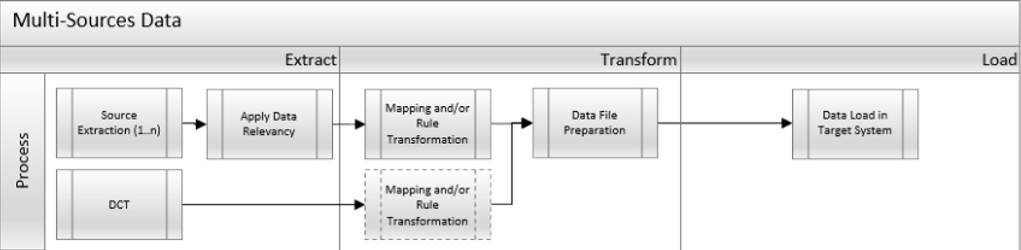
The high-level process is represented by the diagram below:
Summarize High-Level Process. Include diagrams, where applicable. Include information supporting details of Extract, Transform and Load specific to the Data Object
Data Privacy and Sensitivity
Summarize Data Privacy and Sensitivity Requirements, if anyExtraction
Extract data from a source into Syniti Migrate. There are 2 possibilities:
- The data exists. Syniti Migrate connects to the source and loads the data into Syniti Migrate. There are 3 methods:
- Perform full data extraction from relevant tables in the source system(s).
- Perform extraction through the application layer.
- Only if Syniti Migrate; cannot connect to the source, data is loaded to the repository from the provided source system extract/report.
- The data does not exist (or cannot be converted from its current state). The data is manually collected by the business directly in Syniti Migrate. This is to be conducted using DCT (Data Collection Template) in Syniti Migrate
The agreed Relevancy criteria is applied to the extracted records to identify the records that are applicable for the Target loads
Extraction Run Sheet
| Req # | Requirement Description | Team Responsible | ||||||||||||||||||||||||||||||||||||||||||||
|---|---|---|---|---|---|---|---|---|---|---|---|---|---|---|---|---|---|---|---|---|---|---|---|---|---|---|---|---|---|---|---|---|---|---|---|---|---|---|---|---|---|---|---|---|---|---|
| 1. | Extract data from source systems based on the current relevancy rules that apply to the Project and WBS Element Master Data. For each relevant WBS Element extract the object number from source systems with WBS Elements from table PRPS. | Data Team | ||||||||||||||||||||||||||||||||||||||||||||
| 2. | The following tables will be used to extract the settlement data:
To ensure that all costs have been collected via these tables (COSP & COSS), run a report (transaction code CJI3) to extract all the costs posted to the WBS Element/s to reconcile against the totals extracted from table COSP & COSS. Compare and agree the reconciliation values before progressing further to the next steps. For each open Project, confirm that the final balance is zero which will ensure that the settlement costs represent all the postings (debit and credit) within the Project by WBS Element. Extract the transactions by business transaction type. Use table AUFK to reconcile the settlement costs against actual posting extracts (extract by year by period by settlement transaction for each Project. | Data Team | ||||||||||||||||||||||||||||||||||||||||||||
| 3. | Go to source systems (PF2 and WP2) Primary Costs Total (Table COSP)
Go to source system (PF2 and WP2) Secondary Costs Total (Table COSS)
From the above, system will generate report as below. The report will need to be summarized by object number by total for all the fiscal years.
| Data Team | ||||||||||||||||||||||||||||||||||||||||||||
| 4. | Step #3 provides what needs to be posted for each WBS Element. These can be split across cost elements, but the proposal is to use one Cost Element for both posting and settlement (GL account TBD) | Data Team | ||||||||||||||||||||||||||||||||||||||||||||
| 5. | Extract the Settlement Rule object from table COBRB in source systems (PF2 and WP2) to find the settlement objects for the above project.
System will provide a report as below that will include the following fields:
Extract the asset numbers from this report. | Data Team | ||||||||||||||||||||||||||||||||||||||||||||
| 6. | Extract the fixed asset values from table ANEP in source systems (PF2 and WP2) to check what has been posted to the Asset under Construction (AUC).
System will generate as below:
This report will need to be summarized by Object Number by total for all months. Check against the WBS Element postings before loading into S/4HANA.
| Data Team | ||||||||||||||||||||||||||||||||||||||||||||
| 7. | Run transaction code S_ALR_87011963 (Asset Balances report) for all AUC assets within the relevant Company Code. Check each individual asset balance before making any posting to a WBS Element. | Data Team | ||||||||||||||||||||||||||||||||||||||||||||
| 8. | Once the overall balance has been agreed above, posting will be required and run settlement (CJ8G) | Data Team |
Selection Screen
If applicable, this section will give the details on any selection screen parameters, including the parameter type, that are required to be entered to ensure consistent data extracts.| Selection Ref Screen | Parameter Name | Selection Type | Requirement | Value to be entered/set |
|---|---|---|---|---|
| N/A |
Data Collection Template (DCT)
A DCT will be required to collect the transactions posted to the WBS Elements/Project that are not in PF2 and WP2 but have been selected in the DCT for master data for Projects and WBS Elements – CAPEX and Projects and WBS Elements- OPEX.
Target Ready Data Collection Template will be created for Data Object data with exception of some fields which require transformation as mentioned in the transformation rule.
<Object> DCT Rules
| Field Name | Field Description | Rules |
ACDOCA-POSID | WBS Element | To be prepopulated based on WBS element load with new WBS number. |
ACDOCA-WSL | Amount | For previous year actuals, total all transaction values and post as a single transaction with the posting date of the 31 Dec of the previous year. For current year actuals, total all transaction values by month and post as a single transaction with the posting date of the last month end of each month |
ACDOCA-BUDAT | Posting Date | For previous year actuals, total all transaction values and post as a single transaction with the posting date of the 31 Dec of the previous year. For current year actuals, total all transaction values by month and post as a single transaction with the posting date of the last month end of each month |
ACDOCA-POPER | Posting Period | Enter Posting Period. This should default in the DCT based on Posting Date |
ACDOCA-GJAHR | Fiscal Year | Enter fiscal year. This should default based on Posting Date |
ACDOCA-BLART | Document Type | Use Document Type “SA” (TBC) or "UE"? |
ACDOCA-BLDAT | Document Date | Same as Posting Date |
ACDOCA-BKTXT | Header Text | TBC |
ACDOCA-RBUKRS | Company Code | Enter Company Code |
ACDOCA-RACCT | GL Account | Default to GL XXXXX (TBC) |
ACDOCA-RWCUR | Currency | Enter Local Currency. Group currency will be calculated. |
ACDOCA-SGTXT | Item Text | Migration transaction TBC |
Extraction Dependencies
List the steps that need to occur before extraction can commence
| Item # | Step Description | Team Responsible |
|---|---|---|
| 1. | All WBS element cleansing has been completed in PF2 and WP2 | Business |
Transformation
The Target fields are mapped to the applicable Legacy field that will be its source, this is a 3-way activity involving the Business, Functional team and Data team. This identifies the transformation activity required to allow Syniti Migrate to make the data Target ready:
- Perform value mapping and data transformation rules.
- Legacy values are mapped to the to-be values (this could include a default value)
- Values are transformed according to the rules defined in Syniti Migrate
- Prepare target-ready data in the structure and format that is required for loading via prescribed Load Tool. This step also produces the load data ready for business to perform Pre-load Data Validation
Transformation Run Sheet
| Item # | Step Description | Team Responsible |
|---|---|---|
| 1. | In ADMM, select Object 9031 and launch this to execute transformation | Syniti Team |
| 2. | Perform transformation for all relevant WBS Elements. Legacy WBS Element is mapped to S/4HANA WBS elements in mapping table. | Syniti Team |
| 3. | Generate Pre-Load reports in ADMM for the extracted WBS Element amounts. | Syniti Team |
| 4. | Validate the transformed file as part of pre-load validation, raise data defects or provide the pre-load sign-off. | Business |
| 5. | Analyze and resolve any pre-load defects logged by business. | Data Team |
Transformation Rules
| Rule # | Source system | Source Table | Source Field | Source Description | Target System | Target Table | Target Field | Target Description | Transformation Logic |
|---|---|---|---|---|---|---|---|---|---|
| 1. | PF2 and WP2 | COSP | OBJNR | Object Number | S/4HANA | ACDOCA | POSID | WBS Element Number | COSP Object Number will identify the WBS Element from PF2 and WP2 (PRPS table) which will map to the S/4HANA WBS Element identified in WBS mapping table. |
| 2. | PF2 and WP2 | COSS | OBJNR | Object Number | S/4HANA | ACDOCA | POSID | WBS Element Number | COSS Object Number will identify the WBS Element from PF2 and WP2 (PRPS table) which will map to the S/4HANA WBS Element identified in WBS mapping table. |
| 3. | PF2 and WP2 | COSP | BUKRS | Company Code | S/4HANA | ACDOCA | RBUKRS | Company Code | Mapping table from legacy company code to S/4HANA Company Code. |
| 4. | PF2 and WP2 | COSS | BUKRS | Company Code | S/4HANA | ACDOCA | RBUKRS | Company Code | Mapping table from legacy company code to S/4HANA Company Code. |
| 5. | PF2 and WP2 | PRPS | PRCTR | Profit Center | S/4HANA | ACDOCA | PRCTR | Profit Center | Map Legacy Profit Centre to the S/4 HANA Profit Centers. |
| 6. | PF2 and WP2 | COSP | GJAHR | Fiscal Year | S/4HANA | ACDOCA | GJAHR | Fiscal Year | |
| 7. | PF2 and WP2 | COSS | GJAHR | Fiscal Year | S/4HANA | ACDOCA | GJAHR | Fiscal Year | |
| 8. | N/A | N/A | N/A | N/A | S/4HANA | ACDOCA | RACCT | Account Number | Use GL Account to post to the new WBS Element. TBC |
| 9. | PF2 and WP2 | COSP | WOGxx | Value Obj Curr | S/4HANA | ACDOCA | POPER | Posting Period | |
| 10. | PF2 and WP2 | COSS | WOGxx | Value Obj Curr | S/4HANA | ACDOCA | POPER | Posting Period | |
| 11. | N/A | S/4HANA | ACDOCA | BUDAT | Posting Date | ||||
| 12. | N/A | S/4HANA | ACDOCA | BLDAT | Document Date | ||||
| 13. | PF2 and WP2 | COSP | WOGxx | Value Obj Curr | S/4HANA | ACDOCA | WSL | Amount in Transaction Currency | xx represents all periods for previous years. Value type (COSP-WRTTP) must be “4” and Dr/Cr Indicator (COSP-BEKNZ) set to “O - Special: Sender credit from settlement”. Once the data is collected the signage must be changed prior to posting. As most of the settlement amounts will be a negative amount, this value must be changed to a positive amount before posting back to the S/4HANA WBS Element. If the settlement amount is a positive value, it must be changed to a negative value. Logic will be required to determine the posting period from the field name WOGxx, with xx being the posting month. E.g. 01,02,03 |
| 14. | PF2 and WP2 | COSS | WOGxx | Value Obj Curr | S/4HANA | ACDOCA | WSL | Amount in Transaction Currency | xx represents all periods for previous years. Value type (COSP-WRTTP) must be “4” and Dr/Cr Indicator (COSP-BEKNZ) set to “O - Special: Sender credit from settlement”. Once the data is collected the signage must be changed prior to posting. As most of the settlement amounts will be a negative amount, this value must be changed to a positive amount before posting back to the S/4HANA WBS Element. If the settlement amount is a positive value, it must be changed to a negative value. Logic will be required to determine the posting period from the field name WOGxx, with xx being the posting month. E.g. 01,02,03 |
| 15. | N/A | S/4HANA | ACDOCA | BLART | Document Type | Default to UE? TBC | |||
| 16. | N/A | S/4HANA | ACDOCA | USNAM | User Name | Default to data migration user ID | |||
| 17. | N/A | S/4HANA | ACDOCA | SGTXT | Item Text | Specify source WBS Element | |||
| 18. | PF2 and WP2 | S/4HANA | ACDOCA | BKTXT | Header Text | Default to “Data Object 9031” | |||
| 19. | PF2 and WP2 | S/4HANA | ACDOCA | RACCT | Offsetting GL Account | Use the Offset GL Account used for GL Balance migration - (TBC). This will be used for migration for transactions that will eventually settle to AUC |
Transformation Mapping
Use the exact name and reference this section in the “Transformation rules” above| Mapping Table Name | Mapping Table Description |
|---|---|
WBS Element/Project Definition | Legacy WBS Element will be mapped to the new S/4HANA number which has been created from the PPM Item number. |
Project Types | Legacy Project Types to be mapped to new S/4HANA Project Types. |
Company Code | Legacy Company Codes mapped to new S/4HANA Company Codes. |
Plant | Legacy Plant mapped to new S/4HANA Plants. |
Investment Reason | ??? |
Cost Centre | Legacy Cost Centers mapped to new S/4HANA Cost Centers. |
Profit Centre | Legacy Profit Centers mapped to new S/4HANA Profit Centers. |
Transformation Dependencies
List the steps that need to occur before transformation can commence| Item # | Step Description | Team Responsible |
|---|---|---|
| 1. | All records must be transformed after relevancy rules have been applied. | Data |
| 2. | All cleansing reports must have been verified and endorsed. Only clean records will therefore be subject to transformation. | Business |
| 3. | All mapping table values must be verified by the business. | Business |
| 4. | All the fields within the WBS Elements must have the new values configured in S/4HANA | Data/Functional Team |
Pre-Load Validation
Project Team
The following pre-load validations will be performed by the Project Team.Completeness
| Task | Action |
|---|---|
Verify Counts | Data team to verify the load count is the same as per identified data from WBS Element file. |
Number of WBS Elements per Project Definition | Verify that there is the same number of WBS Elements per Project Definition. |
WBS Element Levels | Check that each WBS Element is at the correct level. |
Verify against table COSP | Run all relevant transactions in table COSP and match the WBS Elements against the Pre-Load report to verify all relevant WBS Elements have been selected. |
Accuracy
| Task | Action |
|---|---|
| Validate | Check that each WBS element has the correct S/4HANA Project Definition code. |
Business
The following pre-load validations will be performed by the Business.Completeness
| Task | Action |
|---|---|
| Verify counts | Business to verify the load count is the same as per identified data from WBS Elements relevancy. The report will be the same one used by the Data Team ready for upload. |
Accuracy
| Task | Action |
|---|---|
| Validate | Business to verify that all the data in the load table/file is accurate as per the endorsed transformation rules and mapping. It needs to be 100% accurate. |
Load
To load Project Definition:
See the DCT for PPM Item Load Section. All these relevant Project Definitions will be loaded into the PPM modules as PPM Items. Within SAP there is a special upload file and upload program that will load these Project Definitions into PPM Items.
Once these Project Definitions are loaded into PPM Items there will be a trigger to use the Project Definition Template to post these PPM Items as Project Definitions together with the first two levels of WBS Elements in S/4HANA SAP Project Systems.
Then we will use the BAPI below to map the legacy WBS Elements to the correct level two WBS Element. The assumption here is that by cutover all WBS Elements will be created in the following manner thus making it easier to map to the correct WBS Element.
The load process includes:
- Execute the automated data load into target system using load tool or product the load file if the load must be done manually
- Once the data is loaded to the target system, it will be extracted and prepared for Post Load Data Validation
Load Run Sheet
| Item # | Step Description | Team Responsible |
|---|---|---|
| 1. | ||
| 2. | ||
| 3. | Data | |
| 4. | Data | |
| 5. | Data | |
| 6. | Data | |
| 7. | ||
| 8. | ||
| 9. | ||
| 10. | ||
| 11. | ||
| 12. | ||
Load Phase and Dependencies
Identify the phase as to “when” the load for this object will occur. <Pre-Cutover, Cutover, Post Cutover> and list the steps that need to occur before the load can commence
Configuration
List the Configurations required before loading can commence
| Item # | Configuration Item |
|---|---|
Conversion Objects
| Object # | Preceding Object Conversion Approach |
|---|---|
| list the exact title of the conversion object of only the immediate predecessor – this will then confirm the DDD (Data Dependency Diagram) | |
Error Handling
The table below depicts some possible system errors for this data object during data load. All data load error is to be logged as defect and managed within the Defect Management
| Error Type | Error Description | Action Taken |
|---|---|---|
Post-Load Validation
Project Team
The following post-load validations will be performed by the Project Team.Completeness
| Task | Action |
|---|---|
| title | specific details of what and how the task needs to be performed e.g. which reports are being used etc. |
Accuracy
| Task | Action |
|---|---|
| title | specific details of what and how the task needs to be performed e.g. which reports are being used etc. |
Business
The following post-load validations will be performed by the business.Completeness
| Task | Action |
|---|---|
| title | specific details of what and how the task needs to be performed e.g. which reports are being used etc. |
Accuracy
| Task | Action |
|---|---|
| title | specific details of what and how the task needs to be performed e.g. which reports are being used etc. |
Key Assumptions
- Master Data Standard is up to date as on the date of documenting this conversion approach and data load.
- Data Object is in scope based on data design and any exception requested by business.
Any additional key assumptions.
See also
Insert links and references to other documents which are relevant when trying to understand this decision and its implications. Other decisions are often impacted, so it's good to list them here with links. Attachments are also possible but dangerous as they are static documents and not updated by their authors.