| Status | |
|---|---|
| Owner | |
| Stakeholders | The business stakeholders involved in making, reviewing, and endorsing this decision. Type @ to mention people by name |
Purpose
The purpose of this document is to define the conversion approach to create Business Partners - Prospect (BUP002) in S/4 HANA.
In Salesforce, a Prospect is typically used to track potential customers who have shown interest but have not yet been qualified as quotations or sales order. They may include essential details like company information, interaction history, and engagement level.
In SAP S/4HANA, the Prospect is intended to be represented similarly but with a distinct ERP-focused approach. Prospects are classified as BP (Business Partners) under the Customer category, with attributes that allow future conversion into full-fledged customers.
Conversion Scope
The scope of this document covers the approach for converting active Prospect from Legacy Source Systems into S/4HANA following the Business Partners - Prospect (BUP002) Master Data Design Standard.
The data from legacy system includes:
- Partner Type is prospect and there is no deletion indicator.
- For prospect created for more than 2 years, there is usage for the prospect within the 2 years, e.g., visit reports, active lead/sales opportunity.
- For prospect created within 2 years, it is not in any blocked status
- The prospect is for GBU within scope.
The data from legacy system excludes:
- Exclusion Criteria 1
- Exclusion Criteria 2
- Exclusion Criteria n
| Source | Scope | Source Approx No. of Records | Target System | Target Approx No. of Records |
|---|---|---|---|---|
| iCare | Active Prospect | S4 Hana | ||
| CoreCRM | Active Prospect | S4 Hana | ||
Additional Information
Multi-language Requirement
Summarize Multi-language Requirement/s, if any
Document Management
N/A.
Legal Requirement
Summarize Legal Requirement/s, if any
Special Requirements
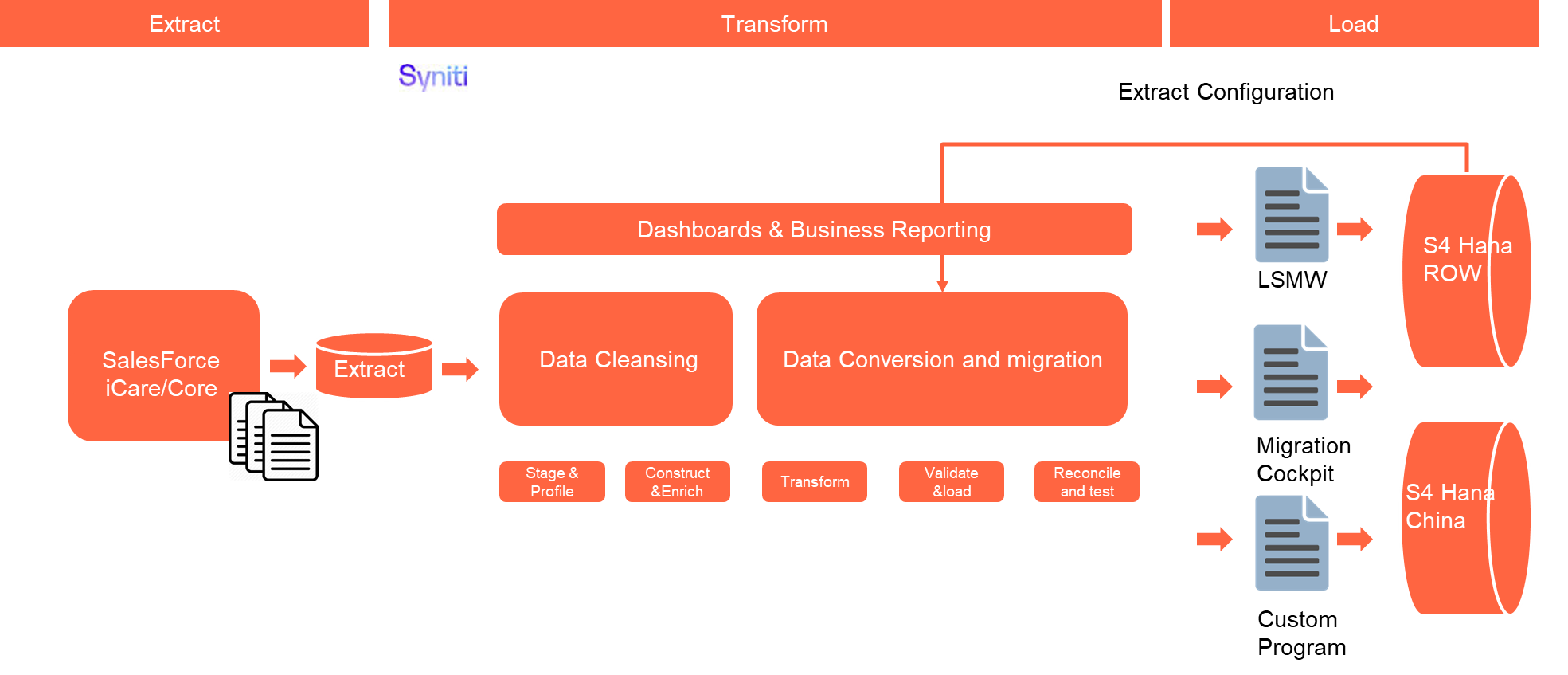
Due to compliance requirement, there will be one SAP instance for Rest of the World and one for China specifically. For entities in China, the data will be loaded into SAP China instance while the entire migration process will remain the same as rest of the world.
To identify the record is for SAP China Instance, it will use below logic.
If the data conversion involves third-party systems or external data sources, such as Icertis, describe any additional requirements related to data mapping, transformation logic, validation rules or security measures that must be followed.
Target Design
With Functional input, document the technical design of the target fields that are in the scope of this document.
The technical design of the target for this conversion approach.
| Table | Field | Data Element | Field Description | Data Type | Length | Requirement |
|---|---|---|---|---|---|---|
| MARA | MATNR | MATNR | Material Number | CHAR | 18 | Mandatory |
Data Cleansing
All data cleansing should take place in the data source system as defined in this document, unless system limitations prevent it.
If data cleansing is managed outside of the source system (e.g. Syniti Migrate, 3rd Party Vendor, DCT), the necessary documentation must be produced and appended to this deliverable for sign-off.
| ID | Criticality | Error Message/Report Description | Rule | Output | Source System |
|---|---|---|---|---|---|
Conversion Process
The high-level process is represented by the diagram below:
The ETL (Extract, Transform, Load) process is a structured approach to data migration and management, ensuring high-quality data is seamlessly transferred across systems. Here’s a breakdown of its key components:
1. Extraction
The process begins with extracting metadata and raw data from source systems, such as Syensqo CRM system (i.e., iCare/CoreCRM) periodically. The extracted data is then staged for transformation.
2. Transformation
Once extracted, the data undergoes cleansing, consolidation, and governance. This step ensures data integrity, consistency, and compliance with business rules. The transformation process includes:
- Data validation to remove inconsistencies.
- Standardization to align formats across datasets.
- Business rule application to refine data for operational use.
3. Loading
The transformed data is then loaded into the target S4 Hana system.
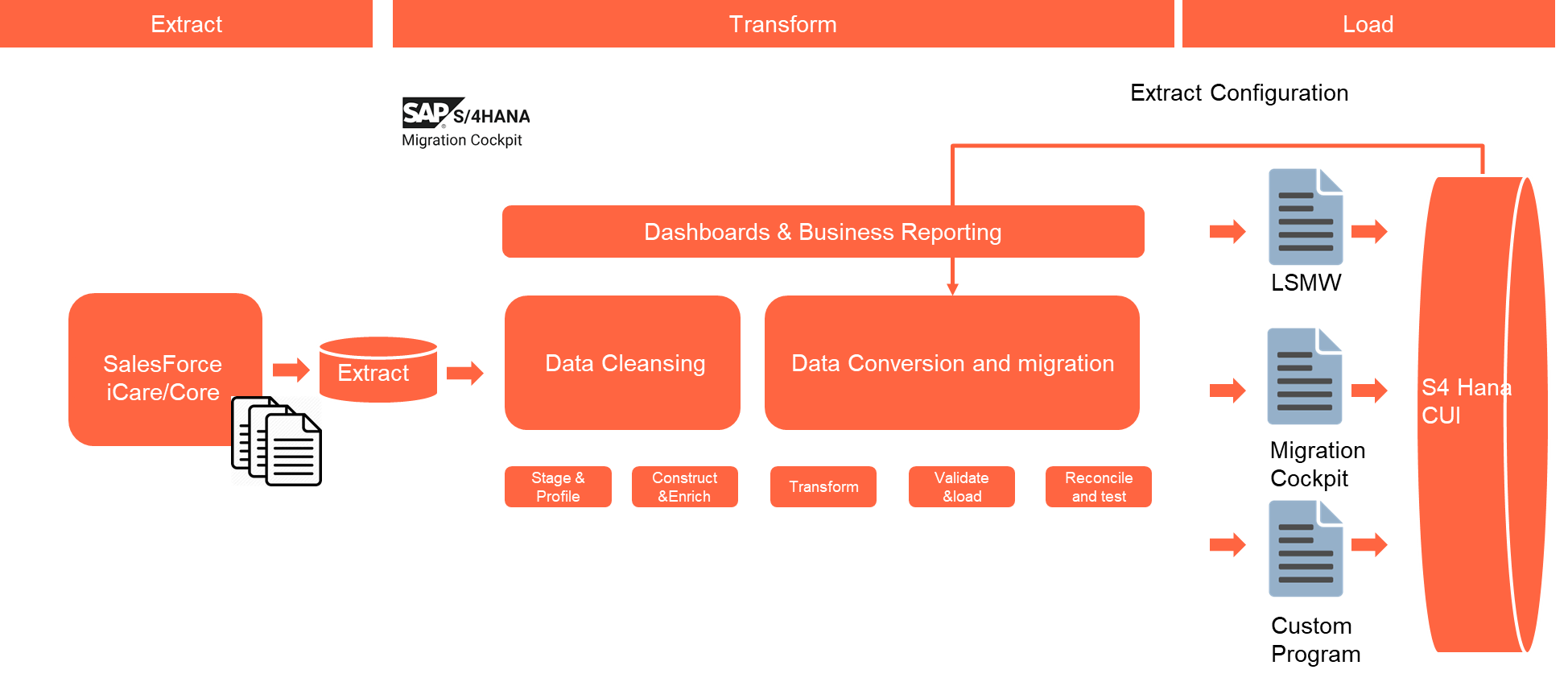
For CUI instance, the ETL process will be similar, but it will not use Syniti tool.
Data Privacy and Sensitivity
Summarize Data Privacy and Sensitivity Requirements, if anyExtraction
Extract data from a source into Syniti Migrate. There are 2 possibilities:
- The data exists. Syniti Migrate connects to the source and loads the data into Syniti Migrate. There are 3 methods:
- Perform full data extraction from relevant tables in the source system(s).
- Perform extraction through the application layer.
- Only if Syniti Migrate; cannot connect to the source, data is loaded to the repository from the provided source system extract/report.
- The data does not exist (or cannot be converted from its current state). The data is manually collected by the business directly in Syniti Migrate. This is to be conducted using DCT (Data Collection Template) in Syniti Migrate
The agreed Relevancy criteria is applied to the extracted records to identify the records that are applicable for the Target loads.
For SAP CUI related entities, it will be alternative extraction process and the data will be stored in approved tools.
Extraction Run Sheet
| Req # | Requirement Description | Team Responsible |
|---|---|---|
Selection Screen
If applicable, this section will give the details on any selection screen parameters, including the parameter type, that are required to be entered to ensure consistent data extracts.| Selection Ref Screen | Parameter Name | Selection Type | Requirement | Value to be entered/set |
|---|---|---|---|---|
Data Collection Template (DCT)
Target Ready Data Collection Template will be created for Data Object data with exception of some fields which require transformation as mentioned in the transformation rule.<Object> DCT Rules
| Field Name | Field Description | Rule |
|---|---|---|
Extraction Dependencies
List the steps that need to occur before extraction can commence
| Item # | Step Description | Team Responsible |
|---|---|---|
Transformation
The Target fields are mapped to the applicable Legacy field that will be its source, this is a 3-way activity involving the Business, Functional team and Data team. This identifies the transformation activity required to allow Syniti Migrate to make the data Target ready:
- Perform value mapping and data transformation rules.
- Legacy values are mapped to the to-be values (this could include a default value)
- Values are transformed according to the rules defined in Syniti Migrate
- Prepare target-ready data in the structure and format that is required for loading via prescribed Load Tool. This step also produces the load data ready for business to perform Pre-load Data Validation
Transformation Run Sheet
| Item # | Step Description | Team Responsible |
|---|---|---|
Transformation Rules
| Rule # | Source system | Source Table | Source Field | Source Description | Target System | Target Table | Target Field | Target Description | Transformation Logic |
|---|---|---|---|---|---|---|---|---|---|
Transformation Mapping
Use the exact name and reference this section in the “Transformation rules” above| Mapping Table Name | Mapping Table Description |
|---|---|
Transformation Dependencies
List the steps that need to occur before transformation can commence| Item # | Step Description | Team Responsible |
|---|---|---|
Pre-Load Validation
Project Team
The following pre-load validations will be performed by the Project Team.Completeness
| Task | Action |
|---|---|
| title | specific details of what and how the task needs to be performed e.g. which reports are being used etc. |
Accuracy
| Task | Action |
|---|---|
| title | specific details of what and how the task needs to be performed e.g. which reports are being used etc. |
Business
The following pre-load validations will be performed by the business.Completeness
| Task | Action |
|---|---|
| title | specific details of what and how the task needs to be performed e.g. which reports are being used etc. |
Accuracy
| Task | Action |
|---|---|
| title | specific details of what and how the task needs to be performed e.g. which reports are being used etc. |
Load
The load process includes:
- Execute the automated data load into target system using load tool or product the load file if the load must be done manually
- Once the data is loaded to the target system, it will be extracted and prepared for Post Load Data Validation
Load Run Sheet
| Item # | Step Description | Team Responsible |
|---|---|---|
Load Phase and Dependencies
Identify the phase as to “when” the load for this object will occur. <Pre-Cutover, Cutover, Post Cutover> and list the steps that need to occur before the load can commence
Configuration
List the Configurations required before loading can commence
| Item # | Configuration Item |
|---|---|
Conversion Objects
| Object # | Preceding Object Conversion Approach |
|---|---|
| list the exact title of the conversion object of only the immediate predecessor – this will then confirm the DDD (Data Dependency Diagram) | |
Error Handling
The table below depicts some possible system errors for this data object during data load. All data load error is to be logged as defect and managed within the Defect Management
| Error Type | Error Description | Action Taken |
|---|---|---|
Post-Load Validation
Project Team
The following post-load validations will be performed by the Project Team.Completeness
| Task | Action |
|---|---|
| title | specific details of what and how the task needs to be performed e.g. which reports are being used etc. |
Accuracy
| Task | Action |
|---|---|
| title | specific details of what and how the task needs to be performed e.g. which reports are being used etc. |
Business
The following post-load validations will be performed by the business.Completeness
| Task | Action |
|---|---|
| title | specific details of what and how the task needs to be performed e.g. which reports are being used etc. |
Accuracy
| Task | Action |
|---|---|
| title | specific details of what and how the task needs to be performed e.g. which reports are being used etc. |
Key Assumptions
- Master Data Standard is up to date as on the date of documenting this conversion approach and data load.
- Data Object is in scope based on data design and any exception requested by business.
Any additional key assumptions.
See also
Insert links and references to other documents which are relevant when trying to understand this decision and its implications. Other decisions are often impacted, so it's good to list them here with links. Attachments are also possible but dangerous as they are static documents and not updated by their authors.