AFT Folder : https://drive.google.com/drive/folders/1Bj1TnCYeBs3re_TkKm_2jtBrQc2dx9mS
AFT Prod app : https://exportcontrolaccessflag.solvay.com/#/home/results/resultslist
Pre-Prod app: https://prj-accessflag-pre-prod.ew.r.appspot.com/#/home/results/resultslist
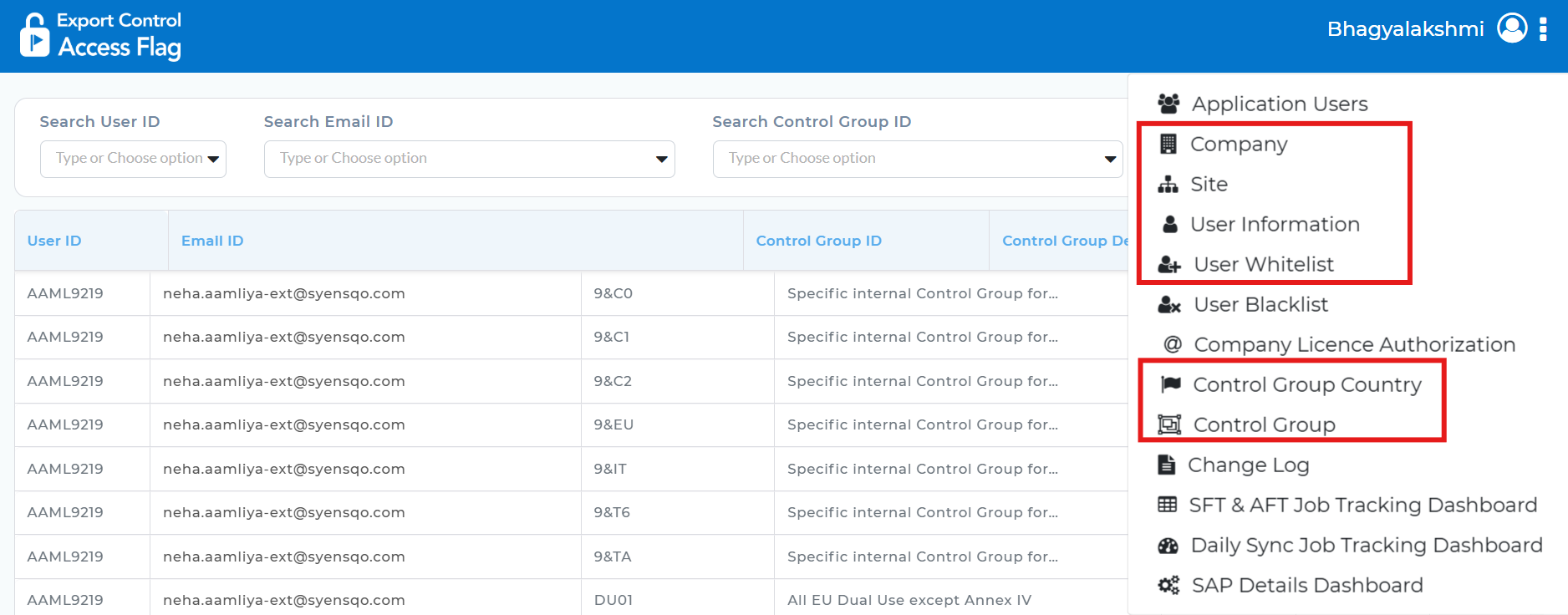
1.Go to AFT application for PROD environment and export the data from the following tabs:
i) User Information
ii) Companies
iii) Sites
iv) User Whitelist
v) Control Group Country
vi) Control Group
2. Click on export control access flag icon and search for yes value and export AFT flag yes values.
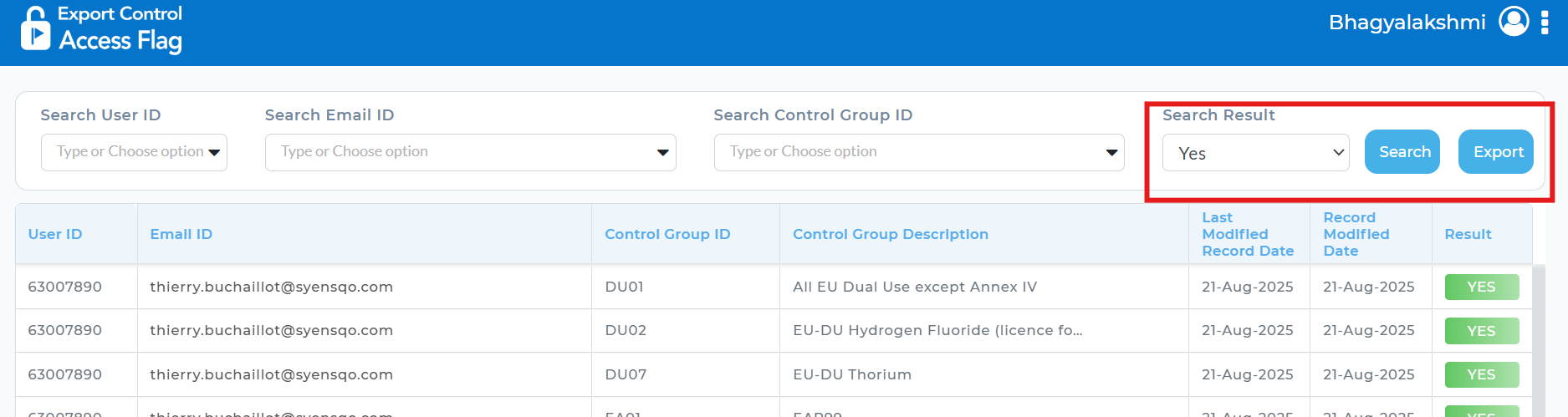
Search for NO value and export the data.
Export Flag Yes and NO values in AFT preproduction as well
3. When the data's are exported (Step 1 & Step 2), We will be getting an email with the export details
Open the mail and click on the link, We will get the exported details in Google document
Sample Email :

Open Drive and Go to AFT→ Reports and Search for latest document and open it, Make a copy of the report and provide the current date as a title
Copy paste all the exported data into the latest document by replacing the previous data.
4. Columns to be Copied from Exported data to latest document:
AFT whitelist- Copy from columns A-D
AFT users-Copy from Columns A-I
AFT flag Yes-A to C
Aft flag No-A to B
Aft pre prod Yes- A to B
AFT pre prod No – A to B
AFT sites- A to C
Aft Companies- A to C
Control Group Country - A to D
Control Group - A to D
Note:
If there is any bulk data i.e lakhs of data then split the data and copy accordingly.
Copy the columns one by one depending upon the size of data.
For Copy - Ctrl+C
Once you see the dotted lines around column, it means that data is copied.
For Pasting in the document, right click on particular column and select Paste with Values option.
After copy pasting is done, perform all the 8 checks given below.
Check #1: Coherence test
This test is automatically done by AFT dashboard on page "Daily Sync Job Tracking". This test is "number of users x numbers of control groups = number of flags YES + number of flags NO"
If the data is not correct, Go to AFT flag Yes copy all user ID paste it in Unknown users tab (Column A) and remove duplicates (go to data and perform data clean up) and apply filter in B column with user IDs except blanks and choose all the user Id’s.
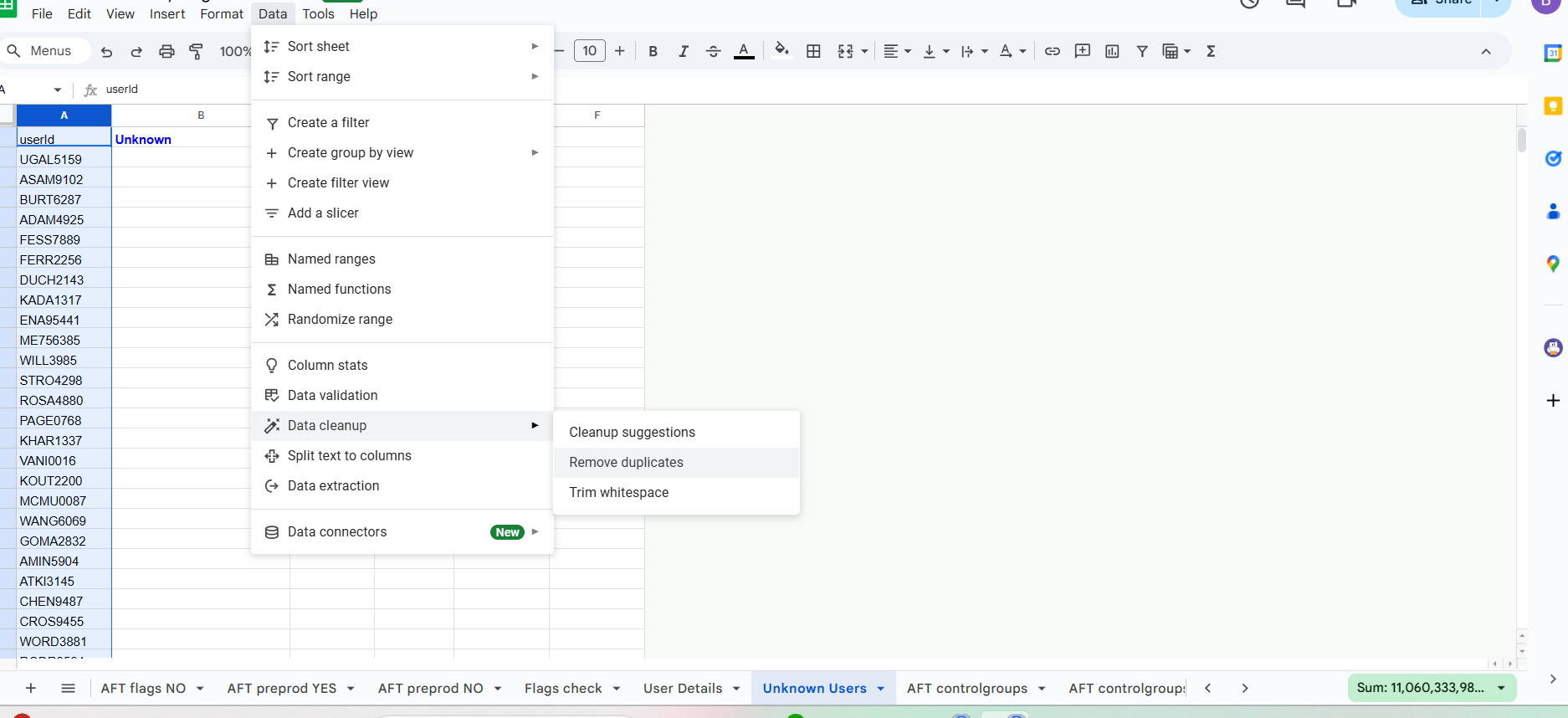
If any users found, Make a note of the users list
Check #2: Sync test
Go to last sync date tab and check the column A to check if we have any data in greater than 10 days

If values are found, then go to that particular date in AFT flag Yes and copy paste all user ID into new spreadsheet
Remove duplicates from the new spreadsheet (data ->data clean up -> remove duplicates) -> Rename new file as " Users to force flag computation" → Then download the file to Microsoft Excel (.xlsx)
Go to access flag tool -> Go to solvay user information -> Import the new file named "Users to force flag computation"
In case of forced resync, recheck flags (redo exports until CHECK #1 and CHECK #2 successfully passed)
Check #3: User profile (Check for User with missing information)
Go to AFT users tab and apply filter on Column G (unselect blanks, default values Like 9999999999 /9999999998 /9999999997 ) and Column H (Select Blanks)


Make a note of the users with missing information
Check #4: Test concerning DU01 issue - Whitelist exception
Go to AFT USERS tab → Filter Column S for oups
Copy the data into new Spreadsheet and name it as Forced DUO1 List with User ID, Control Group ID, Validity Date, Comments details
Add Control group ID as DU01 and Column C- Validity Date- Copy heading date as 2030 for all the users
Column D should be Comments(Ticket ID - Which we should be creating to track the activity)
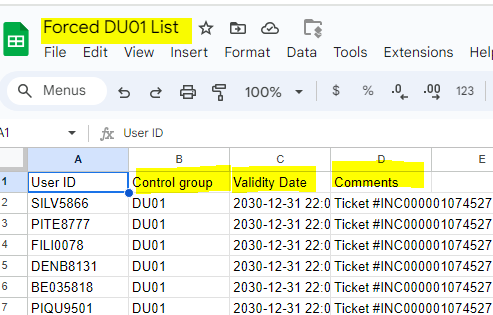
Once done, Download the file and go to AFT PROD app and go to User whitelist tab and import data by attaching the downloaded file "Forced DU01 List"

In case of upload, redo exports until CHECK #1, CHECK #2, CHECK #3 and CHECK #4 successfully passed)
Check #5: Test concerning DU01 issue - Remove from whitelist
Go to AFT whitelist tab filter column G and select YES values
If users are there, we should delete in AFT tool under User whitelist tab (These Users are not valid for the exception any more)
Check #6: Test concerning validity of whitelist entries
Step 1:
Go to AFT whitelist tab, filter Column F by “?”
Copy the user IDs into new sheet and name as Missing Users in Pre PROD and add these users in the AFT preprod server (To add the users in AFT preprod Go to AFT preprod tool and go to user information tab and click on import import and add the downloaded file Missing Users in PRE PROD.).
Create an incident request to track this activity
Step 2:
In Aft whitelist filter with Column F for Yes values

If any users are available, then Remove users from DU01 in Aft tool Prod server (To delete go to User whitelist tab in AFT prod server, search for particular user and delete the DU01 flag)

Create an incident request to track this activity
Check #7: Test concerning expiration date of whitelist entries
Go to Dashboard Whitelist, and check for next expiration date
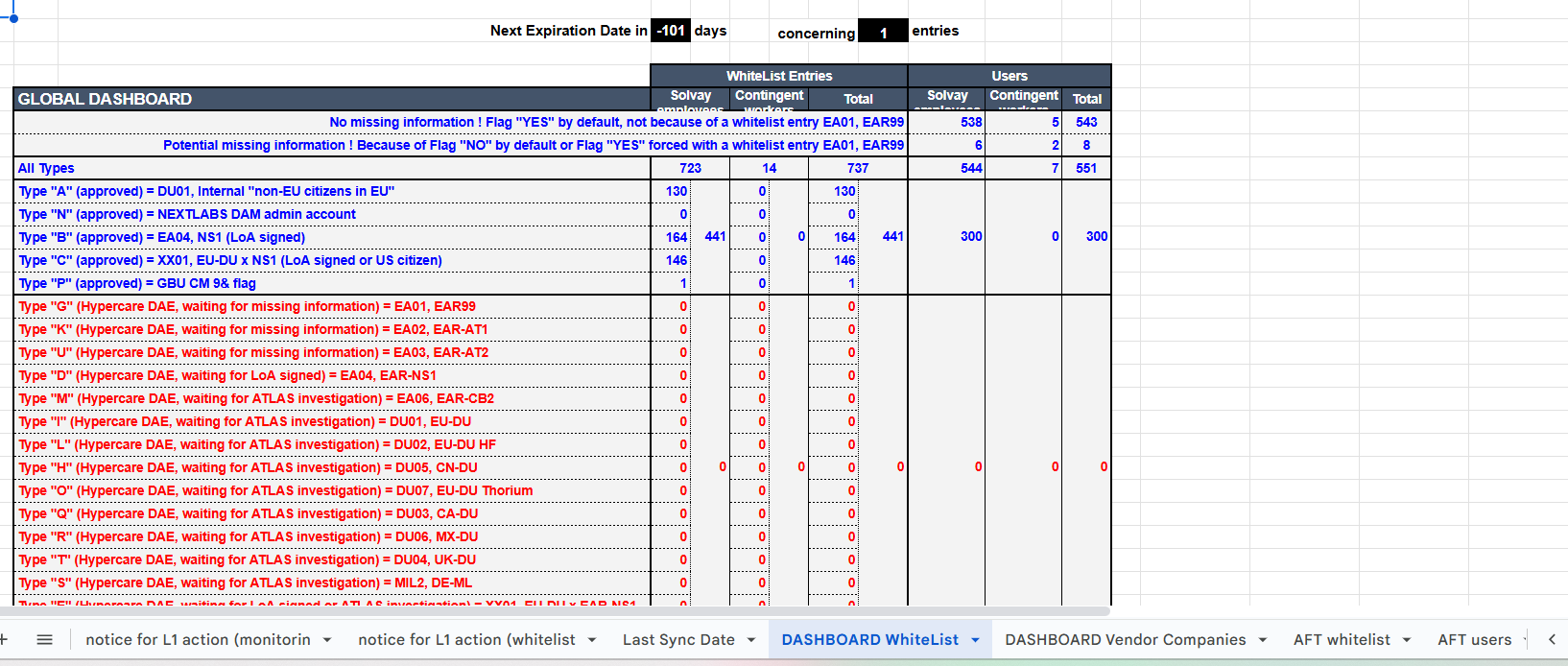
Go to AFT whitelist and filter column AO by users whose expiration date is less than 10 days.
Copy the USER ID and Control group of the filtered users into new file and name it as USER EXPIRATION and track the users details.
Check #8: Update of vendor codes having at least one contingent worker with flags YES
Go to AFT users and filter Column R to check if any new company available if yes copy the company code and paste it into Dashboard vendor Companies Tab and do Ctrl+D for the remaining values(Column B to G).
Make a note of the new companies added
Note:
After completing all the checks, Send a mail to douglas.delacruz@syensqo.com regarding results of 8 checks that has been performed.
Sample Canned Response of the mail to be sent to Marie with the results of all 8 checks:
Hi @douglas.delacruz@syensqo.com
Good Day
Please find below the AFT report and results for this week :
Provide document link:
Ex: https://docs.google.com/spreadsheets/d/1Wrk7WjfEazAwkqhMOz2itSfTlGzzT_LoQmg8JmwU_Gs/edit#gid=1653508929
Check #1 : Coherence test
We found some flags in export list. Here are the details:
User ID:
XXXXX
Check #2 : Sync test
Resync for the users with abnormal latest resync (10 days or more)
No users available or XXXXX
Check #3 : User profile
We found few AFT users with missing information : "Company Code" present but "Company Country" details are missing
Here is the link:
XXX
Check #4 : Test concerning DU01 issue - Whitelist exception
Identified the users and added users to whitelist exception with expiration date 2030, Dec 31
XX users identified - Ticket (Ticket ID)
Provide the link or USER ID of the users found:
Ex: https://docs.google.com/spreadsheets/d/1Py03Oq08BrwGhBvKe_rg98uXwIJ95us5XJkx9K-voD8/edit#gid=0
Check #5 : Test concerning DU01 issue - Remove from whitelist
No users identified
Check #6 : Test concerning validity of whitelist entries
Missing users in PRE-PROD are identified and added (INC000001074529)
Sample link: https://docs.google.com/spreadsheets/d/16uSalVVePG230498_LChCrEzpYjZHy7OhlcBzAtnC2U/edit#gid=0
DU01 Whitelist clean up :
No users found.
Check #7 : Test concerning expiration date of whitelist entries
Expiration date identified : XXX users identified
Sample link: https://docs.google.com/spreadsheets/d/1_Jqo8WiHLnm_tiseso15zBo8Rt5KB7TzQqqAkYYkkJs/edit#gid=0
Check #8 : Update of vendor codes having at least one contingent worker with flags YES
XX New external Company is identified and updated in "DASHBOARD Vendor Companies"
Thanks & Regards,
Bhagyalakshmi M M
Note:
Add a note in incidents that: Done Resync successfully and close the requests.
If bulk data is imported, then validation is required from AFT Team.
Creating Tickets:
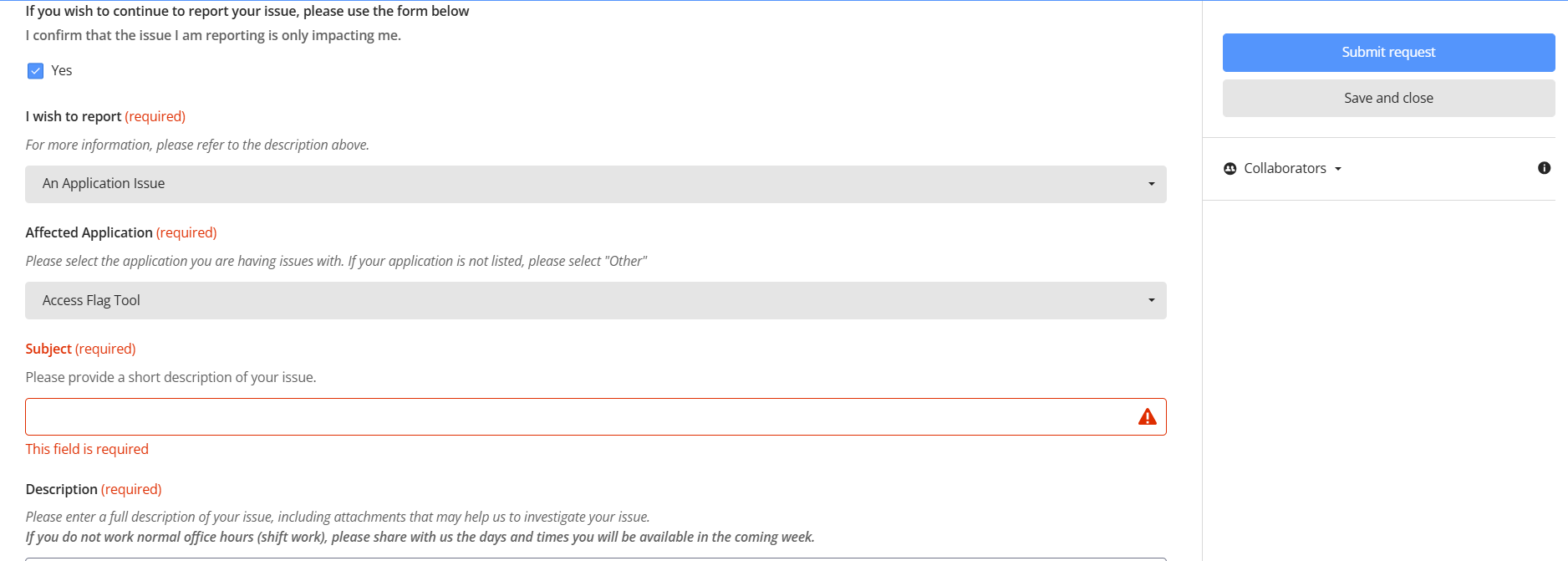
Service One Link: https://solvay-dwp.onbmc.com/dwp/app/#/catalog
Template in Service One: Report an IT issue

Choose Application issue
Application: Access Flag tool
Reference Tickets:
Proactive SM: WO0000000644833
Reactive SM for Forced DU01: INC000001074527
Reactive SM for Missing Users in PRE-PROD: INC000001074529
Reactive SM for DU01 Whitelist Cleanup: INC000001072302
Note: User Reference tickets for Subject and description while creating tickets.
AFT monitoring ticket comes under Proactive SM.
Incidents created during the checks belongs to Reactive SM.