| Status | In Progress |
|---|---|
| Owner | |
| Stakeholders |
Purpose
The purpose of this document is to define the conversion approach to create Project Definition in S/4 HANA.
Project Definition is the framework of the Work breakdown structure in SAP. Project Definition holds the default, header information such as Start and end date and scope of the Projects.
As per Syensqo design below are the list of project scenarios, each with a project profile that contains default values and control parameters for processing objects and functions in the Project System.
| ZPS0001 | Capital/ Operational Expense |
| ZPS0002 | Operational Expense |
| ZPS0003 | Statistical Expense |
| ZPS0004 | Intercompany Recharges |
| ZPS0005 | Provisional Expense |
Based on scenarios, PS Project can be automatically created from PPM item once stage-gate 1 is approved or created manually independent of PPM. Where the Project is created from PPM the project ID is copied from the PPM item.
Below Project Profiles will be allowed for creation of Project definition directly without PPM item integration and the coding mask assigned during transformation.
| ZPS0003 | Statistical Expense | F | -000000-00-00-XX-XX-XX |
| ZPS0004 | Intercompany Recharges | F | -000000-00-00-XX-XX-XX |
| ZPS0005 | Provisional Expense | F | -000000-00-00-XX-XX-XX |
Conversion Scope
The scope of this document covers the approach for converting active Project Definition from Legacy Source Systems into S/4HANA following the Master Data Design Standard- Project Definition.
Scope include:
- Extracting existing active Project Definition from SAP ECC systems WP2 and PF2.
- Applying transformation and cleansing logic via Syniti to conform with the S/4HANA data model.
- Loading the transformed Project definition into SAP S/4HANA while ensuring data integrity, correct assignment to project profile as per project scenarios.
- Linking the relevant Projects to PPM items.
The conversion will ensure all projects are aligned to the defined project coding mask and relevant Organizational Units as designed for the target S/4HANA landscape.
All project definition (new project profile ZPS0001, ZPS0002) relevant to PPM linking will be created from PPM items and is excluded from this conversion scope.
The data from legacy system includes:
All the projects below will be migrated from legacy source systems (PF2 and WP2) into S/4HANA –
- Open Projects from in scope company codes
- Closed Project from in scope company codes with postings in migration relevant financial year (currently migration relevant is 2028). The postings technically does not occur directly against the project definition but against objects within the project therefore, postings against a WBS element is used as a proxy for determination of postings against the project.
The data from legacy system excludes:
- Where the mapped project profile is ZPS0001 or ZPS0002.
Logic:
- Proj elements not in closed status
- Table PROJ
Key in field "Company Code" in scope.
Field project profile not in excluded project profile.
Result: Object numbers of WBS that are in company codes in scope.
- Table JEST:
Field "Object number" = Key in the object numbers of WBS (from Step A)
Field "Status Inactive" = blank
Then filter object number that do not have status I0046 (Closed)
These Project Profile need to be migrated dependent on project profile mapping.
- Closed Project that have WBS element with cost in current year must also be migrated.
Logic:
Table PROJ
Field "Company Code" in scope.
Field project profile in scope project profile.
Result: Object numbers of WBS that are in company codes in scope.
Table JEST:
Field "Object number" = Key in the object numbers of Project
Field "Status Inactive" = blank
Then filter object number that has status I0046 (Closed).
Result closed projects.
Table PRPS
Field PSPHI For closed projects numbers
Result WBS numbers for
Table RPSCO:
Field "Object number" = Key in the object numbers of WBS
Field "Fiscal Year" = Current year
Field "Value Type" = 4
Result = Object numbers that have cost in current year.
These WBS needs to be migrated.
In addition to the migration of existing Project definitions from ECC there are also some internal orders in ECC which will be migrated to WBS elements in S4 Hana. As the project definition is a requirement for the creation of WBS elements, project definitions which does not exist in ECC will be required, these Project definitions will be defined in a DCT.
The
| Source | Scope | Source Approx No. of Records | Target System | Target Approx No. of Records |
|---|---|---|---|---|
| WP2 | 14500 | S/4HANA | ||
| PF2 | ||||
Additional Information
Multi-language Requirement
Summarize Multi-language Requirement/s, if any
Document Management
As per CNV-1025
Legal Requirement
Summarize Legal Requirement/s, if any
Special Requirements
Target Design
The technical design of the target for this conversion approach.
| Table | Field | Data Element | Field Description | Data Type | Length | Requirement |
|---|---|---|---|---|---|---|
| PROJ | PSPID | PS_PSPID | Project definition | CHAR | 24 | Mandatory |
| PROJ | POST1 | PS_POST1 | Description | CHAR | 40 | Mandatory |
| PROJ | STSPR | PS_STSPR | WBS status profile | CHAR | 8 | System Generated |
| PROJ | VERNR | PS_VERNR | No. of Person Resp. | NUM | 8 | Mandatory |
| PROJ | ASTNR | PS_ASTNR | Applicant no. | CHAR | 25 | Mandatory |
| PROJ | VBUKR | PS_VBUKR | Company code | CHAR | 4 | Mandatory |
| PROJ | VKOKR | PS_VKOKR | Controlling area | CHAR | 4 | Mandatory |
PROJ | PRCTR | PRCTR | Profit Center | CHAR | 10 | Mandatory |
| PROJ | PWHIE | PS_PWHIE | Project Currency | CHAR | 5 | Mandatory |
| PROJ | PLFAZ | PS_PLFAZ_CHG | Start date | DATS | 8 | Mandatory |
| PROJ | PLSEZ | PS_PLSEZ_CHG | Finish date | DATS | 8 | Conditional |
| PROJ | WERKS | WERKS_D | Plant | CHAR | 4 | Conditional |
PROJ | KALID | FABKL | Factory Calendar | CHAR | 2 | System Generated |
| PROJ | PROFL | PROFIDPROJ | Project Profile | CHAR | 7 | Mandatory |
| PROJ | BPROF | BP_BPROFIL | Budget Profile | CHAR | 6 | Mandatory |
| PROJ | BESTA | PS_BESTAND | Project stock | CHAR | 1 | Mandatory |
| PROJ- | XSTAT | PS_XSTAT | Statistical | CHAR | 1 | Conditional |
| PROJ | PPROF | BP_PPROFIL | Planning Profile | CHAR | 6 | System generated |
| PROJ | PLINT | PLINT | Integrated Planning | CHAR | 1 | Mandatory |
| PROJ | FUNC_AREA | FKBER | Functional Area | CHAR | 16 | Mandatory |
| PROJ | ZLEGACYID | ? | Legacy Project ID | CHAR | Conditional | |
| /RPM/OBJ_LINK | ITEM_D | /RPM/TV_EXTID | PPM Item | CHAR | 16 | Conditional |
| /RPM/OBJ_LINK | PSPID | PS_PSPID | Project Definition | CHAR | 24 | Conditional |
Data Cleansing
Closing of projects
| ID | Criticality | Error Message/Report Description | Rule | Output | Source System |
|---|---|---|---|---|---|
1024-001 | C1 | Active project in current year | Active projects in needs to be reflected in SAP S/4 | Active projects | WP2/PF2 |
1024-002 | C2 | Closed project that have cost in current year | |||
1024-003 | C3 | Old projects with no actuals / commitment | If the old projects do not have any actual (and/or) commitments in the past year, set the project to status CLSD (CJ20N) | Old project set to closed | WP2/PF2 |
1024-004 | C4 | Project with AUC that created <= 2017 there's no movement in FY2023 - FY2024 and haven't been capitalized for long period | - Review AUC asset that there's no movement (changes) for the year 2023-2024 - Review Project with WBS that linked to the asset. If there's no further cost expected, TECO WBS - Run settlement to capitalized AUC(CJ88) | Only genuine Project WBS with AUC is outstanding and no AUC not capitalized for closed/TECO Capex Project WBS | WP2/PF2 |
Conversion Process
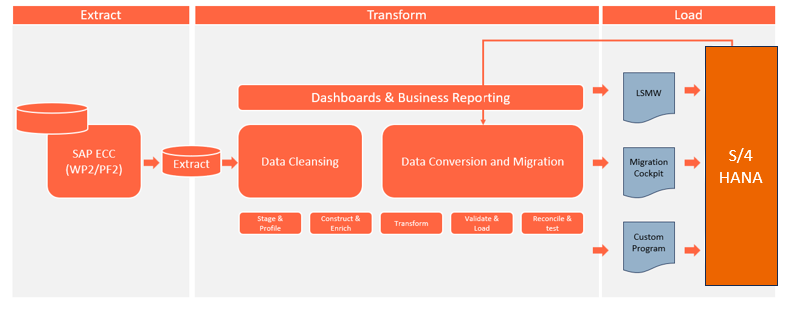
The high-level process is represented by the diagram below:
Data Privacy and Sensitivity
Summarize Data Privacy and Sensitivity Requirements, if anyExtraction
Extract data from a source into Syniti Migrate.
. There are 2 possibilities:
- The data exists. Syniti Migrate connects to the source and loads the data into Syniti Migrate. There are 3 methods:
- Perform full data extraction from relevant tables in the source system(s).
- Perform extraction through the application layer.
- Only if Syniti Migrate; cannot connect to the source, data is loaded to the repository from the provided source system extract/report.
- The data does not exist (or cannot be converted from its current state). The data is manually collected by the business directly in Syniti Migrate. This is to be conducted using DCT (Data Collection Template) in Syniti Migrate
The agreed Relevancy criteria is applied to the extracted records to identify the records that are applicable for the Target loads
Extraction Run Sheet
| Req # | Requirement Description | Team Responsible |
|---|---|---|
1024-001 | Confirm scope and extraction approach for each ECC source systems WP2, PF2 (direct DB or manual extract) | Data Team (I2M), Data Team (Syniti) |
1024-002 | Establish and validate Syniti connectivity to both ECC source systems | Technical / Basis Team, Data Team (Syniti) |
1024-003 | Perform full data extraction from relevant SAP PROJ from both source systems WP2, PF2 | Data Team (Syniti) |
1024-004 | Extract Project Definition via the application layer for additional validations for Manual Data Collection using DCTs | Data Team (I2M) |
1024-005 | Apply agreed Relevancy Criteria to filter only applicable Project records for S/4HANA | Data Team (I2M), Data Team (Syniti) |
1024-006 | In case of restricted access or connectivity issues, receive pre-extracted reports/files from source system team and upload to Syniti Migrate manually | Data Team (I2M), Data Team (Syniti) |
1024-008 | Perform data quality checks on extracted records (e.g., missing fields, invalid dates, incorrect formats) | Data Team (I2M), Data Team (Syniti) |
1024-009 | Review and approve extracted data sample sets from each source system before transformation begins | Business / Functional Team |
Selection Screen
If applicable, this section will give the details on any selection screen parameters, including the parameter type, that are required to be entered to ensure consistent data extracts.| Selection Ref Screen | Parameter Name | Selection Type | Requirement | Value to be entered/set |
|---|---|---|---|---|
Data Collection Template (DCT)
Target Ready Data Collection Template will be created for Project Definitionsdata with exception of some fields which require transformation as mentioned in the transformation rule.
Project Definition DCT Rules
| Field Name | Field Description | Rule |
|---|---|---|
| PSPID | Project definition | Unique Identifier for the Project, system generated number. In SyWay, Projects which are created without PPM item will have Prefix, "F" denotes Operational Expense Projects. Separate MDS for Project Templates. Ones created via PPM item will inherit its number from PPM item |
| POST1 | Description | Short description, Name of the Project If Created via PPM Item, this field will be copied from PPM item |
| STSPR | WBS status profile | Profile used to Control User Statuses. This will be derived from the Investment Profile configuration |
| VERNR | No. of Person Resp. | Project Owner Position number Refer configuration table field TCJ04-PS_VERNR for data validation. Inherited if created Project is created via PPM item field Person Responsible Position ID |
| ASTNR | Applicant no. | This field represent the position of the Project Financial Controller. Refer configuration table field TCJ05-ASTNR for data validation. Inherited if the project is created via PPM item field - Project Financial Controller Position ID. |
| VBUKR | Company code | Represents legal entity . Refer configuration table field T001-BURKS for data validation. Inherited if created Project is created via PPM item field Area |
| VKOKR | Controlling area | Controlling Area is a self-contained organizational unit used for internal cost accounting, Default from Project Profile |
| PRCTR | Profit Center | Profit Center represent a plant or a site or generic for GBU. Refer master data table field CEPC-PRCTR for allowed values. Inherited if Project is created via PPM item field Profit Centre |
| PWHIE | Project Currency | Currency of the Project derived from the Company code |
| PLFAZ | Start date | Planned Start date of the Project. Inherited if created Project is created via PPM item |
| PLSEZ | Finish date | Planned finish date of the Project, Entered if known. Inherited if created Project is created via PPM item |
| WERKS | Plant | Plant represent a site of Project. Not need for the groupwide expense projects Inherited if created Project is created via PPM item field Plant |
| KALID | Factory Calendar | Derived from the Plant. Refer configuration table field TFACD-IDENT for allowed values. |
| PROFL | Project Profile | The profiles contain default values and control parameters for processing objects and functions in the Project System. Below Project Profiles will be allowed for creation of Project definition directly without PPM item ZPS0003 ZPS0004 ZPS0005 Inherited from Template if created Project is created via PPM item |
| BPROF | Budget Profile | The budget profile brings together the control parameters for budgeting Such as Time horizon, Currency Translation, availability control. This will be inherited from the Project profile |
| BESTA | Project stock | This field determines the behavior of the stock for Project. The Field will be automatically determined from Project Profile. Once set it cannot be changed. No Project Stock will be used |
| XSTAT | Statistical | Indicator to specify whether a WBS element is only for statistical purposes or whether it may carry actual costs. Mandatory for Statistical Projects with Project profile ZPS0003 |
| PROFL | Planning Profile | Profile which control parameters for cost planning. This is derived from Project profile |
| PLINT | Integrated Planning | This indicator specifies whether an order/project participates in integrated planning or not. Derived from project profile. |
| FUNC_AREA | Functional Area | Functional Area will be maintained manually Refer configuration table field TFKB-FKBER for allowed values." Default from Template where applicable |
| ZLEGACYID | Legacy Project ID | Legacy system Project ID, updated for migrated Projects Otherwise must be blank Inherited if created Project is created via PPM item |
Extraction Dependencies
List the steps that need to occur before extraction can commence
| Item # | Step Description | Team Responsible |
|---|---|---|
1 | Ensure DCT is collected for Project Definition | Data Team |
2 | Perform preliminary completeness check | Data Team |
3 | Raise issues as defects if Req # 1 to 2 are not met | Data Team |
4 | Repeat Req # 1 to 3 if required | Data Team |
Transformation
The Target fields are mapped to the applicable Legacy field that will be its source, this is a 3-way activity involving the Business, Functional team and Data team. This identifies the transformation activity required to allow Syniti Migrate to make the data Target ready:
- Perform value mapping and data transformation rules.
- Legacy values are mapped to the to-be values (this could include a default value)
- Values are transformed according to the rules defined in Syniti Migrate
- Prepare target-ready data in the structure and format that is required for loading via prescribed Load Tool. This step also produces the load data ready for business to perform Pre-load Data Validation
Transformation Run Sheet
| Item # | Step Description | Team Responsible |
|---|---|---|
Transformation Rules
| Rule # | Source system | Source Table | Source Field | Source Description | Target System | Target Table | Target Field | Target Description | Transformation Logic |
|---|---|---|---|---|---|---|---|---|---|
| DCT | PSPID | Project definition | S/4 | PROJ | PSPID | Project definition | Copy from source | ||
| DCT | POST1 | Description | S/4 | PROJ | POST1 | Description | Copy from source | ||
| DCT | S/4 | PROJ | STSPR | WBS status profile | Inherit from Project Profile | ||||
| DCT | VERNR | No. of Person Resp. | S/4 | PROJ | VERNR | No. of Person Resp. | Copy from source | ||
| DCT | ASTNR | Applicant no. | S/4 | PROJ | ASTNR | Applicant no. | Copy from source | ||
| DCT | VBUKR | Company code | S/4 | PROJ | VBUKR | Company code | Mapping from source: Company Code Old to new | ||
| DCT | S/4 | PROJ | VKOKR | Controlling area | Default to | ||||
| DCT | PRCTR | Profit Center | S/4 | PROJ | PRCTR | Profit Center | Mapping from source: Profit Center Old to new | ||
| DCT | S/4 | PROJ | PWHIE | Project Currency | Mapping from Company Code | ||||
| DCT | PLFAZ | Start date | S/4 | PROJ | PLFAZ | Start date | Copy from source | ||
| DCT | PLSEZ | Finish date | S/4 | PROJ | PLSEZ | Finish date | Copy from source | ||
| DCT | WERKS | Plant | S/4 | PROJ | WERKS | Plant | Mapping from Source: Plant Old to new | ||
| DCT | S/4 | PROJ | KALID | Factory Calendar | Mapping from Plant | ||||
| DCT | PROFL | Project Profile | S/4 | PROJ | PROFL | Project Profile | Copy from source | ||
| DCT | S/4 | PROJ | BPROF | Budget Profile | Inherit from Project Profile | ||||
| DCT | S/4 | PROJ | BESTA | Project stock | Default to blank | ||||
| DCT | S/4 | PROJ- | XSTAT | Statistical | Inherit from Project Profile | ||||
| DCT | S/4 | PROJ | PPROF | Planning Profile | Inherit from Project Profile | ||||
| DCT | PLINT | Integrated Planning | S/4 | PROJ | PLINT | Integrated Planning | Copy from source | ||
| DCT | FUNC_AREA | Functional Area | S/4 | PROJ | FUNC_AREA | Functional Area | Copy from source | ||
| DCT | ZLEGACYID | Legacy Project ID | S/4 | PROJ | ZLEGACYID | Legacy Project ID | Copy from source |
Transformation Mapping
Use the exact name and reference this section in the “Transformation rules” above| Mapping Table Name | Mapping Table Description |
|---|---|
Transformation Dependencies
List the steps that need to occur before transformation can commence| Item # | Step Description | Team Responsible |
|---|---|---|
Pre-Load Validation
Project Team
The following pre-load validations will be performed by the Project Team.Completeness
| Task | Action |
|---|---|
| title | specific details of what and how the task needs to be performed e.g. which reports are being used etc. |
Accuracy
| Task | Action |
|---|---|
| title | specific details of what and how the task needs to be performed e.g. which reports are being used etc. |
Business
The following pre-load validations will be performed by the business.Completeness
| Task | Action |
|---|---|
| title | specific details of what and how the task needs to be performed e.g. which reports are being used etc. |
Accuracy
| Task | Action |
|---|---|
| title | specific details of what and how the task needs to be performed e.g. which reports are being used etc. |
Load
The load process includes:
- Execute the automated data load into target system using load tool or product the load file if the load must be done manually
- Once the data is loaded to the target system, it will be extracted and prepared for Post Load Data Validation
Load Run Sheet
| Item # | Step Description | Team Responsible |
|---|---|---|
Load Phase and Dependencies
Identify the phase as to “when” the load for this object will occur. <Pre-Cutover, Cutover, Post Cutover> and list the steps that need to occur before the load can commence
Configuration
List the Configurations required before loading can commence
| Item # | Configuration Item |
|---|---|
Conversion Objects
| Object # | Preceding Object Conversion Approach |
|---|---|
| list the exact title of the conversion object of only the immediate predecessor – this will then confirm the DDD (Data Dependency Diagram) | |
Error Handling
The table below depicts some possible system errors for this data object during data load. All data load error is to be logged as defect and managed within the Defect Management
| Error Type | Error Description | Action Taken |
|---|---|---|
Post-Load Validation
Project Team
The following post-load validations will be performed by the Project Team.Completeness
| Task | Action |
|---|---|
| title | specific details of what and how the task needs to be performed e.g. which reports are being used etc. |
Accuracy
| Task | Action |
|---|---|
| title | specific details of what and how the task needs to be performed e.g. which reports are being used etc. |
Business
The following post-load validations will be performed by the business.Completeness
| Task | Action |
|---|---|
| title | specific details of what and how the task needs to be performed e.g. which reports are being used etc. |
Accuracy
| Task | Action |
|---|---|
| title | specific details of what and how the task needs to be performed e.g. which reports are being used etc. |
Key Assumptions
- Master Data Standard is up to date as on the date of documenting this conversion approach and data load.
- Data Object is in scope based on data design and any exception requested by business.
Any additional key assumptions.
See also
Insert links and references to other documents which are relevant when trying to understand this decision and its implications. Other decisions are often impacted, so it's good to list them here with links. Attachments are also possible but dangerous as they are static documents and not updated by their authors.