| Status | |
|---|---|
| Owner | |
| Stakeholders | The business stakeholders involved in making, reviewing, and endorsing this decision. Type @ to mention people by name |
Purpose
The purpose of this document is to define the conversion approach to upload Materials - Class Type 001 into S/4 HANA as part of the Material Data Migration.
Link to MDS: DD-FUN-050 Master Data Standard_2017-Material master - Class Type 001
Conversion Scope
The scope of this document covers the approach for converting active Class data linked to Class Type 001 from Legacy Source Systems into S/4HANA following the Material Master Data Design Standard.
Click here to go to the Conversion Spec for 2019 to see the full set of relevancy rules.
List of source systems and approximate number of records
| Source | Scope | Source Approx No. of Records | Target System | Target Approx No. of Records |
|---|---|---|---|---|
| PF2 & WP2 | A To-Be set of Classes linked to Class Type 001 will be defined by the Business and the Functional Team. This will be a combination of new and existing Classes. The new classes with all their details will be captured in a DCT. This DCT will also be used to capture the existing Classes that will be migrated into the Target. Note that only the descriptions with languages in the Core or Additional list will be migrated. Service Master records that will become Materials in the target are out of scope. See the mail from Simran. Service Master Data Used in 2017 CLASS TYPE 001 in S4H.pdf | WP2: 22,838 (3,001 **) PF2: 5,167 (6 **) ** Linked to relevant materials | S4H | 28,005 (3,007 **) ** Linked to relevant materials |
Jira Task to track the Classes that will be added to CLASS TYPE 001:
Configuration Document containing the above classes: <To Be Add>
Profiling
| Legacy System | Total Relevant Materials | Relevant Materials assigned to Classes |
|---|---|---|
| PF2 | 104,484 | 4,224 |
| WP2 | 72,378 | 25,866 |
Top 30 Classes by Legacy system
| Legacy System | CLASS | Material Count |
|---|---|---|
| PF2 | Z_MAT_PL_ARCH | 3,202 |
| SPARE_PARTS_TC | 989 | |
| Z_ORTEMS | 6 | |
| DANGEROUS_GOOD | 7 | |
| Z_SAD_MM | 7 | |
| Z68-42169 | 1 | |
| WP2 | Z_CM_MAT | 6,043 |
| LIP0020148 | 3,447 | |
| M001 | 2,898 | |
| Z_MAT_PL_ARCH | 2,088 | |
| MATERIAL_SEGMENTS | 935 | |
| LIP0034040 | 842 | |
| Z_MAT_ADDITIONAL | 456 | |
| Z_MAT_CRIT | 418 | |
| LIP0008485 | 343 | |
| CRIT_IND | 333 | |
| LIP0007716 | 226 | |
| LIP0031355 | 210 | |
| LIP0032812 | 120 | |
| LIP0034030 | 94 | |
| LIP0032484 | 82 | |
| LIP0008484 | 81 | |
| LIP0032488 | 78 | |
| LIP0031345 | 69 | |
| LIP0034571 | 69 | |
| LIP0008411 | 68 | |
| LIP0034568 | 61 | |
| LIP0008367 | 60 | |
| LIP0034050 | 60 | |
| M002_H_05_AH | 57 | |
| LIP0008258 | 54 | |
| LIP0034000 | 54 | |
| M002_A_08_AT | 52 | |
| LIP0031324 | 51 | |
| LIP0020168 | 50 | |
| LIP0008394 | 46 |
Predecessor Objects
Material (Characteristics of CLASS TYPE -001) (2018) → Material - Class Type 001 (2017).
Additional Information
Multi-language Requirement
Multi language is supported for Materials - Class Type 001. Login via a different language will show the description displayed in the logon language if the language key is maintained.
The following languages are allowed:
- Core languages: EN - English, FR - French, IT - Italian and ZH - Mandarin.
- Additional languages: PT - Portuguese, DE - German and ES - Spanish.
Document Management
Not Applicable
Legal Requirement
Not Applicable
Special Requirements
Not Applicable
Target Design
With Functional input, document the technical design of the target fields that are in the scope of this document.
The technical design of the target for this conversion approach.
| Table | Field | Field Description | Data Type | Length | Requirement |
|---|---|---|---|---|---|
| KLAH | CLINT | Internal Class Number | NUMC | 10 | Required |
| KLAH | KLART | Class Type | CHAR | 3 | Required |
| KLAH | CLASS | Class | CHAR | 18 | Required |
| KLAH | STATU | Status | CHAR | 1 | System |
| KLAH | LOCLA | Local class | CHAR | 1 | Conditional |
| KLAH | VONDT | Valid from | DATS | 8 | System |
| KLAH | BISDT | Valid to | DATS | 8 | System |
| KLAH | PRAUS | Same classification | CHAR | 1 | System |
| KLAH | ANAME | Created By | CHAR | 12 | System |
| KLAH | ADATU | Created On | DATS | 8 | System |
| KLAH | ANZUO | No of Assignments | CHAR | 1 | System |
| SWOR | CLINT | Internal Class Number | NUMC | 10 | Required |
| SWOR | SPRAS | Language Key | LANG | 1 | Required |
| SWOR | KLPOS | Item Number | NUMC | 2 | Required |
| SWOR | KSCHL | Class Description | CHAR | 40 | Required |
| SWOR | KSCHG | Keyword (Upper Case for Matchcode) | CHAR | 40 | Required |
Data Cleansing
All data cleansing should take place in the data source system as defined in this document, unless system limitations prevent it.
| ID | Criticality | Error Message/Report Description | Rule | Output | Source System | Syniti Report Required |
|---|---|---|---|---|---|---|
| 1 | Medium | No Class Description in Allowed Languages | The following language are allowed as being either core, or additional: DE, EN, ES, FR, IT, PT, ZH. | KLAH-KLART and KLAH-CLASS | PF2 & WP2 | YES |
Conversion Process
The high-level process for Classes that will be migrated are represented by the diagram below:
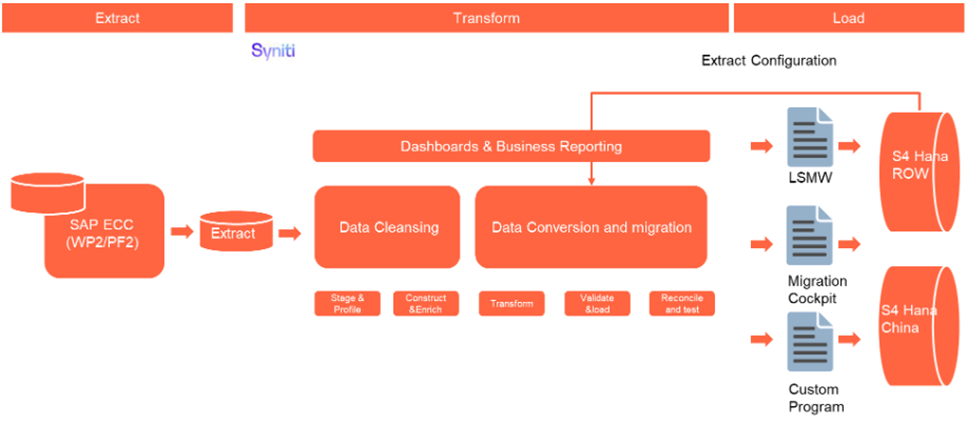
The high level process for Classes that will be captured in a DCT are represented by the diagram below:

Field Governance Rules | |||||
These governance rules apply to the individual fields within the data record. | |||||
Rule # | Field Label | Rule Description | Validation Method | Conditional Logic | Cleansing Rule (Also see Data Cleansing section above) |
1 | KLAH-KLART | Only records with CLASS TYPE 001 are being migrated. | Upfront Automated | KLART = '001' | |
3 | SWOR-SPRAS | The following language are allowed: DE, EN, ES, FR, IT, PT, ZH. | Upfront Automated | No Class Description in Allowed Languages | |
Data Privacy and Sensitivity
Not ApplicableExtraction
Class data for CLASS TYPE 001 that are linked to Material records that have been identified as part of Basic Data will be extracted. No data for Service Master records that will become Materials in the target will be extracted.
Extraction Run Sheet
| Req # | Requirement Description | Team Responsible |
|---|---|---|
1 | Extract data from source system based on relevancy rules | Syniti |
Selection Screen
| Selection Ref Screen | Parameter Name | Selection Type | Requirement | Value to be entered/set |
|---|---|---|---|---|
| Not Applicable |
Data Collection Template (DCT)
| Field | Field Description | Rule |
|---|---|---|
| Action | New or Migrated Class | Radio Button or Checkbox |
| LegacySystem | Legacy System | Only applicable to Migrated. Then either PF2 or WP2. |
| KLART | Class Type | Not a field seen by the Users. Only applicable to New. Default to '001'. |
| CLASS | Class | Applicable to both. |
| STATU | Status | Not a field seen by the Users. Only applicable to New. Default to '1'. |
| LOCLA | Local class | Not a field seen by the Users. Only applicable to New. Default to Blank. |
| VONDT | Valid from | Not a field seen by the Users. Only applicable to New. Default to Today. |
| BISDT | Valid to | Not a field seen by the Users. Only applicable to New. Default to '99991231'. |
| PRAUS | Same classification | Not a field seen by the Users. Only applicable to New. Default to Blank. |
| SPRAS | Language Key | Only applicable to New. Default to 'EN'. Convert to internal code. |
| KLPOS | Item Number | Not a field seen by the Users. Only applicable to New. Counter. |
| KSCHL | Class Description | Only applicable to New. |
| KSCHG | Keyword (Upper Case for Matchcode) | Not a field seen by the Users. Only applicable to New. Upper case version of KSCHL. |
Extraction Dependencies
| Item # | Step Description | Team Responsible |
|---|---|---|
| 1 | The list of Classes will be provided by the Functional Team in the Configuration Document based on the To-Be design. | S2P Functional Team |
Transformation
The Target fields are mapped to the applicable Legacy field that will be its source, this is a 3-way activity involving the Business, Functional team and Data team. This identifies the transformation activity required to allow Syniti Migrate to make the data Target ready:
- Prepare target-ready data in the structure and format that is required for loading via prescribed Load Tool. This step also produces the load data ready for business to perform Pre-load Data Validation
Transformation Run Sheet
| Item # | Step Description | Team Responsible |
|---|---|---|
1 | Verify that data is extracted from the DCT. | Syniti / S2P Data Team |
2 | Verify that data is extracted from both source systems. | Syniti / S2P Data Team |
3 | Transformation jobs are ready for execution. | Syniti |
4 | Review and Validate Error and Preload Reports | Syniti |
5 | Generate Load Files | Syniti |
Transformation Rules
| Rule # | Source system | Source Table | Source Field | Source Description | Target System | Target Table | Target Field | Target Description | Transformation Logic |
|---|---|---|---|---|---|---|---|---|---|
| 1 | PF2, WP2 & DCT | KLAH | CLINT | Internal Class Number | S4H | KLAH | CLINT | Internal Class Number | System generated |
| 2 | PF2 & WP2 | KLAH | KLART | Class Type | S4H | KLAH | KLART | Class Type | Copy As-Is (will always be '001') |
| 3 | PF2 & WP2 | KLAH | CLASS | Class | S4H | KLAH | CLASS | Class | Copy As-Is |
| 4 | PF2 & WP2 | KLAH | STATU | Status | S4H | KLAH | STATU | Status | Copy As-Is |
| 5 | PF2 & WP2 | KLAH | LOCLA | Local class | S4H | KLAH | LOCLA | Local class | Copy As-Is |
| 6 | PF2 & WP2 | KLAH | VONDT | Valid from | S4H | KLAH | VONDT | Valid from | Copy As-Is |
| 7 | PF2 & WP2 | KLAH | BISDT | Valid to | S4H | KLAH | BISDT | Valid to | Copy As-Is |
| 8 | PF2 & WP2 | KLAH | PRAUS | Same classification | S4H | KLAH | PRAUS | Same classification | Copy As-Is |
| 9 | PF2 & WP2 | KLAH | ANAME | Created By | S4H | KLAH | ANAME | Created By | System generated |
| 10 | PF2 & WP2 | KLAH | ADATU | Created On | S4H | KLAH | ADATU | Created On | System generated |
| 11 | PF2 & WP2 | KLAH | ANZUO | No of Assignments | S4H | KLAH | ANZUO | No of Assignments | System generated |
| 12 | PF2 & WP2 | SWOR | CLINT | Internal Class Number | S4H | SWOR | CLINT | Internal Class Number | Map from legacy KLAH-CLINT to KLAH-CLINT generated in Rule 1 |
| 13 | PF2 & WP2 | SWOR | SPRAS | Language Key | S4H | SWOR | SPRAS | Language Key | Copy As-Is |
| 14 | PF2 & WP2 | SWOR | KLPOS | Item Number | S4H | SWOR | KLPOS | Item Number | Copy As-Is |
| 15 | PF2 & WP2 | SWOR | KSCHL | Class Description | S4H | SWOR | KSCHL | Class Description | Copy As-Is |
| 16 | PF2 & WP2 | SWOR | KSCHG | Keyword (Upper Case for Matchcode) | S4H | SWOR | KSCHG | Keyword (Upper Case for Matchcode) | Copy As-Is |
Transformation Mapping
Use the exact name and reference this section in the “Transformation rules” above| Mapping Table Name | Mapping Table Description | Link |
|---|---|---|
| CLINT (used rule 12 above to link the legacy value to the Target value) | XREF | MM Config Values - Classes for 001 |
Transformation Dependencies
List the steps that need to occur before transformation can commence| Item # | Step Description | Team Responsible |
|---|---|---|
1 | Data has been extracted from sources systems | Syniti |
2 | Deduplication is completed | Syniti & S2P Data Team |
3 | Configuration should be completed - (Config documents should be complete) | S2P Functional Team |
4 | Value mapping and XREF tables are ready | Syniti & S2P Data Team |
Pre-Load Validation
Project Team
Completeness
| Task | Action |
|---|---|
Verify Record Count | The number of records presented after relevancy checks and validation needs to be correct compared to the staged data in Migrate. |
Completeness check | All fields required as per mapping template rules must be completed. Validity reports checking each field in Syniti must be built. |
Accuracy
| Task | Action |
|---|---|
Conversion Accuracy | Data team to verify that the data staged in the preload tables are correct in terms of the mapping rules. This will be done via Syniti DSP reports. |
Business
The following pre-load validations will be performed by the business.Completeness
| Task | Action |
|---|---|
Count and Completeness check | All fields required as per mapping template rules must be completed. Validity reports checking each field in ADMM must be built to help check. |
Accuracy
| Task | Action |
|---|---|
Conversion Accuracy | Business team to verify that the data staged in the preload tables are correct in terms of the mapping rules. This will be done via Syniti ADMM reports/SAP reports |
Load
The load process includes:
- Execute the automated data load into target system using the appropriate load tool.
- Once the data is loaded to the target system, it will be extracted and prepared for Post Load Data Validation.
Load Run Sheet
| Item # | Step Description | Team Responsible |
|---|---|---|
1 | Verify data extracted | Data Specialist/Functional - S2P |
2 | Verify data combined from both source systems | Data Specialist/Functional - S2P |
3 | Verify Material XREF is ready (based on load of 2019 Material Master - Basic View) | Data Specialist/Functional - S2P |
4 | Stage data for transformations | Syniti |
5 | Run transforms | Syniti |
8 | Execute pre-load report | Syniti |
9 | Validate preload report - release | Data Specialist/Functional - S2P |
10 | Prepare and simulate | Syniti |
11 | Pre-load verification and approval to load | Functional/Data Owner - S2P |
12 | Load to S4 | Syniti |
13 | Complete Jira steps, Volumes and Timings | All - where applicable |
14 | Execute post-load report | Syniti |
15 | Post-load report verification/validation | Data Specialist/Functional/Data Owner - S2P |
16 | Object load completion approval | Data Owner - S2P |
Load Phase and Dependencies
Identify the phase as to “when” the load for this object will occur. <Pre-Cutover, Cutover, Post Cutover> and list the steps that need to occur before the load can commence
Configuration
List the Configurations required before loading can commence
| Item # | Configuration Item |
|---|---|
| Not Applicable |
Conversion Objects
| Object # | Preceding Object Conversion Approach |
|---|---|
| 1 | Material Master - Basic View (2019) |
Error Handling
The table below depicts some possible system errors for this data object during data load. All data load error is to be logged as defect and managed within the Defect Management
| Error Type | Error Description | Action Taken |
|---|---|---|
Data | Classes not linked to a Target Material | Fix incorrect data |
Data | Incorrect Language | Fix incorrect data |
Data | Duplicates | Fix incorrect data |
Load | Authorization errors | Apply for the applicable authorization permission and retry |
Load | Technical load failures - If using MC - Simulation errors, etc | Investigate error and rectify. Retry simulation and/or load |
Post-Load Validation
Project Team
The following post-load validations will be performed by the Project Team.Post-Load Steps
Step Description | Team Responsible |
Execute post-load report | Syniti |
Post-load report verification/validation | Data Specialist/Functional/Data Owner - S2P |
Object load completion approval | Data Owner - S2P |
Completeness
| Task | Action |
|---|---|
Verify count | The number of records presented in the post-load needs to be compared to the preload – Syniti report |
Field by field check | Compare source data to target data. |
Accuracy
| Task | Action |
|---|---|
Verify Logs | Check if there is data that failed to load and perform the necessary actions (e.g. register as post load issue or attempt to load the record again, etc.). |
Business
The following post-load validations will be performed by the business.Completeness
| Task | Action |
|---|---|
Verify Count | The number of records presented in the preload needs to be compared to the post-load Syniti report. |
Missing data | Check missing data which was supposed to be loaded. |
Reconciliation | Participate in Post-load walkthroughs. |
Accuracy
| Task | Action |
|---|---|
Conversion Accuracy | Business team to verify that the data staged in the preload tables are correct in terms of the mapping rules. This will be done via Syniti/SAP reports. |
Key Assumptions
- Master Data Standard is up to date as on the date of documenting this conversion approach and data load.
- Materials - Class Type 001 is in scope based on data design and any exception requested by business.
Any additional key assumptions.
See also
Insert links and references to other documents which are relevant when trying to understand this decision and its implications. Other decisions are often impacted, so it's good to list them here with links. Attachments are also possible but dangerous as they are static documents and not updated by their authors.