Purpose
The purpose of this document is to define the conversion approach to create Project Budget in S/4 HANA.
In the Syway Project budget is used to assign active availability control on Capital Projects while providing a binding financial plan for budget managed Operating Projects.
Conversion Scope
The scope of this document covers the approach to maintain Project Budgets in S/4HANA.
A report is executed to transfer budget from the PPM item, migrated as per CNV-9035 Portfolio Item - Financial Plan, to Level 1 WBS elements and a DCT provides the option to distribute budget to Phase Level WBS elements where this is required.
Relevancy Criteria
The scope of migration is all projects created from PPM items, where the PPM item has Approved funding.
For Project (WBS Level 1) Budget - Migrate PPM item financial view Approved Funding(Object 9035), this to include budget for closed projects
Only Current overall budget will be loaded from legacy, without differentiation for applied variations.
For item types with phase level templates (eg Industrial Project with Qualification, Industrial Projects, IT Full Lifecycle Project, R&I New Product Introduction)
a DCT template will be provide to allow for budget distribution to phase level where this is required
List of source systems and approximate number of records
| Source | Scope | Source Approx No. of Records | Target System | Target Approx No. of Records |
|---|---|---|---|---|
| S/4 | PPM items with level 1 WBS elements | 5000 | S/4 Hana | 5000 |
| DCT | Budget for level 2 WBS elements | TBD | S/4 Hana | TBD |
Budget to be loaded in the instance where WBS element is loaded.
Additional Information
Multi-language Requirement
Not Applicable
Document Management
Not Applicable
Legal Requirement
Not Applicable
Special Requirements
Not Applicable
If the data conversion involves third-party systems or external data sources, such as Icertis, describe any additional requirements related to data mapping, transformation logic, validation rules or security measures that must be followed.
Target Design
With Functional input, document the technical design of the target fields that are in the scope of this document.
The technical design of the target for this conversion approach.
| Table | Field | Data Element | Field Description | Data Type | Length | Requirement |
|---|---|---|---|---|---|---|
| BPGE | OBJNR | BP_OBJEKT | Object number | CHAR | 22 | Mandatory |
| BPGE | WRTTP | CO_WRTTP | Value Type | CHAR | 2 | Mandatory |
| BPGE | VERSN | BP_VERSION | Version | NUMC | 4 | Mandatory |
| BPGE | VORGA | BP_VORGANG | Budget Type | CHAR | 4 | Mandatory |
| BPGE | TWAER | TWAER | Transaction Currency | CUKY | 5 | Mandatory |
| BPGE | WTJHR | WTGES | Overall value in transaction currency | CURR | 21 | Mandatory |
Data Cleansing
Cleansing is done on the master data objects to which the budgets relate, no specific budget cleansing is required.
If data cleansing is managed outside of the source system (e.g. Syniti Migrate, 3rd Party Vendor, DCT), the necessary documentation must be produced and appended to this deliverable for sign-off.
| ID | Criticality | Error Message/Report Description | Rule | Output | Source System |
|---|
Conversion Process
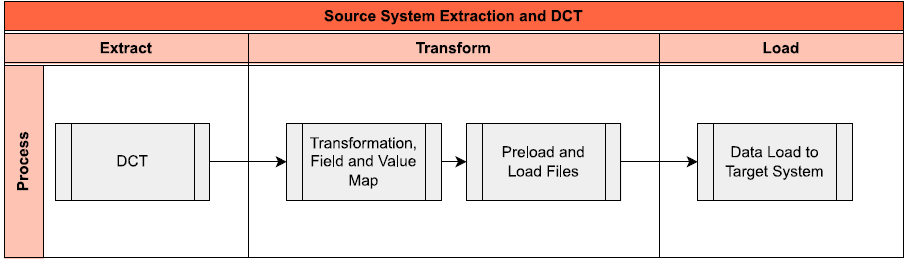
The high-level process is represented by the diagram below:
Data Privacy and Sensitivity
Not ApplicableExtraction
Extract data from a source into Syniti Migrate. There are 2 possibilities:
- The data exists. Syniti Migrate connects to the source and loads the data into Syniti Migrate. There are 3 methods:
- Perform full data extraction from relevant tables in the source system(s).
- Perform extraction through the application layer.
- Only if Syniti Migrate; cannot connect to the source, data is loaded to the repository from the provided source system extract/report.
- The data does not exist (or cannot be converted from its current state). The data is manually collected by the business directly in Syniti Migrate. This is to be conducted using DCT (Data Collection Template) in Syniti Migrate
The agreed Relevancy criteria is applied to the extracted records to identify the records that are applicable for the Target loads
Extraction Run Sheet
| Req # | Requirement Description | Team Responsible |
|---|---|---|
| 1 | Ensure DCT is collected | Data Team |
| 2 | Perform preliminary completeness check, data quality check. | Data Team |
| 3 | Raise issues as defects if Req # 1 to 2 are not met | Data Team |
| 4 | Repeat Req # 1 to 3 if required | Data Team |
Selection Screen
If applicable, this section will give the details on any selection screen parameters, including the parameter type, that are required to be entered to ensure consistent data extracts.| Selection Ref Screen | Parameter Name | Selection Type | Requirement | Value to be entered/set |
|---|---|---|---|---|
| Not Applicable |
Data Collection Template (DCT)
Target Ready Data Collection Template will be created for Project Budget data with exception of some fields which require transformation as mentioned in the transformation rule.Project Budget DCT Rules
Completion of the DCT is only for Projects where assignment of budget is required at phase level.
| Field Name | Field Description | Rule |
|---|---|---|
| PARENT | Item | The PPM items to which the phase is related. The values are restricted to PPM Items with Approved Funding values in CNV-9035 Portfolio Item - Financial Plan, This is a required field for capturing but not relevant for Preload validations. |
| PARENT_BUDGET | Level 1 Budget | Total approved funding The field displays the total Approved Funding for the item to which the WBS element is related. This is a calculated field assisting user with understanding the value available for assignment to the lower levels and is used in the preload validation of the Amount field. |
| POSID | WBS Element | This is a dropdown field of Phase level WBS Elements of the project selected. The values are restricted to the Level 2 WBS elements created in CNV-1022 and further restricted by the PARENT selected. This is a required field. |
| WTGES | Amount | The budget assigned to the phase Preload validation the Sum of Amount fields for all POSID's linked to the same PARENT may not be more than the PARENT_BUDGET |
Extraction Dependencies
No extraction required
| Item # | Step Description | Team Responsible |
|---|
Transformation
The Target fields are mapped to the applicable Legacy field that will be its source, this is a 3-way activity involving the Business, Functional team and Data team. This identifies the transformation activity required to allow Syniti Migrate to make the data Target ready:
- Perform value mapping and data transformation rules.
- Legacy values are mapped to the to-be values (this could include a default value)
- Values are transformed according to the rules defined in Syniti Migrate
- Prepare target-ready data in the structure and format that is required for loading via prescribed Load Tool. This step also produces the load data ready for business to perform Pre-load Data Validation
Transformation Run Sheet
| Item # | Step Description | Team Responsible |
|---|---|---|
| 1 | Obtain DCT Sign-off from Business | Data team |
| 2 | Execute Load and perform Transformation | Data team |
| 3 | Monitor the transformation progress and ensure performance and completion is within allowed timeframe | Data team |
| 4 | Review and Validate Error and Preload Reports | Data Team |
| 5 | Generate data load count. | Data team |
| 6 | Generate Load Files | Data Team |
| 7 | Log errors as defects, if any and address resolutions. Close defects. | Data team |
| 8 | Re-transform and re-validate the Pre-load reports if necessary. | Data team |
| 9 | Validate the transformed file as part of pre-load validation, raise data defects or provide the pre-load sign-off. | Business |
| 10 | Analyze and resolve any pre-load defects logged by business. | Data team |
| 11 | Repeat steps 7 to 10 if necessary | Data team |
| 12 | Proceed to pre-load validations | Data team |
Transformation Rules
List of Custom Target Reports for this object is maintained here: Conversion Specification - Custom Reports Register.
The Standard template for the upload of Item financials that can be used for the upload of project budget, this includes ability to upload of custom fields, into S/4 Hana: Item Budget Load File.xlsx - Google Sheets
Transfer Item Budget to the Level 1 WBS element via a report which is run /RPM/CO_DOWNLOAD, execution of report is restricted By Portfolio ID and Lowest level bucket ID.
Execute report for all level 3 Buckets (DCT created for CNV-1113 and the Default Portfolio.
Once the above report has been execute the distribution of the budget to Level 2 WBS elements can be performed
| Rule # | Source system | Source Table | Source Field | Source Description | Target System | Target Table | Target Field | Target Description | Transformation Logic |
|---|---|---|---|---|---|---|---|---|---|
| DCT | WBS | PSPID | WBS Element | S/4 Hana | BPGE | PSPID | WBS Element | Manually copy from Non ECC source | |
| DCT | WBS | WTGES | Amount | S/4 Hana | BPGE | WTGES | Amount | Manually copy from Non ECC source | |
| S/4 Hana | BPGE | VORGA | Budget Type | Default "KBUD" | |||||
| S/4 Hana | BPGE | TWAER | Currency | Select currency from PRPS for PSPID | |||||
| S/4 Hana | BPGE | WRTTP | Value Type | Default "41" |
Transformation Mapping
No transformation mapping required| Mapping Table Name | Mapping Table Description |
|---|
Transformation Dependencies
List the steps that need to occur before transformation can commence| Item # | Step Description | Team Responsible |
|---|
Pre-Load Validation
Project Team
The following pre-load validations will be performed by the Project Team.Completeness
| Task | Action |
|---|---|
| Verify Record Count | SyWay I2M Data Team to verify that the total number of relevant records in the Preload and Load Sheets. |
Accuracy
| Task | Action |
|---|---|
| Conversion Accuracy | SyWay I2M Data Team to verify that all fields below meet pass the checks:
|
| Review Error Reports | Review and correct the errors. Achieve a zero-error record count as much as possible. |
Business
The following pre-load validations will be performed by the business.Completeness
| Task | Action |
|---|---|
| Verify Record Count | Business Data Owner/s to verify that the total number of relevant records from the DCT is equal to the total number of records in the Preload and Load Sheets. |
Accuracy
| Task | Action |
|---|---|
| Conversion Accuracy | Business Data Owner/s to verify that all the data in the load table/file is accurate as per endorsed transformation/mapping rules (and signed-off DCT data). |
Load
The load process includes:
- Execute the automated data load into target system using load tool or produce the load file if the load must be done manually
- Once the data is loaded to the target system, it will be extracted and prepared for Post Load Data Validation
Load Run Sheet
| Item # | Step Description | Team Responsible |
|---|---|---|
| 1 | Execute standard program for transfer from PPM to PS | SyWay I2M Data Team |
| 2 | Validate few records loaded by accessing WBS Budget App | SyWay I2M Data Team |
| 3 | Generate post load report if step 2 is validated | SyWay I2M Data Team |
| 4 | Load WBS level 2 budget using custom or standard upload | SyWay I2M Data Team |
| 5 | Validate few records loaded by accessing WBS Budget App | SyWay I2M Data Team |
| 6 | Generate post load report if step 5 is validated | SyWay I2M Data Team |
Load Phase and Dependencies
Identify the phase as to “when” the load for this object will occur. <Pre-Cutover, Cutover, Post Cutover> and list the steps that need to occur before the load can commence
Configuration
List the Configurations required before loading can commence
| Item # | Configuration Item |
|---|---|
| 1 | PS Budget Profile |
Conversion Objects
| Object # | Preceding Object Conversion Approach |
|---|---|
| 1026 | WBS Element CAPEX/OPEX/STATISTICAL |
| 9035 | Portfolio Item - Financial Plan |
Error Handling
The table below depicts some possible system errors for this data object during data load. All data load error is to be logged as defect and managed within the Defect Management
| Error Type | Error Description | Action Taken |
|---|---|---|
| Invalid Data | WBS element does not exist | Correct DCT values |
| Invalid Data | Budget Assigned to Lower level is greater than the Parent Budget | Investigate the reason for error and update DCT values accordingly |
Post-Load Validation
Project Team
The following post-load validations will be performed by the Project Team.Completeness
| Task | Action |
|---|---|
Verify Count WBS | SyWay I2M Data Team to verify the record count created in target S/4 HANA by accessing post load reports or standard reports from S/4 HANA. Report CJI8 can be used for this purpose. |
Verify Logs WBS | Check if there is data that failed to load for PPM Item and perform the necessary actions (e.g. register as post load issue or attempt to the record again, etc.).
|
Accuracy
| Task | Action |
|---|---|
Conversion Accuracy | Verify that the budget were loaded to S/4 HANA correctly via table BPGE or reort CJI8 |
Business
The following post-load validations will be performed by the business.Completeness
| Task | Action |
|---|---|
| Verify Count | Extract budget from Project Budget Fiori APP and compare record count to expected count. |
Accuracy
| Task | Action |
|---|---|
| Verify Accuracy | Extract budget from Project Budget Fiori APP and Verify budget for level 1 WBS elements align with related PPM items. |
| Verify Accuracy | Extract budget from Project Budget Fiori APP and Verify distributed budget for level 2 WBS elements align with expected values |
Key Assumptions
- Project Budget is in scope based on data design and any exception requested by business.
Any additional key assumptions.
See also
Insert links and references to other documents which are relevant when trying to understand this decision and its implications. Other decisions are often impacted, so it's good to list them here with links. Attachments are also possible but dangerous as they are static documents and not updated by their authors.