| Status | |
|---|---|
| Owner | |
| Stakeholders |
Purpose
The purpose of this document is to define the conversion approach to create Sampling Procedures in S/4HANA.
Sampling Procedures are master data in SAP Quality Management (QM) that determine how the inspection scope is defined, such as the number of units to be inspected from a lot or the percentage of the lot to be checked. They provide standardized rules for sample determination and ensure consistency across inspection lots, inspection plans, and inspection characteristics. Sampling procedures can be based on fixed sample sizes, percentage samples, or inspection severity levels defined by sampling schemes.
In SAP S/4HANA, the structure and usage of sampling procedures remain consistent with SAP ECC. Sampling procedures are typically defined at the plant level, with key attributes such as sampling type, sample size, code group assignment, validity dates, and indicator settings. They can be assigned to master inspection characteristics (MICs) or directly within inspection plans, ensuring harmonized inspection strategies across materials and processes.
In SAP ECC, aside from the standard structure of sampling procedure master data (procedure ID, plant, type, and parameters), there may be additional variants, such as procedures linked to specific inspection severity levels, schemes that determine dynamic modification rules, or customized procedures with client-specific enhancements. Some legacy systems may also include obsolete or unused sampling procedures, which will require cleansing and validation before migration (pending MDS).
This conversion aims to migrate active and relevant sampling procedure records from existing ECC systems into S/4HANA by applying the required transformation logic using Syniti as the data migration and transformation platform. The converted records will be loaded into the target S/4HANA system using standard SAP mechanisms such as BAPIs (e.g., BAPI_INSPSAMPLINGPROCEDURE_CREATE), IDOCs, or direct table loads where applicable, ensuring data accuracy, compliance, and usability in the target system.
Conversion Scope
The scope of this document covers the approach for converting active Sampling Procedure from Legacy Source Systems into S/4HANA following the Sampling Procedure Master Data Design Standard.
The data from legacy system includes:
- Active Sampling Procedures that have been used in inspection plans (PLMK-STICHPRVER) or inspection lots in the last three (3) years.
- Sampling Procedures without deletion flag (QDSV-LOEKZ not set).
- Plant-specific Sampling Procedures that will be mapped to the To-Be Plant structure (based on the agreed To-Be Plant Mapping).
- Sampling Procedures with valid sampling type, such as:
- Fixed sample size,
- 100% inspection,
- Percentage-based sampling,
- Sampling schemes (AQL, inspection severity levels).
- Sampling Procedures referenced in other QM master data, such as Master Inspection Characteristics (MICs) or Inspection Plans, to ensure no broken references.
- Sampling Procedures with valid valuation rules, such as acceptance number (n/c,d), AQL values, severity levels, or control chart integration.
- Sampling Procedures with valid text descriptions (QDSVT-KURZTEXT) in required languages for business use.
The data from legacy system excludes:
- Inactive Sampling Procedures not used in inspection plans or inspection lots for more than three (3) years.
- Sampling Procedures marked for deletion (QDSV-LOEKZ = X).
- Sampling Procedures belonging to deleted or out-of-scope plants (per the To-Be Plant Mapping).
- Obsolete or duplicate Sampling Procedures, such as:
- Redundant procedures replaced by corporate harmonized standards,
- Local variations with identical logic already covered by global procedures.
- Sampling Procedures with invalid configurations, such as:
- Missing or inconsistent sampling type (e.g., quantitative setup without sample size),
- Invalid or obsolete AQL/severity levels,
- References to deleted or inactive Sampling Schemes (QDPK/QDPP).
- Sampling Procedures without descriptions or missing mandatory fields required for migration to S/4HANA.
- Test or temporary procedures created for validation purposes but never used in production.
| Source | Scope | Source Approx No. of Records | Target System | Target Approx No. of Records |
|---|---|---|---|---|
| PF2 & WP2 | Sampling Procedure data will be extracted from client PF2 and WP2 | PF2 = 45 records WP2 = 535 records | S/4 HANA | 580 |
Additional Information
Multi-language Requirement
Sampling Procedure description will be maintained in English by default.
Since multi-language support is available for Sampling Procedure, users logging in with a different language will see the description displayed in their logon language, provided that the corresponding language key has been maintained in the Sampling Procedure.
Document Management
N/A
Legal Requirement
N/A
Special Requirements
N/A
Target Design
The technical design of the target for this conversion approach.
| Table | Field | Data Element | Field Description | Data Type | Length | Requirement |
|---|---|---|---|---|---|---|
| QDSV | STICHPRVER | QSTPRVER | Sampling Procedure | CHAR | 8 | R |
| QDSV | STICHPRART | QSTPRART | Sampling Type | CHAR | 3 | R |
| QDSV | BEWERTMOD | QBEWMOD | Valuation Mode | CHAR | 3 | R |
| QDSV | KZOHI | QKZOHI | No Stage Change | CHAR | 1 | NU |
| QDSV | KZUMFS | QKZUMFS | Multiple Samples | CHAR | 1 | NU |
| QDSV | KZNOCUT | QKZNOCUT | Recurring inspections | CHAR | 1 | NU |
| QDSV | STPRANZ | QSTPRANZ | No. of samples | INT1 | 3 | NU |
| QDSV | STPRUMF | QSTPRUMF | Sample size | INT4 | 10 | C |
| QDSV | ANNAHMEZ | QANNAHMEZ | Acceptance no. | INT2 | 5 | NU |
| QDSV | KFAKTOR | QKFAKTOR | K-factor | FLTP | 16 | NU |
| QDSV | KFAKTORNI | QNINITIAL | Not Initial | CHAR | 1 | NU |
| QDSV | KZNVWSV | QKZNVWSV | Usage Blocked | CHAR | 1 | NU |
| QDSV | KZVWSVPL | QKZVWSVPL | In Task List | CHAR | 1 | S |
| QDSV | FBKEY | QFBKEY | Determination Rule | CHAR | 2 | S |
| QDSV | FBKEYMFS | QFBKEYMFS | Valuation Rule | CHAR | 2 | C |
| QDSV | STPRPLAN | QSTPRPLANV | Sampling Scheme | CHAR | 3 | NU |
| QDSV | PRSCHAERFE | QPRSCHAERV | Inspection severity | NUMC | 3 | NU |
| QDSV | AQLWERT | QAQLWERTV | AQL Value | DEC | 7 | NU |
| QDSV | PROZUMF | QPROZUMF | Size as lot % | FLTP | 16 | C |
| QDSV | PROZUMFNI | QNINITIAL | Not Initial | CHAR | 1 | S |
| QDSV | PROZAZL | QPROZAZL | AccNo. as % | FLTP | 16 | NU |
| QDSV | PROZAZLNI | QNINITIAL | Not Initial | CHAR | 1 | NU |
| QDSV | ERSTELLER | QERSTELLER | Created By | CHAR | 12 | S |
| QDSV | AENDERER | QAENDERER | Changed By | CHAR | 12 | S |
| QDSV | ERSTELLDAT | QDATUMERST | Created On | DATS | 8 | S |
| QDSV | AENDERDAT | QDATUMAEND | Changed On | DATS | 8 | S |
| QDSV | KZRAST | QKZRAST | With inspection points | CHAR | 1 | NU |
| QDSV | RASTER | QRASTER | Inspection Frequency | NUMC | 3 | NU |
| QDSV | QRKART | QQRKART | Ctrl Chart Type | CHAR | 3 | NU |
| QDSV | DUMMY_QDSV_INCL_EEW_PS | DUMMY | Dummy function in length 1 | CHAR | 1 | NU |
| QDSVT | STICHPRVER | QSTPRVER | Sampling Procedure | CHAR | 8 | R |
| QDSVT | SPRACHE | SPRAS | Language Key | LANG | 1 | R |
| QDSVT | KURZTEXT | QKURZTEXT | Short Text | CHAR | 40 | R |
Data Cleansing
| ID | Criticality | Error Message/Report Description | Rule | Output | Source System |
|---|---|---|---|---|---|
| C1 | Sampling Procedure not used in last 3 years | Sampling Procedures (QDSV) not referenced in any MIC or Inspection Plan (PLMK-STICHPRVER) or Inspection Lot for ≥ 3 years will not be migrated. | Active Sampling Procedures used in last 3 years | PF2/WP2 | |
| C1 | Sampling Procedure flagged for deletion | Procedures with deletion indicator (QDSV-LOEKZ = X) are excluded. | Sampling Procedures with no deletion flag | PF2/WP2 | |
| C1 | Sampling Procedure in out-of-scope Plant | Procedures assigned to plants not in To-Be Plant Mapping are excluded. | Sampling Procedures valid in active plants | PF2/WP2 | |
| C1 | Invalid Sampling Type | STICHPRART (type: fixed %, 100%, scheme) not configured or not valid in target system. | Sampling Procedures with valid type | PF2/WP2 | |
| C1 | Missing Sample Size / % | Sampling Procedures missing values for sample size, percentage, or calculation rules will not be migrated. | Procedures with complete sample definition | PF2/WP2 | |
| C1 | Invalid Scheme Reference | Procedures referencing a scheme (QDPK/QDPP) not existing or inactive in target are excluded. | Sampling Procedures with valid scheme | PF2/WP2 | |
| C1 | Invalid AQL/Severity Level | Procedures with AQL value, acceptance number, or inspection severity not in target customizing are excluded. | Valid AQL/Severity Sampling Procedures | PF2/WP2 | |
| C2 | Duplicate Sampling Procedure ID | Duplicate STICHPRVER across same plant detected; only one harmonized record retained. | Unique Sampling Procedure IDs per plant | PF2/WP2 | |
| C2 | Missing or invalid description in required languages | QDSVT-KURZTEXT missing in business languages; procedure excluded unless translated. | Sampling Procedures with multilingual texts | PF2/WP2 | |
| C2 | Inconsistent links in dependent master data | Sampling Procedure referenced by MIC/Inspection Plan that is not active will be excluded. | Sampling Procedures with valid references | PF2/WP2 | |
| C3 | Obsolete local variations | Plant-specific duplicates already replaced by harmonized corporate standards excluded. | Harmonized corporate Sampling Procedures | PF2/WP2 | |
| C3 | Audit data inconsistent | ERDAT/AEDAT/ERNAM missing or illogical (e.g., future date, null values). | Sampling Procedures with valid audit trail | PF2/WP2 | |
| C3 | Test/Temporary Sampling Procedures | Procedures created for testing/training excluded unless explicitly approved. | Business-relevant Sampling Procedures only | PF2/WP2 |
Conversion Process
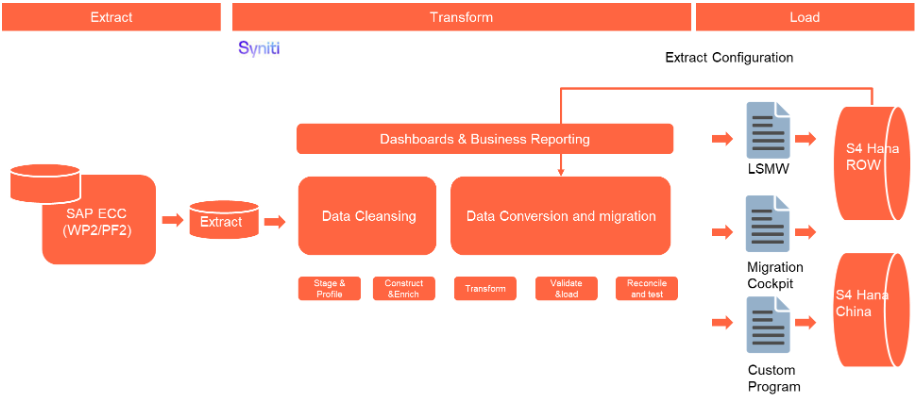
The high-level process is represented by the diagram below:
The ETL (Extract, Transform, Load) process is a structured approach to data migration and management, ensuring high-quality data is seamlessly transferred across systems. Here’s a breakdown of its key components:
1. Extraction
The process begins with extracting metadata and raw data from source systems, such as Syensqo ECC system (i.e. WP2/PF2) periodically. The extracted data is then staged for transformation.
2. Transformation
Once extracted, the data undergoes cleansing, consolidation, and governance. This step ensures data integrity, consistency, and compliance with business rules. The transformation process includes:
- Data validation to remove inconsistencies.
- Standardization to align formats across datasets.
- Business rule application to refine data for operational use.
3. Loading
The transformed data is then loaded into the target S/4HANA system.
Data Privacy and Sensitivity
Not applicable
Extraction
Extract data from a source into Syniti Migrate. There are 2 possibilities:
- The data exists. Syniti Migrate connects to the source and loads the data into Syniti Migrate. There are 3 methods:
- Perform full data extraction from relevant tables in the source system(s).
- Perform extraction through the application layer.
- Only if Syniti Migrate; cannot connect to the source, data is loaded to the repository from the provided source system extract/report.
- The data does not exist (or cannot be converted from its current state). The data is manually collected by the business directly in Syniti Migrate. This is to be conducted using DCT (Data Collection Template) in Syniti Migrate
The agreed Relevancy criteria is applied to the extracted records to identify the records that are applicable for the Target loads
Extraction Run Sheet
| Req # | Requirement Description | Team Responsible |
|---|---|---|
| Extraction Scope Definition | - Identify the source systems and databases involved. - Define the data objects (tables, fields, records) to be extracted. - Establish business rules for data selection. | Syniti / LTC Data team |
| Extraction Methodology | - Specify the extraction approach (full, incremental, or delta extraction). - Determine the tools and technologies used. - Define data filtering criteria to exclude irrelevant records. | Syniti |
| Extraction Execution Plan | - Establish execution timelines and batch processing schedules. - Assign responsibilities for extraction monitoring. - Document dependencies on other migration tasks. | Syniti |
| Data Quality and Validation | - Define error handling mechanisms for extraction failures. | Syniti |
Selection Screen
| Selection Ref Screen | Parameter Name | Selection Type | Requirement | Value to be entered/set |
|---|---|---|---|---|
| Not applicable |
Data Collection Template (DCT)
The Data Collection Template (DCT) will not be applicable in this case. If there is a need to create a new Master Data (MD) for Sampling Procedure object, the business must perform this activity in the source system. The newly created object will then be captured and migrated as part of the standard migration process.Extraction Dependencies
| Item # | Step Description | Team Responsible |
|---|---|---|
| 1 | Source System Availability
| Syensqo IT |
| 2 | Data Structure
| Syniti |
| 3 | Referential Integrity
| Syniti |
| 4 | Extraction Methodology
| Syniti |
| 5 | Performance and Scalability Considerations
| Syniti |
| 6 | Security and Compliance
| Syniti |
Transformation
The Target fields are mapped to the applicable Legacy field that will be its source, this is a 3-way activity involving the Business, Functional team and Data team. This identifies the transformation activity required to allow Syniti Migrate to make the data Target ready:
- Perform value mapping and data transformation rules.
- Legacy values are mapped to the to-be values (this could include a default value)
- Values are transformed according to the rules defined in Syniti Migrate
- Prepare target-ready data in the structure and format that is required for loading via prescribed Load Tool. This step also produces the load data ready for business to perform Pre-load Data Validation
Transformation Run Sheet
| Item # | Step Description | Team Responsible |
|---|---|---|
1 | Transformation Scope Definition - Identify the source and target data structures. - Define business rules for data standardization. - Establish data cleansing requirements to remove inconsistencies. | Data Team |
2 | Data Mapping and Standardization - Align source fields with target fields. - Ensure unit consistency (e.g., currency, measurement units) | Data Team |
3 | Business Rule Application - Implement data enrichment/collection if applicable - Apply conditional transformations based on predefined logic/business rules | Data Team |
4 | Transformation Execution Plan - Define batch processing schedules. - Assign responsibilities for monitoring execution. - Establish error-handling mechanisms | Syniti |
Transformation Rules
| Rule # | Source system | Source Table | Source Field | Source Description | Target System | Target Table | Target Field | Target Description | Transformation Logic |
|---|---|---|---|---|---|---|---|---|---|
Transformation Mapping
Use the exact name and reference this section in the “Transformation rules” above| Mapping Table Name | Mapping Table Description |
|---|---|
Transformation Dependencies
List the steps that need to occur before transformation can commence| Item # | Step Description | Team Responsible |
|---|---|---|
Pre-Load Validation
Project Team
Completeness
| Task | Action |
|---|---|
Compare Data Counts |
|
Validate the mandatory fields | Validate there is value for all the mandatory fields |
Validate Primary Keys and Unique Constraints |
|
Test Referential Integrity | Confirm dependent records exist in related tables |
Accuracy
| Task | Action |
|---|---|
Validate the transformation | Validate the fields which require transformation have the value after transformation instead of the original field value |
Check Data Consistency |
|
Business
Completeness
| Task | Action |
|---|---|
Compare Data Count |
|
| Review populated templates for missing or incorrect values | Use checklists to verify completeness and correctness before submission |
Accuracy
| Task | Action |
|---|---|
Conversion Accuracy | Business Data Owner/s to verify that all the data in the load table/file is accurate as per endorsed transformation/ mapping rules (and signed-off DCT data). |
Load
The load process includes:
- Execute the automated data load into target system using load tool or product the load file if the load must be done manually
- Once the data is loaded to the target system, it will be extracted and prepared for Post Load Data Validation
Load Run Sheet
| Item # | Step Description | Team Responsible |
|---|---|---|
1 | Load Scope Definition - Identify the target system and database structure. - Define data objects (tables, fields, records) to be loaded. - Establish business rules for data validation. | Data team |
2 | Load Methodology - Specify the loading tools and technologies (Migration Cockpit, LSMW, custom loading program). | Syniti |
3 | Data Quality and Validation - Ensure data integrity checks (null values, duplicates, format validation). - Perform pre-load validations to verify completeness. - Define error handling mechanisms for load failures | Syniti |
4 | Load Execution Plan - Establish execution timelines and batch processing schedules. - Assign responsibilities for monitoring execution. - Document dependencies on other migration tasks | Syniti |
5 | Logging and Reporting - Maintain detailed logs of loading activities. - Generate summary reports on loaded data volume and quality. - Define escalation procedures for errors | Syniti |
Load Phase and Dependencies
The Sampling procedure will be loaded in the pre-cutover (PreCutover 4 phase) period.
Before loading, it will have dependency on the following configuration and data objects in the S/4 HANA.
Configuration
| Item # | Configuration Item |
|---|---|
Conversion Objects
| Object # | Preceding Object Conversion Approach |
|---|---|
| list the exact title of the conversion object of only the immediate predecessor – this will then confirm the DDD (Data Dependency Diagram) | |
Error Handling
The table below depicts some possible system errors for this data object during data load. All data load error is to be logged as defect and managed within the Defect Management
| Error Type | Error Description | Action Taken |
|---|---|---|
Post-Load Validation
Project Team
Completeness
| Task | Action |
|---|---|
Validate Record count in the backend | Validate all tables with prefix “QINF” has the same records as the loading file |
Display Records | Pick up a few random Material Listing or Material Exclusions, and run t-code: QI03 to validate the QIR and can be displayed without any error. |
Perform Source-to-Target Comparisons |
|
Accuracy
| Task | Action |
|---|---|
Execute Sample Queries and Reports |
|
Conduct Post-Migration Reconciliation | Generate reports comparing pre- and post-migration data. |
Business
Post-load validation is a critical step in data migration, ensuring that transferred data is accurate, complete, and functional within the target system.
1. Ensuring Data Integrity
After migration, data must be consistent with its original structure. Post-load validation checks for missing records, incorrect mappings, and formatting errors to prevent discrepancies.
2. Business Continuity
Faulty data can disrupt operations, leading to financial losses and inefficiencies. Validating post-load data ensures that applications function as expected, preventing downtime.
3. Error Detection and Resolution
By validating data post-migration, businesses can detect anomalies early, reducing the cost and effort required for corrections
Completeness
| Task | Action |
|---|---|
| Perform Source-to-Target Comparisons |
|
| Conduct Post-Migration Reconciliation | Go through reports comparing pre- and post-migration data. |
Accuracy
| Task | Action |
|---|---|
Perform Manual Testing | Conduct manual spot-checks for additional assurance. |
Key Assumptions
- Master Data Standard is up to date as on the date of documenting this conversion approach and data load.
- Sampling procedure is in scope based on data design and any exception requested by business.
- Data cleansing has met the required percentage threshold for the specified mock cycle and all preparation activities have been completed.
- Data entries in DCT are target-ready data unless a specific transformation rule is stated for that field in the transformation rules.
See also
Insert links and references to other documents which are relevant when trying to understand this decision and its implications. Other decisions are often impacted, so it's good to list them here with links. Attachments are also possible but dangerous as they are static documents and not updated by their authors.