| Status | |
|---|---|
| Owner | |
| Stakeholders | The business stakeholders involved in making, reviewing, and endorsing this decision. Type @ to mention people by name |
Purpose
The purpose of this document is to define the conversion approach to create Business Partners - Customer (Sales and Service) - FLCU01 in S/4 HANA.
In SAP ECC, the Customer Sales View is part of the Customer Master Data, which is used to store customer-related information for sales transactions. It includes details such as sales area, pricing, delivery preferences, and billing information. The setup typically involves maintaining customer records separately for different sales organizations, distribution channels, and divisions.
In SAP S/4HANA, the Customer Sales View is integrated into the Business Partner (BP) model, which replaces the traditional customer/vendor objects from ECC. The Business Partner serves as a central entity, allowing a single record to hold multiple roles (e.g., customer and vendor). The Customer Sales View in S/4HANA is represented under the BP role FLCU01, which contains sales-specific data such as sales area assignments, pricing conditions, and delivery preferences
Conversion Scope
The scope of this document covers the approach for converting active <Data Object> from Legacy Source Systems into S/4HANA following the Business Partners - Customer (Sales and Service) - FLCU01 Master Data Design Standard.
The data from legacy system includes:
a. The BP general is migrated
b. The sales area under which the sales view data is maintained for the customer is within the scope of S4 Hana
c. Customer has active sales view data, Or there is usage for the customer within 4 years.
or there is no Customer order block (sales area) (KNVV-AUFSD)
| Criteria | Relevancy Rule | Technical Details |
|---|---|---|
| 1 | The BP general is migrated | Select where KNVV-KUNNR = KNA1-KUNNR in scope |
| 2 | AND The sales area under which the sales view data is maintained for the customer is within the scope of S4 Hana | AND KNVV-VKORG in (Sales Org in Scope) |
| 3 | AND There is no Central Sales Block (KNA1-CASSD) in the customer general master data, which is used to block all the sales view data of the customer. | AND KNA1-CASSD is initial |
| 4 | AND there is no Deletion flag for customer at sales view level | AND KNVV-LOEVM is initial |
The data from legacy system excludes:
- The sales org for the sales view is out of scope, such as Oil & Gas and Aroma specific sales organizations.
| Source | Scope | Source Approx No. of Records | Target System | Target Approx No. of Records |
|---|---|---|---|---|
| WP2 | Customer Master Data Sales View Extract from KNVV/KNVI/KNVP etc. | 50671 | S4 Hana ROW | 50671 |
| PF2 | Customer Master Data Sales View Extract from KNVV/KNVI/KNVP etc. | 30963 | S4 Hana ROW | 30963 |
| WP2 | Customer Master Data Sales View Extract from KNVV/KNVI/KNVP etc. | 8552 | S4 Hana China | 8552 |
| PF2 | Customer Master Data Sales View Extract from KNVV/KNVI/KNVP etc. | 8045 | S4 Hana China | 8045 |
| WP2 | Customer Master Data Sales View Extract from KNVV/KNVI/KNVP etc. | 10753 | S4 Hana CUI | 10753 |
| PF2 | Customer Master Data Sales View Extract from KNVV/KNVI/KNVP etc. | N/A | S4 Hana CUI | N/A |
Additional Information
Multi-language Requirement
N/A
Document Management
N/A
Legal Requirement
CMMC 2.0 is a mandatory DoD cybersecurity certification for contractors handling Controlled Unclassified Information (CUI) and Federal Contract Information (FCI). CUI includes sensitive technical data (e.g., design specs, system info) related to U.S. military and space applications. The Composites Business handles CUI and is therefore within CMMC scope. Without certification, the business risks disqualification from existing and future DoD programs.
It is mandatory to implement CMMC-compliant systems and processes to for all the organizations that are dealing with CUI.
Therefore, there will be one SAP instance specifically for CUI related entities. The migration for CUI related entities will be covered by US based data consultant using separate tools.
Special Requirements
A. Different SAP Instance Migration Approach
Due to compliance requirement, there will be one SAP instance for Rest of the World (ROW), one for China and one for CUI.
- For entities in China, the data will be loaded into SAP China instance while the entire migration process will remain the same as rest of the world.
- For entities which will reside in CUI, the migration will be handled by US based data consultant.
Please refer to the link for the entity mapping for each instance. SAP instance mapping based on company code
- To identify the record is for which SAP instance, it will follow below logic. If the same customer is mapped to multiple instances, the customer sales view data will be migrated in the respective SAP instance.
- For customer with sales view in scope, map the sales org to company code first, then map the company code to the SAP instance based on the mapping file.
If the data conversion involves third-party systems or external data sources, such as Icertis, describe any additional requirements related to data mapping, transformation logic, validation rules or security measures that must be followed.
B. One Sales Organization per GBU
As elaborated in KDD060 - Sales Enterprise Structure - Sales Organization, in the S4 Hana design, one sales organization will be mapped to one GBU. Therefore, it is possible that one sales organization in legacy system is mapped to multiple sales organization in the S4. When such scenario happens, one record of customer master data sales view will be split into multiple records based on the mapping.
C. Distribution Channel Transformation
In S4 Hana design, there will be 3 distribution channels defined.
- Domestic
- Export
- Intercompany
Domestic/Export distribution channel is used for external customers, and determined based on the Departure country (from Plant, or Sales Organization/Company code country if plant information is not applicable)/Destination Country (Ship-to Party country).
Intercompany distribution channel is determined based on the nature of the business partner, i.e. if it is Syensqo entity or affiliated companies, it will be defined as Intercompany Distribution Channel.
To identify Domestic/Export distribution channel, it will apply below logics.
- Fetch the Sales history of the customer within the sales organization in scope (VBAK/VBAP/VBPA).
- Derive the matrix of Sales Organization/Plant/Plant country/Ship-to party/Ship-to country
- If Plant country is same as Ship-to country, then for key combination of Sales Organization/Ship-to party, the transformed distribution channel will be Domestic.
- If Plant country is different as Ship-to country, then for key combination of Sales Organization/Ship-to party, the transformed distribution channel will be Export.
- Apply the result to rest of the customers in the same sales document, e.g., Sold-to customer, Payer, Bill to etc. It will then get a matrix of Sales Org/Customer/Distribution Channel(After transformation)
If there is no sales history as this is a new customer, similar logic will be applied using Customer master data sales view partner data.
- Fetch the partner information from customer master data sales view for sales organization in scope (KNVV/KNVP).
- Derive the matrix of Sales Organization/Country/Ship-to party/Ship-to country
- If Sales Organization country is same as Ship-to country, then for key combination of Sales Organization/Ship-to party, the transformed distribution channel will be Domestic.
- If Sales Organization country is different as Ship-to country, then for key combination of Sales Organization/Ship-to party, the transformed distribution channel will be Export.
- Apply the result to rest of the customers in the same customer master data, e.g., Sold-to customer, Payer, Bill to etc. It will then get a matrix of Sales Org/Customer/Distribution Channel(After transformation)
Consolidate all the entries and remove the duplicate records. As a result, there will be a matrix based on Sales Organization/Distribution Channel/Customer. This information will be the base to migrate the customer sales view data (such as KNVV/KNVP etc.).
Target Design
With Functional input, document the technical design of the target fields that are in the scope of this document.
The technical design of the target for this conversion approach.
| Table | Field | Data Element | Field Description | Data Type | Length | Requirement |
|---|---|---|---|---|---|---|
| KNVI | KUNNR | KUNNR | Customer | CHAR | 10 | Mandatory |
| KNVI | ALAND | ALAND | Departure Ctry/Reg. | CHAR | 3 | Mandatory |
| KNVI | TATYP | TATYP | Tax Condition Type | CHAR | 4 | Mandatory |
| KNVI | TAXKD | TAXKD | Tax Classification | CHAR | 1 | Mandatory |
| KNVP | KUNNR | KUNNR | Customer | CHAR | 10 | Mandatory |
| KNVP | VKORG | VKORG | Sales Organization | CHAR | 4 | Mandatory |
| KNVP | VTWEG | VTWEG | Distribution Channel | CHAR | 2 | Mandatory |
| KNVP | SPART | SPART | Division | CHAR | 2 | Mandatory |
| KNVP | PARVW | PARVW | Partner Function | CHAR | 2 | Optional |
| KNVP | KUNN2 | KUNN2 | Customer | CHAR | 10 | Optional |
| KNVP | LIFNR | LIFNR | Supplier | CHAR | 10 | Optional |
| KNVP | PERNR | PERNR | Personnel Number | NUMC | 8 | Optional |
| KNVP | PARNR | PARNR | Contact Person | NUMC | 10 | Optional |
| KNVP | KNREF | KNREF | Partner description | CHAR | 30 | Optional |
| KNVP | DEFPA | DEFPA | Default Partner | CHAR | 1 | Optional |
| KNVV | KUNNR | KUNNR | Customer | CHAR | 10 | Mandatory |
| KNVV | VKORG | VKORG | Sales Organization | CHAR | 4 | Mandatory |
| KNVV | VTWEG | VTWEG | Distribution Channel | CHAR | 2 | Mandatory |
| KNVV | SPART | SPART | Division | CHAR | 2 | Mandatory |
| KNVV | LOEVM | LOEVM | Del. indicator for sales area | CHAR | 1 | Optional |
| KNVV | AUFSD | AUFSD | Order block for sales area | CHAR | 2 | Optional |
| KNVV | KALKS | KALKS | Cust.Pric.Procedure | CHAR | 2 | Mandatory |
| KNVV | KDGRP | KDGRP | Customer Group | CHAR | 2 | Optional |
| KNVV | INCO1 | INCO1 | Incoterms | CHAR | 3 | Optional |
| KNVV | LIFSD | LIFSD | Delivery block for sales area | CHAR | 2 | Optional |
| KNVV | AUTLF | AUTLF | Complete Delivery | CHAR | 1 | Optional |
| KNVV | ANTLF | ANTLF | Max.Part.Deliveries | DEC | 1 | Optional |
| KNVV | KZTLF | KZTLF | Part.dlv./item | CHAR | 1 | Optional |
| KNVV | KZAZU | KZAZU | Order Combination | CHAR | 1 | Optional |
| KNVV | LPRIO | LPRIO | Delivery Priority | NUMC | 2 | Optional |
| KNVV | VSBED | VSBED | Shipping Conditions | CHAR | 2 | Optional |
| KNVV | FAKSD | FAKSD | Billing block for sales area | CHAR | 2 | Optional |
| KNVV | PERFK | PERFK | Invoicing Dates | CHAR | 2 | Optional |
| KNVV | PERRL | PERRL | Invoice List Sched. | CHAR | 2 | Optional |
| KNVV | WAERS | WAERS | Currency | CUKY | 5 | Mandatory |
| KNVV | KTGRD | KTGRD | Acct Assmt Grp Cust. | CHAR | 2 | Optional |
| KNVV | ZTERM | ZTERM | Terms of Payment | CHAR | 4 | Optional |
| KNVV | VWERK | VWERK | Delivering Plant | CHAR | 4 | Optional |
| KNVV | VKGRP | VKGRP | Sales Group | CHAR | 3 | Optional |
| KNVV | VKBUR | VKBUR | Sales Office | CHAR | 4 | Optional |
| KNVV | KVGR2 | KVGR2 | Customer Group 2 | CHAR | 3 | Optional |
| KNVV | KURST | KURST | Exchange Rate Type | CHAR | 4 | Optional |
| KNVV | PRFRE | PRFRE | Price determination | CHAR | 1 | Optional |
| KNVV | KABSS | KABSS | Paymt guarant. proc. | CHAR | 4 | Optional |
| KNVV | CASSD | CASSD | Sales Block for Sales Area | CHAR | 2 | Optional |
| KNVV | AGREL | AGREL | Settlement Mgmt. | CHAR | 1 | Optional |
| KNVV | UEBTO | UEBTO | Overdeliv. Tolerance | DEC | 3 | Optional |
| KNVV | UNTTO | UNTTO | Underdel. Tolerance | DEC | 3 | Optional |
| KNVV | PODKZ | PODKZ | Relevant for POD | CHAR | 1 | Optional |
| KNVV | INCO2_KEY | INCO2_KEY | Incoterm Location 1 | RAW | 16 | Optional |
| KNVV | ZZ_SINGLE_PACKING_LIST | ZZ_SINGLE_PACKING_LIST | Single Packing List | Optional | ||
| KNVV | ZZ_SINGLE_PARENT_BATCH | ZZ_SINGLE_PARENT_BATCH | Single Parent Batch | Optional | ||
| KNVV | ZZ_WHOLE_NR | ZZ_WHOLE_NR | Whole number Required | Optional | ||
| STXH | TDOBJECT | TDOBJECT | Text object | CHAR | 10 | Optional |
| STXH | TDNAME | TDNAME | Text Name | CHAR | 70 | Optional |
| STXH | TDID | TDID | Text ID | CHAR | 4 | Optional |
| STXH | TDSPRAS | TDSPRAS | Language Key | LANG | 1 | Optional |
| STXL | TDOBJECT | TDOBJECT | Text object | CHAR | 10 | Optional |
| STXL | TDNAME | TDNAME | Text Name | CHAR | 70 | Optional |
| STXL | TDID | TDID | Text ID | CHAR | 4 | Optional |
| STXL | TDSPRAS | TDSPRAS | Language Key | LANG | 1 | Optional |
| STXL | CLUSTD | CLUSTD | Data | LRAW | 7902 | Optional |
Data Cleansing
All data cleansing should take place in the data source system as defined in this document, unless system limitations prevent it.
If data cleansing is managed outside of the source system (e.g. Syniti Migrate, 3rd Party Vendor, DCT), the necessary documentation must be produced and appended to this deliverable for sign-off.
| ID | Criticality | Error Message/Report Description | Rule | Output | Source System |
|---|---|---|---|---|---|
| 3003-001 | C-1 | Identify customer not used in the existing sales area | The general view and sales view is active, and the sales view is created for more than 2 years, but there is no sales transaction within the sales area for more than 2 years for this customer | Customer/Name/Country/Sales Org/Distribution Channel/Division/Last usage
| |
| 3003-002 | C-2 | Fill in mandatory fields based on master data standards 1. Incoterm | For all the sold-to party (partner function SP or AG) and the sales view is active, but there is no incoterm maintained | Customer/Name/Country/Sales Org/Distribution Channel/Division/Incoterm1/Incoterms 2 | |
| 3003-003 | C-1 | Fill in mandatory fields based on master data standards 2. Payment term | For all the payer party (partner function PY) and the sales view is active, but there is no payment term maintained | Customer/Name/Country/Sales Org/Distribution Channel/Division/Payment Term | |
| 3003-004 | C-2 | Fill in mandatory fields based on master data standards 3. Shipping Condition | For all the ship-to party (partner function SH or WE) and the sales view is active, but there is no shipping condition maintained | Customer/Name/Country/Sales Org/Distribution Channel/Division/Shipping condition | |
| 3003-005 | C-1 | 4. Validate non-ISO incoterm used, such as COL. CPU, DAT(replaced by DPU), PPA, PPD | For all the active customer in migration scope, if there is incoterm, and the incoterm value is included in list [COL. CPU, DAT(replaced by DPU), PPA, PPD] | Customer/Name/Country/Sales Org/Distribution Channel/Division/Incoterm1/Incoterms 2 | |
| 3003-006 | C-2 | 5. Validate obsolete payment term maintained | For all the active customer in migration scope, if there is payment term, and the payment term value is not in S4 Hana design | Customer/Name/Country/Sales Org/Distribution Channel/Division/Payment term/Payment term description | |
| 3003-007 | C-2 | 6. Update obsolete CSR as business partner | For all the active customer in migration scope, if there is partner function ZI/ZN for WP2. VE/VW for PF2 | Customer/Name/Country/Sales Org/Distribution Channel/Division/Partner function/Personnel Number/Name | |
| 3003-008 | C-3 | 7. Incoterm part 2 with "." maintained | For all the active customer in migration scope, if the Incoterm 2 value is "." | Customer/Name/Country/Sales Org/Distribution Channel/Division/Incoterm1/Incoterms 2 | |
| 3003-009 | C-2 | Fill in mandatory fields based on master data standards 8. Missing sales group | |||
| 3003-010 | C-2 | Fill in mandatory fields based on master data standards 9. Missing sales office | For all the active customer in migration scope, the sales office field is blank | Customer/Name/Country/Sales Org/Distribution Channel/Division/Sales Office | |
| 3003-011 | C-3 | 10. Check non standard currency code in use such as US$ | For all the active customer in migration scope, the currency field has value such as US$ | Customer/Name/Country/Sales Org/Distribution Channel/Division/Currency | |
| 3003-012 | Due to sales area definition change, multiple sales view record might merge into one record. If multiple records have different values, pick the main records. | ||||
| 3003-013 | C-1 | For sales area marked with Customer Order Block, validate if the sales view should be blocked | For all the active customer in migration scope, there is Customer Order block | Customer/Name/Country/Sales Org/Distribution Channel/Division/Customer order block/last usage Sales Document (Select MAX(VBAK-ERDAT) WHERE VBAK-VBELN=VBPA-VBELN AND VBPA-KUNNR = KNVV-KUNNR AND VBAK-VKORG = KNVV-VKORG AND VBAK-VTWEG = KNVV-VTWEG AND VBAK-SPART = KNVV-SPART) |
Conversion Process
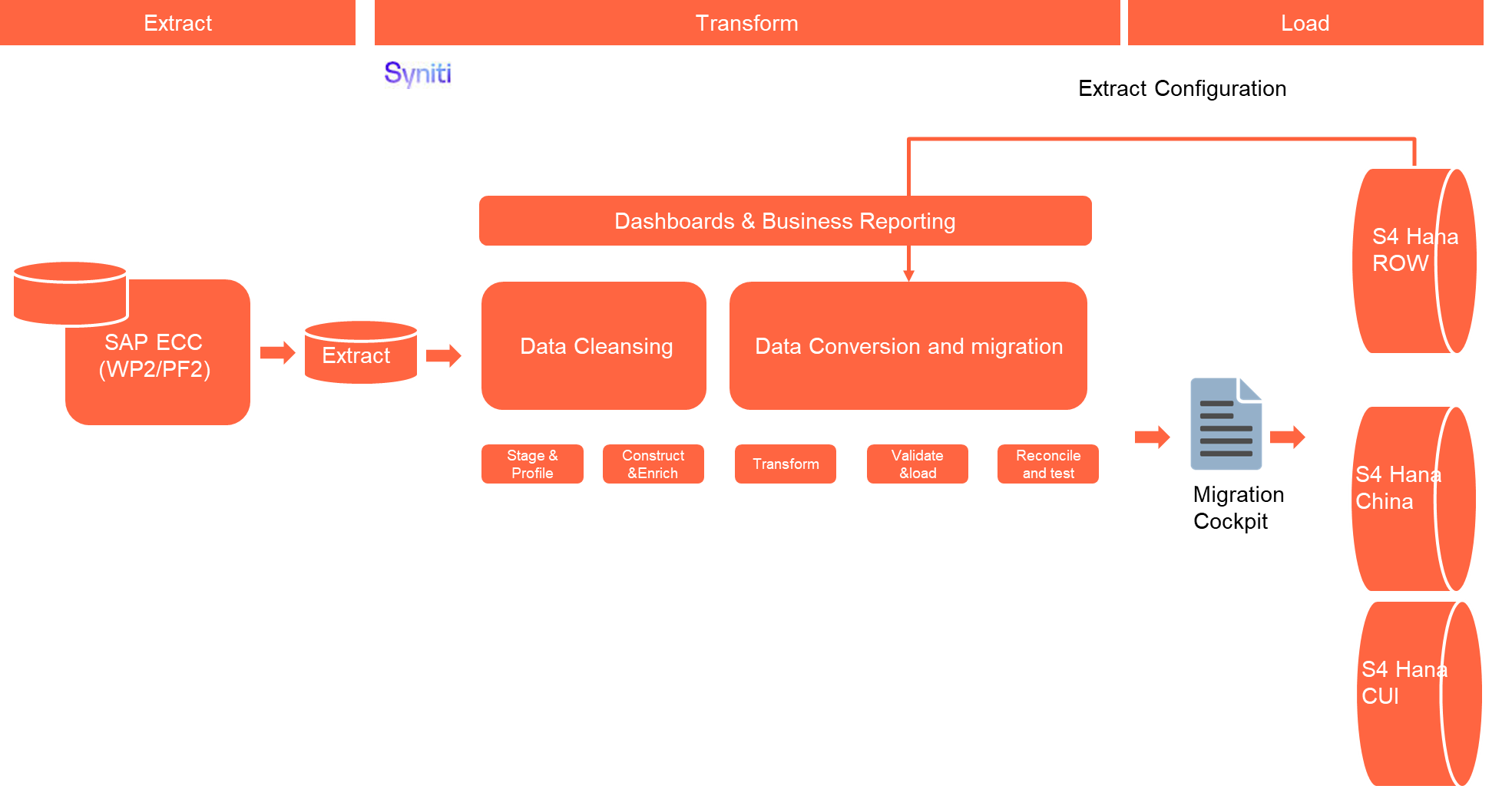
The high-level process is represented by the diagram below:
The ETL (Extract, Transform, Load) process is a structured approach to data migration and management, ensuring high-quality data is seamlessly transferred across systems. Here’s a breakdown of its key components:
1. Extraction
The process begins with extracting metadata and raw data from source systems, such as Syensqo ECC system (i.e., WP2/PF2) periodically. The extracted data is then staged for transformation.
2. Transformation
Once extracted, the data undergoes cleansing, consolidation, and governance. This step ensures data integrity, consistency, and compliance with business rules. The transformation process includes:
- Data validation to remove inconsistencies.
- Standardization to align formats across datasets.
- Business rule application to refine data for operational use.
3. Loading
The transformed data is then loaded into the target S4 Hana system using migration cockpit.
Data Privacy and Sensitivity
Extraction
Extract data from a source into Syniti Migrate for SAP ROW and SAP China relevant entities. There are 2 possibilities:
- The data exists. Syniti Migrate connects to the source and loads the data into Syniti Migrate. There are 3 methods:
- Perform full data extraction from relevant tables in the source system(s).
- Perform extraction through the application layer.
- Only if Syniti Migrate cannot connect to the source, data is loaded to the repository from the provided source system extract/report.
- The data does not exist (or cannot be converted from its current state). The data is manually collected by the business directly in Syniti Migrate. This is to be conducted using DCT (Data Collection Template) in Syniti Migrate
The agreed Relevancy criteria is applied to the extracted records to identify the records that are applicable for the Target loads.
Extraction Run Sheet
| Req # | Requirement Description | Team Responsible |
|---|---|---|
| Extraction Scope Definition | - Identify the source systems and databases involved. - Define the data objects (tables, fields, records) to be extracted. - Establish business rules for data selection. | Syniti Syniti / LTC Data team |
| Extraction Methodology | - Specify the extraction approach (full, incremental, or delta extraction). - Determine the tools and technologies used. - Define data filtering criteria to exclude irrelevant records. | Syniti |
| Extraction Execution Plan | - Establish execution timelines and batch processing schedules. - Assign responsibilities for extraction monitoring. - Document dependencies on other migration tasks. | Syniti |
| Data Quality and Validation | - Define error handling mechanisms for extraction failures. | Syniti |
Selection Screen
If applicable, this section will give the details on any selection screen parameters, including the parameter type, that are required to be entered to ensure consistent data extracts.| Selection Ref Screen | Parameter Name | Selection Type | Requirement | Value to be entered/set |
|---|---|---|---|---|
| N/A | ||||
Data Collection Template (DCT)
Target Ready Data Collection Template will be created for Data Object data with exception of some fields which require transformation as mentioned in the transformation rule.<Object> DCT Rules
| Field Name | Field Description | Rule |
|---|---|---|
Extraction Dependencies
List the steps that need to occur before extraction can commence
| Item # | Step Description | Team Responsible |
|---|---|---|
| 1 | Source System Availability
| Syensqo IT |
| 2 | Data Structure
| Syniti |
| 3 | Referential Integrity
| Syniti |
| 4 | Extraction Methodology
| Syniti |
| 5 | Performance and Scalability Considerations
| Syniti |
| 6 | Security and Compliance
| Syniti |
Transformation
The Target fields are mapped to the applicable Legacy field that will be its source, this is a 3-way activity involving the Business, Functional team and Data team. This identifies the transformation activity required to allow Syniti Migrate to make the data Target ready:
- Perform value mapping and data transformation rules.
- Legacy values are mapped to the to-be values (this could include a default value)
- Values are transformed according to the rules defined in Syniti Migrate
- Prepare target-ready data in the structure and format that is required for loading via prescribed Load Tool. This step also produces the load data ready for business to perform Pre-load Data Validation
Transformation Run Sheet
| Item # | Step Description | Team Responsible |
|---|---|---|
| 1 | Transformation Scope Definition - Identify the source and target data structures. - Define business rules for data standardization. - Establish data cleansing requirements to remove inconsistencies. | Data Team |
| 2 | Data Mapping and Standardization - Align source fields with target fields. - Ensure unit consistency (e.g., currency, measurement units) | Data Team |
| 3 | Business Rule Application - Implement data enrichment/collection if applicable - Apply conditional transformations based on predefined logic/business rules | Data Team |
| 4 | Transformation Execution Plan - Define batch processing schedules. - Assign responsibilities for monitoring execution. - Establish error-handling mechanisms | Syniti |
Transformation Rules
| Rule # | Source system | Source Table | Source Field | Source Description | Target System | Target Table | Target Field | Target Description | Transformation Logic |
|---|---|---|---|---|---|---|---|---|---|
| 1 | WP2/PF2 | KNVI | KUNNR | Customer | S4 Hana | KNVI | KUNNR | Customer | Mapping - Map based on new S4 BP partner number |
| 2 | WP2/PF2 | KNVI | ALAND | Departure Ctry/Reg. | S4 Hana | KNVI | ALAND | Departure Ctry/Reg. | Copy - |
| 3 | WP2/PF2 | KNVI | TATYP | Tax Condition Type | S4 Hana | KNVI | TATYP | Tax Condition Type | Mapping - Refer to MAP_TATYP |
| 4 | WP2/PF2 | KNVI | TAXKD | Tax Classification | S4 Hana | KNVI | TAXKD | Tax Classification | Mapping - Refer to MAP_TAXKD |
| 5 | WP2/PF2 | KNVP | KUNNR | Customer | S4 Hana | KNVP | KUNNR | Customer | Mapping - Map based on new S4 BP partner number |
| 6 | WP2/PF2 | KNVP | VKORG | Sales Organization | S4 Hana | KNVP | VKORG | Sales Organization | Rule - Refer to MAP_VKORG When one legacy VKORG is mapped to multiple VKORG based on mapping table, it should multiply the sales view data, meaning creating additional KNVV/KNVP/KNVI records etc |
| 7 | WP2/PF2 | Distribution Channel | S4 Hana | KNVP | VTWEG | Distribution Channel | Rule - Follow KNVV records transformation result | ||
| 8 | WP2/PF2 | Division | S4 Hana | KNVP | SPART | Division | Default - Default to 01 - Product | ||
| 9 | WP2/PF2 | KNVP | PARVW | Partner Function | S4 Hana | KNVP | PARVW | Partner Function | Rule - 1. Refer to MAP_PARVW for existing partner function 2. Add a new partner function XX when KNVV-VKGRP has value |
| 10 | WP2/PF2 | KNVP | KUNN2 | Customer | S4 Hana | KNVP | KUNN2 | Customer | Mapping - 1. For existing partner, Map based on new S4 BP number |
| 11 | WP2/PF2 | KNVP | LIFNR | Supplier | S4 Hana | KNVP | LIFNR | Supplier | Mapping - Map based on new S4 BP number |
| 12 | WP2/PF2 | KNVP | PERNR | Personnel Number | S4 Hana | KNVP | PERNR | Personnel Number | Rule - 1. Map based on new S4 BP Employee partner number 2. When KNVV-VKGRP has value, map it to XX partner function. For the value, refer to mapping file MAP_VKGRP |
| 13 | WP2/PF2 | KNVP | PARNR | Contact Person | S4 Hana | KNVP | PARNR | Contact Person | Mapping - Map based on new S4 BP number |
| 14 | WP2/PF2 | KNVP | KNREF | Partner description | S4 Hana | KNVP | KNREF | Partner description | Copy - |
| 15 | WP2/PF2 | KNVP | DEFPA | Default Partner | S4 Hana | KNVP | DEFPA | Default Partner | Copy - |
| 16 | WP2/PF2 | KNVV | KUNNR | Customer | S4 Hana | KNVV | KUNNR | Customer | Mapping - Map based on new S4 BP partner number |
| 17 | WP2/PF2 | KNVV | VKORG | Sales Organization | S4 Hana | KNVV | VKORG | Sales Organization | Rule - Refer to MAP_VKORG When one legacy VKORG is mapped to multiple VKORG based on mapping table, it will create multiple KNVV/KNVP/KNVI records etc |
| 18 | WP2/PF2 | KNVV | VTWEG | Distribution Channel | S4 Hana | KNVV | VTWEG | Distribution Channel | Rule - When it is external customer and the Ship to customer (KNVP-KUNNR where PARVW = SH) is in the same country (KNA1-LAND) as the sales org (T001-COUNTRY WHERE TVKO-BURKS = T001-BUKRS), it is mapped to Domestic When it is external customer and the Ship to customer is in the differnet country as the sales org, it is mapped to Export When it is external customer, and ther are multiple ship-to, some is domestic, some is export. then multiply the sales view data based on Domestic/Export distribution channel. Validte VBPA records for 3 year transaction. Check Ship-to party is Export or Domestic. Then apply the result to all the VBPA-KUNN2 for the same documents. Compare based on KUNN2(KUNNR)/VKORG combination with KNVV records to see if it is matching or there is missing. If there is missing, it will require to create the KNVV records for the combination of KUNNR/VKORG for the missing distribution channels When it is an intercompany customer, it is mapped to Intercompany |
| 19 | WP2/PF2 | Division | S4 Hana | KNVV | SPART | Division | Default - Default to 01 - Product | ||
| 20 | WP2/PF2 | KNVV | LOEVM | Del. indicator for sales area | S4 Hana | KNVV | LOEVM | Del. indicator for sales area | Copy - |
| 21 | WP2/PF2 | KNVV | AUFSD | Order block for sales area | S4 Hana | KNVV | AUFSD | Order block for sales area | Copy - |
| 22 | WP2/PF2 | KNVV | KALKS | Cust.Pric.Procedure | S4 Hana | KNVV | KALKS | Cust.Pric.Procedure | Default - '1' |
| 23 | WP2/PF2 | Customer Group | S4 Hana | KNVV | KDGRP | Customer Group | DCT - | ||
| 24 | WP2/PF2 | KNVV | INCO1 | Incoterms | S4 Hana | KNVV | INCO1 | Incoterms | Copy - |
| 25 | WP2/PF2 | KNVV | LIFSD | Delivery block for sales area | S4 Hana | KNVV | LIFSD | Delivery block for sales area | Copy - |
| 26 | WP2/PF2 | KNVV | AUTLF | Complete Delivery | S4 Hana | KNVV | AUTLF | Complete Delivery | Copy - |
| 27 | WP2/PF2 | KNVV | ANTLF | Max.Part.Deliveries | S4 Hana | KNVV | ANTLF | Max.Part.Deliveries | Copy - |
| 28 | WP2/PF2 | KNVV | KZTLF | Part.dlv./item | S4 Hana | KNVV | KZTLF | Part.dlv./item | Copy - |
| 29 | WP2/PF2 | KNVV | KZAZU | Order Combination | S4 Hana | KNVV | KZAZU | Order Combination | Copy - |
| 30 | WP2/PF2 | KNVV | LPRIO | Delivery Priority | S4 Hana | KNVV | LPRIO | Delivery Priority | Copy - |
| 31 | WP2/PF2 | KNVV | VSBED | Shipping Conditions | S4 Hana | KNVV | VSBED | Shipping Conditions | Mapping - Refer to MAP_VSBED |
| 32 | WP2/PF2 | KNVV | FAKSD | Billing block for sales area | S4 Hana | KNVV | FAKSD | Billing block for sales area | Copy - |
| 33 | WP2/PF2 | KNVV | PERFK | Invoicing Dates | S4 Hana | KNVV | PERFK | Invoicing Dates | Mapping - Refer to MAP_PERFK |
| 34 | WP2/PF2 | KNVV | PERRL | Invoice List Sched. | S4 Hana | KNVV | PERRL | Invoice List Sched. | Mapping - Refer to MAP_PERFK |
| 35 | WP2/PF2 | KNVV | WAERS | Currency | S4 Hana | KNVV | WAERS | Currency | Copy - |
| 36 | WP2/PF2 | Acct Assmt Grp Cust. | S4 Hana | KNVV | KTGRD | Acct Assmt Grp Cust. | Rule - Based on Distribution channel to determine the value | ||
| 37 | WP2/PF2 | KNVV | ZTERM | Terms of Payment | S4 Hana | KNVV | ZTERM | Terms of Payment | Mapping - Refer to MAP_ZTERM |
| 38 | WP2/PF2 | KNVV | VWERK | Delivering Plant | S4 Hana | KNVV | VWERK | Delivering Plant | Mapping - Refer to MAP_WERKS |
| 39 | WP2/PF2 | KNVV | ZZTEAMC | Sales Group | S4 Hana | KNVV | VKGRP | Sales Group | DCT - Refer to Table MAP_ZZTEAMC for mapping first Data collection based on customer market segment. 001 Mining Solutions 002 Phosphorous Specialties 003 Polymer Additives 004 Home and Personal Care 005 Agro 006 Coatings 007 Industrial Process Solutions 008 Transportation 009 Batteries 010 Green Hidrogen 011 Life Solutions 012 Channel & Digital Sales 013 Electronics & Industrial 014 Intercompany 015 Aerospace and Defense 016 Consumer, Healthcare, Environment 017 Channel Partners 018 Transportation (Auto and Aero) |
| 40 | WP2/PF2 | KNVV | VKBUR | Sales Office | S4 Hana | KNVV | VKBUR | Sales Office | Mapping - Refer to MAP_VKBUR |
| 41 | WP2/PF2 | KNVV | KVGR2 | Customer Group 2 | S4 Hana | KNVV | KVGR2 | Customer Group 2 | Copy - |
| 42 | WP2/PF2 | KNVV | KURST | Exchange Rate Type | S4 Hana | KNVV | KURST | Exchange Rate Type | Copy - |
| 43 | WP2/PF2 | KNVV | PRFRE | Price determination | S4 Hana | KNVV | PRFRE | Price determination | Copy - |
| 44 | WP2/PF2 | KNVV | KABSS | Paymt guarant. proc. | S4 Hana | KNVV | KABSS | Paymt guarant. proc. | Copy - |
| 45 | WP2/PF2 | KNVV | CASSD | Sales Block for Sales Area | S4 Hana | KNVV | CASSD | Sales Block for Sales Area | Copy - |
| 46 | WP2/PF2 | KNVV | AGREL | Settlement Mgmt. | S4 Hana | KNVV | AGREL | Settlement Mgmt. | Copy - |
| 47 | WP2/PF2 | KNVV | UEBTO | Overdeliv. Tolerance | S4 Hana | KNVV | UEBTO | Overdeliv. Tolerance | Copy - |
| 48 | WP2/PF2 | KNVV | UNTTO | Underdel. Tolerance | S4 Hana | KNVV | UNTTO | Underdel. Tolerance | Copy - |
| 49 | WP2/PF2 | KNVV | PODKZ | Relevant for POD | S4 Hana | KNVV | PODKZ | Relevant for POD | Copy - |
| 50 | WP2/PF2 | Incoterm Location 1 | S4 Hana | KNVV | INCO2_KEY | Incoterm Location 1 | Rule - Follow the same rule based on CNV-1051 TM-Locations. If cannot find, by default it will be the same ID as BP number (10 digits with leading 0). | ||
| 51 | WP2/PF2 | KNVV | ZZ_SINGLE_PACKING_LIST | Single Packing List | S4 Hana | KNVV | ZZ_SINGLE_PACKING_LIST | Single Packing List | Copy - |
| 52 | WP2/PF2 | KNVV | ZZ_SINGLE_PARENT_BATCH | Single Parent Batch | S4 Hana | KNVV | ZZ_SINGLE_PARENT_BATCH | Single Parent Batch | Copy - |
| 53 | WP2/PF2 | KNVV | ZZ_WHOLE_NR | Whole number Required | S4 Hana | KNVV | ZZ_WHOLE_NR | Whole number Required | Copy - |
| 54 | WP2/PF2 | STXH | TDOBJECT | Text object | S4 Hana | STXH | TDOBJECT | Text object | Copy - It will include those KNVV object text |
| 55 | WP2/PF2 | STXH | TDNAME | Text Name | S4 Hana | STXH | TDNAME | Text Name | Rule - The format is AAAAAAAAAA/BBBB/CC/DD A - Customer Number map to S4 BP Number B - Sales Org mapping - MAP_VKORG C - Distribution Channel mapping - Follow KNVV-VTWEG conversion value D - Divsion default to 01 |
| 56 | WP2/PF2 | STXH | TDID | Text ID | S4 Hana | STXH | TDID | Text ID | Mapping - Refer to MAP_TDID_KNVV |
| 57 | WP2/PF2 | STXH | TDSPRAS | Language Key | S4 Hana | STXH | TDSPRAS | Language Key | Copy - |
| 58 | WP2/PF2 | STXL | TDOBJECT | Text object | S4 Hana | STXL | TDOBJECT | Text object | Copy - |
| 59 | WP2/PF2 | STXL | TDNAME | Text Name | S4 Hana | STXL | TDNAME | Text Name | Mapping - The format is AAAAAAAAAA/BBBB/CC/DD A - Customer Number map to S4 BP Number B - Sales Org mapping - MAP_VKORG C - Distribution Channel mapping - Follow KNVV-VTWEG conversion value D - Divsion default to 01 |
| 60 | WP2/PF2 | STXL | TDID | Text ID | S4 Hana | STXL | TDID | Text ID | Mapping - Refer to MAP_TDID_KNVV |
| 61 | WP2/PF2 | STXL | TDSPRAS | Language Key | S4 Hana | STXL | TDSPRAS | Language Key | Copy - |
| 62 | WP2/PF2 | STXL | CLUSTD | Data | S4 Hana | STXL | CLUSTD | Data | Copy - |
List of Custom Target Reports for this object is maintained here: Conversion Specification - Custom Reports Register.
Transformation Mapping
Use the exact name and reference this section in the “Transformation rules” above| Mapping Table Name | Mapping Table Description |
|---|---|
| MAP_VKORG | Sales Organization Mapping Table |
| MAP_SPART | Division Mapping table |
| MAP_ZTERM | Payment terms Mapping table |
| MAP_PARVW | Partner Function Mapping table |
| MAP_VKGRP | Sales Group Mapping to new partner fucntion |
| MAP_PERFK | Invoice/Invoice List Calendar Mapping |
| MAP_VKBUR | Sales Office Mapping |
| MAP_VSBED | Shipping Condition Mapping |
| MAP_TDID_KNVV | Text in Sales View mapping |
| MAP_TATYP | Customer Tax condition type mapping |
| MAP_TAXKD | Customer Tax classification mapping |
| MAP_WERKS | Plant Mapping |
Transformation Dependencies
List the steps that need to occur before transformation can commence| Item # | Step Description | Team Responsible |
|---|---|---|
| 1 | Source Data Integrity - Ensure extracted data is complete, accurate, and consistent. - Validate that data types and formats align with transformation requirements. | Syniti |
| 2 | Referential Integrity - Ensure dependent records are transformed together or in advance, such as CNV-3007 Business Partner General | Syniti |
| 3 | Transformation Logic and Mapping - Define data mapping rules between source and target schemas. | Data Team |
| 4 | Performance and Scalability Considerations - Optimize transformation processes for large datasets. - Ensure system resources can handle transformation workloads | Syniti |
| 5 | Logging and Error Handling - Maintain detailed logs of transformation activities. - Define error-handling procedures for failed transformations | Syniti |
Pre-Load Validation
Project Team
The following pre-load validations will be performed by the Project Team.Completeness
| Task | Action |
|---|---|
| Compare Data Counts |
|
| Validate the mandatory fields | Validate there is value for all the mandatory fields |
| Validate Primary Keys and Unique Constraints |
|
| Test Referential Integrity | Confirm dependent records exist in related tables |
Accuracy
| Task | Action |
|---|---|
| Validate the transformation | Validate the fields which require transformation have the value after transformation instead of the original field value |
| Check Data Consistency |
|
Business
Post-load validation is a critical step in data migration, ensuring that transferred data is accurate, complete, and functional within the target system.
1. Ensuring Data Integrity
After migration, data must be consistent with its original structure. Post-load validation checks for missing records, incorrect mappings, and formatting errors to prevent discrepancies.
2. Business Continuity
Faulty data can disrupt operations, leading to financial losses and inefficiencies. Validating post-load data ensures that applications function as expected, preventing downtime.
3. Error Detection and Resolution
By validating data post-migration, businesses can detect anomalies early, reducing the cost and effort required for corrections
Completeness
| Task | Action |
|---|---|
| Compare Data Counts |
|
| Review populated templates for missing or incorrect values | Use checklists to verify completeness and correctness before submission |
Accuracy
| Task | Action |
|---|---|
| Check Data Consistency |
|
Load
The load process includes:
- Execute the automated data load into target system using load tool or product the load file if the load must be done manually
- Once the data is loaded to the target system, it will be extracted and prepared for Post Load Data Validation
Load Run Sheet
| Item # | Step Description | Team Responsible |
|---|---|---|
| 1 | Load Scope Definition - Identify the target system and database structure. - Define data objects (tables, fields, records) to be loaded. - Establish business rules for data validation. | Data team |
| 2 | Load Methodology - Specify the loading tools and technologies (Migration Cockpit, LSMW, custom loading program). | Syniti |
| 3 | Data Quality and Validation - Ensure data integrity checks (null values, duplicates, format validation). - Perform pre-load validations to verify completeness. - Define error handling mechanisms for load failures | Syniti |
| 4 | Load Execution Plan - Establish execution timelines and batch processing schedules. - Assign responsibilities for monitoring execution. - Document dependencies on other migration tasks | Syniti |
| 5 | Logging and Reporting - Maintain detailed logs of loading activities. - Generate summary reports on loaded data volume and quality. - Define escalation procedures for errors | Syniti |
Load Phase and Dependencies
The Business Partner General will be loaded in the pre-cutover period.
Before loading, it will have dependency on the configuration.
Configuration
List the Configurations required before loading can commence
| Item # | Configuration Item |
|---|---|
| 1 | Sales Area Definition |
| 2 | Sales Office Definition |
| 3 | Sales Group Definition |
| 4 | Payment Term definition |
| 5 | Define Tax Determination Rule |
Conversion Objects
| Object # | Preceding Object Conversion Approach |
|---|---|
| 3007 | Business Partner General (Role 000000) |
| Employee Personal Information | |
| 3011 | Business Partners - Contact Persons (BUP001) |
Error Handling
The table below depicts some possible system errors for this data object during data load. All data load error is to be logged as defect and managed within the Defect Management
| Error Type | Error Description | Action Taken |
|---|---|---|
| Configuration / Data Transformation | The value XXX for field XXX doesn't exist |
|
| Configuration | There is mandatory field XXX missing |
|
Post-Load Validation
Project Team
The following post-load validations will be performed by the Project Team.Completeness
| Task | Action |
|---|---|
| Perform Source-to-Target Comparisons |
|
Accuracy
| Task | Action |
|---|---|
| Execute Sample Queries and Reports |
|
| Conduct Post-Migration Reconciliation | Generate reports comparing pre- and post-migration data. |
Business
Post-load validation is a critical step in data migration, ensuring that transferred data is accurate, complete, and functional within the target system.
1. Ensuring Data Integrity
After migration, data must be consistent with its original structure. Post-load validation checks for missing records, incorrect mappings, and formatting errors to prevent discrepancies.
2. Business Continuity
Faulty data can disrupt operations, leading to financial losses and inefficiencies. Validating post-load data ensures that applications function as expected, preventing downtime.
3. Error Detection and Resolution
By validating data post-migration, businesses can detect anomalies early, reducing the cost and effort required for corrections
Completeness
| Task | Action |
|---|---|
| title | specific details of what and how the task needs to be performed e.g. which reports are being used etc. |
Accuracy
| Task | Action |
|---|---|
| title | specific details of what and how the task needs to be performed e.g. which reports are being used etc. |
Key Assumptions
- Master Data Standard is up to date as on the date of documenting this conversion approach and data load.
- BP Customer sales view is in scope based on data design and any exception requested by business.
- There will be 3 SAP instances, one for ROW, one for China and one for CUI only.
- For SAP CUI instance, the migration activity will be handled by US based data consultant.
- One sales org will represent one GBU as captured in KDD060 - Sales Enterprise Structure.
Any additional key assumptions.
See also
Insert links and references to other documents which are relevant when trying to understand this decision and its implications. Other decisions are often impacted, so it's good to list them here with links. Attachments are also possible but dangerous as they are static documents and not updated by their authors.