After making the decision to depart the company, you need to inform your Manager or your Site HR,  and if you have an employment contract or union agreement that states how much notice you should give, abide by it.

Can the restrictive covenants for sensitive roles impede me from taking a job outside of Syensqo?

Here is the procedure to follow if you are in a sensitive role and want to resign.

When you have given notice that you’re leaving your job and turned in your official resignation, there are still some things you should do to ensure a smooth transition:

  • Read the Offboarding article in the HR Wiki.
  • Take the time to inform the colleagues who've supported you, and who you would like to keep in touch with, that you are resigning, retiring, or starting a new chapter of your lif


If you are new to Syensqo's Wiki space, you may need to link your Google Drive in order to see embedded documents.

Follow the instructions here. 

Before your last day of work, please ensure to:

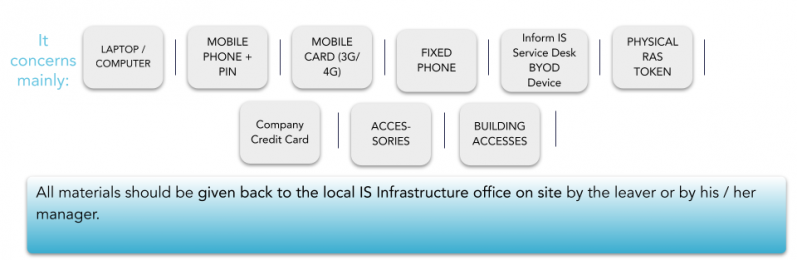
  • Remind your manager to book a meeting with your local infrastructure team to return your equipment (PC, Phone, Sim Cards, etc...);

  • Store all Syensqo documents in Google Drive;

  • Transfer Google drive ownership to the relevant person (access the detailed procedure);

  • Transfer ownership of meetings in Google calendar (if applicable);

  • Submit any outstanding expense reports and settle any outstanding balance on Corporate Card (if applicable);

  • Open a Service One ticket requesting cancellation of your Fed Ex Account (if applicable);

  • Delete any personal information from your computer, your emails or your Google Drive including any photos after transferring what is important;

  • Deliver the Company’s card to the Travel Expenses team, Line Manager or Site HR (if applicable). If you can't deliver the card to the responsible team, please destroy it;

  • Please open a ticket to the T&E team requesting to cancel you card;
  • Deliver the access card (badge) to the site contact (facilities/HR etc.).

  • Ensure you agree to an “Out of office notification” message with your Line Manager / Syensqo assignment supervisor.  Please be aware this cannot be set once your account is deactivated. It must be set before you log out for the last time;

  • Deliver the assets to the local Service Desk on their last day of work (if applicable).

Important Notice

If not permanently on site, you should leave all your equipment at the front desk of the site you are attached to after having received approval from your Line Manager / Syensqo assignment supervisor, and in compliance with the country's legal requirements.
The Local IS Infrastructure on site must be informed in advance to ensure they are able to check the equipment with you.


You are about to leave Syensqo and you are wondering ...
... for how long will Syensqo retain various data concerning you?
... if you have some control over your personal data?

Find the answers in your local Employee Privacy notice!

Point of attention: Syensqo as an employer undertakes to keep personal data only for the retention period indicated in the Employee Privacy notices. You are invited to store information (e.g. pay slips) by your own means if you need to keep them beyond this period, e.g. when you will retire.

Below is the current employee privacy notice, please select your country:

For the generic Employee Notice in English, please click here


Why this Moment Matters?

Exit Management is a key part of the leader’s role as you will lead the relationship with the employee to ensure that this Moment that Matters is experienced as positively as possible with a focus on business continuity, while the role of the Site HR Partner is to ensure compliance by giving guidance and support on the technicalities. 

Please look at the exit management process visual for managers.

The following scenarios are in scope:

  • INVOLUNTARY SEPARATION (restructuring, poor performance, misconduct);
  • VOLUNTARY SEPARATION (resignation);
  • MEDICAL INCAPACITY (long term);
  • RETIREMENT (legal retirement where it applies).

What to do as a Leader?  

Partner with the employee’s Site HR all along the process: from the moment an initial separation intent or request is communicated until when all practicalities regarding the separation have been completed. 

As a Leader, these guidelines will help you organize the departure of your new team member. You will have to start termination action in My HR Services as well as submit Offboarding request to remove all to deactivate IT access and remove assets. The offboarding procedure is mandatory and applies to the whole group without any exception.

Exit Management is a key part of the leader’s role. You make the final decision. Dedicated Site HR Partner are there to support you for all employment types (cadre and non-cadre). Below is a step-by-step guide for you to follow:

Step one: Discuss

  • This mandatory step requires you to discuss the separation intent or request with relevant parties (N+1) and inform the employee’s Site HR Partner.

  • IMPORTANT:  You should also check in My HR Services (employee Profile) whether the employee holds a Sensitive Role and consult the process for additional steps & decisions related to Sensitive Roles. If you have questions, the Site HR Partner is able to advise you.

Step two: Evaluate/ Decide

  • Evaluate, with the Site HR, the right type of solution to take your decision.
  • Think about the decision making criteria,  who else to involve in the process and how you can avoid making biased decisions.

Step three: Create an action plan

  • If a decision is taken to proceed with the separation, start by creating an action plan. Click here to download the template.

Step four: Communicate

  • Notify employee of the separation decision and rationale.

  • Discuss and confirm to the employee the separation date, package (if any) and other necessary terms based on action plan, supported by the employee’s Site HR Partner.

  • As a Leader you need to plan and prepare for difficult conversations and lead the discussion with courage and empathy. Here you can find a communication toolkit to prepare yourself.

Step five: Finalize the action plan and record separation in My HR Services

  • As soon as possible, enter separation details (date, reason etc) in My HR Services  to process the request. You will receive an automated confirmation when this is completed.
  • This action will be reviewed and approved by the Site HR.

Next Steps 

The offboarding procedure is mandatory and applies to the whole group without any exception.

To launch the separation of your team member, the first action you need to do is record termination in My HR Services.

The termination action is owned and initiated by the Manager.

Below are the step-by-step instructions on how to enter the separation details in My HR Services.