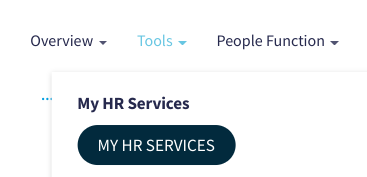
- Go to My HR Services and click on View My profile
 2. To update your information, follow these steps: 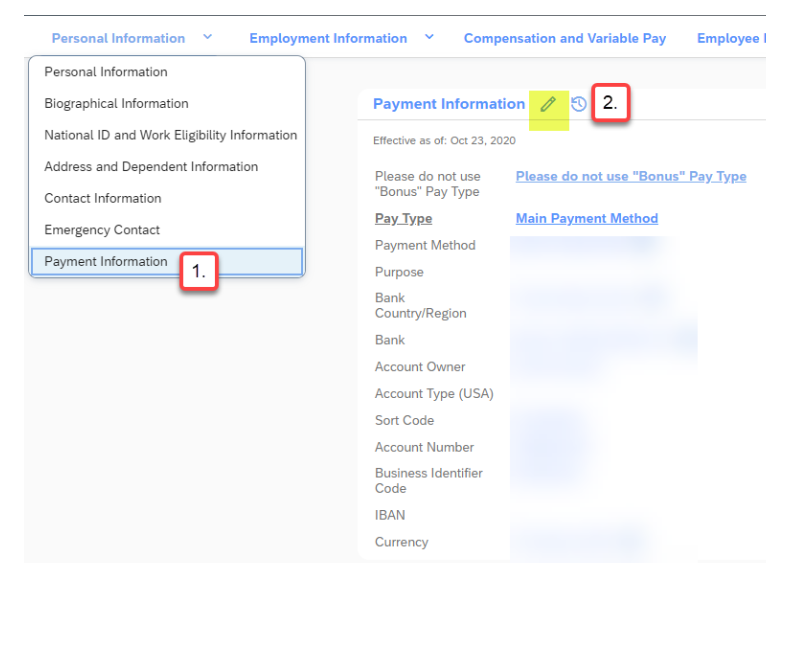
1. To add a check as a payment method, please follow these stepsPlease update only the highlighted fields. - Date: Must be the start date of the pay period you want the change to be reflected in.
- Pay Type: Every employee must have a Main Payment Method Set up.

2. To add a bank transfer or direct deposit as a payment method

3. To add your Bank information as a payment methodUpdate the following fields: - Date: Must be the start date of the pay period you want the change to be reflected in.
- Pay Type: Every employee must have a Main Payment Method Set up. This is the primary bank information.
- Note: If you wish to have your funds Direct Deposited, please choose Bank Transfer on the drop down menu or “check” if you want to receive it via check (not recommended).
- Bank: Please enter routing number
- Account Type (USA): Specify checking or savings
To add an additional account: To transfer a portion of your net pay to a secondary account, you can either choose a percentage or an amount. 
Please enter the following information: - Date: Must be the start date of the pay period you want the change to be reflected in.
- Pay Type: Payroll
- Note: If you wish to have your funds Direct Deposited, please choose Bank Transfer on the drop down menu or “check” if you want to receive it via check (not recommended).
- Bank: Please enter routing number
- Account Type (USA): Specify checking or savings
- Account Number: This is the account number where you want your funds to go to
- Percent: Percentage of the fund that you want to receive in your account or Amount: The portion of your fund that you want to receive in your account.

4. How to stop/cancel/delete bankIf you delete the Main Payment Method, please add a new account for this Pay Type, otherwise there will be a payroll error and this will cause a delay in your payment. - Refer to Step 1 on how to add Main Account.

If you have any questions please open a ticket via SyRa.
Important notes: The field of Sort Code (In the US known as Routing Number) is locked/blocked and no update must be done in this field. To update your bank account you only need to insert information on the "Bank” field by entering the routing number. Upon entering the routing number in the Bank field, it automatically updates the number in the Sort Code. If for any reason your form gets rejected, it might be linked to the fact that the bank information is not in our database in these situations please create a ticket in Service One.
|