| Status | |
|---|---|
| Owner | |
| Stakeholders | The business stakeholders involved in making, reviewing, and endorsing this decision. Type @ to mention people by name |
Purpose
The purpose of this document is to define the conversion approach to create <Data Object> in S/4 HANA.
Summarise how the data is currently utilized and set up in the legacy system/s and how object is intended to be represented in S/4, and any other relevant information
Link to MDS
Conversion Scope
The scope of this document covers the approach for converting active Materials - Additional Data from Legacy Source Systems into S/4HANA following the Materials Master Data Design Standard.
From the current system landscape, Material data exists separately in the legacy systems (PF2 and WP2), with potential discrepancies in both organizations. Harmonization and validation are required to ensure accurate and consolidated data in S/4HANA. While PF2 and WP2 serve as source systems, extensive mapping and transformation logic will be necessary to produce properly formatted load templates in line with the target design.
Relevancy Rules
This object is migrated after Material Basic Data, therefore only materials in scope for object '2019 - Materials Basic Data View' are in scope for this object. Click CNV-2019 Materials - Basic Data View to go to the Conversion Spec for 2019 to see the full set of relevancy rules.
| Source | Scope | Source Approx No. of Records | Target System | Target Approx No. of Records |
|---|---|---|---|---|
| PF2,WP2 | The Material Master Records (Additional Data) will be extracted/collected via DCT. An initial extract of the relevant data will be provided in Google Sheet format to assist business in decision making on including any relevant data from Source Systems. Any additional data that need to be created to support the new design may be added in the DCT. A data review and standardization will be done across all Info Records in the DCT. | 700,000 | S4H | 300,000 |
Additional Information
Multi-language Requirement
Multi language is supported for Materials - PO Text. Login via a different language will show the description displayed in the logon language if the language key is maintained.
The following languages are allowed:
- Core languages: EN - English, FR - French, IT - Italian and ZH - Mandarin.
- Additional languages: PT - Brazilian Portuguese, DE - German, ES - Spanish,
TH - Thai(descoped by CR0086). - Supplier languages that are possible: FR - French, EN - English, ES - Spanish, DE - German, IT - Italian, NL - Dutch, PT - Brazil Portuguese, ZH - Mandarin, PL - Polish, JA - Japanese, KO - Korean, FI - Finnish, BG - Bulgarian, RU - Russian, TH- Thai, ZF - Chinese traditional.
- Z9 is a generic language code and will be excluded from any extractions
Document Management
Not Applicable
Legal Requirement
Not Applicable
Special Requirements
Not Applicable
Target Design
The technical design of the target for this conversion approach.
| Table | Field | Data Element | Field Description | Data Type | Length | Requirement |
|---|---|---|---|---|---|---|
| MARA | MATNR | Material Number | Automatic | 40 | Mandatory | |
| MARM | MEINH | Alternative Unit of Measure (ISO Format) | CHAR | 3 | Conditional | |
| MARM | UMREN | Denominator for Conversion to Base Unit | DEC | 5 | Conditional | |
| MARM | UMREZ | Numerator for Conversion to Base Unit | DEC | 5 | Conditional | |
| MARA | MEINS | Base Unit of Measure | CHAR | 3 | Automatic | |
| MARM | EAN11 | GTIN | CHAR | 18 | Conditional | |
| MARM | NUMTP | GTIN Category | CHAR | 2 | Conditional | |
| MARM | LAENG | Length | QUAN | 13,3 | Conditional | |
| MARM | BREIT | Width | QUAN | 13,3 | Conditional | |
| MARM | HOEHE | Height | QUAN | 13,3 | Conditional | |
| MARM | MEABM | Unit for Length/Width/Height(ISO Format) | CHAR | 3 | Conditional | |
| MARM | BRGEW | Gross Weight | QUAN | 13,3 | Conditional | |
| MARM | NTGEW | Net Weight (derived) | QUAN | 13,3 | Automatic | |
| MARM | GEWEI | Unit of Weight (ISO Format) | CHAR | 3 | Conditional | |
| MARM | VOLUM | Volume | QUAN | 13,3 | Conditional | |
| MARM | VOLEH | Volume Unit (ISO Format) | CHAR | 3 | Conditional | |
| T002T | SPTXT | Language Key | CHAR | 2 | Conditional | |
STXL | CLUSTD | Long Text (Text ID: GRUN) | CHAR | 132 | Conditional | |
| T002T | SPTXT | Language Key | CHAR | 2 | Conditional | |
| STXL | CLUSTD | Long Text (Text ID: IVER) | CHAR | 132 | Conditional |
Data Cleansing
| ID | Criticality | Error Message/Report Description | Rule | Output | Source System |
|---|---|---|---|---|---|
2021-001 | C1 | UoM alignment | All material AUoMs to adhere to S4 standardization, refer to UoM mapping table TBA | PF2/WP2 | |
| 2021-002 | C1 | Additional Descriptions | Material descriptions must adhere to S4 standardization so no special characters etc and must not exceed character limit. Refer to 'Informal Words' document: | PF2/WP2 | |
| 2021-003 | C1 | Language | Check that all language ID's match the text. Eg. EN description contains English text. | PF2/WP2 |
Conversion Process
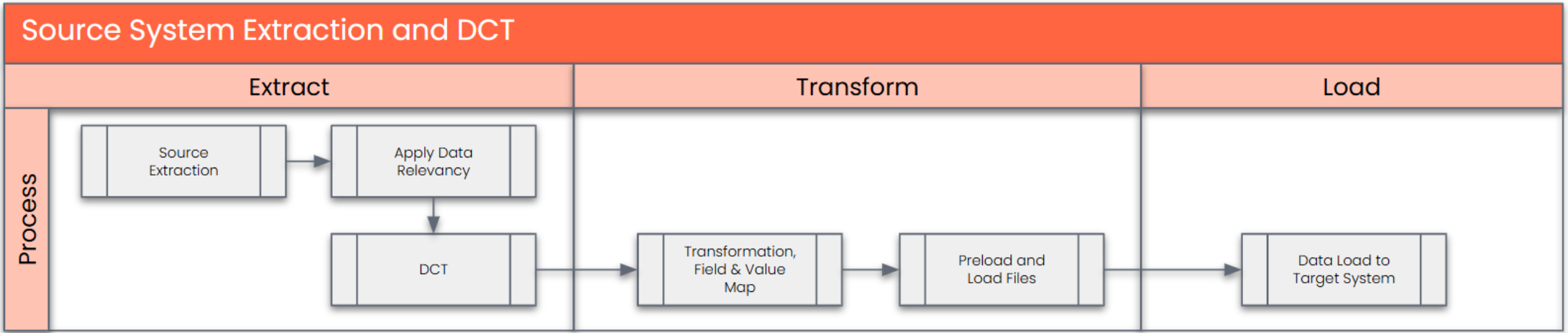
The high-level process is represented by the diagram below:
Data Privacy and Sensitivity
Not ApplicableExtraction
The agreed Relevancy criteria is applied to the extracted records to identify the records that are applicable for the Target loads
Extraction Run Sheet
| Req # | Requirement Description | Team Responsible |
|---|---|---|
1 | Extract data from source system based on relevancy rule | SyWay Data Team |
2 | Google Sheet report pre-populated with PF2 and WP2 information to be generated based on relevancy criteria. | SyWay Data Team |
Selection Screen
| Selection Ref Screen | Parameter Name | Selection Type | Requirement | Value to be entered/set |
|---|---|---|---|---|
| Not Applicable |
Data Collection Template (DCT)

| SAP Structure | SAP Field | Type | Length | Field Description | Importance | Rules |
| MARM - Alternative Unit of Measure 1:n | ||||||
| MARM | MATNR | CHAR | 18 | Material Number | mandatory for sheet | |
| MARM | MEINH | UNIT | 3 | Alternative Unit of Measure | mandatory for sheet | |
| MARM | UMREN | NUMC | 5 | Denominator for Conversion to Base Unit | mandatory for sheet | |
| MARM | UMREZ | NUMC | 5 | Numerator for Conversion to Base Unit | mandatory for sheet | |
| MARM | EAN11 | CHAR | 18 | GTIN (EAN/UPC) | ||
| MARM | NUMTP | CHAR | 2 | GTIN Category | ||
| MARM | LAENG | DEC | 15 (3 decimals) | Length | ||
| MARM | BREIT | DEC | 15 (3 decimals) | Width | ||
| MARM | HOEHE | DEC | 15 (3 decimals) | Height | ||
| MARM | MEABM | UNIT | 3 | Unit of Measure for Dimensions | ||
| MARM | BRGEW | DEC | 15 (3 decimals) | Gross Weight | ||
| MARM | GEWEI | UNIT | 3 | Weight Unit | ||
| MARM | VOLUM | DEC | 15 (3 decimals) | Volume | ||
| MARM | VOLEH | UNIT | 3 | Volume Unit | ||
| MARM | CAPAUSE | DEC | 3 (no decimals) | Capacity Usage | ||
| SAP Structure | SAP Field | Type | Length | Field Description | Importance | Rules |
| MEAN - Additional GTINs 1:n | ||||||
| MEAN | MATNR | CHAR | 18 | Product Number (Material Number) | mandatory for sheet | |
| MEAN | MEINH | UNIT | 3 | Alternative Unit of Measure | mandatory for sheet | |
| MEAN | EAN11 | CHAR | 18 | GTIN (EAN/UPC) | mandatory for sheet | |
| MEAN | EANTP | CHAR | 2 | GTIN Category | mandatory for sheet | |
| SAP Structure | SAP Field | Type | Length | Field Description | Importance | |
| MAKT - Material Descriptions (short/long material text per language) 1:n | ||||||
| MAKT | MATNR | CHAR | 18 | Material Number | mandatory for sheet | Product Number* A key that uniquely identifies the product. |
| MAKT | SPRAS | CHAR | 2 | Language Key | mandatory for sheet | Language Key* The language key indicates - the language in which texts are displayed, - the language in which you enter texts, - the language in which the system prints texts. |
| MAKT | MAKTX | CHAR | 40 | Product Description | mandatory for sheet | Product Description* Text that describes the product in more detail. Note: You can maintain additional descriptions (for languages other than those provided on the 'Basic Data' sheet). |
| SAP Structure | SAP Field | Type | Length | Field Description | Importance | |
| STXL - Long Text (Compressed Text Lines) | ||||||
STXH / STXL | MATNR | CHAR | 18 | Material Number | mandatory for sheet | Product Number* A key that uniquely identifies the product. |
| STXH / STXL | RELID | CHAR | 2 | Cluster ID (normally TX) | mandatory for sheet | |
| STXH / STXL | TDOBJECT | CHAR | 10 | Text object (e.g. MATERIAL, EINKBELEG, INFORECORD) | mandatory for sheet | |
| STXH / STXL | TDNAME | CHAR | 70 | Name of text (cluster key – usually material number or document key) | mandatory for sheet | |
| STXH / STXL | TDID | CHAR | 4 | Text ID (type of text, e.g. GRUN, BEST, etc.) | mandatory for sheet | |
| STXH / STXL | TDSPRAS | LANG | 1 | Language key | mandatory for sheet | |
| STXH / STXL | SRTF2 | INT2 | 5 | Sort field for teext lines (internal) | Technical – system-controlled, not to be filled via DCT | |
| STXH / STXL | CLUSTR | INT2 | 5 | Cluster length information (technical) | Technical – system-controlled, not to be filled via DCT | |
| STXH / STXL | CLUSTD | RAW | 255 | Compressed text data | Content – filled indirectly via text FM (READ_TEXT/SAVE_TEXT), not directly in DCT | |
Extraction Dependencies
| Item # | Step Description | Team Responsible |
|---|---|---|
1 | Loading Material Master Basic Data is required before Additional data is loaded | Cutover |
Transformation
The Target fields are mapped to the applicable Legacy field that will be its source, this is a 3-way activity involving the Business, Functional team and Data team. This identifies the transformation activity required to allow Syniti ADMM to make the data Target ready:
- Perform value mapping and data transformation rules.
- Legacy values are mapped to the to-be values (this could include a default value)
- Values are transformed according to the rules defined in Syniti ADMM
- Prepare target-ready data in the structure and format that is required for loading via prescribed Load Tool. This step also produces the load data ready for business to perform Pre-load Data Validation
Transformation Run Sheet
| Item # | Step Description | Team Responsible |
|---|---|---|
1 | Verify that data is extracted and merged. | Syniti/S2P |
2 | Transformation jobs are ready for execution. | Syniti |
Transformation Rules
| Rule # | Source system | Source Table | Source Field | Source Description | Target System | Target Table | Target Field | Target Description | Transformation Logic |
|---|---|---|---|---|---|---|---|---|---|
| 001 | PF2/WP2 | MARM | MATNR | Material Number | S/4HANA | MARM | MATNR | Material Number | Generate new Material number in Target System and maintain mapping in reference table |
| 002 | PF2/WP2 | MARM | MEINH | Alternative Unit of Measure (ISO Format) | S/4HANA | MARM | MEINH | Alternative Unit of Measure (ISO Format) | Copy from source to target system |
| 003 | PF2/WP2 | MARM | UMREN | Denominator for Conversion to Base Unit | S/4HANA | MARM | UMREN | Denominator for Conversion to Base Unit | Copy from source to target system |
| 004 | PF2/WP2 | MARM | UMREZ | Numerator for Conversion to Base Unit | S/4HANA | MARM | UMREZ | Numerator for Conversion to Base Unit | Copy from source to target system |
| 005 | PF2/WP2 | MARM | EAN11 | GTIN | S/4HANA | MARM | EAN11 | GTIN | Copy from source to target system |
| 006 | PF2/WP2 | MARM | NUMTP | GTIN Category | S/4HANA | MARM | NUMTP | GTIN Category | Copy from source to target system |
| 007 | PF2/WP2 | MARM | LAENG | Length | S/4HANA | MARM | LAENG | Length | Copy from source to target system |
| 008 | PF2/WP2 | MARM | BREIT | Width | S/4HANA | MARM | BREIT | Width | Copy from source to target system |
| 009 | PF2/WP2 | MARM | HOEHE | Height | S/4HANA | MARM | HOEHE | Height | Copy from source to target system |
| 010 | PF2/WP2 | MARM | MEABM | Unit for Length/Width/Height(ISO Format) | S/4HANA | MARM | MEABM | Unit for Length/Width/Height(ISO Format) | Copy from source to target system |
| 011 | PF2/WP2 | MARM | BRGEW | Gross Weight | S/4HANA | MARM | BRGEW | Gross Weight | Copy from source to target system |
| 012 | PF2/WP2 | MARM | GEWEI | Unit of Weight (ISO Format) | S/4HANA | MARM | GEWEI | Unit of Weight (ISO Format) | Copy from source to target system |
| 013 | PF2/WP2 | MARM | VOLUM | Volume | S/4HANA | MARM | VOLUM | Volume | Copy from source to target system |
| 014 | PF2/WP2 | MARM | VOLEH | Volume Unit (ISO Format) | S/4HANA | MARM | VOLEH | Volume Unit (ISO Format) | Copy from source to target system |
| 015 | PF2/WP2 | MARM | MAKTX | Description | S/4HANA | MARM | MAKTX | Description | Copy additional descriptions in multiple languages from source to target system |
| 016 | PF2/WP2 | MARM | SPRAS | Language Key | S/4HANA | MARM | SPRAS | Language Key | Copy from source to target system |
Transformation Mapping
| Mapping Table Name | Mapping Table Description |
|---|---|
| Material | XREF |
Transformation Dependencies
List the steps that need to occur before transformation can commence| Item # | Step Description | Team Responsible |
|---|---|---|
Not Applicable |
Pre-Load Validation
Project Team
Completeness
| Task | Action |
|---|---|
Verify Record Count | The number of records presented after relevancy checks and validation needs to be correct compared to the staged data in Migrate. |
Accuracy
| Task | Action |
|---|---|
Conversion Accuracy | Data team to verify that the data staged in the preload tables are correct in terms of the mapping rules. This will be done via Syniti DSP reports. |
Business
Completeness
| Task | Action |
|---|---|
Count and Completeness check | All fields required as per mapping template rules must be completed. Validity reports checking each field in ADMM must be built to help check. |
Accuracy
| Task | Action |
|---|---|
Conversion Accuracy | Business team to verify that the data staged in the preload tables are correct in terms of the mapping rules. This will be done via Syniti ADMM reports/SAP reports |
Load
The load process includes:
- Execute the automated data load into target system using load tool or product the load file if the load must be done manually
- Once the data is loaded to the target system, it will be extracted and prepared for Post Load Data Validation
Load Run Sheet
| Item # | Step Description | Team Responsible |
|---|---|---|
1 | Verify data extracted | Data Specialist/Functional - S2P |
2 | Verify data merged | Data Specialist/Functional - S2P |
3 | Verify Material XREF is ready | Data Specialist/Functional - S2P |
4 | Release - Load signoff and go-ahead by Functional/Data Owner | Functional/Data Owner - S2P |
5 | Approval to stage/Pre-stage steps | Functional/Data Owner - S2P |
6 | Extraction from source | Developer - Syniti or Data Specialist - S2P |
7 | Extraction from S4 where needed | Developer - Syniti or Data Specialist - S2P |
8 | Stage data for transformations | Developer - Syniti or Data Specialist - S2P |
9 | Run transforms | Developer - Syniti or Data Specialist - S2P |
10 | Execute pre-load report | Data Specialist/Functional - S2P |
11 | Validate preload report - release | Data Specialist/Functional - S2P |
12 | Prepare and simulate | Data Specialist - S2P |
13 | Pre-load verification and approval to load | Functional/Data Owner - S2P |
14 | Load to S4 | Data Specialist - S2P |
15 | Complete Jira steps, Volumes and Timings | All - where applicable |
16 | Execute post-load report | Developer - Syniti or Data Specialist - S2P |
17 | Post-load report verification/validation | Data Specialist/Functional/Data Owner - S2P |
18 | Object load completion approval | Data Owner - S2P |
Load Phase and Dependencies
Configuration
| Item # | Configuration Item |
|---|---|
| Not Applicable |
Conversion Objects
| Object # | Preceding Object Conversion Approach |
|---|---|
| 1 | Material Master - Basic View (2019) |
Error Handling
| Error Type | Error Description | Action Taken |
|---|---|---|
| Data | Language errors | Fix incorrect data |
| Data | Duplicates | Fix incorrect data |
Post-Load Validation
Project Team
Post-Load Step
Step Description | Team Responsible |
Execute post-load report | Developer - Syniti or Data Specialist - S2P |
Post-load report verification/validation | Data Specialist/Functional/Data Owner - S2P |
Object load completion approval | Data Owner - S2P |
Completeness
Completeness
| Task | Action |
|---|---|
Execute post-load report | Developer - Syniti or Data Specialist - S2P |
Post-load report verification/validation | Data Specialist/Functional/Data Owner - S2P |
Object load completion approval | Data Owner - S2P |
Accuracy
| Task | Action |
|---|---|
Verify count | The number of records presented in the preload needs to be compared to the post-load. – Syniti report |
Field by field check | Compare source data to target data. |
Business
Completeness
| Task | Action |
|---|---|
Verify Count | The number of records presented in the preload needs to be compared to the post-load Syniti report. |
Missing data | Check missing data which was supposed to be loaded. |
Reconciliation | Participate in Post-load walkthroughs. |
Accuracy
| Task | Action |
|---|---|
Conversion Accuracy | Business team to verify that the data staged in the preload tables are correct in terms of the mapping rules. This will be done via Syniti/SAP reports. |
Key Assumptions
- Master Data Standard is up to date as on the date of documenting this conversion approach and data load.
- Materials - Additional Data is in scope based on data design and any exception requested by business.