| Status | |
|---|---|
| Owner | |
| Stakeholders | RAI-ext, Praveen BAVISKAR-ext, Amit |
| Jira Request ID | |
| Jira Development ID |
High- Level Specification
| Parameter | Value |
|---|---|
| Application System | Icertis |
| Business Process Reference | 03.03.04.01. Create Agreement/Amendment |
Functional Overview
The system enforces a mandatory approval workflow for Bid Waiver forms prior to initiating the Delegation of Authority (DOA) approval process for any Master Agreement, Sub-Agreement, or standalone agreement. This requirement ensures that Contracting Specialists cannot proceed with agreement approvals unless the Bid Waiver has been formally approved. By embedding this control, the process aligns with the Bid Waiver Policy, mitigates operational risk, and upholds audit integrity by preventing unauthorized agreements from advancing in the approval chain.
Scope and Objectives
This custom development focuses on enforcing Bid Waiver compliance within the agreement approval workflow. Specifically, it introduces page-level and logic-based enhancements to ensure that when the "Competitive Sourced" metadata field is marked as No and Contract Value is more then 100k,, an approved Bid Waiver form is required before an agreement can be sent for Delegation of Authority (DOA) approval.
The scope includes:
Page-Level Customization:
Implementing an alert on the agreement page when the user clicks “Send for Approval,” guiding them to obtain Bid Waiver approval first.
Enforcement Logic:
Validating the status of the associated Bid Waiver form. The system will block the approval process unless the form is marked as Approved.
Conditional Enforcement:
The Bid Waiver requirement is enforced only when metadata field "Competitive Sourced" = No and Contract Value is more then 100K Euro. If metadata field "Competitive Sourced" = Yes, no restrictions or alerts are applied.
Language:
Only English language is in scope of this FS for the alert message.
Contract Types:
Only applicable for Master Agreement, Sub-Agreement and Standalone Agreement (excluding amendments).
Objectives
- Ensure compliance with Bid Waiver policy by preventing agreements from being sent for approval without prior authorization.
- Provide clear and actionable guidance to Contracting Specialists through user-friendly alerts.
- Reduce operational risk and maintain audit integrity by embedding approval checks directly into the workflow.
- Improve user experience by automating enforcement based on metadata conditions, minimizing manual oversight.
Process Flow Diagram

Only applicable for Master Agreement, Sub-Agreement and Standalone Agreement (excluding amendments).
Step | Description | Comment |
|---|---|---|
| 1 | The user drafts the agreement according to the requirements and selects in the metadata whether the agreement involves Competitive Sourced. | The metadata field “Competitive Sourced” must be manually entered by the user based on the sourcing event. Using the System Configurable Rule, if Competitive Sourced = No and the Contract Value exceeds 100k, the Bid Waiver Form association is made mandatory by the system. In this case user must follow step 2 and step 3. In case the Agreement metadata field "Competitive Sourced" = Yes, user does not need a Bid Waiver Form and skip step 2 and step 3. |
| 2 | The user creates an association record for the Bid Waiver form manually and fills in all required metadata (as defined in the configuration workbook). | Only is case of metadata field "Competitive Sourced" = No & Contract Value is more then 100k, The user can proceed drafting the Agreement at any point of time, while processing the Bid Waiver Form in parallel. |
| 3 | The user or process follows the Bid Waiver form approval workflow as outlined in the configuration workbook. | Once the Bid Waiver form is created. User can send the Bid waiver form for approval. |
| 4 | Once the agreement is ready for approval, the user clicks on "Send for Approval" for the Agreement. | All approvals are following the configuration workbook (either manual added via add to team or automated through rules). As agreement approvals might have different approvers compared to the Bid Waiver Form association approvals. |
| 5 | Upon clicking "Send for Approval", the system checks whether the Bid Waiver form is created and in Approved status. | If the Bid Waiver form is created and in Approved status the system he system proceed with step 7. If the Bid Waiver form is created and in Draft Status then the system proceed with step 6. |
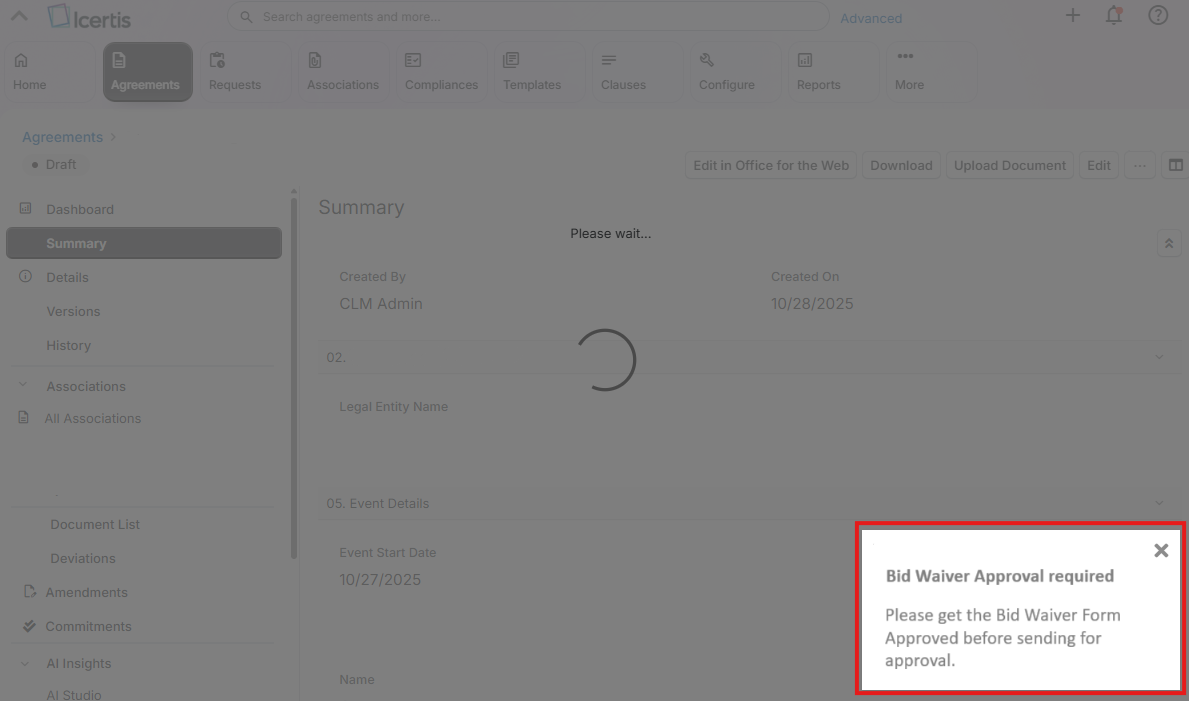
| 6 | If the Bid Waiver form is created and in draft status the system displays a message: “Please get the Bid Waiver Form Approved before sending for approval.” | |
| 7 | If the Bid Waiver form is created and in Approved status the system proceeds with the approval workflow and subsequent steps. |
Assumptions
- The Bid Waiver form functionality utilizes out-of-the-box configurations, as defined in the configuration workbook. No customizations are applied to the form itself beyond standard metadata and workflow settings.
- Users involved in drafting agreements and managing Bid Waiver forms have the appropriate access rights and roles assigned, in accordance with the configuration workbook. This includes permissions to create, edit, and submit Bid Waiver forms, as well as to initiate the agreement approval process.
- The metadata field "Competitive Sourced" is correctly configured and available on the agreement record, and its values ("Yes" or "No") are reliably used to trigger enforcement logic.
- Standard approach of translations will be followed.
Dependencies
Not Applicable
Security, Integrity and Controls
Not Applicable - Standard out of the box security, integrity and controls are used.
Configuration Requirements
Only applicable for Master Agreement, Sub-Agreement and Standalone Agreement (excluding amendments).
- Competitive Sourced: Must be configured as a metadata attribute on the agreement, per the configuration workbook.
- Bid Waiver Association: Agreements must support linking to a Bid Waiver form, as defined in the configuration workbook.
- Bid Waiver Approval Flow: The approval workflow for Bid Waiver forms must follow the stages and roles outlined in the configuration workbook.
- Access and Permissions: Users must have the correct roles and permissions to manage Bid Waiver forms and initiate agreement approvals, as specified in the configuration workbook.
Language Requirements
The standard String ResourceKeys have to be used. This ensured that when any translations are needed, the out of the box functionality of Icertis can be used to translate the User Interface message at any point of time / release. Assuming the standard approach will be followed.
Special Requirements
Not Applicable
Design Rationale
The design ensures that a Bid Waiver form is approved prior to submitting any Master Agreement, Sub-Agreement, or standalone agreement for Delegation of Authority (DOA) approval. This requirement is critical for maintaining compliance with the Bid Waiver Policy and mitigating operational risks. By enforcing this prerequisite, the process prevents agreements from advancing without the necessary prior authorization, thereby safeguarding audit integrity and ensuring adherence to organizational governance standards.
At the time of writing (November 20, 2025), the out-of-the-box functionality in Icertis does not support this requirement. Additional capabilities, such as the Icertis Reusable Library (RL), were evaluated; however, RL only supports peer-to-peer relationships (e.g., Master Agreement and Sub-Agreement) and does not accommodate parent-child associations (e.g., Master Agreement and Bid Waiver Form). As a result, RL cannot fully meet the requirement for enforcing the Bid Waiver approval dependency.
Functional Requirements
- When the Competitive Sourced metadata field is set to No, the system must enforce that a Bid Waiver form is both associated and approved before allowing the agreement to be sent for approval.
- Only applicable for Master Agreement, Sub-Agreement and Standalone Agreement (excluding amendments).
- The system must also provide a clear alert to guide Contracting Specialists when this condition is not met.
- Alert message = "Please get the Bid Waiver Form Approved before sending for approval.".
Recommended UI Technology
Standard Icertis
Application Screen
Wireframe or Mock-Up
When a user attempts to send the agreement for approval (as outlined in step 4 of the process flow), the system should validate whether Agreement metadata field "Competitive Sourced" is set to 'No' (as outlined in step 5 of the process flow).
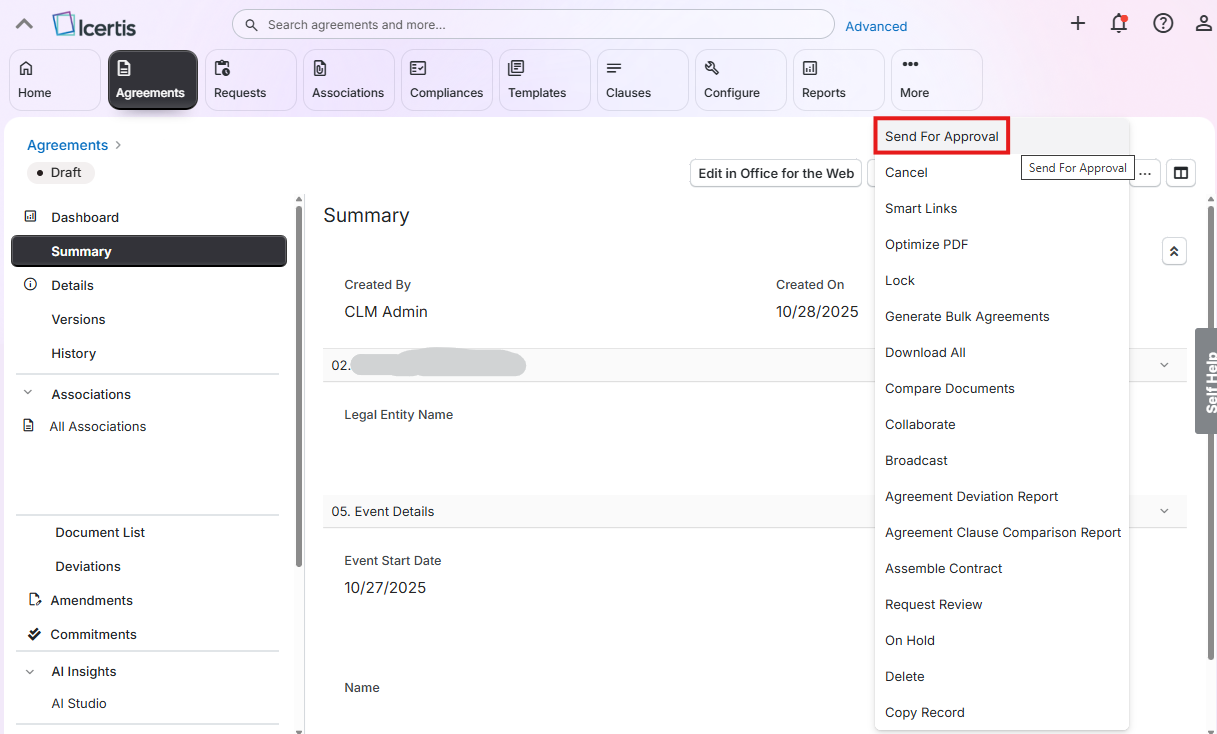
If this condition is met, the system must verify that the Bid Waiver Form has been created and approved, as outlined in step 6 of the process flow.
If the Bid Waiver Form is missing or not approved, the system should display a contextual message to inform the user and prevent further action (as outlined in step 7 of the process flow).
Screen Behavior
Not Applicable - Standard behavior applied.
Screen Navigation
Standard behavior applies. Action buttons such as "Send for Approval" are available based on role-action mappings defined in the configuration workbook. The trigger for Bid Waiver validation is initiated when the user clicks "Send for Approval", as shown in the mockup below.
Data Integration
Not Applicable
Custom Tables
Not Applicable
Master data
Not Applicable
Configuration table
Not Applicable
Tooltips
Not Applicable
Front-End
Standard Icertis
Mobile Services
Not Applicable
Authentication & Authorization
Not Applicable - Standard Authentication of Icertis
Accessibility
Not Applicable - Standard configuration as per configuration workbook
Volumetrics
All agreement created have to follow the requirement.
Performance Consideration
Not Applicable
Error Handling
Not Applicable
Testing
How to Test
Positive Flow – Bid Waiver created and approved:
- Draft Agreement with metadata field "Competitive Sourced" = No
- Create Bid Waiver Form and send Form for Approval
- Approve Bid Waiver Form
- Send Agreement for Approval
Positive Flow – Bid Waiver not applicable:
- Draft Agreement with metadata field "Competitive Sourced" = Yes
- Skip Bid Waiver Form Creation and send Agreement for Approval
Validation – No Bid Waiver Form Created:
- Draft Agreement with metadata field "Competitive Sourced" = No
- Skip Bid Waiver Form Creation and send Agreement for Approval
Validation – Bid Waiver Form Not Approved:
- Draft Agreement with metadata field "Competitive Sourced" = No
- Create Bid Waiver Form and send Form for Approval
- Approver ignored Bid Waiver form Approval
- Send Agreement for Approval
Validation – Bid Waiver Form Rejected:
- Draft Agreement with metadata field "Competitive Sourced" = No
- Create Bid Waiver Form and send Form for Approval
- Approver Rejects Bid Waiver Form
- Send Agreement for Approval
Validation - Bid Waiver not applicable for Amendments:
- Draft Amendment
- Send Amendment for approval
Test Conditions and Expected Results
List all test conditions – this will then be used as a basis to execute both the technical and functional unit tests
| ID | Condition | Expected Result |
|---|---|---|
| Positive Flow – Bid Waiver created and approved | ||
| 1 | User drafts the agreement and sets metadata field "Competitive Sourced" to "No" & Contract Value is more then 100k | Agreement record created; output document generated. |
| 2 | User creates and associates a Bid Waiver form. | Bid Waiver form created and submitted for approval. |
| 3 | Approver reviews and approves the Bid Waiver form. | Bid Waiver Form status = Approved. |
| 4 | User clicks "Send for Approval". | Agreement proceeds to approval workflow. |
| Positive Flow – Bid Waiver not applicable | ||
| 5 | User drafts the agreement and sets metadata field "Competitive Sourced" to "Yes". | Agreement record created; output document generated. |
| 6 | User clicks "Send for Approval" without creating a Bid Waiver form. | Agreement proceeds to approval workflow. |
| Validation – No Bid Waiver Form Created | ||
| 7 | User drafts the agreement and sets metadata field "Competitive Sourced" to "No" & Contract Value is more then 100k. | Agreement record created; output document generated. |
| 8 | User clicks "Send for Approval" without creating a Bid Waiver form. | System displays alert: |
| Validation – Bid Waiver Form Not Approved | ||
| 9 | User drafts the agreement and sets metadata field "Competitive Sourced" to "No" & Contract Value is more then 100k. | Agreement record created; output document generated. |
| 10 | User creates and associates a Bid Waiver form. | Bid Waiver form created and submitted for approval. |
| 11 | Approver ignored approval and remains in "Pending for Approval" status. | Bid Waiver not approved. |
| 12 | User clicks "Send for Approval" without creating a Bid Waiver form. | System displays alert: |
| Validation – Bid Waiver Form Rejected | ||
| 13 | User drafts the agreement and sets metadata field "Competitive Sourced" to "No" & Contract Value is more then 100k | Agreement record created; output document generated. |
| 14 | User creates and associates a Bid Waiver form. | Bid Waiver form created and submitted for approval. |
| 15 | Approver rejects the form. | Bid Waiver status = Draft. |
| 16 | User clicks "Send for Approval" without creating a Bid Waiver form. | System displays alert: |
| Validation - Bid Waiver not applicable for Amendments | ||
| 17 | User draft an amendment | During creation, user is not able to see the attribute "Competitive Sourced". After creation, user is not able to see neither create the association "Bid Waiver Form". |
| 18 | User clicks "Send for Approval" without | Amendment proceeds to approval workflow. |
Test Considerations/Dependencies
Not Applicable
Other Information
To support UI customization for the Bid Waiver Form, an internal API call is used to retrieve relevant form data during workflow execution. This is implemented via the Workflow Action Hook, which allows the UI to respond to workflow events by fetching and displaying accurate form details. Integrating the API in this hook ensures the form reflects real-time data and is Upgrade-safe.
- get /v{version}/agreements/{contractTypeName}/{agreementId}/associations/{associationName}
- example: /v{version}/agreements/ICMMasterAgreement/1f37d364-e674-47b6-8d45-79c093e40e8e/associations/ICMBidWaiverForm
Below example payload to identify the status:
{
"Messages": null,
"Data": [
{
"ICMParentContractType": "",
"FilePath": {
"Content": null,
"Name": "ICMBidWaiverForm_7fb7570f-dd29-4d9b-9d6f-d41d8204d659_1",
"Extension": "DOCX",
"Path": "default:\\agreements\\ICMCertificates_7fb7570f-dd29-4d9b-9d6f-d41d8204d659_1.Docx"
},
"ICMTemplate": {
"Name": "",
"Version": "",
"Extensions": null
},
"IsLocked": false,
"LockedByUser": "",
"LockedByUserId": "",
"ICMCertificateExpiryDate": null,
"ICMCertificateCategory": "Insurance",
"ICMAgreementCode": "ICMBidWaiverForm_10",
"ICMExternalId": "",
"Name": "Test template",
"Status": "Draft",
"CreatedBy": "wytse.bezemer-ext@syensqo.com",
"CreatedDate": "2025-10-28T17:04:16",
"ModifiedBy": "wytse.bezemer-ext@syensqo.com",
"ModifiedDate": "2025-10-28T17:04:16",
"LinkageType": null,
"SysId": "7fb7570f-dd29-4d9b-9d6f-d41d8204d659",
"TypeOfContract": "AssociatedDocument",
"ContractTypeName": "ICMBidWaiverForm",
"OrgPath": "/syesnqo/procurement/procurement contracts"
}
],
"HasMoreData": false,
"PagingData": {
"RowsPerPage": 100,
"TotalNumberOfPages": -1,
"PageNumber": 1,
"TotalRowCount": -1
}
}
Development Details
Package
| Package Name | Parent Package |
|---|---|
UI Implementation
UI Type | UI Name | Fiori Catalogue | Design Rationale Reference |
|---|---|---|---|
API Implementation
| API Type | API Name | Purpose / High Level Logic | API Product | Design Rationale Reference |
|---|---|---|---|---|
Other Development Objects
| Object Type | Object Name | Purpose/High Level Logic | Design Rationale Reference |
|---|---|---|---|
Appendix
See also
Insert links and references to other documents which are relevant when trying to understand this decision and its implications. Other decisions are often impacted, so it's good to list them here with links. Attachments are also possible but dangerous as they are static documents and not updated by their authors.