| Status | |
|---|---|
| Owner | VAN AARDE-ext, Tonya |
| Stakeholders | |
| Jira Request ID | |
| Jira Development ID |
High- Level Specification
| Parameter | Value |
|---|---|
| Application System | Application System (Source)S/4Hana ROW, S/4Hana China |
| Business Process Reference | 02.04.02.01. Manage Standard Sales Order |
Functional Overview
1. Business Requirement
To ensure robust and stable integration between Sales & Distribution (SD) and Transportation Management (TM), the business requires control over changes to the Shipping Condition once Transportation planning has commenced.
When a Freight Unit (FU) has already been planned and assigned to a Freight Order or Freight Booking, changing the Shipping Condition— to anyting else (for example Ocean to Air)—creates a mismatch between the sales document and the transportation execution. This can result in automatic de-assignment of the Freight Unit, leading to disruption of downstream logistics processes, replanning efforts, and potential delivery delays.
This WRICEF introduces controlled validation logic to prevent Shipping Condition changes to any other shipping condition when the related Freight Unit is already planned.
The solution supports:
Protection of TM planning integrity
Prevention of Freight Unit de-assignment
Consistent SD–TM integration behavior
Controlled flexibility based on Freight Unit planning status
Scope and Objectives
This WRICEF covers a targeted enhancement applicable to:
Sales Orders (Document Category C)
Change processing only
The enhancement applies at sales order header level, evaluated against item-level Freight Unit planning status, and is enforced during Save.
Applications in Scope
SAP Fiori
- Manage Sales Orders – Version 2
- Change Sales Orders
Why Standard SAP Is Not Sufficient
SAP standard does not include a validation mechanism to:
Check Freight Unit planning status in TM when a Shipping Condition is changed in Sales Orders
Prevent mode-of-transport mismatches once a Freight Unit is Planned or Partially Planned
Distinguish between allowed and disallowed Shipping Condition changes based on TM execution status
Without such validation:
Users can change the Shipping Condition to any other shipping condition after TM planning has occurred
Freight Units may be automatically de-assigned due to transport mode inconsistencies
Freight Orders or Freight Bookings can be disrupted or invalidated
Downstream logistics processes require manual correction and replanning
Limited Control in SAP Fiori Sales Order Processing
In the Manage Sales Orders – Version 2 Fiori app:
Shipping Condition changes are allowed without awareness of TM planning status
No standard error handling exists to block incompatible changes at Save
Users receive no immediate feedback on the impact of changes to TM execution
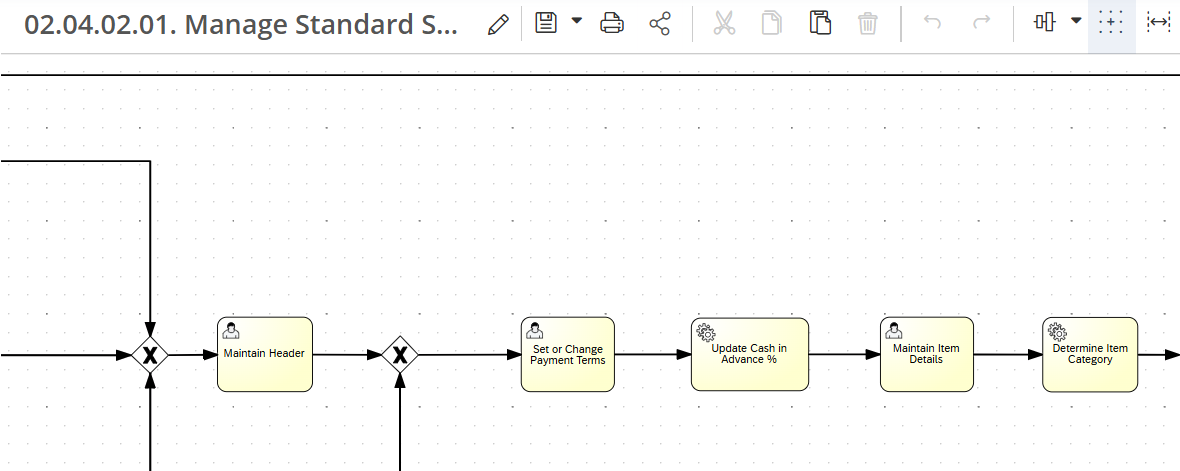
The scope of this enhancement is depicted in process step Maintain item details below. For the full Signavio, please go to 02.04.02.01. Manage Standard Sales Order
Step | Description | Comment |
|---|---|---|
| 1. | Create sales order | Shipping condition is 01 - ocean. |
| 2. | Change Sales order | Change sales order with shipping condition for ocean (01) to air (03) or any other condition. |
| 3. | Freight Unit is created and linked to the order | Freight Until status is set to planned. |
| 4. | Save Sales Order | The system should not allow the change and issue error message. |
Assumptions
Sales Orders are integrated with SAP Transportation Management (TM) and generate Freight Units (FUs) as part of standard SD–TM integration.
Freight Unit planning status maintained in TM (
/SCMTMS/D_TORROT-PLAN_STATUS_ROOT) is considered the single source of truth for determining whether Transportation planning has commenced.The Shipping Condition field (
VBAK-VSBED) is used consistently to derive the mode of transport for TM planning.The restriction applies only when a Shipping Condition change would result in a mode-of-transport conflict with an already Planned or Partially Planned Freight Unit.
When a Freight Unit is in Not Planned (“01”) status, the system assumes that no TM execution commitments exist and Shipping Condition changes may proceed.
The validation logic assumes a direct and reliable link between Sales Order items and Freight Units via standard TM integration tables.
- Error handling is implemented as a hard validation (blocking error) to prevent inconsistent data from being saved.
Dependencies
Not Applicable.
Security, Integrity and Controls
The enhancement will follow the SAP standard security and authorization framework.
The authorization to maintain these this field should be included in the Customer Representative Role as part of the Manage Sales Orders v2 - F3893, VA02 Change Sales order.
Configuration Requirements
Not Applicable
Language Requirements
Not Applicable
Special Requirements
Not Applicable
Design Rationale
Functional Requirements
Shipping Condition Change Restriction
Applicability
The restriction requirements apply to sales document header changes for:
Sales Orders (Document Category C)
The validation behavior shall be enforced in:
SAP Fiori – Manage Sales Orders – Version 2 (F3893)
1. Shipping Condition Field (VBAK-VSBED)
Field Usage
The system shall use the standard SAP Shipping Condition field (VBAK-VSBED) to derive the Mode of Transport for downstream Transportation Management (TM) planning.
2. Freight Unit Planning Status Evaluation
TM Integration Dependency
The system shall evaluate the Freight Unit (FU) planning status in SAP Transportation Management before allowing certain Shipping Condition changes.
TM Tables in Scope
Sales Order Item ↔ Freight Unit link:
/SCMTMS/D_TORITEFreight Unit Root:
/SCMTMS/D_TORROTPlanning Status Field:
/SCMTMS/D_TORROT-PLAN_STATUS_ROOT
Relevant Planning Status Values
| Value | Description |
|---|---|
| 01 | Not Planned |
| 02 | Partially Planned |
| 03 | Planned |
Shipping Condition Restriction Logic
Standard Field Usage
The system shall restrict changes to the Shipping Condition (VBAK-VSBED) based on the Freight Unit planning status in TM.
Restriction Logic
When a user attempts to change the Shipping Condition, the system shall apply the following rules:
Restricted Scenario
The system shall prevent saving the Sales Order if all of the following conditions are met:
Existing Shipping Condition = Any allowed value for example (Ocean (01))
New Shipping Condition = anything other allowed value
A Freight Unit exists for at least one Sales Order item
Freight Unit Planning Status is:
Planned (“03”), or
Partially Planned (“02”)
Allowed Scenarios
The system shall allow the Sales Order to be saved when:
Freight Unit Planning Status = Not Planned (“01”)
No Freight Unit exists for the Sales Order
Restriction Lift Logic
Applicability
The restriction shall be dynamically lifted based on the Freight Unit planning state.
Restriction Lift Rules
If the Freight Unit Planning Status changes to:
Not Planned (“01”)
Then:
The Shipping Condition change from Ocean → any other value shall be permitted
The Sales Order may be saved successfully
Error Handling
Blocking Behavior
If the restriction conditions are met, the system shall:
Prevent the Sales Order from being saved
Error Messaging
The system shall display a clear and meaningful error message indicating that:
The Shipping Condition change from Ocean to any other condition is not permitted
The related Freight Unit is already Planned or Partially Planned in Transportation Management
Example (illustrative):
“Shipping Condition change from Ocean to Air is not permitted. Related Freight Unit is already planned in Transportation Management.”
Proposed Technology to Use
An implementation of BADI is required and put a validation in SD_SLS_CHECK_HEAD / SD_SLS_CHECK_BEFORE_SAVE to check, before saving a Sales Document, that when the Route Type is OCEAN, the associated Freight Unit Planning Status meets the required condition suggested below; otherwise the system should block the save with an appropriate message.
Data Source Considerations
| Table | Field Name | Comments/Calculation/Field Manipulation |
|---|---|---|
| VBAK | VSBED | Shipping Condition |
| SCMTMS | D_TORITE | Sales order item - Freight Unit link |
| SCMTMS | D_TORROT-PLAN_STATUS_ROOT | Planning status field |
Data Validation Considerations
Not Required
| Table | Field Name | Comments/Calculation/Field Manipulation |
|---|---|---|
Custom Tables
Not Required
Master Data
<Title Custom Table 1>
<Include an overview of the table and what it’s used for>
| Field | Description | Data Type/Length | Validation rule/ Value Help |
|---|---|---|---|
Configuration Table
Title Configuration Table 1
Include an overview of the table and what it’s used for
| Field | Description | Data Type/Length | Validation rule/ Value Help |
|---|---|---|---|
Selection Screen Enhancement
This section will give the details on the selection screen parameters, parameter type and whether it’s obligatory or not. This section can be used to define the Import Export parameters for Function Module or User Exit or Screens. Can be deleted if not needed.
| Field Name | Description | Select: Option or Parameter Check box or Radio button Import or Export | Data Type/Length | Default Value/ Validation rule/ Value Help | Selection Logic |
|---|---|---|---|---|---|
Processing Logic
Shipping Condition Change Restriction (Sales Order Header)
Applicability
The restriction applies to:
Sales Orders (Document Category C)
Header-level changes to Shipping Condition (VBAK-VSBED)
Enforced in:
SAP Fiori – Manage Sales Orders – Version 2 (F3893)
1. Standard Field Usage
The system shall use the standard SAP field:
Shipping Condition (VBAK-VSBED)
This field is used to derive the Mode of Transport for downstream Transportation Management (TM) planning.
The system shall restrict changes to VBAK-VSBED based on the related Freight Unit planning status in TM.
2. TM Integration Dependency
When a Shipping Condition change is attempted, the system shall:
Identify Freight Units linked to the Sales Order items via:
/SCMTMS/D_TORITE (Sales Order Item ↔ Freight Unit link)
Read the Freight Unit root record:
/SCMTMS/D_TORROT
Evaluate Planning Status field:
/SCMTMS/D_TORROT-PLAN_STATUS_ROOT
Planning Status values:
| Code | Meaning |
|---|---|
| 01 | Not Planned |
| 02 | Partially Planned |
| 03 | Planned |
Shipping Condition Restriction Logic
Step-by-step logic at Sales Order Save
FOR the Sales Order header being saved:
Read existing Shipping Condition = VSBED_old
Read new Shipping Condition = VSBED_new
Restricted Scenario (Ocean → Non-Ocean)
The system shall prevent saving the Sales Order if all of the following conditions are met:
Existing Shipping Condition = Ocean (01)
New Shipping Condition ≠ Ocean (01)
At least one Freight Unit exists for any Sales Order item
Freight Unit Planning Status is:
02 (Partially Planned), or
03 (Planned)
If all above conditions are met:
→ Prevent Sales Order save (transaction rollback)
→ Raise blocking error message
→ Set field focus to Shipping Condition (VBAK-VSBED)
Allowed Scenarios
The system shall allow the Sales Order to be saved when:
Freight Unit Planning Status = 01 (Not Planned)
ORNo Freight Unit exists for the Sales Order
Restriction Lift Logic
Applicability
The restriction shall be dynamically evaluated at each save attempt.
Restriction Lift Rules
If the Freight Unit Planning Status changes to:
01 (Not Planned)
Then:
The Shipping Condition change from Ocean (01) → any other value shall be permitted
The Sales Order may be saved successfully
This ensures the restriction is not permanent and responds dynamically to TM planning status.
Error Handling
Blocking Behavior
If the restriction conditions are met, the system shall:
Prevent the Sales Order from being saved
Display a blocking error message
Suggested Error Text
Shipping Condition cannot be changed from Ocean because Freight Unit planning has already started in Transportation Management (Status: Planned or Partially Planned).
Expected Outcomes by Scenario
| Existing | New | FU Exists | PLAN_STATUS | Result |
|---|---|---|---|---|
| Ocean | Air | Yes | 03 | ❌ Block |
| Ocean | Road | Yes | 02 | ❌ Block |
| Ocean | Air | Yes | 01 | ✅ Allow |
| Ocean | Air | No | N/A | ✅ Allow |
| Air | Road | Yes | 03 | ✅ Allow (not Ocean→Non-Ocean scenario) |
| Ocean | Ocean | Any | Any | ✅ Allow |
Volumetrics
Monthly average 124 Sales orders are changed from Ocean to Air on Legacy System.
Performance Considerations
The enhancement is expected to support concurrent updates by a maximum of two (2) users simultaneously.
These updates would occur on different sales orders and potentially across different Sales Organizations.
No mass processing, background jobs, or high-volume parallel processing is expected. Therefore, no additional performance optimization beyond standard SAP transaction handling is required.
Error Handling
Blocking Behavior
If the restriction conditions are met, the system shall:
Prevent the Sales Order from being saved
Error Messaging
The system shall display a clear and meaningful error message indicating that:
The Shipping Condition change from Ocean to any other condition is not permitted
The related Freight Unit is already Planned or Partially Planned in Transportation Management
Example (illustrative):
“Shipping Condition change from Ocean to Air is not permitted. Related Freight Unit is already planned in Transportation Management.”
Testing
How to Test
Please provide some guidance and/or test data to help the developer unit test the enhancement. Please include both positive and negative testing (to validate error situations handling). The developer will need to test repeatedly, so where appropriate provide instructions to reverse the actions performed so the test may be run again or explain how to create new input data to the test. The developer will need logons for test users representing the various roles within the approval process.
Test Conditions and Expected Results
| ID | Condition | Expected Result |
|---|---|---|
| TC-01 | Fiori F3893 (Change SO): Change Shipping Condition 01 (Ocean) → 03 (Air) and the related FU PLAN_STATUS_ROOT = 03 (Planned) | Save is blocked. Error message displayed. Shipping Condition remains unchanged. |
| TC-02 | Fiori F3893 (Change SO): Change Shipping Condition 01 (Ocean) → 03 (Air) and the related FU PLAN_STATUS_ROOT = 02 (Partially Planned) | Save is blocked. Error message displayed. Shipping Condition remains unchanged. |
| TC-03 | Fiori F3893 (Change SO): Change Shipping Condition 01 (Ocean) → 03 (Air) and the related FU PLAN_STATUS_ROOT = 01 (Not Planned) | Save succeeds. Shipping Condition updates to Air. |
| TC-04 | Fiori F3893 (Change SO): Change Shipping Condition 01 (Ocean) → 03 (Air) and no FU exists for the SO items | Save succeeds. Shipping Condition updates to Air. |
| TC-05 | Fiori F3893 (Change SO): Change Shipping Condition 01 (Ocean) → Road/Other non-Air (e.g., 02) while FU is Planned (03) | Save succeeds. Change is allowed (no restriction triggered). |
| TC-06 | Fiori F3893 (Change SO): SO has multiple items; at least one linked FU is Planned (03); user changes 01 (Ocean) → 03 (Air) | Save is blocked. Error message displayed (restriction triggered if any relevant FU is Planned/Partially Planned). |
| TC-07 | Fiori F3893 (Change SO): SO has multiple items; all linked FUs are Not Planned (01); user changes 01 (Ocean) → 03 (Air) | Save succeeds. Shipping Condition updates to Air. |
| TC-08 | SAP GUI VA02 (Change SO): Change Shipping Condition 01 (Ocean) → 03 (Air) and related FU is Planned (03) | Save is blocked with the same error-handling behavior as Fiori. Shipping Condition remains unchanged. |
| TC-09 | Fiori F3893 / VA02: Attempt to save the SO without changing Shipping Condition (remains Ocean) while FU is Planned/Partially Planned | Save succeeds. No validation triggered (since no Ocean→Air change occurred). |
Test Considerations/Dependencies
List any considerations essential for application test planning (e.g., test this before ABC along with DEF separate from GHI). If the development encompasses a user interface, explain how to test it. List any insights as to how this component could be tested the most efficiently.
Other Information
Development Details
Package
| Package Name | Parent Package |
|---|---|
Enhancement Implementation
| Enhancement Type | Standard Definition Name | Custom Implementation Name | Design Rationale Reference |
|---|---|---|---|
Other Development Objects
| Object Type | Object Name | Purpose/High Level Logic | Design Rationale Reference |
|---|---|---|---|
Appendix
Custom Authorization Group Naming Convention
This table is based on the Syensqo development standards document. It provides the naming conventions for authorization groups to associated with custom reports and tables to comply with security requirements.
ABAP | ZFI | ZMM | ZPS | ZCO | ZSD | ZBC | ZFI | ZCA |
|---|---|---|---|---|---|---|---|---|
| TABLES | ZFIT | ZMMT | ZPST | ZCOT | ZSDT | ZBCT | ZFIT | ZCAT |
See also
Insert links and references to other documents which are relevant when trying to understand this decision and its implications. Other decisions are often impacted, so it's good to list them here with links. Attachments are also possible but dangerous as they are static documents and not updated by their authors.
