| Status | |
|---|---|
| Owner | |
| Stakeholders |
Purpose
The purpose of this document is to define the conversion approach to create 1057 - QM Master Inspection Characteristics in S/4 HANA.
Master Inspection Characteristics are a fundamental element of SAP Quality Management (QM) used to define the parameters, specifications, and methods for quality inspections. MICs provide a standardized definition of what is to be inspected and how it should be measured, ensuring uniformity and consistency across inspection plans and quality processes. MICs can be maintained as Quantitative (numeric specifications such as measurement ranges and tolerances) or Qualitative (descriptive specifications such as defect classes or codes).
In SAP S/4HANA, the structure and usage of MICs remain consistent with SAP ECC, typically defined by key combinations such as plant, characteristic name, and characteristic type. MICs may include additional settings such as selected sets for qualitative characteristics, catalog assignments, default inspection methods, target values, upper and lower specification limits, and sampling procedures.
In SAP ECC, aside from the standard MIC structures, there may be additional configurations, such as plant-independent characteristics, characteristics linked to custom catalogs, or MICs with special control indicators and custom fields. Certain legacy systems may also include MICs with obsolete catalog references, inactive units of measure, or unused selected sets (pending MDS review), which must be validated before conversion.
This conversion aims to migrate active and relevant MIC records, along with their associated control indicators, selected sets, catalog assignments, default inspection methods, and specification limits, from existing ECC systems into S/4HANA. The migration will apply the required transformation logic using Syniti as the data migration and transformation platform. The converted records will be loaded into the target S/4HANA system using standard SAP mechanisms such as BAPIs (e.g., BAPI_INSPOPER_RECORDRESULTS for linking to inspection operations, or QS21 transaction for creation), IDOCs, or direct table loads where applicable, ensuring data integrity, compliance, and reusability across inspection plans.
This Conversion Specification does not include the WPX system (CUI Objects).
Conversion Scope
The scope of this document covers the approach for converting active Conversion Specification CNV-1057 Master Inspection Characteristic (MIC) from Legacy Source Systems into S/4HANA following the Master Inspection Characteristic Master Data Design Standard MDS-1057.
From the current landscape, MIC data exists in legacy quality management systems (e.g., PF2 and WP2). Harmonization and validation are required to ensure accurate and consolidated MIC data in S/4HANA. While PF2 and WP2 serve as source systems, extensive mapping and transformation logic will be applied to ensure clean, relevant, and standardized data is migrated.
Active MIC records that meet the Material Relevancy Criteria (aligned with valid Material Master Basic Data View, QM View, QM Inspection Plan and Master Recipe) and are used in valid inspection processes within the last four (4) years.
MICs without deletion flags, ensuring only valid and relevant characteristics are migrated.
MICs assigned to in-scope plants or inspection plans based on the To-Be Plant Mapping.
MICs linked to valid inspection types and usage (e.g., 01, 04, 09) to ensure functional integration with quality processes in the target system.
MICs with valid catalog assignments (e.g., defect class, code group, selected set) and valid control indicators.
MICs referenced in sampling procedures or inspection plans to ensure inspection process continuity in the target environment.
The data from legacy system excludes:
Inactive or obsolete MICs that are not used in inspection plans or linked processes within the last four (4) years.
MICs marked for deletion in the legacy system.
MICs assigned to plants that are out of scope, based on the To-Be Plant Mapping in Enterprise Structure Catalog worksheet "30. Plants"
Invalid or incomplete catalog assignments, missing required control indicators, or unsupported settings in S/4HANA.
Relevancy rule
- Material/Plant with history and active usage
Materials must be defined at both global level (MARA) and plant level (MARC) with valid status and assignment to active in-scope plants. Only materials with active QM View are considered relevant. In addition, QM View relevancy must aligned with Material Master Basic Views (CNV-2019) to ensure consistent dependency with MARA-level relevancy. Usage confirmation may also include inspection lots (QALS) within the last four (4) years where applicable. - Active Inspection Types
Only materials with at least one valid and active inspection type (e.g., 01, 02, 03, 04, 05, 06, 08, 10, 11, 12, 17) maintained inQMATand linked to relevant plants will be considered in scope. - Inspection Setup with Valid Usage
Inspection types must be relevant to in-scope Syensqo business processes (e.g., Goods Receipt, In-Process, Delivery). Materials without any active inspection usage in the last four (4) years will be excluded. Plant-Specific Validation
Materials with QM View will be checked against active plant mappings (To-Be Plant Definition) to ensure that only valid, active plants are considered for migration.
Material/Plant active with four (4) years inspection usage history ➝ validates active QM View (QMAT) with at least one valid inspection type (e.g., 01, 04, 09) ➝ confirms Control Key, Certificate Type, and Q-Score alignment with configuration ➝ ensures accurate integration with incoming inspection and quality processes in S/4HANA.
Plant Merging
Plants will be harmonized based on the To-Be Plant Mapping. As some legacy plants will be merged into one target plant, QM Views will be reassigned accordingly to ensure data consistency and alignment with the new plant structure in SAP S/4HANA.
| Source | Scope | Source Approx No. of Records | Target System | Target Approx No. of Records |
|---|---|---|---|---|
| PF2 & WP2 | Master Inspection Characteristic will be extracted from PF2 and WP2 | PF2 =10145 records WP2 = 41526 records | S/4 HANA | 11722 records |
Additional Information
Multi-language Requirement
Master Inspection Characteristic description will be maintained in English by default.
Since multi-language support is available for Master Inspection Characteristic, users logging in with a different language will see the description displayed in their logon language, provided that the corresponding language key has been maintained in the on Characteristic.
Document Management
Not applicable
Legal Requirement
Not applicable
Special Requirements
Not applicable
Target Design
The technical design of the target for this conversion approach.
| Table | Field | Data Element | Field Description | Data Type | Length | Requirement |
| QPMK | GUELTIGAB | GUELTIGAB | Valid-from Date | DATS | 8 | R |
| QPMK | LOEKZ | LOEKZ | Status of Master Record | CHAR | 1 | R (Migrate only status 1 and 2)
2 = Released 3 = Can No Longer Be Used 4 = Deletion Flag 5 = Archive |
| QPMK | MASSEINHSW | MASSEINHSW | Unit of Measurement in Which Quantitative Data Is Stored | UNIT | 3 | C |
| QPMK | MKMNR | QMERNKR | Master Inspection Characteristic (MIC) | CHAR | 18 | R |
| QPMK | SOLLWERT | SOLLWERT | Target Value for a Quantitative Characteristic | DEC | 15 | C |
| QPMK | STELLEN | STELLEN | Number of Places to the Right of a Decimal Point (Accuracy) | NUMC | 2 | C |
| QPMK | STEUERKZ | STEUERKZ | Cntrl Indicator String for Insp. Char./Master Insp. Char. | CHAR | 30 | R : Correspond to control data. System concatenate the data pulled from TQ27 customizing table or changed by the user --> Definition in Appendix tab |
| QPMK | TOLERANZOB | TOLERANZOB | Upper Specification Limit | DEC | 15 | C |
| QPMK | TOLERANZSL | TOLERANZSL | Tolerance Key | CHAR | 3 | C |
| QPMK | TOLERANZUN | TOLERANZUN | Lower Specification Limit | DEC | 15 | C |
| QPMK | VERSION | VERSION | MIC Version | NUMC | 6 | S |
| QPMK | WERKS | WERKS | Plant for Master Inspection Characteristic | CHAR | 4 | R |
| QPMK | ZAEHLER | QZAEHLER | Plant for Master Inspection Characteristic (Plant Specific MIC) | CHAR | 4 | R |
| QPMT | ZAEHLER | ZAEHLER | Plant for Master Inspection Characteristic | NUM | 4 | R |
| QPMT | MKMNR | MKMNR | Master Inspection Characteristic | CHAR | 8 | R |
| QPMT | VERSION | VERSION | Version Number of Inspection Method | CHAR | 6 | S |
| QPMT | SPRAS | SPRAS | Language Key | CHAR | 2 | R |
| QPMK | CODE9U | CODE9U | Defect Code for Rejection at Lower Specification Limit | CHAR | 8 | C If defect indicator and lower specification limit is set in QPMK-STEUERKZ and business required to maintain a defect catalog for the lower tolerance defect than this field need to be populated Value can be : Copy from the current system or a data enrichment or can be a blank. |
| QPMK | CODEGR9O | CODEGR9O | Defect Code Group for Rejection at Upper Tolerance | CHAR | 8 | C If defect indicator and upper specification limit is set in QPMK-STEUERKZ and business required to maintain a defect catalog for the upper tolerance defect than this field need to be populated Value can be : Copy from the current system or a data enrichment or can be a blank. |
| QPMK | CODE9O | CODE9O | Defect Code for Rejection at Upper Specification Limit | CHAR | 8 | C If defect indicator and upper specification limit is set in QPMK-STEUERKZ and business required to maintain a defect catalog for the upper tolerance defect than this field need to be populated Value can be : Copy from the current system or a data enrichment or can be a blank. |
| QPMK | ATINN | ATINN | Internal characteristic | NUMC | 10 | S |
| QPMK | EEANTVERF | EEANTVERF | Fraction Calculation | CHAR | 1 | NU |
| QPMK | CODEGRQUAL | CODEGRQUAL | Defect Code Group for General Rejection | CHAR | 8 | C If defect indicator and upper specification limit is set in QPMK-STEUERKZ and business required to maintain a defect catalog for the upper tolerance defect than this field need to be populated Value can be : Copy from the current system or a data enrichment or can be a blank. |
| QPMK | CODEQUAL | CODEQUAL | Defect Code for Rejection: General | CHAR | 8 | C If defect indicator and upper specification limit is set in QPMK-STEUERKZ and business required to maintain a defect catalog for the upper tolerance defect than this field need to be populated Value can be : Copy from the current system or a data enrichment or can be a blank. |
| QPMK | DUMMY10 | DUMMY10 | Spec ID | CHAR | 10 | C |
| QPMK | DUMMY20 | DUMMY20 | Spec | CHAR | 20 | C |
| QPMK | DUMMY40 | DUMMY40 | Text Line for Additional Information | CHAR | 40 | C |
| QPMK | SORTFELD | SORTFELD | Search Field | CHAR | 20 | R |
| QPMK | LSPER | LSPER | Data Record Is Used | CHAR | 1 | S |
| QPMK | KONSISTENT | KONSISTENT | Copy Model/Reference Characteristic | CHAR | 1 | R : Empty is a valid value |
| QPMK | AUTOR | AUTOR | Name of User Who Created the Data Record | CHAR | 12 | S |
| QPMK | DATES | DATES | System Date on Which Data Record Was Created | DATS | 8 | S |
| QPMK | AEAUT | AEAUT | Name of User Who Last Changed Data Record | CHAR | 12 | S |
| QPMK | DATAE | DATAE | System Date on Which Data Record Was Changed | DATS | 8 | S |
| QPMK | CHANGEDDATETIME | CHANGEDDATETIME | UTC Time Stamp in Short Form (YYYYMMDDhhmmss) | CHAR | 14 | S |
| QPMK | MERKGEW | MERKGEW | Weighting of Characteristic | DEC | 3 | C (Empty is a valid value) Value can be : Copy from the current system or a data enrichment or can be a blank. Accepted values as per 10/2025 are :
|
| QPMK | PRFQL | PRFQL | Inspector Qualification | CHAR | 3 | C |
| QPMK | QAUTH | QAUTH | Authorization Group QM Master Data | CHAR | 4 | C |
| QPMK | PLAUSIOBEN | PLAUSIOBEN | Upper Plausibility Limit | DEC | 15 | C |
| QPMK | PLAUSIUNTE | PLAUSIUNTE | Lower Plausibility Limit | DEC | 15 | C |
| QPMK | TOLERWEIOB | TOLERWEIOB | Change to Upper Specification Limit | CHAR | 1 | C |
| QPMK | TOLERWEIUN | TOLERWEIUN | Change to Lower Specification Limit | CHAR | 1 | C |
| QPMK | TOLERWAB | TOLERWAB | Date from Which the Tolerance Change Is Valid | DATS | 8 | C |
| QPMK | TOLERWBIS | TOLERWBIS | Date Until Which the Tolerance Change Is Valid | DATS | 8 | C |
| QPMK | CODEGR9U | CODEGR9U | Defect Code Group for Rejection at Lower Tolerance | CHAR | 8 | C If defect indicator and lower secification limit is set in QPMK-STEUERKZ and business requiered to maintain a defect catalog for the lower tolerance defact than this field need to be populated |
| QPMK | GRENZEOB1 | GRENZEOB1 | First Upper Specification Limit | DEC | 15 | C |
| QPMK | GRENZEUN1 | GRENZEUN1 | First Lower Specification Limit | DEC | 15 | C |
| QPMK | GRENZEOB2 | GRENZEOB2 | Second Upper Specification Limit | DEC | 15 | C |
| QPMK | GRENZEUN2 | GRENZEUN2 | Second Lower Specification Limit | DEC | 15 | C |
| QPMT | KURZTEXT | KURZTEXT | Short Text for MIC | CHAR | 40 | R |
| STXH | TDOBJECT | TDOBJECT | Texts: application object | CHAR | 10 | S : Always "QPMERKMAL" |
| STXH | TDNAME | TDNAME | Name | CHAR | 70 | S : Link with MIC |
| STXH | TDID | TDID | Text ID | CHAR | 4 | S : Always "QPMT" |
| STXH | TDSPRAS | TDSPRAS | Language Key | LANG | 1 | S |
| STXH | TDTITLE | TDTITLE | Title in dialog box | CHAR | 20 | S |
| STXH | TDFRELES | TDFRELES | Release | CHAR | 4 | S |
| STXH | TDFUSER | TDFUSER | Created by | CHAR | 12 | S |
| STXH | TDFDATE | TDFDATE | Date created | DATS | 8 | S |
| STXH | TDFTIME | TDFTIME | Time Created | TIMS | 6 | S |
| STXH | TDLRELES | TDLRELES | Last Changed in Release | CHAR | 4 | S |
| STXH | TDLUSER | TDLUSER | Last changed by | CHAR | 12 | S |
| STXH | TDLTIME | TDLTIME | Last Changed At | TIMS | 6 | S |
| STXH | TDVERSION | TDVERSION | Version | CHAR | 4 | S |
| STXH | TDSTYLE | TDSTYLE | Style Name | CHAR | 8 | S |
| STXH | TDFORM | TDFORM | Form name | CHAR | 10 | S |
| STXH | TDHYPHENAT | TDHYPHENAT | Hyphenation Active | CHAR | 1 | S |
| STXH | TDTRANSTAT | TDTRANSTAT | Translation status | CHAR | 1 | S |
| STXH | TDOSPRAS | TDOSPRAS | Original language | LANG | 1 | S |
| STXH | TDMACODE1 | TDMACODE1 | Short Title 1 | CHAR | 20 | S |
| STXH | TDMACODE2 | TDMACODE2 | Short Title 2 | CHAR | 20 | S |
| STXH | TDTXTLINES | TDTXTLINES | Number of Text Lines in Line Table | NUMC | 5 | S |
| STXH | TDREF | TDREF | Reference text | CHAR | 70 | S |
| STXH | TDREFNAME | TDREFNAME | Name of Referenced Text | CHAR | 70 | S |
| STXH | TDREFID | TDREFID | ID of Referenced Text | CHAR | 4 | S |
| STXH | TDTEXTTYPE | TDTEXTTYPE | SAPscript: Format of Text | CHAR | 1 | S |
| STXH | TDCOMPRESS | TDCOMPRESS | SAPscript: Text is compressed | CHAR | 1 | S |
| STXH | LOGSYS | LOGSYS | Logical system | CHAR | 10 | S |
| STXH | RELID | RELID | CHAR02 data element | CHAR | 2 | S |
| STXL | TDOBJECT | TDOBJECT | Text object | CHAR | 10 | S : Always "QPMERKMAL" |
| STXL | TDNAME | TDNAME | Text name | CHAR | 70 | S : Link with MIC |
| STXL | TDID | TDID | Text ID | CHAR | 4 | S : Always "QPMT" |
| STXL | TDSPRAS | TDSPRAS | Language | LANG | 1 | S |
| STXL | SRTF2 | SRTF2 | BIN1 data element fo | RAW | 2 | S |
| STXL | CLUSTR | CLUSTR | BIN2 data element fo | RAW | 2 | S |
| STXL | CLUSTD | CLUSTD | Data | RAW | 255 | S : Correspond to the long text |
| STXH | TDLDATE | TDLDATE | Changed On | DATS | 8 | S |
| STXH | TDREFOBJ | TDREFOBJ | Object of Referenced Text | CHAR | 10 | S |
| STXH | TDOCLASS | TDOCLASS | SAPscript: Object Class | CHAR | 2 | S |
Data Cleansing
All data cleansing activities must be performed in the source systems (e.g., PF2, WP2) wherever possible, following the rules and criteria defined in this document. The objective is to ensure that only valid, active, and relevant master data is migrated to S/4HANA, while obsolete, redundant, or inconsistent records are excluded.
If certain data cleansing activities cannot be executed directly in the source systems due to system limitations, they may be managed externally (e.g., using Syniti Migrate, 3rd Party Vendor tools, or DCT processes). In such cases, proper documentation of the cleansing activity must be maintained and appended to this deliverable to support review, validation, and sign-off by stakeholders.
| ID | Criticality | Error Message/Report Description | Rule | Output | Source System |
|---|---|---|---|---|---|
| 1057-001 | C1 | MIC not used in last 4 years | All MICs not referenced in any inspection plan (PLMK) or inspection lot in the last 4 years won’t be migrated. | Active MICs used within last 4 years | PF2/WP2 |
| 1057-002 | C1 | MIC flagged for deletion | All MICs with status ≠ 1 and 2 (QPMK-LOEKZ) won’t be migrated. | Active MICs with status = 1 (Being Created) and 2 (Released) | PF2/WP2 |
| 1057-003 | C1 | Duplicate MIC (and duplicate description) | Identify all MICs with duplicate or similar descriptions (e.g., PH, PH1, PH3) and provide them for consolidation. Only one MIC should be selected for use. | Business must decide which MIC will be retained as the representative MIC for data migration purpose. | PF2/WP2 |
Conversion Process
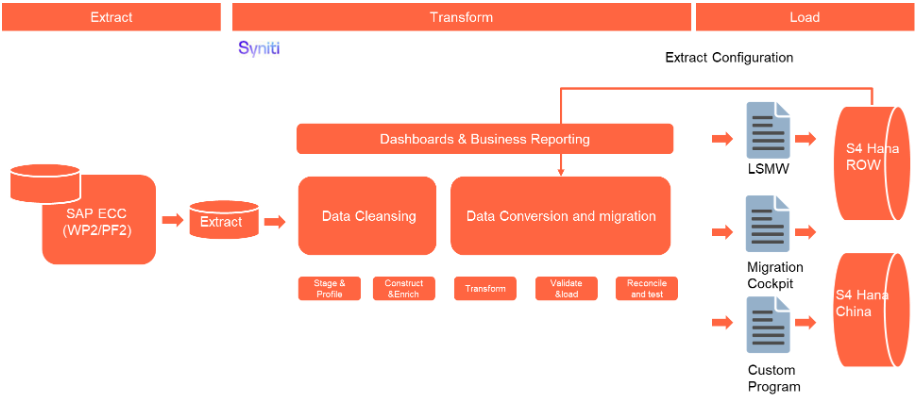
The high-level process is represented by the diagram below:
The ETL (Extract, Transform, Load) process is a structured approach to data migration and management, ensuring high-quality data is seamlessly transferred across systems. Here’s a breakdown of its key components:
1. Extraction
The process begins with extracting metadata and raw data from source systems, such as Syensqo ECC system (i.e. WP2/PF2) periodically. The extracted data is then staged for transformation.
2. Transformation
Once extracted, the data undergoes cleansing, consolidation, and governance. This step ensures data integrity, consistency, and compliance with business rules. The transformation process includes:
- Data validation to remove inconsistencies.
- Standardization to align formats across datasets.
- Business rule application to refine data for operational use.
3. Loading
The transformed data is then loaded into the target S/4HANA system.
Data Privacy and Sensitivity
Not applicableExtraction
Extract data from a source into Syniti Migrate. There are 2 possibilities:
- The data exists. Syniti Migrate connects to the source and loads the data into Syniti Migrate. There are 3 methods:
- Perform full data extraction from relevant tables in the source system(s).
- Perform extraction through the application layer.
- Only if Syniti Migrate; cannot connect to the source, data is loaded to the repository from the provided source system extract/report.
- The data does not exist (or cannot be converted from its current state). The data is manually collected by the business directly in Syniti Migrate. This is to be conducted using DCT (Data Collection Template) in Syniti Migrate.
The agreed relevancy criteria is applied to the extracted records to identify the records that are applicable for the Target Loads
Extraction Run Sheet
| Req # | Requirement Description | Team Responsible |
|---|---|---|
| Extraction Scope Definition | - Identify the source systems and databases involved. - Define the data objects (tables, fields, records) to be extracted. - Establish business rules for data selection. | Syniti / LTC Data team |
| Extraction Methodology | - Specify the extraction approach (full, incremental, or delta extraction). - Determine the tools and technologies used. - Define data filtering criteria to exclude irrelevant records. | Syniti |
| Extraction Execution Plan | - Establish execution timelines and batch processing schedules. - Assign responsibilities for extraction monitoring. - Document dependencies on other migration tasks. | Syniti |
| Data Quality and Validation | - Define error handling mechanisms for extraction failures. | Syniti |
Selection Screen
| Selection Ref Screen | Parameter Name | Selection Type | Requirement | Value to be entered/set |
|---|---|---|---|---|
| Not applicable |
Data Collection Template (DCT)
A Target-Ready Data Collection Template will be created for all required fields in the SAP QM - Master Inspection Characteristics, except for fields that require transformation in accordance with the defined transformation rules. Each template will follow the structure and format required by the target S/4HANA Quality Management.
- Master Inspection Characteristic - Basic Data
Field Name Field Description Data Type Length Requirement Rule Mapping QPMK-ZAEHLER Plant for Master Inspection Characteristic NUM 4 Required Mandatory technical key for MIC per plant Copy from DCT QPMK-MKMNR Master Inspection Characteristic CHAR 8 Required Must be unique per plant Copy from DCT QPMK-WERKS Plant for Master Inspection Characteristic NUM 4 Required Must exist in plant mapping; must be active plant Copy from DCT QPMK-VERSION Version Number of Master Inspection Characteristics CHAR 6 System generated System generated value System-generated QPMK-GUELTIGAB Valid-From Date DATE 8 Required Default = creation date unless specified Copy from DCT QPMK-SORTFELD Search Field CHAR 20 Required Optional (Used for search help) Copy from DCT QPMK-LOEKZ Status of Master Record CHAR 1 Required Value as per below:
1 = Being Created
2 = Released
3 = Can No Longer Be Used
4 = Deletion Flag
5 = ArchivedCopy from DCT QPMT-ZAEHLER Plant for Master Inspection Characteristic NUM 4 Required Mandatory technical key for MIC per plant Copy from DCT QPMT-MKMNR Master Inspection Characteristic CHAR 8 Required Must be unique per plant Copy from DCT QPMT-KURZTEXT Short Text CHAR 40 Required Short Text for MIC Copy from DCT QPMT-VERSION Version Number of Inspection Methods CHAR 6 System generated System generated value System-generated QPMT-SPRAS Language Key CHAR 2 Required Default = EN unless multilingual Copy from DCT QPMK-LSPER Data Record Is Used CHAR 1 Conditional Can be used to link MIC to a Batch Characteristic Copy from DCT QPMK-KONSISTENT Copy Model / Reference Characteristic CHAR 1 Conditional Value as per below:
Blank = Incomplete Copy Model (system default value)
1 = Complete Copy Model
X = Reference CharacteristicsCopy from DCT QPMK-STEUERKZ Control Indicator String CHAR 30 Required Derived from QS27 customizing Copy from DCT QPMK-MERKGEW Weighting of Characteristic NUM 2 Conditional Value as per below:
01 = Critical Characteristic
02 = Major Characteristic A
03 = Major Characteristic B
04 = Minor Characteristic A
05 = Minor Characteristic B
91 = Critical Characteristic
92 = Major Characteristic
93 = Minor CharacteristicCopy from DCT QPMK-PRFQL Inspector Qualification CHAR 8 Conditional Validate against qualification list (if used) Copy from DCT QPMK-DUMMY10 Spec ID CHAR 20 Conditional Copy from legacy or enrichment or blank Copy from DCT QPMK-DUMMY20 Spec CHAR 40 Conditional Copy from legacy or enrichment or blank Copy from DCT QPMK-DUMMY40 Text Line for Additional Information CHAR 40 Conditional Copy from legacy or enrichment or blank Copy from DCT QPMK-QAUTH Authorization Group QM Master Data CHAR 4 Conditional Optional; controls access to QM master data Copy from DCT QPMK-TOLERANZSL Tolerance Key CHAR 4 Conditional Populate only if tolerance data is maintained Copy from DCT QPMK-STELLEN Decimal Places NUM 2 Conditional Required for quantitative MIC Copy from DCT QPMK-MASSEINSHW Unit of Measurement CHAR 3 Conditional Required for quantitative MIC; must exist in T006 Copy from DCT QPMK-SOLLWERT Target Value NUM 13 Conditional Optional; only if maintained in legacy Copy from DCT QPMK-TOLERANZOB Upper Specification Limit NUM 13 Conditional Optional; only if maintained Copy from DCT QPMK-TOLERANZUN Lower Specification Limit NUM 13 Conditional Optional; only if maintained Copy from DCT QPMK-GRENZEOB1 First Upper Specification Limit NUM 13 Conditional Optional Copy from DCT QPMK-GRENZEUN1 First Lower Specification Limit NUM 13 Conditional Optional Copy from DCT QPMK-GRENZEOB2 Second Upper Specification Limit NUM 13 Conditional Optional Copy from DCT QPMK-GRENZEUN2 Second Lower Specification Limit NUM 13 Conditional Optional Copy from DCT QPMK-PLAUSIOBEN Upper Plausibility Limit NUM 13 Conditional Optional Copy from DCT QPMK-PLAUSIUNTE Lower Plausibility Limit NUM 13 Conditional Optional Copy from DCT QPMK-TOLERWEIOB Change to Upper Spec Limit CHAR 13 Conditional Optional Copy from DCT QPMK-TOLERWEIUN Change to Lower Spec Limit CHAR 13 Conditional Optional Copy from DCT QPMK-TOLERWAB Date From Which Tolerance Change is Valid CHAR 8 Conditional Optional Copy from DCT QPMK-TOLERWBIS Date Until Which Tolerance Change is Valid CHAR 8 Conditional Optional Copy from DCT QPMK-CODEGRU Defect Code Group for Rejection at Lower Tolerance CHAR 8 Conditional Required only if defect indicator in QPMK-STEUERKZ requires it Copy from DCT QPMK-CODEGU Defect Code for Rejection at Lower Spec Limit CHAR 8 Conditional Required only if defect indicator in QPMK-STEUERKZ requires it Copy from DCT QPMK-CODEGR90 Defect Code Group for Rejection at Upper Tolerance CHAR 8 Conditional Required only if defect indicator in QPMK-STEUERKZ requires it Copy from DCT QPMK-CODEGQUAL Defect Code Group for General Rejection CHAR 8 Conditional Required only if defect indicator in QPMK-STEUERKZ requires it Copy from DCT QPMK-CODEQUAL Defect Code for Rejection: General CHAR 4 Conditional Required only if defect indicator in QPMK-STEUERKZ requires it Copy from DCT - Master Inspection Characteristic - Long Text
Field Name Field Description Data Type Length Requirement Rule Mapping STXH-TDOBJECT Text Object CHAR 10 Required Always = QPMERKMAL Copy from DCT STXH-TDNAME Name CHAR 70 Required Link with MIC (derived from MIC key) Copy from DCT STXH-TDID Text ID CHAR 4 Required Always = QPMT Copy from DCT STXH-TDSPRAS Language Key CHAR 1 Required Default = EN unless multilingual Copy from DCT STXL-CLUSTD Text Cluster Data CHAR 2000 Conditional Must contain MIC long text lines Copy from DCT Note: Please check the link attached for Layout:
Extraction Dependencies
| Item # | Step Description | Team Responsible |
|---|---|---|
| 1 | Source System Availability
| Syensqo IT |
| 2 | Data Structure
| Syniti |
| 3 | Referential Integrity
| Syniti |
| 4 | Extraction Methodology
| Syniti |
| 5 | Performance and Scalability Considerations
| Syniti |
| 6 | Security and Compliance
| Syniti |
Transformation
The Target fields are mapped to the applicable Legacy field that will be its source, this is a 3-way activity involving the Business, Functional team and Data team. This identifies the transformation activity required to allow Syniti Migrate to make the data Target ready:
- Perform value mapping and data transformation rules.
- Legacy values are mapped to the to-be values (this could include a default value)
- Values are transformed according to the rules defined in Syniti Migrate
- Prepare target-ready data in the structure and format that is required for loading via prescribed Load Tool. This step also produces the load data ready for business to perform Pre-load Data Validation
Transformation Run Sheet
| Item # | Step Description | Team Responsible |
|---|---|---|
| 1 | Obtain DCT Sign-off from Business | SyWay Data Team |
| 2 | <Add steps from Syniti Migrate here> | SyWay Data Team |
| 3 | Review and Validate Error and Preload Reports | SyWay Data Team |
| 4 | Generate Load Files | SyWay Data Team |
Transformation Rules
| Rule # | Source system | Source Table | Source Field | Source Description | Target System | Target Table | Target Field | Target Description | Transformation Logic |
|---|---|---|---|---|---|---|---|---|---|
| 1 | PF2, WP2 | QPMK | GUELTIGAB | Valid-from Date | S4 HANA | QPMK | GUELTIGAB | Valid-from Date | Use S/4 Start-from Date |
| 2 | PF2, WP2 | QPMK | LOEKZ | Status of Master Record | S4 HANA | QPMK | LOEKZ | Status of Master Record | Copy from legacy. Migrate both status 1 (Being Created) and status 2 (Released) records |
| 3 | PF2, WP2 | QPMK | VERSION | Version of Master Inspection Characteristic | S4 HANA | QPMK | VERSION | Version of Master Inspection Characteristic | System-generated value |
| 4 | PF2, WP2 | QPMK | MASSEINHSW | Unit of Measurement in Which Quantitative Data Is Stored | S4 HANA | QPMK | MASSEINHSW | Unit of Measurement in Which Quantitative Data Is Stored | Xref (value mapping) from master data T006 |
| 5 | PF2, WP2 | QPMK | MKMNR | Master Inspection Characteristic (MIC) | S4 HANA | QPMK | MKMNR | Master Inspection Characteristic (MIC) | Copy from legacy |
| 6 | PF2, WP2 | QPMK | SOLLWERT | Target Value for a Quantitative Characteristic | S4 HANA | QPMK | SOLLWERT | Target Value for a Quantitative Characteristic | Copy from legacy for quantitative MIC; blank for qualitative |
| 7 | PF2, WP2 | QPMK | STELLEN | Number of Places to the Right of a Decimal Point (Accuracy) | S4 HANA | QPMK | STELLEN | Number of Places to the Right of a Decimal Point (Accuracy) | Copy from legacy for quantitative MIC. Default value as 0 (blank) for qualitative. |
| 8 | PF2, WP2 | QPMK | STEUERKZ | Cntrl Indicator String for Insp. Char./Master Insp. Char. | S4 HANA | QPMK | STEUERKZ | Cntrl Indicator String for Insp. Char./Master Insp. Char. | Copy from legacy. Validate against S/4 customizing (only permitted flags). |
| 9 | PF2, WP2 | QPMK | TOLERANZOB | Upper Specification Limit | S4 HANA | QPMK | TOLERANZOB | Upper Specification Limit | Copy from legacy. Numeric check; ensure upper ≥ lower when both present. |
| 10 | PF2, WP2 | QPMK | TOLERANZSL | Tolerance Key | S4 HANA | QPMK | TOLERANZSL | Tolerance Key | Copy from legacy. Must exist in S/4 target customizing |
| 11 | PF2, WP2 | QPMK | TOLERANZUN | Lower Specification Limit | S4 HANA | QPMK | TOLERANZUN | Lower Specification Limit | Copy from legacy. Numeric check; ensure lower ≤ upper when both present. |
| 12 | PF2, WP2 | QPMK | WERKS | Plant for Master Inspection Characteristic | S4 HANA | QPMK | WERKS | Plant for Master Inspection Characteristic | Xref (value mapping) from To-Be Plant Mapping |
| 13 | PF2, WP2 | QPMK | ZAEHLER | Plant for Master Inspection Characteristic (Plant Specific MIC) | S4 HANA | QPMK | ZAEHLER | Plant for Master Inspection Characteristic (Plant Specific MIC) | Copy from legacy. Plant must be exist in Material Relevancy Rules. |
| 14 | PF2, WP2 | QPMT | ZAEHLER | Plant for Master Inspection Characteristic | S4 HANA | QPMT | ZAEHLER | Plant for Master Inspection Characteristic | Copy from legacy. Plant must be exist in Material Relevancy Rules. |
| 15 | PF2, WP2 | QPMT | MKMNR | Master Inspection Characteristic (MIC) | S4 HANA | QPMT | MKMNR | Master Inspection Characteristic (MIC) | Copy from legacy |
| 16 | PF2, WP2 | QPMT | KURZTEXT | Short Text for MIC | S4 HANA | QPMT | KURZTEXT | Short Text for MIC | Copy from legacy |
| 17 | PF2, WP2 | QPMT | VERSION | Version number of Inspection Method | S4 HANA | QPMT | VERSION | Version number of Inspection Method | Copy from legacy |
| 18 | PF2, WP2 | QPMT | SPRAS | Language Key | S4 HANA | QPMT | SPRAS | Language Key | Default = EN unless multilingual |
| 19 | PF2, WP2 | QPMK | CODE9U | Defect Code for Rejection at Lower Specification Limit | S4 HANA | QPMK | CODE9U | Defect Code for Rejection at Lower Specification Limit | Copy from legacy. Catalog/code must exist in target. |
| 20 | PF2, WP2 | QPMK | CODEGR9O | Defect Code Group for Rejection at Upper Tolerance | S4 HANA | QPMK | CODEGR9O | Defect Code Group for Rejection at Upper Tolerance | Copy from legacy. Target catalog group must exist. |
| 21 | PF2, WP2 | QPMK | CODE9O | Defect Code for Rejection at Upper Specification Limit | S4 HANA | QPMK | CODE9O | Defect Code for Rejection at Upper Specification Limit | Copy from legacy. Ensure code is valid in target. |
| 22 | PF2, WP2 | QPMK | CODEGRQUAL | Defect Code Group for General Rejection | S4 HANA | QPMK | CODEGRQUAL | Defect Code Group for General Rejection | Copy from legacy. Target catalog group must exist. |
| 23 | PF2, WP2 | QPMK | CODEQUAL | Defect Code for Rejection: General | S4 HANA | QPMK | CODEQUAL | Defect Code for Rejection: General | Copy from legacy. arget code must exist. |
| 24 | PF2, WP2 | QPMK | DUMMY10 | Spec ID | S4 HANA | QPMK | DUMMY10 | Spec ID | Copy only if value exists (optional). Leave blank otherwise. |
| 25 | PF2, WP2 | QPMK | DUMMY20 | Spec | S4 HANA | QPMK | DUMMY20 | Spec | Copy only if value exists (optional). Leave blank otherwise. |
| 26 | PF2, WP2 | QPMK | DUMMY40 | Text Line for Additional Information | S4 HANA | QPMK | DUMMY40 | Text Line for Additional Information | Copy only if value exists (optional). Leave blank otherwise. |
| 27 | PF2, WP2 | QPMK | SORTFELD | Search Field | S4 HANA | QPMK | SORTFELD | Search Field | Copy from legacy |
| 28 | PF2, WP2 | QPMK | KONSISTENT | Copy Model/Reference Characteristic | S4 HANA | QPMK | KONSISTENT | Copy Model/Reference Characteristic | Copy from legacy |
| 29 | PF2, WP2 | QPMK | MERKGEW | Weighting of Characteristic | S4 HANA | QPMK | MERKGEW | Weighting of Characteristic | Copy from legacy |
| 30 | PF2, WP2 | QPMK | PRFQL | Inspector Qualification | S4 HANA | QPMK | PRFQL | Inspector Qualification | Copy from legacy |
| 31 | PF2, WP2 | QPMK | QAUTH | Authorization Group QM Master Data | S4 HANA | QPMK | QAUTH | Authorization Group QM Master Data | Copy from legacy. Ensure target auth group exists |
| 32 | PF2, WP2 | QPMK | PLAUSIOBEN | Upper Plausibility Limit | S4 HANA | QPMK | PLAUSIOBEN | Upper Plausibility Limit | Copy from legacy. Numeric check; only relevant to quantitative MICs. |
| 33 | PF2, WP2 | QPMK | PLAUSIUNTE | Lower Plausibility Limit | S4 HANA | QPMK | PLAUSIUNTE | Lower Plausibility Limit | Copy from legacy. Numeric check; only relevant to quantitative MICs. |
| 34 | PF2, WP2 | QPMK | TOLERWEIOB | Change to Upper Specification Limit | S4 HANA | QPMK | TOLERWEIOB | Change to Upper Specification Limit | Copy from legacy |
| 35 | PF2, WP2 | QPMK | TOLERWEIUN | Change to Lower Specification Limit | S4 HANA | QPMK | TOLERWEIUN | Change to Lower Specification Limit | Copy from legacy |
| 36 | PF2, WP2 | QPMK | TOLERWAB | Date from Which the Tolerance Change Is Valid | S4 HANA | QPMK | TOLERWAB | Date from Which the Tolerance Change Is Valid | Copy from legacy. Validate as a real date; must be ≤ “valid-to”. |
| 37 | PF2, WP2 | QPMK | TOLERWBIS | Date Until Which the Tolerance Change Is Valid | S4 HANA | QPMK | TOLERWBIS | Date Until Which the Tolerance Change Is Valid | Copy from legacy. Validate as a real date; must be ≥ “valid-from”. |
| 38 | PF2, WP2 | QPMK | CODEGR9U | Defect Code Group for Rejection at Lower Tolerance | S4 HANA | QPMK | CODEGR9U | Defect Code Group for Rejection at Lower Tolerance | Copy from legacy. Target group must exist. |
| 39 | PF2, WP2 | QPMK | GRENZEOB1 | First Upper Specification Limit | S4 HANA | QPMK | GRENZEOB1 | First Upper Specification Limit | Copy from legacy. Numeric; ensure UoM alignment |
| 40 | PF2, WP2 | QPMK | GRENZEUN1 | First Lower Specification Limit | S4 HANA | QPMK | GRENZEUN1 | First Lower Specification Limit | Copy from legacy. Numeric; check lower ≤ upper. |
| 41 | PF2, WP2 | QPMK | GRENZEOB2 | Second Upper Specification Limit | S4 HANA | QPMK | GRENZEOB2 | Second Upper Specification Limit | Copy from legacy |
| 42 | PF2, WP2 | QPMK | GRENZEUN2 | Second Lower Specification Limit | S4 HANA | QPMK | GRENZEUN2 | Second Lower Specification Limit | Copy from legacy |
| 43 | PF2, WP2 | STXH | TDOBJECT | Texts: application object | S4 HANA | STXH | TDOBJECT | Texts: application object | Defaulted to "QPMERKMAL" |
| 44 | PF2, WP2 | STXH | TDNAME | Name | S4 HANA | STXH | TDNAME | Name | Link with MIC |
| 45 | PF2, WP2 | STXH | TDID | Text ID | S4 HANA | STXH | TDID | Text ID | Always "QPMT" |
| 46 | PF2, WP2 | STXH | TDSPRAS | Language Key | S4 HANA | STXH | TDSPRAS | Language Key | Copy from legacy |
| 47 | PF2, WP2 | STXH | TDTITLE | Title in dialog box | S4 HANA | STXH | TDTITLE | Title in dialog box | System-generated value |
| 48 | PF2, WP2 | STXH | TDFRELES | Release | S4 HANA | STXH | TDFRELES | Release | System-generated value |
| 49 | PF2, WP2 | STXH | TDFUSER | Created by | S4 HANA | STXH | TDFUSER | Created by | System-generated value |
| 50 | PF2, WP2 | STXH | TDFDATE | Date created | S4 HANA | STXH | TDFDATE | Date created | System-generated value |
| 51 | PF2, WP2 | STXH | TDFTIME | Time Created | S4 HANA | STXH | TDFTIME | Time Created | System-generated value |
| 52 | PF2, WP2 | STXH | TDLRELES | Last Changed in Release | S4 HANA | STXH | TDLRELES | Last Changed in Release | System-generated value |
| 53 | PF2, WP2 | STXH | TDLUSER | Last changed by | S4 HANA | STXH | TDLUSER | Last changed by | System-generated value |
| 54 | PF2, WP2 | STXH | TDLTIME | Last Changed At | S4 HANA | STXH | TDLTIME | Last Changed At | System-generated value |
| 55 | PF2, WP2 | STXH | TDVERSION | Version | S4 HANA | STXH | TDVERSION | Version | System-generated value |
| 56 | PF2, WP2 | STXH | TDSTYLE | Style Name | S4 HANA | STXH | TDSTYLE | Style Name | System-generated value |
| 57 | PF2, WP2 | STXH | TDFORM | Form name | S4 HANA | STXH | TDFORM | Form name | System-generated value |
| 58 | PF2, WP2 | STXH | TDHYPHENAT | Hyphenation Active | S4 HANA | STXH | TDHYPHENAT | Hyphenation Active | System-generated value |
| 59 | PF2, WP2 | STXH | TDTRANSTAT | Translation status | S4 HANA | STXH | TDTRANSTAT | Translation status | System-generated value |
| 60 | PF2, WP2 | STXH | TDOSPRAS | Original language | S4 HANA | STXH | TDOSPRAS | Original language | System-generated value |
| 61 | PF2, WP2 | STXH | TDMACODE1 | Short Title 1 | S4 HANA | STXH | TDMACODE1 | Short Title 1 | System-generated value |
| 62 | PF2, WP2 | STXH | TDMACODE2 | Short Title 2 | S4 HANA | STXH | TDMACODE2 | Short Title 2 | System-generated value |
| 63 | PF2, WP2 | STXH | TDTXTLINES | Number of Text Lines in Line Table | S4 HANA | STXH | TDTXTLINES | Number of Text Lines in Line Table | System-generated value |
| 64 | PF2, WP2 | STXH | TDREF | Reference text | S4 HANA | STXH | TDREF | Reference text | System-generated value |
| 65 | PF2, WP2 | STXH | TDREFNAME | Name of Referenced Text | S4 HANA | STXH | TDREFNAME | Name of Referenced Text | System-generated value |
| 66 | PF2, WP2 | STXH | TDREFID | ID of Referenced Text | S4 HANA | STXH | TDREFID | ID of Referenced Text | System-generated value |
| 67 | PF2, WP2 | STXH | TDTEXTTYPE | SAPscript: Format of Text | S4 HANA | STXH | TDTEXTTYPE | SAPscript: Format of Text | System-generated value |
| 68 | PF2, WP2 | STXH | TDCOMPRESS | SAPscript: Text is compressed | S4 HANA | STXH | TDCOMPRESS | SAPscript: Text is compressed | System-generated value |
| 69 | PF2, WP2 | STXH | LOGSYS | Logical system | S4 HANA | STXH | LOGSYS | Logical system | System-generated value |
| 70 | PF2, WP2 | STXH | RELID | CHAR02 data element | S4 HANA | STXH | RELID | CHAR02 data element | System-generated value |
| 71 | PF2, WP2 | STXL | TDOBJECT | Text object | S4 HANA | STXL | TDOBJECT | Text object | Defaulted to "QPMERKMAL" |
| 72 | PF2, WP2 | STXL | TDNAME | Text name | S4 HANA | STXL | TDNAME | Text name | Link with MIC |
| 73 | PF2, WP2 | STXL | TDID | Text ID | S4 HANA | STXL | TDID | Text ID | Always "QPMT" |
| 74 | PF2, WP2 | STXL | TDSPRAS | Language | S4 HANA | STXL | TDSPRAS | Language | Copy from legacy |
| 75 | PF2, WP2 | STXL | SRTF2 | BIN1 data element fo | S4 HANA | STXL | SRTF2 | BIN1 data element fo | System-generated value |
| 76 | PF2, WP2 | STXL | CLUSTR | BIN2 data element fo | S4 HANA | STXL | CLUSTR | BIN2 data element fo | System-generated value |
| 77 | PF2, WP2 | STXL | CLUSTD | Data | S4 HANA | STXL | CLUSTD | Data | Copy from legacy |
| 78 | PF2, WP2 | STXH | TDLDATE | Changed On | S4 HANA | STXH | TDLDATE | Changed On | System-generated value |
| 79 | PF2, WP2 | STXH | TDREFOBJ | Object of Referenced Text | S4 HANA | STXH | TDREFOBJ | Object of Referenced Text | System-generated value |
| 80 | PF2, WP2 | STXH | TDOCLASS | SAPscript: Object Class | S4 HANA | STXH | TDOCLASS | SAPscript: Object Class | System-generated value |
Transformation Mapping
| Mapping Table Name | Mapping Table Description |
|---|---|
| Plant | Mapping of legacy Plants to new S/4HANA Plant codes according to To-Be Plant Mapping definition. Ensures characteristics are assigned to valid and active plants only. |
| Characteristic Name (MIC) | Mapping of legacy Master Inspection Characteristic (QS21) names to new harmonized naming convention in S/4HANA, following corporate quality standards. |
| Characteristic Type | Mapping of legacy Characteristic Type values (Quantitative / Qualitative) to target system domain values (QMTB-KZQUI). |
| Catalog Type | Mapping of legacy Catalog Type to valid Catalog Type entries in configuration table TQ15 in S/4HANA. |
| Selected Set / Code Group | Mapping of legacy Selected Set and Code Group to harmonized sets in target system (reference configuration table TQ15T). Ensures consistency of catalog-based inspection characteristics. |
| Unit of Measure (UoM) | Mapping of legacy Units of Measure to ISO-compliant Units of Measure in S/4HANA (as defined in table T006). |
| Decimal Places | Mapping of legacy Decimal Place format to target format as per S/4HANA numeric precision standard (QPMK-ANZST / QPMK-STELL). |
| Target Value / Upper & Lower Limit | Conversion of legacy target, lower, and upper specification limits into harmonized decimal format consistent with target measurement system. |
| Characteristic Group | Mapping of legacy characteristic groups (QPMK-MERKNR grouping) to harmonized groups in target system for standardized reporting and search. |
| Plant Authorization Group | Mapping of legacy Authorization Groups (QPMK-BEGRU) to target Authorization Groups in S/4HANA (per configuration table TBRG). |
| Class / Class Type (Optional) | Mapping of legacy class assignments (if MICs were linked to classes) to target class and class type configuration in S/4HANA. |
| Reference Indicator | Mapping of legacy Reference Indicator values to target domain values ensuring correct reference linkage between global and plant-specific MICs. |
Transformation Dependencies
List the steps that need to occur before transformation can commence| Item # | Step Description | Team Responsible |
|---|---|---|
| 1 | Ensure tables completeness | Syniti |
| 2 | Ensure all Transformation mappings are up to date. | Syniti |
Pre-Load Validation
Project Team
Completeness
| Task | Action |
|---|---|
| Business validates the load file | Send the load file to the Business Representatives for all plants so they can review and validate the data. |
| Mock 1 test must occur beforehand | The 1st mock load (manual) must be executed before the actual load can take place. |
| Count before and after | Review and document the item counts in the Transformation Files before the load, and verify them again after the load. |
| Validation Reports |
Accuracy
| Task | Action |
|---|---|
| Conversion Accuracy | SyWay P2F-MFG Data Team to verify that all fields below meet pass the checks:
|
| Review Error Reports | Review and correct the errors. Achieve a zero-error record count as much as possible. Raise defects for data remediated and requiring a correction in the source data. |
Business
Completeness
| Task | Action |
|---|---|
| Verify Record Count | Business Data Owner/s to verify that the total number of relevant records from the the system is equal to the total number of records in the Preload and Load Sheets. |
Accuracy
| Task | Action |
|---|---|
| Conversion Accuracy | Business Data Owner/s to verify that all the data in the load table/file is accurate as per endorsed transformation/mapping rules. |
Load
The load process includes:
- Execute the automated data load into target system using load tool or product the load file if the load must be done manually
- Once the data is loaded to the target system, it will be extracted and prepared for Post Load Data Validation
Load Run Sheet
| Item # | Step Description | Team Responsible |
|---|---|---|
1 | Ensure Pre-load sign-offs are obtained. | SyWay Data team |
2 | Go to the load tool and select the correct load Program. | SyWay Data team |
3 | Proceed with Data load. | SyWay Data team |
4 | Validate few records loaded by accessing standard transactions. | SyWay Data team |
5 | Generate the post load reports in the tool. | SyWay Data team |
6 | Log errors as defects, if any and address resolutions. Close defects. | SyWay Data team |
7 | Resolve defects by re-upload and re-generate post load reports if necessary. | SyWay Data team |
8 | Business to validate the post load files as part of post-load validation, raise data defects or provide the post-load sign-off. | Business |
9 | Repeat steps 5 to 7 if necessary. | SyWay Data team |
Load Phase and Dependencies
Pre-Cutover
Configuration
| Item # | Configuration Item |
|---|---|
| 1 | T001W – Plants/Branches: Definition of plants where Master Inspection Characteristics are created and maintained. |
| 2 | T006 – Units of Measurement: ISO-compliant UoM definitions to ensure consistency of quantitative inspection characteristics. |
| 3 | TQ07A – Inspection Types: Configuration of valid inspection types used for assigning MICs in inspection plans or material QM view. |
| 4 | TQ08 – Control Keys (QM): Definition of control keys for inspection processing, including in-process and final inspection controls. |
| 5 | TQ09 – Usage Keys: Definition of usage keys to determine where inspection characteristics can be used (e.g., in inspection plans, material QM view). |
| 6 | TQ15 – Catalog Types: Definition of catalog types for qualitative inspection characteristics (e.g., defect codes, result recording codes). |
| 7 | TQ15T – Selected Sets & Code Groups: Configuration of selected sets and code groups used to classify qualitative MIC values. |
| 8 | TBRG – Authorization Groups: Assignment of authorization groups controlling access and maintenance rights for MICs. |
| 9 | TQ30 – Reference Indicators: Configuration of reference indicator usage for linking global and plant-specific MICs. |
| 10 | TQ75 – Decimal Places & Format: Configuration of decimal places, number format, and rounding rules for quantitative MIC values. |
| 11 | TCLA – Class Type (optional): Configuration of class type if MICs are linked to classification system (e.g., class type 023). |
| 12 | TQ33 – Catalog Profile Assignment: Control of which catalog profiles are assigned to MICs for standardizing defect recording. |
| 13 | TQ85 – Inspection Lot Origin: Configuration of inspection lot origin values that determine MIC usage in inspection processes. |
Conversion Objects
| Object # | Preceding Object Conversion Approach |
|---|---|
| 1064 | Sampling Procedure |
| 1043 | Inspection Methods |
Error Handling
| Error Type | Error Description | Action Taken |
|---|---|---|
| 1 | Plant does not exist or not mapped in target system | Verify that the plant exists in the target system and mapping is correctly maintained. Reprocess once mapping is updated. |
| 2 | UoM (Unit of Measure) not valid or not harmonized | Ensure that UoM is mapped correctly in T006 and harmonized with the target system. Correct invalid values in the collection template and reload. |
| 3 | Catalog or Selected Set not found in target system | Check if the required catalog and selected set are already migrated or configured in the target system. Migrate or create them before reprocessing. |
| 4 | Characteristic code or description missing | Validate source data completeness. Update missing mandatory fields (e.g., short text, characteristic ID) in the collection template. |
| 5 | Duplicate inspection characteristic records for the same plant | Perform deduplication and retain only the valid active characteristic in the collection file before loading. |
| 6 | Invalid characteristic type or control indicators | Review and correct control indicators (e.g., quantitative/qualitative flags, sampling procedures) to align with target system configuration. |
| 7 | Authorization group or class type not maintained in target system | Ensure the required authorization group or class type is configured in the target system before reprocessing. |
| 8 | Obsolete or marked-for-deletion characteristics | Exclude these records from migration as per data cleansing rules. |
Post-Load Validation
Project Team
Completeness
| Task | Action |
|---|---|
| Verify Count | SyWay P2F-MFG Data Team to verify the record count created in target S/4 HANA by accessing post load reports in dspMigrate or standard reports from S/4 HANA. |
Accuracy
| Task | Action |
|---|---|
| Verify Logs | Check if there is data that failed to load and perform the necessary actions (e.g. register as post load issue or attempt to load the record again, etc.). |
Business
Completeness
| Task | Action |
|---|---|
| Verify Count | Download Post Load Reports from dspMigrate and verify that the record count loaded in the target S/4 HANA is the same count as of the endorsed load file. |
Accuracy
| Task | Action |
|---|---|
| Conversion Accuracy | Verify that the Material BOM data in target S/4 HANA were loaded correctly via DSP Migrate post load reports or standard reports from S/4 HANA. |
Key Assumptions
Master Data Standard (MDS) is up to date as of the date of documenting this conversion approach and Master Inspection Characteristic data load.
Data cleansing activities have been completed to ensure only active, valid, and relevant Master Inspection Characteristics are migrated. Characteristics marked for deletion or obsolete records are excluded.
Required configuration elements such as Catalogs, Selected Sets, Code Groups, Control Indicators, and Authorization Groups are already in place in the target S/4HANA system prior to migration.
All Units of Measure (UoM) used in quantitative characteristics are harmonized between source and target systems to ensure data consistency during migration.
Plant master data and organizational mapping are completed prior to Master Inspection Characteristic load to ensure proper assignment.
Number ranges for characteristic identifiers are preconfigured in S/4HANA and internal numbering will be applied during migration unless otherwise specified.
Only fields required for QM inspection processing, quality planning, and execution are in scope for migration. Legacy-specific or unused fields will not be migrated.
Enrichment activities (such as missing control indicators, invalid UoM, or obsolete characteristics) are handled outside of the automated migration process and may require business sign-off.
Dependencies such as catalog entries, selected sets, and reference data are assumed to be loaded and validated prior to characteristic migration.
Any exceptions to these assumptions (e.g., manual updates to control indicators or special characteristic types) will be managed through a formal exception process.