
Page under active update (12/03/2026 - 13/03/2026) This document is currently being revised. Content may change. |
Governance applies to GUI, Web Dynpro, and Suggested Executables imported from Signavio. |
Signavio is the primary source for identifying, capturing, and managing application requirements.
1. Capture application requirements in Signavio
Applications must be modelled in Signavio within the relevant business process using:
Primary Executables
Associated Executables
Alternative Executables
2. Use the Tracker only to check the status of applications
Functional and business consultants should consult the Tracker to verify:
whether the application has been deployed in ERD
whether the application requires approval from the Integration Team
whether there are technical notes or deployment issues recorded by the Tech Team
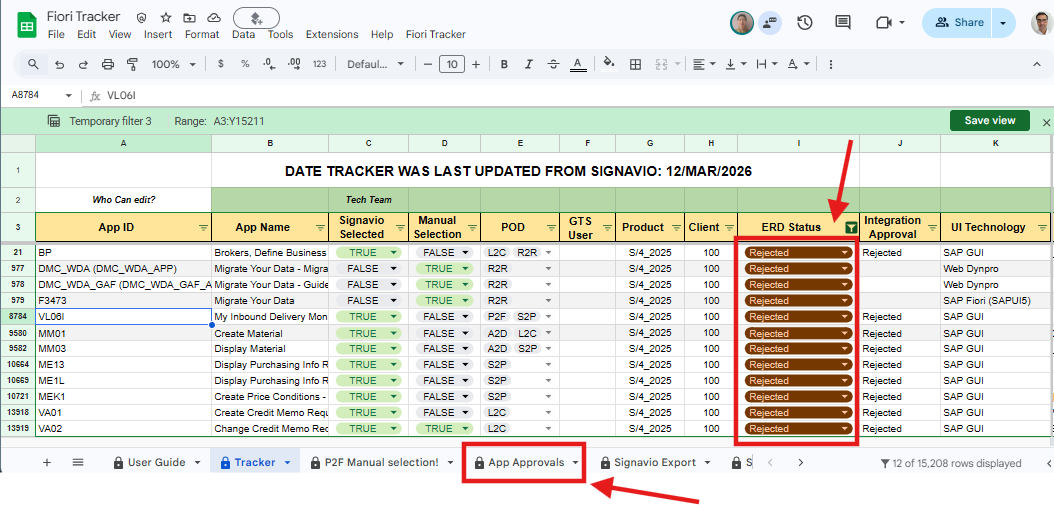
whether the application was rejected during governance review
Examples:
The image below shows applications that have been deployed in ERD and are ready for testing.
NOTE: If ERD Status = "Deployed in ERD" but the application is not accessible in the ERD Launchpad, create a Jira task for the Tech Team (see “How to raise a Jira Task?”).
Whether the application requires approval from the Integration Team (see the Governance section for details).

The image below shows examples where the Tech team recorded technical notes or deployment issues during ERD deployment.

Whether the application was rejected during the Integration Team governance review. Check the App Approvals sheet or contact the Integration Team for the reason.
3. Weekly Update Cycle
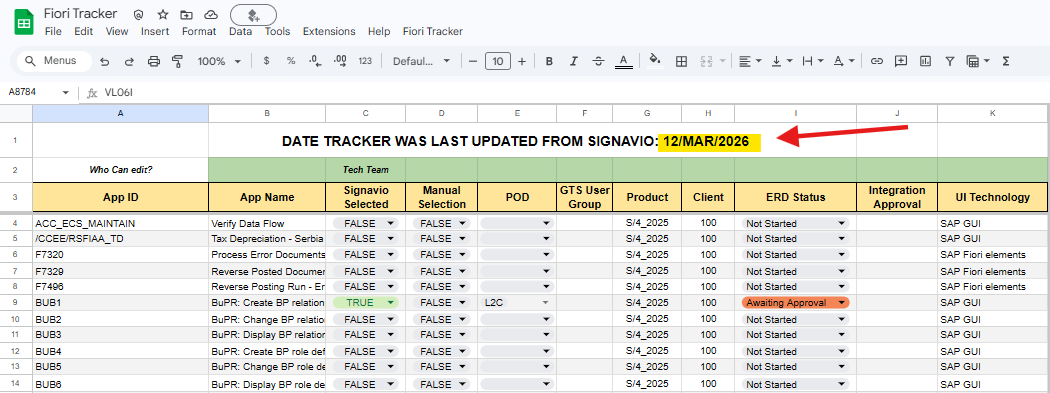
The Fiori App Tracker is a central governance and deployment tracker for SAP Fiori apps selected for the project. It is used by the Tech team to assess, approve, and deploy apps, and by functional teams to track selection status, approvals, and deployment progress.
The tracker is pre-populated with the complete SAP Fiori app catalogue for the target release (SAP S/4HANA Private Cloud 2025), sourced from the SAP Fiori Apps Reference Library. This baseline catalogue explains why the tracker contains a large number of apps and should not be interpreted as project scope.
Project scope is defined by selection indicators, which bring together two sources:
Signavio-driven apps
Apps that are registered as primary or associated executables in processes modelled in Signavio. These are imported from Signavio into the tracker on a regular cadence and flagged as selected.
Manually selected apps
Apps that are required but do not naturally sit inside a Signavio business process (for example system setup, or technical/admin apps). These will require a selection process via 'Manual App selection' sheet (See section: How to Select non-Signavio Apps)
Jira tickets are raised for technical team to address Technical issue, once your app status shows 'Deployed in ERD' if you are still facing issues in ERD Launchpad then you can follow the instruction is this guide Jira Task to raise a ticket/task for tech team
A governance step applies to all SAP GUI transactions, Web Dynpro applications, and Suggested Executables imported from Signavio.
For this purpose a separate sheet titled “App Approvals” has been created.
This process is managed by the Integration Team. For queries or updates, contact the Integration Team directly.
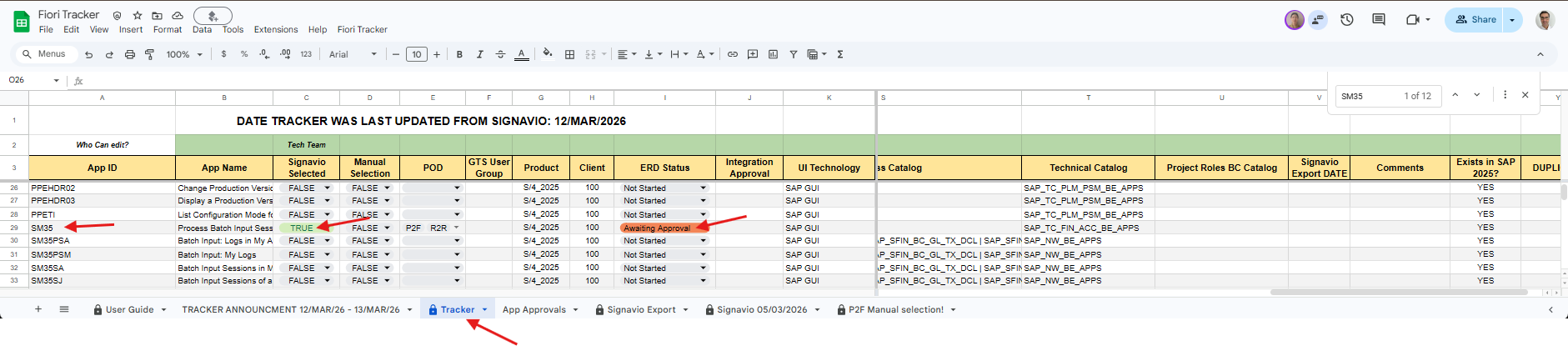
All imported Executables from Signavio that are not SAP Fiori apps will automatically have their ERD Status set to “Awaiting Approval” in the Tracker sheet.
These applications are also automatically copied to the App Approvals sheet.
Example:
The Tracker sheet is updated with application SM35. Because this is an SAP GUI transaction, the ERD Status is automatically set to “Awaiting Approval”, and the application is copied to the App Approvals sheet (see next image).
POD teams must provide justification in Column H of the App Approvals sheet for Integration Team review.

The steps for GUI and Web Dynpro are:
The Integration Team reviews the App Approvals sheet and may either contact the POD for clarification or assign an approval status.
The status entered by the Integration Team in Column I (“Approval”) of the App Approvals sheet will automatically update the Tracker sheet.
If the application is approved, the Tech Team will deploy the application.
For queries, delays, or applications requiring urgent deployment, contact the Integration Team.
All imported 'Suggested Executables' from Signavio will be captured in App Approvals Sheet. Suggested Executables require Integration Team Approval after approval Signavio Team will convert them to 'Executables' in Signavio allowing them to be entered in Tracker as part of the next update cycle.
Example:

The steps for Suggested Executables are:
Suggested Excutables are not captured in Tracker Sheet, they require Approval and to be converted to Executables in Signavio before being captured in Tracker Sheet. See Steps next. |
This governance step is mandatory and applies to all PODs.
App ID / App Name – identifier and title of the standard SAP app from the SAP Fiori Apps Library.
Manual Selection – TRUE = required; FALSE = not required.
POD – multi-select; pick all PODs requesting the app.
URL – opens the SAP Fiori Apps Library entry to verify details.
Status – maintained by Tech (read-only for you), shows deployment progress.
“Awaiting Approval” is used for all classic transactions (SAP GUI and Web Dynpro) to confirm there is no suitable Fiori alternative before deployment.
"Deployed in ERD" is the final state.
Cadence and steps may evolve as we fine-tune the process and as team capacity changes. This page will be updated as the tracker matures.