

STEP 1
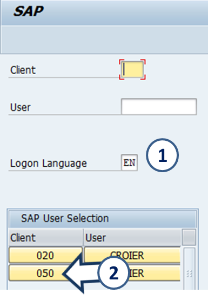
Open the SAP logon 
Click Syensqo ERP- Production - PF2

1. Enter Logon Language = EN
2. Click 
STEP 2
Enter transaction code ZZF_MDWF_REQUEST and 
You can add it to your favorites [menu System – User Profile – Expand Favorites]

Request for Master Data: Initial Screen

On the first line of the transaction, you will find a menu where you can find the functions accessible at each moment
1. On the initial screen :
 List existing requests : « My request report »
 Modify an existing request
 Display an existing request
2. In case of Display or Update of an existing request, enter the request number here
3. In case of Creation, select the category of data you want to create / update
4. The text box at the bottom of the screen is an “info board”, giving the last information about the application (update, new functions,…)
After selecting a Data type, the application brings you to the creation screen

STEP 3
Fill the request
1. Select your need : 
2. Enter the title of the request which will be used in all emails.
3. Select the system landscape.
- CICC = PI2
- ERP Rodia Core = WP2
- ERP Solvay = PF2

4. Enter:
- the Company code (for WP2)
- or PRS CoCode (for PF2 & PI2)
It can remain blank if request spans over several companies of the same system
5. Select the Business unit. It can remain blank if several GBU are involved
6. It comes when you choose the ERP (see next step)
7. Select the project name when applicable
8. Flag during pre-closing and closing periods, it allows the identification of urgent requests necessary for the closing.
9. Flag to identify temporary request that need to be reversed
The new request must be saved by clicking  before going to the next step