


| Status | Approved |
|---|---|
| Owner | |
| Stakeholders |
Purpose
The purpose of this document is to define the conversion approach for migrating Material Master WM Packaging fields (MARA-HUTYP and MARA-HUTYP_DFLT) from legacy SAP systems into S/4HANA.
These fields are critical for handling unit management and packaging processes in Warehouse Management (WM) and Extended Warehouse Management (EWM). Accurate migration ensures that products are assigned the correct Handling Unit Type and Default HU Type, which directly impacts packing, storage, and goods movement processes.
Conversion Scope
The scope of this document covers the approach for converting active WM Execution View from Legacy Source Systems into S/4HANA following the DD-FUN-050 Master Data Standard - WM Execution Master Data Design Standard.
Included:
Active materials (>3 years) with packaging relevance
Materials used in HU-managed storage types or EWM processes
HU Type (
MARA-HUTYP) and Default HU Type (MARA-HUTYP_DFLT)
Excluded:
Materials flagged for deletion
Obsolete, inactive, or blocked materials
Non-HU relevant materials
Source Systems and Record Volumes
| Source System | Approx. Records Extracted | Target System | Approx. Records After Cleansing |
|---|---|---|---|
| Legacy SAP (PF2) | TBD | S/4HANA | TBD |
| Legacy SAP (WP2) | TBD | S/4HANA | TBD |
Additional Information
Multi-language Requirement
Document Management
Legal Requirement
Special Requirements
Target Design
| Table | Field | Data Element | Field Description | Data Type | Length | Requirement |
|---|---|---|---|---|---|---|
| MARA | HUTYP | HUTYP | Handling Unit Type | CHAR | 4 | Mandatory for HU-managed materials |
| MARA | HUTYP_DFLT | HUTYP_DFLT | Default Handling Unit Type | CHAR | 4 | Mandatory if default HU is required |
Design Notes:
HU Types must be configured in target system (
T331).Fields are client-level (not plant-dependent).
If legacy data is missing
HUTYP_DFLT, business defaults will be applied.
Data Cleansing
| ID | Criticality | Rule | Expected Output | Source System |
|---|---|---|---|---|
| 200X-01 | High | Only active materials (not flagged for deletion) should be migrated | Only active, relevant materials migrated | PF2/WP2 |
| 200X-02 | High | HU Types in legacy must exist in S/4 target customizing | HU Type mapped or defaulted | PF2/WP2 |
| 200X-03 | Medium | Missing Default HU Types should be assigned business-agreed defaults | Default HU Type populated | PF2/WP2 |
| 200X-04 | Medium | Duplicate or invalid HU codes should be removed | Clean, unique HU values | PF2/WP2 |
Conversion Process
The high-level process is represented by the diagram below:
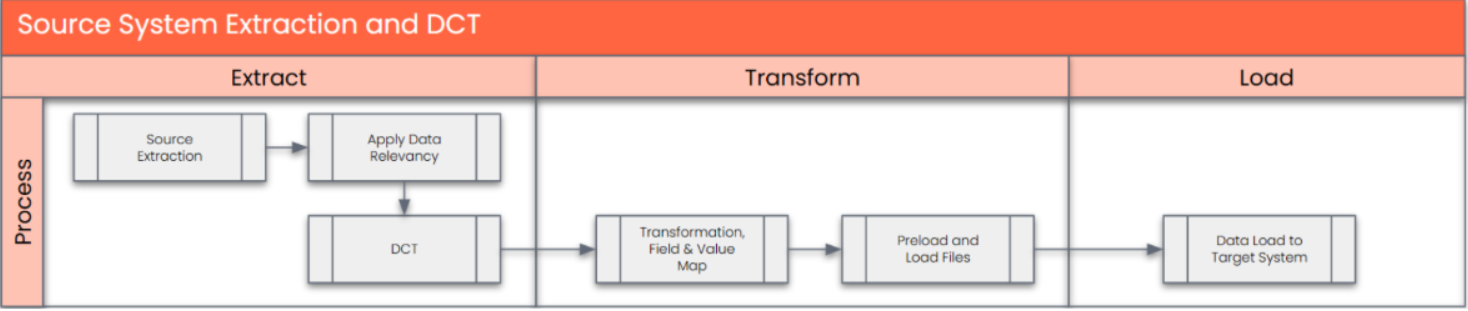
The high-level process is the same as defined for other material master objects:
Extraction (via Syniti)
Extract MARA-HUTYP and MARA-HUTYP_DFLT from legacy SAP.
Apply relevancy criteria (active, HU-relevant).
Transformation (via Syniti)
Apply mapping rules (Legacy HU Type → Target HU Type).
Default missing values where necessary.
Validate against S/4 HU customizing.
Load (via SAP Migration Cockpit, Staging Tables)
Populate Material migration object in Migration Cockpit with HU fields.
Sequence: load HU customizing first, then material master with HU fields.
Validation
Pre-load: confirm HU mapping completeness.
Post-load: sample verification in S/4 (MM03/Display Material).
Extraction
Extract data from a source into . There are 2 possibilities:
- The data exists. connects to the source and loads the data into . There are 3 methods:
- Perform full data extraction from relevant tables in the source system(s).
- Perform extraction through the application layer.
- Only if ; cannot connect to the source, data is loaded to the repository from the provided source system extract/report.
- The data does not exist (or cannot be converted from its current state). The data is manually collected by the business directly in . This is to be conducted using DCT (Data Collection Template) in
The agreed Relevancy criteria is applied to the extracted records to identify the records that are applicable for the Target loads
Scope:
Extract active materials (>3 years) from legacy SAP systems (PF2, WP2).
Include MARA-HUTYP and MARA-HUTYP_DFLT fields.
Apply relevancy criteria to exclude flagged-for-deletion, obsolete, or blocked materials.
Extraction Run Sheet
| Req # | Requirement Description | Team Responsible |
|---|---|---|
| 1 | Extract HU fields (HUTYP, HUTYP_DFLT) from MARA in PF2 and WP2 | Syniti Data Team |
| 2 | Apply relevancy filter (active, HU-relevant materials only) | Syniti Data Team |
| 3 | Deliver extract to staging (SQL / Cockpit Staging Tables) | Syniti Data Team |
Extraction Run Sheet
| Req # | Requirement Description | Team Responsible |
|---|---|---|
| 1 | Extract HU fields (HUTYP, HUTYP_DFLT) from MARA in PF2 and WP2 | Syniti Data Team |
| 2 | Apply relevancy filter (active, HU-relevant materials only) | Syniti Data Team |
| 3 | Deliver extract to staging (SQL / Cockpit Staging Tables) | Syniti Data Team |
Data Collection Template (DCT)
A Target Ready Data Collection Template will be created for WM Packaging fields to handle missing or exception values.
DCT Rules
| Field Name | Field Description | Rule |
|---|---|---|
| Material Number | Unique material identifier | Must follow material mapping agreed for S/4HANA |
| Handling Unit Type (HUTYP) | Packaging handling unit type | Must map to target HU Type (configured in T331) |
| Default HU Type (HUTYP_DFLT) | Default packaging HU type | Apply mapping; if blank in legacy, assign business default |
Extraction Dependencies
| Item # | Step Description | Team Responsible |
|---|---|---|
| 1 | HU Type configuration (T331) must be extracted from legacy and validated against target | Functional / Syniti |
| 2 | Material active/inactive flag to be applied before extract | Syniti |
| 3 | Exclude deleted/obsolete materials as per cleansing rules | Syniti |
Transformation
The Target fields are mapped to the applicable Legacy field that will be its source, this is a 3-way activity involving the Business, Functional team and Data team. This identifies the transformation activity required to allow to make the data Target ready:
- Perform value mapping and data transformation rules.
- Legacy values are mapped to the to-be values (this could include a default value)
- Values are transformed according to the rules defined in
- Prepare target-ready data in the structure and format that is required for loading via prescribed Load Tool. This step also produces the load data ready for business to perform Pre-load Data Validation
Transformation will ensure extracted data is mapped, validated, and target ready.
Value Mapping: Legacy HU Types → Target HU Types.
Defaulting Logic: If no Default HU Type is available, assign standard default.
Validation: Verify that mapped HU Types exist in target customizing (
T331).
Transformation Run Sheet
| Item # | Step Description | Team Responsible |
|---|---|---|
| 1 | Apply HU Type mapping table | Syniti Data Team |
| 2 | Default missing HU values | Business / Functional Team |
| 3 | Validate against target customizing | Project Team |
| 4 | Deliver transformed data into Cockpit staging tables | Syniti |
Transformation Rules
| Rule # | Source System | Source Table | Source Field | Target System | Target Table | Target Field | Transformation Logic |
|---|---|---|---|---|---|---|---|
| 1 | PF2/WP2 | MARA | HUTYP | S/4HANA | MARA | HUTYP | Map via HU Type mapping table |
| 2 | PF2/WP2 | MARA | HUTYP_DFLT | S/4HANA | MARA | HUTYP_DFLT | Map or default missing value; validate |
Transformation Mapping
The transformation step ensures that all Handling Unit fields (MARA-HUTYP, MARA-HUTYP_DFLT) from the legacy system are properly mapped and validated against the target design in S/4HANA.
Key Considerations
HU Type Mapping
Legacy HU Types must be translated to the corresponding HU Types in the target S/4HANA configuration (
T331).Where no 1:1 mapping exists, business-agreed default HU Types will be assigned.
Default HU Type Assignment
If
MARA-HUTYP_DFLTis missing in the source, default values will be populated based on packaging design rules.Certain material groups may have standardized default HU assignments (e.g., “Carton,” “Pallet”).
Material Number Mapping (Legacy → New)
Some materials in the legacy system may be renumbered or consolidated into new material numbers in S/4HANA (e.g., harmonization or duplicate cleanup).
In such cases:
Legacy
MARA-MATNR→ mapped to newMARA-MATNRin target (per approved Material Harmonization Mapping table).Corresponding HU Type values will follow the mapped material into the target.
Multiple legacy materials may map into one new material (e.g., consolidation of variants).
Data Integrity Checks
Ensure that no material is left without a valid HU Type.
Validate that all new material numbers used as target keys exist in the master material mapping table before load.
Transformation Dependencies
List the steps that need to occur before transformation can commence
HU Types must exist in S/4 (
T331) before load.Materials must be created first (basic data) before updating HU fields.
Conversion sequencing aligned with overall Material Master load (Basic Data → Packaging → Plant/WM data).
Pre-Load Validation
Project Team Responsibilities
Completeness: Ensure all materials have populated HU fields before load.
Accuracy: Cross-check HU Types against target customizing.
Business Responsibilities
Completeness: Confirm that all business-relevant materials are included.
Accuracy: Validate that assigned HU Types are correct and align with packaging standard
Load
Load will be executed via SAP Migration Cockpit (Staging Tables).
Steps:
Load HU customizing (
T331).Load Material Master Basic Data (MARA).
Load/update HU fields (
MARA-HUTYP,MARA-HUTYP_DFLT).
Load Run Sheet
| Item # | Step Description | Team Responsible |
|---|---|---|
| 1 | Execute automated data load via Migration Cockpit staging tables | Data Team |
| 2 | Extract post-load data from S/4HANA for verification | Project Team |
Load Phase and Dependencies
Configuration Prerequisites:
HU Types configured in
T331.
Conversion Object Dependencies:
Predecessor: Material Master – Basic Data.
Successor: Plant/WM views (if applicable).
Error Handling
| Error Type | Description | Action |
|---|---|---|
| Mapping Error | HU Type not found in target customizing | Update mapping table or request config update |
| Data Error | Missing or invalid HU values | Default or cleanse via Syniti |
| Load Error | MARA lock due to prior load | Schedule delta load |
Post-Load Validation
Project Team:
Completeness: Compare load counts (source vs target).
Accuracy: Run spot-checks in S/4 (MM03, Packaging tab).
Business Team:
Completeness: Confirm all expected materials have HU data.
Accuracy: Validate default HU Types function correctly during inbound/outbound processes.
Key Assumptions
- Master Data Standard is up to date as on the date of documenting this conversion approach and data load.
- is in scope based on data design and any exception requested by business.
HU Types are fully configured in target S/4 system before migration.
Only active, HU-relevant materials are in scope.
Syniti mappings are signed off by business before load.
Migration Cockpit is the standard tool for loading data into S/4.
Cutover strategy may require delta load for newly created/updated materials.
See also
Change log
Workflow history
| Title | Last Updated By | Updated | Status | |
|---|---|---|---|---|
| There are no pages at the moment. | ||||