


| Status | Revision in Progress |
|---|---|
| Owner | |
| Stakeholders |
Purpose
The purpose of the document is to define the data conversion approach to create Business Partners – 3rd Party Suppliers through FLVN01 Supplier Role including Purchasing Organization, partner function views in S/4 HANA.
In SAP ECC, the Vendor Master Purchasing View (including the Partner Functions) is part of the Vendor Master Data, which is used to store vendor-related information for purchasing transactions. The setup typically involves maintaining vendor records separately for different purchasing organizations..
In SAP S/4HANA, the Vendor Purchasing View is integrated into the Business Partner (BP) model, which replaces the traditional customer/vendor objects from ECC. The Business Partner serves as a central entity, allowing a single record to hold multiple roles (e.g., customer and vendor). The Vendor Purchasing View in S/4HANA is represented under the BP role FLVN001, which contains-specific data such as purchasing organization, purchasing group, payment terms, purchasing currency, incoterms, shipping conditions and partner functions.
Conversion Scope
The scope of this document covers the approach for converting active Vendor Master purchasing attributes records from Legacy Source Systems into Business Partner – Supplier Role FLVN001 in S/4 HANA following the Vendor Master Data Design Standard.
MDS and Conversion Specification is referring to the tables and fields - LFA1: Supplier Master (General Section),LFA1: Vendor tax data, LFBK - Vendor bank data, LFBW-Withholding tax data which will be part of 3007-Business Partners - General (Role 000000 ETL and design.
Tables Includes for the CNV-3026 Business Partners – 3rd Party Suppliers (FLVN001) are:
- LFM1: Vendor master record purchasing organization data
- WYT3: Partner Functions
Relevancy Rule
The data from legacy system includes:
- Vendors which pass Relevancy Rules under Data Object (3007-Business Partners - General (Role 000000)):
- Should be created to Purchasing Organization 'inscope' based on Enterprise Structure Catalog
- Should be extended to Standard list(approved list) of Partner Functions (based on MDS-3026).
- Vendors’ relevant purchasing data with potential duplicate records
Vendors’ relevant purchasing data with potential missing information such as partner function, bank, tax, etc related fields
The data from legacy system excludes:
- Vendors blocked or marked for deletion.
- Vendors extended in Purchasing organization which are not is scope based on Enterprise Structure.
- Inactive vendors with no transactions based on the relevancy criteria of CNV-3007
- Employee Vendor where account group LFA1-KTOKK is ('ZZPE' in PF2, 'Z012' in WP2)
- Intercompany Vendor Class LFA1-ZZR_SEGT_ATTR is 'G'
Commission Agent where account group LFA1-KTOKK is 'ZXAG'(removed on 28/09 by JM)Catalog Supplier where Attribute 6 LFA1-ZZLATR6 is not BLANK(removed on 28/09 by JM)
| Source | Scope | Source Approx No. of Records | Target System | Target Approx No. of Records |
|---|---|---|---|---|
PF2, WP2 | Supplier role is applicable only for legally registered entities and strictly adheres to Master Data Standards (MDS) which elaborates out these criteria and other requirements such as Partner Function, being mandatory information used across Business Partner. Identified relevant suppliers from the Global level relevancy. Relevant suppliers with valid purchasing organization extensions in source systems will be in-scope for deduplication analysis. Deduplication exercise will check duplicates at purchasing organization level and business will choose the source of supplier role attributes to be used for migration. Otherwise, if record has no duplicates, it automatically becomes the source for supplier master data transformation. (for further relevancy scope, refer to Business Partner – General DCS) | 40,000 | S/4 HANA | 40,000 |
Additional Information
Multi-language Requirement
Will follow multi-language allowed and created in 3007-Business Partners - General (Role 000000)
Document Management
N/A
Legal Requirement
N/A
Special Requirements
TBD
Target Design
The Business Partner - Supplier master data strictly adheres to Master Data Standards as specified below.
MDS Rules and Google Drive path for the MDS - DD-FUN-050 Master Data Standard_3XXX_Consolidated-Business Partners.xlsx - Google Sheets
The technical design of the target for this conversion approach.
| Table | Field | Data Element | Field Description | Data Type | Length | Requirement |
|---|---|---|---|---|---|---|
| LFM1 | LIFNR | LIFNR | Supplier* | CHAR | 10 | R |
| LFM1 | EKORG | EKORG | Purchasing Organization* | CHAR | 4 | R |
| LFM1 | EKGRP | EKGRP | Purchasing Group | CHAR | 3 | C |
| LFM1 | WAERS | WAERS | Order Currency | CUKY | 5 | C |
| LFM1 | VERKF | VERKF | Salesperson | CHAR | 30 | Not Used |
| LFM1 | TELF1 | TELF1 | Supplier's Telephone Number | CHAR | 16 | Not Used |
| LFM1 | MINBW | MINBW | Minimum Order Value | CURR | 16 | Not Used |
| LFM1 | ZTERM | ZTERM | Terms of Payment Key | CHAR | 4 | C |
| LFM1 | INCOV | INCOV | Inco. Version | CHAR | 4 | Not Used |
| LFM1 | INCO1 | INCO1 | Incoterms | CHAR | 3 | C |
| LFM1 | INCO2_L | INCO2_L | Incoterms Location 1 | CHAR | 70 | C |
| LFM1 | KALSK | KALSK | Group for Calculation Schema | CHAR | 2 | R |
| LFM1 | PLIFZ | PLIFZ | Planned Delivery Time in Days | DEC | 10 | Not Used |
| LFM1 | LFABC | LFABC | ABC Indicator | CHAR | 1 | C |
| LFM1 | VSBED | VSBED | Shipping Conditions | CHAR | 2 | C |
| LFM1 | WEBRE | WEBRE | GR-Based Invoice Verification | CHAR | 1 | C |
| LFM1 | KZAUT | KZAUT | Automatic PO | CHAR | 1 | R |
| LFM1 | MEPRF | MEPRF | Pricing Date Control | CHAR | 1 | C |
| LFM1 | BSTAE | BSTAE | Confirmation Control Key | CHAR | 4 | C |
| LFM1 | KZRET | KZRET | Returns Supplier | CHAR | 1 | C |
| LFM1 | AUBEL | AUBEL | Automatic Debit | CHAR | 1 | Not Used |
| LFM1 | VALID_PRO | VALID_PRO | Settlement Profile | CHAR | 4 | Not Used |
| LFM1 | HSCABS | HSCABS | Absolute Handling Surcharge | CURR | 16 | Not Used |
| LFM1 | HSCPE | HSCPE | Percentage Handling Surcharge | DEC | 16 | Not Used |
| LFM1 | HSCMIN | HSCMIN | Minimum Handling Surcharge | CURR | 16 | Not Used |
| LFM1 | HSCMAX | HSCMAX | Maximum Handling Surcharge | CURR | 16 | Not Used |
| LFM1 | XERSY | XERSY | Autom Evaluated Receipt Settlement (ERS) | CHAR | 1 | C |
| LFM1 | XERSR | XERSR | Autom Evaluated GR Settlement Return | CHAR | 1 | C |
| LFM1 | KZABS | KZABS | Order Acknowledgment Requirement | CHAR | 1 | C |
| LFM1 | EIKTO | EIKTO | Account with supplier | CHAR | 12 | Not Used |
| LFM1 | NRGEW | NRGEW | Grant free goods | CHAR | 1 | Not Used |
| LFM1 | PAPRF | PAPRF | Proact control profile | CHAR | 4 | Not Used |
| LFM1 | BOLRE | BOLRE | Subsequent settlement | CHAR | 1 | Not Used |
| LFM1 | XNBWY | XNBWY | Revaluation | CHAR | 1 | Not Used |
| LFM1 | VENDOR_RMA_REQ | VENDOR_RMA_REQ | RMA required | CHAR | 1 | C |
| LFM1 | PRFRE | PRFRE | Price determination | CHAR | 1 | Not Used |
| LFM1 | BOIND | BOIND | Subsequent settlement indicator active | CHAR | 1 | Not Used |
| LFM1 | BLIND | BLIND | Document index | CHAR | 1 | Not Used |
| LFM1 | AGREL | AGREL | Relevant for settlement management | CHAR | 1 | Not Used |
| LFM1 | LOEVM | LOEVM | Deletion flag purchasing organization | CHAR | 1 | Not Used |
| LFM1 | SKRIT | SKRIT | Sort criterion | CHAR | 1 | Not Used |
| LFM1 | SPERM | SPERM | Selected purchasing organization block | CHAR | 1 | C |
| LFM1 | MRPPP | MRPPP | Planning calendar | CHAR | 3 | Not Used |
| LFM1 | LFRHY | LFRHY | Planning cycle | CHAR | 3 | Not Used |
| LFM1 | BOPNR | BOPNR | Order optimization restriction | CHAR | 4 | Not Used |
| LFM1 | LIBES | LIBES | Order entry by supplier | CHAR | 1 | Not Used |
| LFM1 | LIPRE | LIPRE | Price marking Supplier | CHAR | 2 | Not Used |
| LFM1 | LISER | LISER | Rack Jobbing | CHAR | 1 | Not Used |
| LFM1 | ZOLLA | ZOLLA | Customs Office: Office of Exit/Entry for Foreign Trade | CHAR | 6 | C |
| LFM1 | INCO3_L | INCO3_L | Incoterms Location 2 | CHAR | 70 | Not Used |
| LFM1 | RDPRF | RDPRF | Rounding Profile | CHAR | 4 | Not Used |
| LFM1 | MEGRU | MEGRU | Unit of Measure Group | CHAR | 4 | Not Used |
| LFM1 | ABUEB | ABUEB | Release Creation Profile | CHAR | 4 | Not Used |
| LFM1 | LFM1_EEW_PS | LFM1_EEW_PS | Data Element Extensibility for purchase | CHAR | 1 | Not Used |
| LFM1 | J_1NBOESL | J_1NBOESL | Exchange Key for NF Processing | CHAR | 3 | Not Used |
| LFM1 | FSH_SC_CID | FSH_SC_CID | Customer/Supplier Identifier | CHAR | 2 | Not Used |
| LFM1 | FSH_VAS_DETC | FSH_VAS_DETC | VAS Determination Mode | CHAR | 1 | Not Used |
| LFM1 | UPPRS | UPPRS | Pricing on Subitems (MPN/SUS) | CHAR | 1 | Not Used |
| LFM1 | ACTIVITY_PROFIL | ACTIVITY_PROFIL | Activity Profile for PO Controlling | CHAR | 4 | Not Used |
| LFM1 | TRANSPORT_CHAIN | TRANSPORT_CHAIN | Transportation Chain | CHAR | 10 | Not Used |
| LFM1 | STAGING_TIME | STAGING_TIME | Staging Time in Days | DEC | 3 | Not Used |
| LFM1 | EXPVZ | EXPVZ | Mode of Transport at the Border (Intrast | CHAR | 1 | Not Used |
| LFM1 | VENSL | VENSL | Supplier Service Level | DEC | 5 | Not Used |
| LFM1 | LEBRE | LEBRE | Service - based Invoice verification | CHAR | 1 | R |
| LFM1 | UMSAE | UMSAE | Comparison and agreement of business volumes | CHAR | 1 | Not Used |
| WYT3 | LIFNR | LIFNR | Supplier* | CHAR | 10 | R |
| WYT3 | PARVW | PARVW | Partner Function* | CHAR | 2 | R |
| WYT3 | LIFN2 | LIFN2 | Supplier ID | CHAR | 10 | C |
| WYT3 | PERNR | PERNR | Personnel No. | NUMC | 8 | Not Used |
| WYT3 | PARNR | PARNR | Contact Person ID | NUMC | 10 | C |
| WYT3 | DEFPA | DEFPA | Default | CHAR | 1 | C |
| WYT3 | EKORG | EKORG | Purchasing organization | CHAR | 4 | R |
| WYT3 | LTSNR | LTSNR | Supplier Subrange | CHAR | 6 | S |
| WYT3 | WERKS | WERKS | Plant | CHAR | 4 | S |
Data Cleansing
| ID | Criticality | Error Message/Report Description | Rule | Output | Source System |
|---|---|---|---|---|---|
3026-001 | C1 | Deduplication | Deduplication of supplier records with parent and child approach. Vendors with same name, VAT ID, bank details, etc., should be unified to avoid redundant BP creation. Same or similar name | PF2/WP2 | |
3026-002 | C2 | Vendor General Bank - Missing or Incorrect Bank details | 1) Bank account numbers and IBANs must be in the correct format. For countries outside the EU, the appropriate format must be validated. 2) SWIFT/BIC codes must be present and valid to ensure proper international transactions. 3) Banks assigned to Vendors (BP) must be validated in Bank Master table (BNKA). If BANK details are not found then after confirmation from Business get missing BANK details configured in System | Vendor, Name, Country, Description, Region, Comment, Baseline | PF2/WP2 |
3026-003 | C2 | Vendor General - Missing or Incorrect Address details | 1) The address info is mandatory, check if source data is updated. 2) For Business Partners (vendors), ensure the 'City' is populated in the Vendor General Data. | PF2/WP2 | |
3026-004 | C2 | VAT Number / Tax Number | 1) VAT numbers, tax codes, and tax jurisdictions must be valid and correctly formatted 2) International vendors must comply with tax rules of their respective countries 3) Generally all records should have at least one of the fields VAT numbers, tax codes, and tax jurisdictions, CNPJ updated 4) International vendors must comply with tax rules of their respective countries | PF2/WP2 | |
| 3026-005 | C2 | Missing Emails | Check if correct 'Email' is not populated for Purchasing Organization | PF2/WP2 | |
3026-006 | C2 | Not Approved Payment Terms | Check the Payment Terms assigned to the vendor and verify if it exists in the mapping table | PF2/WP2 | |
Conversion Process
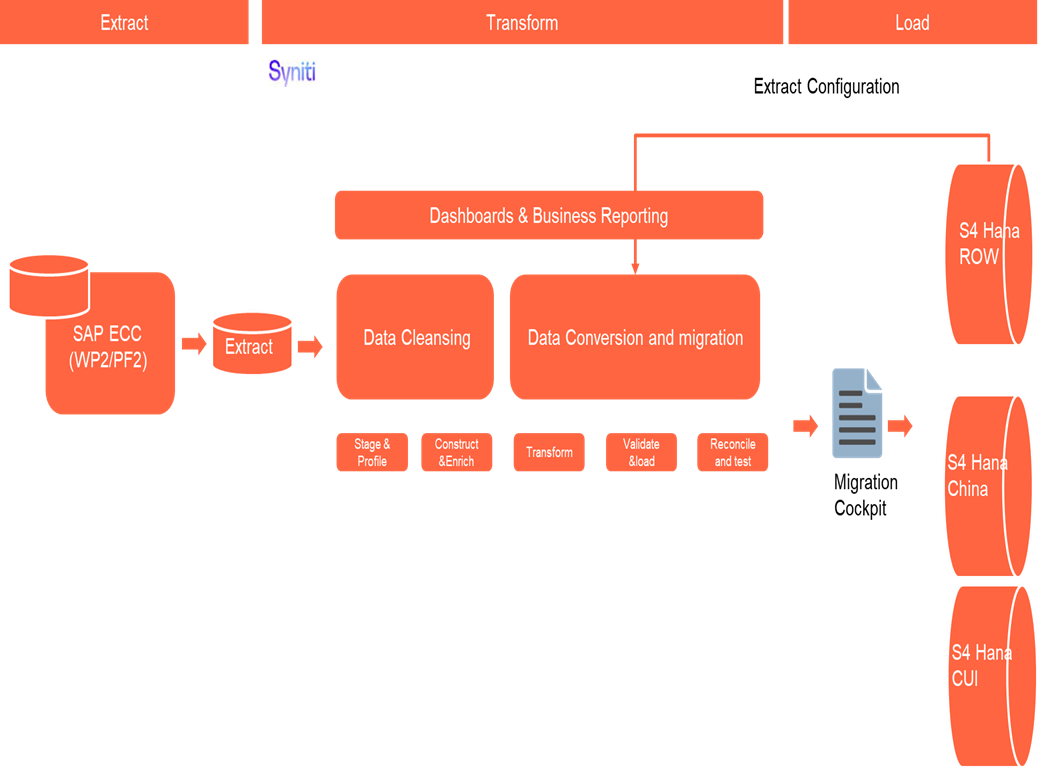
The high-level process is represented by the diagram below:
The ETL (Extract, Transform, Load) process is a structured approach to data migration and management, ensuring high-quality data is seamlessly transferred across systems. Here’s a breakdown of its key components:
1. Extraction
The process begins with extracting metadata and raw data from source systems, such as Syensqo ECC system (i.e., WP2/PF2) periodically. The extracted data is then staged for transformation.
2. Transformation
Once extracted, the data undergoes cleansing, consolidation, and governance. This step ensures data integrity, consistency, and compliance with business rules. The transformation process includes:
- Data validation to remove inconsistencies.
- Standardization to align formats across datasets.
- Business rule application to refine data for operational use.
3. Loading
The transformed data is then loaded into the target S4 Hana system using migration cockpit.

Deduplication
Purchasing Organization extensions from Vendors identified in global relevancy and will undergo a deduplication exercise to determine record source of purchasing data for Business Partner – 3rd Party Suppliers.
This is where business needs to select which record to use as valid source of Purchasing Organization data.
Parent and child approach will be used for selection of golden record.
Scenario 1: Non-Duplicate Vendor (Global) having multiple active Purchasing Organization extensions
Vendor has no duplicates at global level. However, vendor has multiple Purchasing Organization data within same name, country, etc.
Scenario 2: Duplicate Vendors (Global) having multiple active Purchasing Organizations
Duplication of vendor exist in Vendor Global duplicate group and extended to same purchasing organization.
Data Privacy and Sensitivity
Extraction
Extract data from a source into Syniti Migrate for SAP relevant entities. There are 2 possibilities:
- The data exists. Syniti Migrate connects to the source and loads the data into . There are 3 methods:
- Perform full data extraction from relevant tables in the source system(s).
- Perform extraction through the application layer.
- Only if Syniti Migrate; cannot connect to the source, data is loaded to the repository from the provided source system extract/report.
- The data does not exist (or cannot be converted from its current state). The data is manually collected by the business directly in Syniti Migrate. This is to be conducted using DCT (Data Collection Template) in Syniti Migrate
The agreed Relevancy criteria is applied to the extracted records to identify the records that are applicable for the Target loads
Extraction Run Sheet
| Req # | Requirement Description | Team Responsible |
|---|---|---|
Refresh Criteria | Refresh LFM1, WYT3 tables via Syniti Tool (Vendor data) | Data team |
Extraction Scope Definition | - Identify the source systems and databases involved. | Syniti Syniti / Data team |
Extraction Methodology | - Specify the extraction approach (full, incremental, or delta extraction). | Syniti |
Extraction Execution Plan | - Establish execution timelines and batch processing schedules. | Syniti |
Data Quality and Validation | - Define error handling mechanisms for extraction failures. | Syniti |
Selection Screen
| Selection Ref Screen | Parameter Name | Selection Type | Requirement | Value to be entered/set |
|---|---|---|---|---|
| N/A | ||||
Data Collection Template (DCT)
Target Ready Data Collection Template will be created for data with exception of some fields which require transformation as mentioned in the transformation rule.DCT Rules
| Field Name | Field Description | Rule |
|---|---|---|
Extraction Dependencies
| Item # | Step Description | Team Responsible |
|---|---|---|
1 | Ensure that the necessary cleansing activities in legacy sources (PF1,WP1) are complete | Data/Business |
2 | Ensure that create, change and deletion of master data is freeze in PF1, WP1 Production system | SyWay IT team |
| 3 | Source System Availability
| Syensqo IT |
| 4 | Data Structure
| Syniti |
| 5 | Referential Integrity
| Syniti |
| 6 | Extraction Methodology
| Syniti |
| 7 | Performance and Scalability Considerations
| Syniti |
| 8 | Security and Compliance
| Syniti |
Transformation
The Target fields are mapped to the applicable Legacy field that will be its source, this is a 3-way activity involving the Business, Functional team and Data team. This identifies the transformation activity required to allow to make the data Target ready:
- Perform value mapping and data transformation rules.
- Legacy values are mapped to the to-be values (this could include a default value)
- Values are transformed according to the rules defined in
- Prepare target-ready data in the structure and format that is required for loading via prescribed Load Tool. This step also produces the load data ready for business to perform Pre-load Data Validation
Transformation Run Sheet
| Item # | Step Description | Team Responsible |
|---|---|---|
1 | Run LFA1 Relevancy in Syniti | Data Team |
2 | Run LFM1 Relevancy in Syniti | Data Team |
3 | Run BP Relevancy in Syniti | Data Team |
4 | Run Business Partner Supplier execution in Syniti | Data Team |
5 | Transformation Scope Definition | Data Team |
6 | Data Mapping and Standardization | Data Team |
7 | Business Rule Application | Data Team |
8 | Transformation Execution Plan | Syniti |
Transformation Rules
| Rule # | Source system | Source Table | Source Field | Source Description | Target System | Target Table | Target Field | Target Description | Transformation Logic |
|---|---|---|---|---|---|---|---|---|---|
1 | PF2/WP2 | LFM1 | LIFNR | VENDOR NUMBER | S/4 HANA | LFM1 | LIFNR | SUPPLIER NUMBER | Derive via legacy to SyWay S4 Business Partner mapping |
2 | PF2/WP2 | LFM1 | EKORG | PURCHASING ORGANISATION | S/4 HANA | LFM1 | EKORG | PURCHASING ORGANISATION | Derive via legacy to SyWay S4 Purchasing Organization mapping |
3 | PF2/WP2 | LFM1 | EKGRP | PURCHASING GROUP | S/4 HANA | LFM1 | EKGRP | PURCHASING GROUP | Derive via legacy to SyWay S4 Purchasing Group mapping |
4 | PF2/WP2 | LFM1 | WAERS | ORDER CURRENCY | S/4 HANA | LFM1 | WAERS | ORDER CURRENCY | *Derive via legacy to SyWay S4 Purchasing Currency code mapping |
5 | PF2/WP2 | LFM1 | VERKF | SALESPERSON | S/4 HANA | LFM1 | VERKF | SALESPERSON | |
6 | PF2/WP2 | LFM1 | TELF1 | TELEPHONE | S/4 HANA | LFM1 | TELF1 | TELEPHONE | |
7 | PF2/WP2 | LFM1 | MINBW | MINIMUM ORDER VALUE | S/4 HANA | LFM1 | MINBW | MINIMUM ORDER VALUE | |
8 | PF2/WP2 | LFM1 | ZTERM | PAYMENT TERMS | S/4 HANA | LFM1 | ZTERM | PAYMENT TERMS | |
9 | PF2/WP2 | LFM1 | INCOV | INCO VERSION | S/4 HANA | LFM1 | INCOV | INCO VERSION | |
10 | PF2/WP2 | LFM1 | INCO1 | INCOTERMS | S/4 HANA | LFM1 | INCO1 | INCOTERMS | Derive via legacy to SyWay S4 Incoterms mapping |
11 | PF2/WP2 | LFM1 | INCO2_L | INCOTERMS LOCATION 1 | S/4 HANA | LFM1 | INCO2_L | INCOTERMS LOCATION 1 | *Derive via legacy to SyWay S4 Incoterms Location mapping |
12 | PF2/WP2 | LFM1 | INCO3_L | INCOTERMS LOCATION 2 | S/4 HANA | LFM1 | INCO3_L | INCOTERMS LOCATION 2 | |
13 | PF2/WP2 | LFM1 | KALSK | SCHEMA GROUP SUPPLIER | S/4 HANA | LFM1 | KALSK | SCHEMA GROUP SUPPLIER | |
14 | PF2/WP2 | LFM1 | PLIFZ | PLANNED DELIVERY TIME | S/4 HANA | LFM1 | PLIFZ | PLANNED DELIVERY TIME | |
15 | |||||||||
16 | PF2/WP2 | LFM1 | LFABC | ABC INDICATOR | S/4 HANA | LFM1 | LFABC | ABC INDICATOR | |
17 | PF2/WP2 | LFM1 | VSBED | SHIPPING CONDITIONS | S/4 HANA | LFM1 | VSBED | SHIPPING CONDITIONS | |
18 | PF2/WP2 | LFM1 | WEBRE | GR-BASED INVOICE VERIFICATION | S/4 HANA | LFM1 | WEBRE | GR-BASED INVOICE VERIFICATION | |
19 | PF2/WP2 | LFM1 | KZAUT | AUTOMATIC PURCHASE ORDER | S/4 HANA | LFM1 | KZAUT | AUTOMATIC PURCHASE ORDER | |
20 | PF2/WP2 | LFM1 | MEPRF | PRICING DATE CONTROL | S/4 HANA | LFM1 | MEPRF | PRICING DATE CONTROL | |
21 | PF2/WP2 | LFM1 | BSTAE | CONFIRMATION CONTROL KEY | S/4 HANA | LFM1 | BSTAE | CONFIRMATION CONTROL KEY | |
22 | PF2/WP2 | LFM1 | KZRET | RETURNS SUPPLIER | S/4 HANA | LFM1 | KZRET | RETURNS SUPPLIER | |
23 | PF2/WP2 | LFM1 | AUBEL | AUTOMATIC DEBIT | S/4 HANA | LFM1 | AUBEL | AUTOMATIC DEBIT | |
24 | PF2/WP2 | LFM1 | VALID_PRO | SETTLEMENT PROFILE | S/4 HANA | LFM1 | VALID_PRO | SETTLEMENT PROFILE | |
25 | PF2/WP2 | LFM1 | HSCABS | ABSOLUTE HANDLING SURCHARGE | S/4 HANA | LFM1 | HSCABS | ABSOLUTE HANDLING SURCHARGE | |
26 | PF2/WP2 | LFM1 | HSCPE | PERCENTAGE HANDLING SURCHARGE | S/4 HANA | LFM1 | HSCPE | PERCENTAGE HANDLING SURCHARGE | |
27 | PF2/WP2 | LFM1 | HSCMIN | MINIMUM HANDLING SURCHARGE | S/4 HANA | LFM1 | HSCMIN | MINIMUM HANDLING SURCHARGE | |
28 | PF2/WP2 | LFM1 | HSCMAX | MAXIMUM HANDLING SURCHARGE | S/4 HANA | LFM1 | HSCMAX | MAXIMUM HANDLING SURCHARGE | |
29 | PF2/WP2 | LFM1 | XERSY | AUTOM EVALUATED RECEIPT SETTLEMENT (ERS) | S/4 HANA | LFM1 | XERSY | AUTOM EVALUATED RECEIPT SETTLEMENT (ERS) | |
30 | PF2/WP2 | LFM1 | XERSR | AUTOM EVALUATED GR SETTLEMENT RETURN | S/4 HANA | LFM1 | XERSR | AUTOM EVALUATED GR SETTLEMENT RETURN | |
31 | PF2/WP2 | LFM1 | KZABS | ORDER ACKNOWLEDGMENT REQUIREMENT | S/4 HANA | LFM1 | KZABS | ORDER ACKNOWLEDGMENT REQUIREMENT | |
32 | PF2/WP2 | WYT3 | LIFNR | VENDOR | S/4 HANA | WYT3 | LIFNR | SUPPLIER | |
33 | PF2/WP2 | WYT3 | EKORG | PURCHASING ORG | S/4 HANA | WYT3 | EKORG | PURCHASING ORG | |
34 | PF2/WP2 | WYT3 | PARVW | PARTNER FUNCTION | S/4 HANA | WYT3 | PARVW | PARTNER FUNCTION | |
35 | PF2/WP2 | WYT3 | LIFN2 | REF TO VENDOR | S/4 HANA | WYT3 | LIFN2 | REF TO VENDOR | |
36 | PF2/WP2 | WYT3 | PERNR | PERSONAL NO | S/4 HANA | WYT3 | PERNR | PERSONAL NO | |
37 | PF2/WP2 | WYT3 | PARNR | CONTACT PERSON | S/4 HANA | WYT3 | PARNR | CONTACT PERSON | |
38 | PF2/WP2 | WYT3 | DEFPA | DEFAULT PARTNER | S/4 HANA | WYT3 | DEFPA | DEFAULT PARTNER | |
39 | PF2/WP2 | STXL | TDNAME | VENDOR | S/4 HANA | Function - READ_TEXT (STHX header table) | LIFNR | SUPPLIER | |
40 | PF2/WP2 | STXL | EKORG | PURCHASING ORGRNIZATION | S/4 HANA | Function - READ_TEXT (STHX header table) | EKORG | PURCHASING ORGANIZATION | |
41 | PF2/WP2 | STXL | TDID | TEXT ID | S/4 HANA | Function - READ_TEXT (STHX header table) | TDID | TEXT ID | |
42 | PF2/WP2 | STXL | TDSPRAS | LANGUAGE | S/4 HANA | Function - READ_TEXT (STHX header table) | TEXT_TDSPRAS | LANGUAGE KEY | |
43 | PF2/WP2 | STXL | CLUSTD | DATA | S/4 HANA | Function - READ_TEXT (STHX header table) | TEXT_LINES | TEXT | |
44 | PF2/WP2 | KNVK | LIFNR | VENDOR | S/4 HANA | ADRC_NATION LENG (IAV)-LIFNR | LIFNR | SUPPLIER | |
45 | PF1/WP2 | KNVK | PARNR | CONTACT PERSON ID | S/4 HANA | ADRC_NATION LENG (IAV)-PARNR | PARNR | CONTACT PERSON ID | |
46 | PF2/WP2 | ADRC | NATION | ADDRESS VERSION | S/4 HANA | ADRC_NATION LENG (IAV)-PARNR | NATION | ADDRESS VERSION | |
47 | PF2/WP2 | ADRC | NAME1 | NAME 1 | S/4 HANA | ADRC_NATION | VNAME | FIRST NAME | |
48 | PF2/WP2 | ADRC | NAME2 | NAME 2 | S/4 HANA | ADRC_NATION LENG (IAV)-VNAME | LNAME | LAST NAME | |
49 | PF2/WP2 | ADRC | NAME3 | NAME 3 | S/4 HANA | ADRC_NATION LENG (IAV)-LNAME | NAME_MIDDLE | MIDDLE NAME | |
50 | PF2/WP2 | ADRC | NAME4 | NAME 4 | S/4 HANA | ADRC_NATION LENG (IAV)-MIDDLE | NAME_BIRTH | BIRTH NAME | |
51 | PF2/WP2 | ? | S/4 HANA | ADRC_NATION LENG (IAV)-BIRTH | BUILDING_B | BUILDING CODE | |||
52 | PF2/WP2 | ? | S/4 HANA | ADRC_NATION LENG (IAV)-BUILDING_B | ROOM_B | ROOM NUMBER | |||
53 | PF2/WP2 | ? | S/4 HANA | ADRC_NATION LENG (IAV)-ROOM_B | FLOOR_B | FLOOR | |||
54 | PF2/WP2 | ADRC | CITY | CITY1 | S/4 HANA | ADRC_NATION LENG (IAV)-FLOOR_B | CITY | CITY | |
55 | PF2/WP2 | ADRC | STREET | STREET | S/4 HANA | ADRC_NATION LENG (IAV)-CITY | STREET | STREET | |
56 | PF2/WP2 | ADRC | HOUSE_NUM1 | HOUSE NUMBER | S/4 HANA | ADRC_NATION LENG (IAV)-STREET | HOUSE_NO | HOUSE NUMBER | |
57 | PF2/WP2 | ADRC | BUILDING | BUILDING CODE | S/4 HANA | ADRC_NATION LENG (IAV)-HOUSE_NO | BUILDING | BUILDING CODE | |
58 | PF2/WP2 | ADRC | ROOMNUMBER | ROOM NUMBER | S/4 HANA | ADRC_NATION LENG (IAV)--BUILDING | ROOM | ROOM NUMBER | |
59 | PF2/WP2 | ADRC | FLOOR | FLOOR | S/4 HANA | ADRC_NATION LENG (IAV)-ROOM | FLOOR | FLOOR | |
60 | PF2/WP2 | FIWTIN_TAN_EXEM | ACCNO | SUPPLIER | S/4 HANA | FIWTIN_TAN_EXEM | ACCNO | SUPPLIER | |
61 | PF2/WP2 | FIWTIN_TAN_EXEM | BUKRS | COMPANY CODE | S/4 HANA | FIWTIN_TAN_EXEM | BUKRS | COMPANY CODE | |
62 | PF2/WP2 | FIWTIN_TAN_EXEM | SECCODE | SECTION CODE | S/4 HANA | FIWTIN_TAN_EXEM | SECCODE | SECTION CODE | |
63 | PF2/WP2 | FIWTIN_TAN_EXEM | WT_EXDF | EXEMPTION FROM | S/4 HANA | FIWTIN_TAN_EXEM | WT_EXDF | EXEMPTION FROM | |
64 | PF2/WP2 | FIWTIN_TAN_EXEM | WT_EXDT | EXEMPTION TO | S/4 HANA | FIWTIN_TAN_EXEM | WT_EXDT | EXEMPTION TO | |
65 | PF2/WP2 | FIWTIN_TAN_EXEM | WT_EXNR | EXEMPTION NUMBER | S/4 HANA | FIWTIN_TAN_EXEM | WT_EXNR | EXEMPTION NUMBER | |
66 | PF2/WP2 | FIWTIN_TAN_EXEM | WT_EXRT | EXEMPTION RATE | S/4 HANA | FIWTIN_TAN_EXEM | WT_EXRT | EXEMPTION RATE | |
67 | PF2/WP2 | FIWTIN_TAN_EXEM | WT-WT_EXRS | EXEMPTION REASON | S/4 HANA | FIWTIN_TAN_EXEM | WT-WT_EXRS | EXEMPTION REASON | |
68 | PF2/WP2 | FIWTIN_TAN_EXEM | THR | EXEMPTION THRESHOLD AMOUNT | S/4 HANA | FIWTIN_TAN_EXEM | THR | EXEMPTION THRESHOLD AMOUNT | |
69 | PF2/WP2 | FIWTIN_TAN_EXEM | WAERS | EXEMPTION CURRENCY | S/4 HANA | FIWTIN_TAN_EXEM | WAERS | EXEMPTION CURRENCY | |
70 | PF2/WP2 | WYT3 | LIFNR | VENDOR | S/4 HANA | WYT3 | LIFNR | VENDOR | |
71 | PF2/WP2 | WYT3 | EKORG | PURCHASING ORGANIZATION | S/4 HANA | WYT3 | EKORG | PURCHASING ORGANIZATION | Derive via legacy to SyWay S4 Purchasing Organization mapping |
72 | PF2/WP2 | WYT3 | LTSNR | SUPPLIER SUBRANGE | S/4 HANA | WYT3 | LTSNR | SUPPLIER SUBRANGE | |
73 | PF2/WP2 | WYT3 | WERKS | PLANT | S/4 HANA | WYT3 | WERKS | PLANT | |
74 | PF2/WP2 | LFM1 | EXPVZ | MODE OF TRANSPORT AT BORDER | S/4 HANA | LFM1 | EXPVZ | MODE OF TRANSPORT AT BORDER | |
75 | PF2/WP2 | ??? | S/4 HANA | LFM1 | ZTERMDAT ??? | TERMS OF PAYMENT KEY | |||
76 | PF2/WP2 | ??? | S/4 HANA | LFM1 | HBKID ??? | SHORT KEY FOR HOUSE BANK | |||
77 | PF2/WP2 | LFBK | BANKS | BANK COUNTRY / REGION KEY | S/4 HANA | LFBK | BANKS | BANK COUNTRY / REGION KEY | |
78 | PF2/WP2 | LFBK | BANKL | BANK KEYS | S/4 HANA | LFBK | BANKL | BANK KEYS | |
79 | PF2/WP2 | LFBK | BKONT | BANK CONTROL KEY | S/4 HANA | LFBK | BKONT | BANK CONTROL KEY | |
80 | PF2/WP2 | LFBK | BKREF | REFERENCE SPECIFICATIONS FOR BANK DETAIL | S/4 HANA | LFBK | BKREF | REFERENCE SPECIFICATIONS FOR BANK DETAIL | |
| |||||||||
|
Transformation Mapping
| Mapping Table Name | Mapping Table Description |
|---|---|
Legacy Vendor-BP Master Mapping | Legacy to SyWay S4 Business Partner mapping |
Purchasing Organization Mapping | Legacy to SyWay S4 Purchasing Organization Mapping |
Business Partner deDupe mapping (Global Data) | Dedupe Golden-Child (Global) mapping |
Payment Terms Mapping | Legacy to SyWay S4 Payment Terms Mapping |
Incoterms Mapping | Legacy to SyWay S4 Incoterms Mapping |
Purchasing Group Mapping | Legacy to SyWay S4 Purchasing Group Mapping |
Partner Function Mapping | *Legacy to SyWay S4 Partner Function Mapping |
Purchasing Currency Code Mapping | *Legacy to SyWay S4 Purchasing Currency code mapping |
Vendor deDupe mapping (Purchasing Organization Data) | Dedupe Golden-Child (Purchasing Organization) Mapping |
*TBD |
Transformation Dependencies
List the steps that need to occur before transformation can commence| Item # | Step Description | Team Responsible |
|---|---|---|
1 | Extract PF2,WP2 source tables – LFM1, LFBK, WYT3 | Data Team |
2 | Ensure all vendor master data collection templates, deduplication and cleansing completeness and no errors | Data Team |
3 | Ensure that Business Partner – General is loaded | Data Team |
4 | Ensure that all required Configurations are in S/4 HANA | Data Team |
5 | Source Data Integrity | Syniti |
6 | Referential Integrity | Syniti |
| 7 | Transformation Logic and Mapping | Data Team |
| 8 | Performance and Scalability Considerations | Syniti |
| 9 | Logging and Error Handling | Syniti |
Pre-Load Validation
Project Team
Completeness
| Task | Action |
|---|---|
Verify Count for External Vendor Purchasing Organization extensions/BP Supplier Role | Verify that the record count in the pre-load file is the same as the record count based on the relevancy (including deduplication) results |
Verify Count (Others) | Pre-Load validations record counts will be done to verify completeness and accuracy of the transformed data against DCT approved. |
Validate the mandatory fields | Validate there is value for all the mandatory fields |
Validate Primary Keys and Unique Constraints | Check for duplicate or missing primary key values, i.e., if there is same BP number. |
| Test Referential Integrity | Confirm dependent records exist in related tables |
Accuracy
| Task | Action |
|---|---|
Data Accuracy | Data team to verify that all the data in the load table/file is accurate as per signed-off transformation rules and DCT contents |
Error Reports | Verify that all necessary error reports have been validated and that errors have been addressed. |
| Check Data Consistency | Compare field values across systems Validate data formats and structures |
Business
Completeness
| Task | Action |
|---|---|
Verify Count for External Vendor Purchasing Organization extensions/BP Supplier Role | Verify that the record count in the pre-load file is the same as the record count based on the relevancy (including deduplication) results |
Verify Count (Others) | Pre-Load validations record counts will be done to verify completeness and accuracy of the transformed data against DCT approved. |
Verify Relevancy Rules | Verify that the relevancy rules were correctly applied |
Accuracy
| Task | Action |
|---|---|
Verify Data Accuracy | Verify that all the data in the load table/file is accurate as per signed-off transformation rules and DCT contents |
Review Error Reports | Verify that all necessary error reports have been validated, and that errors have been addressed. |
Verify Transformation Rules | Verify that the transformation rules are correct and have been carried out correctly |
Load
The load process includes:
- Execute the automated data load into target system using load tool or product the load file if the load must be done manually
- Once the data is loaded to the target system, it will be extracted and prepared for Post Load Data Validation
Load Run Sheet
| Item # | Step Description | Team Responsible |
|---|---|---|
1 | Load Sample Vendors Default Partner | Data team |
2 | Validate sample Vendors Default Partner | Data team |
3 | Load remaining Vendors Default Partner | Data team |
4 | Validate data loaded for Vendors Default Partner | Data team |
5 | Load Scope Definition | Data team |
6 | Load Methodology | Syniti |
7 | Data Quality and Validation | Syniti |
| 8 | Load Execution Plan | Syniti |
| 9 | Logging and Reporting | Syniti |
Load Phase and Dependencies
The Business Partner General will be loaded in the pre-cutover period.
Before loading, it will have dependency on the configuration.
Configuration
| Item # | Configuration Item |
|---|---|
1 | Obtain the approved upload USER ID’s to be used (e.g. Firefighter ID) |
2 | SAP USER profile (SU3) Date and Decimal Notation Formats are in sync with the load format |
3 | Purchasing Organisation Configuration |
4 | Purchasing Group Configuration |
5 | Incoterms Configuration |
6 | Authorization Group Configuration |
7 | Plant Configuration |
8 | Confirmation Control Configuration |
9 | Payment Terms Configuration |
Conversion Objects
| Object # | Preceding Object Conversion Approach |
|---|---|
3007 | Business Partners - General |
3018 | Business Partners – FI Vendor |
Error Handling
| Error Type | Error Description | Action Taken |
|---|---|---|
Configuration | Configuration value for the field is not valid/missing | If it is a missing configuration item then engage Functional team to expedite and fix the error in the system. |
Invalid Data | Configuration value for the field is not valid. | The parameter entry needs to be reviewed (ex. invalid payment terms). If it is an invalid data, business needs to review and correct the source of the data either in PF2/WP2 or if it’s mapped in DCT. |
Technical Setup | Interface / Connection issue within target system’s landscape | N/A – the data will be loaded directly to S/4HANA environment |
Authorization Error | <USER ID> is not authorized to access Business Partner create | Contact Basis to obtain Fire Fighter ID (or SyWay S4 approved data loading ID) or fix the authorization setup |
Post-Load Validation
Project Team
Completeness
| Task | Action |
|---|---|
Verify Count for External Vendor Purchasing Organization extensions/BP Supplier Role | Verify that the record count in the post-load report is the same as the record count based on the relevancy (including deduplication) results |
Verify Count (Others) | Post-Load validations record counts will be done to verify completeness and accuracy of the transformed data against DCT approved. |
Accuracy
| Task | Action |
|---|---|
Data Accuracy | Data team to verify that all the data in the target tables is accurate as per signed-off transformation rules and DCT contents |
Post Load Error Reports | Verify that all necessary post-load error reports have been validated, and that errors have been addressed. |
Business
Completeness
| Task | Action |
|---|---|
Verify Count for External Vendor Purchasing Organization extensions/BP Supplier Role | Verify that the record count in the post-load file is the same as the record count based on the relevancy (including deduplication) results |
Verify Count (Others) | Post-Load validations record counts will be done to verify completeness and accuracy of the transformed data against DCT approved. |
Validate Loaded Data | Validate, as per the loads files signed-off, that all records are in the target system |
Accuracy
| Task | Action |
|---|---|
Verify Data Accuracy | Verify that all the data in the target tables is accurate as per signed-off transformation rules and DCT contents |
Review Post Load Error Reports | Verify that all necessary post load error reports have been validated, and that errors have been addressed. |
Validate Loaded Data | Validate, as per the loads files signed-off, that all records are in the target system |
Key Assumptions
- Master Data Standard is up to date as on the date of documenting this conversion approach and data load.
- Business Partner - Vendor Purchasing View including the Partner Functions Data Object is in scope based on data design and any exception requested by business.
See also
Change log
Workflow history
| Title | Last Updated By | Updated | Status | |
|---|---|---|---|---|
| There are no pages at the moment. | ||||